


Effigy
Game-ready 3D assets and 2D sprites from a picture or a sentence, made on your own GPU.
Generate, clean, retopologize, texture, rig, animate and export, offline, on one 16 GB NVIDIA card.
Set it up · Manual · Capabilities · How it works · How-tos · Under the hood · Agents · Status · Development

Sixteen characters generated from concept images and put through the character chain. The blue dots are the 52 joints Effigy placed on its own; twelve of the sixteen needed no correction (bench).
Local and offline |
Commercial-cleanCREDITS.txt and LICENSES.json.
|
Non-destructive and scriptable |
Capabilities
Start from anything
|
Two 3D engines
|
Game-ready geometry
|
Better textures
|
Rig and skin
|
Animate
|
Parts
|
Import and export
|
Blender, two ways
|
A library that remembers
|
2D pictures and pixel art
|
Sprites from your characters
|

The Double Dragon move set on the bench viking, as 15-colour pixel art: 21 moves, 382 frames, from the 3D character to a Godot sprite in under a minute (how-to, bench).
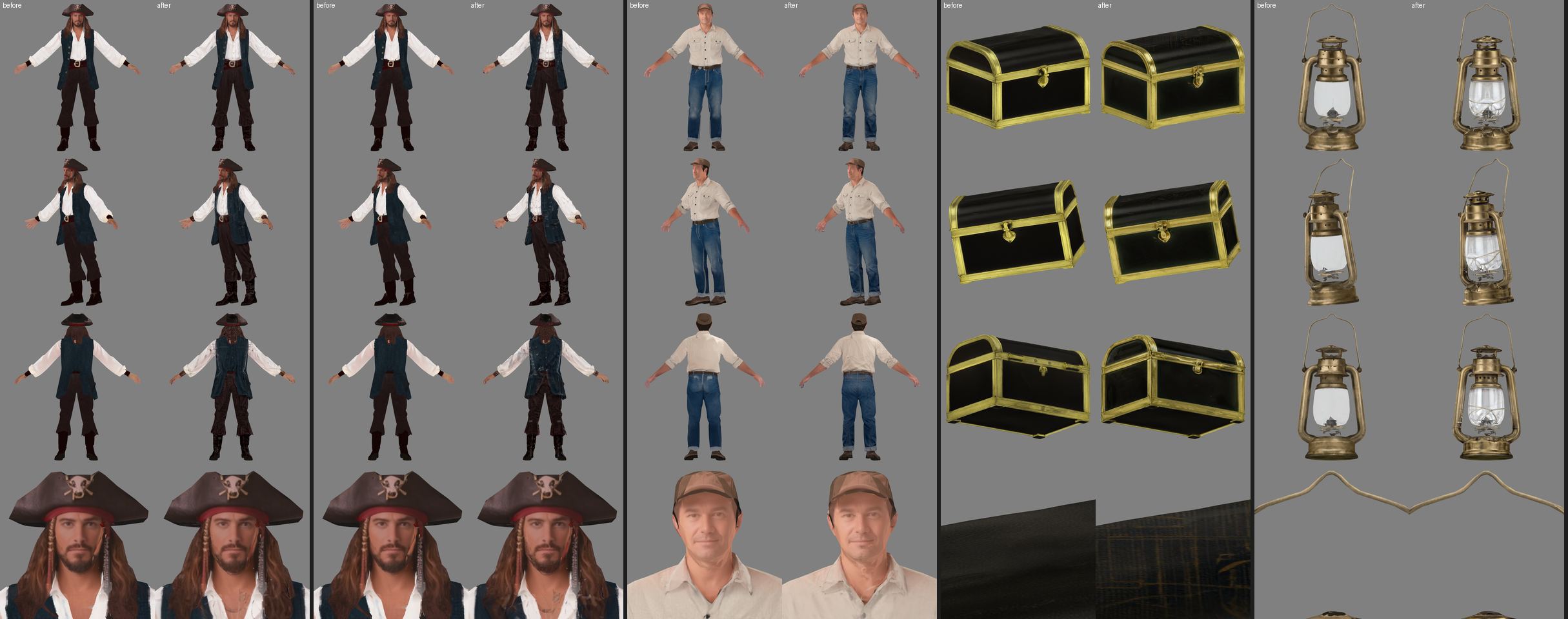
The optional detail pass: each pair is before | after; rows are front, three-quarter, back and a close-up (bench).
How it works
The workflow is a line of stages. Solid ones run for every asset; dashed ones are optional and mostly for characters.
flowchart LR
  R[Reference<br><sub>prompt → brief → concepts,<br>or your image</sub>] --> G[Generate<br><sub>Fast or Faithful</sub>]
  G --> C[Clean] --> S[Simplify<br><sub>tri or quad</sub>] --> U[Unwrap] --> B[Bake<br><sub>PBR + normal + AO</sub>]
  B -.-> F[Face<br><sub>from the image</sub>] -.-> D[Detail<br><sub>Tile redraw</sub>] -.-> P[Parts]
  P -.-> RG[Rig] -.-> SK[Skin] -.-> A[Animate<br><sub>clips, text, video</sub>]
  B --> CH[Check] --> E[Export<br><sub>Godot, Unreal, Unity,<br>web, OBJ, print</sub>]
  A -.-> CH
Each stage is a Python module in steps/ that runs as its own process in the environment its model needs,
reads one version folder and writes the next. The backend never imports torch: it owns the library, the job
queue, the GPU lock and the Blender link, and streams progress to the browser.
flowchart TB UI[Browser<br><sub>React + three.js</sub>] <-->|fetch, SSE| API[server/<br><sub>FastAPI · GPU lock · library · jobs</sub>] AG[Agent<br><sub>Claude Code, Codex, Cursor…</sub>] -->|MCP| API API -->|one process per step| ST[steps/<name>.py<br><sub>.venv-ml · .venv-skin · .venv-kimodo · .venv-parts · .venv-gemx</sub>] API -->|headless| BL[Blender 5.2.2<br><sub>exports, rig checks</sub>] API <-->|localhost socket| LIVE[Your Blender<br><sub>live link</sub>] ST --> LIB[(library/<asset>/<NNN_step>/<br><sub>files + meta.json</sub>)] BL --> LIB
Timings
Measured on the reference machine (RTX 5080 Laptop, 16 GB VRAM, 32 GB RAM); every number comes from a bench
document under docs/bench/.
| What | Time |
|---|---|
| Four concept images from a prompt | ~70 s |
| Image → 3D model (Faithful, median) | ~2 min |
| A prop through the whole chain to export (median) | ~3 min |
| Skeleton fit | 9 s |
| Face projection | 6–8 s |
| Texture detail pass | 2.5–4.5 min |
| Motion from a sentence | 30 s cold, ~4 s warm |
| Motion from a video | ~2 min |
| A 1920 × 1088 picture (warm) | ~29 s |
| Sprites of a 21-move set (382 frames) | 7 s |
| Pixel art of that sheet | ~21 s |
What's under the hood
Every model, tool and dataset is listed in licenses.yaml and shown on the app's Licences
page. All of them allow commercial use of what they produce; two carry an attribution the export writes into
CREDITS.txt. You choose what to download: props only, characters, characters with motion, or everything
(60 to 141 GB).
| Stage | Model or tool | Licence |
|---|---|---|
| Concept images | Z-Image-Turbo | Apache-2.0 |
| Background, camera | BiRefNet; MoGe-2 | MIT; MIT |
| A-pose | FLUX.2-klein-4B; DWPose | Apache-2.0; Apache-2.0 |
| 3D, Fast | TRELLIS.2-4B, TRELLIS-image-large | MIT |
| 3D, Faithful | Pixal3D (+ NAF); DINOv3 | MIT (Apache-2.0); DINOv3 licence, "Built with DINOv3" |
| Mesh kernels | TRELLIS.2's CuMesh, flex_gemm, o_voxel, built for sm_89 and sm_120 (wheels/) |
MIT |
| Face from the image | Real-ESRGAN (4× upscale) + our projection | BSD-3-Clause |
| Texture detail | Z-Image-Turbo + Fun-ControlNet-Union 2.1 (Tile) | Apache-2.0 |
| Parts | GeoSAM2 | Apache-2.0 |
| Skinning | SkinTokens; or Blender's bone heat | MIT; GPL (separate process) |
| Animation clips | Mesh2Motion packs | CC0 |
| Motion from text | Kimodo (SOMA skeleton); Llama 3 8B Instruct + LLM2Vec as its text encoder | NVIDIA Open Model Licence; Llama 3 Community Licence (gated, "Built with Meta Llama 3"); MIT |
| Motion from video | GEM-X; SAM 3D Body; MHR | NVIDIA Open Model Licence; SAM licence; Apache-2.0 |
| Blender ops, exports | Blender 5.2.2 LTS (pinned, SHA-256 checked); gltfpack | GPL-3.0-or-later (its own process); MIT |
| 2D pictures, styles | Z-Image-Turbo + three style LoRAs (pixel art, classic painting, children's drawings) through peft | Apache-2.0 |
| Pixel art, sprite sheets | our own (numpy, Pillow); sprites drawn by Blender's Workbench; the PICO-8 palette | MIT; GPL (its own process); CC0 |
What the policy rules out and why (non-commercial weights, region-restricted licences, models trained on data you can't ship) is in docs/PLAN.md §6.
Hardware and install
| GPU | An NVIDIA card with 16 GB (the reference is an RTX 5080 Laptop; 12 GB works for the Fast engine, best effort). The bundled CUDA kernels are built for the RTX 40 and 50 series; older cards need a rebuild (.github/workflows/wheels.yml). |
| OS | Windows 11, driver 575 or newer. Linux runs from source with the same uv sync, but the three kernel wheels are Windows builds: bring your own. |
| Disk | 70–160 GB, mostly models; they can live on another drive. |
| RAM | 32 GB recommended: the 3D engines peak at ~20 GB of host memory. |
Install = download the zip from Releases, unzip and
double-click run.bat. It downloads Python, PyTorch, Blender and the models you pick into
its own folder; nothing is installed system-wide, and uninstalling is deleting the folder. The step-by-step
guide, including the Hugging Face login for the gated models, is SETUP.md. From a git
checkout, run.bat (or run.sh) does the same.
Let an agent drive it
The effigy MCP server (mcp/effigy_server.py) gives any MCP client the whole workflow as tools:
| Browse | Make | Finish | Blender |
|---|---|---|---|
list_assets, get_asset, get_version, describe_steps, look (rendered previews the agent can see), read_file, fit_check |
create_asset, import_file, run_step, job_status, cancel_job |
validate, export |
open_in_blender, pull_from_blender |
Setup → Connect an agent prints the configuration for Claude Code, Claude Desktop, Codex, Cursor and
Gemini CLI, with absolute paths: use that, not the repo's .mcp.json, which is relative and serves only a
Claude Code session started inside the checkout. The API answers only local requests, so the agent runs on
the machine the app runs on. A typical session: import a zip,
look at it, clean and simplify it, validate, export into a folder for Godot; jobs are bounded and the agent
polls job_status like the UI does.
Batch from the command line: with the app running, uv run python -m tools.bench --preset game-prop --set <folder of images> --export godot --to <folder> --out <file>.csv runs the preset over every image, exports each
result and copies it into <folder>/<asset>_godot/, one CSV row per image (seconds and VRAM per step, the checks,
the export folder). A run that stops midway is not resumed: run it again on the images that are left (every image
becomes a new asset, nothing is overwritten).
Status
Effigy is young (started October 2026) and has been exercised on one machine. What's in the benches under
docs/bench/ is real and measured; what isn't there hasn't been run. Known limits:
- Windows first; Linux from source only. No macOS (no CUDA).
- Engine imports were checked headless for Godot 4.7 and Unreal 5.8; the Unity export is written to Unity's conventions but has not been import-checked yet. The 2D sprites were checked in Godot 4.7; Unreal's Paper2D import needs the editor and is not checked yet.
- The automatic skeleton fit is right on about three of four characters; the editor covers the rest. Creature fits depend on a clean mesh (touching legs or a fused snout fail a skin check).
- The brief step is template-based, no LLM in the loop. The detail pass can invent detail (a per-view keep/drop is open).
- An experimental Hunyuan3D engine is designed but not built; if it ever is, its outputs are fenced as restricted (its licence excludes the EU, UK and South Korea) and never reach a preset.
Development
Needs uv and Node 22. run.bat / run.sh syncs the Python environments,
downloads the pinned Blender and gltfpack on first run, builds the UI once and serves it on
http://127.0.0.1:8000 (another port: Setup, App address, or EFFIGY_PORT).
uv sync --frozen                                   # .venv: backend, tests, lint (Python 3.12)
uv run pytest -q && uv run ruff check . && uv run ruff format --check .
UV_PROJECT_ENVIRONMENT=.venv-ml uv sync --frozen --group ml       # the ML steps (torch 2.8 cu128)
UV_PROJECT_ENVIRONMENT=.venv-ml uv run --frozen --group ml pytest -q   # the ML suite (CPU; GPU tests need EFFIGY_GPU_TESTS=1)
cd ui && npm ci && npm run build && npx playwright test            # the UI and its browser tests
uv run python -m server.blender_install            # pinned Blender into blender/
python tools/package.py                            # the Windows portable zip into dist/
| Folder | What |
|---|---|
server/ |
FastAPI backend: library, jobs, the GPU and RAM safeguards, installs, the Blender link, exports |
steps/ |
one module per pipeline step, run as a subprocess; _*.py are shared helpers (mesh, bake, views, animation maths) |
engine/ |
vendored engines (TRELLIS.2 patches, Pixal3D, GeoSAM2, GEM-X) with their licences and PATCHES.md |
blender_ops/ |
headless Blender scripts (GPL-3.0-or-later, the only non-MIT code here) |
mcp/ |
the MCP server for agents |
ui/ |
Vite + React + TypeScript + three.js; ui/tests/ are the Playwright specs |
tools/ |
model downloads and the manifest, the benches, packaging |
docs/ |
plan, architecture, the user journey, setup, the implementation notes, research, benches |
tests/ |
pytest suites (backend, steps, Blender ops, exports) |
wheels/ |
the CUDA kernel wheels for Windows |
Environment variables (never committed): EFFIGY_MODELS and EFFIGY_LIBRARY move the two big folders;
EFFIGY_BLENDER and EFFIGY_GLTFPACK point at existing installs; EFFIGY_BLENDER_MCP_PRO_DIR and
BLENDER_MCP_PRO_LICENSE are for the live link through Blender MCP Pro (the free blender-mcp add-on works
too).
How the project is run: one milestone per branch and PR, acceptance checks in the PR, the numbers recorded in
docs/bench/. Contracts between steps (file names, frames, units, meta.json) are frozen in
docs/IMPLEMENTATION.md §3; coding agents start there. CI workflows run on request
only.
Documents
| SETUP.md | from a fresh Windows machine to the first asset |
| MANUAL.md | the user manual: every page, panel and tool of the app |
| docs/WORKFLOW.md | the user journey, prompt to export |
| docs/howto/ | step-by-step guides, such as animating a pixel-art character for a 2D game |
| docs/PLAN.md | why it exists, the decisions, the licence policy, the roadmap |
| docs/ARCHITECTURE.md | processes, the GPU scheduler, the asset store, packaging |
| docs/IMPLEMENTATION.md | milestones, frozen contracts, what was built and measured |
| docs/research/ | the surveys behind each choice: generators, texturing, rigging, motion, Blender, agents |
| docs/bench/ | every measured number and sheet |
Licence
MIT (see LICENSE), except blender_ops/, which is GPL-3.0-or-later because it runs inside Blender.
Models, tools and datasets keep their own licences, listed in licenses.yaml; Effigy's own
code and the assets you make with it are yours.