

Takedawn
An unofficial static recompilation of the original Xbox version of Burnout 3: Takedown:
a native program for Mac, Windows, Linux, the Steam Deck and Android handhelds.
You bring the game data from your own disc.
Download · Quick start · FAQ · Report a bug
Important
Takedawn is an unofficial, non-commercial fan project. It is not affiliated with, endorsed by or sponsored by Electronic Arts, Criterion Games or Microsoft. All trademarks belong to their owners.
No game data is included or distributed: no disc images, no textures, models, sound, music or films, and no shader cache made from them. To play you need your own, legally obtained disc of the North America (NTSC-U) retail release for the original Xbox. Takedawn checks a copy of it and takes the game data from there. Please do not ask for game files or disc images, and do not share them. See the full legal notice.
TL;DR
- This is a port, not a remaster. It runs the original 2004 game with its own cars, tracks, textures and physics. The picture and sound extras are options on top.
- Takedawn runs the original Xbox Burnout 3: Takedown as a native program.
- Compared with the console: up to 4x resolution, widescreen and ultrawide, 60 fps crash cameras, and music and 60 fps in split screen. Custom soundtracks play from a folder of your own MP3 or FLAC files. Highlights has the rest.
- Download it for your device and start it. For full speed it needs about a Steam Deck's power.
- Point it at a disc image of your own Burnout 3 (USA). It installs the game data, then you play.
- To update, install the new version over the old one. Saves and settings stay.
- Settings: Back and Start, F1, or TAKEDAWN SETTINGS in the game's menu.
- Bugs: first check the known issues. Then switch on Advanced > Diagnostic logging, restart the game and make the problem happen again. Then Advanced > Create bug report, and attach the zip to the issue form.
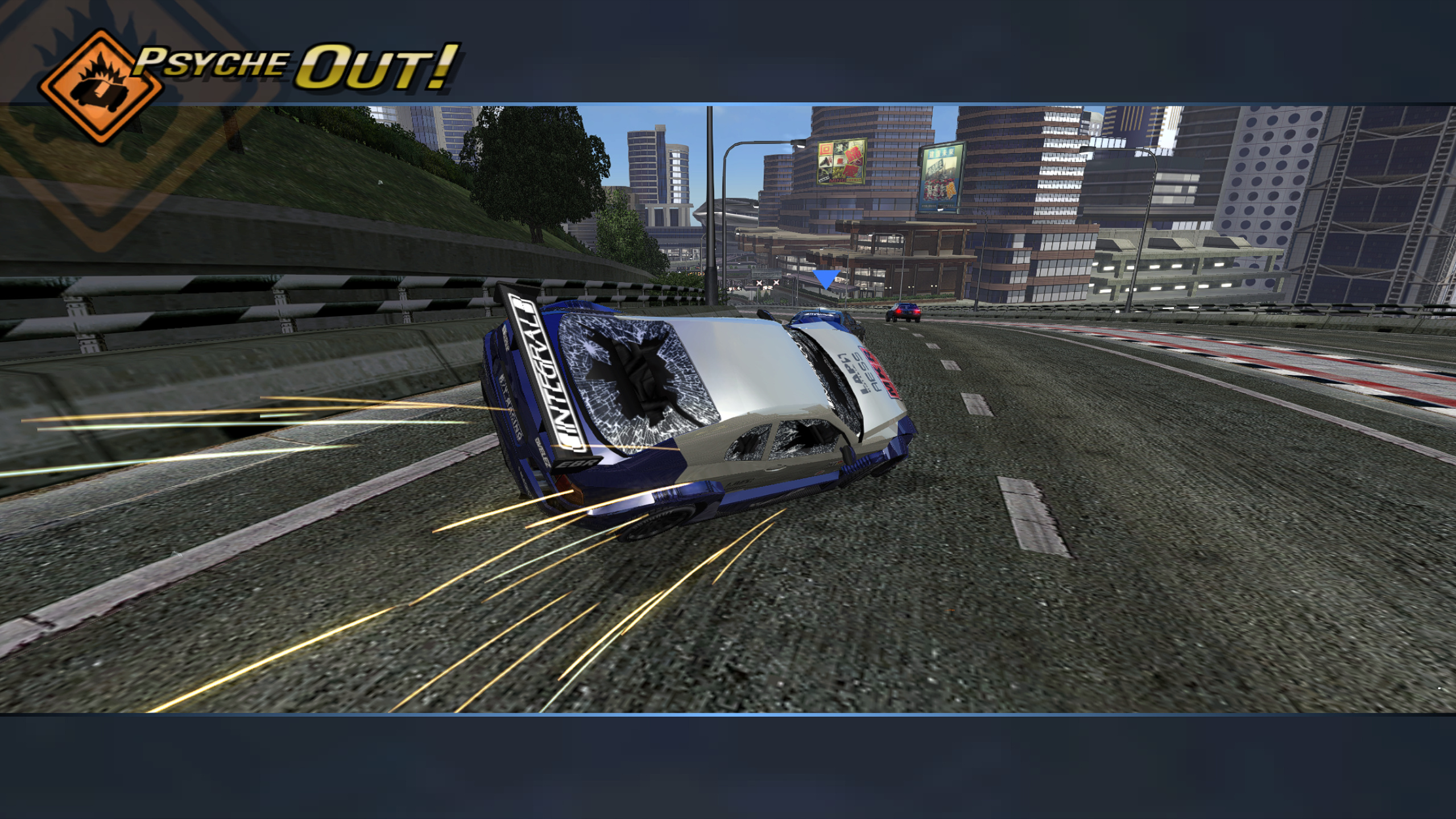
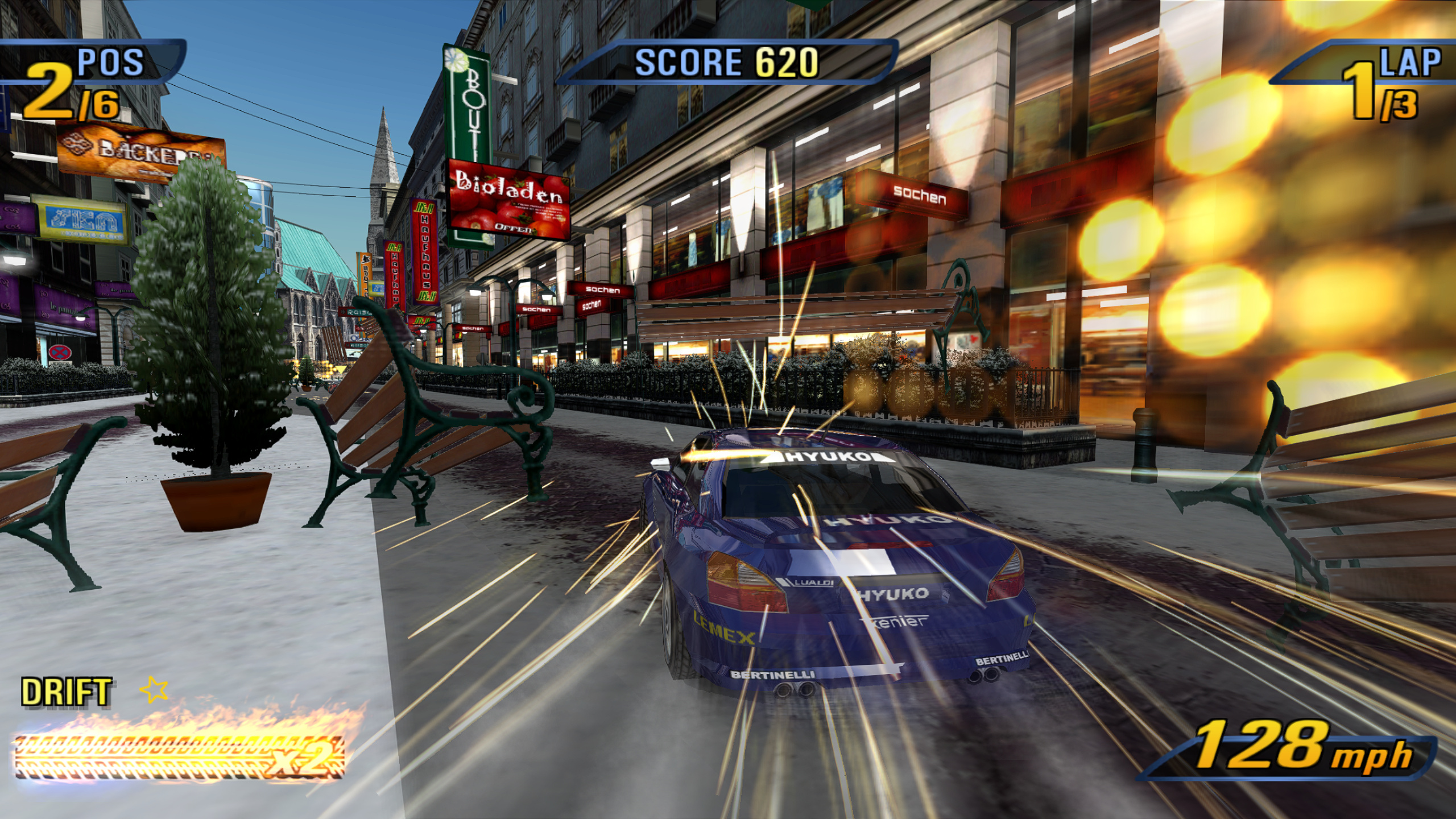 A winter city in Europe. |
 Road Rage at the Far East harbour. |
 Alpine road in Europe. |
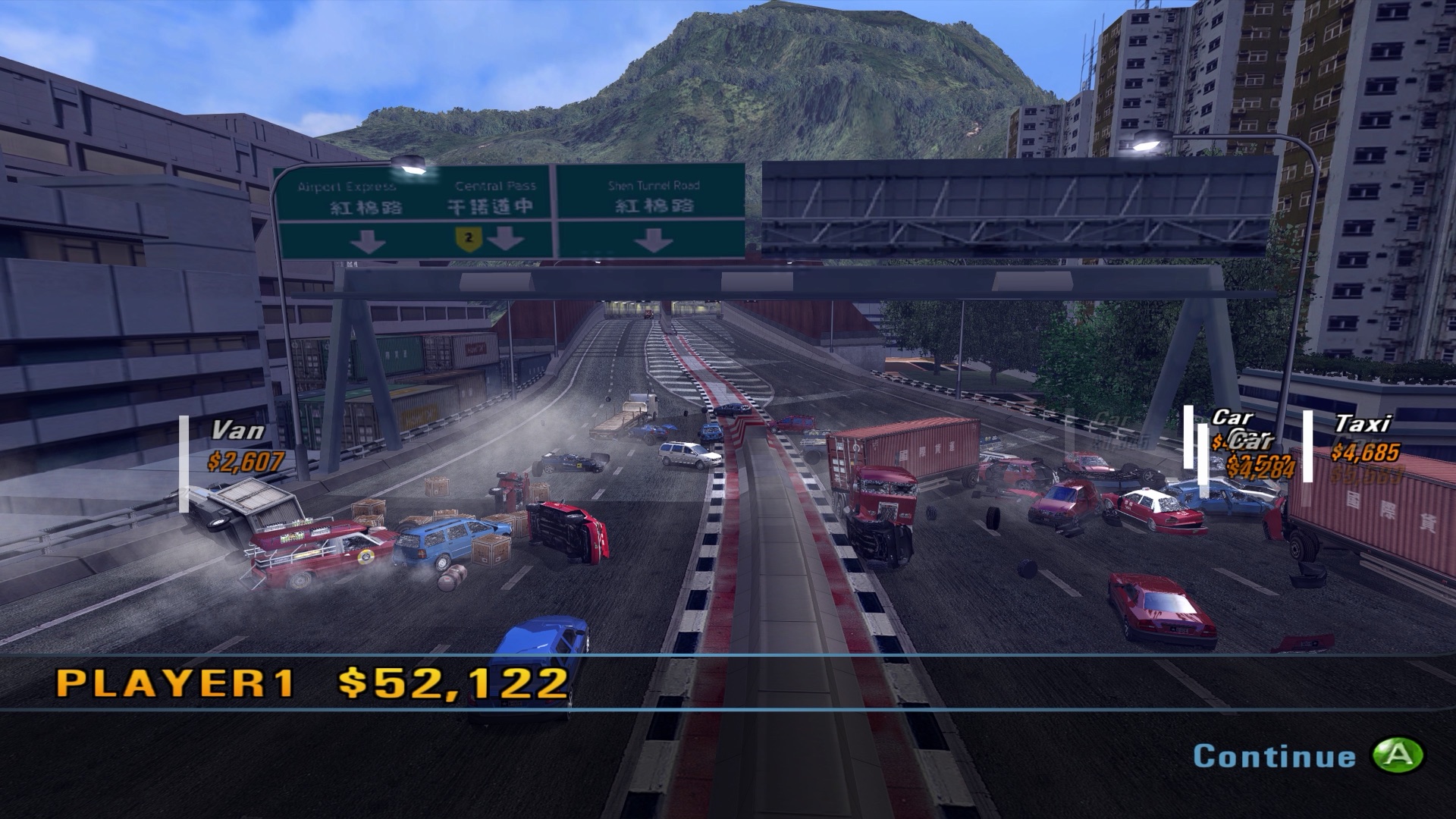 Crash mode at the Far East docks. |
 Settings, Graphics page. |
 Pause menu with a PlayStation pad. |
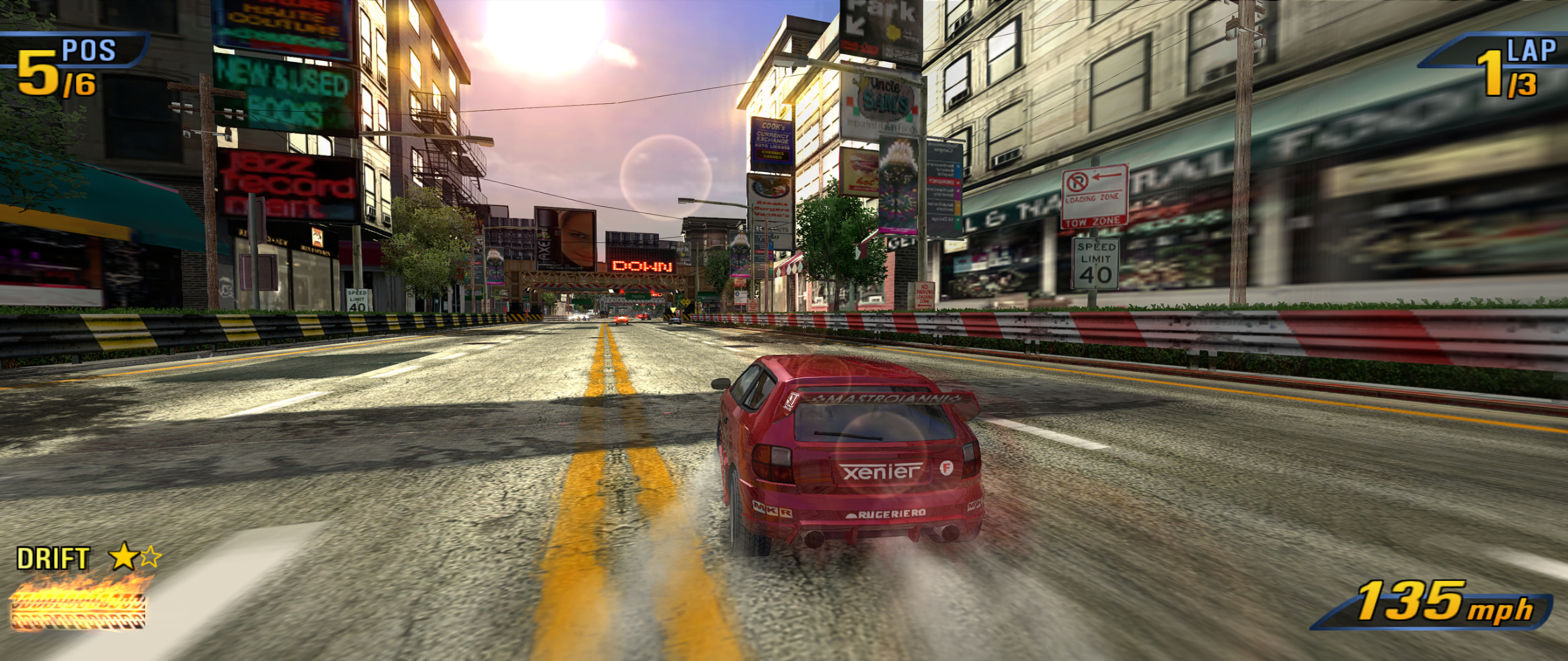
21:9 ultrawide.
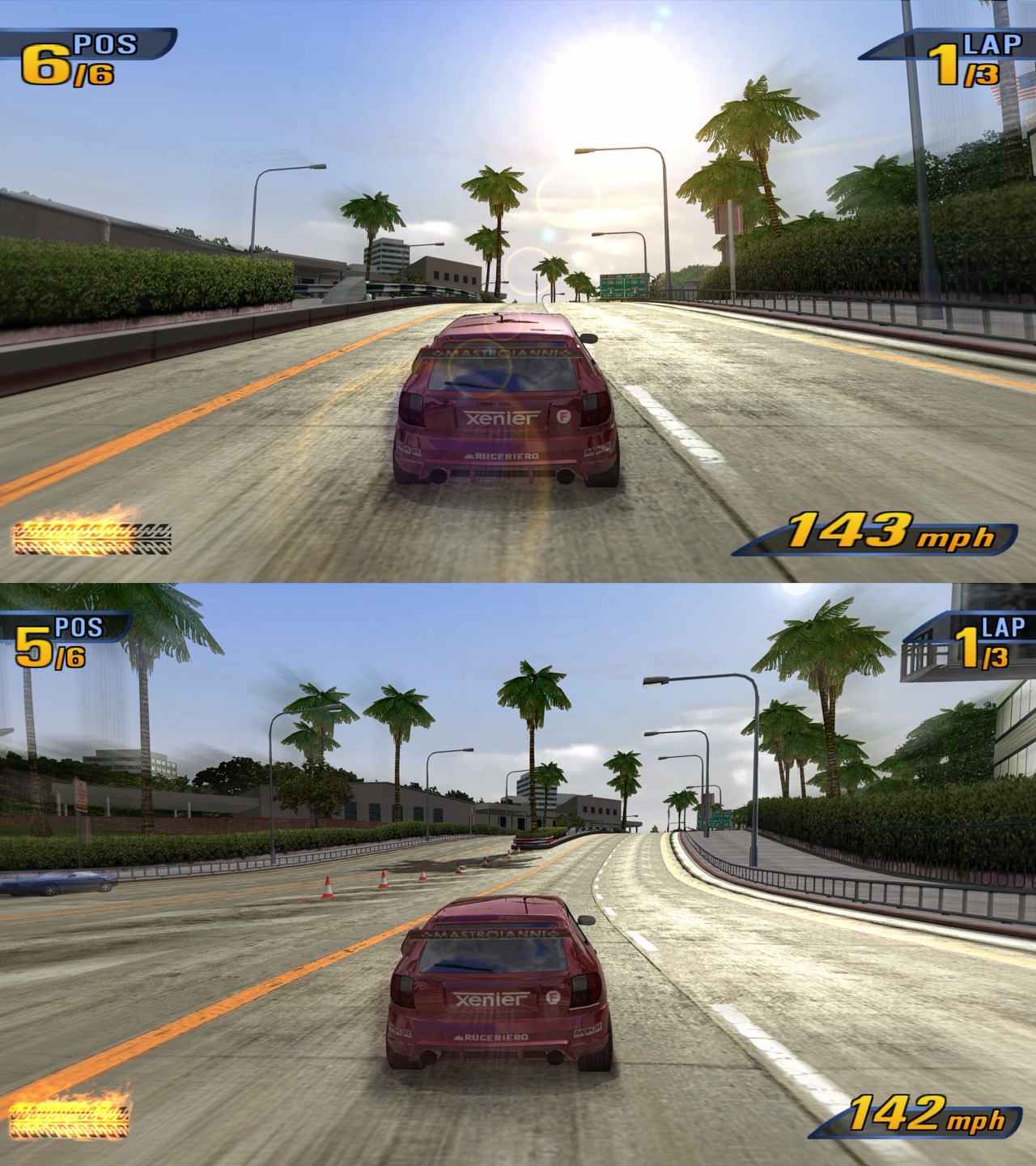
Widescreen HUD fix off on top, on below.
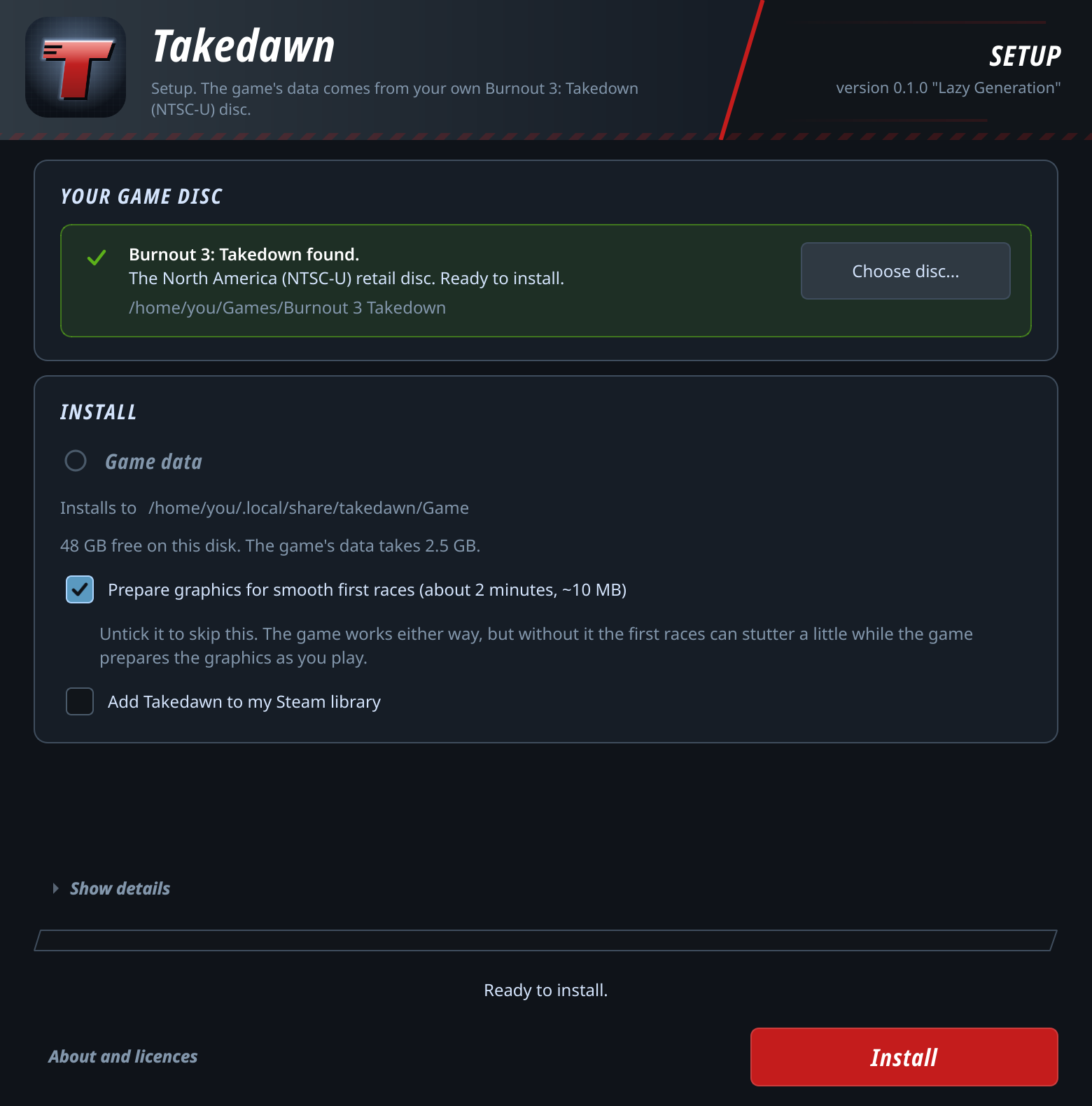
Setup window on first start, disc image accepted.
Unedited screenshots. The game content in them belongs to its owners.
Contents: What it is · Highlights · Download · Quick start · How to update · Setup by platform · Controls · Settings · Performance · Tips · FAQ · Known issues · What's next · For developers · Credits · How this was made · Greetings · Licence · Legal notice
What is Takedawn?
Takedawn runs the original Xbox release of Burnout 3: Takedown as an ordinary program on your device. The game's own code was translated ahead of time into a native program for x86-64 and arm64. The menus, the races and Crash mode all run that translated code (see how it works). It needs the North American Xbox version of the game.
The download is only the program. The game data (cars, tracks, sound, films) comes from your own disc: on first start Takedawn asks for a copy of it, checks every file and copies the data into place. Then you play, with a few things the console couldn't do: a higher internal resolution, widescreen with an undistorted HUD, ultrawide, and a settings menu you can open mid-race.
Highlights
- Render scale from 1x (640x480, as on the console) to 4x (2560x1920). Android also has 1.5x.
- The game's own 16:9 mode stretches the HUD by a third. The widescreen HUD fix keeps it in its 4:3 shape, at the edges of the screen.
- Scenery detail: trees and other roadside objects keep their detailed models as far as they are drawn. On the console the pines turn into flat cut-outs at 250 m and pop back to full detail as you get close.
- Ultrawide at 21:9 and 32:9: races fill the whole width and show more at the sides. Menus and films stay 16:9 in the middle.
- 60 fps, locked to your display's refresh, also on 120 Hz screens.
- Crash cameras can run at 60 fps instead of the console's 30, in races and in Crash mode.
- Split screen can run at 60 fps and with music. The console runs it at 30 with no music.
- A or Start skips the training film before a mode's first event, which the console makes you sit through.
- Your own music: choose a folder of MP3, FLAC, Ogg or WAV files and pick it in the game's EA GAMES TRAX menu, like a custom soundtrack on the Xbox. Each folder is one soundtrack, and each song's volume is matched to the game's music. On Android the game asks for access to your music files the first time you open that menu row.
- 5.1 surround, with a per-speaker mix for each sound group (music, engines, crashes and more) and a recommended 5.1 preset.
- Menu and HUD upscaling redraws the game's 2D art at 2x or 4x with an edge-following scaler, so text and icons stay sharp at high render scales.
- Anti-aliasing (FXAA or SMAA), sharpening, up to 16x anisotropic filtering, sharper distant textures, and rival cars that keep their detail further away. You can switch off the game's bloom and motion blur.
- A settings menu in the game's own style, with its fonts and buttons. Open it with Back and Start, F1, or TAKEDAWN SETTINGS in the game's Settings and pause menus. The game pauses while it's open.
- Button prompts for your controller: Xbox, PlayStation (DualShock and DualSense), Nintendo, Steam, or a neutral set that shows the button's position. They switch to whatever controller you're using.
- Optional PS2 driving controls: accelerate and brake on the face buttons, boost on the right shoulder. Also rumble strength, a Nintendo face-button layout, and km/h.
- Before each save the game keeps a copy of the old one, and you can restore an earlier save from the menu. Saves can be exported and imported, including between platforms.
- A setup window that checks your disc image file by file. An interrupted install never leaves you with a half-installed game. The setup can also build the shaders before you first play (the box is ticked by default), so the first races don't hitch.
- Advanced > Create bug report puts the logs, settings and a system summary in one zip, with your user name and home folder removed.
- On desktop, Advanced > Check for updates tells you whether a newer version is out.
Download
| Platform | File | Size |
|---|---|---|
| Mac (Apple silicon, macOS 13 or newer) | Takedawn-0.1.1-macos-arm64.dmg |
about 20 MB |
| Windows (64-bit) | Takedawn-0.1.1-windows-x64-setup.exe |
about 18 MB |
| Linux and Steam Deck (x86-64) | Takedawn-0.1.1-linux-x86_64.AppImage |
about 24 MB |
| Android (arm64, Snapdragon), experimental | Takedawn-0.1.1-android-arm64.apk |
about 15 MB |
All files are on the releases page, with a SHA256SUMS file and a
BUILDINFO file that says what each was built from. To check a download, run
shasum -a 256 <file> on a Mac or sha256sum <file> on Linux and compare the
result with the line for that file. What changed in each release is in
CHANGELOG.md.
None of the desktop files is code signed, so each system asks once whether you trust it. The APK is signed with the project's own key, which Android needs for updates. The steps are under Setup by platform.
What was tested
I play it on these machines:
| Machine | CPU | RAM | Graphics | System |
|---|---|---|---|---|
| MacBook Air | Apple M5 | 24 GB | Apple M5 | macOS 26.7, own screen and an external 4K 120 Hz monitor |
| Steam Deck OLED | AMD Custom APU 0932 | 16 GB | AMD Van Gogh, Mesa RADV | SteamOS, Game Mode |
| Desktop PC | AMD Ryzen 7 7700X | 32 GB | AMD Radeon RX 9070 XT, Mesa RADV | Bazzite, 5.1 sound, 120 Hz TV |
| Desktop PC | AMD Ryzen 7 5800X | 32 GB | AMD Radeon RX 9060 XT, Adrenalin 26.8.1 | Windows 11 Pro |
| PC | AMD Ryzen 7 5825U | 28 GB usable | AMD Radeon Vega (Barcelo), Mesa RADV | Ubuntu 24.04 |
| Retroid Pocket 5 | Snapdragon 865 | 8 GB | Adreno 650, bundled Turnip driver | Android 13 |
| Laptop | Intel Core Ultra 5 228V | 32 GB | Intel Arc 130V | Windows 11, tried only |
That's as much as one person can test. If you play it on other hardware, or something breaks, please tell me through the issue form. A bug report zip from Advanced > Create bug report helps a lot.
Devices
| Device | State |
|---|---|
| Mac with Apple silicon | Tested |
| Steam Deck OLED | Tested |
| Windows desktop with an AMD graphics card | Tested |
| Linux desktop with an AMD graphics card (Bazzite) | Tested |
| Ubuntu 24.04 with AMD integrated graphics (Ryzen 7 5825U) | Tested |
| Retroid Pocket 5 | Tested |
| Samsung Galaxy S20 FE (Snapdragon 865) | Runs. A one-hour session had no problems. Slower than the Retroid Pocket 5 once the phone warms up |
| Poco F4 (Snapdragon 870) | Runs, but doesn't hold 60 fps. Always slower than the Retroid Pocket 5 |
| Retroid Pocket Classic (Snapdragon G1 Gen 2) | Starts, but 30 fps at most, so the game runs slow |
| Retroid Pocket 6, AYN Odin 2 | Expected to work, not tested. The bundled graphics driver supports their GPU |
| AYN Odin 3 | Uncertain, not tested. Its GPU is new to the bundled driver and it ships Android 15, which may restrict how the driver is loaded |
| Steam Deck LCD, other Linux distributions | Not tested |
| Windows 11 laptop, Intel Core Ultra 5 228V (integrated graphics) | Runs. 40 to 60 fps even at render scale 1 |
| Windows desktop, AMD Ryzen 5 9600X, NVIDIA GeForce RTX 5060 Ti 16 GB | Runs. A friend's short test held a steady 60 fps at render scale 3 and 4 |
| Other PCs with NVIDIA graphics | Not tested |
| Linux PCs with Intel graphics | Not tested |
| Intel Macs | Not supported. There is no Intel build |
| Android devices without a Snapdragon chip (Mali, PowerVR, Xclipse graphics) | Not supported yet. If the device's own driver supports Vulkan 1.3, it might work |
| Samsung Galaxy S23 FE (Exynos 2200, Xclipse graphics) | Starts on the phone's own driver, but slow: about 30 fps even at render scale 1 |
| An Adreno device's own driver instead of the bundled one | Not supported yet. If it supports Vulkan 1.3, it might work; the bundled driver is the default |
System requirements
- All platforms: a copy of your own disc (see Quick start), about 3 GB of free space (the setup checks), and a game controller or a keyboard. Android needs a controller. The game data takes 2.5 GB.
- Mac: Apple silicon and macOS 13 or newer. Only tested on macOS 26.
- Windows: 64-bit Windows 10 or newer and a graphics driver with Vulkan 1.3. With AMD graphics, use Adrenalin 26.8.1 or newer. Older AMD drivers leak memory, which adds up over a long session.
- Linux and Steam Deck: x86-64, glibc 2.29 or newer and a graphics driver with Vulkan 1.3. The AppImage needs no FUSE library.
- Android: Android 13 or newer, 64-bit, a Snapdragon chip with Adreno graphics, and a built-in or connected controller.
For full speed (60 fps)
The game advances one step per frame, as on the Xbox. Below 60 fps the whole game runs slower.
- PC and Linux: a CPU at least as fast as the Steam Deck's (4 cores, 8 threads, Ryzen 3000 or newer). Low-power laptop chips may fall short: a Core Ultra 5 228V laptop ran at 40 to 60 fps at render scale 1. A 2-core Celeron is too slow.
- Graphics: Steam Deck class at render scale 1 or 2. Higher scales need a desktop card.
- Mac: Apple silicon. Tested on M5 only.
- Android: Snapdragon 865 or newer. Phones that throttle when warm can drop below 60.
Quick start
- Make a copy of your own disc. Takedawn supports one version of the game:
the North America (NTSC-U) retail disc for the original Xbox. It accepts an
.isoin XISO layout, a full disc image with the video partition first, or a folder with the extracted files. Takedawn does not provide disc images and does not link to them. - Get Takedawn for your device from Download and follow the setup for your platform.
- Start it. While the game data is missing, Takedawn opens its setup window. Choose your disc image or folder, or drop it on the window. Takedawn says at once whether it is the right game and version. On Linux and the Steam Deck it also looks for the disc in the usual places and offers what it finds. Press Install. It copies the data into your user folder and checks every one of the 716 files against a list of known sizes and SHA-256 sums. This took 3 to 10 seconds on the tested computers and the Steam Deck. Afterwards you can delete the disc image.
- Press Play. If the "Prepare graphics" box is ticked (the default), the shader pre-build runs first. In the game, open the settings with Back and Start together on a controller, or F1 on a keyboard.
Saves and settings are stored apart from the program and the game data, so an update leaves them alone.
How to update
Updates are manual. On desktop, Settings > Advanced > Check for updates tells you whether a newer version is out, and the Advanced page shows which version you have. Download the new one from the releases page.
- Mac: quit Takedawn, drag the new one into Applications and choose Replace, then allow it once more with Open Anyway.
- Windows: run the new setup program. It updates in place and keeps one copy of the previous version.
- Linux and Steam Deck: replace the old AppImage file with the new one under the same file name, so the Steam shortcut keeps working.
- Android: install the new APK over the old one. Do not uninstall first.
On every platform an update keeps your saves, settings and installed game data, and you don't need the disc image again.
Setup by platform
Mac
-
Open the disk image and drag Takedawn to your Applications folder. The image also holds a short "Read me first" file with the next step.
-
Open Takedawn. The app has no Apple developer signature and is not notarised, so the first time macOS says it cannot be opened because Apple cannot check it. Click Done, not Move to Trash.
- On macOS 15 and newer: open System Settings > Privacy & Security, scroll down to the line about Takedawn, click Open Anyway, confirm, and enter your password if asked.
- On macOS 13 and 14: right-click the app (or Control-click it), choose Open, and click Open in the message.
You do this once per download.
-
In the setup window choose your disc image, or drop it on the window, and press Install, then Play.
The game data goes to ~/Library/Application Support/Takedawn/Game. For a
disc image in Desktop, Documents or Downloads, macOS asks once whether
Takedawn may read that folder.
To open the settings: F1 or Cmd+comma, or Back and Start on a controller.
To remove it: delete the app, ~/Library/Application Support/Takedawn (this
deletes your saves too) and ~/Library/Caches/Takedawn.
Windows
- Run the setup program. It is not code signed, so Windows SmartScreen shows "Windows protected your PC" with an unknown publisher. Click More info, then Run anyway. Windows may ask the same once more for the program itself.
- The setup installs for your user account only and needs no administrator
rights. It puts the program in
%LOCALAPPDATA%\Programs\Takedawn, adds a Start menu entry, and offers a desktop icon, which is off unless you tick it. - Start Takedawn from the Start menu. In the setup window choose your disc image or folder, or drop it on the window, and press Install, then Play.
There is no portable zip. The game data goes to %LOCALAPPDATA%\Takedawn\Game
and your saves to %APPDATA%\Takedawn.
In a 24 Hz or 30 Hz display mode the game can't show 60 fps. Use 60 Hz or more.
To remove it: uninstall Takedawn in Settings > Apps. The uninstaller leaves
the game data and your saves and says where they are. Delete
%LOCALAPPDATA%\Takedawn and, if you do not want your saves any more,
%APPDATA%\Takedawn.
Linux
-
Make the AppImage executable and start it:
chmod +x Takedawn-0.1.1-linux-x86_64.AppImage
./Takedawn-0.1.1-linux-x86_64.AppImage
-
The setup window looks for your disc in your home folder, Downloads, mounted drives and cards, and the Xbox folders of EmuDeck and RetroDECK. If it finds the right disc it asks "Use it?". Otherwise press "Choose disc..." and pick an image or an extracted folder. Then press Install, and Play.
-
If you use Steam, you can tick "Add Takedawn to my Steam library". The window asks first, closes Steam for a moment, writes the shortcut and starts Steam again. It also writes library art (cover, hero and logo) made from your disc, or Takedawn's own art if that does not work. If you say no, or Steam cannot be closed, add the AppImage in Steam yourself.
The game data goes to ~/.local/share/takedawn/Game, or to
$XDG_DATA_HOME/takedawn/Game if that variable is set. Nothing is installed
system-wide. The AppImage bundles its own SDL and Qt and needs glibc 2.29 or
newer, the Vulkan loader and the usual desktop libraries from your system. It
was built in the Steam Runtime SDK. If it doesn't run on your distribution,
please report it.
To remove it: delete the AppImage, ~/.local/share/takedawn (this deletes
your saves too) and ~/.cache/takedawn.
Steam Deck
The whole setup works with the Deck's controls, in Game Mode or in Desktop Mode.
On a Steam Deck OLED, set the screen to 60 Hz for this game (Quick Access menu > Performance).
- In Desktop Mode, download the AppImage, for example into a
Gamesfolder in your home folder, and make it executable: right-click > Properties > Permissions > "Is executable". Copy your disc image to the Deck or to its SD card. - Add it to Steam: Games > Add a Non-Steam Game to My Library > Browse, and pick the AppImage. Leave Compatibility (Proton) off: this is a native Linux program. The setup window's "Add Takedawn to my Steam library" box does the same: it asks first, closes Steam for a moment and starts it again.
- Return to Game Mode and start Takedawn. The setup window fills the screen. The D-pad or left stick moves the blue highlight, A selects, B goes back, the shoulder buttons scroll, and Start is the main button (Install, then Play). The bottom of the window shows what the buttons do.
- If the window found your disc, choose "Use it". Otherwise open "Choose disc..." and pick it from the window's own list of folders and drives.
- Press Start to install (about 2 minutes, most of it preparing the graphics), and Start again to play.
On a Deck, the first start uses full screen, the game's 16:9 mode with the widescreen HUD fix, render scale 2 and SMAA. You can change all of it in the settings. To open them, hold View (the button with two squares) and press Menu (three lines).
Tips for the Deck are under Tips for smooth play.
Android (experimental)
I test the Android build on a Retroid Pocket 5. The Devices list has the phones it has also run on.
- Download the APK on the device and open it. Android asks whether the app you opened it with (the browser or the file manager) may install unknown apps. Allow it, install, and switch the permission off again if you like. Google Play Protect may also ask whether to install an app it does not know.
- Copy your disc image to the device, or have it on an SD card.
- Start Takedawn. The first start asks for the disc image. Pick it with the system's file picker. The app doesn't ask for storage permission. It checks the image and copies the data into its own folder, hashing every file. If the copy is interrupted, pick the same image again and it continues.
- Play with the built-in controls or a connected controller. The game has no touch controls. To open the settings press Back and Start together, which is Select and Start on a Retroid Pocket.
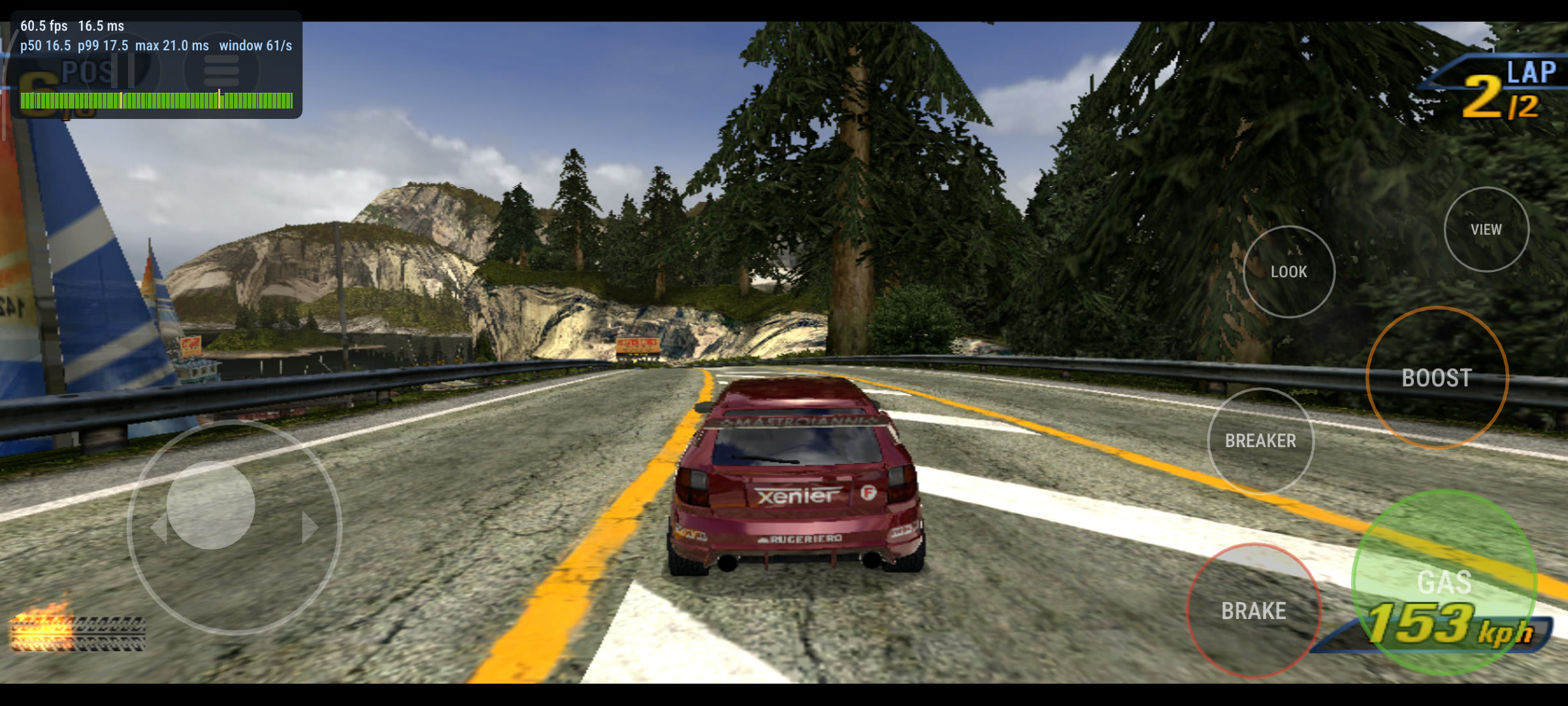
Touch controls on a Poco F4. In testing, not in the current release.
The game needs Vulkan 1.3. Most Snapdragon devices ship a driver that offers less, so the APK bundles Mesa's open-source Turnip driver and loads it inside the app. It changes nothing outside the app and needs no root. You can choose the driver in three places: the second entry in the launcher, "Takedawn: graphics driver"; a button on the setup page; and the Graphics page of the settings while the game runs. The choices are:
- Automatic (the default, and the one to use): the bundled Turnip on every Adreno device, because that is the driver the game is tested with. On other GPUs it is the device's own driver;
- the bundled Turnip driver;
- the device's own driver;
- a driver file you pick (Adreno only).
A driver file is a Turnip build for Adreno GPUs, packed as a .zip with a
meta.json in it. Android emulators load drivers in this format, and their
users share builds for many devices. You only need one if the bundled driver
can't run the game on your device.
The driver is loaded before the game starts, so a change takes effect at the next start. The settings page has a "Restart now to use it" button. If the game doesn't reach its first frames with a driver you picked, or that driver stops working later, the next start switches back to Automatic and tells you.
An update only installs if the new APK is signed with the same key as the old one. Every release from this project is. To remove the app, uninstall it. Android offers to keep its data, which holds your saves.
Controls
The game uses its own Xbox controls. Other pads are matched by button position, and the keyboard works as a pad on Mac, Windows and Linux. If you know the game from the PlayStation 2, Input > Driving controls has the PS2 layout for driving.
| Action | Controller | Keyboard |
|---|---|---|
| Accelerate | Right trigger | W or Up |
| Brake, reverse | Left trigger | S or Down |
| Steer | Left stick | A and D, or Left and Right |
| Boost | A | Space |
| Look back | X | Shift |
| Change view | Y | Ctrl |
| Crashbreaker | B | Backspace |
| Next music track | Right shoulder | E |
| Pause | Start | Enter or Esc |
The settings open with TAKEDAWN SETTINGS in the game's Settings and pause menus, with Back and Start together on a controller (View and Menu on a Steam Deck, Select and Start on a Retroid Pocket), or with F1 on a keyboard.
Input > Button prompts sets which button icons are shown (Auto follows the controller in use). With the PS2 layout, the prompts still show the game's own buttons (in Crash mode the Crashbreaker prompt says B, while R2 fires it). The PS2 layout and the Nintendo face-button layout are described in docs/controls.md.
Settings
The game is paused while the settings are open and sees no input. Move with
the D-pad or the arrow keys, change pages with LB and RB (on a keyboard Q and E,
Tab and Shift+Tab, or Page Up and Page Down), set a row back to its default
with Y or Delete, and close with B or Esc.
Changes are saved to settings.toml in the save folder. Rows marked (restart)
take effect at the next start. Each page can be reset to its defaults.
The first start uses defaults that suit modern screens:
| First-start settings | |
|---|---|
| Mac, Windows, Linux desktop | Full screen, the game's 16:9 mode with the widescreen HUD fix, linear filter, render scale 3, SMAA, sharpening 30%, Menu and HUD upscaling 2x, texture sharpness Auto, vehicle detail Far, scenery detail Far |
| Steam Deck, and any machine in a gamescope session | The same, with render scale 2 |
| Android | Full screen, 16:9 with the widescreen HUD fix, render scale 1.5, FXAA, sharpening 30%, Menu and HUD upscaling 2x |
Once you change a setting, your choice sticks. 4:3, windowed mode and 1x are still in the menu. Everything else that changes the console's look (ultrawide, km/h and the rest) is off until you switch it on.
All settings and their defaults
Display
| Row | Choices | Default and notes |
|---|---|---|
| Fullscreen | On, Off | On |
| Aspect ratio (restart) | 4:3, 16:9 | 16:9, the game's own widescreen mode |
| Filter | Nearest, Linear, Integer | Linear. How the picture is scaled to the window |
| Overscan | Show all, Crop | Crop: cuts off the border a TV would hide |
| Present fit | Letterbox, Fill 16:10 | Letterbox. Fill 16:10 fills a Steam Deck's screen and crops the sides a little |
| Speed units | mph, km/h | mph, as on the disc. km/h also changes distances to metres. Applies from the next race |
| Widescreen HUD | On, Off | On. With 16:9, keeps the HUD in its 4:3 shape at the edges of the picture. Applies from the next race |
| Ultrawide | Off, 21:9, 32:9, Window | Off. Needs Aspect ratio 16:9. Applies from the next race |
| Score board | Original, Smooth | Original, as on the console. Smooth fades the dark plate behind the score together with its text |
Graphics
| Row | Choices | Default and notes |
|---|---|---|
| Render scale (restart) | 1x to 4x; on Android also 1.5x | 3x, 2x on a Steam Deck, 1.5x on Android. 1x is 640x480, 2x is 1280x960, 3x is 1920x1440, 4x is 2560x1920 |
| Anisotropic filtering | Off, 2x to 16x | 8x. 4x on Android |
| Anti-aliasing | Off, FXAA, SMAA | SMAA, FXAA on Android. Both work on the finished frame. SMAA is cleaner and costs a little more |
| Sharpening | 0 to 100% | 30% |
| Menu and HUD upscaling | Off, 2x, 4x | 2x. Smooths the game's menu text, HUD and icons |
| Texture sharpness (LOD bias) | Off, Auto, -0.5, -1.0, -1.5 | Auto, Off on Android. With a render scale above 1x, picks sharper texture levels |
| Dither (Mac only) | On, Off | Off. A faint noise that hides stripes in smooth gradients such as the sky |
| Bloom | On, Off | On, as on the console. The glow over the picture while you boost |
| Motion blur | On, Off | On, as on the console. The streaks towards the edges at speed |
| Vehicle detail distance | Original, Far (2x), Farthest (4x) | Far, Original on Android. How far away rival cars and traffic keep their detailed models. It does not change scenery or where traffic appears |
| Scenery detail | Original, Far | Far, Original on Android. How far away trees and other roadside objects keep their detailed models. On Original the pines turn into flat cut-outs at 250 m; on Far they stay detailed as far as they are drawn |
| 60 fps crash cameras | On, Off | Off. The console drops to 30 in crash and takedown cameras. Needs a fast machine |
| 60 fps split screen | On, Off | Off. Two-player races at 60 instead of 30. Needs a fast machine; leave it off on a handheld |
| Build shaders now | action | See the shader pre-build. Not on Android |
On Android this page also has the graphics driver rows: the driver in use, the driver at the next start, driver packages, and "Restart now to use it".
Bloom and motion blur are drawn at the render scale you chose, like the rest of the picture.
Audio
| Row | Choices | Default and notes |
|---|---|---|
| Master volume, Mute, Mute in the background | 100%, Off, Off | |
| Speakers (restart) | Auto, Stereo, 5.1 | Auto: 5.1 when the system's sound output has six or more channels |
| Speaker test | action | Plays each of the six speakers in turn |
| Custom music folder | a folder | Off. See Can I use my own music?. On Android the row asks for access to music files |
| Custom music loudness | Off, Quieter, Match game music, Louder | Match game music |
| Music in split screen | On, Off | Off. The console plays no music in split screen. On plays EA GAMES TRAX or your custom music in two-player Race and Road Rage |
Input
| Row | Choices | Default and notes |
|---|---|---|
| Stick deadzone, Trigger deadzone | Raise the stick deadzone if the car steers by itself | |
| Rumble strength | 0 to 3 | 1.5 on desktops, 1.75 on a Steam Deck, 2.0 on Android. 0 turns it off. 1.0 is the Xbox pad's own curve |
| Face buttons | Xbox layout, Nintendo layout | Xbox layout |
| Driving controls | Xbox layout, PS2 layout | Xbox layout. See Controls |
| Button prompts | Auto, Xbox (original), Xbox (modern), PlayStation, PlayStation 5, Nintendo, Steam, Positional, Keyboard | Auto |
| Vibration (Android only) | Auto, Controller, This device, Off | Auto: the device vibrates when you play on its built-in pad |
Power
| Row | Choices | Default and notes |
|---|---|---|
| Power mode | Balanced, Battery saver, Auto; on a Mac also Maximum | Balanced. Battery saver uses less power and can show an occasional small dip. Auto watches the frame times and only works harder when frames start to arrive late |
Maximum busy-waits all the time. In measurements it was no steadier than Balanced on the Steam Deck and the Mac and worse on Windows. It also uses more power, so it's not in the menu on Windows, Linux and Android. On the Mac, Balanced held the same frame times at about half of Maximum's CPU use and added no input latency (measured from button press to finished frame).
Advanced
| Row | Notes |
|---|---|
| Performance overlay | Frame rate and a frame-time graph in the corner |
| Diagnostic logging | Off. On writes the full log, which bug reports include. Switch it on, restart, then make the problem happen |
| Entry in the game's menu | On. TAKEDAWN SETTINGS in the game's Settings and pause menus |
| Add Steam library art | Linux and Steam Deck. Writes cover, hero, logo and icon for a Takedawn entry already in Steam |
| Create bug report, Create bug report with a screenshot | See Reporting a bug |
| Version | Which build you are running |
| Check for updates | Says whether a newer version is out. Not on Android |
| Reset all settings |
A RECOMP_* environment variable overrides the settings file, and the menu
shows such a row as locked. The variables are in
docs/running.md.
The shader pre-build
The game compiles each shader the first time it's needed, which causes short hitches in the garage, at the first race start and at the first crash. To avoid that, the game can play two scenes by itself once, with no window or sound, and compile the shaders they use.
- It is optional. The setup window's "Prepare graphics for smooth first races" box is ticked by default; untick it to skip. You can start it later from Graphics > Build shaders now.
- It takes about a minute on the tested Mac and about two minutes on a Steam Deck (116 seconds) and on the tested Windows PC (107 seconds).
- It uses a few MB of disk.
- Without it the game still runs. Each shader compiles once, at first use, and is cached.
- It is not available on Android, where shaders compile on first use and are remembered between starts.
Measured on a Steam Deck in a new profile's first race: the longest frame at car select dropped from 365 ms to 47 ms, and the race had no shader compiles at all. A few shaders can still compile later, for tracks and modes the two scenes do not visit. Details are in docs/shader-prebuild.md.
The cache is built on your machine from your game data and stays there. Takedawn ships no shader cache or shader list.
Performance
The game targets 60 fps, with 30 in some crash cameras and replays. At 60 fps a frame lasts 16.7 ms. The numbers below are frame times in a race. "p99" is the 99th percentile: 99 of 100 frames were at least that fast.
| Device | Settings | Result |
|---|---|---|
| MacBook Air (M5) | Render scale 3, played | 23,159 frames, p99 16.7 ms, 0.04% over 20 ms |
| Steam Deck OLED, Game Mode | Balanced, 330-second race | p99 16.71 ms, 0.14% over 20 ms, 7 to 9 W |
| Steam Deck OLED, Game Mode | The 0.1.0 AppImage at render scale 3, 90-second race | p99 16.84 ms, 0.17% over 20 ms, 9.2 W |
| Steam Deck OLED, Game Mode | Battery saver, 330-second race | p99 17.9 to 18.8 ms, 0.4 to 0.7% over 20 ms, 5 to 6 W |
| Windows desktop, 60 Hz | Render scale 2, SMAA, 20-minute race | p99 17.14 ms, 2 of 71,977 frames missed |
| MacBook Air (M5) | Balanced | p99 16.77 ms, at about half the processor use of Maximum |
| Windows desktop, 4K virtual display | Render scale 3, SMAA, 56 minutes of racing, release candidate 2 | p50 16.6 ms, p99 19.1 ms, 3 frames over 50 ms |
| Retroid Pocket 5 | Render scale 2, busy race | 0.6% of frames over 18.5 ms |
| Retroid Pocket 5 | Render scale 1.5, busy race, bloom and motion blur on | 1.0% of frames over 18.5 ms |
| Retroid Pocket 5 | The same with both off | 0.5% of frames over 18.5 ms |
The watt figures are the Deck's own power reading over two runs each. The
Retroid Pocket 5 rows are from a build before the current Turnip setting
(TU_DEBUG=nobin,noubwc), which adds a few slow frames.
Not measured yet:
- Ultrawide. It was only checked by eye on the Mac, at 21:9 and 32:9 in a window. There are no frame times from an idle machine and none from a real ultrawide display.
- Render scales above 2 on the Retroid Pocket 5.
- The frame-time cost of bloom and motion blur outside Android, and of the vehicle detail distance anywhere. Bloom and blur are 5 of a race frame's 22 render passes; on the Retroid Pocket 5 switching both off saved 0.5 to 0.75 ms of graphics time per frame. Farther vehicle detail draws up to a fifth more geometry when all rivals are in view.
Tips for smooth play
- Run the display at 60 Hz or a multiple of it. On a 120 Hz display each game frame stays up for two refreshes.
- Steam Deck OLED: set the screen to 60 Hz for this game (Quick Access menu > Performance) and leave Steam's frame limiter off. At 90 Hz it can judder.
- Steam Deck: Present fit > Fill 16:10 fills the screen. Letterbox keeps the whole 16:9 picture with thin bars.
- Run the shader pre-build once.
- If busy scenes drop below 60, lower the render scale one step. On the Retroid Pocket 5, 1.5x is the default for that reason.
- For a 21:9 display use render scale 4. The game's frame is 640 columns wide, so a wide picture needs the higher scale to stay sharp.
- Advanced > Performance overlay shows the frame rate and frame times.
FAQ and troubleshooting
Does Takedawn include the game?
No. It includes the program, which contains the game's translated code and no game data. Cars, tracks, sound, music and films come from your own disc.
Which version of the game do I need?
The North America (NTSC-U) retail disc for the original Xbox. The setup
recognises it by the SHA-256 of its default.xbe:
9f497acd82adb8edfb72cc31aeeb35010b45d32b13a3f1fc6540717ff24d13f9. It refuses
PAL and Japanese discs and patched files, because the program was built from
that one executable.
Is this an emulator?
No. The game's x86 code was translated ahead of time into a native program. Takedawn supplies what the game expects from the console: its system software, graphics chip, sound chip and controllers.
Can the draw distance be raised?
Only for vehicles. Graphics > Vehicle detail distance keeps rival cars and traffic detailed for longer. Where scenery, track and traffic appear is fixed in the game's track data and cannot be raised by a setting.
Can I use my own music?
Yes. Choose a folder in Audio > Custom music folder, then pick it in the game's EA GAMES TRAX screen. It plays MP3, FLAC, Ogg and WAV files. On Android the game asks for access to music files the first time you open the row; if you said no, allow it in Settings > Apps > Takedawn > Permissions > Music and audio.
Can it run above 60 frames per second?
No. The game steps its simulation once per frame, so 60 is its own speed.
Can I bring my saves from an Xbox?
I haven't tried that. Saves made with Takedawn move between its platforms:
quit the game on both machines and copy the UDATA folder from one save
folder to the other.
The setup refuses my disc image. Why?
It tells you why:
- Wrong game or wrong version: not the North America retail disc.
- A disc for another console.
- Not an Xbox disc image: for example a video DVD image or another file with
an
.isoname. - Truncated image: the file is shorter than the disc. Copy or dump it again.
- Damaged files: a file's checksum did not match. Dump the disc again.
- Disk full or no permission: choose another place or free some space. The install needs 3 GB.
If an install is interrupted, start it again. It continues, and the game does not start until every file is in place and checked.
My Mac says Takedawn cannot be opened.
Use Open Anyway in System Settings > Privacy & Security, as described under Mac. You do this again after each update.
Windows shows "Windows protected your PC".
The setup program is not code signed. Click More info, then Run anyway.
Android will not install the APK.
Allow the app you opened it with to install unknown apps (Settings > Apps > Special app access > Install unknown apps). If Android says the app conflicts with an existing one, an APK signed with a different key is installed, for example a build you made yourself. Uninstall that one first and keep its data if you are offered the choice.
Android: the start page says no usable graphics driver, or the game is very slow.
The game needs Vulkan 1.3. Open the graphics driver page from the launcher and choose Automatic. On a device without Adreno graphics the game uses the device's own driver. If that driver has no Vulkan 1.3, the game can only draw on the processor, which is far too slow to play.
The game hitches in the first races.
Shaders are compiling. Run Graphics > Build shaders now, or play on: each hitch happens once.
There is no rumble on my controller on Android.
On Android, the library Takedawn uses for controllers can't rumble external pads. When you play on the built-in controls, the device's own vibration motor is used.
Where are my saves, settings and logs?
| Mac | Windows | Linux and Steam Deck | Android | |
|---|---|---|---|---|
Saves, settings.toml, logs, bug reports, crash reports |
~/Library/Application Support/Takedawn |
%APPDATA%\Takedawn |
~/.local/share/takedawn |
takedawn/ in the app's folder, Android/data/io.github.xenophobentx.takedawn/files, which a PC reaches over USB |
| Game data | Game/ in that folder |
%LOCALAPPDATA%\Takedawn\Game |
Game/ in that folder |
Burnout 3 Takedown/ in the app's folder |
| Shader cache (safe to delete) | ~/Library/Caches/Takedawn |
%LOCALAPPDATA%\Takedawn\cache |
~/.cache/takedawn |
The app's cache, which Android may empty |
The profile is in UDATA/4541005b/ inside the save folder. At each start the
game copies the profile to backup/ if it changed, and keeps the newest five.
Deleting the save folder, or the Android app without keeping its data, deletes
your saves.
Can I put the game data somewhere else?
Yes, from a terminal. The setup window has no option for it. Install with
--install <image> --dest <folder> (see
the command-line installer) and start the
program with --data <folder>, or set the environment variable
TAKEDAWN_DATA to that folder.
Reporting a bug
- Open the settings, go to Advanced and switch on Diagnostic logging. Restart the game so the log covers the start, then make the problem happen again.
- In Advanced, choose Create bug report, or Create bug report with a
screenshot to add the picture behind the menu. If the game does not start,
run the program with
--bug-reportfrom a terminal. On Android the start page has the same button, with "Save a copy to Downloads" and "Share". - A line under the menu says where the zip file went: the
reportsfolder in your save folder, astakedawn-report-<date>-<time>.zip. - Open an issue on the issue tracker, attach the zip, and say what you were doing, what you expected, what happened and roughly how long into the session.
The zip holds the logs of the last runs, crash and hang reports, your
settings, a summary of your system and the session's frame times. It is
between 70 and 130 KB. Your home folder is written as ~, and your user name
and the computer's name are replaced. It contains no saves, no game data and
no shader cache. You can open the file and read it before you attach it. The
full list of what is in it is in docs/running.md.
Never attach game files or disc images to an issue. CONTRIBUTING.md says how reports and pull requests are handled.
Known issues
- On Windows with G-Sync or FreeSync on, frame times are uneven and the game can
run slightly fast. A fix is in progress. Until then, turn variable refresh off
for Takedawn.exe (NVIDIA Control Panel: Monitor Technology, Fixed Refresh; AMD
Software: FreeSync off in the game's profile), or set the environment variable
RECOMP_VBLANK_SYNC=off. - Diagnostic logging that is switched on in the settings is not active at the next start. Switch it off and on again in the running game before you make a bug report.
- With Driving controls set to PlayStation 2, Crash mode shows the wrong button prompts. The Crashbreaker prompt says B (or Circle), while R2 fires it.
What's next
- Touch controls on Android. In testing.
- HDR on the Steam Deck OLED, HDR monitors and TVs, and Macs. In testing.
- Android: more devices (other Snapdragon handhelds, then non-Adreno GPUs with Vulkan 1.3).
- Texture packs: load replacement textures from a folder, for higher resolution art and mods.
- iPad?
- Online: System Link over LAN and XLink Kai, then Insignia?
There are no dates.
For developers
How it works
Takedawn is a static recompilation. A toolkit reads the game's x86 executable, finds its functions and translates them to C, and a compiler turns that C into a native program for x86-64 or arm64. The game's calls to the Xbox kernel and libraries are answered by a runtime: memory, files, threads, timers, an emulated USB host with game pads and the console's sound chip. The game's own Direct3D code writes commands for the Xbox's NV2A graphics chip into a buffer. The runtime reads that buffer, translates the chip's vertex programs and register combiners into shaders, and draws with Metal on a Mac and with Vulkan on Windows, Linux and Android.
No game logic or screen is rewritten by hand. The optional features that
change the game (km/h, the widescreen HUD, ultrawide, the bloom and motion
blur switches, vehicle detail distance) change values in the game's own code
at places listed in config/patches.json, and do
nothing when they are off.
The program contains the translated code of the game's executable. It contains none of the game's data. More in docs/architecture.md.
The command-line installer
The setup window is a front end for the program's own installer, which also runs from a terminal.
takedawn --install <image-or-folder> [--dest <dir>] [--check]
takedawn --data-status          where the game data is and whether it is whole
takedawn --data <dir>           start with the game data in <dir>
takedawn --no-setup             do not open the setup window when data is missing
takedawn --version              version, codename and what it was built from
takedawn --bug-report [--out <dir>]
takedawn --build-shaders [--status]
The program is Takedawn.app/Contents/MacOS/Takedawn on a Mac,
Takedawn.exe in %LOCALAPPDATA%\Programs\Takedawn on Windows, and the
AppImage file itself on Linux.
--check only says what the disc is and writes nothing. Without --dest the
data goes to the per-user folder in the table above. Progress is printed as
lines (STEP, PROGRESS, RESULT) that another program can read. The exit
status is 0 on success, and 3 when there is no complete install and no setup
window can be shown. docs/installer.md has the details.
Building from source
The repository contains no game code and no game data. Building needs your own
disc: the build translates your own default.xbe. The steps, the per-platform
builds and the release packaging are in docs/building.md.
Further documents:
| Topic | Document |
|---|---|
| Running, saves, the bug report, headless scripts, environment variables | docs/running.md |
| How we test: scratch profiles, the AI driver, headless scenes, frame-time tools | docs/testing.md |
| How the release packages are built | docs/release.md |
| The data installer and the setup window | docs/installer.md |
| The Windows build and its measurements | docs/windows.md |
| The Android build, the graphics driver, devices | docs/android.md |
| Shader pre-build | docs/shader-prebuild.md |
| The widescreen HUD fix | docs/widescreen-hud.md |
| Ultrawide | docs/ultrawide.md |
| Bloom, motion blur and how effects follow the render scale | docs/effects.md |
| Driving controls: Xbox and PS2 layout | docs/controls.md |
| Draw distance and vehicle detail | docs/draw-distance.md |
| Button prompt artwork | assets/glyphs/README.md |
| How the parts fit together | docs/architecture.md |
Bug reports and pull requests are welcome. CONTRIBUTING.md says what a useful report contains, what must never be committed and where code may come from.
Credits
Takedawn grew out of other people's work:
- sp00nznet/burnout3 by Ned Heller, the project this repository started from. It booted the game through its real entry point on a software renderer on Windows.
- sp00nznet/xboxrecomp, also by Ned Heller: the recompiler and the Xbox runtime.
- apexJCL/xboxrecomp, the fork of the toolkit that this project's runtime is based on. The Metal backend and the first macOS host come from it.
- ThirteenAG/WidescreenFixesPack, whose fix for the PlayStation 2 version showed the approach for the widescreen HUD and ultrawide patches. The Xbox patch sites were found in this build.
- Nahelam's list of function names for the PlayStation 2 version, which helped to find the matching places in the Xbox code. No code was taken.
- xemu, Cxbx-Reloaded and xboxdevwiki, the toolkit's references for how the hardware behaves.
- Xerenge, Dolphin and Unleashed Recompiled, for ideas: bring your own disc with a prebuilt program, the setup window's flow, the bug report, and a shader list compiled at start. No code was taken.
What is inside the downloads:
| Component | Used for | Licence |
|---|---|---|
| Sound-chip (MCPX APU) emulation, based on code from xemu | The console's sound chip in the runtime | LGPL-2.1-or-later |
| ADPCM-XQ decoder | Decoding the game's ADPCM sound | BSD-3-Clause |
| Dear ImGui 1.92.9b | The settings menu | MIT |
| SMAA reference implementation | Anti-aliasing | MIT |
| AMD FidelityFX CAS | Sharpening | MIT |
| Super-xBR, a C version of Hyllian's shaders | Menu and HUD upscaling | MIT |
| Roboto Condensed, a subset | The settings menu's text | OFL-1.1 |
| DejaVu Sans Mono, a subset | Settings menu letters outside basic Latin | Bitstream Vera licence with the DejaVu changes |
| dr_libs (dr_mp3, dr_flac, dr_wav) | Playing your own MP3, FLAC and WAV music | Unlicense or MIT-0 |
| stb_vorbis | Playing your own Ogg Vorbis music | Unlicense or MIT |
| SDL2, and on Mac and Linux sdl2-compat over SDL 3 | Window, sound, controllers | zlib |
| glslang | Compiling shaders for Vulkan | BSD-3-Clause, Apache-2.0, MIT |
| Qt 6 | The setup window, linked dynamically | LGPL-3.0 |
| Mesa Turnip 26.2.4 | The Vulkan driver in the Android APK | MIT |
| libadrenotools | Loading that driver inside the Android app | BSD-2-Clause |
| LLVM libc++ | C++ runtime in the Android APK | Apache-2.0 with LLVM exception |
The xemu-derived sound-chip code is linked into the program. Every package
carries its licence text and attribution in a licenses folder, with a
SOURCE.txt that names the two source commits the program was built from, and
that source is published with each release. The full list, with sources and
copyright lines, is in THIRD_PARTY_NOTICES.md.
People who contributed are in CONTRIBUTORS.md.
How this was made
I build Takedawn with AI coding agents (Claude) doing much of the typing. I decide what goes in, review the changes and test them on hardware I own: a Mac, a Steam Deck, a Bazzite PC, a Windows PC, an Ubuntu PC and a Retroid Pocket 5. Changes are tested there in real races, with measured frame times, before they are merged. The recompiler and the runtime are the xboxrecomp toolkit, started by sp00nz and carlos; a good part of my work went into it as well.
Greetings
sp00nz and carlos (apexJCL), the toolkit and the first Burnout 3 port started with you. The xemu team, Nahelam, the Turnip folks and the Orca team. To all the demoscene passivists, Russ from Retro Game Corps and TechDweeb: never met you, still a fan. And Criterion Games, for making the best arcade racers there are.
To every Burnout fan still waiting for the next one: we are the Lazy Generation.
Licence
Takedawn's own code is under the MIT licence, see LICENSE.
Third-party components keep their own licences, listed above. The licence covers this project's code only. It grants nothing in the game.
Legal notice
Takedawn is an unofficial fan project, made without payment and offered free of charge. It is not affiliated with, endorsed by or sponsored by Electronic Arts Inc., Criterion Games or Microsoft Corporation.
"Burnout" and "Burnout 3: Takedown" are trademarks of Electronic Arts Inc. Xbox is a trademark of Microsoft Corporation. Steam and Steam Deck are trademarks of Valve Corporation. All other names, including Mac, macOS, Windows, Android, Snapdragon, Adreno, Retroid Pocket and AYN Odin, belong to their owners. They are used here only to say what Takedawn works with. The game is named only to say which game this project runs. No logo, box art or other artwork of the game is used. The Takedawn icon and the button prompt pictures are original artwork, and no console maker's artwork or font is used in them. The release codename is a song title. No lyrics, sound or artwork of the song are used.
No game data is included or distributed. The downloads contain the program, which holds code translated from the game's executable, and no textures, models, sound, music, films, disc files, shader caches or shader lists. To play you need your own, legally obtained disc of the game, and Takedawn takes the data from your copy of it.
The screenshots on this page show Takedawn running on my machines. The game content visible in them belongs to its owners.
The software is provided "as is", without warranty of any kind, as set out in the MIT licence.