

Motion Prompt
English | 日本語
日本語の説明は README.ja.md にあります。 中文用户:名称一览目前只有英文和日文。把
make-your-own/prompts/en/01-translate.md交给 Claude Code、Codex 等编程 AI,就可以制作中文或其他语言的版本。 Other languages: the name lists are in English and Japanese for now. Givemake-your-own/prompts/en/01-translate.mdto a coding AI to make a version in your language.
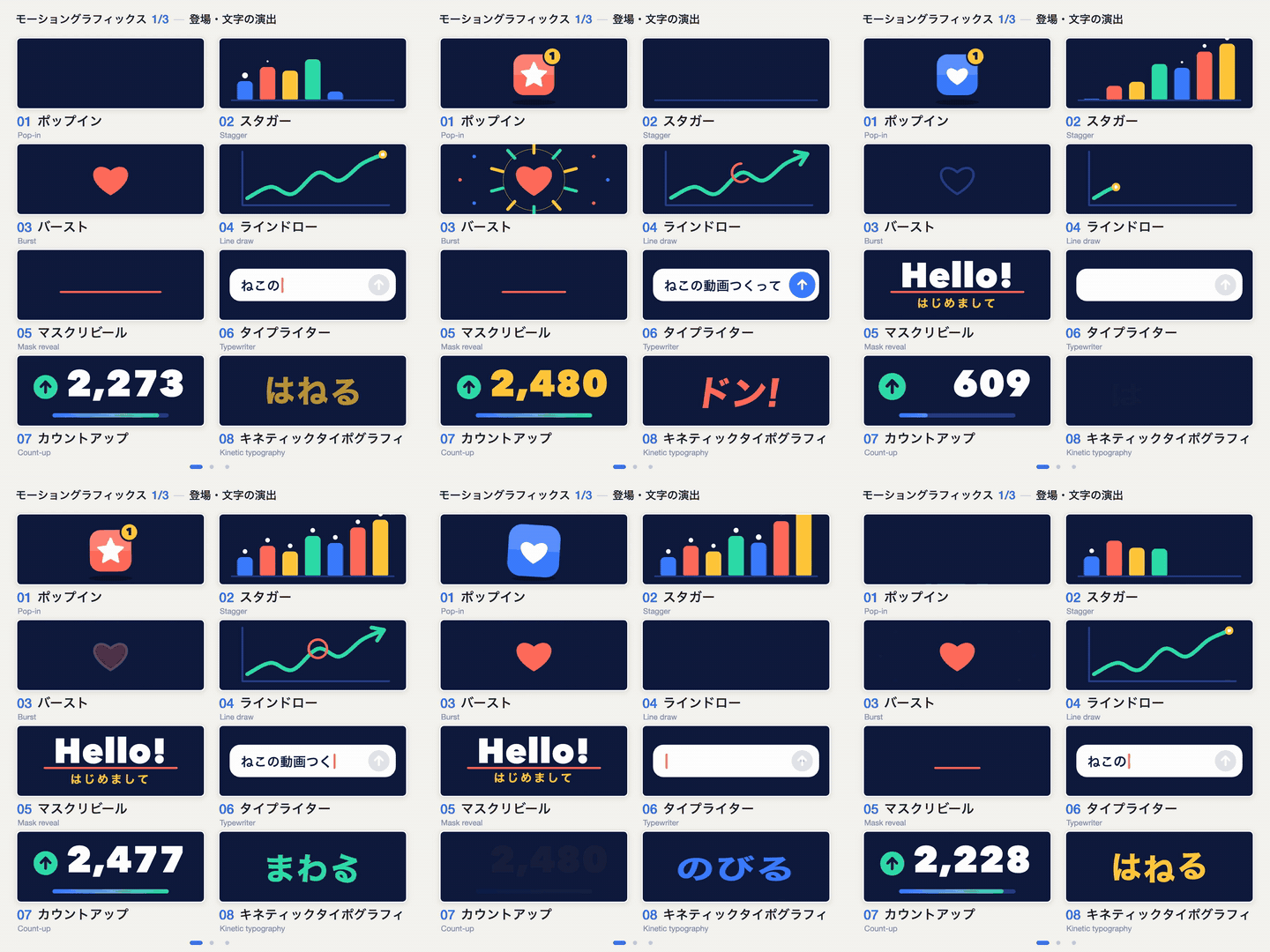
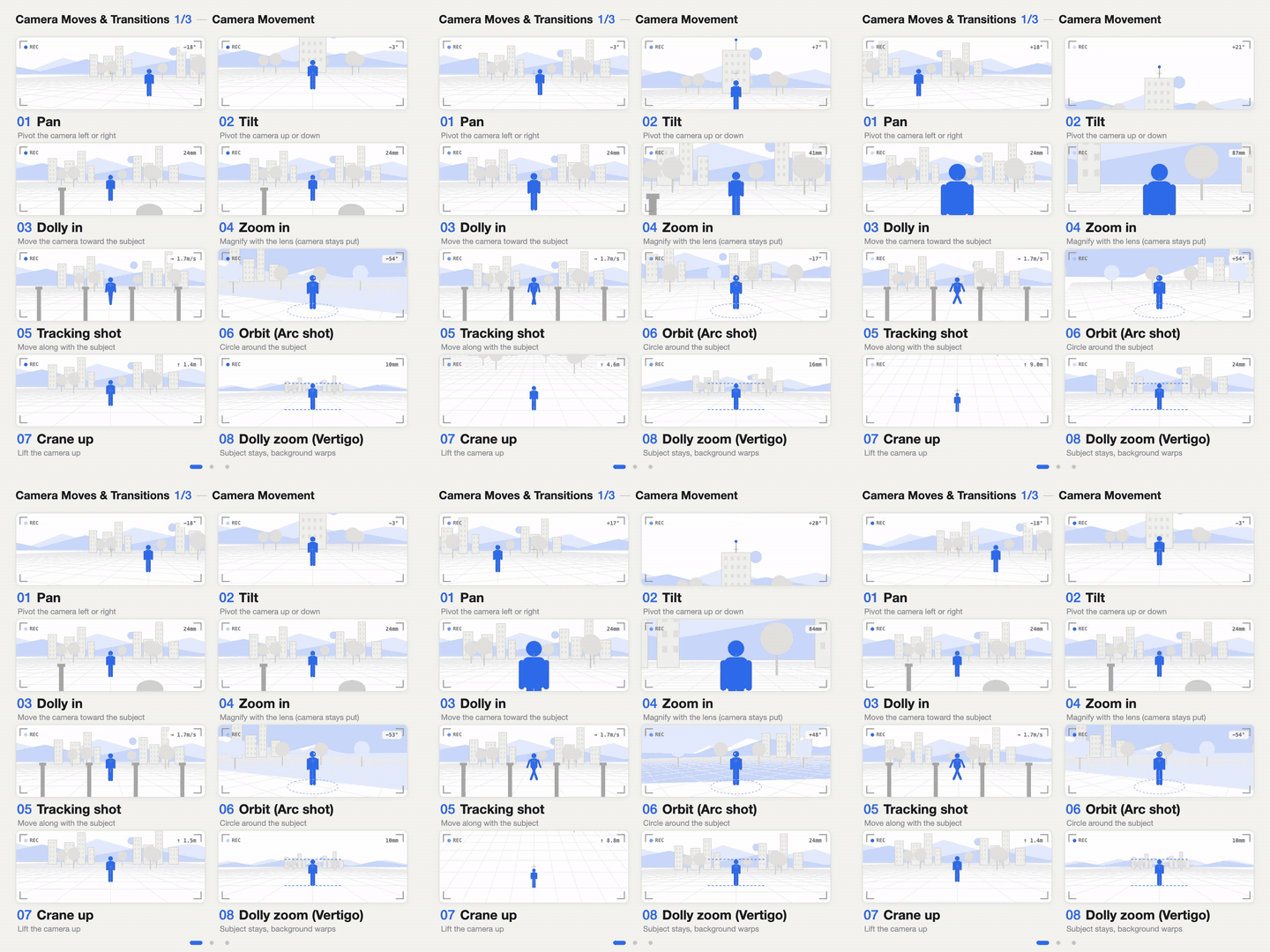
A library of names for the things you ask an AI to make. Each name comes with a moving sample, a one-line meaning and an example of how to ask for it. Five sets are in it now, 24 names each and 120 in all: motion-graphics moves (motion), camera moves (camera), UI component names (ui), landing page and web effects (lp), and photo looks, lighting and styles (photo). It also comes with the prompts to make the same kind of library for your own field, in your own language.
| Motion graphics | Camera moves |
|---|---|
 |
 |
- Gallery (every sample, moving): https://showheyohtaki.github.io/motion-prompt/
- Name lists you can read here on GitHub:
packs/ - Examples from other people who share names with samples (embeds and links to their posts on X): https://showheyohtaki.github.io/motion-prompt/found.html
Why I made this
I posted a few short videos that put names to motion-graphics moves and camera moves, and over the next few days a lot of comments came in. One of them said, in essence, that what had been holding them back was not a lack of imagination. It was not knowing what this kind of movement is called.
Reading that, I thought: if people who know their field, in many languages, laid out the "common language" you need to work well with AI as a library you can look through, it would be really useful. So I tried making that as a GitHub repository.
This is not one style to copy. It is a place where you can use the prompts and instructions here to make motion graphics like these, and to make the same kind of name samples for your own field, in your own language, with whatever look you like.
Another comment said: "this is how you become a creative director". Exactly. I think it would be a wonderful thing if there were more creative directors all over the world, doing great work together with AI.
Shohei Ohtaki
The names in here now
| Numbers | Pack | Names | Lists |
|---|---|---|---|
| 001–024 | motion: motion graphics moves |
24 | English · 日本語 |
| 025–048 | camera: camera moves and transitions |
24 | English · 日本語 |
| 049–072 | ui: UI component names |
24 | English · 日本語 |
| 073–096 | lp: landing page and web effects |
24 | English · 日本語 |
| 097–120 | photo: photo looks, lighting and styles |
24 | English · 日本語 |
Each list gives the number, the name, what it means and an example of how to ask an AI for it. The same names move in the gallery.
Each pack has its own look. The motion pack is dark navy with four colors. The camera pack is light gray with one blue. The ui pack is warm off-white with black and one blue, and a cursor sets each part moving. The lp pack draws a white browser window on a pale gray desk, with a vermilion accent and blue for the pictures on the page. The photo pack has no shared palette: each card is painted in the colors of its own scene, and the effect fades in and back out so you can compare. That is on purpose. What a pack has to get right is the names, not a house style.
Three ways to use it
1. Open the library, pick, and send your picks to your AI
With the motion-prompt skill installed in Claude Code or Codex, asking is enough to open this gallery. You do not need to remember names or numbers. When you are not sure what something is called, have the library opened, the way you would look a word up in a dictionary.
npx skills add showheyohtaki/motion-prompt
- Ask your AI:
Open the motion-prompt library. - The gallery opens in your browser. Press "Pick" on the samples you want, as many as you like. The note field at the bottom of the screen takes a short line such as "for the opening title".
- Press "Send to AI" and your picks reach the AI. Go back to it and say what you want done:
Edit the opening of this video like this.
The agent uses only what you picked. It fetches their specs and reference code and builds them into your video or site the way your project works. Name a kind, as in "show me the camera moves", and the gallery opens filtered to that pack.
For an AI without the skill, pick in the gallery, press "Copy picks" at the bottom of the screen and paste the text into the chat. It includes the demo and spec URLs.
When you know the numbers, you can skip the gallery and ask by number:
Use the motion-prompt skill with #012 and #045 to make this product video look professional.
Replace the part where the title appears with #005 from motion-prompt. Keep the length and the transitions before and after it.
Turn the camera move in motion-prompt #032 into an English prompt for Veo. The subject is a coffee cup on a desk.
Other ways to install, and what the agent does, are in Skill reference below.
2. Look up the name and say it to your AI
Open a list or the gallery, find the thing you have in mind, and use its name in your prompt. Adding how long, how strong and what moves makes the result closer to what you want.
Bring the title in with a mask reveal from below, 0.6 s, each line slightly after the one before.
Slow dolly in toward her face; move the camera, do not zoom.
No install is needed for this. The names work in a coding AI, a video-generation model or a brief to a person.
3. Make a version for your own field or language
make-your-own/ has copy-and-paste prompts for a coding AI, a script that renders the videos, and the two finished examples (HTML source, three videos and a cheat-sheet image each).
| Goal | Prompt |
|---|---|
| The same videos in another language | 01-translate.md |
| The names of your own field, with your own look | 02-your-own-field.md |
| The one-page cheat-sheet image | 03-cheatsheet-image.md |
The field does not have to be video. Lighting, sound, UI, photography, cooking, architecture: any field where knowing the name is what lets you ask for the thing.
Add the names of your field
If you know a field well, please add its common language here, in your language. CONTRIBUTING.md explains how to add a pack or add a language to an existing pack, and what a name needs before it goes in. A coding AI can do most of the building with the prompts above.
Original posts
The videos this started from (X, in Japanese):
- https://x.com/showheyohtaki/status/2108065874511077598
- https://x.com/showheyohtaki/status/2109112248832503895
- https://x.com/showheyohtaki/status/2109840044554891464
The set from the first post (names of animations for websites and landing pages) is not in this repository yet. The lp pack is a different set. Some names overlap with that post (parallax, scroll snap and others), but the selection and the samples were made new for this repository. The ui pack is based on "UIパーツ名24" (24 UI part names), posted on X on October 10, and photo was also made new for this repository.
Skill reference
Node.js 18 or later is required.
Install
With a prompt. Paste this into Claude Code or Codex:
Read https://github.com/showheyohtaki/motion-prompt and install the motion-prompt skill in this environment. When it is installed, tell me how to use it in three lines.
With a command. This uses the skills installer, which works with Claude Code, Codex and other agents that read Agent Skills:
npx skills add showheyohtaki/motion-prompt
As a Claude Code plugin.
/plugin marketplace add showheyohtaki/motion-prompt
/plugin install motion-prompt@motion-prompt
By hand. Copy the skills/motion-prompt folder to one of these places:
| Location | Scope |
|---|---|
~/.claude/skills/ |
Claude Code, all projects |
~/.agents/skills/ |
Codex and others, all projects |
.claude/skills/ in a project |
Claude Code, that project only |
.agents/skills/ in a project |
Codex and others, that project only |
Install steps for agents
This section is for an AI agent that received the prompt in "With a prompt".
- Check that Node.js 18 or later is available with
node --version. - In the user's project folder, run the command below. If it asks which agent to install for, choose the one you are.
npx skills add showheyohtaki/motion-prompt -y
- If step 2 is not possible, fetch the repository and copy the folder. Copy to
.claude/skills/if you are Claude Code and to.agents/skills/otherwise (or to~/.claude/skills/or~/.agents/skills/for all projects).git clone --depth 1 https://github.com/showheyohtaki/motion-prompt.git /tmp/motion-prompt mkdir -p .claude/skills cp -R /tmp/motion-prompt/skills/motion-prompt .claude/skills/
- Confirm the install. Replace
<skill-dir>with the path where the skill was installed (the one withSKILL.mdin it). It worked if the data source and the element count are printed.Exit code 3 means the data source could not be reached. Get network permission and run it again.node <skill-dir>/scripts/motion-prompt.mjs info
- Read
<skill-dir>/SKILL.mdand tell the user how to use the skill in three lines. For example:- Say "open the motion-prompt library" and the gallery opens. Press "Pick" on what you want, then "Send to AI".
- Then say what to do with them, for example "edit the opening of this video like this".
- If you know the numbers, you can also ask directly: "use #012 and #045".
Do not change existing settings files or other skills.
What the agent does
- When you ask for the library, it opens the gallery in your browser and waits (up to 15 minutes) until you pick and press "Send to AI".
- It works out how your project produces video: Canvas, Remotion, CSS, After Effects, or prompts for a video-generation model.
- It uses what you picked, or the numbers you gave, and nothing else. When you have not chosen, it suggests opening the gallery; if you ask it to choose, it searches the catalog for each scene.
- It rebuilds those moves in your project. Timings, easing and amounts stay as published, while the words, colors and images become yours.
- Its reply ends with a list of the numbers it used, the scene each went into, what it changed, and a link to each sample.
How it works
- One element is one function,
cells[i](ctx, w, h, u).ctxis a Canvas 2D context,wandhare the card size, anduis the time in seconds within the cycle. - The picture depends only on
u. The function does not read the clock or use random numbers when it draws, so live playback and frame-by-frame rendering give the same frames. - Colors, sizes, the cycle length and shared helper functions are collected in a "kit" for each pack. An element needs the kit of its pack.
- There are no external libraries.
Three files make up the skill: the instructions (SKILL.md), notes on moving an element into each kind of video project (references/porting.md), and a Node script that looks elements up (scripts/motion-prompt.mjs, standard library only).
| Command | What it does |
|---|---|
pick / pick --pack camera |
opens the gallery and prints what arrives with "Send to AI": numbers, names, specs and your note. Waits up to 15 minutes |
search typewriter text / search 文字 登場 |
finds elements for a scene (English or Japanese words) |
list / list --pack motion |
an overview of all packs, or one pack listed element by element |
get 12 #045 |
prints the spec and then the code for those numbers (8 at most in one call) |
kit motion |
the shared code of a pack |
prompt 12 |
the copy-paste prompt for an element |
info |
shows where data is coming from, how much there is, and where it is cached |
The script makes GET requests for the text files below and nothing else. Nothing from your project is uploaded. pick also opens a temporary listener on your own machine (127.0.0.1) that receives only the numbers and note sent by "Send to AI" in the gallery.
https://showheyohtaki.github.io/motion-prompt/api/v1/- if that is unreachable:
https://raw.githubusercontent.com/showheyohtaki/motion-prompt/main/api/v1/
| File | Contents |
|---|---|
catalog.json |
version, count, packs, and every element's names, meaning, summary, spec and tags |
{ja,en}/catalog.tsv |
the index as tab-separated text (id, pack, category, title, tags, summary) |
{ja,en}/e/{id}.txt |
a single element: attribution line, what it shows, the spec, then its code |
{ja,en}/p/{id}.txt |
the copy-paste prompt for one element |
kit/{pack}.js |
the shared code of a pack |
If you clone this whole repository, the CLI reads the local api/v1 first and needs no network. Downloaded data is kept on disk, and the saved copy is used when the source cannot be reached.
| Variable | Default |
|---|---|
MOTION_PROMPT_BASE |
read from here instead of the default sources: a local folder or a URL, several separated by commas |
MOTION_PROMPT_CACHE |
where downloads are kept; ~/.cache/motion-prompt, or the system temp folder when the home folder is read-only |
MOTION_PROMPT_TTL |
how long a saved catalog is trusted, in seconds; 21600 (6 hours) |
Run the gallery yourself
git clone https://github.com/showheyohtaki/motion-prompt.git
cd motion-prompt
python3 -m http.server 8000
Open http://localhost:8000/ to see the gallery (index.html). In a clone, node skills/motion-prompt/scripts/motion-prompt.mjs pick --local opens your local copy of the gallery for picking. The file formats are described in FORMAT.md.
License
MIT © 2026 Shohei Ohtaki
Commercial use is allowed, for the code, the videos and the images. When you use an element's code, keep its first line (// Motion Prompt #ID · MIT License (c) 2026 Shohei Ohtaki · …).
To ask for something to be removed or corrected, use the removal or correction form. We act on it as soon as the request is confirmed.
Acknowledgements
The idea of pairing a gallery of live examples with an agent skill comes from Lucian UX/UI Prompt. The CLI's command set and the layout of the static data files follow that project too; see THIRD-PARTY-NOTICES.md.
Author
Shohei Ohtaki (株式会社デイトラ) / X @showheyohtaki