
tv-home
Make a slow, ad-filled Android TV fast and clean again. Debloat it over Wi-Fi and give it a tiny Apple TV-style home screen with rotating nature wallpapers. You can hand the whole thing to Claude Code with one prompt, or do it by hand with the scripts here.
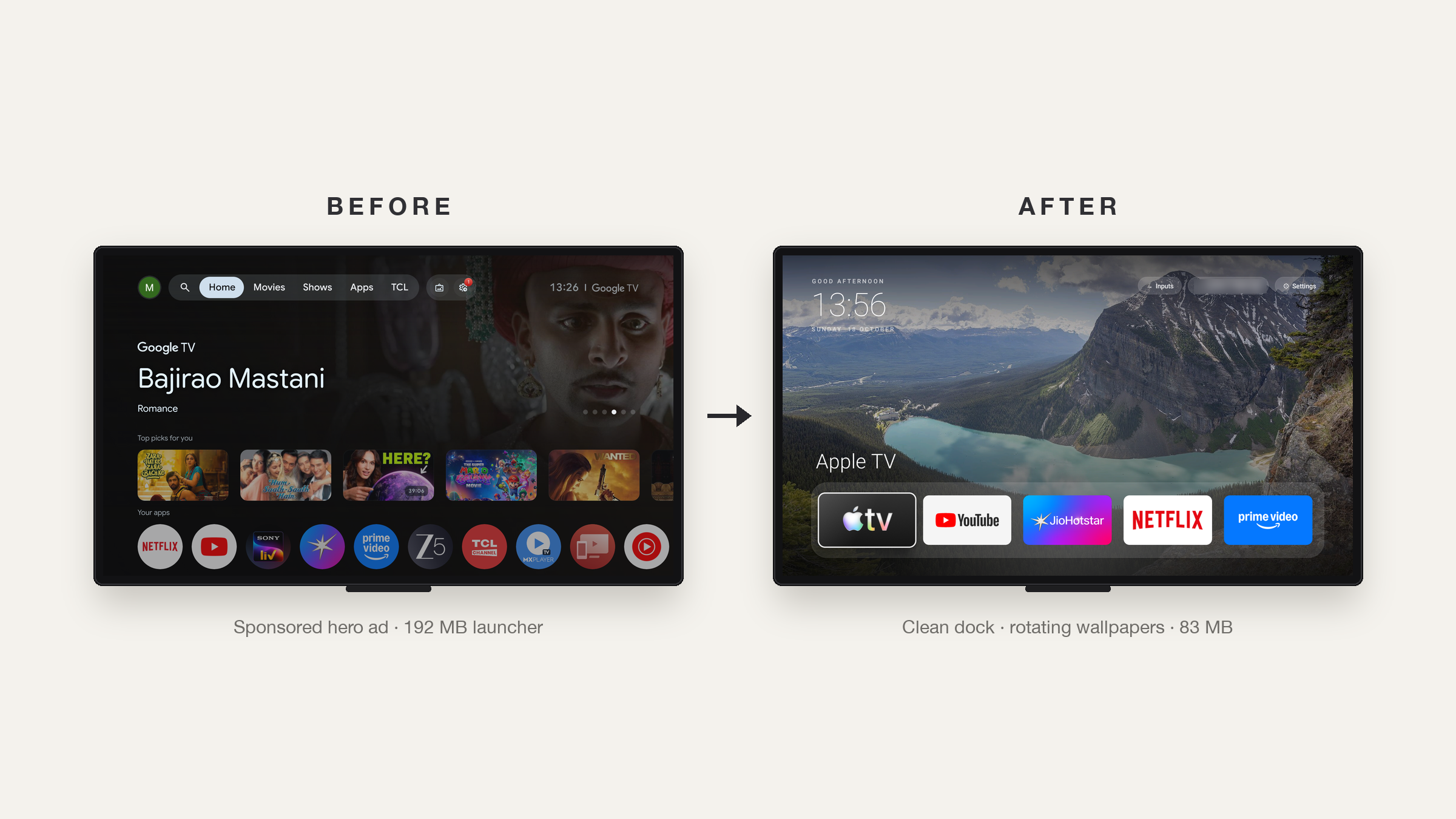
On a 2 GB TCL Google TV this disabled 25 bloat apps and cut the home screen's memory use from 192 MB to 83 MB. Everything is reversible: packages are disabled, never uninstalled.
Do it with Claude Code (easiest)
-
On the TV: Settings → System → About → press OK on Build 7 times → back → Developer options → turn on USB debugging. Keep the TV on, on the same Wi-Fi as your computer.
-
Clone this repo, open Claude Code inside it (so it can reuse the launcher and scripts), and paste:
My Android TV is slow and full of ads. Find it on my Wi-Fi, connect over ADB, and debloat it: disable the manufacturer's ads, telemetry and junk (reversibly, never uninstall), asking me first about apps and features I might use. Then build and install a fast, minimal Apple TV-style home screen with a dock of my favourite apps and rotating nature wallpapers. Back up before changing anything, check every step with screenshots from the TV, and give me a restore script. Heads-up from people who've done this: use the adb-shell Python package if macOS blocks adb; on Google TV also disable com.google.android.tungsten.setupwraith or it hijacks the Home button; and test the Home button from inside an app. -
Accept "Allow USB debugging?" on the TV when asked, then answer a few questions: which apps you use, which go in the dock, whether you want wallpapers.
The prompt is short on purpose; Claude works out the details. The gotchas below are there in case it gets stuck.
Do it by hand (macOS)
./setup.sh                                                  # Python ADB client, JDK 17, Android SDK
tools/find-tv.sh                                            # finds the TV, saves its IP
tools/venv/bin/python -I tools/tv.py --probe                # model, Android version
tools/disable.sh examples/tcl-google-tv-g07/debloat.txt     # or your own list, see examples/
launcher/build-and-install.sh                               # build + install the launcher
Undo everything with tools/restore.sh <the same list>.
What's here
| Path | What it is |
|---|---|
| PROMPT.md | The prompt for Claude Code / any coding agent |
| launcher/ | The home screen. 4.7 MB including the wallpapers; plain Android, no network, no background services |
| launcher/res/values/config.xml | Dock apps, hidden apps, Live TV app, grid columns |
| tools/tv.py | Pure-Python ADB client: shell, batch, screenshots, chunked APK push |
| tools/find-tv.sh | Finds Android TVs on your Wi-Fi |
| tools/type.sh | Type into the TV's on-screen keyboard from your laptop (tools/type.sh alone prompts hidden, for passwords) |
| tools/disable.sh, tools/restore.sh | Apply / undo a debloat list |
| examples/ | Debloat lists per TV model |
The launcher
- Clock, greeting and date top-left. Frosted pills top-right for Inputs (HDMI/AV/Live TV dropdown; the remote's Menu key opens it too), Wi-Fi (shows the network name) and Settings.
- A dock of your favourite apps. The focused app's name appears above it over a glow coloured from its banner. Press Down for every other app in a grid.
- 12 nature photos crossfade every 10 minutes, with a scrim so text stays readable. Swap them in
launcher/assets/wallpapers/(1920×1080 JPEGs, credits inlauncher/WALLPAPER-CREDITS.md). - Deterministic D-pad focus, remembers the last tile, picks up newly installed apps on return.
Change the dock: edit config.xml, then run launcher/build-and-install.sh.
Gotchas we hit
- macOS blocks the
adbbinary on the local network ("No route to host").tools/tv.pyuses theadb-shellPython package instead. - Google TV hijacks the Home button. With the stock launcher disabled, the setup app
(
com.google.android.tungsten.setupwraith) has a higher HOME priority than any third-party launcher. The install script disables it;restore.shre-enables it. - Home opened the launcher behind the current app, because of a stale home task from switching
launchers. Force-stopping the launcher and
com.android.tv.settingsand pressing Home fixes it. The install script does this. - Chained
pmcommands (pm disable a; pm disable b) can silently stop after the first. The scripts run one per shell call. - Apps installed from the Play Store didn't appear, because the package broadcast was missed
while another app was in front. The launcher re-checks with
getChangedPackageson every return. - Unsplash blocks scripted downloads with a bot check. The wallpapers come from Wikimedia Commons Featured Pictures instead.
Supported TVs
Android TV and Google TV: TCL, Xiaomi/Redmi, Hisense, Sony, OnePlus, Realme, Nvidia Shield,
Chromecast with Google TV and most others. Not Samsung (Tizen), LG (webOS) or Fire TV.
Tested on: TCL Google TV (Android 11). Add yours to examples/.
Credits
Inspired by Gathin23/tv-vibehack. Wallpaper photos are from Wikimedia Commons under their own licences, see launcher/WALLPAPER-CREDITS.md. Code is MIT, see LICENSE.