

Playden for PS5
Play your Steam library's Windows games on a jailbroken PS5.
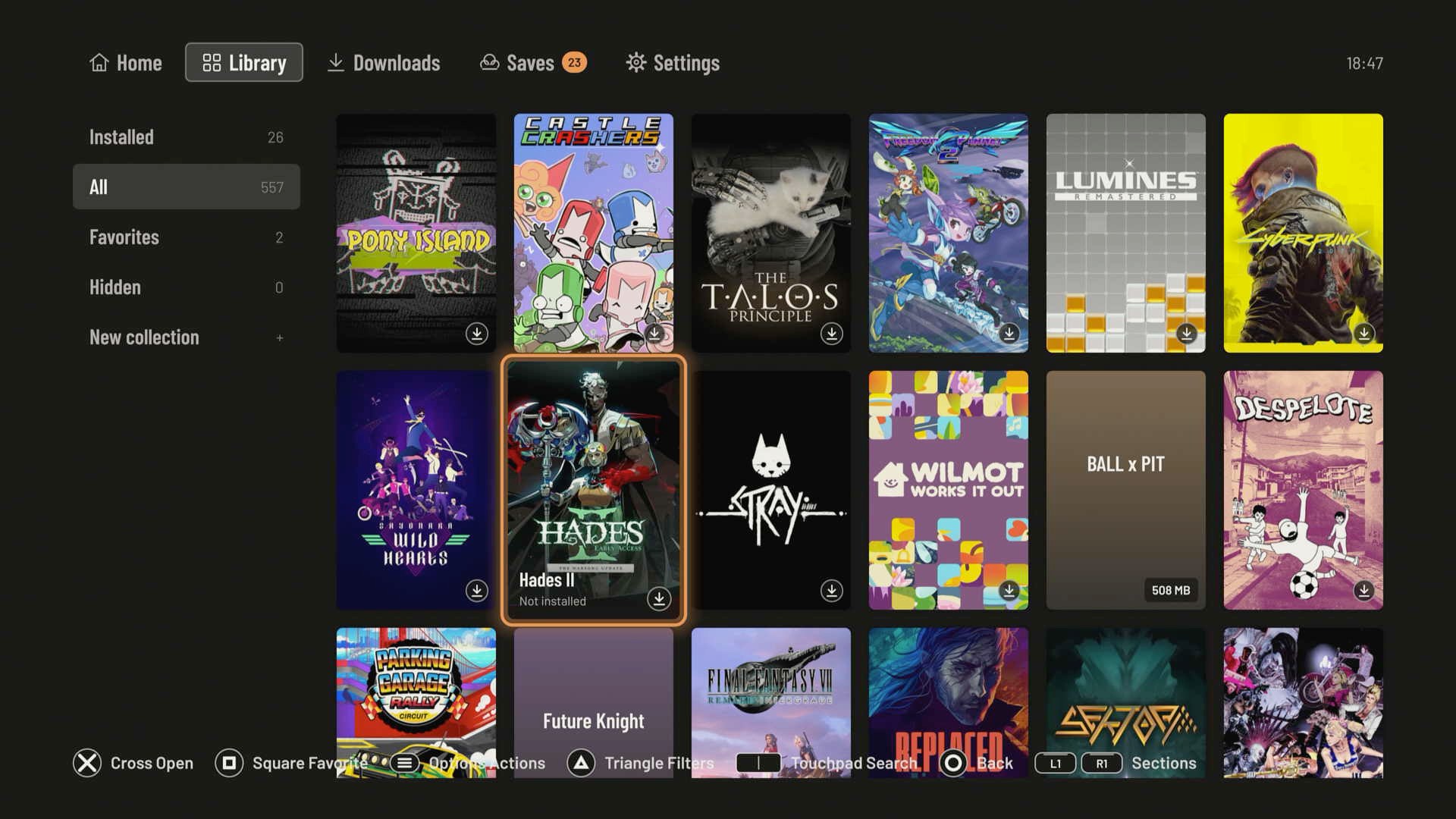
Playden is a launcher that runs on the PS5, adapted from Playden for macOS. You sign in to Steam with a QR code or your account name and password, browse your library, download games, and play them. The Windows games run through prospero-win, a port of Wine to the PS5. Each game gets its own private Windows environment and its own tile on the PS5 Home screen.
Warning
Alpha software. Playden is an early, experimental project. It signs in to your real Steam account, downloads games with your licenses, and reads and writes your Steam Cloud saves. Read Before you use it. If you are not comfortable with these risks, do not use it.
Features
- Steam sign-in with a QR code (approve it in the Steam mobile app), or with your account name and password. Steam Guard email codes, Steam Mobile app codes and approval in the app are supported. The sign-in screen opens on the method you used last.
- Your whole Steam library. Search, sort, favorites, collections, ratings and notes, with cover art and store details. The library works offline from a cache.
- Downloads from Steam. Queue games and watch progress.
- Storage at a glance. Settings › Storage shows how much space is used and lists installed games by size or last played. Select several games and uninstall them together; saves are kept unless you choose otherwise.
- Each game is its own PS5 app. It gets a tile on the Home screen, so you can start it without Playden.
- A private Windows environment per game ("bottle"), so games do not share settings or files.
- Steam Cloud saves. Playden checks your Cloud saves before a game starts and syncs them after it ends. If the console and the Cloud disagree, you choose which one to keep. You can turn the automatic sync off in Settings and sync by hand from the Saves tab.
- Per-game settings. Graphics, frame rate, resolution, controller mapping, and how the game starts: pick any program from the game folder, edit its arguments and library overrides, or try a game Playden flagged anyway. A game's settings can be exported as a recipe (format).
- Graphics. Direct3D 8–11 through DXVK, Direct3D 12 through vkd3d-proton (kit 0.11 and later), OpenGL through Mesa's Zink, and Vulkan, all on the PS5 GPU's Vulkan driver.
- Gamepad support. XInput, DirectInput, Raw Input, Windows.Gaming.Input and the Windows multimedia joystick API, with rumble. Games see the DualSense as an Xbox controller.
- Mouse and keyboard. Plug a USB mouse and keyboard into the PS5, or use a controller preset: the left stick as a mouse, or the D-pad as the arrow keys.
- Install to internal or external disks. Console storage, or an exFAT USB drive formatted on a Mac or PC.
See the compatibility list for the games we have tested.
Planned
- Steam game updates
- Other stores (GOG, Epic)
- Support for game launches (Rockstar, EA, Ubisoft)
- Community recipes in the preset chooser
Before you use it
Playden is alpha software. It is not affiliated with, endorsed by, or supported by Valve. Know these points before you sign in:
- It is an unofficial Steam client. Playden talks to Steam's servers directly, the way the Steam client does. Valve does not support third-party clients. We know of no account problems from this, but the risk is yours to accept.
- Your Steam session stays on the console. Playden stores a Steam sign-in token on the PS5, without encryption. On a jailbroken console, anyone with file access (for example through FTP) can read it. Signing out in Playden deletes the token from the console. If you sign in with your password, Playden sends it to Steam encrypted with Steam's key and never saves it; only the token stays.
- It writes to your Steam Cloud saves. Playden uploads saves after you play. A bug can overwrite good saves with older or broken ones. Back up saves you care about. When Playden shows a conflict, read it before you choose.
- It needs a jailbroken console with root-level helpers. A running game can get elevated rights on the console. Run only games you trust.
- Things will break. Expect games that fail to start, crashes, and the occasional console restart. Keep your console's own data backed up.
Requirements
- A jailbroken PS5 (for example with the WebKit autoloader). We test on firmware 13.60. Playden does not block other firmware versions, but they are untested. Please give your firmware in a test report.
- These payloads loaded after each boot:
- kstuff — required. Without it, every game fails with error CE-100008-9.
- ShadowMountPlus 1.7-beta5fix1 — puts each game's tile on the Home screen. 1.7beta2 also works.
- elfldr, the ELF loader on port 9021 — runs the root helper that gives a game access to its files. Most jailbreak loaders start it for you.
- nanoDNS, if your console's DNS is set to 127.0.0.1 (as many jailbreak guides suggest) — without a local DNS server, Playden can't reach Steam.
- For installing and updating Playden: an FTP server such as zftpd (port 2120), and optionally ps5-web-file-manager (port 8888).
- A Steam account with Windows games.
- A computer with Python 3 on the same network as the PS5, to copy Playden and the kit to it.
- To build it yourself (optional): a Mac with Apple Silicon. Linux should also work, but we have not tested it yet. See Build from source.
Tested with kstuff-lite 1.11, ShadowMountPlus v1.7-beta5fix1 and v1.7beta2, elfldr v0.26, zftpd 1.6.0 and ps5-web-file-manager v1.9. Other versions can work, but these are the ones we know.
How it works
- Playden does not run games itself. It downloads a game, prepares it, and hands it to a separate PS5 app made for that game. That app starts Wine with the game's settings. Because each game is its own app, it has its own tile on the PS5 Home screen, and it is isolated: its files, settings and crashes stay inside it.
- The runtime kit is separate from Playden. The kit holds Wine for PS5, the graphics drivers, a clean Windows environment and the per-game app shell. Playden checks that the installed kit is complete before it uses it.
Install
Download both files from the latest release:
playden-ps5-0.5.0.zip: the Playden app (FAKE77031) and the console tools used below.playden-kit-0.11.zip: the runtime kit 0.11 (hl2-fw1360-dev1), with its source list and license texts.
You need Python 3 on your computer for the tools. Unzip both files next to each other, then run the commands from
the playden-ps5-<version> folder, which holds tools/.
Install Playden
-
Copy the app to the console over FTP.
--installcreates/data/homebrew/FAKE77031and its folders, so it also works on a console that has never had Playden (or was just reinstalled):python3 tools/console_title_deploy.py --host <PS5 IP> deploy --install FAKE77031 --backup backups/<name>
Copying the
FAKE77031folder by hand with an FTP client or the web file manager also works, but then make/data/homebrew, theFAKE77031folder and itslogsandplayden-datafolders writable by everyone (chmod 777). Playden writes there as the app's own user, and a folder created over FTP is usually 755: Playden then stays on its splash screen and writes no logs, can't install games ("cannot create install folder"), or can't finish preparing one ("package staging and destination must support one atomic rename"). -
Wait about 10 seconds. ShadowMountPlus adds the Playden tile to the Home screen.
-
Install the runtime kit (next section).
-
Start Playden and sign in to Steam.
Update Playden
Since 0.3.0, Playden updates itself from this repository's GitHub releases:
- Check: at startup, and with Settings › About › Playden updates › Check now. When a newer release is out, Playden offers it once, with its notes, its download size, and a QR code for its release page on GitHub.
- Download: Download and install fetches the new app and, when the release has a new one, the runtime kit. You can follow the download on the Downloads screen and keep using Playden meanwhile.
- Restart: when the update is ready, Restart Playden closes Playden, puts the new version and kit in place, and opens Playden again. If it doesn't open by itself (the payload loader on port 9021 isn't running), open it from the Home screen. On that first start Playden shows what's new in the version; Settings › About › Release notes shows it again later.
The previous app and kit are kept until the next update, in /data/playden/self-update/backup/ and
/data/playden/kits/.previous-*. Settings › About › Go back to Playden puts them back: Playden
closes, swaps the previous version and its kit in, and opens again. If the swap does not take and the previous
version opens again, it says so and puts its kit back. If the new version itself fails to start, nothing can report it: reinstall Playden over FTP as
described above (your games, sign-in and settings are kept), and put the previous kit folder back in place of
hl2-fw1360-dev1 if the new kit is at fault.
You can also update by hand: run the install command without --install. It copies only the changed files, keeps a
backup of what it replaced, and puts those three folders' modes right if they changed.
Install the runtime kit
This release uses kit 0.11. Upload the kit folder from playden-kit-0.11.zip:
python3 tools/console_kit_upload.py ../playden-kit-0.11/hl2-fw1360-dev1 --host <PS5 IP> --replace
The upload checks every file before it switches to the new kit, and creates /data/playden/kits on a console that
doesn't have it yet. Playden accepts only the kit version it was tested with. Games pick up a new kit when you press
Play.
The kit is built on a Linux x86-64 machine or VM from prospero-win, Wine, Mesa and DXVK. To build it yourself, see Build the kit. The scripts are a record of how we built it, not a turnkey build yet, so most people should use the release download.
Build from source
What you need
-
macOS on Apple Silicon. Linux should also work, but we have not tested it yet.
-
Xcode command line tools.
-
Homebrew packages:
brew install cmake ninja pkgconf sdl2-compat llvm@18 python
-
About 2 GB of free disk space.
-
A checkout path without symbolic links (for example, not under
/tmp).
Get the source
git clone --recursive https://github.com/leolobato/playden-ps5.git
cd playden-ps5
scripts/fetch-deps.sh
fetch-deps.sh downloads the prebuilt PS5 SDKs into deps/ and checks each download against the SHA-256 in
dependencies.lock.json.
Build the PS5 package
scripts/build-lapy-helper.sh
scripts/build-homebrew-ps5.sh
The result is the Playden app, build/homebrew-ps5/dist/FAKE77031. Install it as in Install Playden,
with that folder in place of FAKE77031:
python3 tools/console_title_deploy.py --host <PS5 IP> deploy --install build/homebrew-ps5/dist/FAKE77031 \
  --backup build/console-backups/<name>
Try it on your Mac first (optional)
Playden also builds as a desktop app, which is useful to look at the interface without a console:
scripts/build-homebrew.sh
cmake --build --preset homebrew-host
build/homebrew-host/playden-homebrew --simulation --scenario signed-out
Known issues
- New games can stay at Waiting for the PS5 after you quit Playden when ShadowMountPlus stops registering titles. Reload ShadowMountPlus. Until the game is registered, its Cloud saves are not synced before its first launch.
- If every game hangs on its loading spinner, the ELF loader has stopped. Reload it.
- Some controller games show a mouse pointer in a corner of the screen.
- Playden can crash if you open a game page in the first seconds after start-up.
- 32-bit games can run through an x86 translator, which is slower than native. For 32-bit OpenGL games this includes Mesa itself, so heavy ones can be slow.
- After you update Playden, it can ask you to sign in to Steam again.
- Steam can turn down a saved sign-in that worked before. Playden tries again the next time it starts; if it keeps happening, use Settings › Account › Sign in again: it keeps your library, favorites and settings.
- Godot games (Slay the Spire 2) need
--rendering-driver opengl3in Game settings › Extra arguments. Playden picks Godot's Vulkan renderer, which did not work on this kit. - Two game settings, "120 Hz output" and "OpenGL worker thread", are not available with this kit.
- When you close a game from the PS5 menu, it can stay suspended. Pressing Play again resumes it instead of starting it again.
- Downloads can be slow (about 1 MB/s) on some networks, far from a fast Steam server. Turn on Settings › Storage › Downloads for slow networks: Playden then downloads 8 pieces at the same time instead of 4. On a fast connection it can be slower, so turn it off again if downloads get slower.
See the compatibility list for what we know about each game.
Testing games and reporting problems
Every test helps, including games that work. To report one:
-
If the game did not work, start Playden once more, so it copies the game's log.
-
Collect the logs from your computer:
python3 tools/collect_logs.py --host <PS5 IP>
It lists the games that have a log, the most recently run first, and asks which one to collect. The script reads only Playden's logs, never your Steam sign-in. It hides your Steam account name and SteamIDs, and writes a zip with a summary of your firmware and kit versions.
-
Open a game test report and attach the zip. See a sample report for what to fill in.
For a problem that is not about one game, open a regular issue with the same zip.
Built on
Playden would not exist without these projects.
Projects we carry patches for
I keep a fork of each, with Playden's changes on the fork's main branch, and send fixes upstream.
| Project | What it does for Playden |
|---|---|
| prospero-win | Wine for the PS5. Runs the Windows games: memory management, a 32-bit x86 translator, display, input and audio for the console. Also builds the per-game app shell. |
| ps5-homebrew-ui | The UI toolkit Playden's screens are drawn with: layout, fonts, controller focus and navigation, on OpenGL. |
| ps5-opengl | OpenGL for PS5 homebrew. Draws Playden's own interface. |
| ps5-native-app-boilerplate (mpereiraesaa) | Tools to build native PS5 apps and modules, used for the per-game app shell in the kit. Our fork is named prospero-foundation. |
| PS5-Lapy-JB-Daemon | The root helper. Gives a game's app just enough rights to reach its own files in /data. |
Used as they are
| Project | What it does for Playden |
|---|---|
| ps5-native-app-boilerplate (blackbearreloaded) | Tools to build Playden as a native PS5 app, and its libc.prx. |
| ps5-payload-sdk | The SDK for PS5 homebrew. |
| gbe_fork | Steamworks emulator (LGPL-3.0), shipped with Playden in runtime/steamworks/, so games run without the Steam client. |
Inside the runtime kit
- Wine — runs Windows programs.
- DXVK — turns Direct3D 8–11 into Vulkan.
- vkd3d-proton — turns Direct3D 12 into Vulkan (kit 0.11 and later).
- PS5_Mesa and PS5_Vulkan — Mesa for the PS5: RADV, the AMD Vulkan driver, for the PS5 GPU, and Zink with WGL, which runs Windows OpenGL games on top of Vulkan.
Small libraries
curl, Mbed TLS, SQLite, zstd, LZMA SDK, stb, utf8proc and QR Code generator.
Contributing
Contributions are welcome. CONTRIBUTING.md explains the development setup, the tests, the console workflow, and how to change a forked dependency or a Wine patch.
License
Playden is licensed under the GNU General Public License v3.0 or later. See LICENSE. The submodules, vendored libraries and the runtime kit keep their own licenses: see THIRD_PARTY_NOTICES.md.
Steam is a trademark of Valve Corporation. PlayStation and PS5 are trademarks of Sony Interactive Entertainment. This project is not affiliated with either company.