

Open Lakehouse Compute Fabric (OLCF)
An open-source lakehouse platform that extends Microsoft Fabric with Spark compute you own, and also runs completely on its own. Notebooks, SQL, pipelines and dashboards; a Spark fabric across your own machines; and OLCF Intelligence: discovery, lineage, a glossary and governance over everything it can see.
Created and maintained by Justin Dodrill, a Microsoft Certified Technology Specialist and Database Administrator. Licensed under the Apache License 2.0. Not affiliated with or endorsed by Microsoft; see TRADEMARKS.md.
Status: 0.1.0 beta, for evaluation on trusted infrastructure. It runs end to end on Linux and is covered by thousands of automated tests. Status and maturity has the details, and the release-readiness checklist lists what is still open.
Jump to: What it is | Three ways to run it | Extending Microsoft Fabric | OLCF Intelligence | Runtimes | Screenshots | Architecture | Install | Quickstart | AI and SI agents | Status | Documentation
What it is
OLCF gives you, on one laptop, a few on-premises machines, cloud VMs or Kubernetes:
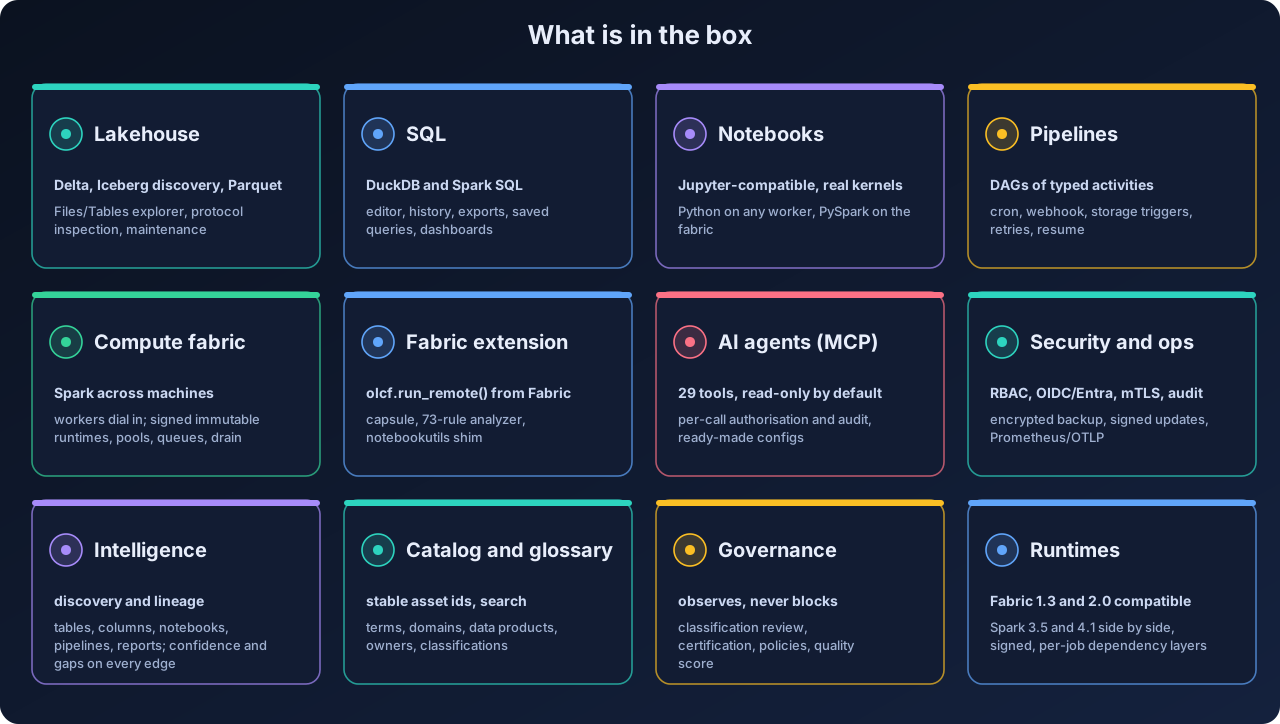
- a web console, REST API, CLI and Python SDK with workspaces, lakehouses (Delta Lake, Iceberg discovery, Parquet), a SQL editor, dashboards, Jupyter-compatible notebooks, pipelines, environments, connections, secrets, schedules, alerts and administration;
- a compute fabric: every machine runs a small worker agent that connects outward to the control plane, and the enrolled machines together form a real Apache Spark Standalone cluster, with several immutable, signed Spark runtimes installed side by side;
- a Microsoft Fabric compute extension: one call in a Fabric notebook,
olcf.run_remote(), sends the whole notebook to your Spark, which reads and writes OneLake directly and returns status, logs and the exit value to the Fabric cell and pipeline; - OLCF Intelligence: it reads the platform (and, if you wish, a Fabric or Power BI tenant) to answer what do we have, where does it come from, what depends on it, and who is responsible for it, with a confidence on every lineage edge and every gap listed;
- an MCP endpoint so AI agents such as Claude Desktop and Claude Code can browse the catalog, follow lineage and run read-only SQL with exactly the permissions of the person who created the token.
Fabric is an adapter, not the core. Nothing in the platform needs a Microsoft subscription.
Three ways to run it
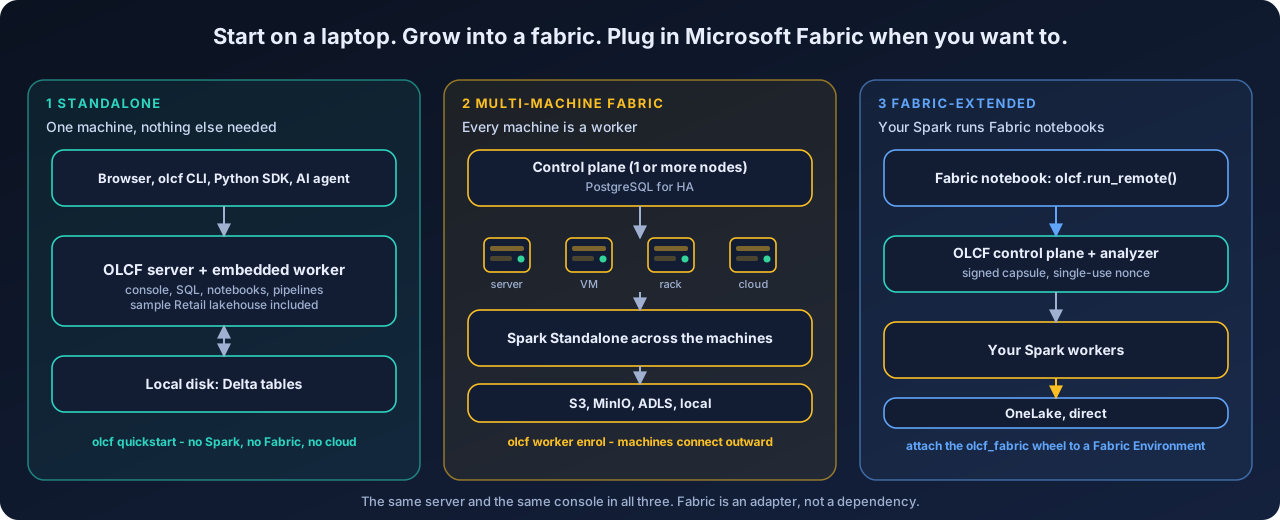
| Mode | What you have | Needs | Start with |
|---|---|---|---|
| 1. Standalone | the full platform on one machine: console, SQL on DuckDB, Python notebooks, dashboards, pipelines, Intelligence, MCP and a sample Retail lakehouse | Python only; no Spark, no Fabric, no cloud | olcf quickstart |
| 2. Multi-machine fabric | the same plus a Spark Standalone cluster across several machines (servers, VMs, a rack, a cloud instance); several runtimes side by side; pools, queues, drain | a Spark runtime (olcf runtime install --with-jdk) and machines that can reach the control plane |
olcf worker enroll-token, then olcf-worker run on each machine |
| 3. Fabric-extended | Fabric notebooks and pipelines whose heavy compute runs on your own hardware, reading and writing OneLake directly | a Fabric tenant you control, the olcf_fabric wheel in a Fabric Environment, Entra and network set-up |
Fabric integration guide |
A single machine is the same design as a cluster of one: an embedded worker agent enrols itself with the control plane, so growing from mode 1 to mode 2 is adding machines, not migrating.
Extending Microsoft Fabric
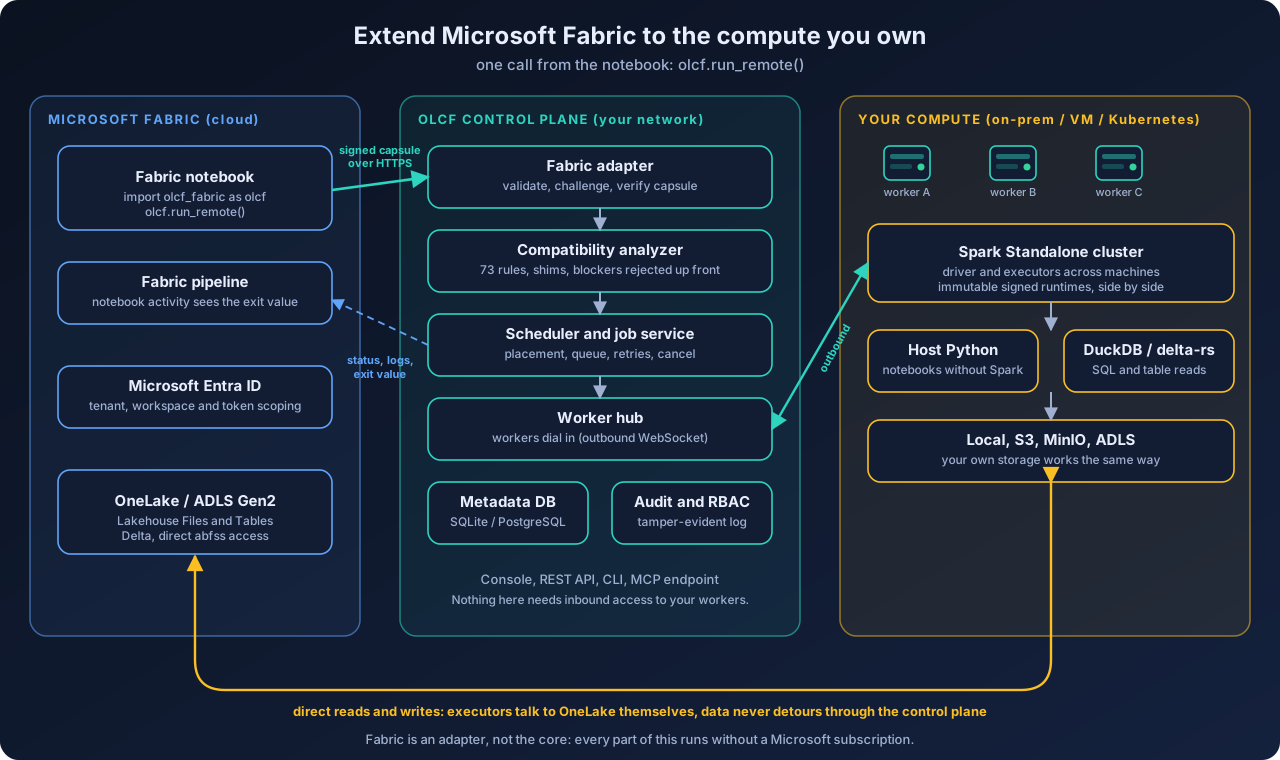
How it works.
- In a Fabric notebook you attach the small, standard-library-only
olcf_fabricpackage and callolcf.run_remote(). - The SDK sends the notebook as a signed execution capsule (HMAC-signed, single-use nonce) over HTTPS to your OLCF control plane. Nothing needs inbound access to your workers: they connect outward.
- A deterministic compatibility analyzer (73 rules, shims for
notebookutilsand friends) checks the notebook first. Anything that cannot work on open-source Spark is rejected up front with the reason, not half-run. - The scheduler places the job on your Spark workers. Executors read and write OneLake / ADLS Gen2 directly; data never detours through the control plane.
- Status, logs and the exit value stream back to the Fabric cell, and a Fabric pipeline's notebook activity sees the result like any local run.
What it is good for: running Fabric notebooks on hardware you already own, keeping heavy or sensitive compute inside your network, burst or batch work that should not consume Fabric capacity, development against a local copy of a lakehouse, and keeping a working path when Fabric is unavailable.
What it is not: it is not Microsoft's runtime and claims no parity with Fabric's proprietary optimisations (the runtimes are labelled Fabric Runtime 2.0 Compatible and 1.3 Compatible). The assumptions behind the Fabric, Entra and OneLake integration, and an acceptance matrix you can run against your own tenant, are in fabric-assumptions. Details: the extension model, the guide.
OLCF Intelligence: discovery, lineage, glossary, governance
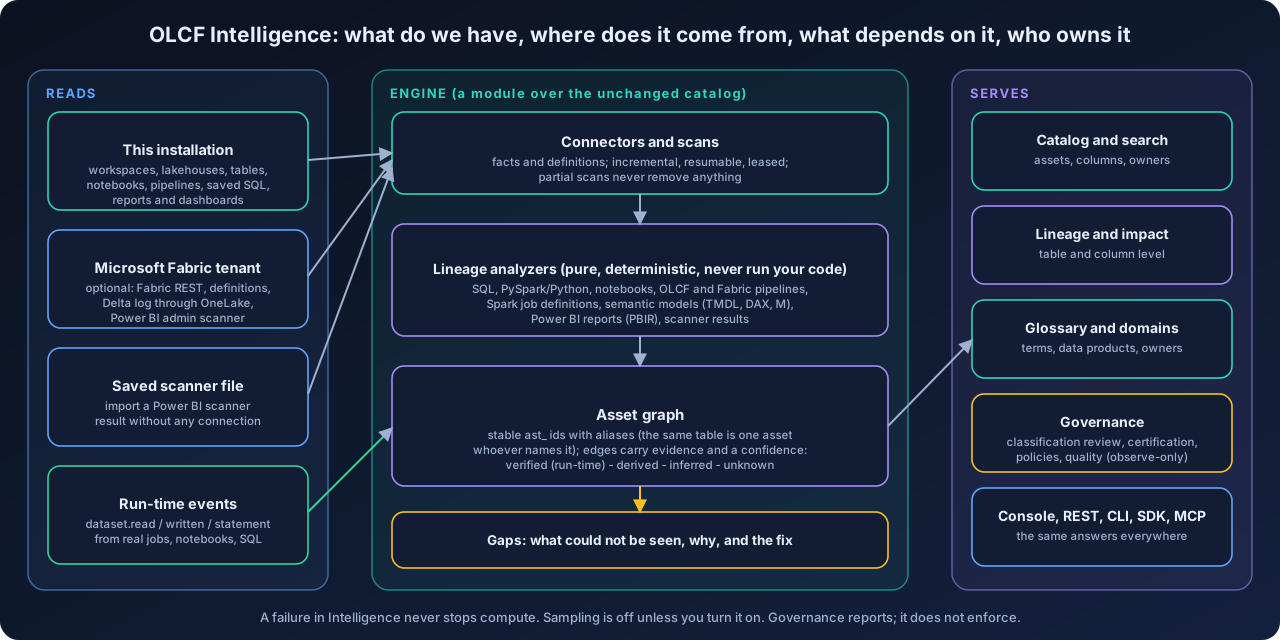
Intelligence is a module layered over the platform's catalog. It answers what do we have, where does it come from, what depends on it, who is responsible, and it is deliberately honest about how sure it is.
- Discovery. Scans this installation and, optionally, a Microsoft Fabric / Power BI tenant (workspaces, lakehouses, tables and columns, notebooks, pipelines, semantic models, reports) or a saved Power BI scanner file. Scans are incremental, resumable and leased; a partial or failed scan never removes anything.
- Lineage. Pure, deterministic analyzers read SQL, PySpark/Python, notebooks, OLCF and Fabric pipelines, Spark job definitions, semantic models (TMDL, DAX, M), Power BI reports (PBIR) and scanner results, without running your code, and work out table-level and column-level lineage. The support matrix lists exactly what each analyzer understands.
- Honest confidence. Every edge carries its evidence and a level:
verified(observed by a real run: jobs, notebooks and SQL publishdataset.read / written / statementevents),derived(static analysis),inferred(matched by name or an assumed default) orunknown. What could not be seen is reported as a gap with the reason and the fix, never guessed. - Stable ids. The same table is one asset (
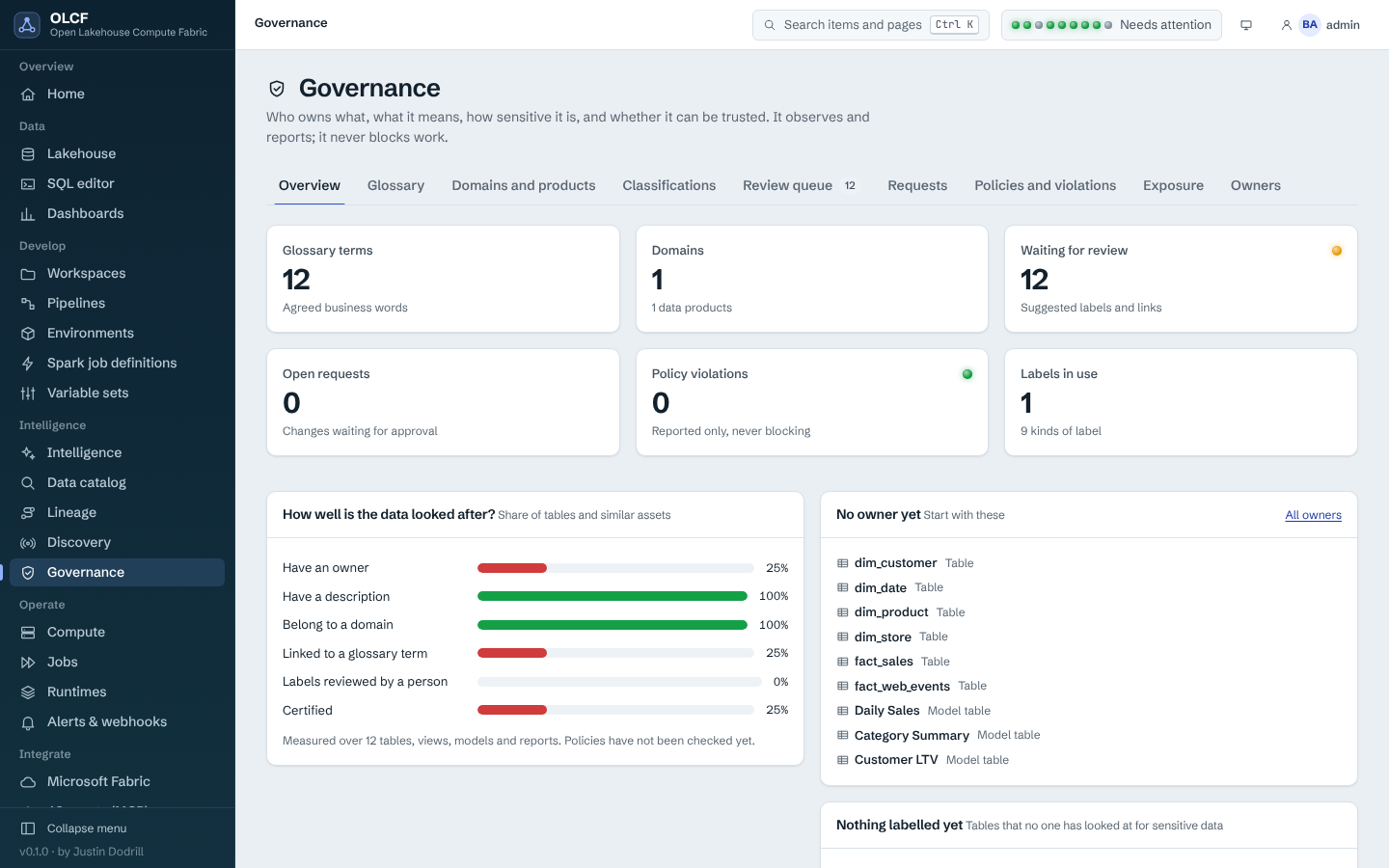
ast_...) whether it is named by an OLCF item, a Delta path, a OneLake path, a Fabric item id or a SQL name; the aliases are kept. Distinct tables that merely share a name are never merged. - Glossary and governance. Business glossary, domains, data products, owners, classifications with a review queue and inheritance, certification, change requests, policies and a quality score. Governance observes and reports; it does not enforce or block work in this release.
- Safe by design. A failure in Intelligence never stops compute. Sampling column values is off unless you turn it on, per policy, with masking and a classified-column exclusion. Everything is available in the console, REST, CLI (
olcf intelligence,olcf governance), SDK and MCP tools.
 |
 |
 |
 |
 |
 |
Read more: concepts, user guide, lineage support matrix, design decision.
Spark runtimes: Fabric 1.3 and 2.0 compatible, side by side
A runtime is an immutable, signed bundle: a Python environment with PySpark and every package pinned by hash, the Maven jars (Delta, Iceberg, S3, Azure) pinned by checksum, and an allow-list of the Spark settings a job may change. Several can be installed at once; the scheduler places a job only on a node where its runtime is ready.
| Runtime id | Family | Spark | Delta | Iceberg | Java | Scala | Python |
|---|---|---|---|---|---|---|---|
olcf-rt-2.0.0 |
fabric-2.0-compatible |
4.1.1 | 4.2.0 | 1.11.0 | 17 or 21 | 2.13 | 3.13 |
olcf-rt-1.3.0 |
fabric-1.3-compatible (legacy) |
3.5.5 | 3.2.0 | 1.11.0 | 8, 11 or 17 | 2.12 | 3.11 |
olcf-rt-native-1.0.0 |
olcf-native |
4.1.1 | 4.2.0 | 1.11.0 | 17 or 21 | 2.13 | 3.13 |
olcf-host-python (built in) |
host-python, no Spark |
n/a | n/a | n/a | n/a | n/a | the worker's own Python |
- Side by side. Install and retire runtimes independently; a notebook, job or Fabric submission asks for a family (for example
fabric-1.3-compatible) and runs only where that runtime is ready. - No Spark needed to start. Python notebooks, DuckDB SQL, dashboards, Intelligence and MCP work on the built-in host-Python runtime; the Spark runtime (several hundred MB) is optional.
- Signed. Each manifest is Ed25519-signed. The bundled development key is public, so a production installation does not trust it until you re-sign with your own key (hardening).
- Not Microsoft's runtime. The versions follow what the open-source projects and Microsoft's public documentation list for Fabric Runtime 2.0 and 1.3. No parity with Fabric's proprietary optimisations is claimed.
More: compute model.
Screenshots
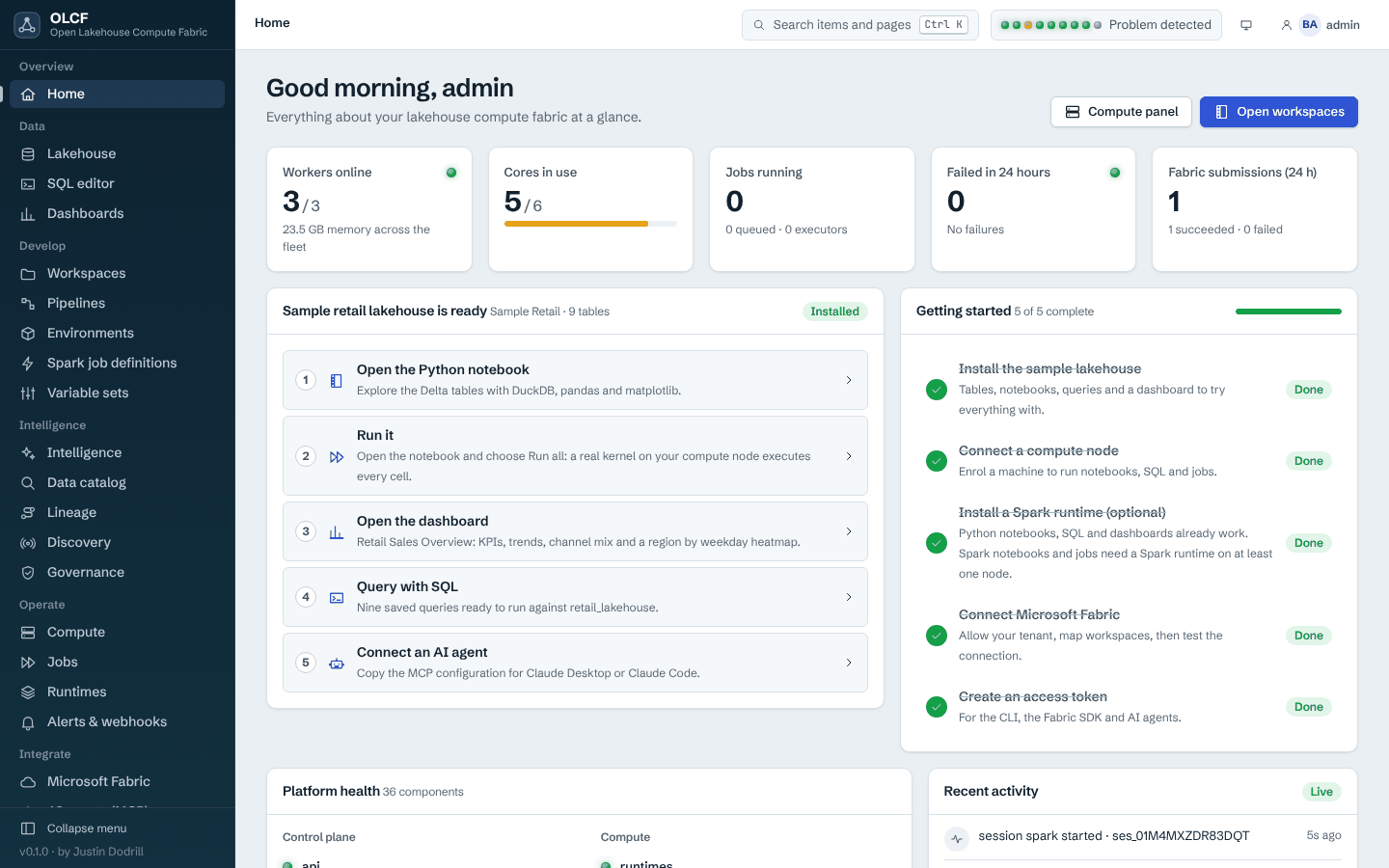
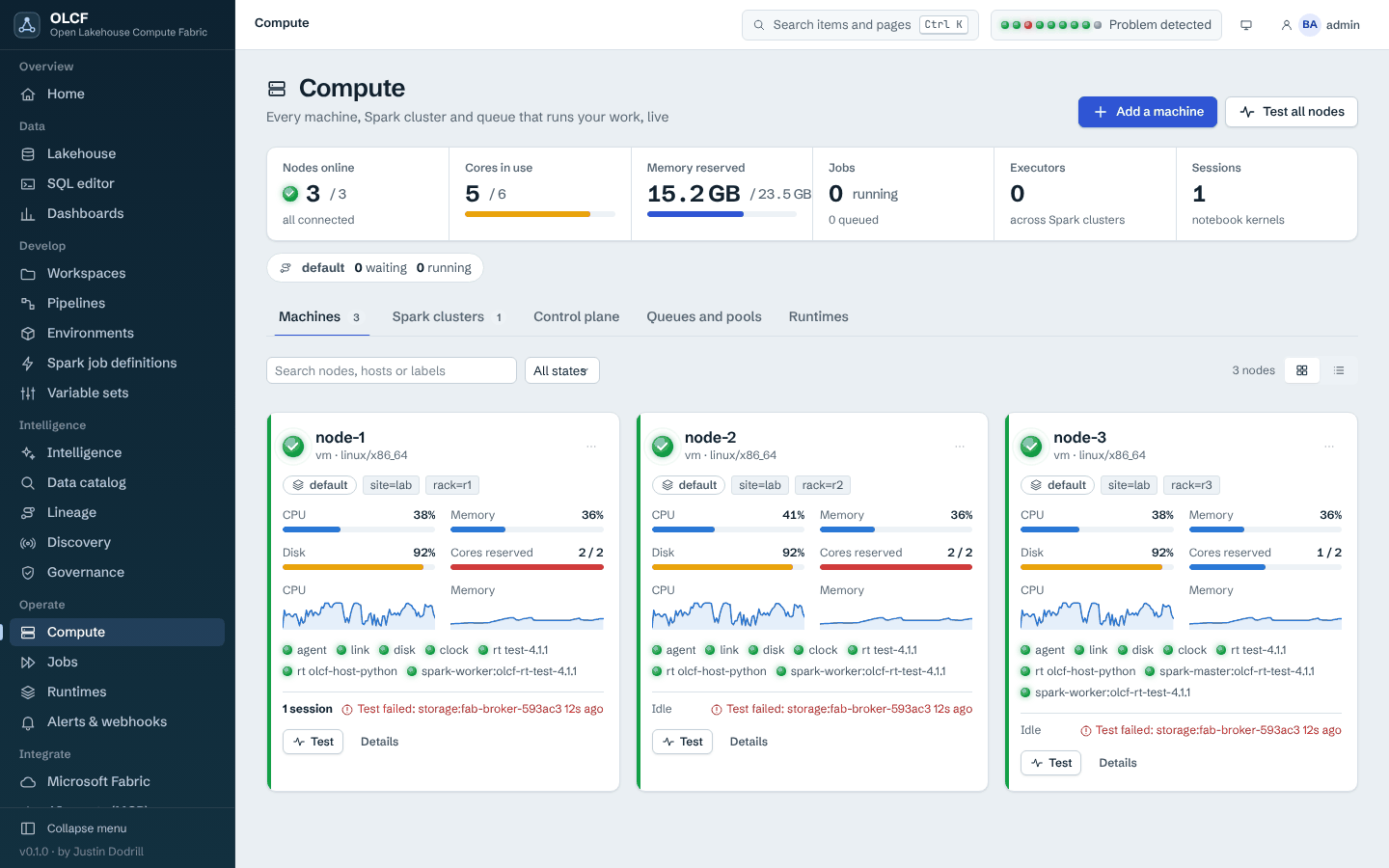
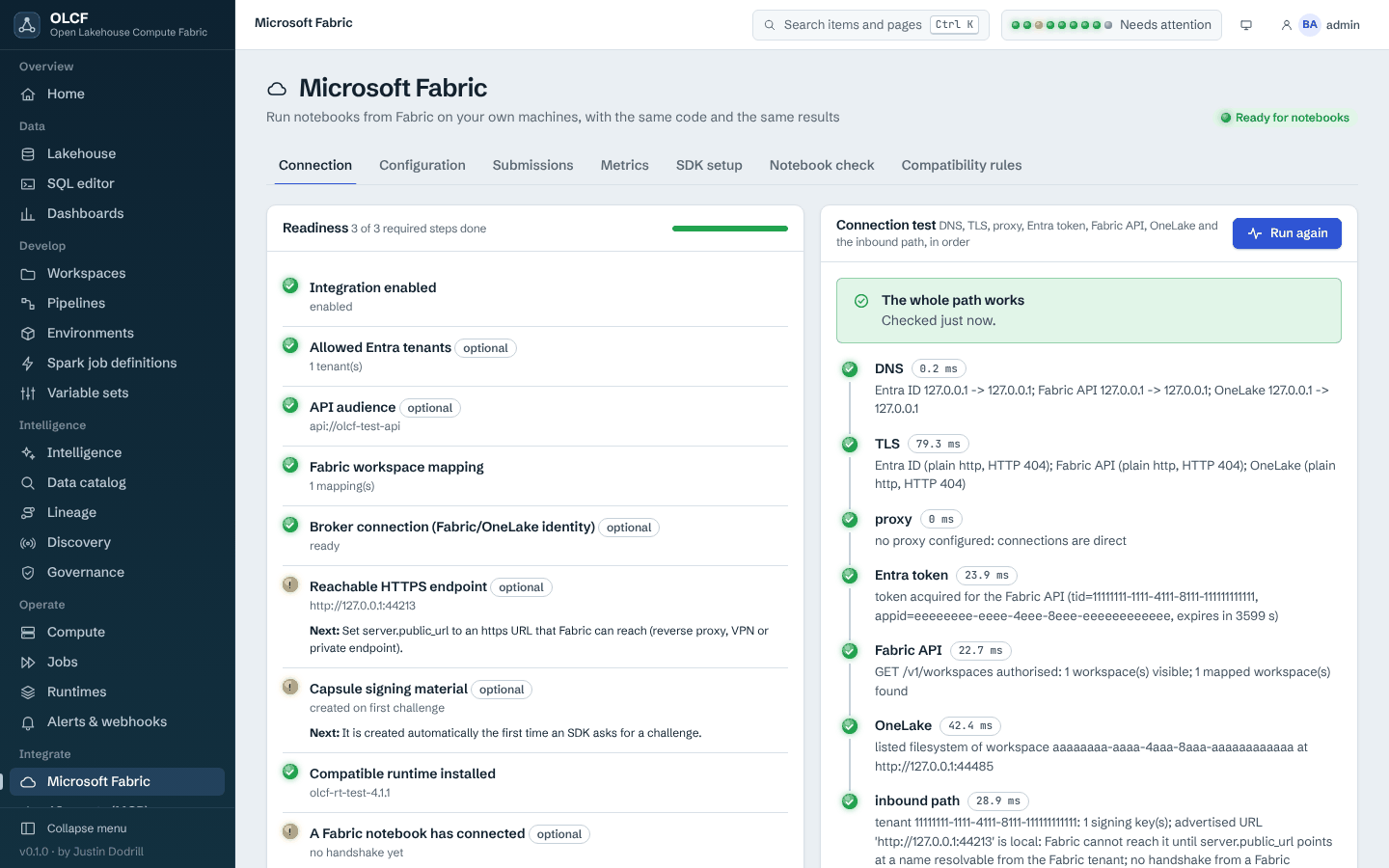
The console has light and dark themes, is served entirely from the package (no CDN, no remote fonts), and works at phone width.
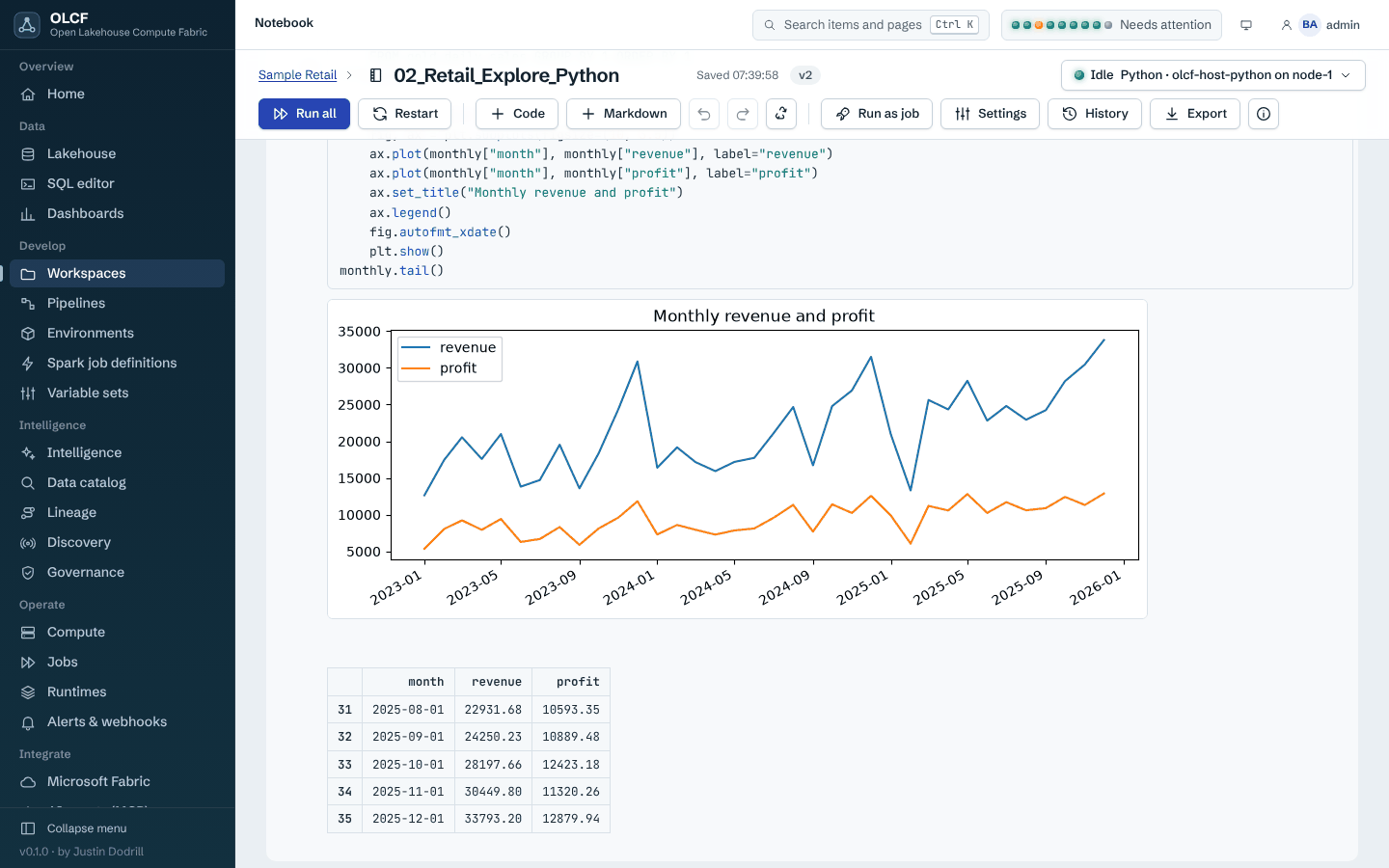
Notebooks. A Jupyter-compatible editor on a real kernel running on a worker node; here the sample Python notebook after Run all (DuckDB, pandas and matplotlib, no Spark).
Home, Compute and Microsoft Fabric.
 |
 |
 |
 |
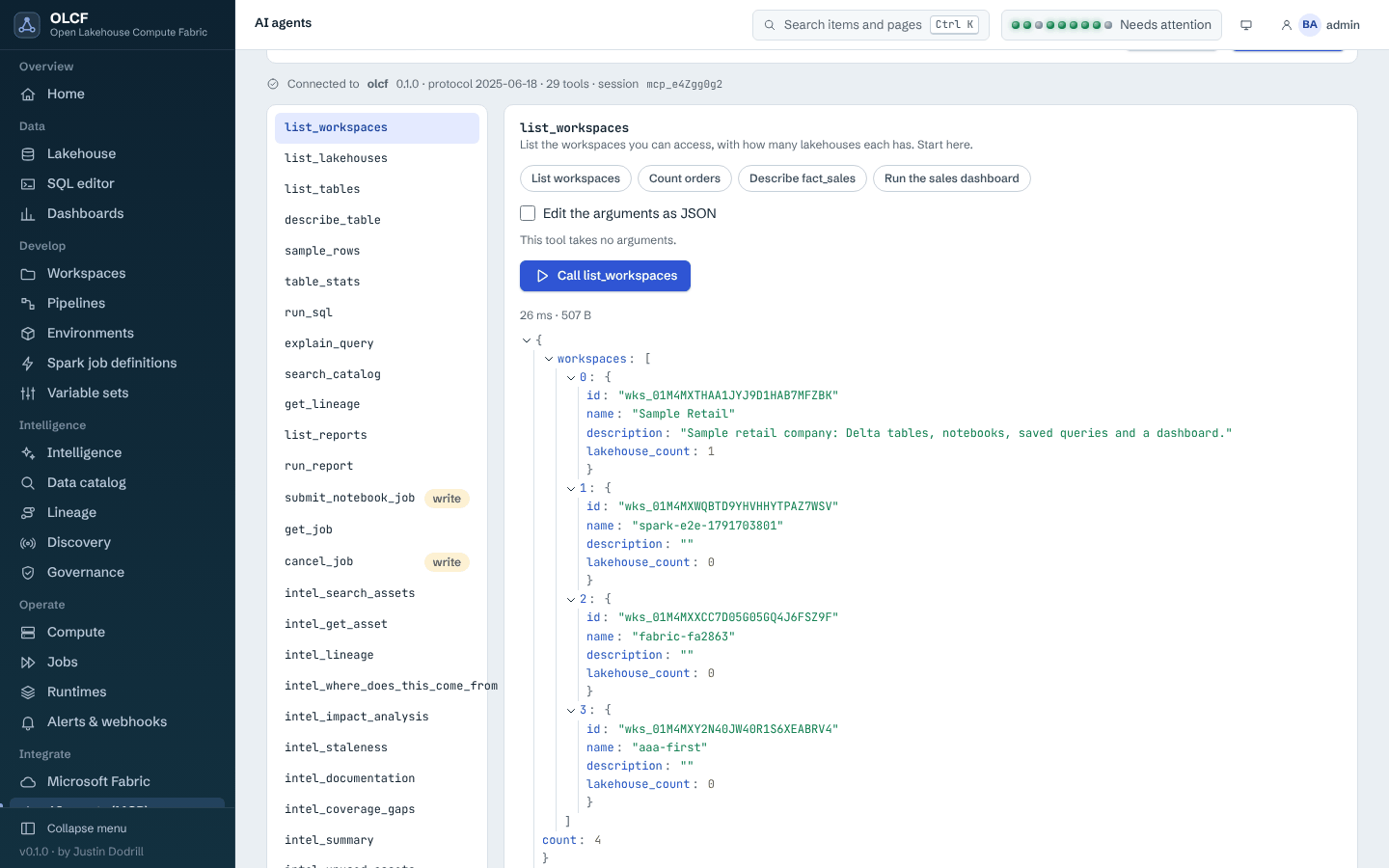
SQL, lakehouse, dashboards, pipelines and AI agents.
 |
 |
 |
 |
 |
 |
Dark theme example: home, notebook, lineage. More: docs/images/ui/.
What is in the box
| Area | What you get | Guide |
|---|---|---|
| Workspaces and items | multi-tenant workspaces; notebooks, lakehouses, SQL queries, pipelines, environments, Spark job definitions, variable sets, schedules, reports; versions, recycle bin, export/import, Git sync | concepts |
| Lakehouse and SQL | Files/Tables explorer, Delta protocol inspection with an interop policy, Iceberg discovery, maintenance (optimize, vacuum with safeguards), DuckDB and Spark SQL, history, exports, dashboards | guide |
| Compute | worker enrolment, pools, queues, cordon/drain, Spark Standalone clusters across machines, local, external-Spark, Kubernetes and Fabric-Livy providers, signed runtimes, per-job dependency layers | guide |
| Fabric extension | SDK, execution capsule, 73-rule compatibility analyzer, notebookutils shim, pull mode, OneLake access, diagnostics |
guide |
| Intelligence | discovery, table and column lineage, impact analysis, glossary, domains, data products, ownership, classification, certification, policies (observe-only), quality score, gaps and coverage | guide |
| Pipelines | notebook, Spark job, script, SQL, copy, HTTP and control-flow activities; cron, webhook, storage and dependency triggers; outbound signed webhooks; alerts | guide |
| Security | RBAC with eight roles, OIDC / Microsoft Entra / LDAP, tamper-evident audit log, secret store, built-in CA with optional mTLS for workers, signed updates | concepts |
| Operations | encrypted backups and restore tests, signed updates and rollback, HA with PostgreSQL leader election, Prometheus and OTLP export, diagnostics and support bundles, retention | operations |
| AI agents | MCP endpoint with 29 tools (15 platform, 14 Intelligence), read-only by default, per-call authorisation and audit | guide |
Architecture
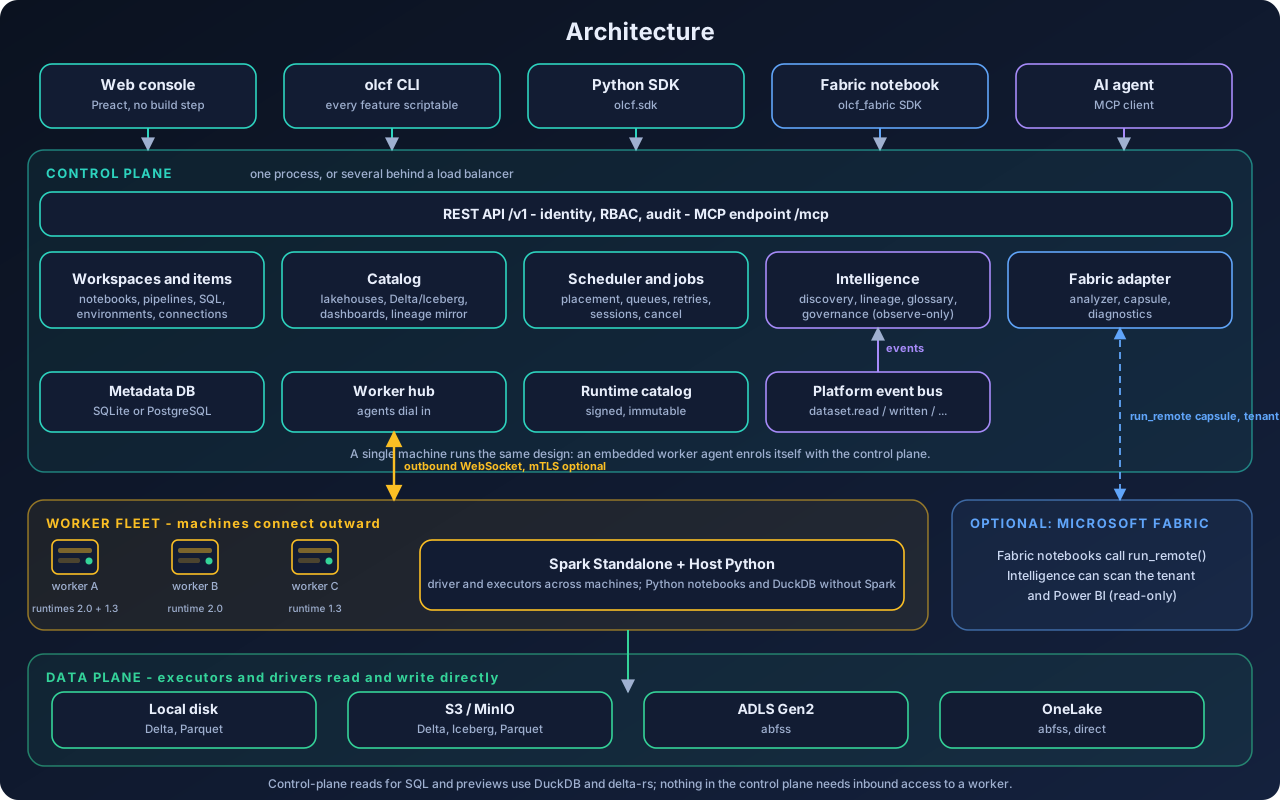
- Control plane (one process, or several behind a load balancer): REST API
/v1with identity, RBAC and audit; the modules (workspaces and items, catalog, scheduler and job services, Intelligence, the Fabric adapter); the worker hub and runtime catalog; the metadata database (SQLite by default, PostgreSQL for HA); the MCP endpoint. - Worker fleet: small agents that dial out to the control plane (WebSocket, mutual TLS optional), report inventory and health, and run notebooks, jobs and Spark. Nothing needs inbound access to a worker.
- Data plane: executors and drivers read and write storage directly: local disk, S3 and MinIO, ADLS Gen2, OneLake; Delta, Iceberg and Parquet. The control plane reads only for previews and SQL (DuckDB, delta-rs).
- Intelligence observes through ordinary platform events (
dataset.read,dataset.written,dataset.statement,dataset.schema_changed) and its own scans; it is isolated so that its failure never reaches compute, and it has no circular runtime dependency on the rest (an import-graph test enforces it).
More: architecture, components and data flow, architecture decisions.
Install
OLCF is a pure-Python package; nothing is compiled, no administrator rights are needed, and every dependency is a wheel. There is no package-index or release download yet, so every route below installs from this repository. Requirements and per-OS notes: docs/getting-started.
1. One-line installer (macOS and Linux, also a Mac without the Xcode Command Line Tools)
curl -fsSL https://raw.githubusercontent.com/jddevtime/open-lakehouse-compute-fabric/main/scripts/install.sh | shIt downloads a checksum-verified uv, lets uv provide a private Python 3.13, installs OLCF from this repository's source archive (every dependency a wheel), runs olcf init, and installs the Spark runtime (with a downloaded Temurin JDK 21 if the machine has no suitable Java; --no-runtime skips this and the installer finishes anyway if the download fails). It needs no git, no system Python and no compiler, and never executes the macOS installer stubs.
Useful options: --ref v0.1.0 (a tag, once one exists), --extras postgres,s3 (or all), --no-runtime, --prefix DIR, --dry-run, --help. To read the script first: scripts/install.sh.
2. uv (any OS, including Windows)
uv tool install --python 3.13 "olcf @ https://github.com/jddevtime/open-lakehouse-compute-fabric/archive/refs/heads/main.tar.gz"
olcf quickstart
Windows without uv: powershell -ExecutionPolicy ByPass -c "irm https://astral.sh/uv/install.ps1 | iex" first. Optional extras: postgres, s3, azure, k8s, keyring, iceberg, ldap, sftp, zstd, plots, all
(for example "olcf[all] @ https://..."). The Spark runtime is separate: olcf runtime install --with-jdk.
3. Docker Compose, all in one
Works the same on Docker Desktop (macOS, Windows, Linux) and Docker Engine, and is the alternative on a Mac that cannot install developer tools. Run from a clone or a source archive:
sh deploy/scripts/gen-env.sh        # writes deploy/.env (mode 0600) with fresh random secrets; never commit it
docker compose -f deploy/docker-compose.yml --profile allinone up -d --build
docker compose -f deploy/docker-compose.yml logs olcf | grep -i password    # first-administrator password, shown once
docker compose -f deploy/docker-compose.yml exec olcf olcf runtime install  # Spark runtime, once
Open http://127.0.0.1:8470. --profile cluster adds PostgreSQL, MinIO and two enrolling workers; --profile tls adds a reverse proxy. The images have not been built in the authoring environment (see status). Helm and Kubernetes: docs/operations/kubernetes.md.
4. From source (to develop)
git clone https://github.com/jddevtime/open-lakehouse-compute-fabric.git && cd open-lakehouse-compute-fabric     # or unpack the source archive: git is not required
uv venv --python 3.13 && uv pip install -e ".[dev]"      # or: python3 -m venv .venv && . .venv/bin/activate && pip install -e ".[dev]"
olcf init && olcf serve
Developer setup, tests and conventions: docs/development/setup.md and CONTRIBUTING.md.
The Fabric SDK
To extend Fabric notebooks, build the standard-library-only olcf_fabric wheel (sh scripts/build_fabric_sdk.sh writes dist/olcf_fabric-<version>-py3-none-any.whl) and attach it to a Fabric Environment; see the Fabric integration guide.
macOS without the Xcode Command Line Tools
OLCF is designed to work on a Mac where the Command Line Tools cannot be installed. There /usr/bin/git, /usr/bin/python3 and /usr/bin/java are installer stubs that open a dialog, so OLCF never executes them: every lookup of git, python, pip or java goes through olcf.core.hostbin, which rejects the stubs and continues down PATH; the installer provides its own uv, Python and JDK. Workspace Git sync needs a real git (without one, the Git endpoints answer 503 git_unavailable with remediation; everything else works). The stub handling is covered by tests that put dialog-opening stubs for these commands on PATH. Details: docs/getting-started/install-macos-no-clt.md.
Quickstart
olcf quickstart # init + start the server + install the sample workspace + print what works, then the optional Spark runtime, then open the UIolcf quickstart prints the console URL (http://127.0.0.1:8470) and the generated admin password once. Nothing in steps 1 to 5 needs Spark: Python notebooks run on the worker's own Python.
- Log in to the console with
adminand that password (the CLI is already logged in as contextlocal; check witholcf whoami). - Sample lakehouse. Sample Retail (80,001 order lines in Delta tables, nine saved queries, a dashboard, three notebooks) is installed by quickstart. Try
olcf sql run -w "Sample Retail" "select count(*) from retail_lakehouse.fact_sales". - Notebook. Open Workspaces > Sample Retail > 02_Retail_Explore_Python and choose Run all (charts need
pip install "olcf[plots]"; without it the notebook prints tables). - Dashboard. Dashboards > Retail Sales Overview: KPIs, trends and a table with period and category filters.
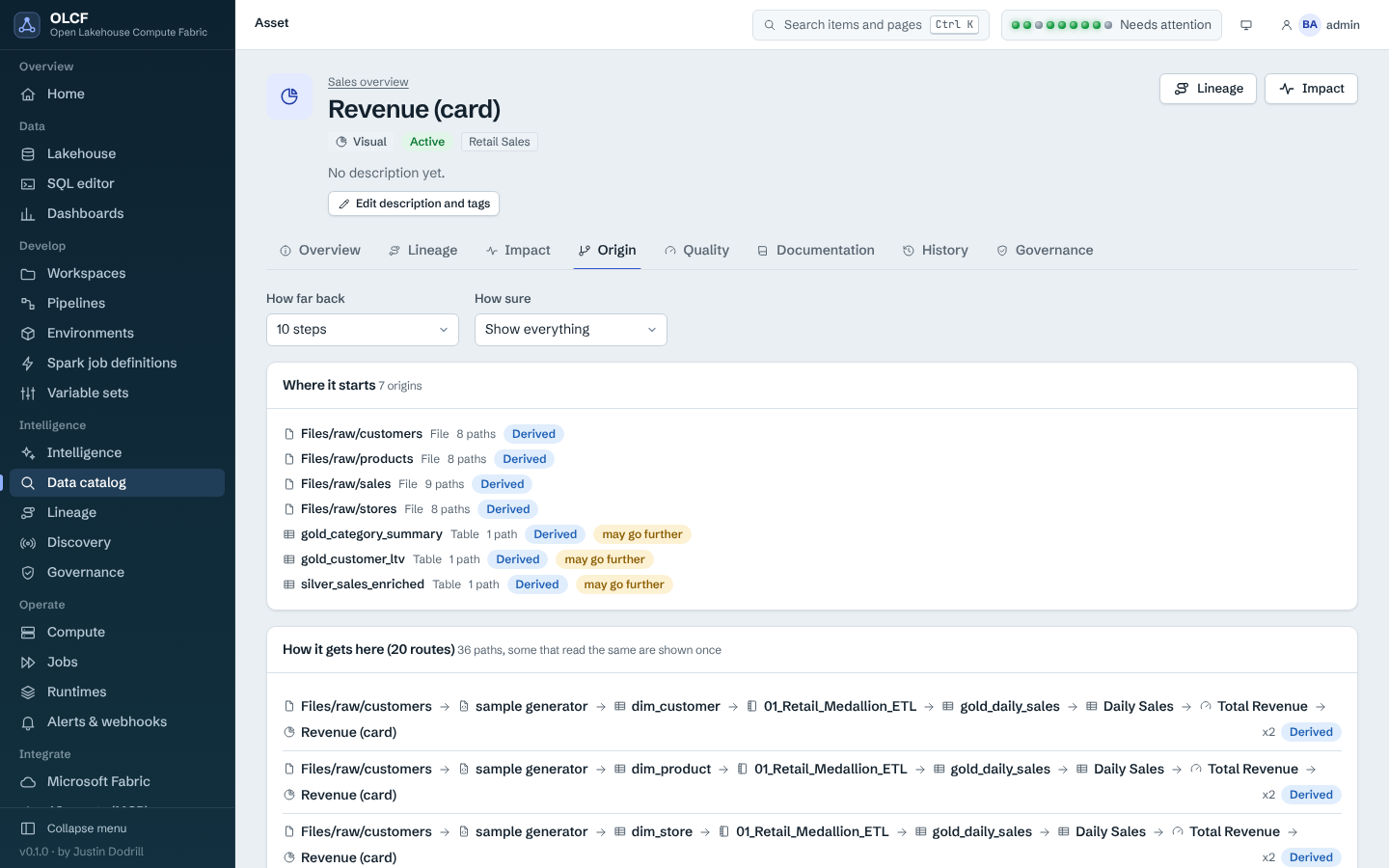
- Intelligence. Open Intelligence > Lineage, pick the Revenue (card) visual and follow it upstream through the model and tables to the notebook that wrote them; every line says how sure it is. (The sample's Power BI report and model are invented for the sample and labelled synthetic wherever they appear.) Or ask from the CLI:
olcf intelligence --help. - Connect an AI agent over MCP. Open AI agents in the console, or run
olcf mcp config --client claude-desktop(or--client claude-code) and paste the printed configuration. Ask: "Where does Revenue originate, and what would break if I changed it?"
Stop the server with olcf stop. Next: first-run tour, adding machines, connecting Microsoft Fabric, Intelligence guide.
AI and SI agents are welcome

Everyone is invited to point their AI or super-intelligence (SI) agent at this repository, for either of two jobs:
- Download it and set it up on your on-premises machine or VM, or connect it to Fabric.
AGENTS.md(and the compactllms.txt) give an agent the exact install commands, the safe path for a Mac without developer tools, and the guardrails. - Contribute, build it out and customise it, then share it back so others benefit. The repository is built to be worked on by agents and people alike: binding engineering rules (CONTRIBUTING.md, contracts), one pytest invocation per test directory with thousands of tests, a plain-JavaScript console with no build step, generated references that CI keeps in sync, and a checklist of the acceptance work that is still open (release readiness).
A prompt that works with most coding agents: "Read AGENTS.md in https://github.com/jddevtime/open-lakehouse-compute-fabric, install OLCF on this machine, run olcf quickstart, and tell me what you did."
Contributions need a Developer Certificate of Origin sign-off from the human who submits them, and AI assistance should be disclosed in the pull request (how).
The platform also serves agents directly: the MCP endpoint lets Claude Desktop, Claude Code or any MCP client browse the catalog, follow lineage and run read-only SQL, audited and limited to the token owner's permissions. Where help is most valuable right now: Windows and macOS runs, Fabric / Power BI tenants with different settings, PostgreSQL with two replicas, Kubernetes clusters, and large Intelligence estates (the open gates).
Status and maturity
Beta for evaluation on trusted infrastructure; trusted-user compute (no OS sandbox between users' code). OLCF 0.1.0 implements the core platform described above and runs end to end on Linux. Use it with infrastructure and users you trust; do not describe it as a multi-tenant, hardened or production-supported service.
| Area | State |
|---|---|
| Server, console, SQL on DuckDB, Python notebooks, pipelines, dashboards, MCP, Intelligence | runs end to end on Linux; thousands of automated tests (testing); browser tests drive the console in headless Chromium |
| Microsoft Fabric, Entra, OneLake, the Fabric and Power BI scanner | built to Microsoft's documented APIs and covered by the automated suite; assumptions and an acceptance matrix for your own tenant |
| Spark and Delta on Spark | tested with a prebuilt runtime; the first-run runtime download needs the network and Maven Central (run python scripts/verify_spark_delta.py to verify yours) |
| Windows, macOS | supported targets; installer behaviour is covered by tests of install.sh, including a Mac without the Command Line Tools |
| Docker images, Helm chart, Kubernetes, Livy | covered by rendered-manifest and protocol tests |
| PostgreSQL, multi-node HA | SQLite is the verified store; PostgreSQL variants exist and several were run, but the Intelligence PostgreSQL tests and real failover drills were not |
| Production runtime trust | the bundled runtime manifests are signed with a development key whose private half is public; production installs re-sign with their own key |
Known limits that matter: notebook and job code runs with the privileges of the worker's operating-system user (the SQL guard and the scrubbed environment are not an OS sandbox, and there is no per-pool isolation); Spark RPC is neither authenticated nor encrypted by OLCF, so keep Spark ports on a private network; Intelligence governance observes and never enforces; lineage is never claimed complete for any source. Out of scope for 0.1.0: a general JDBC/ODBC gateway, external catalog adapters (Hive, Glue, Unity), Iceberg management beyond discovery, R/Scala/C# notebook cells (Java/Scala jar jobs do run), signed OS installers and per-pool isolation.
Three external code reviews of the project (8, 9 and 10 October 2026) are answered, finding by finding, in docs/dev/: first, second and third.
The acceptance work for each area (Fabric and Power BI tenants, Kubernetes, Livy, Windows, recovery, multi-node PostgreSQL, supply chain) is the checklist in release-readiness.md.
requirements-traceability.md maps every section of the original requirements to code and tests with its status.
Documentation
| Start here | |
|---|---|
| docs/README.md | index of all documentation |
| Getting started | install per OS, quickstart, first-run tour, upgrade and uninstall |
| Concepts | architecture, compute model, the Fabric extension model, Intelligence, security model |
| Guides | Fabric integration, clusters, notebooks, SQL, pipelines, Intelligence, MCP, SSO, backup, HA, TLS, observability, troubleshooting |
| Reference | CLI, REST API, SDK, configuration, permissions, events, errors, health checks, ports, lineage support, glossary, FAQ |
| Operations | runbook, sizing, hardening and production checklists, Kubernetes |
| Development | dev setup, repository map, extending OLCF, tests, release process |
| Architecture decisions | why it is built the way it is |
Project policies: CONTRIBUTING.md, AGENTS.md, CODE_OF_CONDUCT.md, SECURITY.md, CHANGELOG.md, TRADEMARKS.md, THIRD_PARTY_NOTICES.md.
Author and licence
Open Lakehouse Compute Fabric was created and is maintained by Justin Dodrill, a Microsoft Certified Technology Specialist and Database Administrator. Copyright 2026 Justin Dodrill. Licensed under the Apache License, Version 2.0; see NOTICE for third-party attributions. To cite it, see CITATION.cff.
"Microsoft", "Fabric", "OneLake", "Azure", "Entra", "Power BI", "Delta Lake", "Apache Spark" and other names are trademarks of their owners, used only to describe compatibility. The runtimes are labelled Fabric Runtime 2.0 Compatible and 1.3 Compatible; they are not, and never claim to be, Microsoft's runtime.