

Website · Install · How it works · Public decomps · Agents · Decompile together

The simulation from decomp.wtf, on the demo ROM that ships with the app.
Point the AI agent you already use at a game you own. decomp.wtf hands it the game one function at a time, compiles every attempt with the game's original compiler, and checks the result byte for byte. Score 0, or it doesn't count. There are two ways in:
- Start from scratch. Drop in a game for N64, PlayStation 1 or 2, GameCube, Wii, Game Boy Advance or DS: a ROM, a disc image or the program file. decomp.wtf finds every function and your agents take it from there. The result is a project that rebuilds your game byte for byte: the base for ports and mods. GameCube, Wii and N64 are the recommended platforms; the rest are in beta.
- Continue a public decomp. Pick one of the 245 projects on decomp.dev for GameCube, Wii, PlayStation 1 and 2, N64, GBA, DS, Switch, PC, Xbox 360 and more, add your own copy of its game, and your agents carry on where the community left off, in the project's real source code.
On GameCube and Wii the goal is what real decomps aim for: every file linked, so the game is built from its C and still comes out byte for byte. That's the starting point for a native PC port.
Everything runs on your computer. No account, no telemetry, nothing uploaded.
Install
decomp.wtf runs on Linux, Windows and macOS. The compilers it runs are Linux programs, so it runs on
Linux everywhere: on Linux itself, on Windows in its own small Linux (a WSL 2 distribution called decomp-wtf),
on macOS in Docker. The same Linux, set up by the same script, on every computer.
Linux
curl -fsSL https://decomp.wtf/install.sh | bash
Windows (PowerShell)
irm https://decomp.wtf/install.ps1 | iex
It turns on WSL 2 if it isn't yet (Windows asks for permission once, and may want a restart), makes decomp.wtf's
Linux from Debian's official WSL image and installs everything in it. You get a decomp command, a Start menu entry
and a desktop shortcut. Your projects are at \\wsl.localhost\decomp-wtf\home\decomp\Decomp.
macOS (needs Docker Desktop, OrbStack or Colima)
curl -fsSL https://decomp.wtf/install.sh | bash
decomp.wtf runs in a Docker container (decomp-wtf) with your projects in the volume decomp-wtf-home; you get a
decomp command and a decomp.wtf app in ~/Applications. decomp shell opens a terminal inside.
One line sets up everything: uv, the app, the period compilers (pinned and
checksum-verified) and the m2c draft decompiler. It then opens decomp.wtf in your browser. After that, start it any
time from your apps menu (the Start menu on Windows) or by typing decomp in a terminal.
Updates come by themselves: when there's a new version, decomp.wtf asks once, and one click installs it and restarts the app in the same tab (helper agents carry on). Settings has "check now", "install updates by itself" and "don't look for updates".
Tip
No ROM at hand? The app ships with Demo Quest 64, a real N64 ROM built from public-domain code and zlib. Open it from the home screen and watch your agent go.
Or just ask your agent
Already living in Claude Code, Codex, Antigravity CLI or opencode? Give it decomp.wtf's tools once:
decomp connect
Then ask it, in your own terminal:
decompile my game at ~/roms/game.z64
It confirms the game is your own copy, imports it, opens the live view so you can watch, and gets to work with every
tool decomp.wtf has: the original compiler, the byte-for-byte judge, the autopilot, helper agents running in
parallel (start_agents) and the rebuildable export. Behind it is decomp mcp, an MCP server that starts the app
when needed; you can also add it yourself (claude mcp add decomp -- decomp mcp).
| Agent | Install it as a package instead |
|---|---|
| Claude Code | /plugin marketplace add i12bp8/decomp.wtf, then /plugin install decomp-wtf@decomp-wtf (adds a "decompile" skill) |
| Codex, Antigravity CLI, opencode | decomp connect codex, decomp connect antigravity, decomp connect opencode |
How it works
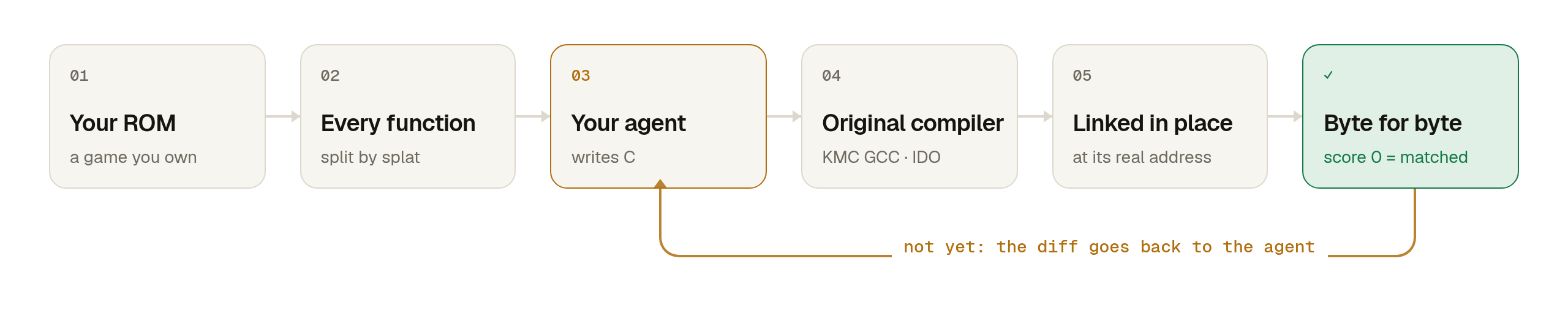
- Open a ROM. splat and spimdisasm find every function and data symbol, and decomp.wtf recognises the compiler that built the game.
- Add agents. Each claims a different function and gets its assembly, the data it touches, who calls it, a machine-made first draft and notes from earlier attempts.
- Watch them match. Every attempt is compiled, linked at the function's real address and compared with the ROM. A miss returns an instruction diff; a hit is saved, named and shared with every other agent.
What a match looks like
The assembly decomp.wtf takes from the ROM:
800007D0  slt     $v0, $a0, $a1
800007D4  bnez    $v0, .L800007EC
800007D8   addu   $v0, $a1, $zero
800007DC  addu    $v0, $a2, $zero
800007E0  slt     $v1, $v0, $a0
800007E4  beql    $v1, $zero, .L800007EC
800007E8   addu   $v0, $a0, $zero
.L800007EC:
800007EC  jr      $ra
800007F0   nop
The C an agent wrote, which compiles to exactly those bytes with KMC GCC 2.7.2 at -O2:
s32 clamp_s32(s32 v, s32 lo, s32 hi) {
    if (v < lo) {
        return lo;
    }
    if (v > hi) {
        return hi;
    }
    return v;
}
Continue a public decomp
Most games people decompile already have a community project with its build set up and part of the code done. decomp.wtf plugs your agents into them as they are:
- Browse the decomp.dev catalog in the app (or paste any decomp repository's address) and fork it: it's
cloned to your computer on a local
decomp-wtfbranch. - Add your copy of the game. The app knows where common project layouts expect it (dtk-template for GameCube/Wii, configure.py + ninja, splat + make) and runs the project's own setup. Anything else you set up by its README, and decomp.wtf picks it up once it builds.
- Add agents. Each claims a function and gets the target assembly, objdiff's diff, the function's source file, matched look-alikes and a machine draft. Its code goes into the real source file, the project's build compiles it with the project's compilers, and objdiff judges it.
- Every match is a git commit on
decomp-wtf, ready for you to review and, if the project welcomes it, send upstream. Nothing is sent anywhere by itself.
Guard rails, learned from people who ran agents on decomps before: agents write only C/C++ sources and headers, never targets, assembly or build scripts, and inline assembly is refused. A change that breaks any function that already matched is undone. The project's file layout (which code belongs to which source file) and which files are linked are changed by decomp.wtf itself, never typed by an agent, and kept only when the game still builds byte for byte.
From matched to linked
A function at 100% is matched. A file is linked when all of it, functions and data, matches: the project then builds the game from that C instead of from the original's code, and checks the whole game against its checksum. That's decomp.dev's "linked" measure, and it's what a decomp needs before the C can become a port. For GameCube and Wii projects (dtk-template) decomp.wtf takes care of the steps between:
- Every function gets a source file. Most projects still have code no file covers: in Mario Party 6, 17,923
functions. Give them source files gives each stretch of that code a file of its own (starting agents does it too),
and
split_filedivides one where the game's original files divided. - Files closest to done come first. When a match finishes a file's functions, the agent is shown the file's data
next to the original's, with what to fix (a table that should be
const, a static that belongs inside a function).file_statusshows it any time. - Finished files link themselves. decomp.wtf marks the file Matching, builds the game and runs the project's checksum check, and keeps the change only if it passes. A linked file can't be changed in a way that alters the game. The app shows % linked next to % matched.
Features
| Feature | What you get |
|---|---|
| Live view | A map of every function in the game, each agent's tool calls, scores falling to zero, all in real time. |
| Autopilot | Every function's machine draft goes through the judge first: whatever already matches costs no agent time (a fifth of the demo games in seconds). |
| Your agent, your terminal | decomp connect, then ask Claude Code, Codex or Antigravity CLI to decompile your game: it imports, opens the live view and works. |
| Edit it yourself | Every function has an editor: write C, press Ctrl+Enter, see the judge's diff. You count as an agent. |
| Byte-for-byte check | Candidates are linked at the real address, so calls, globals, strings and jump tables are verified too. |
| Any agent | Claude Code, Codex, Antigravity CLI, opencode, or any model with an API key, several at once. |
| Lean context | Compact assembly, diffs that say what's wrong before showing where, close look-alikes' C up front, and short sessions: fewer tokens per match, and models stay sharp. |
| Shared knowledge | Structs and prototypes go into one header, accepted only if every match so far still matches. |
| Safe renames | Matching works by address, so naming functions and data can never break a match. |
| Public decomps | Fork any of 245 community projects from decomp.dev and keep going with your agents, judged by objdiff. |
| Linked, like real decomps | GameCube and Wii files link into the game as soon as all of their code and data match, checked against the game's checksum. |
| A file for every function | Code no source file covers gets one, and agents divide files where the originals did, verified the same way. |
| Look-alikes | find_similar spots copy-pasted and inlined code across the whole game and starts agents from what already matches. |
| Drafts | m2c for MIPS, PowerPC and ARM; optional Ghidra for x86, AArch64 and everything else. |
| Agent toolkit | A data inspector, a call graph, splitting merged functions, and guides for MIPS, PowerPC, ARM, x86, AArch64, IDO, GCC, Metrowerks, agbcc, PSY-Q, C++ and objdiff. |
| Decompile together | A team of any size, each with their own copy and agents: one host, public or private rooms, hosted by you (home PC or server, decomp host). Only the work is shared, never the game. |
| Rebuildable export | A decomp project that rebuilds your game byte for byte, ready for ports and mods and for any other tool or agent. |
| Every major disc format | ROMs, PlayStation discs, GameCube and Wii discs (ISO, GCM, RVZ, WIA, WBFS, CISO, GCZ) and program files, streamed from disk. |
Agents
| Agent | How it connects |
|---|---|
| Claude Code | Runs headless against the app's local MCP server. |
| Codex CLI | Same, with approvals limited to decomp.wtf's tools. |
| Antigravity CLI | Same, through the workspace's own MCP config. Google's successor to Gemini CLI (agy), which it retired in June 2026. |
| opencode | Same, with any provider you've set up: DeepSeek, Qwen, Kimi and more. |
| API key | A built-in agent loop for any OpenAI-compatible API: DeepSeek, OpenRouter, OpenAI, or a model on your own computer with llama.cpp, Ollama or LM Studio. It keeps the conversation within the model's context. |
| The agent you talk to | decomp connect (or the Claude Code plugin above): it drives decomp.wtf from your own terminal and can start helpers. |
| Anything else | Point any MCP client (Cursor, Claude Desktop, your own) at decomp mcp, or at the app with Connect another agent. |
Agents only get decomp.wtf's tools: no shell, and no access to your files beyond a fork's own source tree. The app installs missing agents for you and tells you how to sign in. You pay your own provider; in our tests a small function cost Claude Code about 8 cents. Big functions take many more attempts, and cheaper models often get stuck on them on register allocation, so expect the easy part of a game to go fast and the rest to take real time.
Local models. Start the model with at least 16K tokens of context (llama.cpp: -c 16384; Ollama:
OLLAMA_CONTEXT_LENGTH=16384, or it quietly cuts the start of each request off; LM Studio: Context Length), choose
its preset under Agents & models → API key, and set the context size there if it isn't llama.cpp (which says it
itself). The agent trims older tool output to stay within it. Small models do the small functions; the big ones
need a strong model.
Decompile together
A whole team, any size, each on their own computer with their own copy of the game and their own agents, working on one game. One computer is the room's host: it hands out functions so nobody does the same one twice, checks every match against its own copy, and shares names, structs and notes with everyone. Nothing goes through decomp.wtf's website: the people who decompile together host their room and decide who's in.
On a home PC: open the project, click Decompile together, Open the room. Send the link.
On a server (or any always-on machine):
curl -fsSL https://decomp.wtf/install.sh | bash
decomp host mygame.z64 --own-copy --address http://my-server:6481 --service
That runs decomp.wtf in the background (starting with the computer), imports your copy, opens the room and prints the
link. Joining: paste the link into Join a team's room in the app, or decomp join <link> <your copy> --name you.
| Private or public | Private rooms need the invite link; public rooms only the address. Optionally approve each new member. |
| Your address | A free Cloudflare quick tunnel with nothing to set up, or an address you control: your LAN, Tailscale, a server. Rooms at your own address reopen with the same link after a restart. |
| The host's controls | Who's online and on what, remove members, a fresh invite link, stop sharing. |
| Light on the host | Members compile their own attempts; the host compiles only to verify matches. Agents wait while the host is away and carry on when it's back. |
| Every kind of project | Games started from a ROM, GameCube, Wii and DS games started from scratch, and forks of public decomps. A git project's members get its source tree from the host (only what git tracks, never the game), build it with their own copy and tools, and follow every commit made in the room: matches are confirmed and committed by the host, edits of shared files are made there. |
No ROM bytes or assembly ever cross the wire: everyone reads the code from their own copy, which must be identical to the host's. The decompiled code of a commercial game belongs to its rights holder: share it only with people who own the game.
Platforms
| Platform | Status | From scratch | Compilers | Rebuildable project | Public decomps |
|---|---|---|---|---|---|
| GameCube · Wii | ★ Recommended | ✓ disc (ISO, RVZ, WBFS…) or DOL | CodeWarrior GC 1.0 – Wii 1.7 | ✓ dtk-template | ✓ |
| Nintendo 64 | ★ Recommended | ✓ ROM | KMC GCC 2.7.2 · IDO 5.3 / 7.1 | ✓ export | ✓ |
| PlayStation | Beta | ✓ disc (.bin, .iso, .chd) or EXE | GCC 2.7.2 / 2.8.1 (PSY-Q era) | ✓ export | ✓ |
| PlayStation 2 | Beta | ✓ disc or ELF | EE-GCC 2.96 | ✓ export | ✓ |
| Game Boy Advance | Beta | ✓ ROM | agbcc | ✓ export | ✓ |
| Nintendo DS | Beta | ✓ ROM (.nds) | CodeWarrior for DS 1.2 – DSi 1.6 | ✓ ds-decomp | ✓ |
| 3DS · PSP · Switch · PC · Xbox · Xbox 360 | coming | ✓ |
Recommended platforms: GameCube, Wii and Nintendo 64. They're the most tested path from dropping in a game to a full decomp you can port and mod:
- GameCube and Wii projects are the same kind as decomp.dev's (dtk-template): the game is rebuilt and checked byte for byte on every build, and finished files are linked into it as they're done, which is where a native PC port starts. Imported from scratch from Mario Party 4, Melee, Mario Kart: Double Dash, Mario Kart Wii and Twilight Princess discs.
- Nintendo 64 imports are tested on Super Mario 64, GoldenEye and Perfect Dark, including code loaded later and code shipped compressed, and the export rebuilds the ROM byte for byte. For now the export puts every function at its original address: right for matching and for a port, while a mod that makes code bigger needs a shiftable build, which is coming.
Beta: PlayStation, PlayStation 2, Game Boy Advance and DS. They work end to end and are tested on homemade games, much less on real ones so far. Expect rough edges, and please report what you hit: the app's error panel copies everything an issue needs. Public decomps of any platform run in their own project's build, so their status is the project's.
From scratch. splat and spimdisasm split MIPS games, decomp-toolkit analyses GameCube and Wii programs inside a generated dtk-template project, ds-decomp analyses DS ROMs (ARM9, ITCM, DTCM, overlays) inside a generated project of the same kind, and Game Boy Advance ROMs are split by luvdis plus decomp.wtf's own pass for code nothing calls. Code beyond the main program is found too: N64 code the game loads later (placed at its address from its own calls, including code run through the TLB and code Rare and Nintendo shipped compressed), and the PlayStation 1 and 2 overlays in a disc's other files. Every attempt is compiled with the game's compiler and checked byte for byte: linked at its address in the original (MIPS, ARM) or judged by objdiff inside the project's own build (GameCube, Wii, DS).
The base for ports and mods. Export project writes a normal decomp tree (matched functions as C, the rest as
assembly from splat or luvdis, a linker script and build.py) and proves it rebuilds your game byte for byte.
GameCube and Wii projects are dtk-template projects and DS projects are ds-decomp projects; both rebuild the game on
every build, and GameCube and Wii files are linked as they're finished. Game code and data stay out of git: they're regenerated from your own copy, so the tree can be shared
and continued with any tool or agent.
C and C++. GameCube, Wii and DS games are often C++, and decomp.wtf handles it there: code with C++ symbol
names goes into .cpp files, drafts come out as C++, and agents get a guide to classes, vtables, constructors,
inlines and name mangling. On N64, PlayStation, PS2 and GBA, functions started from scratch are written in C for
now; C++ there (mostly PS2 games) is coming. Public decomps use whatever language the project does.
Proprietary compilers (IDO, CodeWarrior, CodeWarrior for DS) are only installed after you accept that. Heavy tools run with a memory cap, so a runaway analysis can't take your computer down.
Windows and macOS. Several of the compilers (KMC GCC, the PlayStation GCCs, EE-GCC, agbcc) only exist as Linux programs, so decomp.wtf runs in Linux everywhere: its own WSL 2 distribution on Windows, Docker on macOS. The installer sets that up; you use the app in your browser as usual, and the results are byte-identical on every computer.
When something goes wrong. A failed import stays on screen with the reason and what happened, and Copy for a
bug report puts the version, the error and the log on your clipboard for an
issue. The full log is .decomp/logs/decomp.log in your projects folder
(~/Decomp), also at The full log in that panel.
Development
uv sync
uv run decomp              # opens the app; projects live in ~/Decomp (or $DECOMP_HOME)
uv run pytest
Repository layout
| Path | What it is |
|---|---|
src/decompnet/rom/ |
ROM reading (n64.py, psx.py), splitting with splat (split.py), the symbol table and the matcher (match.py). |
src/decompnet/app/ |
The app: engine.py (ROM projects), forkengine.py (forks of public decomps), tools.py (MCP tools and agent prompt), agents.py (running agents), server.py (GUI API and MCP), collab.py (rooms), static/ (GUI), guide/ (agent know-how). |
src/decompnet/forks/ |
Fork mode: the decomp.dev catalog, project detection and setup, objdiff, source editing, m2c and Ghidra drafts, linking and file splits for dtk-template projects (project.py, dtksplits.py), and data diffs (datadiff.py). |
src/decompnet/network.py |
The coordination core the engine builds on: claims, attempts, notes, the shared header. |
src/decompnet/toolchains.py |
The pinned compilers: verified downloads and installs. |
src/decompnet/hostenv.py, app/updates.py |
Where decomp.wtf runs (Linux itself, its WSL 2 distribution on Windows, Docker on macOS) and what crosses to the computer around it; updates. |
site/public/install.sh, install.ps1, linux-base.sh, Dockerfile |
The installers: decomp.wtf's own Linux (WSL on Windows, Docker on macOS) is made by linux-base.sh on Debian. |
projects/demo-rom/ |
Builds Demo Quest 64. tests/test_rom.py proves the matcher on it: every function of the original source matches. |
projects/demo-psx/ |
The same game as a PlayStation executable, for tests/test_psx.py. |
projects/demo-fork/ |
A small decomp project in the community's shape (objdiff.json, ninja), for tests/test_forks.py. |
site/ |
The website (Cloudflare Workers static assets), its simulation data (site/tools/build_sim.py) and legal pages. |
Rebuild the demo ROM with uv run python projects/demo-rom/build.py (needs gcc-2.7.2-kmc and ld.lld).
Testing a branch on Windows or macOS. Run the installer from a checkout of the branch: it installs that checkout, and the installed app then follows the branch on GitHub (every new commit pushed there shows up as an update in the app: one click installs it).
git clone -b <branch> https://github.com/i12bp8/decomp.wtf && cd decomp.wtf
powershell -ExecutionPolicy Bypass -File site\public\install.ps1      # Windows
bash site/public/install.sh                                           # macOS (or Linux; --docker to use Docker)
Without a checkout: $env:DECOMP_BRANCH = "<branch>"; irm https://raw.githubusercontent.com/i12bp8/decomp.wtf/<branch>/site/public/install.ps1 | iex
on Windows, curl -fsSL https://raw.githubusercontent.com/i12bp8/decomp.wtf/<branch>/site/public/install.sh | DECOMP_BRANCH=<branch> bash
on macOS. decomp update (or the app's Settings) installs the newest commit by hand.
Built on
splat and spimdisasm split
ROMs, objdiff judges forks, m2c and
Ghidra write first drafts, the
decompals recompiled period compilers do the building, and
decomp.dev lists the public projects. The look-alike finder follows the idea of
coddog; decomp-toolkit,
maspsx and wibo are in the pinned toolbelt
(decompnet toolchain install <name>). Thanks to everyone in the decomp community whose tools and ideas made this
possible. decomp.wtf isn't affiliated with any of these projects.
Use it responsibly
decomp.wtf contains no game code and doesn't provide ROMs. Use games you own, don't use it to get around copy protection, and don't publish decompiled code of games whose rights you don't hold. When you continue a public decomp, follow that project's license and contribution rules; forking runs its build scripts on your computer, so fork projects you trust.
Many community decomps don't accept AI-written contributions, and the ones that do expect a person to stand behind every line. decomp.wtf never sends anything upstream: your agents' work stays on your local branch. Before you open a pull request, read the project's CONTRIBUTING (or ask its maintainers), review the code yourself, and say how it was made.
License
MIT © 2026 Sam Wolfs
Not affiliated with Nintendo or Sony. Nintendo 64 and PlayStation are their trademarks.