
MixMusic
Spotify and YouTube Music in one player, shaped the way you like it.
Website · Download · Changelog · Themes and plugins
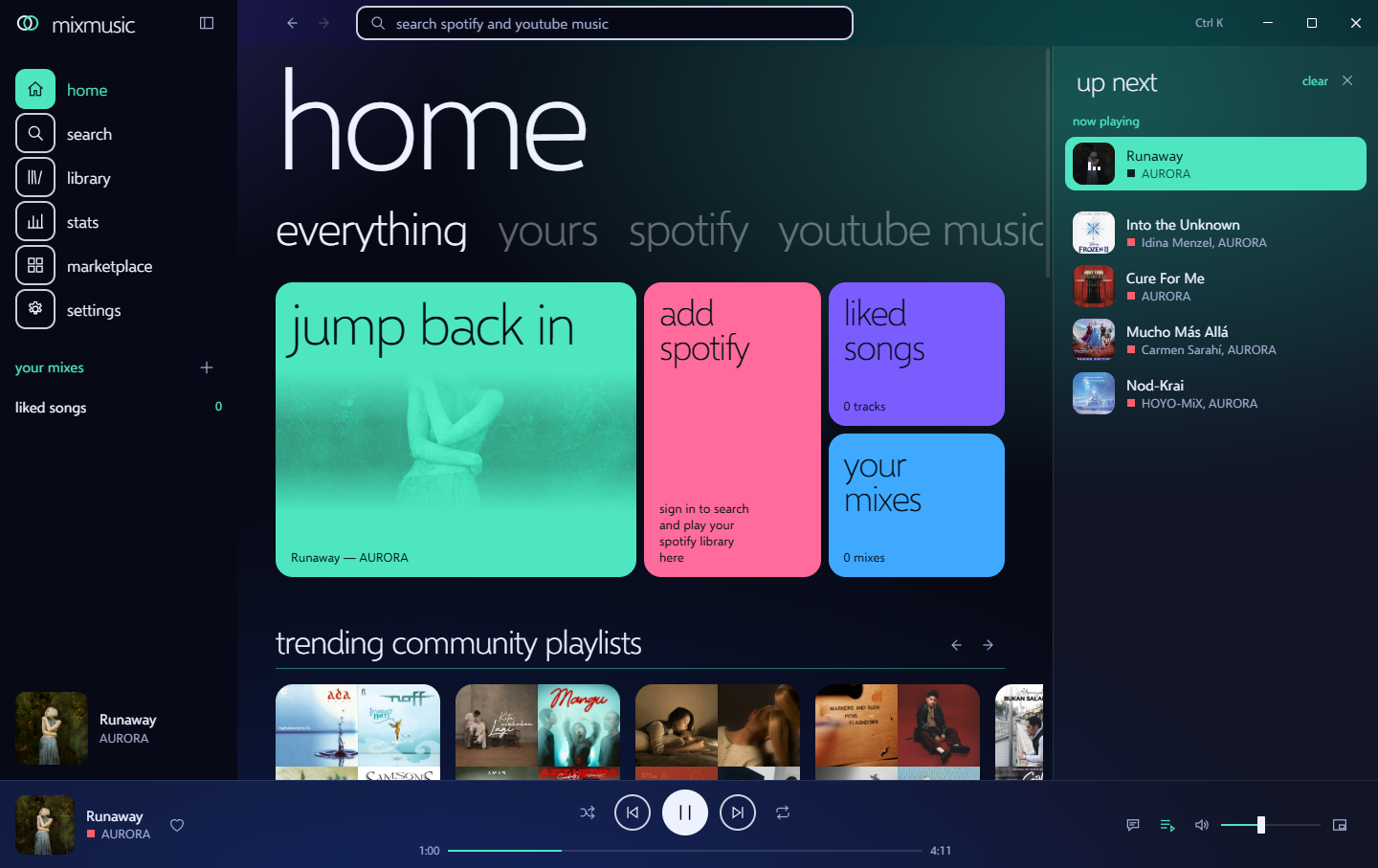
MixMusic is an open-source desktop music player for macOS, Windows and Linux. One search looks through YouTube Music and Spotify at once, one queue mixes tracks of both, and one library keeps liked songs and playlists that hold tracks of either service. Its whole look is a theme, and the community adds themes and plugins to it from a shared registry.
It is a single small Go program built on MyGo: the interface is a web page in the system's own webview, so there is no bundled browser to download or keep in memory.
Features
- One search, two services. Results of YouTube Music and Spotify side by side, every track marked with where it comes from.
- One queue. Play a Spotify track after a YouTube Music one, shuffle and repeat across both, and let a radio carry on when the queue runs out.
- Your mixes. Playlists that hold tracks of every service, liked songs across both, import of a service's playlist into a mix, search and sort inside any of them, history and listening stats day by day.
- Your accounts. Sign in to YouTube Music, on Google's own page, for your home feed and your liked songs, playlists, albums and artists, as your account or one of its brand channels; sign in to Spotify for your library there. Like a song, save an album or a playlist, or follow an artist, and it reaches the service too. Make playlists on YouTube Music and add tracks of either service to them, and what you play joins your YouTube Music history, which its recommendations come from.
- Explore. New releases, trending songs, the charts, moods and genres, and related songs under what plays.
- Spotify your way. Spotify tracks play in MixMusic itself, at Spotify's quality, with no Spotify app open (Premium, on Windows), on Spotify Connect (your Spotify app, your phone, a speaker), or here, from their recording on YouTube Music, with no Premium needed.
- A real player. Crossfade, volume levelling, a 10-band equalizer with presets, a visualizer, synced lyrics that follow the song or read as plain text, and an offline cache of tracks you played.
- At home on the desktop. Media keys and the system's media controls,
tray controls, notifications of new tracks, a mini player that stays on
top, start at login, and
mixmusic://links. - Scrobbling and Discord. Connect Last.fm and every track you hear joins your profile there, with scrobbles made offline sent once you are back. Your Discord profile shows what plays, with its artwork and the time left.
- Updates. MixMusic looks for a new release at start and every few hours, checks its signature, and asks to install it in a pop-up, or installs it by itself if you choose. Settings › About shows the newest version and installs it, or, for a copy that cannot replace itself, downloads its file of the same kind.
- Keyboard first. Shortcuts for everything common, a key of your own for any command, plugins' too, and a command palette (Ctrl K) for the rest.
- Themes. Six built in, options per theme, a theme for the computer's light mode and one for its dark mode, an accent taken from the artwork playing, your own CSS, and community themes one click away.
- Plugins. Small ES modules that add pages, commands, track actions and widgets through a typed API.
Install
Download the latest release for your system from Releases:
| System | Download |
|---|---|
| macOS 12 and later (Apple silicon and Intel) | mixmusic-<version>-macos-universal.dmg |
| Windows 10 and 11 (x64, Arm) | mixmusic-<version>-windows-<arch>-setup.exe |
| Windows, without installing | mixmusic-<version>-windows-<arch>-portable.zip |
| Debian, Ubuntu and derivatives | mixmusic-<version>-linux-<arch>.deb |
| Fedora, openSUSE and derivatives | mixmusic-<version>-linux-<arch>.rpm |
| Any Linux, one file | mixmusic-<version>-linux-<arch>.AppImage |
| Any Linux, in your home folder | mixmusic-<version>-linux-<arch>.tar.gz, with install.sh |
<arch> is amd64 for x64 and arm64 for Arm. Each release lists
SHA256SUMS to verify the downloads with. The files named update-…,
….delta and mixmusic-<version>-macos-… or -windows-<arch>.tar.gz
are what installed apps update from: you need none of them.
The installers, the portable zip and the Linux archive update themselves.
The .deb, the .rpm and the AppImage cannot replace their own files: a
pop-up tells you when a new version is out, and downloads its .deb,
.rpm or AppImage, as Settings › About does. Unpack the
portable zip anywhere and open MixMusic.exe in it; your settings and
library stay in your Windows profile, as with the installer. Make the
AppImage executable (chmod +x) and open it.
What it needs
-
macOS: nothing more. The app is not notarized by Apple yet, so the first time you open it macOS says it cannot check it. Open it anyway from System Settings › Privacy & Security, with Open Anyway, or clear the download mark once in Terminal:
xattr -dr com.apple.quarantine /Applications/MixMusic.app
-
Windows: the WebView2 Runtime, which Windows 11 includes. The installer is not signed yet, so SmartScreen may warn about it: choose More info, then Run anyway.
-
Linux: GTK 3, WebKitGTK 4.1 and the GStreamer plugins that play Opus and AAC audio. On Debian and Ubuntu:
sudo apt install libwebkit2gtk-4.1-0 gstreamer1.0-plugins-good gstreamer1.0-libav libayatana-appindicator3-1 libsecret-1-0
On Fedora:
sudo dnf install webkit2gtk4.1 gstreamer1-plugins-good gstreamer1-plugin-libav libayatana-appindicator-gtk3 libsecret
The tray icon needs
libayatana-appindicator3, and keeping your sign-ins in the system's keyring needslibsecret. The.deband the.rpminstall both; MixMusic works without either. The AppImage holds MixMusic alone, and uses the system's GTK and WebKitGTK like the other downloads. -
To play YouTube Music: yt-dlp, which MixMusic installs for you from Settings › Playback and keeps up to date, and a JavaScript runtime yt-dlp uses for YouTube: Deno, Node.js, Bun or QuickJS. MixMusic finds it on your
PATH, and in the folders of Homebrew, Deno and Bun.
Spotify
Spotify lets each app serve a few users of its owner's choosing, so you sign
in with an app of your own: create one in the
Spotify developer dashboard, add the
redirect URI http://127.0.0.1:47823/callback, and paste its Client ID in
Settings › Accounts. docs/spotify.md walks through it, and
through what Spotify allows apps to do.
YouTube Music
YouTube Music plays without an account. To bring your own home feed and library, choose Sign in to YouTube Music in Settings › Accounts and sign in to Google in the window that opens. What you type goes to Google alone: MixMusic keeps the session the window ends with, encrypted with a key in the system's keyring where there is one. Tracks still play as they do signed out: the session never goes to yt-dlp.
Last.fm
Last.fm asks each app for an API account. Create one at last.fm/api/account/create, where any name will do and the callback URL can stay empty. Paste its API key and shared secret in Settings › Accounts, and approve MixMusic on the page that opens in your browser. A track counts once half of it played, or four minutes.
Discord
Discord shows the name of an application beside what you listen to. Create one called MixMusic in the Discord developer portal, turn on Show what plays on Discord in Settings › Desktop, and paste its application ID there. The Discord app has to be running.
Make it yours
- Themes: the tokens, options and hooks themes style, and how to make one.
- Plugins: the plugin API, with the types for your editor.
- Share them: add yours to the community registry, and everyone can install it from the marketplace.
Troubleshooting
MixMusic writes what goes wrong to mixmusic.log, without your sign-ins:
Settings › About › open logs folder shows it, beside the reports of any
crash. Settings › About › report a problem opens a new issue on GitHub with
your version, system, tools, theme and plugins filled in; attach the log
after reading it. After a crash, MixMusic offers to report it the next
time it starts.
- Nothing plays from YouTube Music. Check Settings › Playback: yt-dlp
has to be installed, and a JavaScript runtime found. MixMusic updates the
yt-dlp it installed every day, as an old one stops finding streams; one of
your own, chosen there, you keep up to date yourself (
yt-dlp -U, or your package manager). A track that cannot play says why: some are not available in your country, or only to signed-in adults on YouTube's own website. - The JavaScript runtime is not found. Opened from the Finder, the Dock
or a desktop menu, MixMusic does not get the
PATHof your terminal. It also looks where Homebrew, Deno, Bun, Volta, Scoop and WinGet install; elsewhere, choose the runtime in Settings › Playback. - YouTube Music signed you out. Settings › Accounts says so when YouTube ends the session, as it does when you sign out of Google everywhere or change your password. Sign out there, then sign in again.
- Google refuses the sign-in window with "This browser or app may not be secure". Google decides this; try again later, or from another network.
- Spotify plays from YouTube Music, not in MixMusic. Spotify plays in MixMusic with Premium, and with a sign-in made since MixMusic played Spotify itself: Settings › Playback asks you to sign in again when yours is older, and says when your system's webview cannot play Spotify.
- Spotify says the app is not allowed. In development mode a Spotify app serves only the users its owner added in the dashboard, by their Spotify email: see docs/spotify.md.
- No tray icon on Linux. The tray needs
libayatana-appindicator3and a desktop that shows AppIndicator icons; GNOME needs its AppIndicator extension. Without it, closing the window quits MixMusic. - Linux does not start it. Install GTK 3 and WebKitGTK 4.1, as above.
- macOS cannot check the app, as it is not notarized yet: open it from System Settings › Privacy & Security › Open Anyway.
Known issues
- MixMusic reads YouTube Music through the interfaces of its own website, and plays it through yt-dlp. When YouTube changes them, searching, playing or signing in can stop working until MixMusic or yt-dlp catches up.
- YouTube Music has no sign-in for other apps: MixMusic signs in with a browser session, which can do with your account what YouTube Music can. Treat it like a password; sign out in Settings › Accounts to delete it.
- Spotify plays in MixMusic itself only where the system's webview plays its protected audio: WebView2 on Windows does, WebKitGTK on Linux does not, and macOS's is not known to. Elsewhere, Spotify Connect plays it.
- Spotify allows apps in development mode a few users, and lets them read less: search shows ten results of each kind, and the tracks of playlists you do not own stay hidden.
- Tracks YouTube restricts to some countries, to signed-in adults or to a channel's members do not play, as streams are found signed out.
- The macOS app is not notarized and the Windows installer is not signed yet, so the first launch asks you to allow it.
- The portable zip does not register
mixmusic://links, and Windows on Arm is less tested than the rest.
Privacy
MixMusic has no account, server, analytics or telemetry of its own. It talks to:
- YouTube and Google: YouTube Music's catalog, its streams through yt-dlp, and the artwork. Signed in, your library there, and, unless you turn it off in Settings › Accounts, the tracks you play, which join your YouTube Music history.
- Spotify, once you sign in: your library, your devices with Spotify
Connect, and Spotify's player, loaded from
sdk.scdn.co, when Spotify plays in MixMusic. - LRCLIB: the title, artists, album and length of the track playing, to find its lyrics.
- GitHub: a check for a new version at start and every few hours, which you can turn off in Settings › About, and each time you open that page; the community registry when you open the marketplace, and the downloads of yt-dlp.
- Last.fm, once you connect it: what you play. Discord, once you turn it on: what plays, to the Discord app on your computer, which shows it on your profile.
What it keeps on your computer: your settings and library (liked songs, mixes, history and recent searches) in the folder Settings › About names; the tracks you played in the cache, as much as you allow in Settings › Playback; your sign-ins in the system's keyring, or, where there is none, in files only your user can read, the YouTube Music session encrypted; and the log, without your sign-ins. The library's history clears what you played, Settings › Playback the cache, and signing out of a service deletes its sign-in.
Develop
You need Go 1.27 or later and Bun 1.2 or later.
bun install
bun run dev        # the app, rebuilt as you edit Go, the frontend live
go test ./... # the Go side bun run typecheck # the frontend bun run build # the packaged app of this system, in build/ bun run build -- -platform windows/amd64,linux/amd64,linux/arm64 go run ./tools/registry -check # the community registry
MyGo needs no C toolchain, so any machine builds MixMusic for every system. docs/architecture.md tells how the parts fit, and CONTRIBUTING.md how to send a change.
Layout
main.go              the app: windows, the tray, media keys, deep links
internal/app         the services the interface calls, and the desktop integration
internal/youtube     YouTube Music's catalog, and your account there
internal/spotify     the Spotify Web API, its sign-in and Spotify Connect
internal/stream      audio streams, found by yt-dlp and served to the player
internal/match       Spotify tracks matched to their YouTube Music recordings
internal/lyrics      synced lyrics
internal/library     liked songs, mixes, history and stats
internal/lastfm      scrobbling to Last.fm
internal/discord     what plays, on your Discord profile
internal/diag        the log, without secrets, and the reports of crashes
internal/addons      themes and plugins, and the community registry
builtin/themes       the themes MixMusic ships with
src/                 the interface: Preact, TypeScript and CSS
sdk/                 the types of the plugin API
community/           community themes and plugins, and their registry
Good to know
MixMusic is not affiliated with, endorsed by or sponsored by Spotify or Google. It plays what these services offer to their users, through the services' own interfaces; use it as their terms allow. Spotify and YouTube Music are trademarks of their owners.
License
MIT. The Selawik typeface in src/assets/fonts is under the
SIL Open Font License.