
CityVisualizer
Create detailed, interactive isometric maps that explain issues, services and systems through places, people and connected stories.
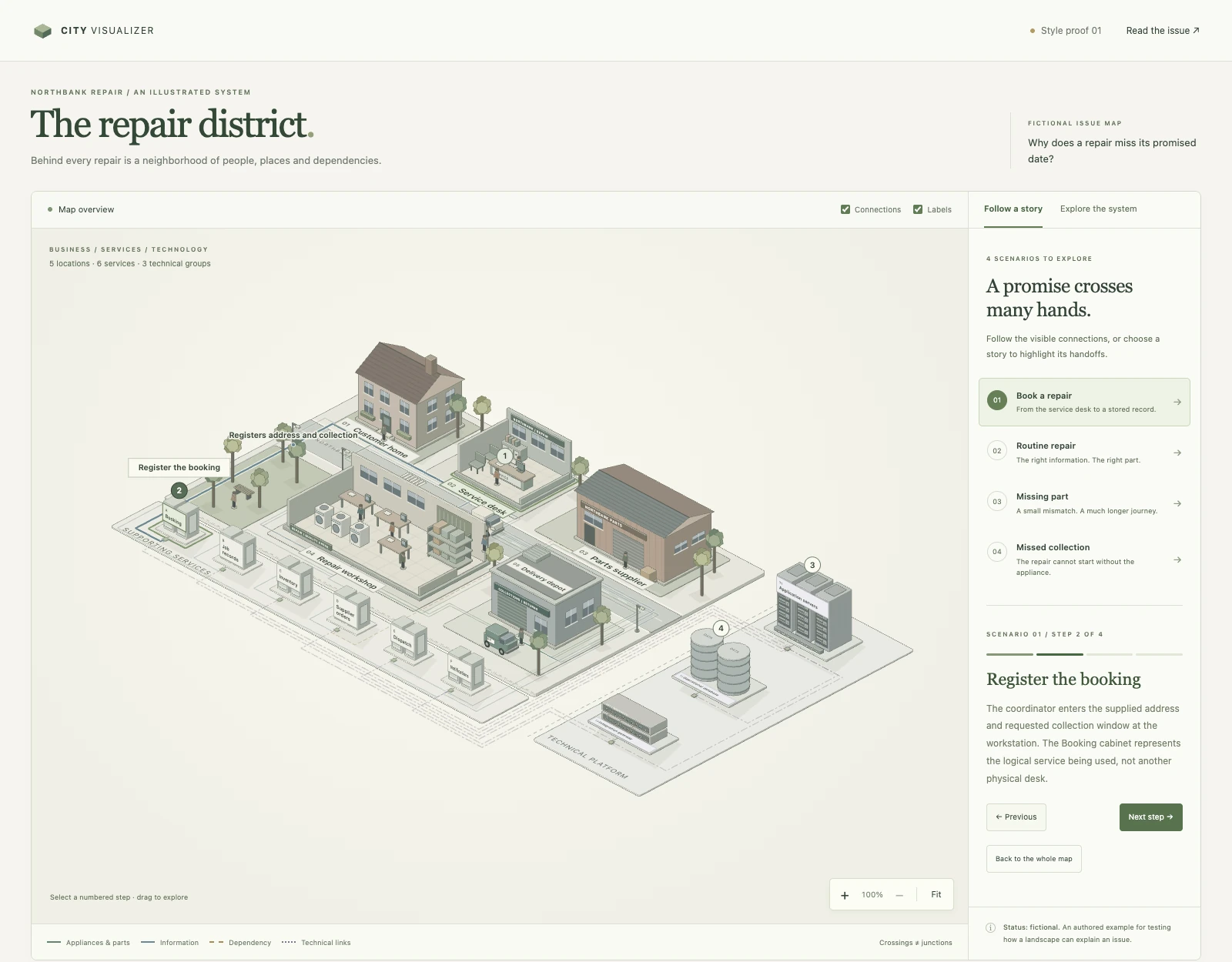
The toolkit supports cities, campuses, buildings, workspaces and technical systems, with animated journeys and nested views. Generated HTML pages are self-contained and work offline.
What can you use it for?
CityVisualizer helps explain processes that cross several people, places or systems. Readers can follow a journey, inspect a location and explore the work inside it. It makes handoffs, dependencies and exceptions visible alongside the main story.
- Customer journeys. Show how people interact with a product or service over time. Make touchpoints, decisions and handoffs easy to follow.
- Technical systems. Show how components connect, exchange information and depend on each other. Let readers move from the overview into the details.
- Complex issues. Explain how people, organizations and resources influence an outcome. Explore different perspectives and show how a change in one area affects another.
- Training and onboarding. Turn unfamiliar processes into guided, step-by-step explanations. Help people understand their role and how their work fits into the whole.
- Workflows. Show how work moves between people and teams. Make responsibilities, dependencies and bottlenecks visible.
- Storytelling. Create explorable settings where people, places and events connect. Let readers follow a story or discover the world at their own pace.
Use the result in documentation, workshops, lessons, presentations or public-facing explainers. Each map comes with editable input data and a standalone HTML page, so you can revise the explanation and share it without running a server.
Example prompts
Use city-visualizer to help our team understand the customer experience and identify where customers need better support. Turn the attached description into an interactive customer journey, from first contact to ongoing use. At each step, show what the customer is trying to achieve, what they must do and which team helps them. Compare a straightforward journey with one where the customer gets stuck. Make it clear where confusion, waiting or handoffs affect the experience.
Use city-visualizer to help new employees learn how to carry out the process described below. Create an interactive workflow that follows a piece of work from start to finish. For each step, explain who is responsible, what information they need, what they do and who receives the result. Include an exception that requires help from another team. By the end, a new employee should understand their responsibilities, when to hand work over and who to ask for help.
Use city-visualizer to help technical and non-technical colleagues understand how this system delivers a result to its users. Use the attached notes to create an interactive overview of its main components and their responsibilities. Follow one user request from submission to response, showing how information moves between components. Then show the same request when a dependency is unavailable. Explain where progress stops, which parts are affected and what the user experiences, using plain language throughout.
Build an example
With a current Node.js installation, run:
node scripts/build.mjs examples/repair-service preview
Open preview/index.html for the interactive map and preview/assets.html for its component study. No package installation is needed.
For a building with nested views:
node scripts/build-v2.mjs examples/landscapes/building preview/building
Use as an AI skill
The skill entry point is SKILL.md. Keep this entire directory together when installing it in your assistant's skills directory, including the kit, examples, references and attribution files.
Ask: “Use city-visualizer to explain [issue] as an interactive map.”
Author your own map
- Start with the brief template.
- Read issue mapping, landscape selection and the data contract.
- Keep editable inputs separate from generated output. Build with explicit input and output paths.
- See verification for model and browser checks.
Run the model/CLI checks:
node scripts/check.mjs
Credits
CityVisualizer was created by Espen Bamberg, inspired by Bo Meyer’s work in visual modelling.
Includes the MIT-licensed Anatomy geometry core by Ryan. See THIRD-PARTY.md and its license.