


agentbox
Your AI coding workspace. On your server. In your browser.
Run Claude Code and Codex CLI on a Linux server you control.
Go from a task to reviewed code with chat, terminal, files, and Git in one place.
English | 简体中文
Quick start · Watch the tour · Screenshots · Architecture · Documentation
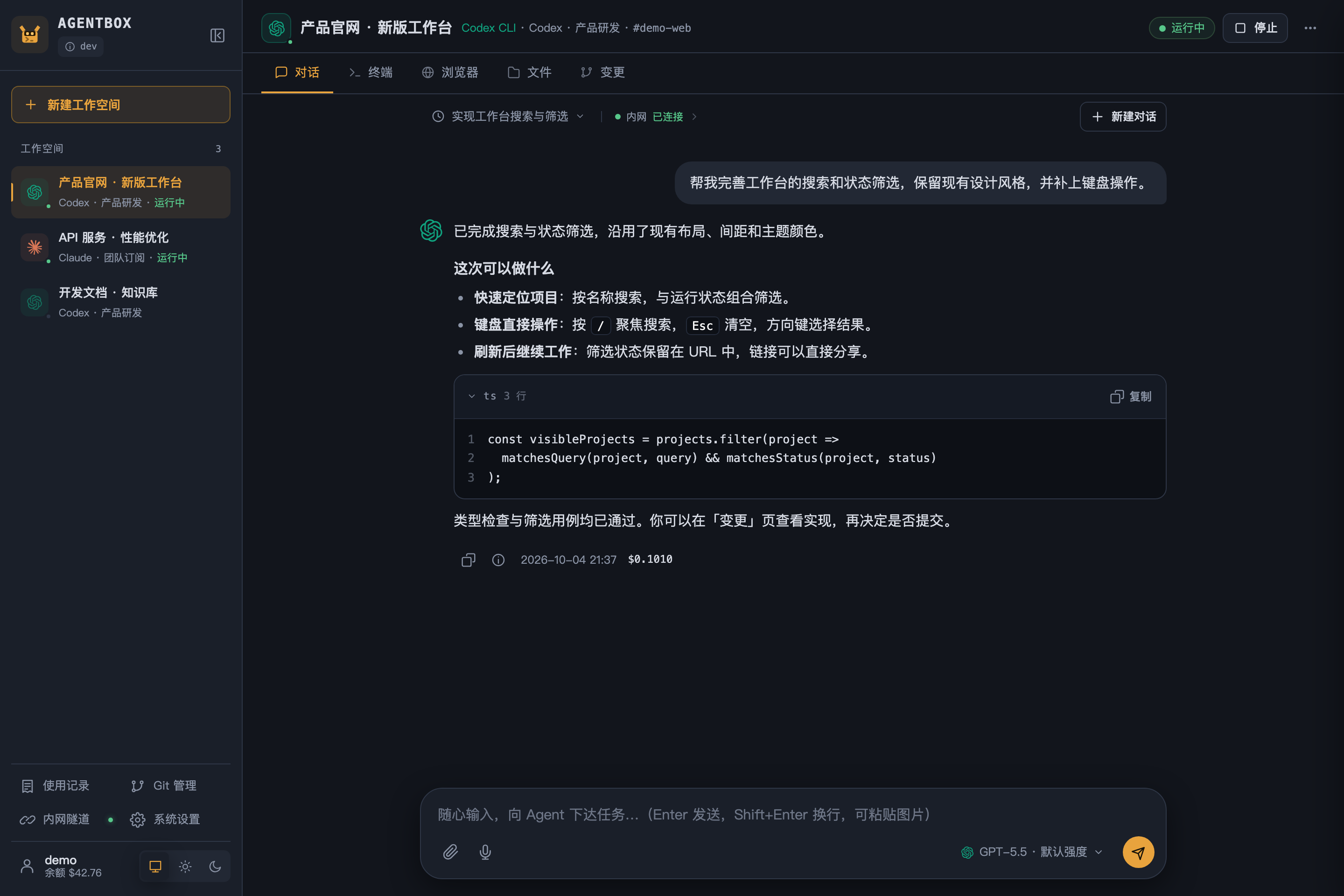
One workspace for the whole task. Open any screenshot to inspect it at full resolution.
Why agentbox?
Set up your coding environment once on your server, then pick up your project from a laptop, desktop, or phone. Your local machine only needs a browser; the agents and project tools run in Docker on the server.
| What you need | What agentbox provides |
|---|---|
| Pick up where you left off | Persistent project files, home configuration, and chat history across browser sessions |
| Work with familiar agents | Claude Code and Codex CLI, with streaming Web chat and their original interactive terminal interfaces |
| Finish the task in one place | Upload or clone → chat → run and preview → review diffs → commit, push, or download |
| Reuse your setup | User-level shared files, layered home templates, Claude skills, and MCP configuration with workspace overrides |
| Give a trusted team access | Central account pools, per-user account scopes, usage records, historical prices, and optional credit limits |
| Connect to your own services | Optional abox-link tunnel to allowlisted repositories, databases, and other private-network services |
You bring the server and your own Claude / Codex subscription, API key, or compatible relay account. Agentbox provides the workspace and management layer; model usage follows your provider's terms and pricing.
Supervisor delegation (development preview) lets a strong main Agent hand work to cheaper models. Turn on "Delegate" next to the chat input of a Claude Code workspace and pick worker models: the main Agent (for example Opus) keeps the conversation, decides the design and writes the critical code, and can call a platform tool to give a well-specified subtask (bulk edits, implementing a given interface, adding tests…) to a worker such as Sonnet, a Codex model, or a relay model under a Claude Code / Codex account. Workers edit the current workspace directly; the main Agent reviews the platform-measured changes and reports back. Administrators tag each account model with the task types it may take and the risks it must avoid; routing filters by these tags and can optionally ask Jev whether a worker or the main Agent itself should do the job. Worker spend is metered on the original workspace. This preview requires schema 18, replaces and removes the earlier multi-Agent collaboration, and makes no cost-saving claim. Design and boundaries →
Extensions are server-side features an administrator enables from the sidebar's Extensions menu; they inspect traffic passing through the model gateway. The first official extension, Loop guard, interrupts a reply in which the model keeps repeating short sentences and rejects identical retries during a cooldown; it never reads prompts, tool arguments or credentials. Administrators approve permissions one by one and choose the accounts it applies to (Claude and Codex API key / relay accounts only; Claude subscriptions and ChatGPT logins are never rerouted). If an extension fails, traffic is allowed by default and the Extensions page shows the degradation. Inspected workspaces show a shield and the extension name in their header. Extensions plug in through one SPI, so more official extensions can follow. Design and boundaries →
Next-prompt suggestions follow the Claude Code CLI: after each turn in a Claude workspace, the empty message box shows the predicted next prompt in grey. Press Tab (or tap Insert on a phone) to put it in the box, then send it yourself. Each suggestion is one extra model request, charged to the balance and listed separately in Usage history as "Next-prompt suggestions"; turn it off per browser in System settings → Appearance and tips. It needs a Claude Code in the Agent image that supports --prompt-suggestions; older images show no suggestions.
Agent questions also follow the CLI: when Claude needs a decision mid-task (its AskUserQuestion tool), the turn pauses and a card shows the questions with their options, single or multiple choice plus a free-text "Other". Submit and the same turn carries on with your answer; Skip, or no answer within 10 minutes, tells the agent to continue on its own judgment and state its assumptions. The first answer from any open page wins, interrupting withdraws the question, and the wait does not count toward the turn's time limit. Only Claude workspaces ask, and only from pages that can show the card; it needs a Claude Code that supports --permission-prompt-tool stdio with stream-json input.
Follow-ups while a task runs: keep typing while the agent works. Queue (the default) runs the message as the next turn once this one ends; steer adds it to the running Claude turn, where it takes effect after the current step (a running command, say) and shows in the conversation where the agent actually received it. Ctrl/⌘+Enter uses the other way for one message, and the default is set per browser in System settings → Appearance and tips. Queued messages are kept on the server, run in order even after a page close or restart, wait for any "result uncertain" turn to be reviewed, and can be withdrawn back to the message box. Codex, and turns already finishing, always queue.
Context usage is the web form of the CLI status line's context bar (claude-hud): in a Claude workspace, a ring and percentage at the bottom right of the message box show how much of the context window the conversation uses, turning yellow from 70% and red from 85%; hover for token counts. It reflects the input plus cache of the main conversation's latest model request and updates with every request; subagents and delegated workers are not counted, and after compaction it shows the compacted size (or "—" until the next request with older Claude Code versions that do not report it). The window size is the one Claude Code reports at the end of each turn, so a new conversation shows only the token count until its first turn ends. Codex workspaces show it too, computed like "context left" in the Codex terminal (about 12K of fixed overhead is excluded first, so it differs slightly from a plain ratio); when Codex falls back to codex exec there is no window size and no meter.
The task list is the to-do list the agent keeps while it works, as in the CLI: when the agent splits the work into steps, a line above the message box reads "Tasks 2/5 · the step in progress"; open it to see them all (done ones struck through, the current one highlighted, blocked ones marked "Waiting on #2"). It is open while a turn runs and collapsed when idle, and hides once everything is done and the turn has ended (a finished plan does not come back in later turns; a new plan shows on its own); while a step is in progress the working line in the conversation names it too. Claude Code turns the list on by default only for older models (Claude 3.x, Opus / Sonnet 4.0–4.7, Haiku 4.5), not for the Claude 5 family, as in the CLI. To have Claude 5 keep one too, turn on "Use the task list with Claude 5 too" under Settings → Appearance and tips (a per-browser preference, applied from the next message); it may use more tokens, since every request then carries the task tools and the model makes extra calls to update its tasks. The list is read from the task files Claude Code keeps in the workspace, so it survives a reload and a stopped workspace. Codex's plans (update_plan) show the same way, for the current turn only.
Requests Claude Code makes on its own without reporting them one by one — the summary request of /compact and automatic compaction, WebFetch digesting a page — are reconciled against Claude Code's own running totals and billed as usual.
Slash commands can be sent straight from the chat of a Claude workspace. Typing / lists the available commands with descriptions, as the CLI does: built-ins, skills, plugin and project commands, read from the workspace's Claude Code without a model request. Use ↑↓ to choose, Tab to fill in, Enter to fill in and send, Esc to close; terminal-only commands are left out. /clear (also /new, /reset) starts a new conversation in the web page, and /model and /effort open the model and reasoning pickers; these three also work in Codex workspaces. /context is answered by Claude Code itself with no model request or charge and is drawn as the same grid as in the terminal, colored by category, with MCP tool, memory file and skill details; its answer is marked "No model was called". On subscription accounts /usage is answered locally too and is drawn as progress bars for each limit window (current session, this week and so on), with reset times in the system time zone and the usage breakdown below. During /compact or automatic compaction the status reads "Compacting context…", and the conversation then marks the size before and after; compaction makes one model request and is charged as usual. None of these name the conversation, and they work with delegation on.
Mentioning files with @ works as in the CLI: type @ (at the start or after a space) and the workspace's files and folders are searched by name as you type, with the matched letters in bold. ↑↓ choose, Tab or Enter fills the path in without sending, Esc closes; choosing a folder fills @folder/ and lists what is inside. Paths are relative to the workspace and paths with spaces are quoted as @"my dir/a b.txt"; Claude Code then includes the file's content (or a folder's listing) in that turn by itself. In Codex workspaces the plain path is filled in, as in Codex's own picker, and the model reads it. Names are read from the workspace on the server, so search works while the workspace is stopped; each folder's .gitignore is respected, and .git, node_modules and similar folders are skipped. In very large workspaces only the upper levels are searched, and the list says so. In the message box a leading command, @ paths and the [Image #1] placeholders left by pasted images or uploaded files are shown in blue, and a placeholder is followed by a space. Placeholders and finished @ paths delete as one piece: Backspace or Delete next to one removes all of it, and removing a placeholder also removes its attachment (undo brings it back); an @ path still being typed deletes letter by letter. Once sent, a command message is shown as a command (monospace, with a prompt sign) and @ paths as file chips, so they stand apart from ordinary questions.
See the workflow
Chat → terminal → Git review → previews. The GIF introduces the core workspace; the 34-second MP4 also visits skills, MCP, usage, and private-network access.
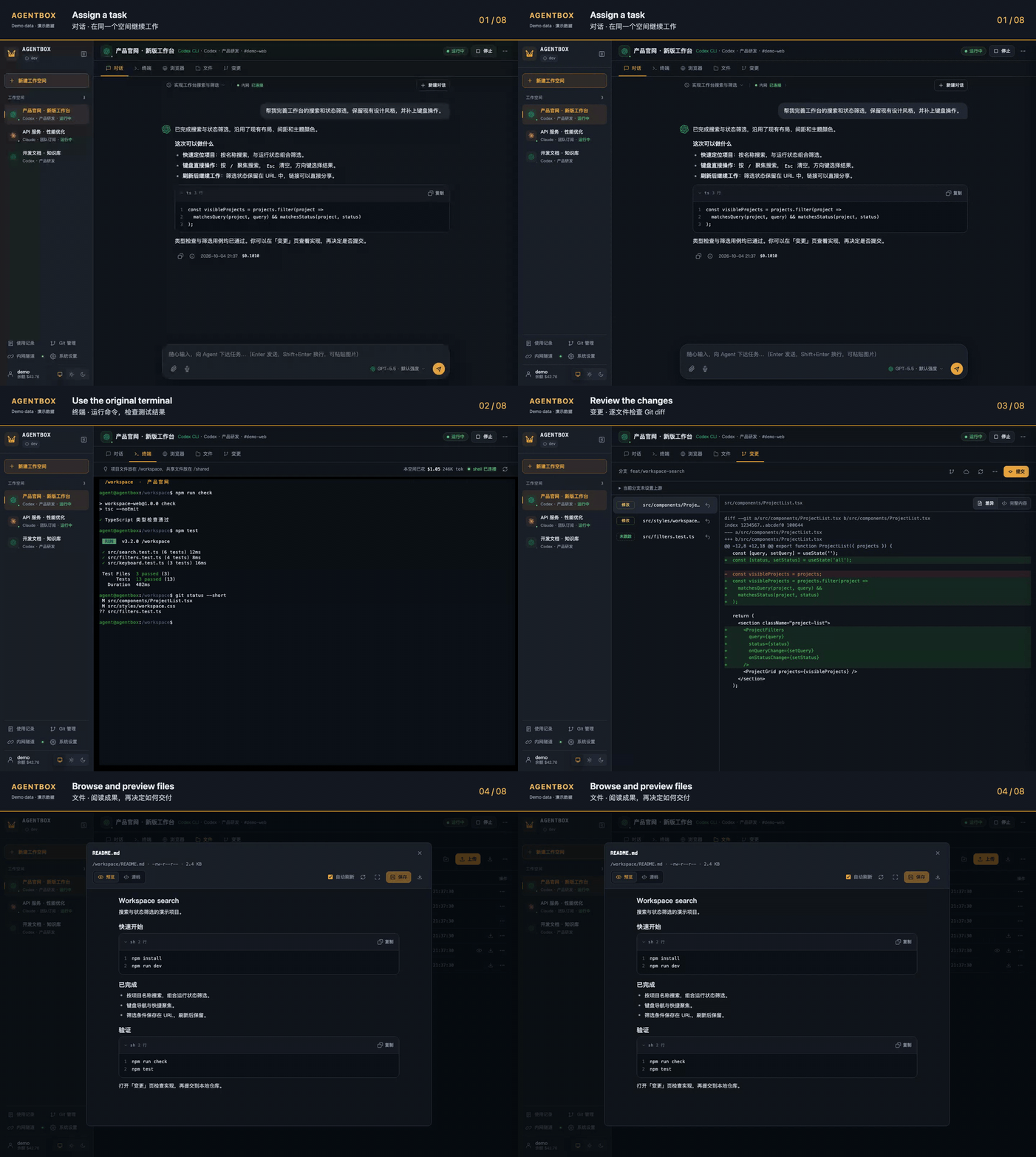
Download the full-resolution MP4 · Browse full-resolution screenshots
Screenshots use 2× pixel density. All media is captured from the actual browser UI with synthetic projects, conversations, command output, and usage records. These are interface demonstrations, not live model benchmarks. The media was captured before multilingual support was added and shows the Chinese interface; v0.1.10 also supports Traditional Chinese and English.
Interface languages
The Web console and abox-link v0.1.10 support 简体中文 · 繁體中文 · English. Choose a language on the login page, in the Web console’s user menu, or at the top of the abox-link panel. The default follows your browser/system language, falling back to English when unsupported; explicit choices are saved on the current device.
Switch immediately while keeping drafts and terminal connections. User content, model responses, terminal output, and server diagnostics remain in their original language. Language behavior and desktop availability →
Quick start
Install on your Linux server
curl -fsSL https://raw.githubusercontent.com/devilcoolyue/agentbox/main/install.sh | sudo bashThe installer downloads and verifies the server package, builds the workspace image, and starts agentbox.service. No Go or Node.js installation is needed on the server. The first image build takes a few minutes and needs access to container registries, Debian repositories, and npm.
- Host: Linux x86_64 / arm64, systemd, and local Docker Engine. Ubuntu 22.04+ / Debian 12+ install missing dependencies automatically. For other distributions, see the prerequisites.
- Sign in: open
http://YOUR_SERVER_IP:8180and useboxadminwith the generated password printed by the installer. Allow TCP 8180 through your firewall if connecting directly; configure HTTPS for ongoing public access. - Stable server: v0.1.15. The command selects the latest stable release; append
-s -- --version v0.1.15to pin it, or-s -- --listen 127.0.0.1:8180to bind only to localhost. - Existing installation: use the console's update entry or the upgrade guide. The installer preserves existing deployments and will not overwrite them.
Configuration lives in /etc/agentbox, data in /var/lib/agentbox. Each workspace defaults to a 2 GiB memory limit and 2 CPUs; size your server for the number of concurrent workspaces. See installation and recovery for all options.
Your first task
The workspace uses a one-time, three-step tour with Skip and replay under More → Quick tour. It does not reserve workspace space. Workspace filters share one row. Local draft saving is managed in System settings → Appearance and tips, available to both administrators and regular users; the preference applies only to the current identity in this browser.
v0.1.11 adds a role-based first-use guide: administrators check the environment, connect accounts and review defaults; users see their authorized accounts. Workspace creation refreshes access and disables submission when no account is available. See M2 progress; this release supports empty, upload and Git project creation with persistent receipts. See project import and recovery; creation receipts were introduced in schema 11, and this release also includes schema 12 chat receipts.
The UI also confirms workspace configuration and offers an editable first-task example. About and updates distinguishes server, Agent image and desktop updates, including version observations and restart scope; see update components. Desktop UI changes require a separate desktop release.
v0.1.11 adds isolated recovery of unsent chat drafts and attachment checks. It also introduces server schema 12 and a versioned chat receipt API connected to the existing runner, with ID deduplication, status queries and recovery after restart. The browser now saves a frozen outgoing copy before sending, queries the original ID after a lost acknowledgement, and provides explicit result review. Unsent drafts stay separate. Local saving can be disabled; older servers retain the legacy send path with a capability notice. Back up before upgrading; older schema 10/11 binaries cannot open schema 12. See draft recovery and M3 progress.
- Add an account in System settings → Account pool (
系统设置 → 账号池). Choose Claude or Codex and connect a subscription or API / relay account. After sign-in, fetch the provider's models, select the ones this account offers, and set reasoning effort per model. Relay and API-key accounts that cannot list models, or list them without reasoning details, can use the official catalog instead: the one the Claude Code and Codex CLIs in the Agent image ship with, read without signing in. System settings → Models (模型管理) hides rarely used models from the chat menu without removing them. Account setup → - Create a workspace and select its agent and account. You can later switch it to another account of the same agent from the workspace ⋯ menu.
- Bring your project: upload files, or open Terminal and clone a repository into
/workspace. - Describe the task in Chat, then inspect files or run commands in Terminal. Both work on the same project files.
- Review Changes before committing. Download the result, or configure a Git connection to push and open a PR / MR. Workspace guide →
Prefer to build from source?
On Linux with Docker, Git, and the Go toolchain in go.mod:
git clone https://github.com/devilcoolyue/agentbox.git
cd agentbox
go build -o agentbox ./cmd/agentbox
./scripts/build-image.sh
openssl rand -hex 24
Save the following as config.json, replacing the password placeholder with the generated random value:
{
  "listen": "127.0.0.1:8180",
  "auth_token": "CHANGE_ME_TO_A_LONG_RANDOM_TOKEN",
  "data_dir": "data",
  "agent_image": "agentbox-agent:latest",
  "accounts": [],
  "proxies": []
}
sudo ./agentbox -config config.json
Open http://127.0.0.1:8180 on the server, or run ssh -N -L 8180:127.0.0.1:8180 user@your-server on your computer and open that address locally. Sign in as boxadmin with the configured auth_token. After first startup the password is stored in the database; editing auth_token does not reset it.
Forgot the administrator password? Starting with v0.1.11, use agentbox admin-reset-password --config /path/to/config.json --user boxadmin: stop the service and verify a backup first, then enter the new password twice in a terminal. It revokes that administrator’s login tokens and preserves workspace and billing data. See the recovery procedure; v0.1.10 and earlier release binaries do not include the command.
The server needs Docker access and permission to set mounted directory ownership to 1000:1000. After stopping this foreground instance, run sudo ./deploy/install.sh and sudo ./deploy/deploy.sh for a source-based systemd installation. See deployment, configuration, and development for details.
How it works
One Go server, SQLite, and Docker. The frontend is embedded in the server binary. Each workspace gets its own container; files and history persist on the host.
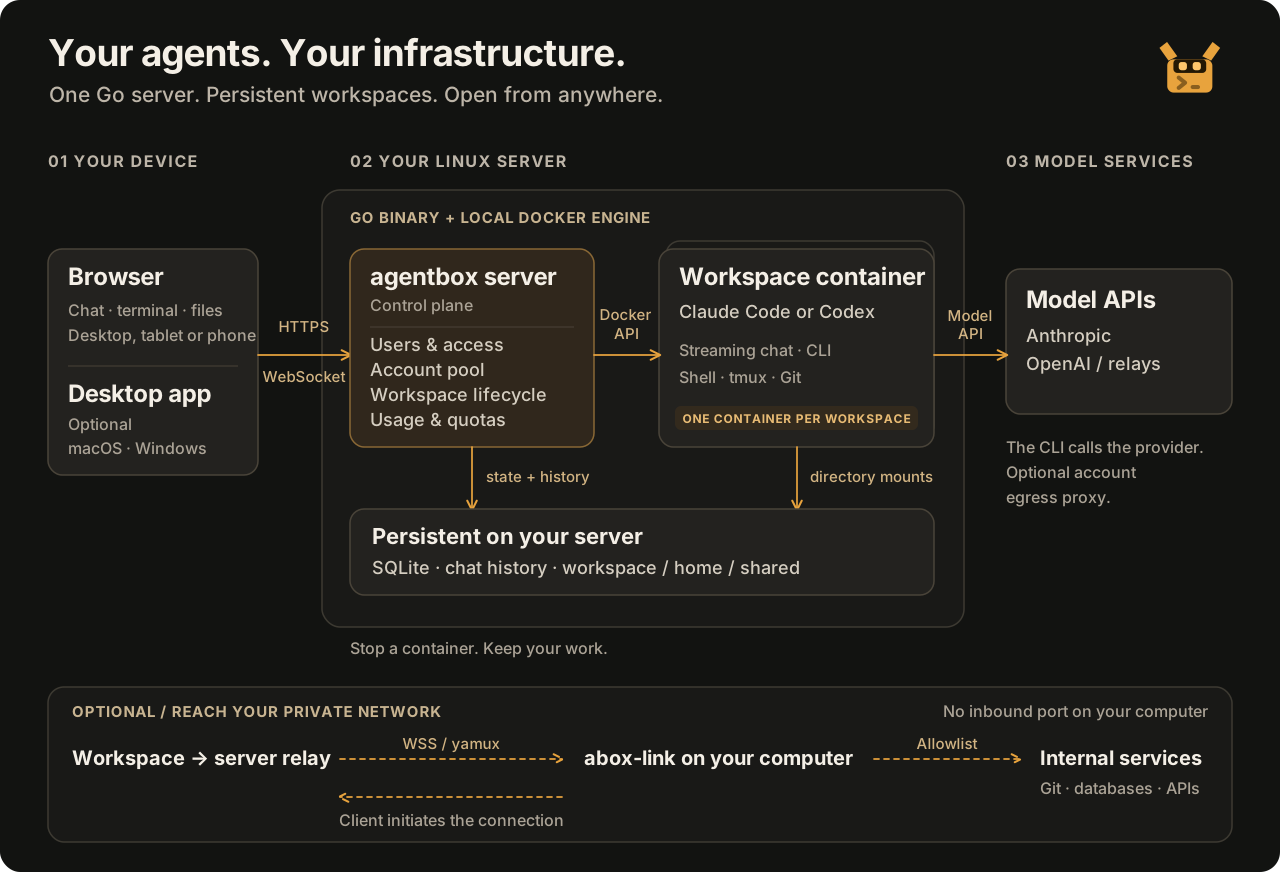
| Layer | Responsibility |
|---|---|
| Browser / optional desktop | Connect to the server and interact with your workspaces |
| Agentbox server | Authentication, account access, workspace lifecycle, HTTP / WebSocket, Git operations, usage and credits |
| Workspace containers | Run Claude Code / Codex CLI and project tools; communicate with your configured model provider |
| Persistent storage | SQLite state and ledger, project files, home directories, shared files, and JSONL chat history |
| Optional abox-link | Connect private services reachable from your computer through an explicit allowlist |
Chat and terminal share files, not an automatic conversation context. Each workspace supports multiple chat threads and one active Web chat turn at a time; long threads open at the newest messages and load earlier ones as you scroll up. Each user's /shared directory is available across their workspaces. Stopping a container retains files and history but ends its processes.
Screenshots
Use the original CLI when you want direct control
Switch to a Shell, Claude Code, or Codex CLI terminal. Run tests, install dependencies, and reconnect to the same tmux session after a network disconnect while the container remains running. Text you select in Claude Code is copied to your local clipboard; when the browser blocks automatic clipboard writes (as Safari does), a "Copy to clipboard" button appears at the bottom of the terminal.

Review what changed before you ship
Inspect the file list and diffs, then commit the repository’s changes. Connect repositories with HTTPS tokens, SSH, or configured GitHub / GitLab OAuth; fetch, pull, preview a push, and create a PR / MR from the Web UI.

See where the usage goes
Filter by time, user, agent, and model. Inspect token counts, recorded costs, pricing snapshots, reasoning effort, and response latency; export records to CSV. Claude Code and Codex CLI terminal records include effort when their transcripts report a consistent value for the turn; retained transcripts are rescanned to fill older records. Missing or conflicting values remain unspecified. Administrators can manage pricing and credit balances.

Files and document previews
Browse, edit, upload, and download from project and shared directories. The source viewer includes syntax highlighting, line numbers, and fullscreen mode. Switch between source and rendered Markdown or HTML to inspect generated documents and pages.


Reusable skills and MCP tools
Manage Claude skills in a workspace or user template. Configure MCP user defaults and workspace overrides, import JSON, and test connections from the container. Codex skills and MCP are configured through its CLI.


Account pools and private-network access
Keep subscription, API key, and relay accounts in one pool with access scopes. Pair abox-link when your workspace needs to reach an allowed service on your local or company network.


Themes, styles and mobile access
Choose light, dark, or system themes, and pick an interface style from the user menu: Amber (default), Liquid Glass, Cyberpunk, Graphite, Verdant, or Blueprint. Style and light/dark are independent and saved in the current browser. You can also make custom themes that start from a built-in style and override its color, corner and font tokens: edit them with a live preview, or copy instructions to an AI and paste its JSON back. Shared themes published by an administrator are available to every user; personal themes are for yourself. See Interface themes. Phone layouts include drawer navigation and a touch terminal shortcut bar, with scrolling and long-press paste.


The capture guide explains how to reproduce the screenshots and tour with demo data.
Choose your entry point
| Entry point | Use it for | Availability |
|---|---|---|
| Web console | Chat, original CLI terminal, files, Git, skills, MCP, and administration | Included in the server; no local agent installation |
| Desktop app | Native Windows/macOS access, project terminals, file transfer, and optional sync | Download 0.1.2 · unsigned public test release |
| abox-link | Allowlisted private-network access from cloud workspaces | Optional; local panel or headless command line on Windows, macOS, and Linux |
| HTTP / WebSocket API | Script workspace operations and usage queries | API reference |
The desktop app has packages for Mac Apple Silicon, Mac Intel, and Windows x64. It connects to your server; it does not replace or upgrade it. Server v0.1.8 provides basic mode; v0.1.9 adds project terminals, pairing, and the sync backend. Sync is disabled by default and requires an administrator to enable it. Desktop 0.1.2 is a manual download: macOS is not notarized, Windows is unsigned, and automatic updates are not enabled. This server release does not update the desktop installer: published Desktop 0.1.2 does not include multilingual UI, while the current desktop source does. See the desktop guide for source, setup, and validation limits.
An optional remote browser image adds a full browser desktop inside a workspace, with persistent website login, clipboard support, and downloads. It is separate from CLI authorization and requires the browser-enabled image.
Agent image updates build from a fixed base to prevent CLI layers accumulating across upgrades. Existing images migrate in the background at the same CLI versions, preserving browser/custom configuration and running workspaces. Insufficient disk space leaves the original image active; retired images are reclaimed after seven days only when references allow it. See image maintenance.
Optional shared tools provide read-only Go SDKs and browser distributions, with writable Go/npm caches shared only within each user. Storage can live on a data disk; running workspaces keep their existing containers.
Know the boundaries
- Use trusted accounts with trusted users. Credentials are made available to the CLI inside containers and can be read by users with terminal access. Account scopes restrict admission; revoking access does not withdraw credentials already delivered or terminate existing processes. See account permissions.
- Persistent files are not persistent processes. Keep durable files in
/workspace,/home/agent, or/shared. Stopping, rebuilding, or idle suspension ends container processes; a browser disconnect alone does not immediately stop the container. - Credits are not hard spending caps. Web chat settles after each turn and may overspend on the final admitted turn. Supported terminal usage is recorded without deducting credits. See usage and quotas.
- Back up user files explicitly. Default system backups cover configuration, credentials, database state, templates, and MCP management state; they exclude workspace files and chat history. Full backups require stopping the service and relevant containers. See backup and restore.
- Deploy within a trusted server boundary. Agentbox uses a local Docker daemon and one server process per data directory. Agents execute code with
bypassPermissionsby default; containers use a non-root user and resource limits. Deployments briefly disconnect clients. - Review and push are separate actions. Web commits do not run hooks or signing and do not automatically push. Use the terminal when you need those commit behaviors. See Git management.
Documentation
English and Chinese READMEs cover the same overview and setup. Detailed guides are currently in Chinese; start with the documentation index.
| You want to… | Read |
|---|---|
| Use chat, terminal, files, previews, and Git | Workspace guide |
| Connect accounts or choose models | Accounts and models |
| Interrupt repetitive model streams across harnesses | Extensions: Loop guard · Standalone loop guard (preview) |
| Reuse skills, templates, and MCP tools | Skills, plugins, and MCP |
| Understand or manage costs | Usage and credits · Pricing catalogs |
| Connect private services | Proxies and abox-link |
| Install, upgrade, back up, or recover | Deployment · Releases · CLI compatibility |
| Configure or integrate the server | Configuration · API reference |
| Choose an interface language | Languages and preferences |
| Import or create interface themes | Interface themes |
| Resolve an error | Troubleshooting |
| Contribute code | Development guide · Contributing |
Development roadmap
v0.1.13 adds local storage capacity management (Chinese): mount checks, per-user project quotas, multiple-disk monitoring, rebuildable cache cleanup, and release retention. It is disabled by default and requires offline Linux preparation. S3 backups and cold workspace archiving remain in the storage plan.
The server and Web console changes from the first round (M1–M5) are included in v0.1.11, but external acceptance—real-user observations, performance thresholds, recovery targets, and desktop signing—is still pending; see the first-round record. The second round (M6–M11) starts on 2026-10-06: first turn the development build into a proper release (v0.1.11 shipped on 2026-10-08; see the M6 record, Chinese), then add real-use acceptance and metrics collection, improve daily efficiency based on real feedback, reduce upstream update and installation cost, deliver a stable desktop release if certificates are available, and finally add more agents behind a capability gate. Scope, dependencies, and acceptance are in the second-round plan (Chinese).
Starting with v0.1.11, the web console shows translated recovery hints and operation IDs for login, workspace startup, and chat failures; existing clients can still read the error field. See the error contract for scope and limitations. Administrators can run instance environment checks; users can check their own workspaces. Results distinguish passed, failed, and unchecked items, and never claim model availability without a model call. See layered diagnostics.
| Milestone | Planned focus |
|---|---|
| M1 · Troubleshooting and maintenance baseline | Consistent error codes and operation IDs, expanded environment diagnostics, administrator password recovery, and clearer documentation and test entry points |
| M2 · First use and project import | Setup guidance by role, a connected workspace creation and upload/Git import flow, and clear version and update behavior |
| M3 · Reliable daily tasks | Chat drafts and receipt acknowledgments, idempotent message acceptance, task status checks after disconnects, and workspace search and filters |
| M4 · Maintenance and upgrade quality | Further separation of complex modules, API contracts and layered CI, CLI protocol compatibility checks, and upgrade and recovery validation |
| M5 · Stable desktop release and consistency across clients | OS signing and notarization, real-device and older-package upgrade acceptance, a multilingual desktop release, and a small sync pilot |
| M6 · Wrap-up and formal release | Commit the development tree, run hosted CI end to end, release server v0.1.11 and desktop 0.1.3 test build, align documented version status |
| M7 · Real-use acceptance and metrics baseline | In-instance aggregate metrics with redacted export, real task observations, agreed performance thresholds and recovery targets, production-data recovery drill |
| M8 · Feedback-driven daily efficiency | Fix the most frequent blockers found in observations; candidates: workspace archiving, task completion notifications, long-conversation rendering |
| M9 · Upstream updates and installation cost | Prebuilt Agent images, CLI baseline advancement, routine dependency upgrades, broader contract generation |
| M10 · Stable desktop release | OS signing and notarization, minimum OS and real devices, a full sync pilot cycle; downgraded to a test release if certificates are unavailable |
| M11 · Additional agents | Provider registry and ACP transport, optional agents in the image; Kimi Code CLI first, dsh / Antigravity as candidates depending on protocol maturity |
Each iteration is initially scoped to 3 weeks. Order and scope may change with user feedback, maintainer availability, and acceptance results; these estimates are not release-date commitments. See the first-round roadmap and the second-round plan (both Chinese) for scope, dependencies, acceptance criteria, the external-resource track, and the kickoff checklist. Issues with concrete use cases and suggestions are welcome.
Build and contribute
The current capability and verification inventory separates implemented features, release records, and pending acceptance. Run python3 scripts/verify.py list to choose checks or python3 scripts/verify.py run quick for local checks with saved reports; see the verification guide.
The server uses Go + SQLite + Docker; the browser console uses TypeScript, native ES Modules, and xterm.js. See the development guide for toolchains and platform-specific checks.
go build ./...
go test ./...

# If you edit the frontend
npm ci
npm run check
npm run build
Commit generated internal/web/static/js/ files alongside changes to web/src/. Full container validation targets Linux; macOS builds and unit tests do not replace it.
Useful bug reports, workflow suggestions, and focused pull requests are welcome. Include reproduction steps and sanitized logs; report vulnerabilities privately via SECURITY.md. If agentbox is useful to you, a Star helps other developers discover it.
License and community
Apache-2.0 · Copyright notices · Third-party licenses · Changelog
Model services and runtime CLIs retain their upstream terms. Thanks to the LINUX DO community for its support and discussions.