
Whistle speech recognition on an ESP32-S3
Hold a button and say "flash the light blue". The LED flashes blue.
The speech recognition runs entirely on a $10 microcontroller: no network, no cloud, no phone. It transcribes whatever you say rather than matching a fixed list of phrases, and it understands commands in seven languages.
The model is Whistle by Cactus Compute (Apache 2.0). Cactus ships no ESP32 build and no source for Whistle's engine. Everything here is an independent C99 implementation with no dependencies, checked tensor by tensor against the official engine.
What you need
| Part | Notes |
|---|---|
| ESP32-S3 board, N16R8 | 16 MB flash and 8 MB octal PSRAM. The model alone is 14.5 MB. ESP32-S3-DevKitC-1 N16R8 or a clone. |
| INMP441 I²S microphone module | the common round breakout board |
| Momentary push button | any tactile switch |
| Jumper wires, breadboard | 8 wires |
| USB cable | to the board's native USB port |
The RGB LED is the WS2812 that is already on the board.
Wiring
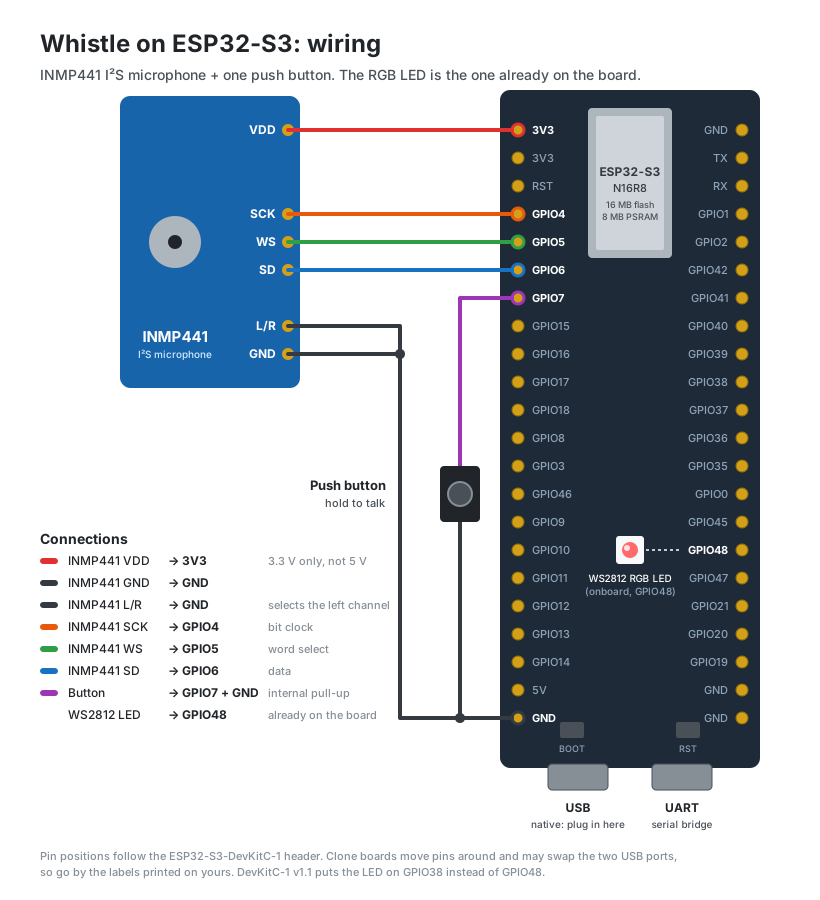
| From | To | |
|---|---|---|
| INMP441 VDD | 3V3 | 3.3 V, not 5 V |
| INMP441 GND | GND | |
| INMP441 L/R | GND | picks the left channel, which the firmware reads |
| INMP441 SCK | GPIO4 | I²S bit clock |
| INMP441 WS | GPIO5 | I²S word select |
| INMP441 SD | GPIO6 | I²S data |
| Button | GPIO7 and GND | the internal pull-up is used, so no resistor |
| WS2812 LED | GPIO48 | on the board already |
Clone boards place header pins differently, so go by the GPIO numbers printed
on your board. If your LED sits on another pin (DevKitC-1 v1.1 uses GPIO38),
change ONBOARD_GPIO at the top of esp32/whistle_demo/main/main.c. A
PNG version of the diagram is there for printing.
Check the microphone before anything else. Loose jumper wires are the
most common fault. esp32/mic_test records while the button is held, and
tools/mic_capture.py saves each clip as a WAV you can listen to. Speech
should sit well above the noise floor (about -45 vs -68 dBFS) with jumps=0.
Stretches of an exact bit pattern such as 0xAAAA mean a bad SCK, WS or power
contact.
Setup
You need ESP-IDF v5.5 or newer, Python 3 and CMake.
# 1. host tools
python3 -m venv .venv
.venv/bin/pip install numpy rich pyserial huggingface_hub

# 2. fetch Whistle (16.9 MB) and cut it down to 4 decoder layers (14.5 MB)
mkdir -p model/whistle && .venv/bin/python -c "
from huggingface_hub import hf_hub_download; import shutil
shutil.copy(hf_hub_download('Cactus-Compute/whistle','whistle.cact'), 'model/whistle/whistle.cact')"
.venv/bin/python tools/whistle_strip.py model/whistle/whistle.cact 4 model/whistle/whistle_d4.cact

# 3. firmware (ESP-IDF must be on PATH)
. $HOME/esp/esp-idf/export.sh
cd esp32/whistle_demo
idf.py set-target esp32s3 && idf.py build
idf.py -p /dev/cu.usbmodemXXXX flash          # bootloader, partition table, app
cd ../..

# 4. the model, into its own flash partition (~100 s)
esptool.py --chip esp32s3 -p /dev/cu.usbmodemXXXX -b 921600 \
    write_flash 0x210000 model/whistle/whistle_d4.cact
Find the port with ls /dev/cu.usb* (macOS) or ls /dev/ttyACM* (Linux).
The model only needs flashing once. After a code change, repeat step 3.
Why cut the model down? The full model is bigger than the board's entire
flash. Whistle's decoder is laddered: every depth from 2 layers up was trained
to work on its own. whistle_strip.py keeps only the layers a depth uses.
Depth 4 fits once the model partition runs to the end of flash
(esp32/whistle_demo/partitions.csv).
Watching it work
.venv/bin/python tools/needle_tui.py --whistle --serial /dev/cu.usbmodemXXXX
The console shows each transcript, the detected language, the LED action and the time each phase took. The board works without it, too.
Using it
The LED glows dim blue for about a second while the model loads, then goes off. That means it is ready.
- Hold the button. The LED turns white while it records.
- Say a command.
- Release. The LED pulses dimly while it transcribes, then does what you said.
A command names a colour (red, green, blue, yellow, purple or white) and can add flash or blink, a blink rate and a duration. The default duration is 3 seconds.
| Say | LED |
|---|---|
| "Make it red." | solid red |
| "Turn the light green for five seconds." | green for 5 s |
| "Flash the light blue." | flashing blue |
| "Blink purple every half a second." | purple, blinking twice a second |
Two red blinks mean it heard only noise. One amber blink means it heard words but no colour.
Short phrases work better than a bare word: "make it red" was recognised far more often than "red" alone (86-93% vs 44% across six test voices).
Other languages
Language detection is automatic. Every language below is on the board at the same time.
| Language | Example | Colours |
|---|---|---|
| English | Flash the light blue. | red, green, blue, yellow, purple, white |
| French | Fais clignoter la lumière en violet. | rouge, vert, bleu, jaune, violet, blanc |
| Spanish | Pon la luz amarilla. | rojo, verde, azul, amarillo, morado, blanco |
| German | Lass das Licht rot blinken. | rot, grün, blau, gelb, lila, weiß |
| Italian | Fai lampeggiare la luce verde. | rosso, verde, blu, giallo, viola, bianco |
| Dutch | Laat het licht blauw knipperen. | rood, groen, blauw, geel, paars, wit |
| Polish | Niech światło miga na czerwono. | czerwony, zielony, niebieski, żółty, fioletowy, biały |
The blink words are clignoter, parpadear, blinken, lampeggiare, knipperen and migać. Numbers from one to ten and "half" work in each language, as in toutes les deux secondes or alle zwei Sekunden.
Performance
Measured on the board at 240 MHz, depth 4, for a 2-second English command:
| Phase | Time |
|---|---|
| log-mel spectrogram | 0.1 s |
| conv stem | 0.9 s |
| encoder (8 layers) | 3.2 s |
| decoder (9 tokens) | 2.2 s |
| total | 6.3 s |
The longer you speak, the longer it takes, because the encoder sees every 80 ms frame. Other languages use more tokens: a 3.2-second French sentence takes 12.6 s.
The matmuls run in int8 on the S3's PIE vector unit, 16 multiply-adds per instruction. Whistle's weights decode exactly to int8 codebook levels and activations get one scale per 128-wide group, so accuracy does not change (80% of colour commands right in int8 vs 78% in float, on 360 test clips). The first working build took 23.9 s for the same command.
Accuracy
Command accuracy means the colour and flash/solid are both right. It was measured on synthetic voices (macOS voices, five phrasings, six colours), both clean and mixed with real INMP441 noise. The second row scores Cactus's own full-size model, run through the official engine and the same parser:
| en | de | fr | es | it | nl | pl | |
|---|---|---|---|---|---|---|---|
| this board (depth 4), clean / noisy | 78 / 76% | 57 / 55% | 72 / 67% | 80 / 85% | 63 / 65% | 42 / 50% | 70 / 43% |
| official engine, full model | - | 37 / 32% | 63 / 48% | 63 / 63% | 42 / 40% | 13 / 17% | 40 / 30% |
| language detected correctly | 98% | 70% | 88% | 84% | 71% | 52% | 83% |
The board beats the full model mostly because the firmware biases decoding towards each language's colour and blink words. When the first transcript names no colour, it also decodes as the next two most likely languages. It accepts one of those only if it names a colour and the model finds it nearly as probable, within 0.2 nats per token. Looser rules turned ordinary sentences into nonsense containing colour words.
English, Spanish and French are solid. German, Italian and Polish work. Dutch is weak, and that comes from Whistle itself: its own detection picks Dutch for only about half of these clips. Of 137 sentences with no colour in them, two produced a command.
On general speech, depth 4 scores 11.7% word error rate on 73 LibriSpeech
utterances (depth 2: 15.3%). tools/eval_whistle.py and
tools/eval_languages.py reproduce these numbers given test clips.
Troubleshooting
Most of these fail silently. The board keeps running and the model keeps producing plausible text.
No serial output. This firmware uses the native USB port's console
(CONFIG_ESP_CONSOLE_USB_SERIAL_JTAG=y). If your board is plugged in through
its UART bridge instead, remove that line from sdkconfig.defaults, delete
sdkconfig and rebuild.
The board sits at waiting for download. Opening the native port with
pyserial's defaults can latch the chip into download mode. The tools here open
it with DTR and RTS low. To reset, run
esptool.py --after watchdog_reset read_mac.
Boot loop with no error message. The PSRAM line mode is wrong. 8 MB parts
are octal (CONFIG_SPIRAM_MODE_OCT=y). The defaults here already set it.
It works but is about 1.5x too slow. ESP-IDF defaults the S3 to 160 MHz.
CONFIG_ESP_DEFAULT_CPU_FREQ_MHZ_240=y is the documented maximum, not an
overclock, and the defaults here already set it.
"Thank you." from an empty room. Whistle, the official engine included, transcribes ten seconds of microphone noise as "Thank you." The firmware measures the noise floor between presses and only runs the model when it hears speech above it.
Don't band-limit or boost the audio. The Whistle blog says the front end is band-limited to 250-3500 Hz, but the shipped filterbank spans 31-7969 Hz. Band-passing a clip turned "turn the light red" into "turn the leg red". Clipping hurts more than low volume, because the engine normalises gain anyway.
A click lowers the gain of everything else. The engine scales each clip to a peak of 1. A single spike, such as a button click or the INMP441's ~85 ms startup transient, shrinks the speech. The firmware keeps the mic clock running and drops the first few ms after the button closes.
No double on the board. The S3's FPU is single precision, so double
is emulated in software. One double accumulator and a double FFT twiddle made
a 2-second clip take 24 s. The output was still correct, so nothing on the
host showed the problem.
Testing without the board
The host build runs the same engine on a computer:
cmake -S host -B build -DCMAKE_BUILD_TYPE=Release && cmake --build build -j8
./build/wh_run model/whistle/whistle_d4.cact clip.wav --led-keywords --gate 12
.venv/bin/python tools/needle_tui.py --whistle --local clip.wav
clip.wav must be 16 kHz mono 16-bit. Add -DCMAKE_C_FLAGS=-DND_PROFILE to
the first line for per-phase timings.
Verifying the engine
Whistle has no published source; the official engine is a prebuilt library.
tools/whistle_ref.py is a NumPy reference whose undocumented details were
worked out by probing that library (tools/whistle_probe.py), and every
tensor was matched by value against the training checkpoint.
.venv/bin/pip install cactus-needle safetensors
.venv/bin/python tools/whistle_cact.py model/whistle/whistle.cact      # tensors, sizes, depths
.venv/bin/python tools/check_whistle.py model/whistle/whistle.cact ./build/wh_run path/to/*.wav
| Check | Result |
|---|---|
676 tensors vs whistle.safetensors |
0 problems |
| C vs NumPy logits (incremental vs full-sequence) | < 6e-5, identical argmax |
| NumPy encoder vs the official engine, speech frames | median ~1%, worst < 3% |
Transcripts vs needle.transcribe() |
identical, or case/punctuation only |
--depth 2..4 vs the official needle --audio-depth |
identical |
whistle_strip.py output vs --depth on the full model |
bit-identical logits |
cactus-needle sends anonymous usage counts by default. Set
NEEDLE_TELEMETRY=0; the tools here do.
Layout
engine/              portable C99 engine, no dependencies
  nd_whistle.c         Whistle: log-mel, conv stem, encoder, decoder
  nd_ledcmd.c          transcript -> LED command, in seven languages
  nd_quant.c           Cactus-Quants kernels, including the int8 PIE path
  nd_cact.c            .cact v3/v4 container reader
  nd_model.c, ...      Needle 2 (see below)
esp32/whistle_demo/  push-to-talk speech -> LED firmware
esp32/mic_test/      microphone and button check
esp32/needle_demo/   the Needle 2 demo; also holds the engine's ESP-IDF component
host/                wh_run and other host tools
tools/               console UI, model tools, references, evaluation
docs/                wiring diagram (tools/wiring_diagram.py draws it)
Built on Needle 2
This started as a port of Cactus's Needle 2,
a 45M-parameter tool-calling language model, to the same board. Whistle ships
in the newer Needle 3 container (.cact v4) and its decoder is a Needle 3
block, so the engine reads both formats. The Needle 2 demo is still here in
esp32/needle_demo; that repo's README explains it.
Credits
Whistle, Needle 2 and their weights are by Cactus Compute, Apache 2.0. The weights are not included here: step 2 of the setup downloads them from Hugging Face. This code is Apache 2.0 too.