

Golden Temple
A golden-hour Japanese temple complex built entirely in code with three.js, rendered offline into a 70-second 1080p60 film.
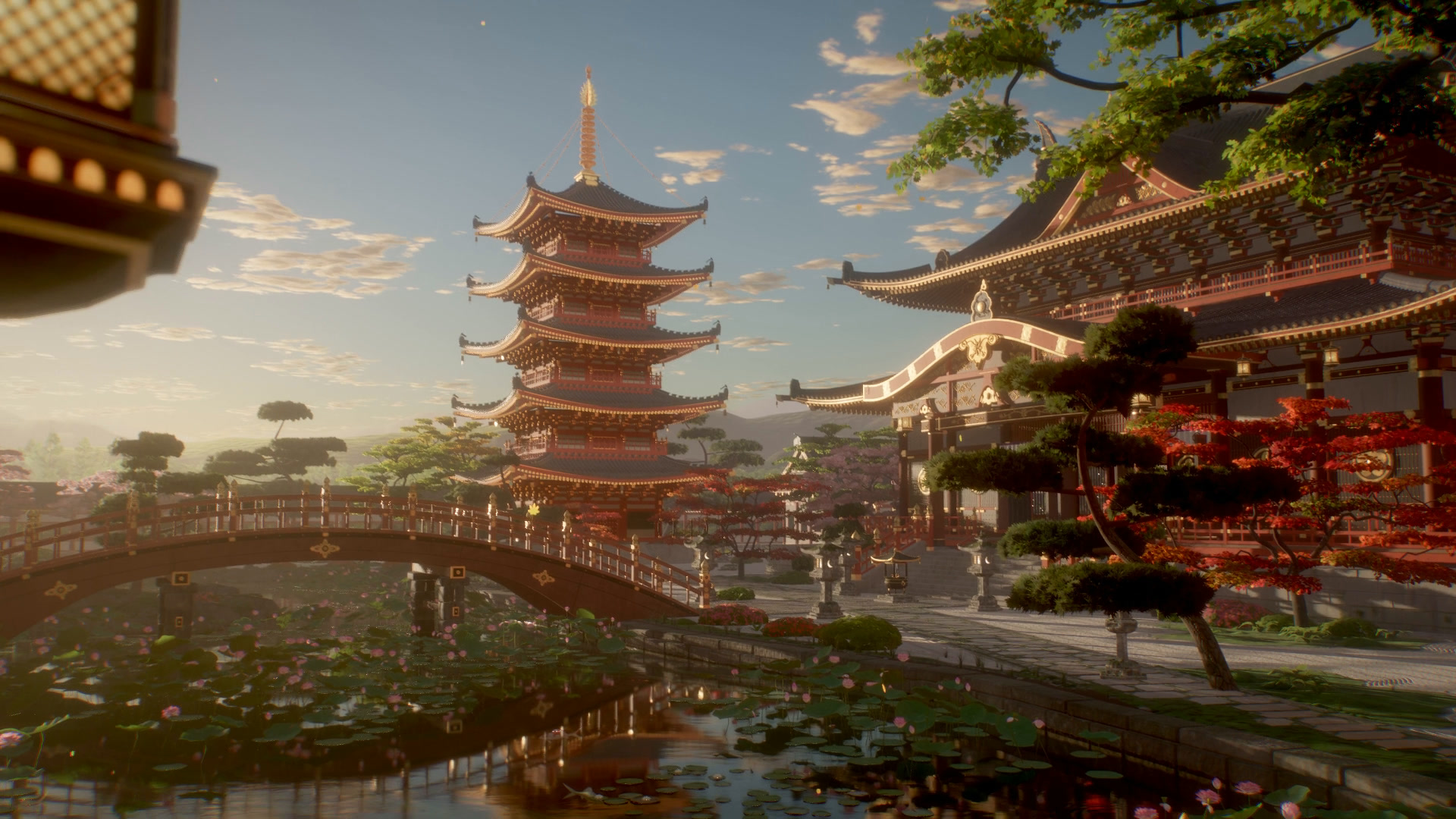
Watch the film
golden-temple-1080p60.mp4 is attached to the latest release: 70 seconds, 1920×1080, 60 fps, H.264, with music. The video is not stored in the repository.
What this is
Everything you see is code. The repository contains no 3D models, no texture files, no HDRIs and no image assets. The buildings, roof tiles, bracket sets, gold fittings, statues, trees, lotus, koi, water, terrain, clouds and sky are all generated by JavaScript when the page loads, and every surface is procedural GLSL injected into three.js's physically based materials. The few textures the scene uses, such as foliage atlases and terrain masks, are computed or drawn onto canvases at load time. The only third-party runtime library is three.js (r186).
- About 31,000 lines of JavaScript build a scene of 24.4 million triangles.
- The world is deterministic. Every random choice comes from a seeded generator, so each load builds exactly the same scene.
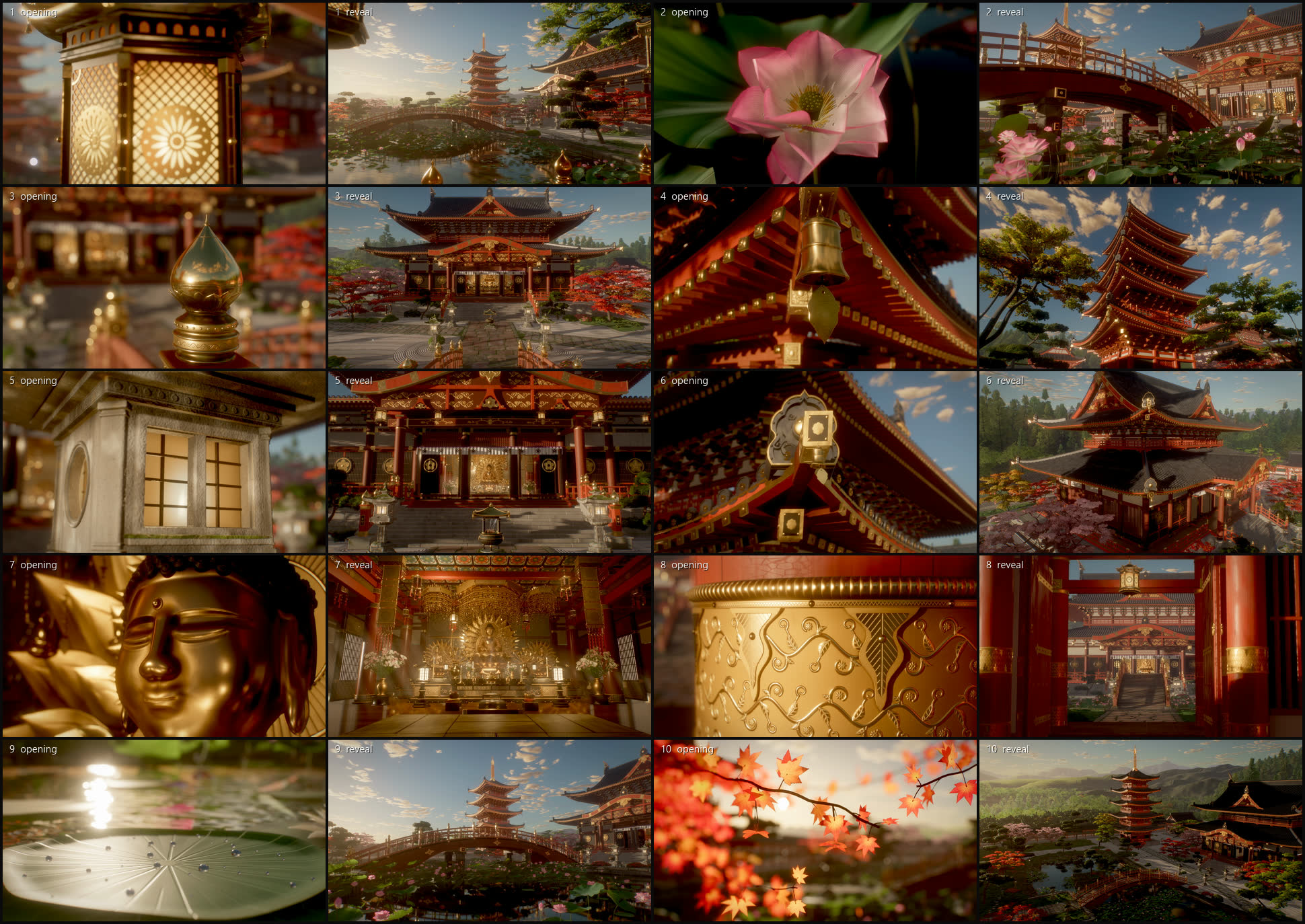
- The film has 10 shots of 7 seconds each. Every shot opens on a macro close-up of one detailed object and pulls back to reveal the scene around it.
- The film is rendered one frame at a time in headless Chrome. Each frame averages 8 sub-frames, which gives anti-aliasing, motion blur, soft sun shadows and noise-free ambient occlusion.
- The music is the one element that is not code: "Finding Movement" by Kevin MacLeod, licensed under CC BY 4.0. It is not included in the repository; a script downloads it (see Music).
Gallery
All stills are single frames from the finished film.
 Hanging lantern at the pond pavilion (shot 1) |
 Lotus in full bloom (shot 2) |
 Gilt giboshi finial on the bridge railing (shot 3) |
 Wind bell under the pagoda eaves (shot 4) |
 The five-storey pagoda (shot 4) |
 Roof corner of the main hall (shot 6) |
 The golden Amida Buddha (shot 7) |
 The inner sanctum (shot 7) |
 Gilt fitting on a gate pillar (shot 8) |
 The mirror pond (shot 9) |

The finale: a crane up over the whole precinct (shot 10)
Quick start
Requirements:
- Node.js 22 or newer
- A browser with WebGL 2 for the interactive preview. The headless tools need Chrome or Edge; they find it automatically, or you can set the
CHROMEenvironment variable to the executable. - ffmpeg on
PATHfor contact sheets, the film and the music
git clone https://github.com/Leonxlnx/golden-temple.git
cd golden-temple
npm install
npm run dev
Open http://localhost:5173/. The first load builds the whole world and compiles its shaders, which can take a few minutes on an integrated GPU the first time (shaders are cached afterwards). The status line in the top-left corner shows progress.
The page is controlled by URL parameters:
| Parameter | Effect |
|---|---|
| (none) | Interactive preview at preview quality. Drag to orbit. Keys 1–9 and 0 play shots 1–10, space pauses, f returns to the free camera, and c copies the current camera as a cam=…&look=… query. |
shot=N&t=sec |
One still frame of the film: shot N (zero-based, 0–9) at t seconds into the shot (0–7). Renders at final quality with 4 sub-frames. |
w=1920&h=1080 |
Canvas size. The default is 1280×720. |
spp=8 |
Sub-frames per frame (anti-aliasing, motion blur, soft shadows). |
q=preview or q=final |
Quality preset. preview uses a 2048² shadow map, 10 AO samples, no depth of field and sky-only ambient light. final uses an 8192² shadow map, 16 AO samples, depth of field and ambient light captured from the built scene. |
modules=pagoda,terrain |
Builds only the listed world modules: terrain, pond, hall, interior, pagoda, bridge, buildings, props, vegetation. Without terrain, a plain ground disc is used. |
cam=x,y,z&look=x,y,z&focal=35 |
An explicit camera, in metres. The focal length is in millimetres for a 36 mm-wide sensor. |
exp, fstop, focus, dof=1, ao, bloom, fog, vol |
Post-processing overrides, for example &exp=1.2&dof=1&fstop=2.8. |
For example, http://localhost:5173/?shot=0&t=5&w=1920&h=1080&spp=8 renders the frame at the top of this page.
Rendering stills
tools/snap.mjs drives headless Chrome on your GPU. It loads the page once, builds the world once, then renders any number of views and saves each one as a PNG. Keep npm run dev running in another terminal.
# one still
node tools/snap.mjs "shot=0&t=5&w=1920&h=1080&spp=8" out/shot1.png

# several views from one page load
node tools/snap.mjs "w=1920&h=1080&spp=8" --view "shot=3&t=0.5" out/bell.png --view "shot=6&t=6.9" out/sanctum.png

# contact sheet of all 10 shots at three moments each -> out/sheets/review.jpg
node tools/sheet.mjs --t 0.5,3.5,6.5 --tag review
sheet.mjs also takes --shots 0,4,9, --w, --h, --spp and --extra "<query>" for post overrides. A lock file in out/ serialises GPU use, so tools started at the same time wait for each other.
Environment variables for the headless tools: CHROME sets the browser executable, ANGLE sets the ANGLE backend (d3d11 by default on Windows, the browser's default elsewhere), and VITE_PORT sets the dev-server port if you run Vite on a port other than 5173.
Rendering the film
npm run dev                     # terminal 1
node tools/render.mjs --w 1920 --h 1080 --fps 60 --spp 8 --out out/temple.mp4   # terminal 2
The page renders each frame, reads the pixels back and posts them to the Node process, which pipes raw RGBA into ffmpeg (libx264, CRF 14, preset slow, BT.709). Nothing is written to disk between the GPU and the encoder.
Measured on the machine that made the film, a laptop with an AMD Radeon 780M integrated GPU:
- building the world and compiling the shaders takes about 2 minutes with a warm shader cache. The first headless run on a fresh clone has no cache yet and can take about 8 minutes; later runs reuse the cache in
out/.chrome-profile; - a 1080p frame with 8 sub-frames takes about 3.3 seconds;
- the full film (4,200 frames) takes about 4 hours, including cool-down pauses.
The renderer idles 60 ms after every frame and rests for 15 s every 250 frames, so an integrated GPU does not run flat out for hours. These pauses add about 8 minutes to the full film. To change them, pass page parameters through --extra, for example --extra "cool=0&restEvery=0".
Useful options:
--from N --to Mrenders only frames N to M−1.tools/splice.mjsputs a re-rendered segment back into a finished film, frame-accurate.--spp 2 --w 960 --h 540makes a quick draft.--crfand--presetset the x264 quality.
Music
The track is not redistributed in this repository. Download it, then edit it to the 70-second cut and mux it onto your render:
npm run fetch-music
node tools/score.mjs --video out/temple.mp4 --out out/temple_final.mp4
fetch-music downloads the MP3 from incompetech.com into assets_audio/, which git ignores, and checks it against the file the edit was timed with. score.mjs joins two sections of the track with a crossfade so that the string crescendo lands on the cut at 0:28 and the biggest hit lands on the cut to the Buddha at 0:42. It then normalises loudness to −16 LUFS and muxes the result as AAC. The video stream is copied, not re-encoded.
If you share a film made with this music, credit it as shown in Credits.
The film's 10 shots
| # | Time | Opens on | Reveals |
|---|---|---|---|
| 1 | 0:00 | A glowing openwork lantern at the pond pavilion | Pulls back across the pond to the pagoda, the arched bridge and the main hall |
| 2 | 0:07 | A lotus in full bloom: stamens, seed pod and dew | Glides low through the lotus bed toward the bridge and the hall |
| 3 | 0:14 | A gilt giboshi finial on the bridge railing | Cranes over the rail onto the bridge axis and pushes toward the hall |
| 4 | 0:21 | A bronze wind bell under the pagoda's first-storey eaves | Pulls back and tilts up all five storeys to the spire |
| 5 | 0:28 | The lit window of a stone lantern on the plaza | Swings onto the processional axis: the hall between the lantern pairs |
| 6 | 0:35 | A gilt rafter cap and bell at the corner of the hall's lower roof | Rises into a high three-quarter view of the two-tier hall |
| 7 | 0:42 | The face of the golden Amida Buddha | Pulls back under the gilt canopy to the whole altar |
| 8 | 0:49 | A chased gilt fitting on a pillar of the south gate | Slides onto the axis for a telephoto view of the hall through the gate |
| 9 | 0:56 | A lotus pad beaded with water drops, just above the water, facing the sun | Rises and turns to the reflections of the pagoda, the bridge and the hall |
| 10 | 1:03 | Backlit maple leaves against the low sun | Cranes up and back over the whole precinct and the hills behind it |
How it works
A short overview. docs/ARCHITECTURE.md covers the frame pipeline, the shot system and how to add modules and shots.
- Engine (
src/core/)sky.js: a physically based sky with single-scattering Rayleigh, Mie and ozone, a cloud layer lit through the atmosphere, and an HDR sun disc.fog.js: aerial perspective and height fog, written into every material's shader so that water reflections get the same haze. It also adds ambient-occlusion volumes, which are boxes that dim sky light inside the hall and under deep eaves.lighting.js: one sun with an 8192² shadow map. The shadow frustum is fitted around each shot's subject, and the image-based light is captured from the sky and then from the built scene.post.js: the sub-frame accumulation pipeline. Each sub-frame renders the HDR scene with 4× MSAA and SSAO and adds it into an accumulation buffer with a Gaussian weight. Across the sub-frames the camera, the sun and the shutter time are jittered, which produces anti-aliasing, soft shadows and motion blur. Each finished frame then gets depth of field, bloom, a blend of ACES and AgX tone mapping, a colour grade, vignette and grain. The pipeline also has a volumetric-light pass that ray-marches the sun's shadow map. The light shafts inside the hall are shadow-mapped slices from the interior module.materials.js:patch(), which injects GLSL hooks (colour, roughness, normal, emissive, lighting, wind) into three.js's standard and physical materials, and the shared procedural library: vermilion lacquer, gold leaf, bronze, roof tile, plaster, granite with moss, and wood.rng.js: the seeded random number generator that every module uses instead ofMath.random.
- World (
src/world/): nine modules, each abuild(ctx)function: terrain, pond, hall, interior, pagoda, bridge, buildings, props and vegetation.src/layout.jsis the shared site plan. - Shots (
src/shots.js): camera keys with a lens per key (focal length, focus distance, f-stop). Orientation is interpolated as a direction, ease curves linger on the close-up, and an optional Gaussian smoothing removes snaps from hand-made keys. Each module can override the camera of its own hero shot insrc/shotkeys/<module>.js. - Quality tools (
tools/):camcheck.mjsreports camera speed, turn rate and acceleration spikes for every shot.lumaflicker.mjsmeasures frame-to-frame brightness flicker per screen region.mcflicker.mjsmeasures motion-compensated shimmer.splice.mjsreplaces a re-rendered frame range in a finished film.
Project structure
golden-temple/
├── index.html              page shell: canvas, status line, HUD
├── vite.config.js
├── src/
│   ├── main.js             URL parameters, world build, frame loop (preview / still / render)
│   ├── layout.js           site plan: where everything is, in metres
│   ├── shots.js            the 10 shots and the camera evaluator
│   ├── core/               engine: sky, fog, lighting, post pipeline, materials, geometry, noise, rng
│   ├── world/              world modules (terrain, pond, hall, interior, pagoda, bridge,
│   │                       buildings, props, vegetation) and their helper files
│   └── shotkeys/           per-module camera overrides for the hero shots
├── tools/
│   ├── snap.mjs            headless GPU stills
│   ├── sheet.mjs           contact sheets
│   ├── render.mjs          offline film render (headless Chrome -> ffmpeg)
│   ├── fetch-music.mjs     downloads the music (not redistributed)
│   ├── score.mjs           edits the music to the cut and muxes it
│   ├── splice.mjs          replaces a frame range in a finished film
│   ├── camcheck.mjs        camera motion check (CPU only)
│   ├── lumaflicker.mjs     brightness flicker metric
│   ├── mcflicker.mjs       motion-compensated shimmer metric
│   ├── flickercheck.mjs    second-difference flicker metric
│   └── lib/chrome.mjs      browser detection and GPU flags
├── docs/
│   ├── ARCHITECTURE.md
│   └── images/             stills from the film
├── CREDITS.txt
└── LICENSE
npm scripts: dev, build, snap, sheet, render, fetch-music, score, camcheck and flicker (lumaflicker.mjs). Pass tool options after --, for example npm run render -- --spp 2 --w 960 --h 540.
How it was made
Golden Temple was built with Claude Code, with Claude Opus 5.5 orchestrating a set of parallel agents. Each agent owned one world module and, for most modules, the camera of its hero shot. All of them shared the site plan in src/layout.js and the engine in src/core/. The agents rendered stills of their work on the GPU through headless Chrome, compared them with reference images and iterated on what they saw. Camera motion and temporal stability were measured with the tools in tools/ before the final render. The reference images are not part of this repository.
Credits
Music:
"Finding Movement" Kevin MacLeod (incompetech.com)
Licensed under Creative Commons: By Attribution 4.0
https://creativecommons.org/licenses/by/4.0/
The music is edited for length by tools/score.mjs and is not redistributed in this repository.
three.js is MIT licensed, © 2010–2026 three.js authors.
See CREDITS.txt.
License
The code is released under the MIT License. See LICENSE. The music is not covered by this license; it is licensed separately under CC BY 4.0, as listed in Credits.