

unbagrnd
A small desktop app that uses AI to remove the background from images — entirely on your device. No cloud API, no account, no telemetry, and no internet access required after a one-time setup step.
- On-device AI. Background removal runs through a real neural network (ONNX Runtime), inferred locally on your machine. No image, filename, or metadata is ever sent anywhere.
- 100% free & open source. MIT-licensed, built on a free, open-source stack — no API keys, no paid tiers, no usage limits.
- Pick your AI model. Choose from several background-removal models in Settings, trading off speed vs. accuracy. Each downloads once on first use (starting at ~43 MB for the default) and is cached locally after that.
- Offline after setup. The only network requests the app ever makes are those one-time model downloads. Nothing else — no analytics, no update checks.
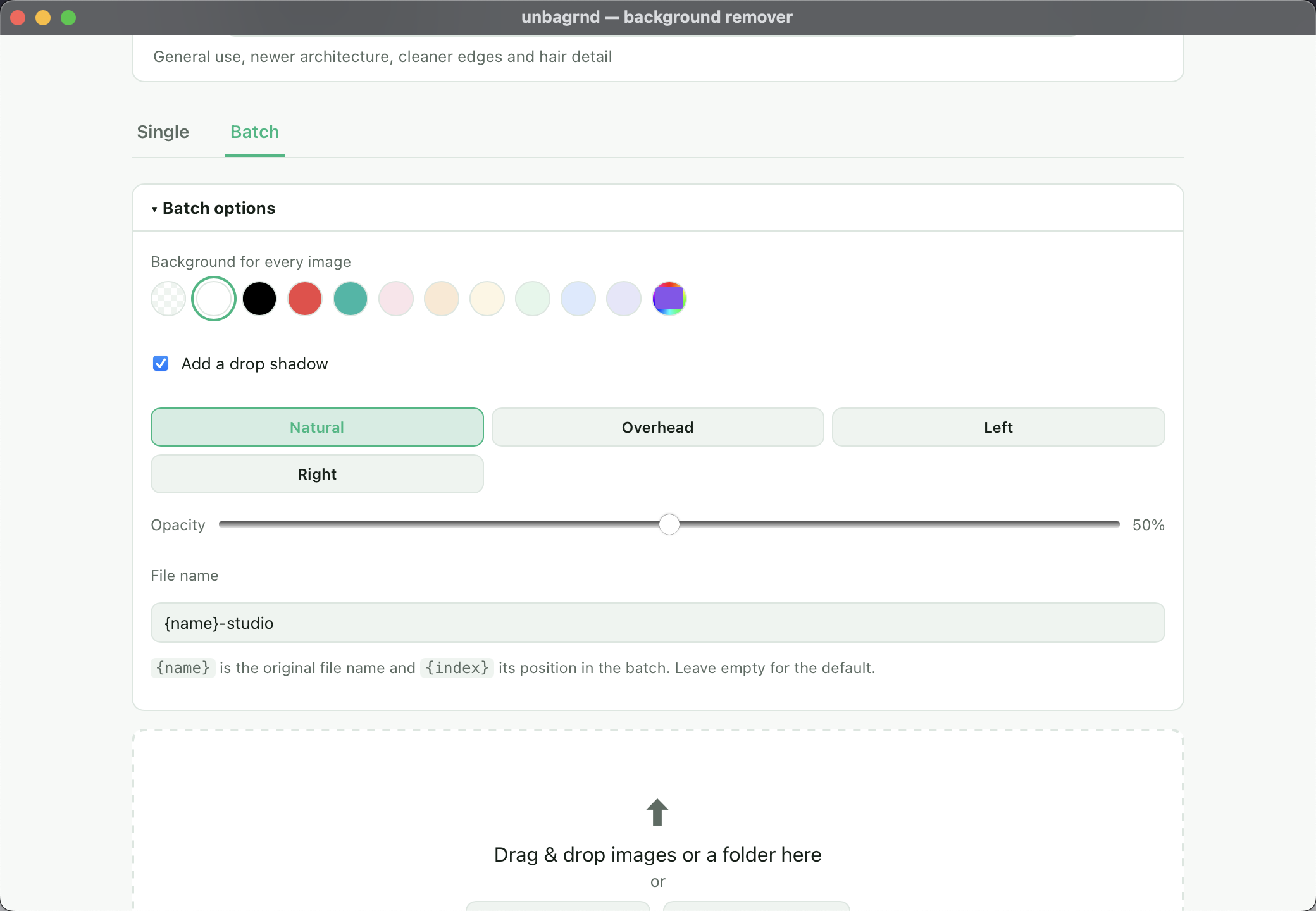
- Single and batch. Process one image, or a whole folder, from the same
window. Batches can apply one background color and drop shadow to every
image, name outputs from a template (
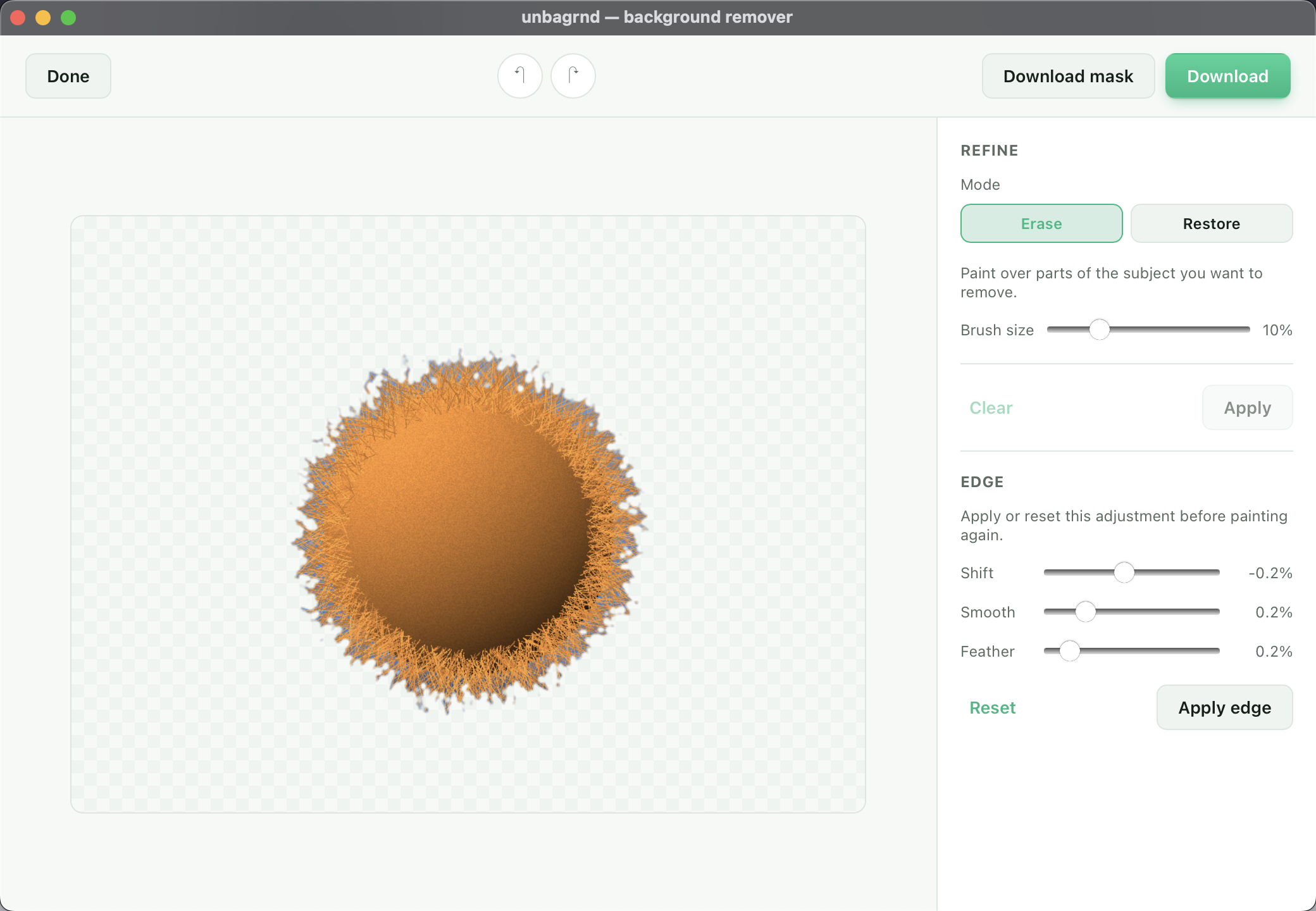
{name},{index}), be cancelled mid-run, retry just the files that failed, and be exported as a ZIP. - Refine by hand. Brush over the result to erase or restore parts of the cutout, with undo/redo — for the spots the model gets almost right.
- Refine the edge. Shift (shrink/grow), smooth, or feather the cutout's outline with live preview — for hair and fur.
- Export the mask. Save the cutout's alpha channel as a black-and-white matte, for use as a layer mask in design tools.
- Edit the background. Fill it with a solid color and add an on-device drop shadow, no AI or network involved.
- Export as PNG, WebP, or SVG. Pick the output format in Settings.
- Cross-platform. macOS, Windows, Linux, and Android.
Screenshots





Videos
How it works
unbagrnd runs IS-Net "general use"
(Apache-2.0, from Qin et al., "Highly Accurate Dichotomous Image
Segmentation", ECCV 2022) as an ONNX model, via the ort
Rust bindings for ONNX Runtime. This is the same model family used by the
popular rembg Python tool. The whole pipeline — decode, resize, normalize,
run the model, turn its predicted mask into an alpha channel, re-encode as
PNG — happens in the Rust backend; the frontend never touches the network.
Installing
Grab the installer for your platform from the Releases page:
- macOS:
.dmg(Apple Silicon only — the on-device ML runtime this app depends on no longer ships prebuilt binaries for Intel Macs) - Windows:
.msi/.exe - Linux:
.AppImage/.deb - Android:
.apk/.aab— release-signed, installs and upgrades in-place like any other app (see Android below for building one yourself)
On first launch, or the first time you remove a background, unbagrnd downloads the model (~170 MB) and shows a progress bar while it does. That only happens once — every run after that is fully offline.
macOS: "unbagrnd is damaged and can't be opened"
This build isn't code-signed or notarized (that requires a paid Apple Developer account), so Gatekeeper quarantines it after download and shows this message — the app itself isn't actually damaged. Clear the quarantine flag once, after moving it to Applications:
xattr -cr /Applications/unbagrnd.app
Development
Requires:
- Node.js 20+
- A recent stable Rust (1.88+), installed via rustup
— not your OS package manager's
rustc, which is often too old to build the ONNX Runtime bindings this app depends on. - The platform build tools Tauri needs — see the
Tauri prerequisites guide for
your OS (on Debian/Ubuntu:
libwebkit2gtk-4.1-dev,libssl-dev,libayatana-appindicator3-dev,librsvg2-dev, plus standard build tools).
npm install       # install frontend dependencies
npm run tauri dev # run the app in dev mode, with hot reload
Building a release installer
npm run tauri build
Produces a native installer for your current OS in
src-tauri/target/release/bundle/.
Android
Every tagged release already ships a release-signed .apk/.aab (see
Releases) — installs and upgrades in-place like any
other app. Build one yourself only if you want to develop against a
connected device/emulator. Requires the Android SDK, an NDK, and
JDK 17+ (ANDROID_HOME and NDK_HOME set), on top of the prerequisites
above:
npx tauri android init   # first time only, scaffolds gen/android
npx tauri android dev    # run on a connected device/emulator, hot reload
npx tauri android build --target aarch64          # signed release APK
npx tauri android build --target aarch64 --debug  # unsigned debug APK (huge - unstripped)
The release APK lands at
src-tauri/gen/android/app/build/outputs/apk/universal/release/app-universal-release.apk.
It's only installable if it's signed: generate a keystore once and point
src-tauri/gen/android/keystore.properties at it (both are gitignored, and
the build falls back to unsigned if the properties file is missing):
cd src-tauri/gen/android/app
keytool -genkeypair -v -keystore unbagrnd-upload-key.jks -alias unbagrnd \
  -keyalg RSA -keysize 2048 -validity 10000
cat > ../keystore.properties <<EOF
storeFile=unbagrnd-upload-key.jks
storePassword=<the password you just set>
keyAlias=unbagrnd
keyPassword=<the same password - PKCS12 keystores don't support separate ones>
EOF
Android's OS-native certificate verifier has a
known, unfixed bug
where it reports any CRL-only certificate (no OCSP URL — the norm since
Let's Encrypt dropped OCSP support in 2025) as revoked, which broke the
model download outright. Worked around in models.rs's http_client(): on
Android the download client is built with a bundled Mozilla root store
instead of going through the platform verifier at all.
Picked/dropped images can't be read with plain std::fs on Android: the
file/photo picker hands back a content:// URI, not a real filesystem
path. commands.rs's open_image goes through the tauri-plugin-fs
plugin instead, which knows how to resolve those via the OS's
ContentResolver. For the same reason, output_path_for can't always save
"next to the source file" on Android (a content URI has no real parent
directory) - it falls back to a directory inside the app's own storage.
Running the Rust test suite
cargo test --workspace # run from the repo root - covers core, src-tauri and api
Most of the backend is covered by ordinary cargo test. The one exception
is the end-to-end inference test in core (decode → preprocess → run the
model → composite the alpha channel), which needs a real cached model file
and is skipped by default so a fresh clone doesn't need a 170 MB download
just to run cargo test. To run it locally:
UNBAGRND_TEST_MODEL_KEY=silueta \
UNBAGRND_TEST_MODEL_PATH=/path/to/silueta.onnx \
UNBAGRND_TEST_IMAGE_PATH=/path/to/a/photo.jpg \
cargo test --release removes_background_from_a_real_photo -- --nocaptureapi's own tests (cargo test -p unbagrnd-api) exercise the real Axum
router end to end (auth, key lifecycle, image validation) against a
throwaway SQLite file, no model or network access needed.
Releasing
Pushing a tag matching v* (e.g. v0.3.3) triggers
.github/workflows/build.yml, which builds
installers for macOS (Apple Silicon + Intel), Windows, and Linux, builds a
debug-signed Android APK/AAB, and attaches all of it to a draft GitHub
release.
API
A self-hosted REST API wrapping the exact same on-device background-removal core the desktop app uses — no cloud, no account, no image ever sent anywhere but your own server.
Architecture
                 unbagrnd
                     |
          +----------+----------+
          |                     |
     Desktop App             API Server
       (Tauri)                 (Axum)
          |                     |
          +----------+----------+
                     |
              unbagrnd-core
           (models.rs, bg_remove.rs)
                     |
              ONNX Runtime
core/ has the one and only background-removal implementation (model
catalog, download/caching, ONNX Runtime inference) — both the desktop app
and the API wrap it, neither reimplements it. See
Project structure above.
Quick start
git clone https://github.com/zidniryi/unbagrnd.git
cd unbagrnd
cp .env.example .env
# edit .env and set UNBAGRND_ADMIN_KEY (e.g. `openssl rand -hex 32`)
docker compose up --build
curl http://localhost:8080/health
# {"status":"ok"}
Interactive API docs (Swagger UI): http://localhost:8080/docs. A ready-made
Postman collection is at
docs/unbagrnd-api.postman_collection.json.
Environment variables
See .env.example for the full, commented list. The
important ones:
| Variable | Default | Meaning |
|---|---|---|
HOST / PORT |
0.0.0.0 / 8080 |
Where the server listens |
DATABASE_URL |
sqlite:///data/unbagrnd.db |
API key metadata storage |
UNBAGRND_ADMIN_KEY |
(unset) | Required for /v1/keys — see below |
UNBAGRND_MODEL_KEY |
silueta |
Which model to load at startup |
UNBAGRND_MODELS_DIR |
/models |
Where the model is cached |
UNBAGRND_MAX_FILE_SIZE_MB |
20 |
Upload size limit |
UNBAGRND_MAX_IMAGE_WIDTH / HEIGHT |
8192 |
Image dimension limit |
UNBAGRND_MAX_CONCURRENT_INFERENCES |
2 |
Bounds simultaneous remove-background calls |
UNBAGRND_MAX_BATCH_SIZE |
10 |
Max images per remove-background/batch request |
UNBAGRND_RATE_LIMIT_PER_MINUTE |
60 |
Per-API-key limit; 0 disables it; resets on restart |
UNBAGRND_CORS_ORIGINS |
* |
Comma-separated allowlist, or * |
API key management
Every /v1/keys route requires X-Admin-Key: $UNBAGRND_ADMIN_KEY — a
regular API key (the kind handed out below to callers of
/v1/remove-background) can never create, list or revoke other keys. If
UNBAGRND_ADMIN_KEY isn't set, these routes are disabled (503) rather
than falling back to some default credential.
curl -X POST http://localhost:8080/v1/keys \
  -H "X-Admin-Key: $UNBAGRND_ADMIN_KEY" \
  -H "Content-Type: application/json" \
  -d '{"name": "my-production-key"}'
# {"id":"...","name":"my-production-key","api_key":"unb_live_...","created_at":"..."}
api_key is only ever returned here, at creation time — only its SHA-256
hash is stored (see key_hash in migrations/0001_api_keys.sql), so save
it now. GET /v1/keys lists metadata only (never the key or its hash);
DELETE /v1/keys/{id} revokes it immediately (soft-deleted, so
revoked_at stays as an audit trail).
Removing a background
curl -X POST http://localhost:8080/v1/remove-background \
  -H "X-API-Key: unb_live_xxxxxxxxx" \
  -F "image=@photo.jpg" \
  --output result.png
Returns a transparent PNG (Content-Type: image/png). The upload is
processed in memory and discarded — nothing about it is written to disk or
logged.
Batch
curl -X POST http://localhost:8080/v1/remove-background/batch \
  -H "X-API-Key: unb_live_xxxxxxxxx" \
  -F "images=@photo1.jpg" \
  -F "images=@photo2.jpg" \
  -F "images=@photo3.jpg"
Up to UNBAGRND_MAX_BATCH_SIZE images in one request (repeat the images
field, one per file). Always returns 200 with one result per image, in
upload order — a single corrupt or unreadable file doesn't fail the rest of
the batch:
{
  "results": [
    { "filename": "photo1.jpg", "status": "ok", "image_base64": "..." },
    { "filename": "photo2.jpg", "status": "ok", "image_base64": "..." },
    { "filename": "photo3.jpg", "status": "error", "error": { "code": "UNSUPPORTED_IMAGE", "message": "..." } }
  ]
}
Every item still goes through the same UNBAGRND_MAX_CONCURRENT_INFERENCES
semaphore a single /v1/remove-background call does, so a large batch
queues internally rather than spiking resource usage.
Endpoints
| Method | Path | Auth | Description |
|---|---|---|---|
GET |
/health |
none | Liveness check |
POST |
/v1/keys |
X-Admin-Key |
Create an API key |
GET |
/v1/keys |
X-Admin-Key |
List API key metadata |
DELETE |
/v1/keys/{id} |
X-Admin-Key |
Revoke an API key |
POST |
/v1/remove-background |
X-API-Key |
Remove one image's background |
POST |
/v1/remove-background/batch |
X-API-Key |
Remove backgrounds from up to UNBAGRND_MAX_BATCH_SIZE images |
GET |
/docs |
none | Swagger UI |
Errors are always JSON: {"error": {"code": "INVALID_API_KEY", "message": "..."}}.
Security & privacy
- API keys:
unb_live_+ 256 bits of CSPRNG-generated entropy, SHA-256 hashed at rest, compared in constant time. Never logged (only the safe-to-displaykey_prefixis). - Upload size, image dimensions, inference concurrency and per-key request rate are all bounded and configurable.
- Nothing this server processes is sent to any third party. There's no analytics, no telemetry, and no dependency on any unbagrnd-operated service — it's exactly as self-contained as the desktop app.
Development (without Docker)
cp .env.example .env   # set UNBAGRND_ADMIN_KEY
cargo run -p unbagrnd-apiUNBAGRND_MODELS_DIR/DATABASE_URL default to /models//data, which
won't be writable outside a container — override both to local paths in
.env (e.g. ./tmp/models, sqlite://./tmp/unbagrnd.db) for local runs.
Production deployment
Put a reverse proxy (Caddy, nginx, Traefik, ...) in front of it for TLS;
unbagrnd-api itself only speaks plain HTTP. Restrict
UNBAGRND_CORS_ORIGINS to your actual frontend origin(s) rather than *,
and treat UNBAGRND_ADMIN_KEY like any other production secret (a real
secrets manager, not a checked-in .env).
Where the model is cached, and how to clear it
The model is stored in the app's local data directory, named after the app
identifier (com.unbagrnd.app):
| OS | Path |
|---|---|
| macOS | ~/Library/Application Support/com.unbagrnd.app/ |
| Linux | ~/.local/share/com.unbagrnd.app/ |
| Windows | %APPDATA%\com.unbagrnd.app\ |
| Android | /data/user/0/com.unbagrnd.app/models/ (app-private storage) |
To clear the cached model (freeing ~170 MB, or to force a clean re-download),
delete that folder, or just the isnet-general-use.onnx file inside it. The
app will re-download it the next time it's needed. On Android, that folder
isn't user-browsable without root/adb, so use in-app Settings ("Clear
model") instead, or just uninstall the app.
Project structure
A Cargo workspace with three Rust members: the shared inference core, the Tauri desktop app, and the self-hosted REST API — see API below for why it's split this way.
unbagrnd/
  Cargo.toml                # workspace root (members: core, src-tauri, api)
  src/                       # desktop frontend: plain HTML/CSS/JS, no framework
    index.html
    styles.css
    main.js
  core/                      # unbagrnd-core: the one background-removal implementation
    src/
      models.rs               # model catalog + download/caching (host-agnostic)
      bg_remove.rs             # preprocessing, inference, postprocessing
  src-tauri/                 # desktop app - wraps core with Tauri commands
    src/
      lib.rs                   # app entrypoint, plugin & command registration
      commands.rs              # Tauri commands exposed to the frontend
      models.rs                # thin AppHandle wrapper around core::models
      background.rs, refine.rs # background-fill/shadow and manual mask refine
      matte.rs                 # alpha-matte export and edge shift/smooth/feather
      settings.rs, system_usage.rs
  api/                        # unbagrnd-api: self-hosted REST API - wraps core with Axum
    src/
      main.rs, config.rs, state.rs, error.rs, openapi.rs
      auth/                    # X-API-Key / X-Admin-Key extractors
      db/                      # SQLite (sqlx) - API key metadata
      routes/                  # /health, /v1/keys, /v1/remove-background
    tests/api_test.rs
  migrations/                 # sqlx SQL migrations for the API's SQLite database
  Dockerfile, docker-compose.yml, .env.example
  .github/workflows/
    build.yml                  # cross-platform desktop + Android release builds
License
MIT — see LICENSE. Free for personal and commercial use.
The bundled model, IS-Net "general use",
is Apache-2.0 licensed and downloaded from rembg's (MIT-licensed) GitHub
release assets — see How it works above.
Contributing
Issues and pull requests are welcome. This is a small, focused tool; the non-negotiable constraints above (local-only, free, offline after setup) apply to any contribution.
Support
If unbagrnd saves you time, you can support its development on Ko-fi.