

ohmail
Consent-first email, on the mailboxes you already have.
New senders wait at the Screener until you let them in, unless you wrote to them first, and everything you said yes to is organized in place — real folders on your own IMAP server, readable by any other mail app, kept when you leave. This repository is the free desktop app for macOS, Windows and Linux, and the server source behind ohmail.app beside it: the whole program, all of its source, AGPL-3.0, no account.
Any IMAP mailbox, Gmail and Microsoft 365 / Exchange*.
* Microsoft 365 and Exchange connect with your Microsoft sign-in on ohmail Cloud and on self-hosted servers set up for it; some organizations require an admin to approve ohmail first. On the desktop app, a local gateway that speaks IMAP can be added — see Local mail gateway.
Download the latest release · try the demo in your browser · ohmail.app

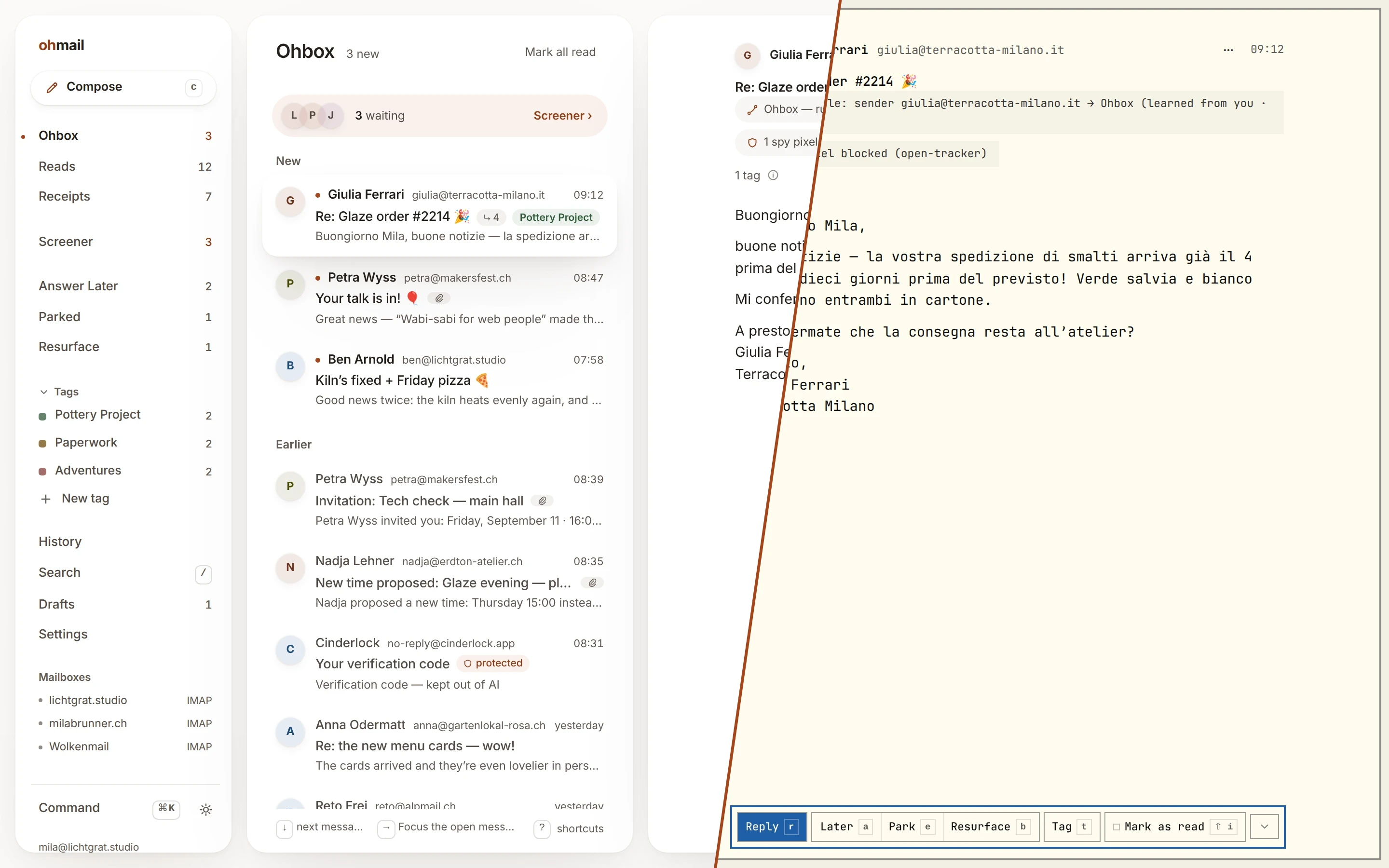
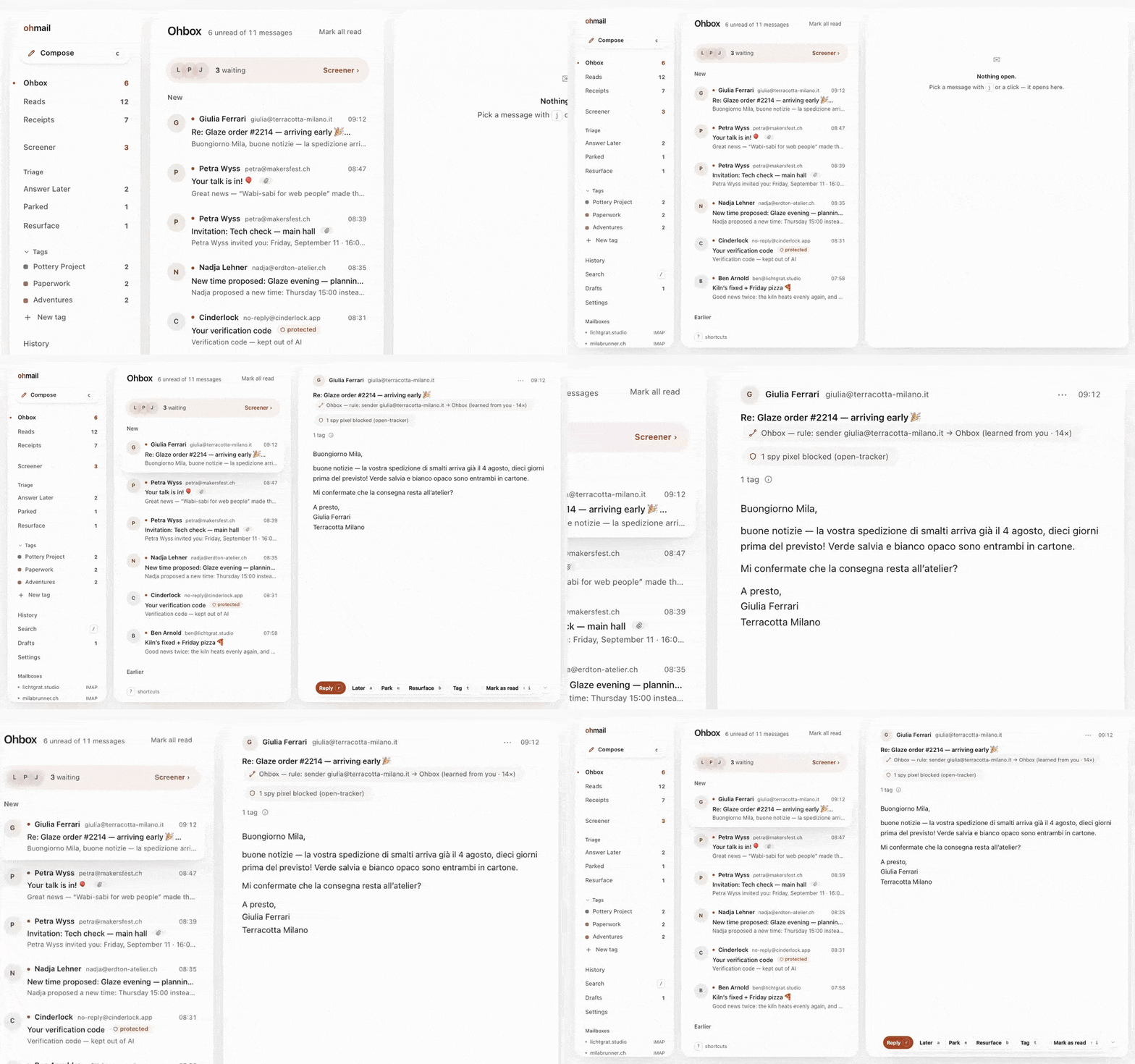
The Ohbox holds only mail you said yes to
Someone new who writes to you waits at the Screener — not in your inbox — unless you wrote to them first. The Ohbox holds the people you said yes to, the rules that file your mail are listed under Settings → Rules to change or revoke, and a tracking pixel the blocker recognises before it loads is never requested unless you turn the blocker off.
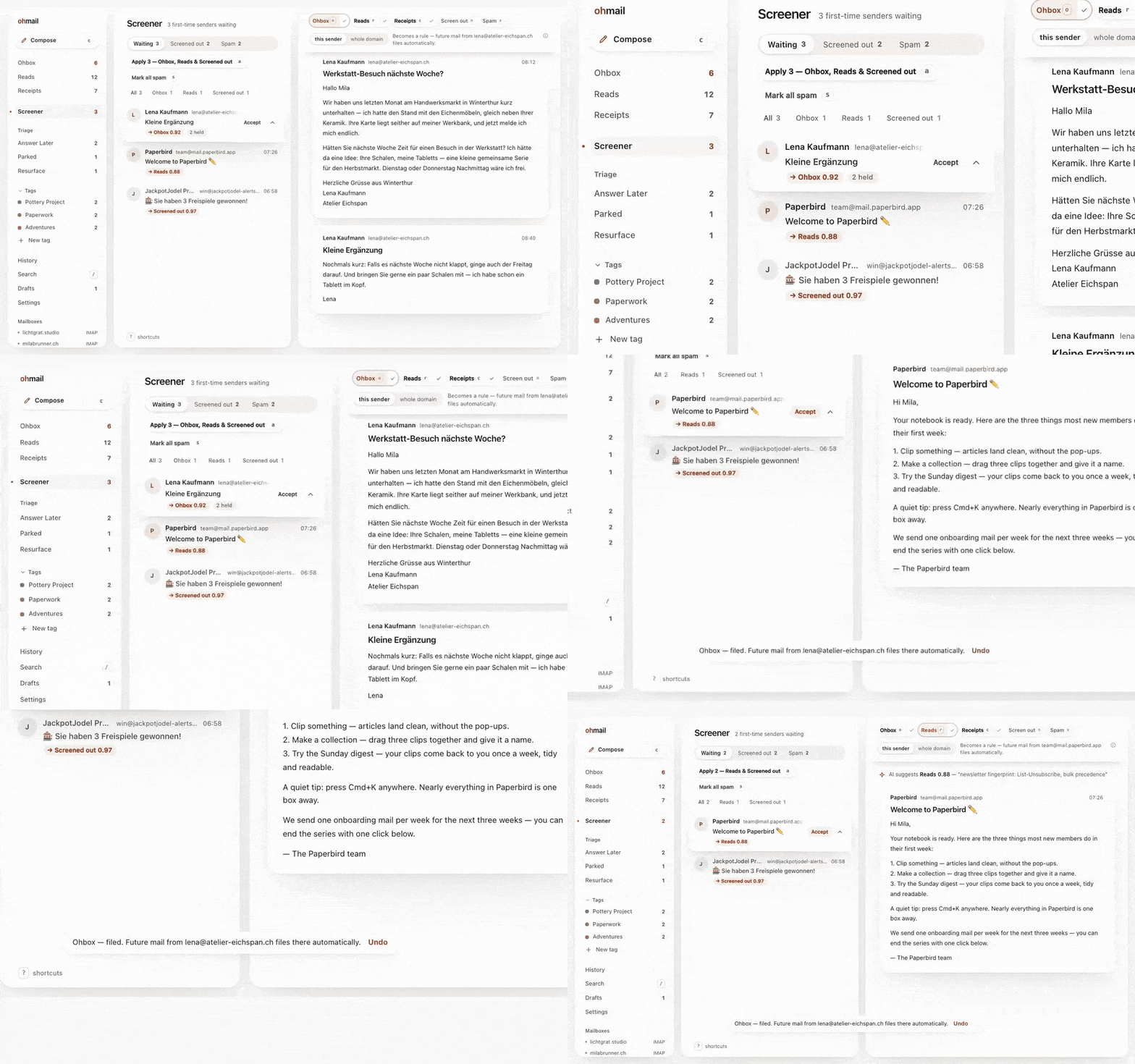
The Screener
New senders wait here until you decide where they go. Someone you have written to since you set up ohmail, or who answers a message you sent, goes straight to the Ohbox.
With AI on — your own Anthropic or OpenAI key, or a local model through Ollama, and off until you turn it on — the Screener proposes a door for each waiting sender, with a confidence and a reason, and one press accepts. Switch on auto-suggest and the proposal is already waiting as the mail arrives. Nothing applies itself unless you ask: a pattern you have confirmed often enough graduates and files itself from then on, spam included; or switch on "Act on confident suggestions for me" and a sender whose suggestion is confident is filed for you — never someone you have written to — with the rule listed for you to undo. Every move is recorded and reversible. A one-time code inside a message is stripped before any model sees it, and automatic routing leaves that mail alone entirely.
Configure nothing and the Screener still holds first contact, rules still file mail, and search still works — the suggestion and the draft are not offered. Running ohmail on your own server instead? The provider list there is shorter today; docs/self-host/README.md has the table.
Spam needs no AI at all: one press files the message into your mailbox's own Junk folder — where the mailbox has one — and the sender rule remembers, so the next mail from that sender never reaches the gate, and a message you move back out of Junk has its text again with the move. Screening out or marking spam also sends the list's one-click unsubscribe on your behalf, where one is offered (on by default; a switch turns it off). Plain newsletters and receipts can be filed out of the Screener by deterministic rules alone, once you switch that on. ohmail deletes nothing on its own.
Which model, what it is shown, and what leaves the machine: Model providers and keys, under Going deeper.
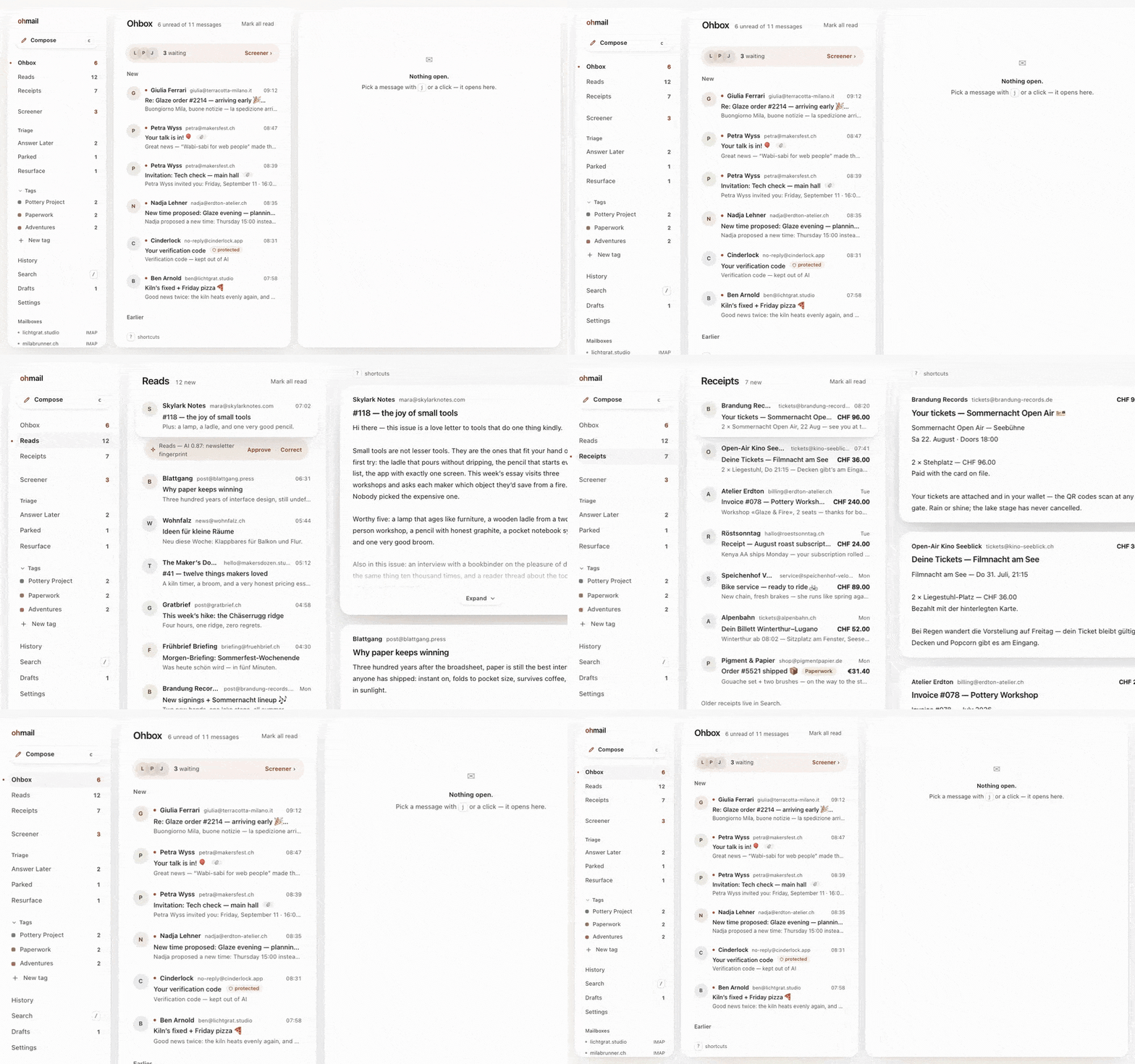
Ohbox · News · Receipts
Three views instead of one pile: people in the Ohbox, newsletters in News with a waterline where you stopped, paperwork in Receipts. Each is backed by a real folder on your own mail server.
All your mailboxes
Gmail, Microsoft 365 and Outlook.com, iCloud, Fastmail, your own server — if it speaks IMAP, ohmail organizes it. One Screener stands in front of all of them, and every reply leaves from whichever of your addresses you choose. Removing a mailbox from your ohmail account can also erase ohmail's copy of its mail — you type its address and confirm with a second factor — and the mail on your own server is never touched.

Your mailbox stays the source of truth
Every filing decision lands as a real folder in your own account, readable by any other mail app, forever. Leave anytime — cancel, sign out, or just open a different client — and your mailbox is already organized.
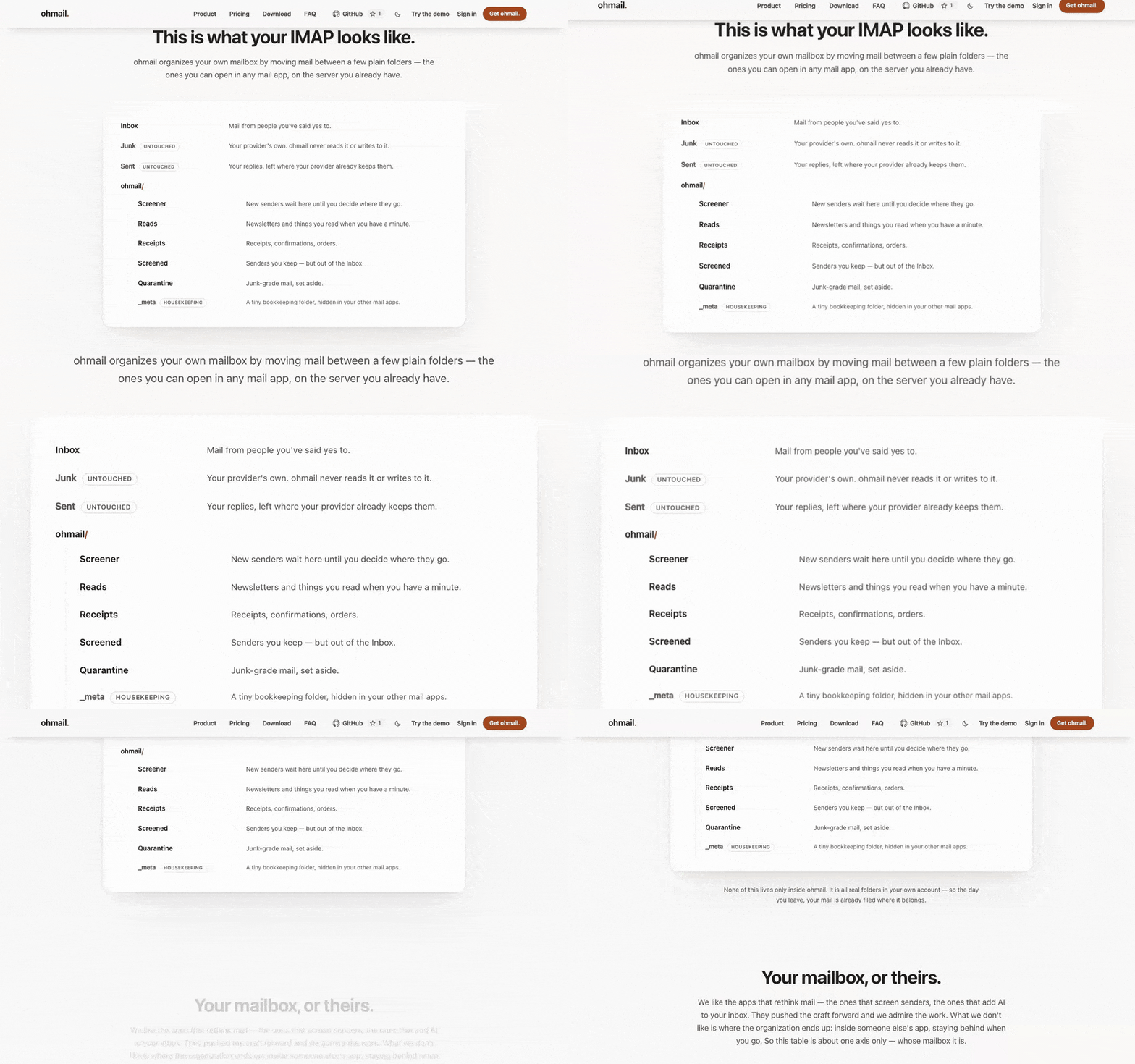
Your settings travel with it. The senders you've screened in, your rules, your notification choices, your
away reply and your tag names are stored in the mailbox itself — a few
kilobytes of versioned JSON in the hidden ohmail/_meta folder, written by
whichever organizer is active. Connect the same mailbox from a desktop
install, from ohmail Cloud or from a server you run, and
ohmail finds them and asks first: "We found your ohmail settings on this
mailbox." No export step, no transfer flow, no account linkage — switching
how you run ohmail is reconnecting a mailbox, not migrating a product.
And if you stop using ohmail entirely, those decisions are still yours: in your own mailbox, in a published format anything can parse — docs/organizer-profile.md is the specification. Rules that live in a SaaS die with the subscription; these don't. Exactly what travels today: screener verdicts, rules, notification rules, the away responder and tag names — the settings you made, never credentials, never keys.
History is the whole mailbox. Every message you own is listed there, newest first, back to the first one — on the web, the desktop and the phone — with the months and years on the right to jump anywhere, and any of them opens and can be deleted, moved or tagged like mail that came in today. Your provider's Junk, Trash and Drafts folders are the exception: ohmail does not read them.
The folders ohmail creates, the lease that names the one active organizer, and exactly what travels with a mailbox and what stays with a deployment: How ohmail organizes inside your mailbox, under Going deeper.
Fast search
Search answers as you type, typo-tolerant, over your whole mailbox: the words of every message (a long one's first 65,536 characters), its subject, its sender, its recipients and its attachment names. What the app already holds shows at once and is replaced by the mailbox's answer; the first page is back in milliseconds, the line under the box says how long it took, and the count follows right behind — about how many, then the exact number. On a desktop that organizes its own mailbox, search reads the app's own store with the same indexes as the server. Narrow it by sender, folder, unread or attachments. Your provider's Junk, Trash and Drafts folders are the places it does not reach.

Dark mode
Light and dark, one press apart — HTML mail included, redrawn for a dark screen with the sender's original one click away.

Photos are compressed before they are sent
Attach a JPEG or a PNG and it is compressed automatically, on your own machine, before anything is uploaded — client-side, so there is no waiting on a server. The Quality dial beside the attach button — Low, Medium, High, or Original for no compression at all — picks how much; Medium is the default, and the choice is remembered per account. Other formats, including the HEIC a modern iPhone writes, are sent exactly as they are.

The frames above were recorded over the demo mailbox at ohmail.app/demo, in an earlier release; the app itself carries no demo mail and opens empty until you connect a mailbox.
Host your own devices from your desktop
First, the fact under the whole price list: a running desktop install is already a self-hosted ohmail. The complete organizer — Screener, rules, filing — runs on your machine against your own mailbox, the mailbox stays the source of truth, and no cloud is in the path. The free app is not a demo of the server product; it is the same product, self-hosted. What this section adds is the next step: on a computer that stays awake, that same install can also be the ohmail server your other devices use.
Since 0.10.0, a desktop install that organizes your own mailbox can serve it to your other devices: Settings → Devices, one switch. Your phone's browser then opens the same client this repository builds — your Ohbox, your Screener, reading and filing real mail — through your own computer, while it is awake. No cloud in the path, and nothing opened to the internet: the engine listens on this computer only, and Tailscale — a free private tunnel between your own devices — carries it to your phone under a real HTTPS address. The pane detects whether Tailscale is installed and running and walks you through what's missing, in plain words.
Adding a device is a QR code: scan it with the device's camera, and it opens your mail and pairs in one step — the ohmail app for Android (apps/mobile) pairs by scanning the same code, or by a typed address over the plain-HTTP LAN door below. Each code works once and expires in five minutes; every paired device is listed and can be removed at any moment, and removing one cuts it off with its next request. Relaunching or updating the desktop app does not unpair anything. When host mode is on, closing the window hides the app instead of quitting it — the tray brings it back — and the enable step offers start-at-login as a visible choice, not a hidden default. Turned off, none of this machinery exists: no listener, no tray, the same app 0.9.x was.
On a phone ohmail wears a navigation made for one hand: the views sit in a floating dock at the bottom of the screen, a tablet opens list and message side by side, and a foldable splits at the hinge with the verbs on an edge rail by your thumb. The renders below come from the design prototype the phone navigation is built from.
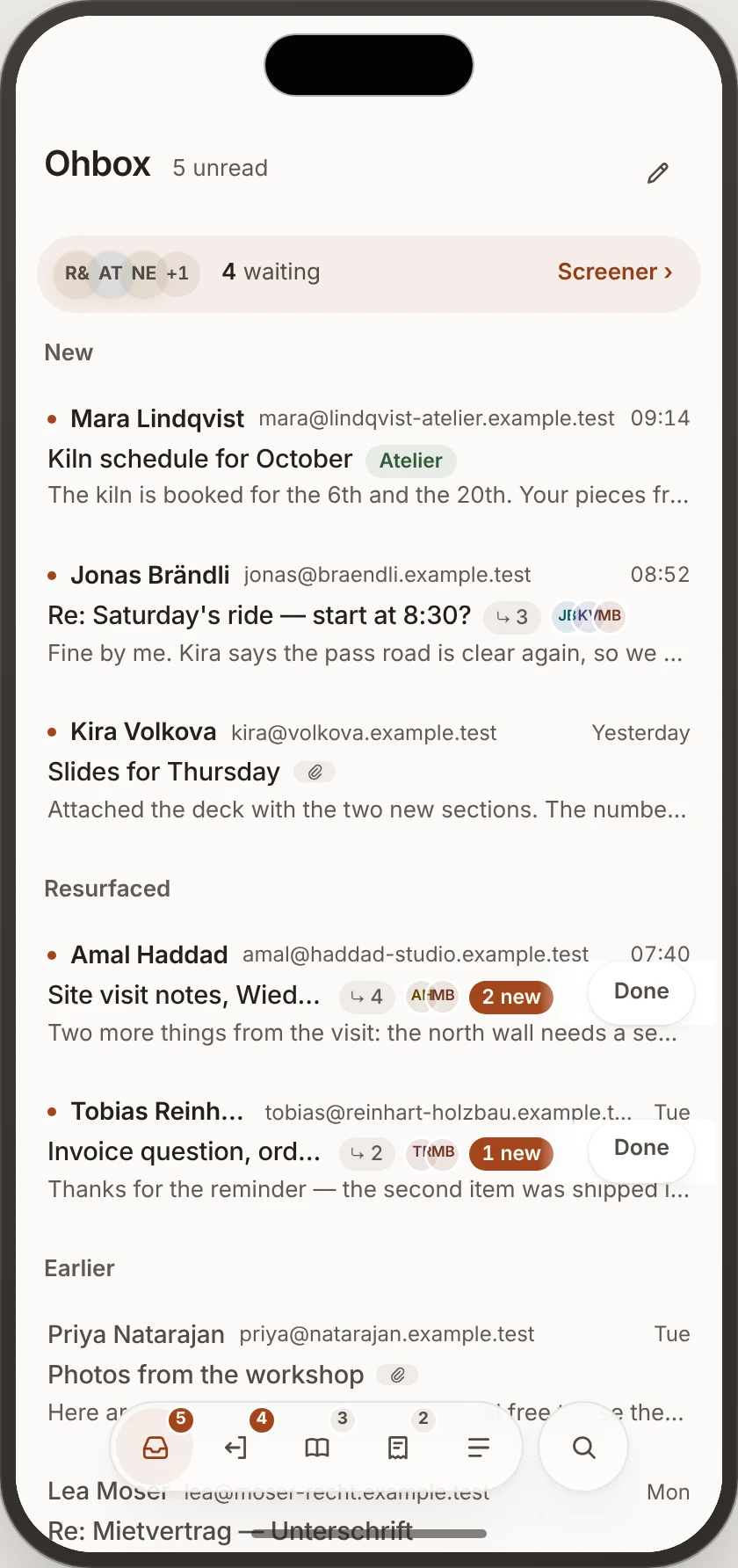
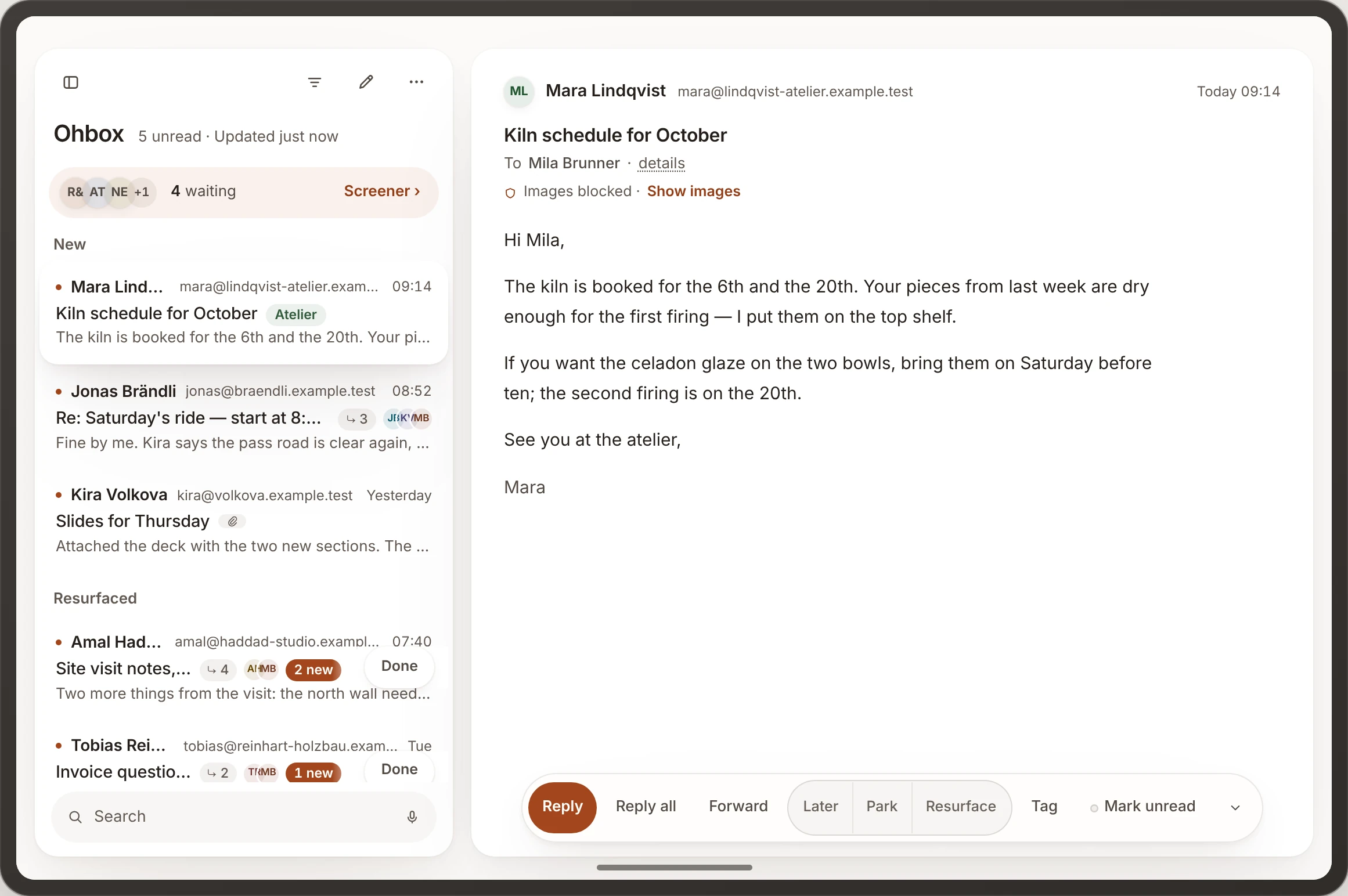
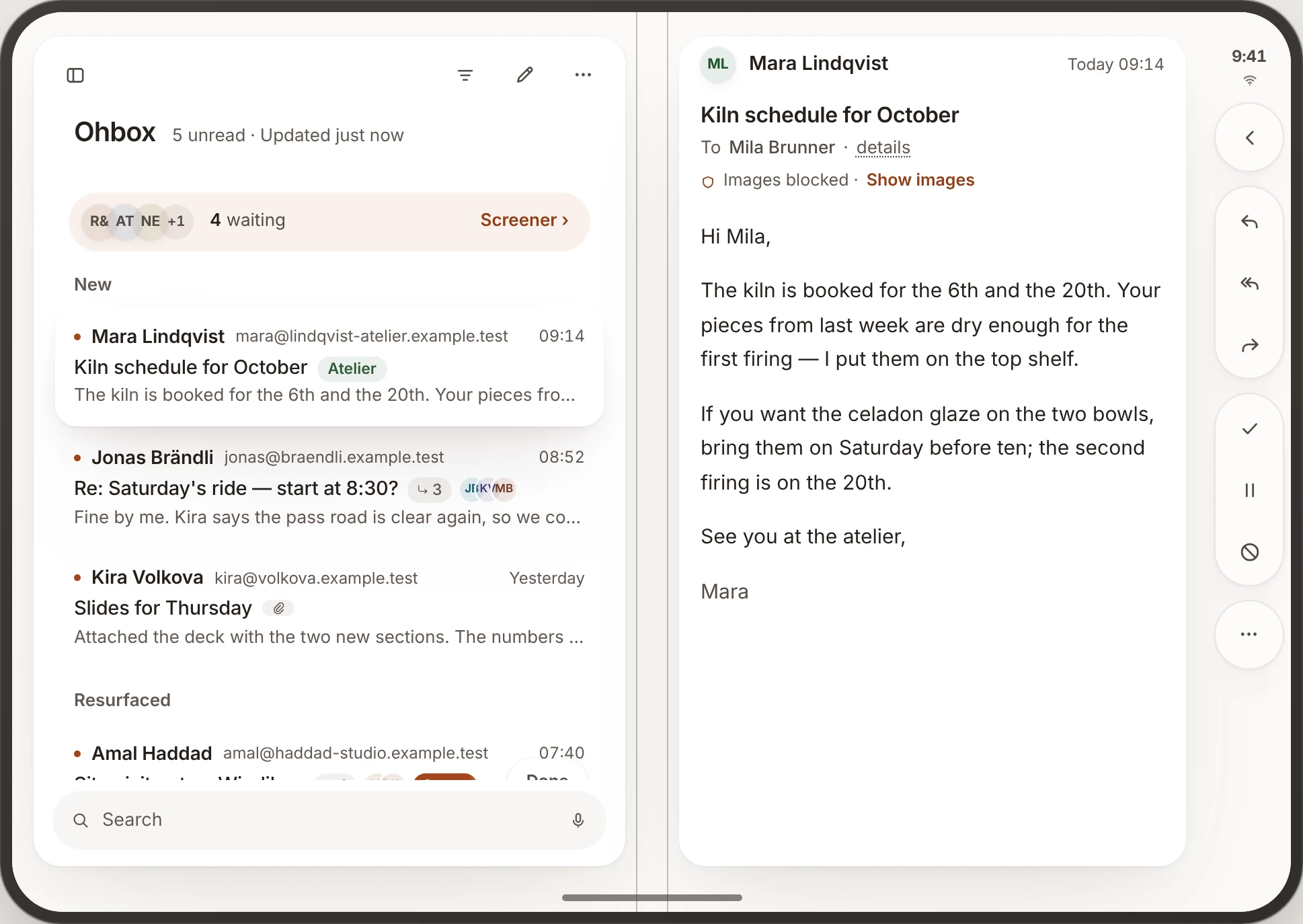
For devices on the same network there is also a plain-HTTP door you can opt into — for apps and API clients, not for phone browsers, which require HTTPS and use the Tailscale address. It binds one address you choose, never all of them.
Also in the box
- Your computer's mail app. ohmail registers as a mail app on all three
platforms, so an email address clicked anywhere opens a new message here,
prefilled. It asks once, after you connect — the way each platform sanctions
(macOS shows its own confirmation; Windows opens the Default-apps page;
Linux goes through
xdg-settings) — and never writes the choice itself. - Triage that comes back. Answer Later, Parked, and Resurface — mail parked until a day you pick, when it returns on its own.
- Tags, not folder trees. One tag reaches across every mailbox; the folder a message lives in stays what it was.
- Calendar invites as event cards — invitations, replies, cancellations and
proposed new times, downloadable as a standard
.ics. - Search that sorts — best match, newest, oldest, by mailbox or by sender.
- Attachments open natively. One press opens a file in the app your computer already uses for it; Download all gives you files, not a zip.
- Every filing verb can be undone. Move, file, Junk, Done, Later, Park,
delete and the bulk verbs raise one toast with Undo —
zfrom the keyboard — and a notice that arrives meanwhile shows beneath it instead of taking it away. - Send + Done. A reply to a message in your Ohbox sends and marks the conversation done in one press, and only once the send has gone through.
- Keyboard first.
j/kto move, one-key filing,?for the full sheet, and a real menu bar where your desktop draws one. - Drafts save themselves, two seconds after you stop typing. Discard asks in the place you pressed it, and a send that could not be confirmed says so, looks in your Sent folder and offers to send again.
- A composer that stays out of the way — a link ends where you stop typing it, inline code ends at a space or a line break, and the toolbar lights the marks the next letter carries.
- English and German, throughout.
Where your mail is, and what the app talks to
Local mode — the default, no account: the engine connects to your IMAP
server over TLS, mirrors your mailbox — every folder but Junk, Trash and Drafts
— to a database on your own disk, and files mail into ohmail/ folders on the
server itself. Nothing leaves your computer but the connections to your provider
(IMAP to read, SMTP to send), the signed update check, the one-click unsubscribe
a screen-out sends where the list offers one (a switch turns it off), and — only
if you turn it on — requests to whichever model provider you chose. Choose a
local Ollama and that last one stays on your machine too. No telemetry, no
analytics.
Your mail password is sealed under a per-install key and never written in the clear. The key is kept in your computer's keystore (Keychain, Credential Manager, Secret Service) and mirrored to a file beside the app's data that only your user account can read — because an unsigned app is refused its own keystore item after every update, and without the mirror your stored password would be lost each time. Where that happens the key lives in the file rather than behind your login password — a real reduction, stated here rather than buried — and the local mail mirror beside it is an ordinary unencrypted database. On a Linux desktop with no Secret Service (a window manager with neither GNOME Keyring nor KWallet running, say) the file is the only copy from the first launch. A locked keyring is never stepped around: the app asks you to unlock it and open ohmail again. The app's log names the store it used each time it starts.
The folder set ohmail creates, and the bookkeeping behind it, are in How ohmail organizes inside your mailbox below.
Cloud mode — optional: the same app can instead sign in to ohmail Cloud, the hosted service, and act as a viewer of a mailbox Cloud organizes on a machine that does not sleep — which is what push, mobile and screening-while-your-laptop-is-shut require. Signing a computer in is one confirmation: Sign in with browser opens ohmail.app, you confirm there, and the app opens your mail — on a fresh install there is no address or code to type. A signed-in desktop stays signed in through a busy server or a dropped connection; only a refusal from ohmail Cloud ends the session. If you have a machine of your own that stays awake, host mode (above) gives your other devices the same mailbox without Cloud — though new-mail push for your phone is one job it leaves out: that takes a full server, ours or a self-hosted one that has set up its own push keypair. Cloud is for when the always-on machine should be ours rather than yours. It is a commercial service built from the server source in this repository (see "What's in this repository" below — only the billing machinery is separate); the desktop app neither asks for it nor needs it, and the choice is made in the app, not by a different download. Prices and the full comparison are at ohmail.app.
Two faces: paper and ohmarchy
ohmail ships one interface wearing two faces. paper is the quiet one and the default everywhere but Linux: light, letter-like, sculpted by shadow rather than line. ohmarchy is the loud one: hard corners, drawn borders, mono type, tiled panes with real gaps, and a louder keyboard cursor — a homage to Omarchy's way of working, built for people who live in a tiling window manager. It is a face, not a fork: same components, same features, same keyboard — different tokens. A face may change how the app looks, never what it is. On a Linux machine ohmail wears ohmarchy first; your own choice always wins and is one press away, in the app under Settings → General → Look and on the website as the paper/ohmarchy toggle above the headline. This README has a twin wearing the other face; the switch line at the top of the page flips every screenshot, and not one sentence. The other face, on the same demo mailbox:
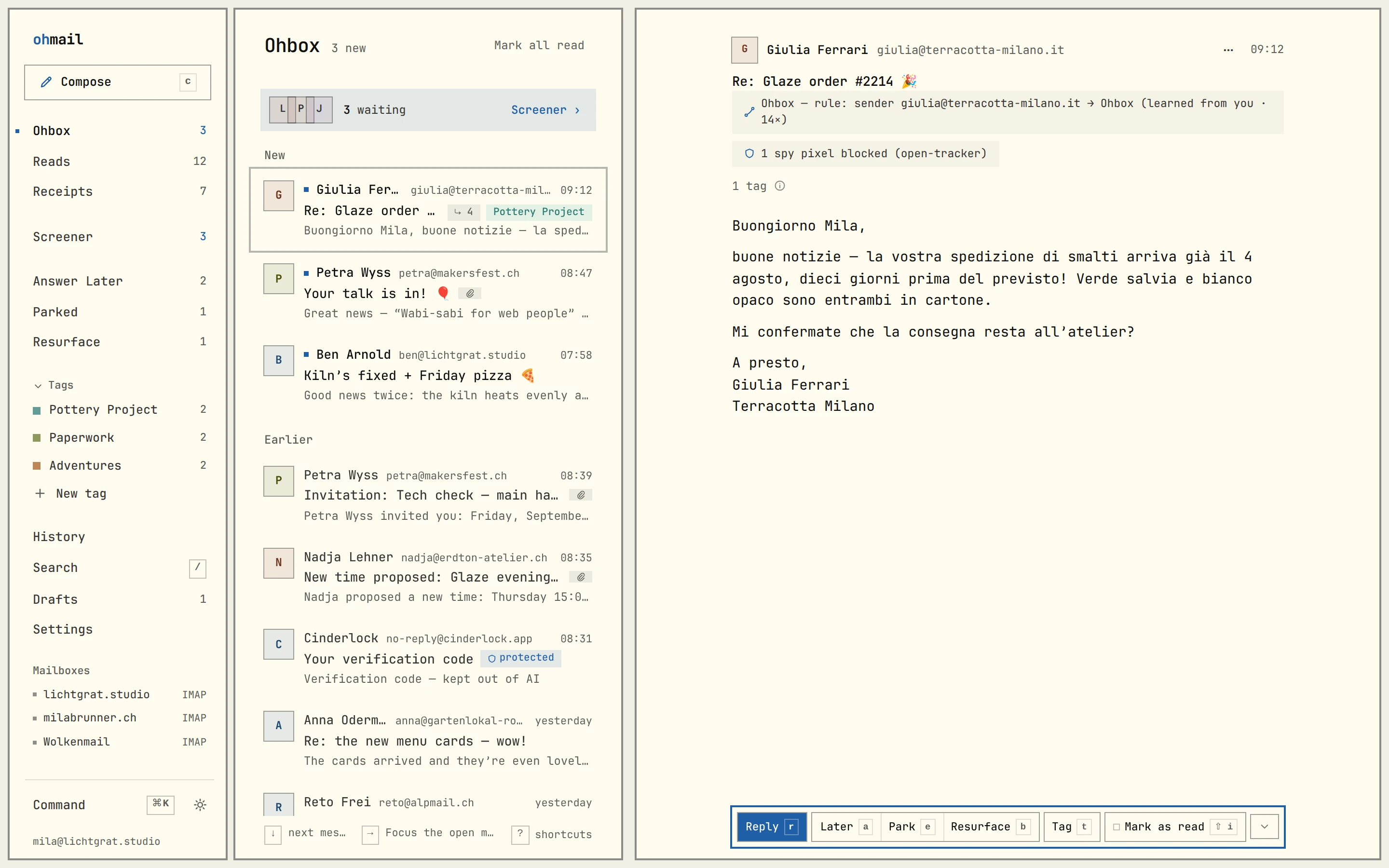
Any Omarchy theme, throughout the app. The face's palette is not
hardcoded: a palette mapping derives the interface's color tokens from an
Omarchy theme's own colors.toml, with contrast floors so a readable theme
stays readable here — theme-agnostic by construction, custom themes included.
On an Omarchy system the desktop app reads the active theme from
~/.local/state/omarchy/current/theme and watches it, so omarchy theme set
re-skins ohmail moments after it re-skins your desktop. Anywhere else the face
keeps its static defaults: Tokyo Night in the dark, Flexoki in the light.
Flip through every theme Omarchy ships — no install, no signup:
the live demo, wearing ohmarchy →
Install
Releases has the installers — no GitHub account needed, and each release names the CI run that built it. Every build carries the local mail engine and its own Node runtime — nothing to install first.
| Platform | File | Requires |
|---|---|---|
| macOS | ohmail.dmg (universal, arm64 + x86_64) |
macOS 15+ |
| Windows | ohmail-windows-setup.exe (NSIS, per-user, no admin) |
Windows 10+, x86_64 |
| Linux · x86_64 | ohmail-linux-x86_64.AppImage, ohmail-linux-amd64.deb or ohmail-linux-x86_64.rpm |
— |
| Linux · arm64 | ohmail-linux-aarch64.AppImage, ohmail-linux-arm64.deb or ohmail-linux-aarch64.rpm |
— |
uname -m tells you which Linux build you want: x86_64 for the first row,
aarch64 for the second. macOS is one file for both architectures; Windows is
x86_64 only — there is no arm64 Windows build.
Nothing carries a code-signing certificate yet, on any platform: those certificates cost money ohmail has not spent, so first launch needs one manual approval, described per platform below, and the checksums are the checks that are actually available. Building from source is the option that requires trusting nobody.
Check what you downloaded. Every release carries a SHA256SUMS listing
every file on it, and every run's summary prints the SHA-256 of the artifacts
it made, so you can check what you downloaded against both:
shasum -a 256 --check SHA256SUMS # sha256sum --check on LinuxSHA256SUMS is published from 0.13.3 onward; earlier releases have only
the run summaries.
Updates. The AppImage, the Windows setup and the macOS app check this
repository's release feed at launch and once a day while they stay open, and
verify every update against a public key committed in this tree before it may
install; a .deb, .rpm or Flatpak install updates through your package
manager instead. Updates, under Going deeper, has the rest.
One copy of ohmail runs per login session; opening it again brings the running window forward.
macOS
Important
The app has no Developer ID signature and is not notarized. Gatekeeper will refuse a double-click and may claim the app "is damaged". It is not. Right-click (or Control-click) ohmail.app → Open → Open.
Windows
Important
No Authenticode signature. SmartScreen will show "Windows protected your PC" on first run: More info → Run anyway.
Important
About WebView2. ohmail draws its window in Microsoft's WebView2 runtime. If it is already installed — Windows 11 has it, and so does any Windows 10 kept current — the installer makes no network connection. If it is missing, the installer downloads the runtime from Microsoft; the app cannot render without it. To install it yourself first: https://developer.microsoft.com/microsoft-edge/webview2/
Linux
chmod +x ohmail-linux-x86_64.AppImage && ./ohmail-linux-x86_64.AppImage   # AppImage
sudo apt install ./ohmail-linux-amd64.deb                                 # Debian, Ubuntu
sudo dnf install ./ohmail-linux-x86_64.rpm                                # Fedora, RHEL; zypper on openSUSE
On arm64 the same, with the aarch64 and arm64 files. Flatpak, a window
that never draws, what arm64 is verified on, how a packaged install updates,
and uninstalling: Linux, in detail, under Going deeper.
Going deeper
Everything from here down is the long form, for the reader who wants the mechanism: what ohmail writes into a mailbox, which hosts the app talks to, how to check a binary, and how to run or build it yourself. Nothing above depends on it.
How ohmail organizes inside your mailbox
For the reader who wants the mechanism. Everything below is ordinary IMAP, inspectable from any other mail client — which is the point: the mailbox is the source of truth, and everything ohmail adds to it is plain IMAP a stranger's client can read.
The folders ohmail creates are a small, frozen set:
Inbox                    mail from people you've said yes to
Junk                     your provider's own — your spam verdicts file into it
Sent                     your replies, left where your provider already keeps them
ohmail/
├── Screener             new senders wait here until you decide where they go
├── News                 newsletters and things you read when you have a minute
├── Receipts             receipts, confirmations, orders
├── Screened             senders you keep, but out of the Inbox
├── Quarantine           spam the automatic patterns set aside, held for review
└── _meta                a small bookkeeping folder; some mail apps show it
_meta also holds your ohmail settings for this mailbox — the senders you've
screened in, your rules, notification choices, away reply and tag names — as a
small versioned-JSON message, so they live in your mailbox rather than in any
ohmail database and move with it (see "Your mailbox stays the source of truth"
above). The format is specified in
docs/organizer-profile.md and implemented in
packages/core/src/adapters/organizer-profile.ts; deleting the message only
resets ohmail's settings, never your mail.
There is no folder called "Spam". Your own spam verdicts ride to the
provider's native Junk folder; what ohmail's automatic patterns set aside on
their own lands in ohmail/Quarantine, held for review — "Spam" is only ever
a friendly label the app shows.
Real moves, crash-safe. Filing a message is a real IMAP move into one of those folders. ohmail first records where the message should be, then the one active organizer performs the move on the server and confirms what it observed — so a crash mid-move leaves a pending intention, never a half-moved mailbox, and nothing else races it.
One organizer per mailbox, agreed inside the mailbox. Beside the settings
message, ohmail/_meta holds the organizer lease: which single install or
service currently organizes this mailbox, renewed as it works — so a desktop
install and a server, which can never query each other, still cannot fight
over one mailbox.
Your own folders, if you want them. Off by default, and per mailbox: switch "Use folders" on and the folders you already keep appear in the menu, each as its own list — the real folders on your server, never a copy. Create, rename and delete them from ohmail and the same IMAP operations happen in your mailbox; deleting a folder files its mail to your provider's Trash first, never an expunge. (Not yet in the standalone desktop app.)
Spam and deletion use your provider's own folders. A spam verdict files the message into the mailbox's native Junk folder — where its filter and your other clients expect spam — and "Not junk" moves it back out; the sender rule, stored with your settings, is the durable memory either way. Delete moves to native Trash, never expunges. Beyond those user-commanded acts — and the Spam filing "Act on confident suggestions for me" does once you switch it on, the same move your press would make — ohmail never acts in Junk or Trash on its own: no rule, no other automatic pass and no AI proposal may name them.
What travels, and what stays. Not a slogan — the architecture. ohmail's desktop app, the hosted service and a server you run never share a database; the only medium they all read is the mailbox itself, so that is where everything durable lives:
- Your mail and its organization are real IMAP folders on your own server —
the
ohmail/*tree plus any folders of your own — moved by ordinary IMAP commands, readable by any client, kept when you leave. - Your settings, rules and screening structure are one small versioned-JSON
message in the hidden
ohmail/_metafolder — the portable organizer profile, specified in docs/organizer-profile.md. - Which ohmail organizes the mailbox is decided in the mailbox too: a lease
message in the same
_metafolder names the one active organizer, so a desktop install, a self-hosted server and the hosted service can hand a mailbox to one another without ever talking to one another.
So switching between hosting types is reconnecting a mailbox. Connect the same mailbox from a desktop install, from a server you run, or from ohmail Cloud, and ohmail finds the settings stored in it and asks before using them. What a deployment keeps to itself is the working copy — the local mirror, cached bodies, device pairings, billing — reconstructible from the mailbox or irrelevant to it, plus the honest edge: decisions with no IMAP representation yet. Triage piles, Resurface timers, learned patterns, which tag is on which message, notes, snippets and the app's own preference switches all stay with the deployment they were made on — the mail, its folders and the profile above are what travel.
Model providers and keys
Pick the model in Settings → Desktop, under AI for suggestions and drafts. Three options, and each model is yours to name:
- Your Anthropic key — requests go to
api.anthropic.com, billed to your account. - Your OpenAI key — requests go to
api.openai.com, billed to your account. - A model on this machine — served by Ollama at
http://127.0.0.1:11434by default, or any address you give it. Install Ollama andollama pull llama3.2before choosing it. Nothing leaves the machine if the server is on it.llama3.2is the default because it is the smallest model measured to do both jobs; something much smaller will suggest a door and then fail to write a draft, and says so rather than hanging.
A key is sealed under a key held in your operating system's keystore, is never written down in the clear, is never read back, and is sent to no host but its own vendor's. The endpoint for a key is fixed in the code and no setting can move it — the option whose address you can change is the local one, which carries no key. Saving runs a fresh test, so a server that is not running, or is running without the model you named, is reported while you are still in the settings rather than the next time you open your mail.
Linux, in detail
Two architectures, two builds. uname -m prints x86_64 or aarch64;
take the matching pair of files. They are separate builds of the same
application — there is no single Linux file that runs on both, the way the macOS
DMG does, because ELF has no equivalent of a universal binary.
Important
The AppImage needs the executable bit:
chmod +x ohmail-linux-x86_64.AppImage && ./ohmail-linux-x86_64.AppImage
# on arm64:
chmod +x ohmail-linux-aarch64.AppImage && ./ohmail-linux-aarch64.AppImage
On a distribution without unprivileged user namespaces, run it with
--appimage-extract-and-run.
The .deb installs with sudo apt install ./ohmail-linux-amd64.deb
(./ohmail-linux-arm64.deb on arm64) and pulls in WebKitGTK.
On Fedora, RHEL and openSUSE, take the .rpm:
sudo dnf install ./ohmail-linux-x86_64.rpm      # Fedora, RHEL, CentOS Stream
sudo zypper install ./ohmail-linux-x86_64.rpm   # openSUSE
# on arm64, the same with ./ohmail-linux-aarch64.rpm
Note the architecture words: the .rpm is named for the machine (x86_64,
aarch64, what uname -m prints), like the AppImage, while the .deb is named
for the Debian architecture (amd64, arm64). Both spellings are the ones the
tool in your hand uses.
The .rpm declares no dependencies, for the same reason the .deb needs only
WebKitGTK: the mail engine and its Node runtime are inside the package, and the
webview stack is your desktop's. Any Fedora or openSUSE desktop that ships a GTK
browser engine already has it.
Flatpak
A Flatpak manifest is in this repository at
apps/desktop/flatpak/app.ohmail.Desktop.yml, and it builds the app with no
network access — every crate, every npm package and the Node runtime the mail
engine runs on are declared, checksummed sources. Build and install it yourself:
flatpak install flathub org.flatpak.Builder org.gnome.Sdk//50 \
  org.freedesktop.Sdk.Extension.rust-stable//25.08 \
  org.freedesktop.Sdk.Extension.node22//25.08

flatpak run org.flatpak.Builder --user --force-clean --install \
  build-dir apps/desktop/flatpak/app.ohmail.Desktop.yml

flatpak run app.ohmail.Desktop
The app id is app.ohmail.Desktop, which is not the identifier the AppImage,
.deb and .rpm use. That is deliberate: a Flatpak may claim desktop names
only under its own id, and a sandbox has its own data directory regardless — so
this build does not read a mailbox another Linux build of ohmail already
mirrored. Connect it to your mail server and it mirrors the mailbox itself; the
server is the master copy either way.
It asks for the network, a window, your login keyring, notifications and the tray, and nothing else — no access to your files. Attachments you open go out through the desktop portal. Start-at-login is not offered in this build.
Note
It is not on Flathub yet. The manifest is here and it builds; the listing
is a submission that has not been made. When it is live, the install will be
flatpak install flathub app.ohmail.Desktop and this section will say so.
Follow issue
#6 for that.
Tip
If the window opens and never draws anything, run it against your own distribution's GTK and WebKitGTK instead of the copies inside the AppImage:
OHMAIL_SYSTEM_WEBKIT=1 ./ohmail-linux-x86_64.AppImage
The AppImage carries most of its own libraries but takes the graphics drivers
from the machine it runs on, and the two have to agree. 0.13.4 fixed the case
that was known to break — the log line to look for is Could not create default EGL display — and this is the way out if a distribution finds another one. It
needs libwebkit2gtk-4.1 installed, which every desktop that ships a GTK
browser engine already has.
Note
What arm64 is and is not verified on. The arm64 build is compiled, tested and packaged on arm64 hardware in this repository's CI, and every check the x86_64 build passes it passes too — including starting its own mail engine from inside the packaged AppImage. What has NOT happened is somebody opening the window on a Raspberry Pi, an Asahi Mac or an arm64 workstation: there is no arm64 machine in this project. If you run it, say how it went — that is the part CI cannot answer.
Important
A packaged install does not update itself, and no longer offers to. A build
installed from the .deb, the .rpm or as a Flatpak reads how it was
installed and does not ask the release feed at all: "Check for Updates" is in
the menu, disabled, and says "Updates Come from Your Package Manager" — or
"Updates Come from Your Software Centre" on the Flatpak — and Settings →
About says the same thing beside the version you are running. Update by
installing the new package over the old one, or let your software centre do it
— or use the AppImage, which is the Linux build that applies its own
updates.
It used to offer, until 0.17.0. A packaged build asked the feed for a package of its own kind, did not find one (the feed publishes AppImages, one per architecture), fell back to the AppImage for its architecture, downloaded it, and then reported "ohmail could not install the update." Nothing on disk was touched — but it was a button that promised a restart, and 130 MB of download spent on nothing.
The feed carries no key for either package format on purpose. Making it work
would mean handing a .deb to dpkg, or an .rpm to rpm, on a machine whose
packages are owned by whatever installed them — and there is no Debian or
Fedora install in this project's CI that could ever exercise that path. This is
the same on x86_64 and arm64, and it applies to any distribution package built
from any of the four.
Uninstall with sudo apt remove ohmail, or sudo dnf remove ohmail /
sudo zypper remove ohmail for the .rpm. One word on every platform:
the package, the binary at /usr/bin/ohmail, the icon and the desktop entry are
all spelled ohmail.
Updates
The app checks one pinned HTTPS address — the release feed of this repository —
at launch, once a day while the app stays open, and whenever you ask, and every
update payload is cryptographically verified against the public key committed in
this tree before it may install. There is no other phone-home.
scripts/verify-feeds.mjs checks both feeds offline; CI runs it on every
release.
A release becomes Latest only once those feeds are on it and answering: the
workflow that signs them marks a new release a prerelease until all three have
been read back from the address your app uses. If they never attach,
/releases/latest stays on the last release whose feeds work, so your app keeps
an update path instead of a 404.
A build that cannot replace its own files does not make that request at all: a
.deb or .rpm install, a Flatpak, and a build from source read how they were
installed and say where updates come from instead — a Flatpak says your software
centre, because that is what updates it. The AppImage, the Windows setup and the
macOS app are the three that check and install.
Verify it yourself
On Windows and Linux the interface is embedded uncompressed on purpose, so you can check what a downloaded binary does without running it:
strings -a ohmail.exe | grep -oE 'https?://[A-Za-z0-9._~:/?#@!$&()*+,;=%-]+' | sort -u
strings -a ohmail.exe | grep -c Ohbox      # the interface really is in there
Almost everything the first command prints is an XML namespace constant, a
documentation link inside an error message, Microsoft's WebView2 download page
(see the Windows note above), or an artifact of grepping a Rust binary.
apps/desktop/README.md goes through them one by one. The rest — every string
that names ohmail or TrafficFlow — is a short list CI spells out entry by entry
and fails the run on anything outside it: the pinned update feed,
https://api.ohmail.app (contacted only once you choose ohmail Cloud), and
seven ohmail.app pages the app may hand to your own browser. Your mail server
never appears in that list and cannot: it is not compiled in, it is whatever you
typed, held in your own configuration file.
What's in this repository. Everything ohmail runs on: the desktop app,
the mail engine, the web interface, the sync API, and the background
organizer. The only code that is not here is the machinery for billing our
hosted customers — a separate service this server reaches over a documented
API; packages/db/src/entitlements-client.ts is the open client of it, and
ENTITLEMENTS_URL is the one setting that points at one.
Self-hosting has no plans, no metering and no billing surface — every limit is off, and AI features run on the provider keys you configure. "Run the server yourself" below is the supported way to do that.
Run the server yourself
The hosted service at ohmail.app is built from the server source in this repository, and the same server runs on your own box: one compose file, prebuilt images, no account, no billing — mailboxes are unmetered on a self-host install.
If the machine you would run it on is the desktop in front of you, you may already be done: a running desktop app is itself a self-hosted ohmail, and host mode (above) serves your other devices from it. The stack below is for a box without a screen — and for things host mode leaves out, like accounts for the other people in your household, sign-in from any browser over the open internet, and new-mail push for the phone (once the install has its push keypair).
git clone https://github.com/trafficflowhq/ohmail.git
cd ohmail/deploy/selfhost
cp .env.example .env      # five required values; the file explains each
docker compose up -d
docker compose logs api   # the first-run setup token is printed here, once
Open your OHMAIL_ORIGIN in a browser and register with that setup token —
there is no public signup on a self-host server. The stack is Caddy as the
one origin (automatic TLS on a real domain), the web app, the API server,
the sync organizer, Postgres, MinIO for attachment staging, and a local
mail sink for verification mail until you point SMTP_URL at a real relay.
deploy/selfhost/docker-compose.yml documents every service and
deploy/selfhost/.env.example every setting.
The images are prebuilt for amd64 and arm64 —
ghcr.io/trafficflowhq/ohmail-server, ohmail-worker, ohmail-web — so a
Raspberry Pi 4 or 5 or an Ampere or Graviton server takes the same commands
as an Intel box; docker pull reads the architecture out of the image.
Every release builds both halves on their own hardware, and from 0.13.3 on
a release also boots the whole stack twice, once per architecture, before a
tag moves. Two things that leaves open, stated rather than implied: images
from earlier releases were built for arm64 but only ever booted on amd64,
and nobody has run any of them for a week of real mail, because there is no
arm64 machine in this project — if you do,
say how it went. They are
built by this repository's own release workflow
(.github/workflows/ghcr-images.yml), on public runners whose logs anyone
can read, from the recipes published in this tree
(apps/server/Dockerfile, apps/worker/Dockerfile.selfhost,
apps/webapp/Dockerfile) against the committed lockfile — so what an image
contains is checkable against the recipe and the source beside it. You can
also build any of them yourself from a clone:
docker build -f apps/server/Dockerfile . at the repository root. If a
pull is ever refused, the current release's image build has not finished
(or its packages are not public yet) — build from source, or take the
previous tag.
This is the first supported cut: it boots cold, migrates, does the first-run ceremony, organizes real IMAP mailboxes and sends. docs/self-host has the guides: a VPS from nothing, an Umbrel package (a draft — not yet in any app store), and backing the server up.
Build the desktop app yourself
Requirements: Rust (stable) and Node 22. On macOS also the Xcode command line tools. On Linux also the Tauri prerequisites — on Ubuntu 24.04:
sudo apt-get install -y libwebkit2gtk-4.1-dev libgtk-3-dev libsoup-3.0-dev \
  libjavascriptcoregtk-4.1-dev librsvg2-dev libayatana-appindicator3-dev \
  libssl-dev build-essential curl wget file patchelf desktop-file-utils
On Windows, the MSVC build tools and WebView2.
The interface, checked before anything native
The quickest verification, and it needs nothing but the repository and Node: build the app's UI bundle and render it headlessly — the render check draws the whole client against a stub engine channel and proves, on the built bundle, that the page itself opens no connection. (The app has no demo mode: it opens empty until you connect a mailbox. The demo is at ohmail.app/demo.)
cd apps/desktop
npm ci                   # apps/desktop has its own lockfile
npm run ui:build:engine  # → dist/, the bundle the app embeds
npm run smoke            # → SMOKE OK — renders, offline audit included
The real thing, with the mail engine in it
# The engine, bundled with the pinned esbuild — a devDependency of the root
# manifest, so `npm ci` at the root is the whole resolution. The bundle is only
# reproducible for a fixed bundler version, so a different one is refused.
npm ci
# The changes this repository carries to its dependencies (`patches/`), applied
# with git. The bundler refuses an engine that does not carry them.
node scripts/apply-patches.mjs apply
node scripts/engine-bundle.mjs

# It boots from the layout it ships in — and refuses to when its migration
# journal is moved away, which is what makes the first half worth anything.
node scripts/verify-engine-boot.mjs

# The official Node build for this platform, checked against nodejs.org's own
# SHASUMS256.txt before it is unpacked. A mismatch is a refusal, not a warning.
node scripts/vendor-node.mjs

# Building with no network? Put the release archives in a directory and name it:
# nothing is downloaded, and the bytes are checked against the digests pinned in
# the script.
OHMAIL_NODE_ARCHIVES=/path/to/archives node scripts/vendor-node.mjs

# And the app itself.
cd apps/desktop && npm run app:build:engine
The result carries the engine at engine/bin/ohmail-engine.mjs and the runtime
at runtime/node, both under the app's resource directory. The build prints
the engine's SHA-256, and so does every CI run — and
scripts/verify-engine-repro.mjs builds it twice and refuses if the results
differ, which is what makes a rebuild that matches mean anything.
How it is put together
One app, three platforms, four architectures — macOS as one universal binary, Windows on x86_64, Linux built separately for x86_64 and arm64. All of them are the same program: a Rust (Tauri) window around the React implementation of the design system, with a Node mail engine beside it that the window talks to over a private pipe — no port, no socket, no listener while host mode is off; arming host mode opens exactly the loopback door the host section above describes, and nothing else.
The page reaches nothing directly. The webview's Content-Security-Policy
is connect-src 'none', so fetch, XHR and WebSocket are refused before they
are attempted. In the interface-only build the main window's capability list
is literally empty ("permissions": []). In the build you download, the
window can call twenty-seven commands and nothing else, every one declared in
src-tauri/build.rs: the bridge to the mail engine and its restart, a
notification and the icon's badge, the window's own performance numbers,
opening a link, a link from a message or an attachment outside the app and
saving an attachment to your Downloads folder (validated by the shell, never
fetched by the page), host mode's controls — reading its state, probing and
arming Tailscale, start-at-login, and opening Tailscale's download page as one
more fixed address the shell owns — the probe a pairing link starts, the
default-mail-app registration, the active Omarchy theme, and the updater's
state, press and daily check. Mail does not travel
over the network from the page — it travels down a pipe to a process on the
same machine. The engine holds the IMAP connection; the page holds no
credential.
Every colour, radius and spacing step comes from packages/tokens; the
interface sources under apps/webapp/app/ and packages/ui are the same ones
the web client renders, not a copy. apps/desktop/README.md is the long
version — the aliases, the capability set, and what each directory is.
This tree is a generated mirror of a private monorepo. Commits arrive as replays that name the monorepo revision they came from; pull requests land in the monorepo and come back out here. CHANGELOG.md records what has shipped.
Roadmap
- Signed installers — a notarized DMG with a real Apple Developer ID and
an Authenticode-signed
.exe. Updates are already signed and verified; this is about the first launch. - A packaged Linux repository — an apt source and a properly signed
AppImage, so an install is a command rather than a download and a
chmod.
Dates are not promised. The order is.
Licence
AGPL-3.0. Copyright © 2026 TrafficFlow GmbH, Staubstrasse 1, 8038 Zürich, Switzerland.
This client is free and is meant to stay free: AGPL-3.0 means anyone can use, study, change and share it, and anyone who redistributes a changed version — or runs one as a network service for other people — must publish their changes under the same terms. A closed-source re-skin of ohmail is not possible, and neither is a closed-source hosted copy. Everything the product needs to run is open source and always will be; the only private code is the machinery for billing our hosted customers. Full text in LICENSE; the reasoning, the third-party position and the per-file-header decision in COPYRIGHT.
The code is free; the name and the icon are not. You may fork, build and redistribute this source; a fork you publish — and any hosting service you run on this code — needs its own name and its own artwork, so nobody is misled about who supports it. TRADEMARK.md is the policy — packaging ohmail for a distribution under its own name is explicitly fine.
Contributions need no CLA and no copyright assignment, just a DCO sign-off
(git commit -s) — see CONTRIBUTING.md. Security reports:
SECURITY.md.
ohmail.app · issues · support@ohmail.app
Built in Zürich by TrafficFlow GmbH.