
Download · Website · Live agents · Features · Compare · Install · Shortcuts · Security
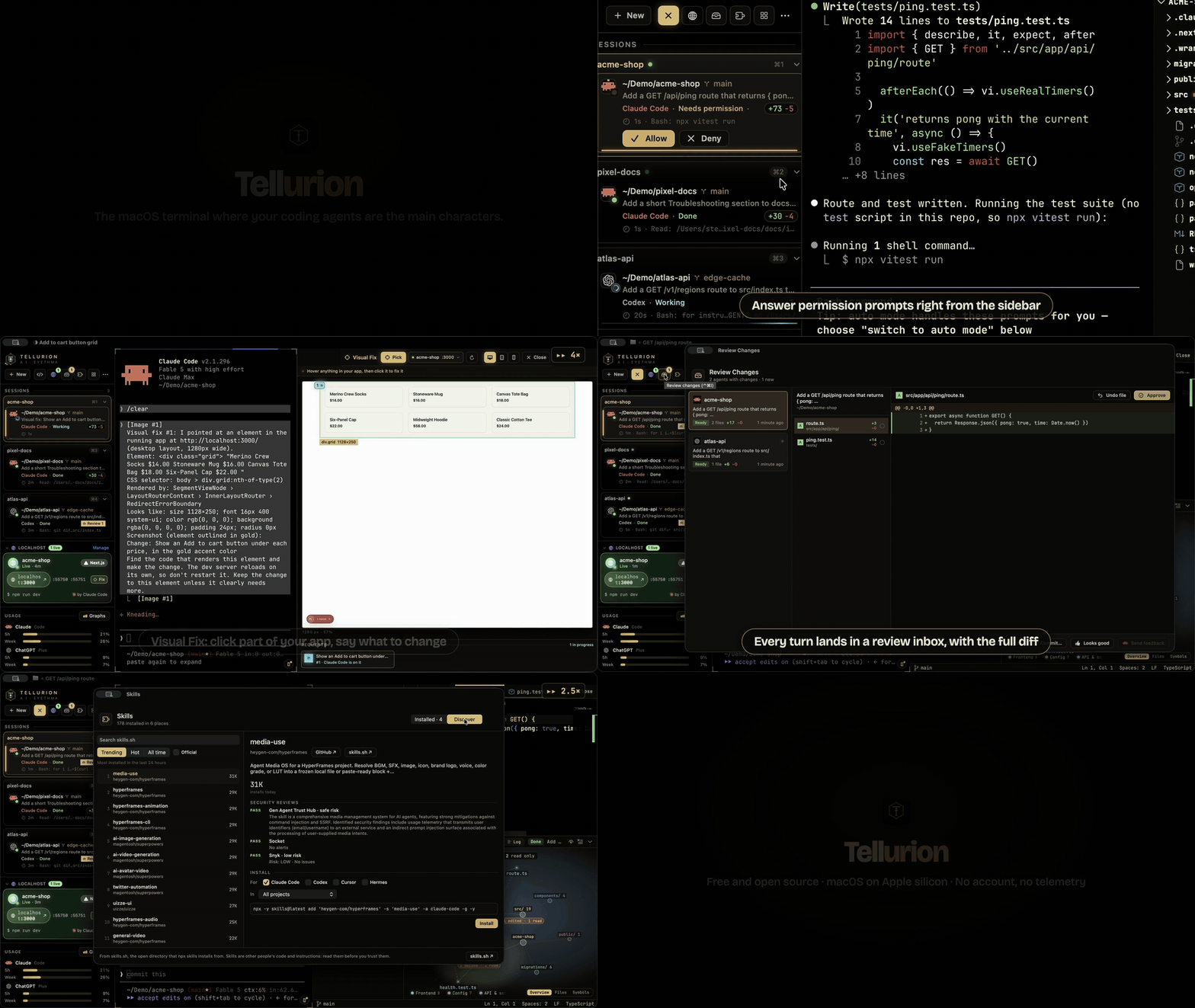
Real app, real agents, demo projects. Watch in full quality.
GhosttyEXTREME is a macOS terminal for developers who run several AI coding agents, like Claude Code, Codex, Gemini CLI and Copilot CLI, across several projects at once. It's a fork of Ghostty, the fast native terminal, that shows what every agent is doing, live: the code it's writing as it writes it, where it is in your project, what part of your backend it touches, and when it needs you. Agents share what they learn about each project, hand work to each other, and leave their changes in a review inbox you can undo from.
Everything Ghostty does still works, and your Ghostty config works as-is. This fork tracks official Ghostty releases and adds its features on top.
Note
Unofficial fork. Not affiliated with or endorsed by the Ghostty project.
curl -fsSL https://raw.githubusercontent.com/steventsvik/GhosttyEXTREME/custom/install.sh | bashApple silicon, macOS 13 or newer. Free and open source (AGPL-3.0). No account, no telemetry.
Watch your agents work, live
Run Claude Code, Codex, Gemini CLI, Copilot CLI or another agent in a tab, the way you already do. GhosttyEXTREME follows each one as it works.
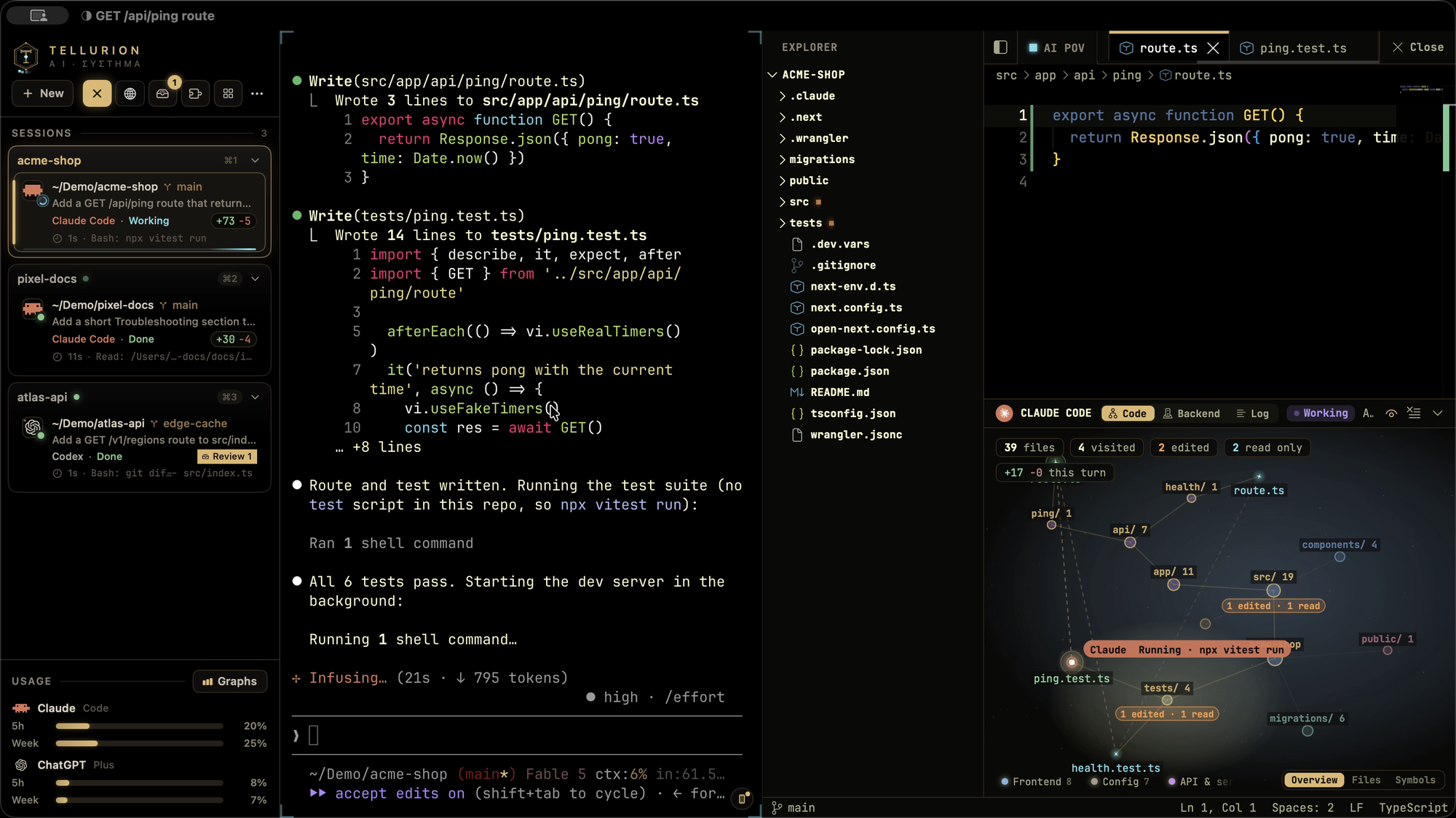
| As the agent… | …you see |
|---|---|
| starts a task | Its card in the sidebar shows the task, a working spinner and a timer, and the corners of its terminal breathe. A snapshot of your project is saved, so the turn can be undone. |
| reads a file | The editor opens that file at the lines it read, and the file lights up cyan on the code map. |
| edits a file | The change types itself into the editor with the lines highlighted, the file turns orange on the map, and the turn's diff count goes up. |
| thinks or replies | The agent panel shows its thinking, messages and every tool call as a timeline, sub-agents included. |
| touches your backend | The Worker, database or bucket that code belongs to lights up in the Backend view. |
| starts a dev server | The server moves into its own tab and keeps running after the agent is done. |
| needs you | Its card turns amber with Allow and Deny buttons and jumps to the top of the command palette and Mission Control. You get a notification you can answer from, and a Dock badge. |
| finishes | Its changes land in Review with the full diff. Not what you wanted? Undo last turn puts your files back. |
Nine agents report live status: Claude Code and Codex, plus GitHub Copilot CLI, Droid, Gemini CLI, Antigravity (agy), Kiro CLI, Cursor CLI and OpenCode. The welcome window connects Claude Code and Codex in one click, and Check Setup offers Connect for each of the others it finds on your Mac. Each hook only observes: it never approves, blocks or changes anything, and any settings file it touches is backed up first (symlinked dotfiles stay symlinks). Copilot, Droid, Gemini and OpenCode also report permission prompts; Kiro, Antigravity and Cursor show Working and Done.
Amp, Goose, Hermes, Aider, Crush, Qwen Code, Kimi and Mistral Vibe are recognized by name and logo when you start them.
Features
| Agent sidebar Live status for every agent in every tab |
Mission Control Every agent in every window on one screen |
Code editor Opens what the agent reads and animates its edits |
| Code map Your project as a map of what the agent touched |
Project memory What Claude Code and Codex know, shared between them |
Hand off Pass a pane's work to Claude or Codex, with the diff |
| Review changes An inbox for each agent's diff, with line comments |
Undo a turn A snapshot before every turn, restored in one click |
Review loops One agent reviews another, round after round |
| Backend view Cloudflare, Supabase, Vercel and more, with live status |
Database view Tables, columns and relations from your schema |
Visual Fix Click an element in your app, say what to change |
| Localhost sessions Dev servers that outlive the agent that started them |
Ports What's listening, and who holds a busy port |
Git panel Pull request and checks, plus jj, GitButler and Graphite |
| Isolated sessions Throwaway Docker containers with only your project |
Agent races Several agents, one task, keep the best result |
Background processes Find and close what's been left running |
| Command history Every command as a block, with one-click fixes |
Agent activity Time, prompts, changes and tokens per day and project |
Setup and settings One-click setup, Check Setup, signed updates |
| Environment Tool versions, containers and local models |
Skills Every agent's skills, kept up to date, and what's trending |
Every agent, at a glance
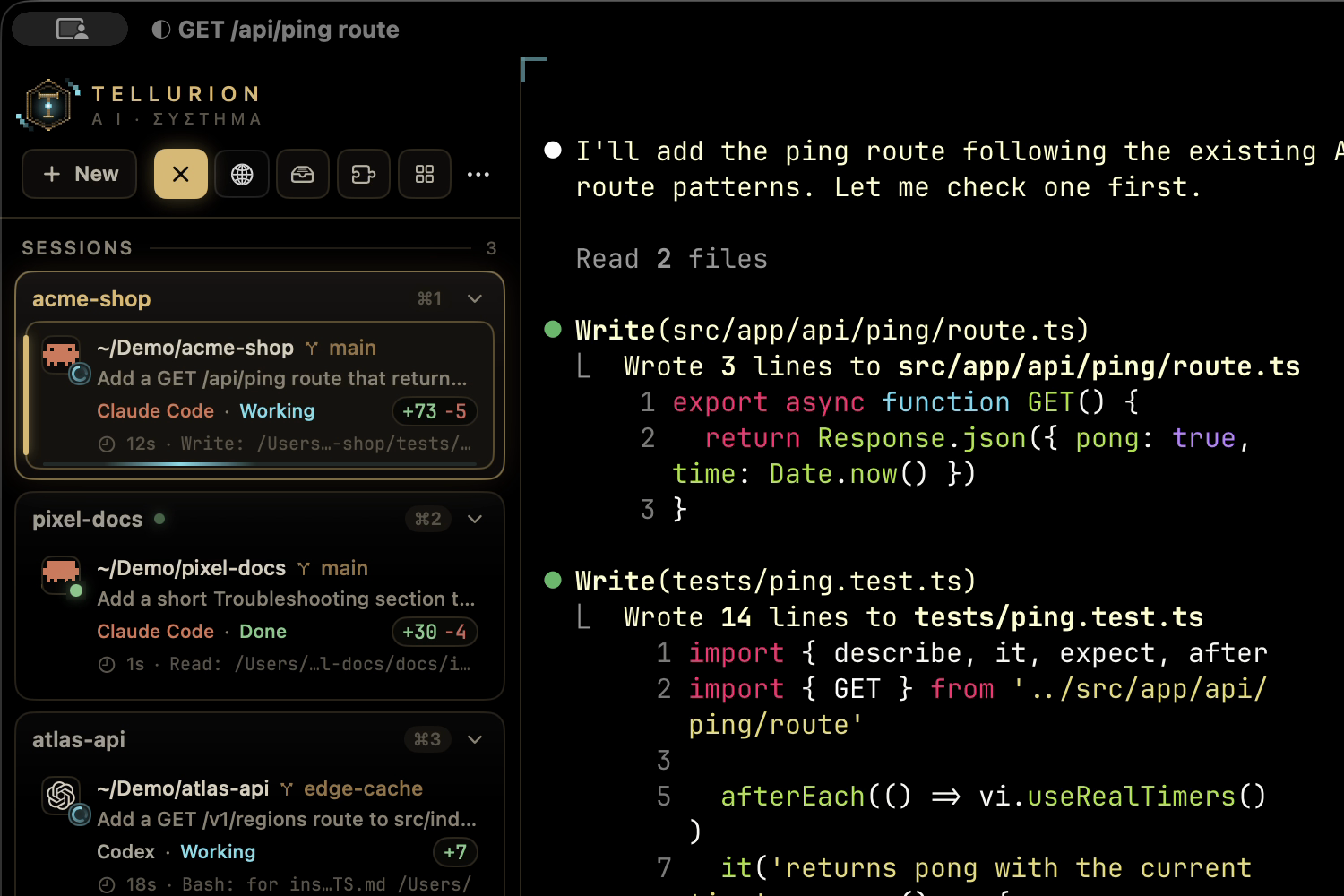
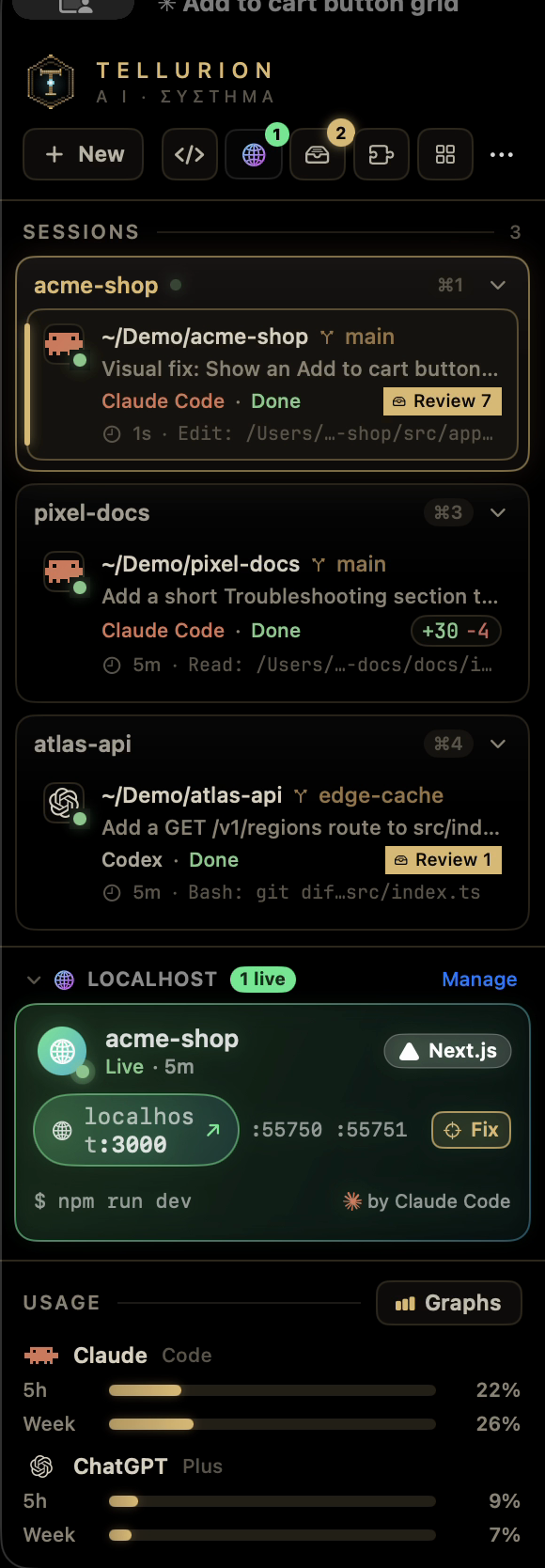
A vertical sidebar (⌃⌘S) lists every tab with its folder, git branch and uncommitted changes. Tabs can be pinned, colored and renamed, and hovering one shows a card with more detail.
- Live status: working, waiting for permission, waiting for input, done or failed. Each card shows the task, how long the agent has been at it and its last action.
- Answer without switching: Allow and Deny right on the card, in Mission Control and in the notification. Keys are only sent when the agent's prompt is actually on screen.
- Project groups: tabs whose agents share a repository are grouped together, with a live summary ("2 working · 1 waiting") and a warning when two agents edit the same file.
- Agents act out their mood. Their sprite reads, types, runs commands and thinks, hops when it needs you and sparkles when it's done. The sigil glows amber while one waits and flares gold when one finishes.
- Alerts: when an agent waits on you in a pane you aren't looking at, you get a notification (click it to jump there) and a count on the Dock icon.
- Usage meters for your Claude and ChatGPT plans (5-hour and weekly windows), with graphs. Click the panel to switch between percentages and when each limit resets.
Mission Control
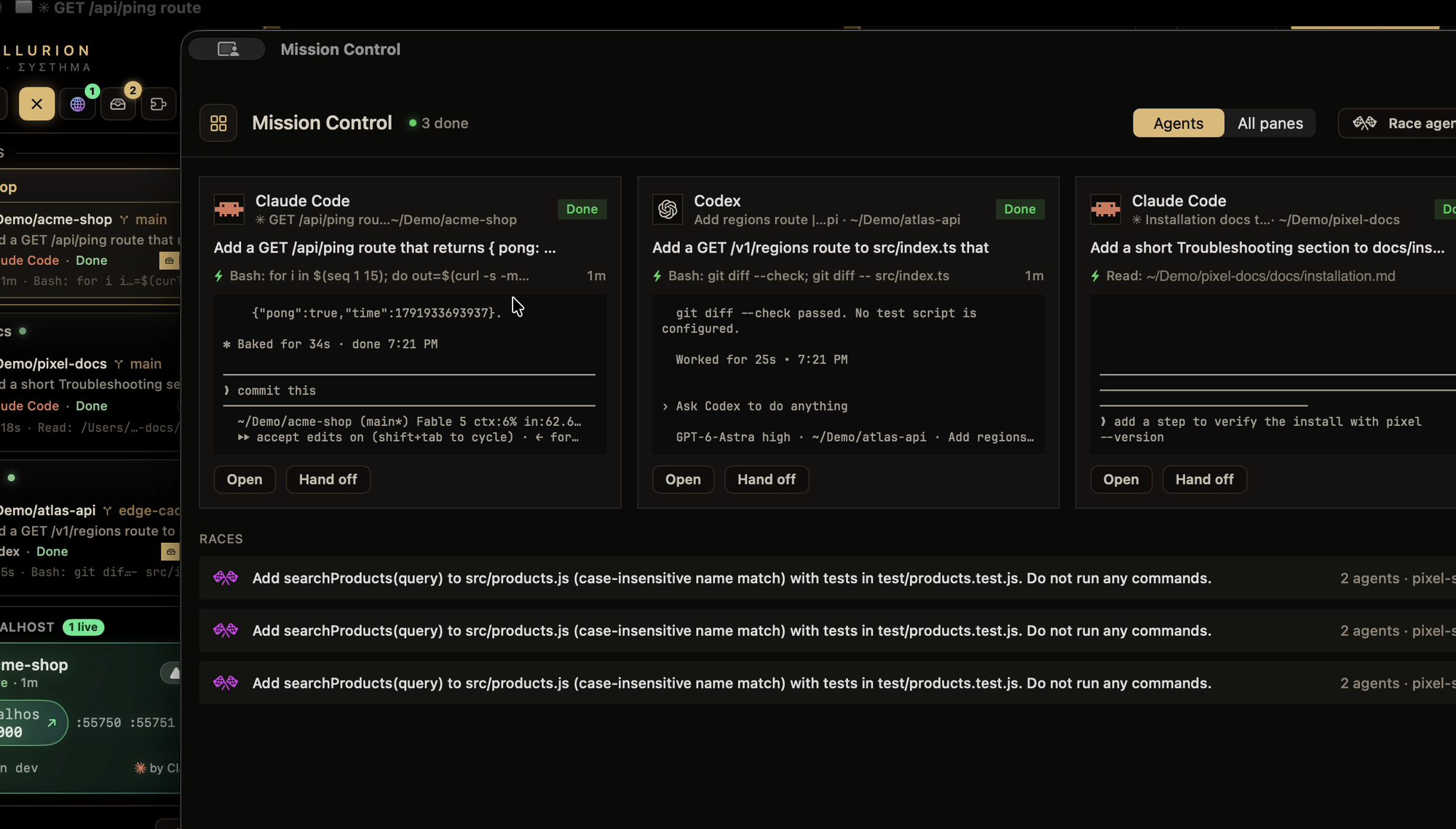
⌃⌘M shows every agent (or every pane) in every window as a live card: status, task, last action, time in that state and the last lines of its terminal. Agents waiting on you come first. Click a card to jump to it, or hand its work off from there.
The command palette (⌘P) puts waiting agents at the top too, so you can answer one in two keystrokes. It also starts new sessions and opens every tool.
A code editor that follows the agent
Each tab has its own VS Code–style editor (Monaco, ⌃⌘E) on that tab's folder, in your terminal theme.
- Follow mode: the editor opens each file the agent reads and animates its edits in as they happen. It follows even while closed, so opening it mid-task shows where the agent is right away.
- Agent panel: a timeline of the session: prompts, thinking, messages, tool calls and results, sub-agents included. With several sub-agents, the editor splits into a pane for each.
- AI POV: replay a session as if you were at the agent's keyboard: files opening, code being typed, commands running.
Code map
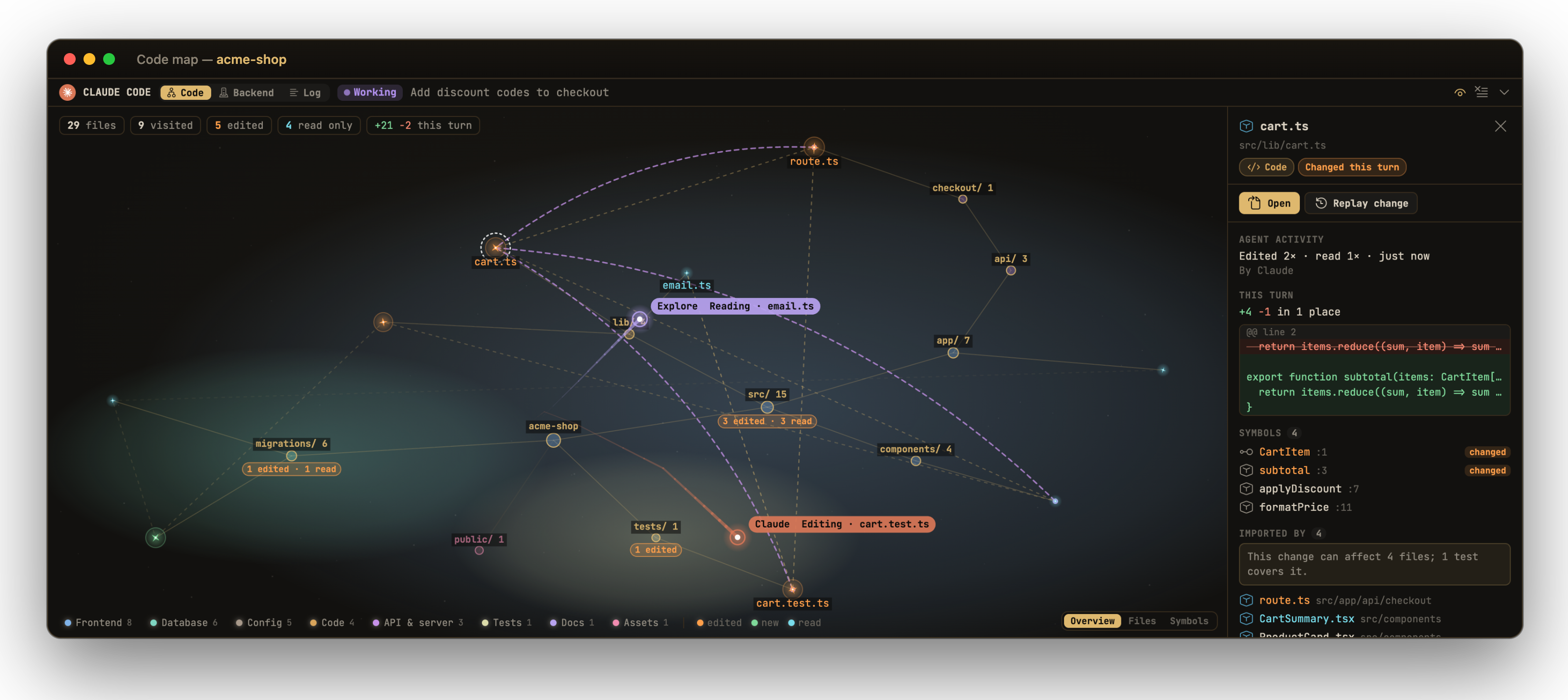
Your project as a star map. Folders are tinted by what they are: frontend, API, database, tests, config. Files light up as the agent reads (cyan) and edits (orange) them.
- Zoom levels: Overview shows the project's areas and how much the agent did in each. Files shows every file. Symbols shows the functions and classes inside, with the ones changed this turn lit.
- Details for anything you click: what the agent did there, this turn's diff, the file's symbols, what imports it, and the backend pieces it uses.
- Blast radius: what imports the file is drawn on the map, with a warning when no test covers the change.
Project memory
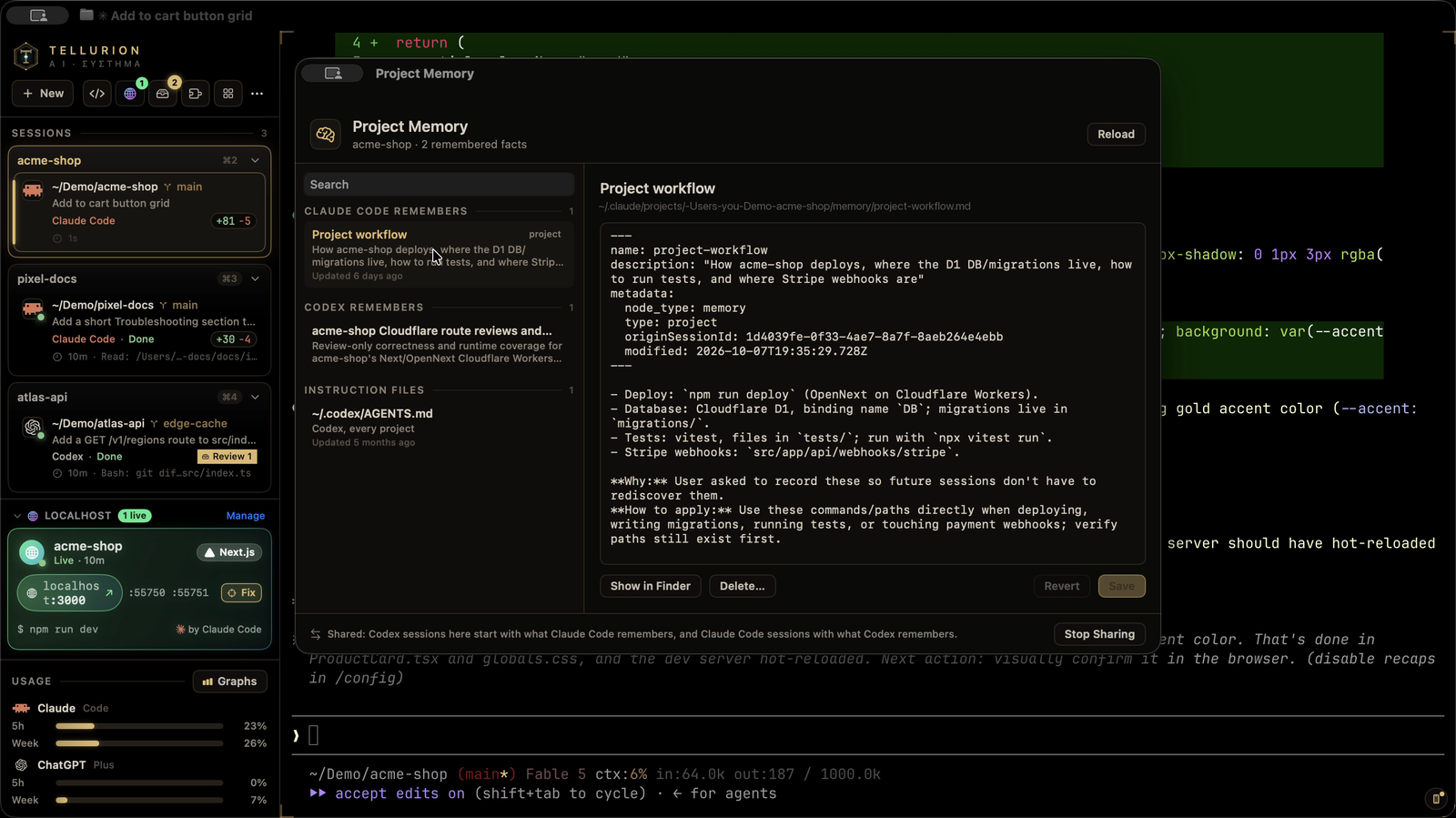
⌃⌘Y shows what Claude Code and Codex remember about the current project, in one window.
- Claude Code's notes can be read, edited and deleted. Deleting one removes it from
MEMORY.mdtoo. - Codex's memories for the project are shown read-only, because Codex rewrites them itself.
- Instruction files (
CLAUDE.md,CLAUDE.local.md,AGENTS.md) that the agents load every session can be edited in place. It never overwrites a file an agent changed while you were editing.
Shared between agents

A new Codex session starts with what Claude Code has learned about the project, and a new Claude Code session with what Codex has learned, labelled as notes that may be out of date. Above, a fresh Codex session answers "how do I deploy and test this project?" from Claude's notes without opening a file. Nothing leaves your Mac, and you can turn it off in Settings.
Hand off
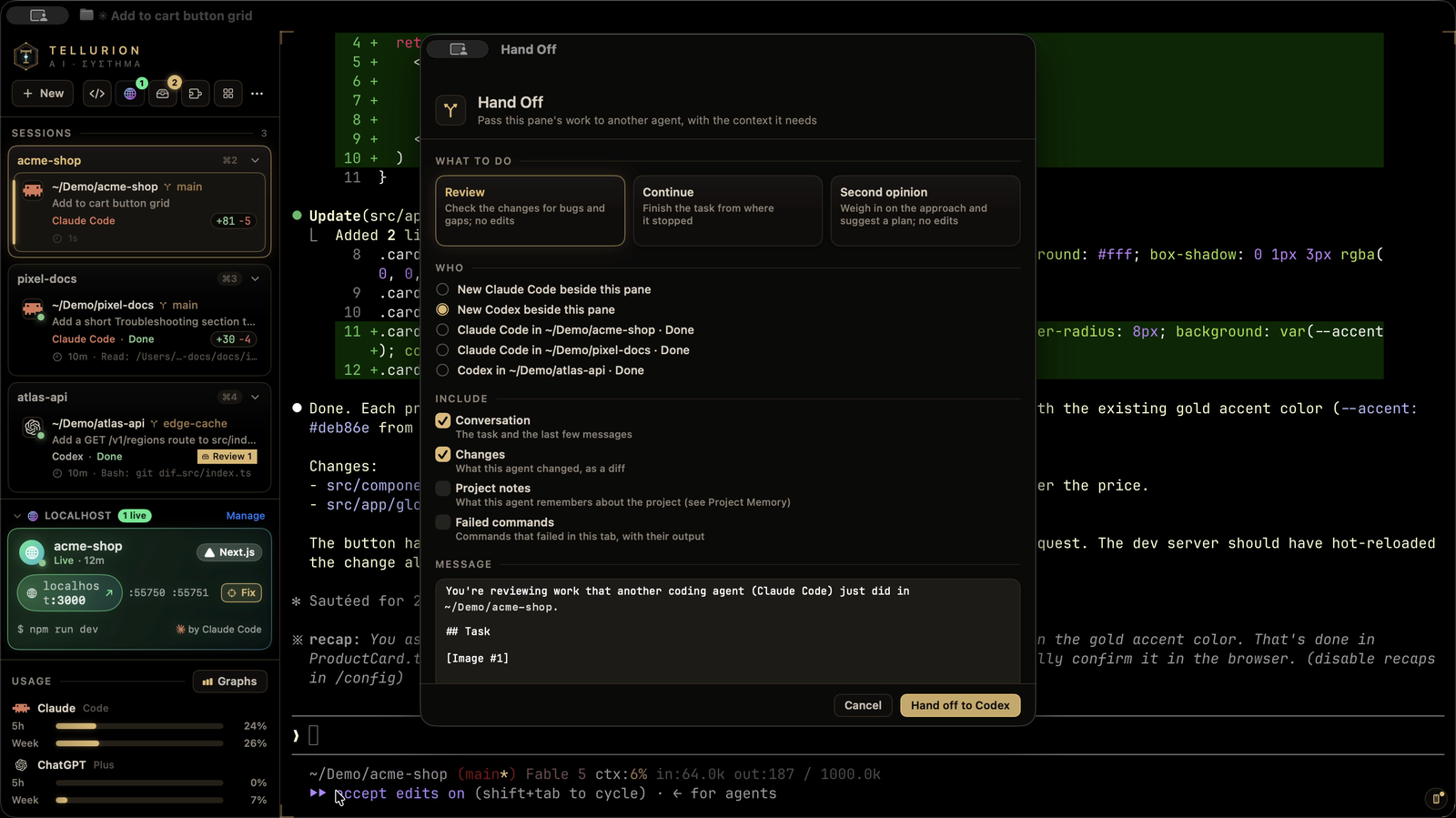
Pass a pane's work to another Claude Code or Codex session: a new one in a split beside it, or one that's already running.
- What it carries: the task, the recent conversation, exactly what the first agent changed (a diff since its first prompt), failed commands, and what the first agent remembers about the project. You can read and edit the message first.
- What to do: Continue picks up where the last agent stopped, Review checks the work without editing anything, and Second opinion weighs in on the approach.
- Failed commands can go straight to the agent already working on the project.
Review loops
Pair an agent with a reviewer (⋮ → Start a review loop…). Each time the writer finishes a turn, the reviewer gets its changes and answers APPROVED or CHANGES NEEDED, and its findings go back to the writer, until it approves or a round limit. Every message waits for your Send unless you turn on Send automatically, and nothing is ever typed into an agent mid-turn or over your own typing.
Review changes
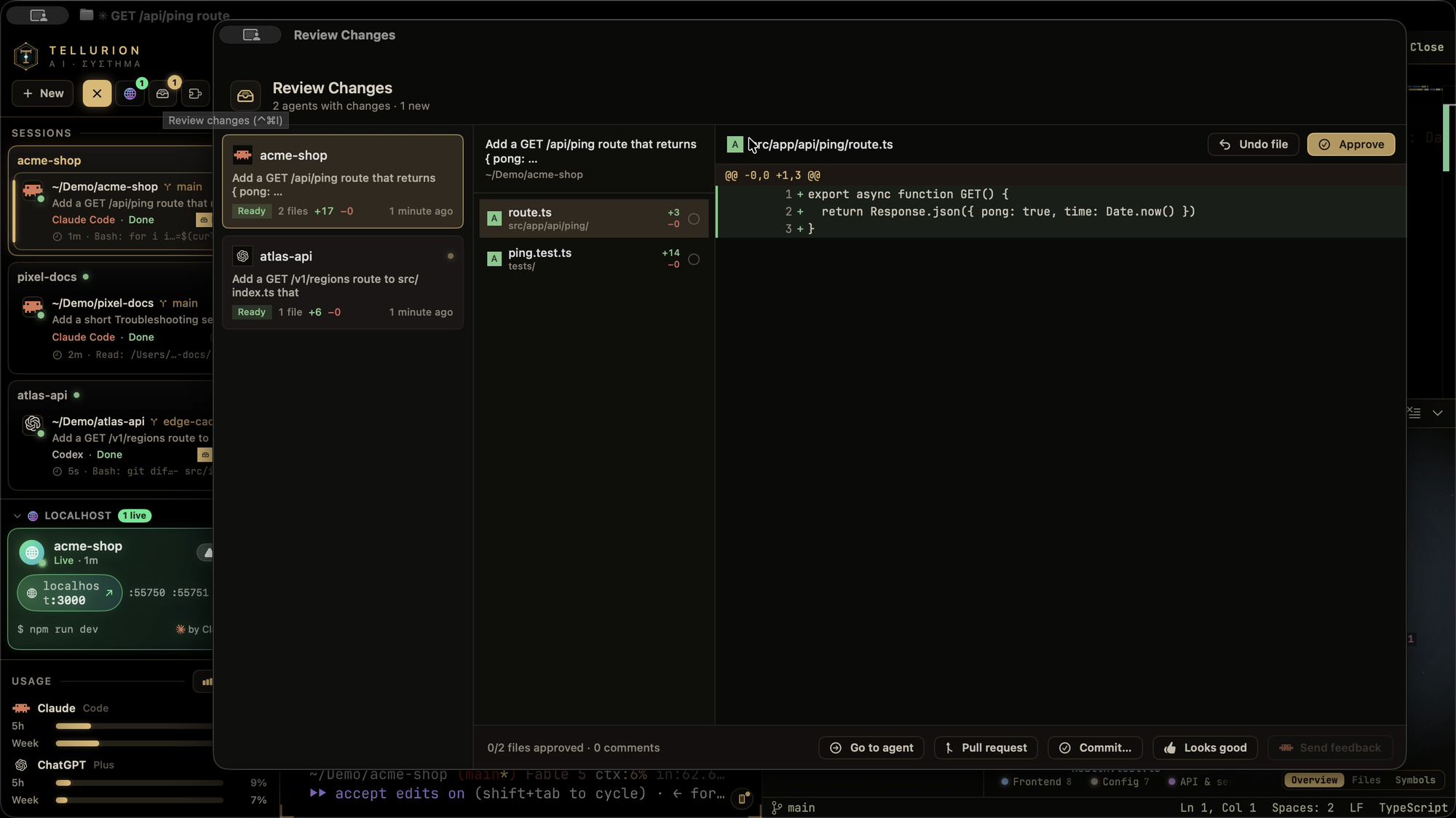
When an agent finishes working in a git repository, its changes land in an inbox (⌃⌘I).
- Read the diff file by file, and approve or undo each file.
- Comment on lines and send the comments back as the agent's next prompt.
- Finish up: commit, or open a pull request.
Undo an agent's turn

Every agent turn starts with a snapshot of your project. Undo last turn (or an earlier one) from the tab's ⋮ menu, or Restore to before this on any of your prompts in the agent timeline. It lists every file it will change and asks first, and your current files are saved too, so the undo can be undone, and the review inbox updates to match. Snapshots are git objects only: no commits, branches or stash entries, and your staged changes stay as they are. Folders that aren't repositories work too.
In a jj repository, the snapshot also remembers jj's own state, so if the agent ran jj commands during the turn, Restore with jj puts jj's history back along with the files.
See your backend
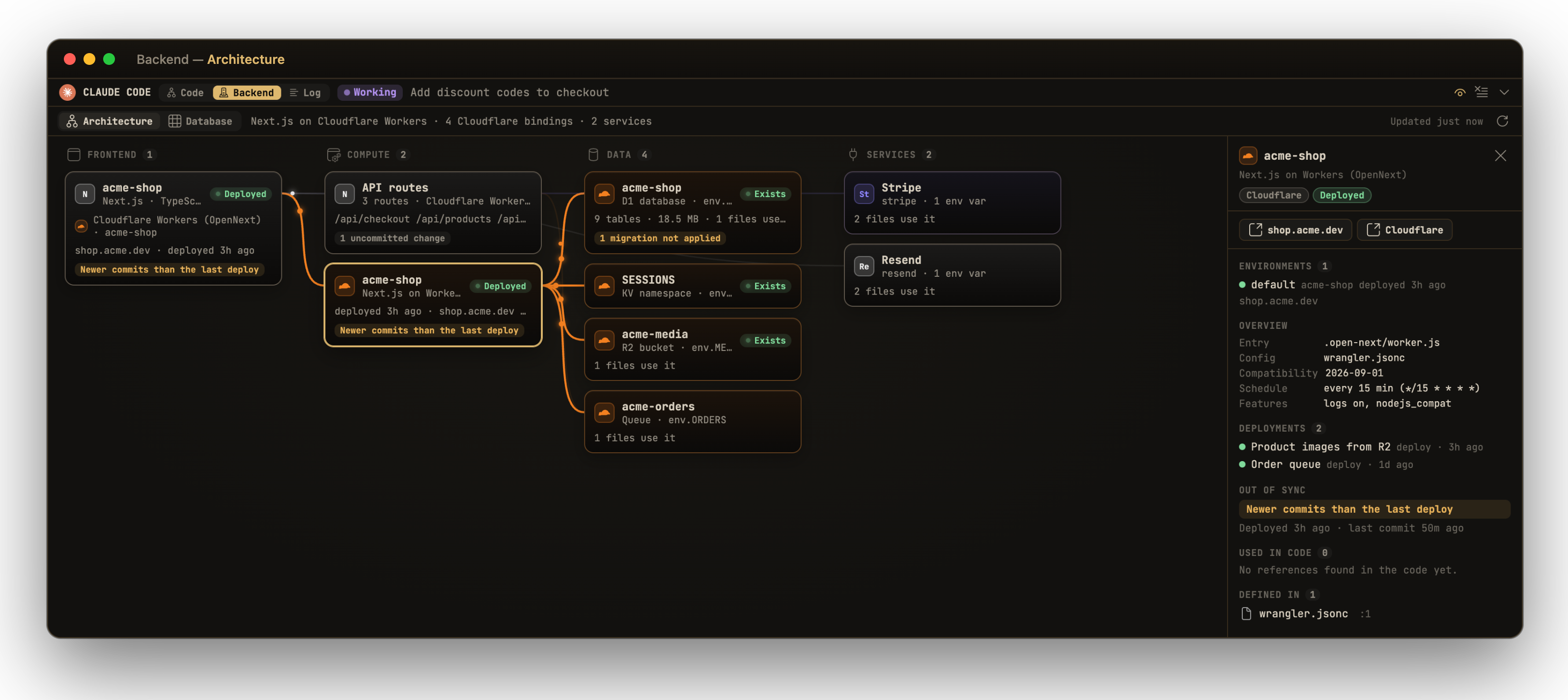
The Backend tab in the code editor's agent panel shows what your project runs on,
worked out from its own files (package.json, wrangler.jsonc, supabase/, .vercel/,
Prisma, env variable names). It works offline and without logins.
- Architecture: frontend → compute → data → services, with a line only where your
code really connects two pieces.
- Cloudflare Workers show their environments, domains, cron schedules and every binding: D1, Hyperdrive, KV, R2, Queues, Durable Objects, service bindings, Workers AI and more.
- Supabase, Vercel, Prisma, Firebase, and services like Stripe, OpenAI and Resend, show up too.
- Live status comes from each provider's own CLI (
wrangler,supabase,vercel), using the logins you already have and only read-only commands. It shows deploys per environment, project health, migrations not applied yet, and commits newer than the last deploy. - Code links: click any piece to see every file that uses it, and open the provider's dashboard or your live site.
- Agent awareness: when the agent edits something that belongs to a piece of your backend, that piece lights up.
Database
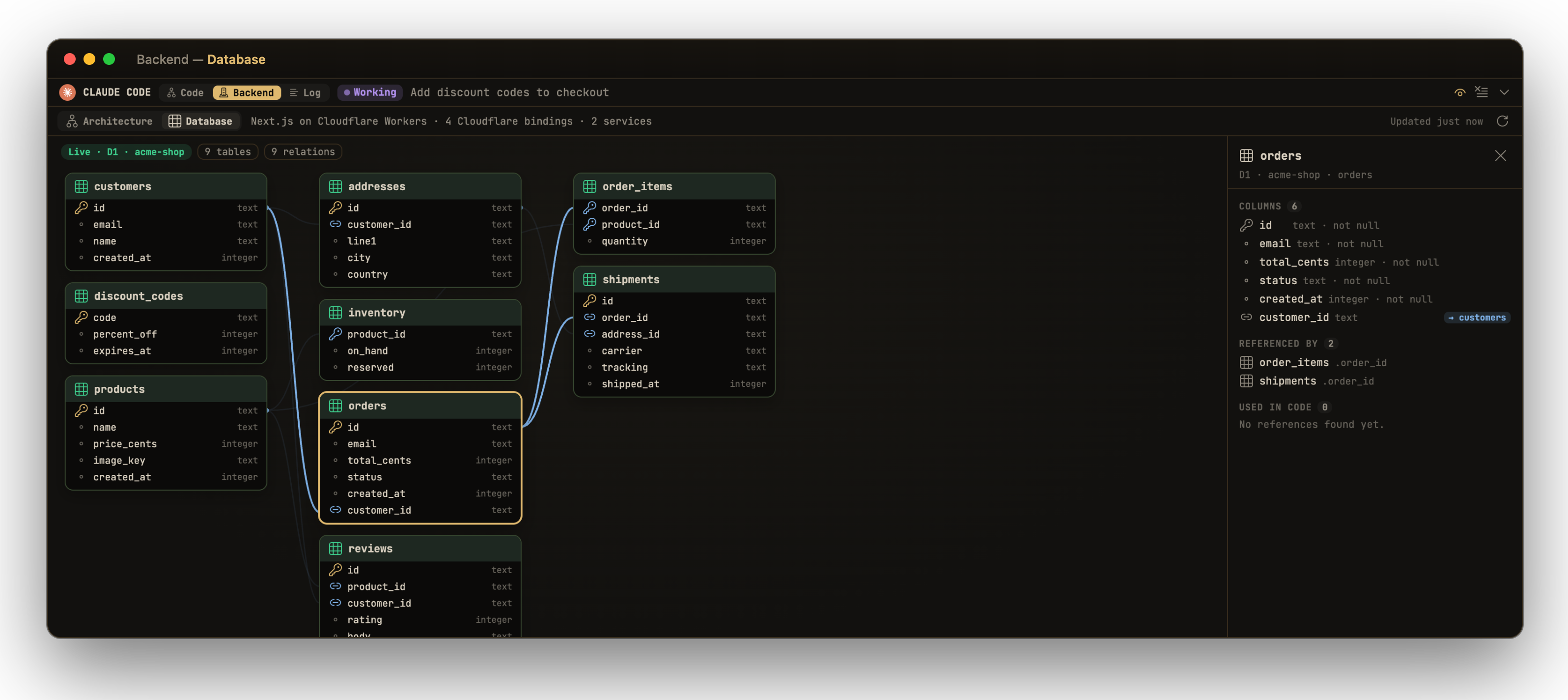
The Database view draws your schema: tables, columns and relations for Supabase, Cloudflare D1, Postgres behind Hyperdrive (read from your migrations) and Prisma.
- Click a table to see its columns, what references it and where your code queries it.
- Row-level security is checked on every Postgres table.
- Large schemas can be searched, and unrelated tables fade back.
Visual Fix
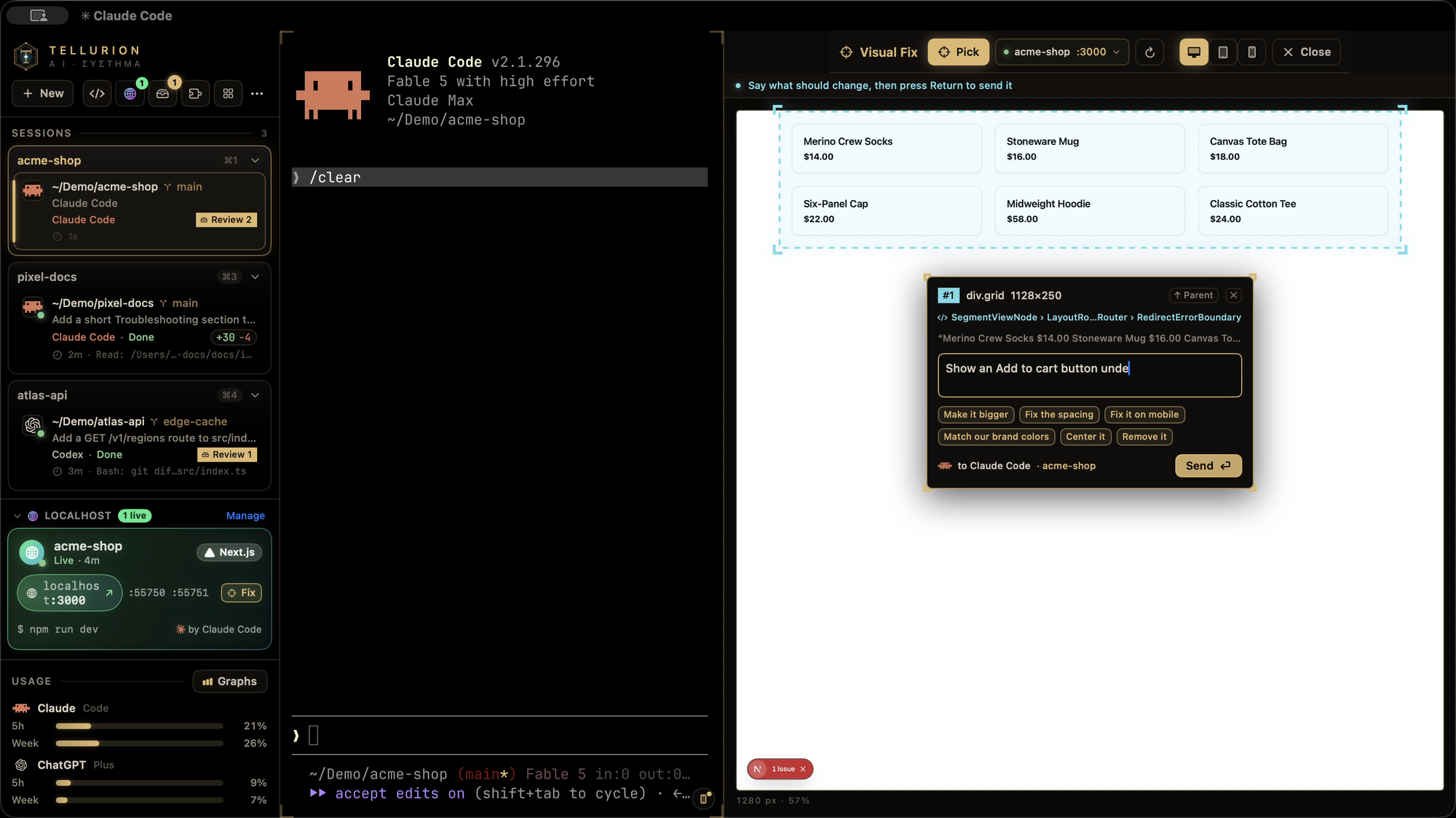
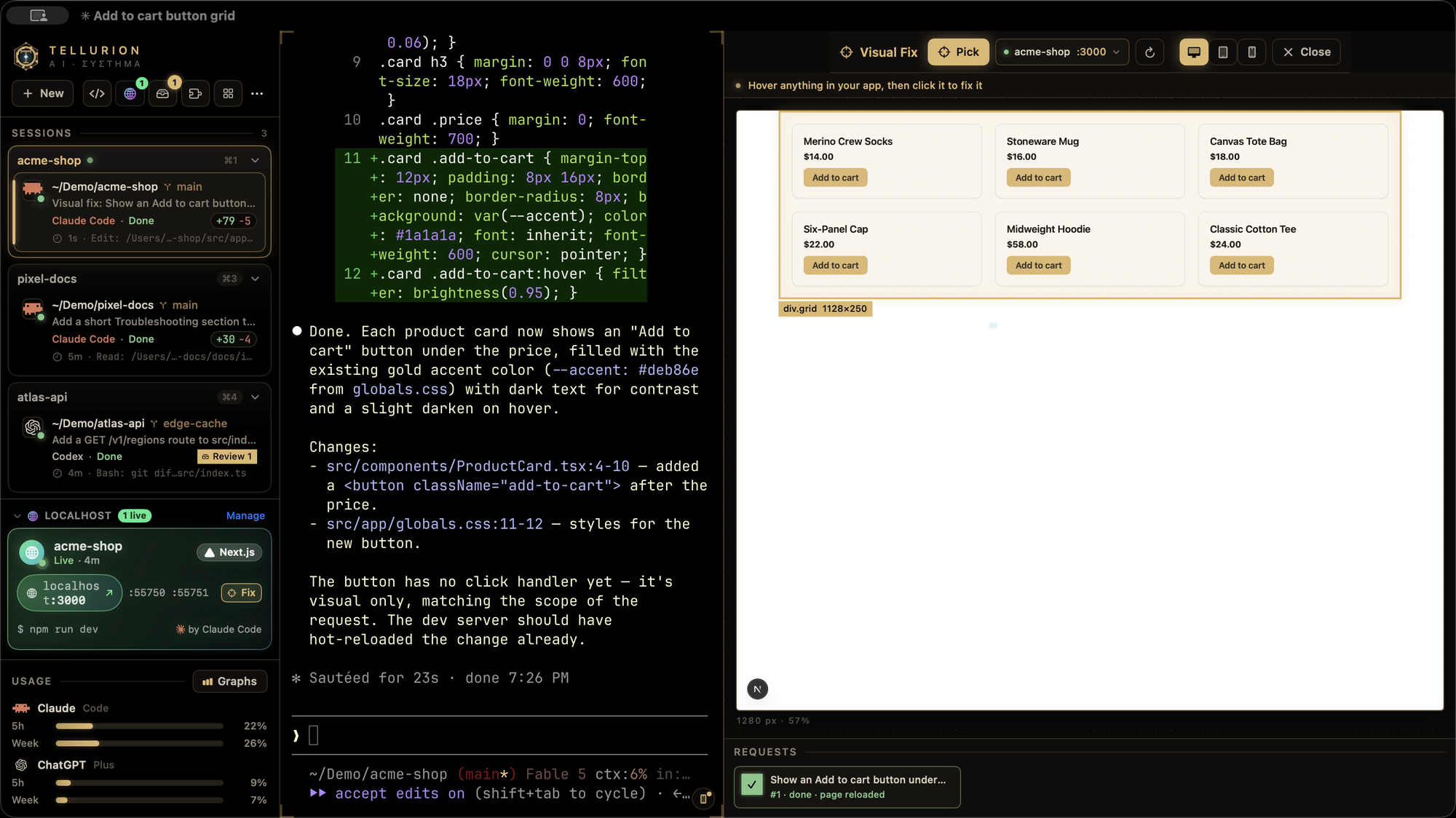
⌃⌘V previews your running dev server beside the terminal, at desktop, tablet or phone size.
- Pick an element: hover any element and click it, then say what should change.
- What the agent gets: the element's HTML and CSS selector, the component and source file that render it (React, Vue and Svelte), its computed styles, and a screenshot.
- Where it goes: the request goes to the agent working in that project, pinned to the element, and its card shows "Visual fix:" with what you asked for. When the change lands, the preview reloads where you were.
Localhost sessions
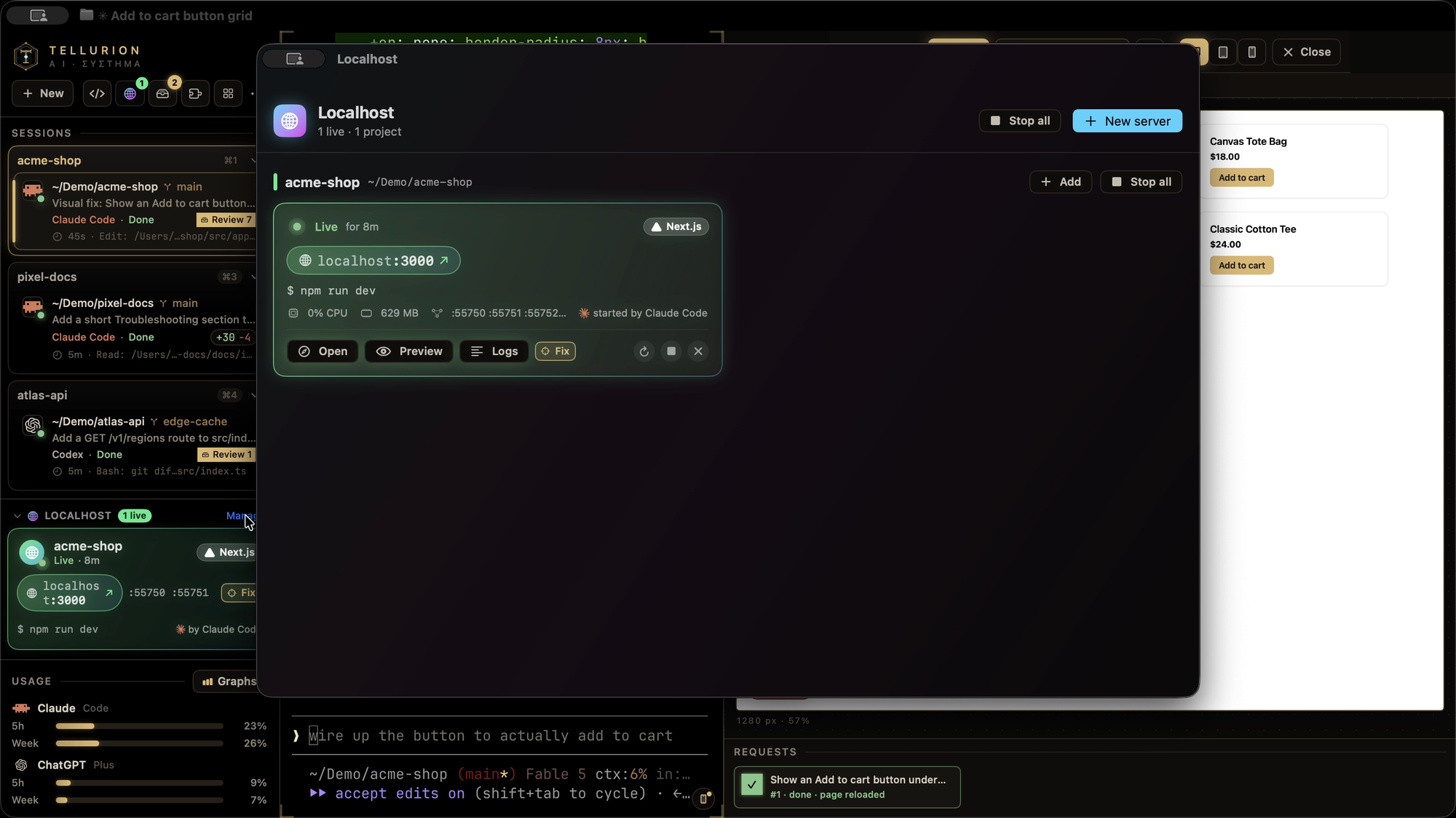
When an agent starts a dev server (npm run dev, vite, rails s, make dev, …), an
SSH tunnel, kubectl port-forward, ngrok or cloudflared, it opens in its own tab
instead, so it keeps running after the agent is done. The agent is told the URL and how to
read the logs.
- Sidebar cards: each server gets a card with live status, its
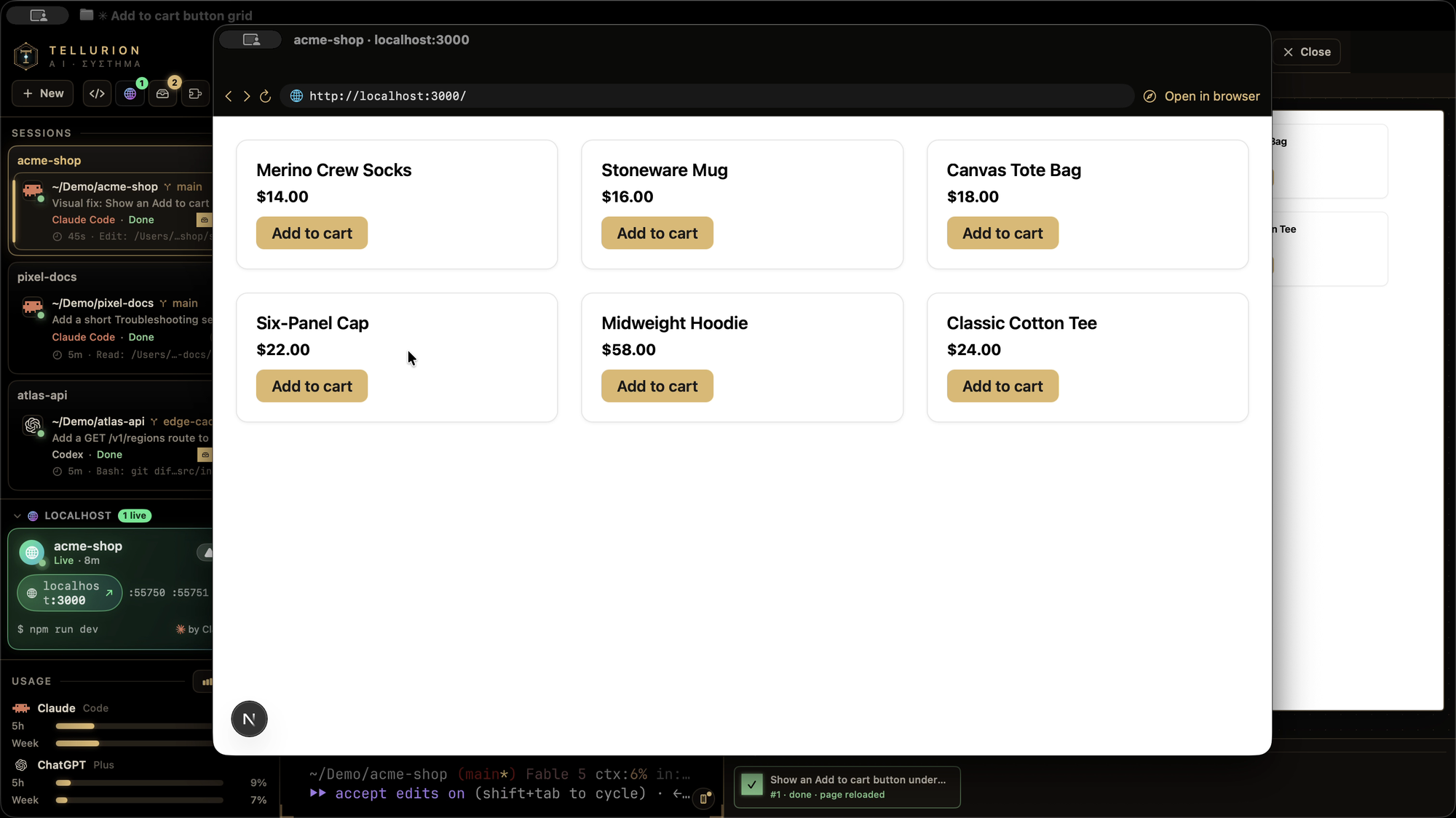
localhostURL, framework, uptime, restart and stop. - The Localhost manager (⌃⌘L) groups servers by project and shows their CPU and memory. It previews pages in a built-in browser and finds dev servers running elsewhere on your Mac, with Keep alive to move one into its own tab.
- Start one yourself from New → Localhost Server…, which offers your
package.jsonscripts.
Ports
The sidebar lists what's listening, which project it belongs to (Next.js, Vite, Django and more get their own badge) and what started it. Open it in the browser or Visual Fix, jump to its tab, or stop it. When a command fails because its port is taken ("EADDRINUSE", "address already in use"), the sidebar names what holds the port and offers to stop it.
Git panel
 |
 |
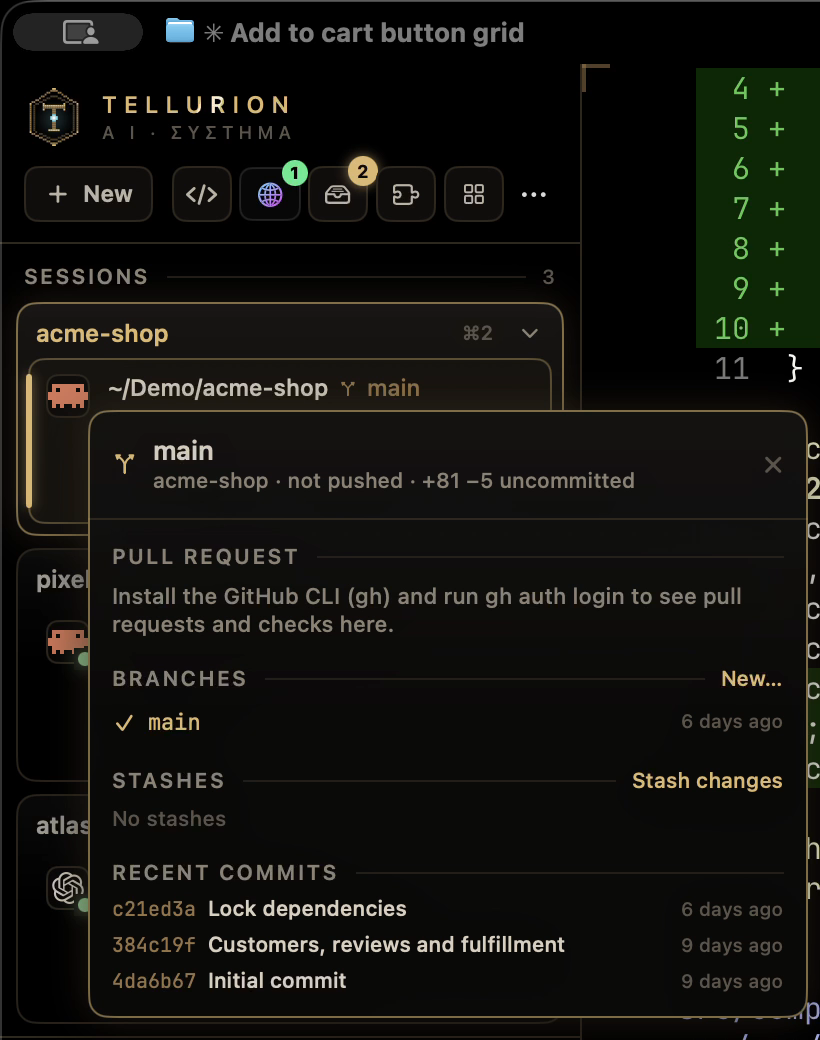
Click a tab's branch for a panel with its pull request (title, review state and every
check, failing ones first, each linked to its log), branches (switch, filter, create),
stashes (stash, apply, pop, drop) and recent commits. Tabs show commits to push and pull
(↑2 ↓1) and the pull request's number and checks beside the branch. Pull requests come
from the GitHub CLI (gh) when it's installed and signed in.
The panel also speaks the tools people use instead of plain branches:
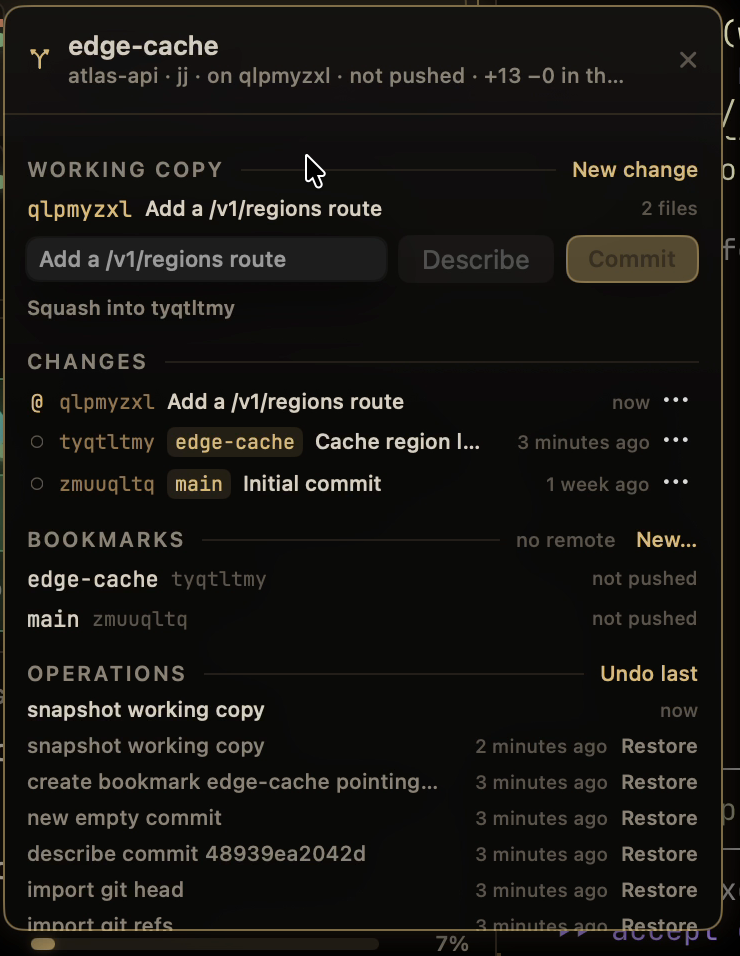
- jj (Jujutsu): the change you're on (or its nearest bookmark) shows in the sidebar, and the panel shows the working-copy change with Describe, Commit, New change and Squash, the changes around it (edit one, start a new change on top, abandon), bookmarks with Fetch and Push, and the operation log, where Undo last or Restore reverses any jj command, an agent's included. Works with or without a git repository beside it.
- GitButler: the sidebar names the branches it has applied
instead of
gitbutler/workspace, and the panel shows them side by side with their commits, push state and pull requests, plus GitButler's own Commit (to the branch you pick), New branch, Push and Undo. - Graphite: in a repository set up with
gt init, the panel shows the stack your branch is in, trunk to top, with each pull request and a "needs restack" marker. Restack, Submit and Sync rungtin a new tab.
Isolated sessions

+ New → Isolated Session (Docker) opens Ubuntu 24.04, Python 3.13, Node 22, or a
sandboxed Claude Code or Codex in a throwaway container. Only the tab's folder is mounted,
at /workspace; your home folder is not, and the container is deleted when you exit.
Sandboxed agents keep their own login in a Docker volume, so your Mac's credentials are
never shared. Needs Docker Desktop, OrbStack or Colima; if Docker isn't running and Colima
is installed, it starts Colima and stops it again afterwards.
Agent races
⌃⌘R gives the same task to several agents at once (Claude Code and Codex, or several of one), each in its own git worktree so they can't touch each other's work or yours. Compare their diffs side by side and apply the one you want.
Background processes
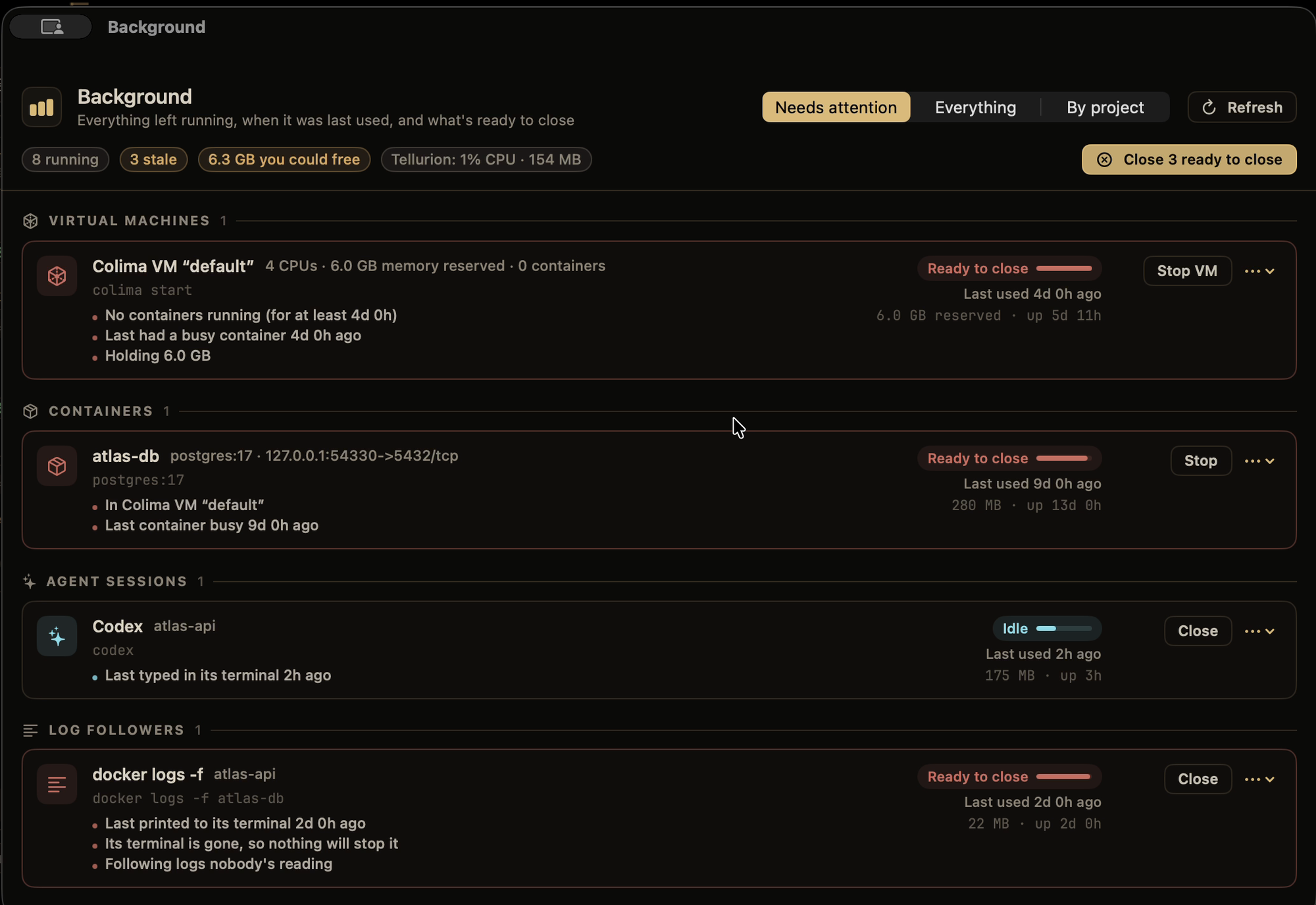
⌃⌘K finds everything left running: dev servers, Colima VMs and containers, agent sessions, browser automation, databases, watchers, log followers and login services.
- Last really used: the last typing or output in its terminal, its agent transcript being written, a live connection to its port, or a busy container.
- A staleness rating (Active, Idle, Stale or Ready to close), with the reasons.
- Cleanup in one click, always with a confirmation first. Login services are never marked ready to close.
Command history
Every command becomes a block with its output, exit code and duration (⌃⌘B). When one fails, a chip offers Fix with Claude or Fix with Codex, or sends it to the agent already working on the project, with the command and its output.
Agent activity
⌃⌘A shows active time, prompts, files and lines changed, commands, test runs and tokens, per day, hour, agent and project. It reads the session history Claude Code and Codex already keep. Resume any recent session in a new tab, and API value shows what your usage would cost at API prices.
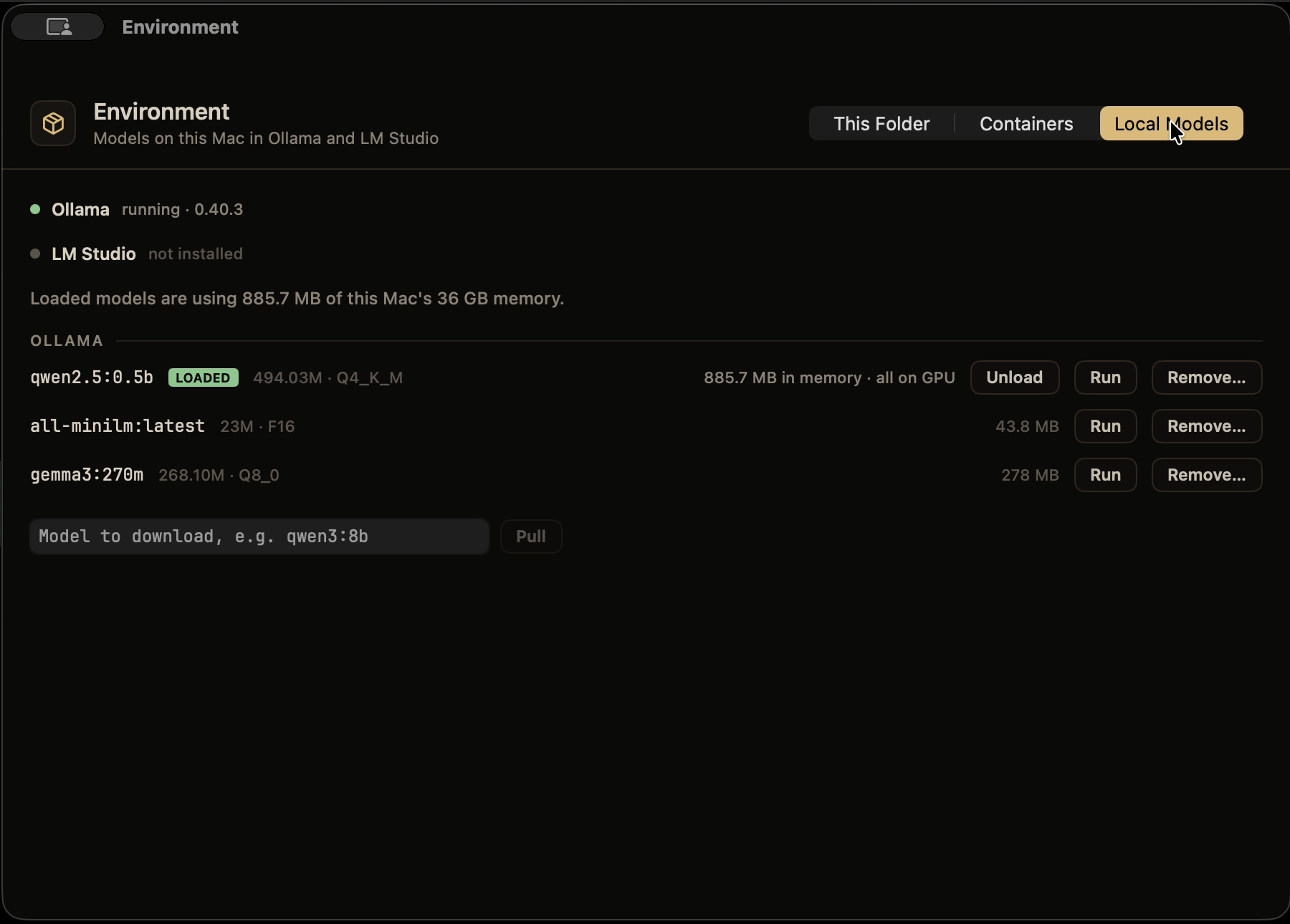
Environment
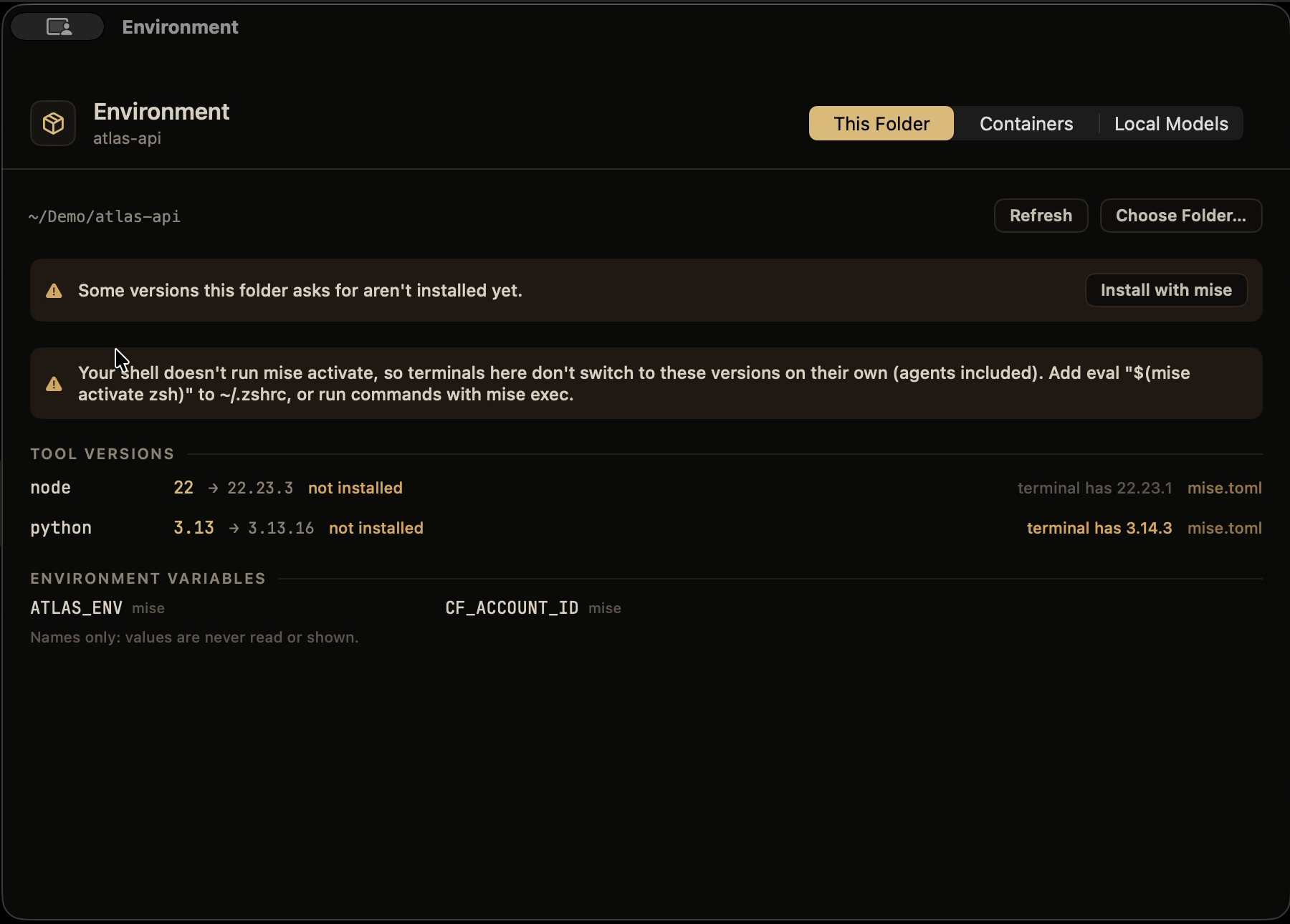
⌃⌘N (or Environment in the command palette) shows what's around your agents:
- This Folder: the tool versions the folder asks for (mise, asdf,
.nvmrc,.python-versionand friends), which aren't installed, when the terminal's own copy differs, and the environment variables mise and direnv add. Only their names are shown; values are never read. Install missing versions, trust a mise config, and allow or block an.envrcafter seeing what it runs. - Containers: everything Docker runs (Docker Desktop, OrbStack or Colima), grouped by Compose project, with CPU, memory and published ports, and Start, Stop, Restart, Logs, a shell inside, and Remove.
- Local Models: the models in Ollama and LM Studio, which are loaded and how much memory and GPU they take, with Unload, Run, Pull and Remove.
Skills
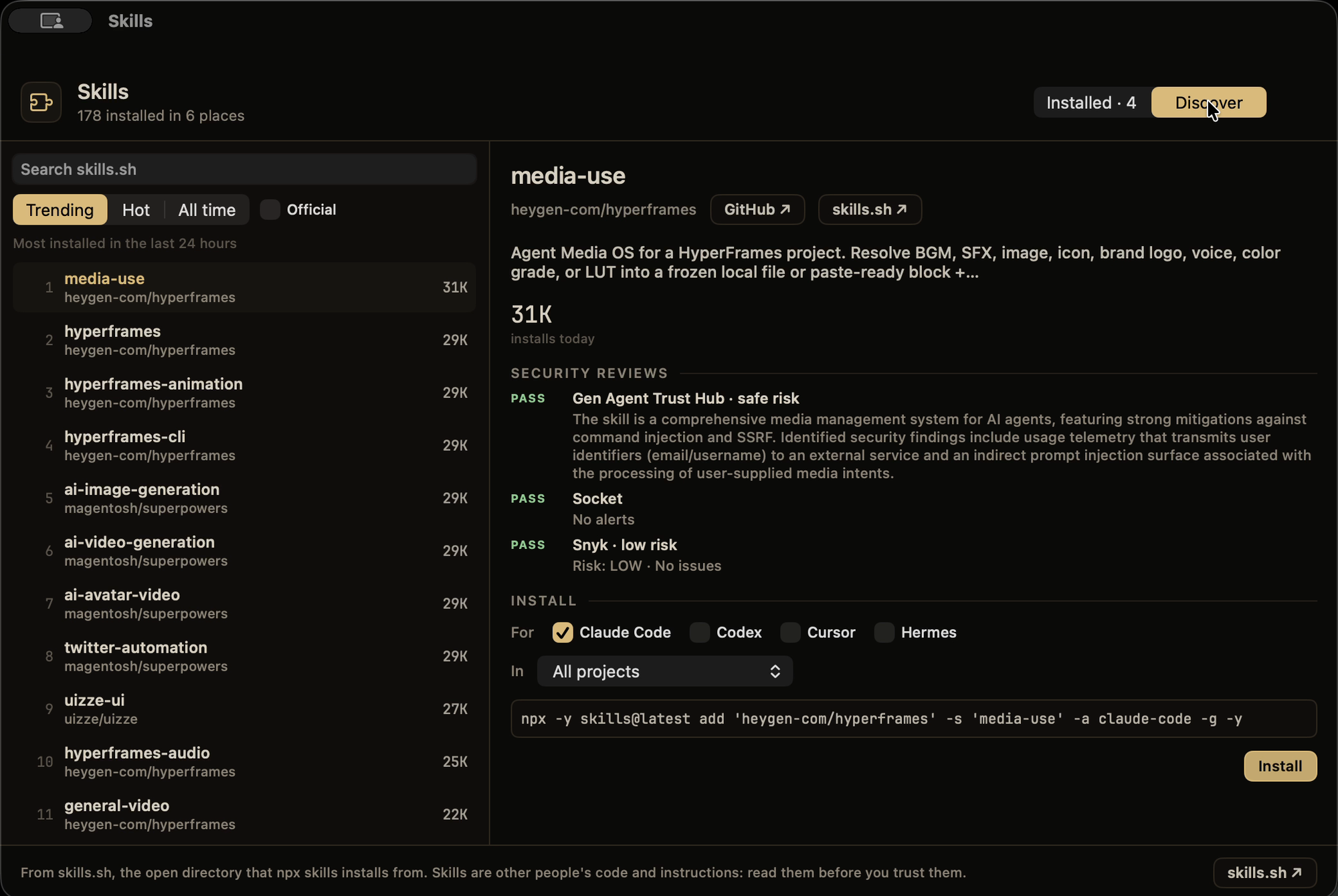
⌃⌘U shows every skill your agents have in one place: Claude Code, Codex, Cursor, Hermes,
the shared ~/.agents/skills folder, Claude Code plugins, Claude.ai's synced skills and the
current project's own.
- Updates: skills installed with
npx skillsor cloned with git are checked against their source, with Update on each and Update All. - Discover: what's trending, hot and most installed on skills.sh, with search, install counts and security reviews. Official company skills can be hidden.
- Install for the agents you pick, in every project or just this one. It shows the exact command and runs it in a new tab.
Setup, settings and updates
- Welcome window: on first launch it finds Claude Code, Codex and the tools the hooks need, connects your agents in one click (backing up each file it changes), lets you pick features, and runs a live test.
- Check Setup (GhosttyEXTREME menu or ⌘P) checks the hooks, each agent's config, jq,
the shell integration and notifications, with a fix button on each problem, and offers
Connect for Copilot CLI, Droid, Gemini CLI, Antigravity, Kiro, Cursor CLI and OpenCode
when it finds them.
ghostty-extreme doctorruns the same checks in a terminal. - Settings (⌘,) turns each feature on or off. A feature that's off has no menu item, shortcut, button or palette entry, and does no background work.
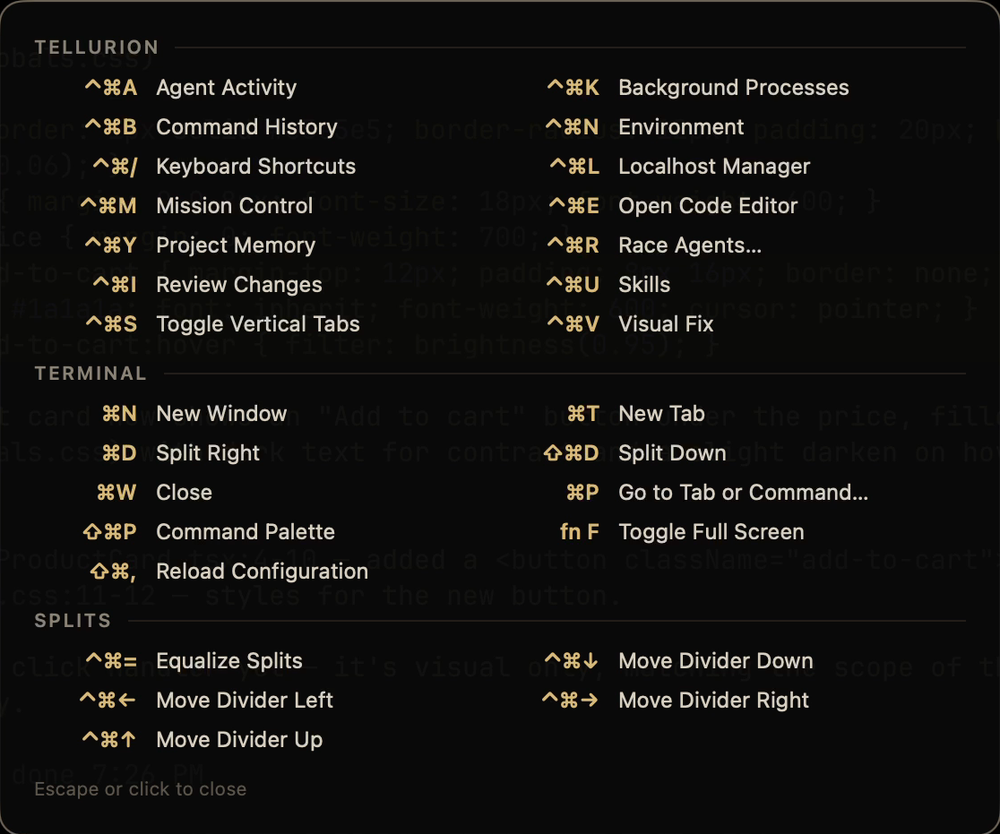
- Every shortcut: hold ⌃⌘ for a moment to see them all over the window.
- Updates appear as a card at the top of the sidebar, checked shortly after launch and every hour. They're signed with this project's key (nothing else is accepted), and after the update your windows, tabs, splits, agent sessions and localhost servers come back.
Everything Ghostty already does
GPU-accelerated rendering, native tabs and splits, the quick terminal, hundreds of themes, ligatures, shell integration, AppleScript and Shortcuts. Your Ghostty config works as-is.
Light on your Mac
All of the sidebar's animations run in Core Animation, so the app does almost no work per frame. Anything you can't see pauses: background tabs, hidden and minimized windows. With six agents working at once, GhosttyEXTREME uses about 1–3% CPU (measured on an Apple silicon MacBook).
Security and privacy
- Nothing leaves your Mac. There's no account, telemetry or server. Agent tracking and shared memory read the files Claude Code and Codex already write.
- Only your own hooks can talk to it. Agent status arrives as terminal escape sequences, which any printed text could imitate. Each launch creates a secret that only its own terminals and hooks know, and events without it are ignored.
- The Backend view never stores credentials. It runs your providers' own CLIs with their existing logins, read-only commands only. It reads only the names of your env variables, never their values, and so does the Environment window.
- Agent hooks only observe. They report status and never approve, block or change what an agent does. Any agent settings file is backed up before it's changed.
- The editor stays local. It can only show its own pages, and Visual Fix only talks to your local dev server.
How it compares
GhosttyEXTREME is for watching and steering the CLI agents you already use. If you want a terminal or editor with its own built-in AI, Warp or Zed may suit you better.
| GhosttyEXTREME | Ghostty | cmux | Warp | Zed | |
|---|---|---|---|---|---|
| What it is | Ghostty fork for running coding agents | Fast native terminal | Ghostty-based terminal for agents | Terminal with built-in agents | Code editor with an agent panel |
| Runs Claude Code, Codex & co. unchanged | ✓ | ✓ | ✓ | ✓ | ✓ in its terminal; also via ACP |
| Status of every agent at a glance | Sidebar card per agent | — | Pane rings, tab highlights, sidebar notification text | Tab status and notifications (Claude Code, Codex, OpenCode via plugins) | For agents in its panel |
| Answer a permission prompt without switching | Sidebar, Mission Control or notification | — | — | Notifies you; answering elsewhere not documented | For agents in its panel |
| See the code as the agent writes it | Editor follows the CLI agent live | — | — | Code review panel for the agent's diff | Follows agents in its panel |
| Map of what the agent touched | Code map with blast radius | — | — | — | — |
| Undo an agent's turn | ✓ | — | — | Not documented for CLI agents | Checkpoints in its agent panel |
| Backend view (Cloudflare, Supabase, Vercel) | ✓ | — | — | — | — |
| Point at your running app, send it to the agent | Visual Fix | — | Browser that agents can drive | — | — |
| Open source | AGPL-3.0 | MIT | Client GPL-3.0; server BSL | Client AGPL/MIT; AI and cloud proprietary | GPL-3.0 |
| Platforms | macOS (Apple silicon) | macOS, Linux | macOS | macOS, Linux, Windows | macOS, Linux, Windows |
Where others are ahead: Warp and Zed run on Linux and Windows and come with their own AI. cmux has SSH workspaces and a browser your agents can control, and its sidebar also shows PR status and listening ports. Ghostty is the lean original that all of this is built on. GhosttyEXTREME is macOS-only, Apple silicon only, and maintained by one person.
Compared from each project's public docs on October 7, 2026. Corrections welcome.
Install
Apple silicon Macs, macOS 13 or newer. In Terminal:
curl -fsSL https://raw.githubusercontent.com/steventsvik/GhosttyEXTREME/custom/install.sh | bashIt downloads the latest release,
checks it against the release's SHA-256 checksums and puts GhosttyEXTREME.app in
/Applications. Then it opens: the welcome window connects Claude Code and Codex in one
click and runs a live test.
Updates arrive in the app: GhosttyEXTREME checks for new releases and installs them when you say so (GhosttyEXTREME → Check for Updates…). They're signed, and the app only accepts updates signed by this project.
Installing by hand instead
Download GhosttyEXTREME-<version>-macos-arm64.zip from the
latest release, unzip it and
move GhosttyEXTREME.app to /Applications. It's signed with a Developer ID and notarized by
Apple, so it opens like any other download.
Your existing Ghostty configuration works as-is.
Keyboard shortcuts
Hold ⌃⌘ for a moment to see them all over the window.
| Shortcut | |
|---|---|
| ⌘P | Command palette: agents waiting on you, new sessions, every tool |
| ⌘, | Settings (Ghostty's config file is under GhosttyEXTREME → Edit Config File…) |
| ⌃⌘S | Show or hide the sidebar |
| ⌃⌘M | Mission Control |
| ⌃⌘E | Code editor |
| ⌃⌘Y | Project memory |
| ⌃⌘V | Visual Fix |
| ⌃⌘L | Localhost sessions |
| ⌃⌘I | Review changes |
| ⌃⌘R | Race agents |
| ⌃⌘K | Background |
| ⌃⌘B | Command history |
| ⌃⌘A | Agent activity |
| ⌃⌘U | Skills |
| ⌃⌘N | Environment |
| ⌃⌘/ | Every shortcut |
Agent status setup
Connect Claude Code, Codex and your shell by hand
The welcome window and Check Setup do all of this for you. The steps below are what they do.
GhosttyEXTREME sets GHOSTTY_EXTREME_AGENT_EVENTS=1 in its terminals. The hook
scripts in agent-hooks/ do nothing anywhere else.
./agent-hooks/install.sh
This copies the hooks to ~/.ghostty-extreme/agent-hooks/ and the localhost command
to ~/.ghostty-extreme/bin/. Point your agents there rather than at the repo: macOS
privacy protection can block terminal processes from reading ~/Desktop or
~/Documents, which silently breaks the hooks.
Shell detection. Add this to ~/.zshrc:
[[ -n "$GHOSTTY_EXTREME_AGENT_EVENTS" ]] && source ~/.ghostty-extreme/agent-hooks/ghostty-extreme.zsh
Claude Code. In ~/.claude/settings.json, run
~/.ghostty-extreme/agent-hooks/agent-hook.sh claude <event> for these hooks:
| Hook | Event |
|---|---|
SessionStart |
session_start |
UserPromptSubmit |
prompt_submit |
PostToolUse |
tool_complete |
PermissionRequest |
permission_request |
Notification |
notification |
Stop |
stop |
StopFailure |
stop_failure |
SessionEnd |
session_end |
PreToolUse (matcher Bash) |
pre_tool_use (moves dev servers into localhost sessions) |
{ "type": "command", "command": "~/.ghostty-extreme/agent-hooks/agent-hook.sh claude stop" }Codex. Run python3 agent-hooks/install-codex.py. It registers Codex's hooks without
touching Claude's settings or saved hook approvals, and backs up the config first.
Restart Codex and approve the new registrations through its normal hook review.
Other agents. Copilot CLI, Droid, Gemini CLI, Antigravity, Kiro, Cursor CLI and
OpenCode are connected from Check Setup → Connect. Each gets a small hook
(agent-event.py; for OpenCode, a plugin in ~/.config/opencode/plugins/) in that agent's
own settings.
Claude usage meter (optional). Have your Claude Code status line script save
rate_limits to ~/.claude/ghostty-extreme/claude-usage.json as
{"updated": <unix time>, "rate_limits": <rate_limits>}.
Build from source
Requirements and build steps
- macOS 13 or newer (developed and tested on macOS 26, Apple silicon)
- Xcode 26 or newer
- Zig 0.15 from Homebrew:
brew install zig@0.15(the ziglang.org build fails to link against the macOS 26.4+ SDKs) jqfor the agent hooks:brew install jq
git clone https://github.com/steventsvik/GhosttyEXTREME.git
cd GhosttyEXTREME
/opt/homebrew/opt/zig@0.15/bin/zig build -Doptimize=ReleaseFast -Dxcframework-target=native
ditto macos/build/ReleaseLocal/Ghostty.app /Applications/GhosttyEXTREME.app
If the repo is in an iCloud-synced folder (like Desktop or Documents), codesign fails on
iCloud's extended attributes. Point macos/build at a folder outside iCloud first;
update-ghostty.sh does this for you.
./update-ghostty.sh rebases this fork onto the newest official Ghostty release, rebuilds
and installs it (it needs an upstream remote pointing at ghostty-org/ghostty).
--check only reports whether a new release exists.
License
AGPL-3.0, see LICENSE. Ghostty's own code is MIT (LICENSE-GHOSTTY). Parts of the sidebar are derived from Warp (AGPL-3.0). Full credits and trademark notes are in NOTICE.md.
For Ghostty itself (configuration, themes, keybindings), see the Ghostty documentation.