

Website · Quick start · CLI reference · Roadmap · Contributing
AI scales. Your attention doesn't. Agents work in parallel, and keeping them moving still pulls you back to a screen — to check, to answer, to approve. Checking fragments your focus: which agent finished, which one is stuck. Every switch costs context: open the tool, read the thread, find what needs you. Stepping away stops the work: a question or an approval sits unanswered until you return. You've delegated the work; staying in control still ties you to a screen.
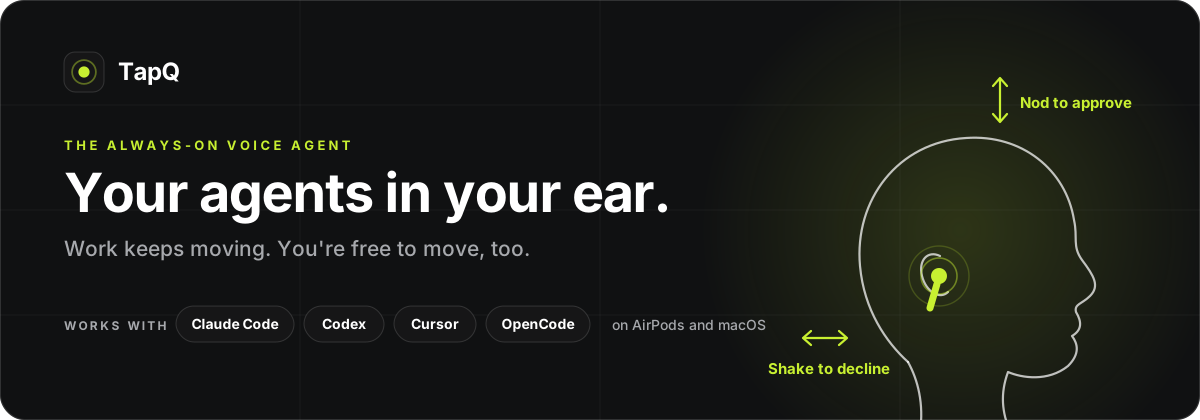
Agents are the first software you don't operate but supervise, and supervision doesn't need a screen — it needs a way to reach you. TapQ is that way. Works today with Claude Code, Codex, Cursor, and OpenCode, on AirPods and macOS.
Contents
- What it does
- How it works
- Privacy and data
- Where TapQ fits
- Current support
- Controls
- Quick start
- FAQ
- Developer guide
- Documentation
- Community
- License
What it does
TapQ is a voice agent that runs in the background all day, connected to your coding agents through their hooks. It listens on-device, speaks only when an agent needs you or you speak to it, and hears your answer through the earbuds. Four things:
- Speaks every prompt. When Claude Code, Codex, Cursor, or OpenCode stops for an
approval, a question, or a choice, TapQ says it in your ear:
Claude Code: Run swift test. Approve?You answer "yes", double-nod, or tilt and tap through the options. Prompts from every open session arrive as one spoken queue. - Reports a finished run and takes the next instruction. "Claude Code finished the migration." — "Tell it to rerun the tests." — "Queued for Claude Code." An agent's turn ends in your ear, and the next one starts there.
- Answers questions about the work. "Who's waiting?" "What did Codex change?" TapQ reads the agents' own transcripts and answers in a sentence instead of a tab.
- Takes goals and follow-ups. "Run the tests and tell me if anything fails." "When Claude Code finishes, rerun the tests." With nothing running at all, "Hey TapQ, set up a Swift package for the parser" starts a session.
An afternoon with two agents:
Claude Code: Run swift test. Approve?
  "yes"
Codex: Run python migrate.py. Approve?
  "no, tell Codex to keep the old table names"
  Queued for Codex.
  "who's waiting?"
  Nothing is waiting. Claude Code finished the migration.
  "when Claude Code finishes the changelog, rerun the tests"
  After Claude Code finishes: rerun the tests — noted.
Answering needs no wake word, nothing to open, nothing to look at. Anything TapQ cannot answer — a multi-select prompt, a missed gesture, a failed voice pipe — falls back to the agent's on-screen prompt exactly as if TapQ weren't installed. Everything TapQ does unprompted is spoken and attributed, and none of it can approve anything.
How it works
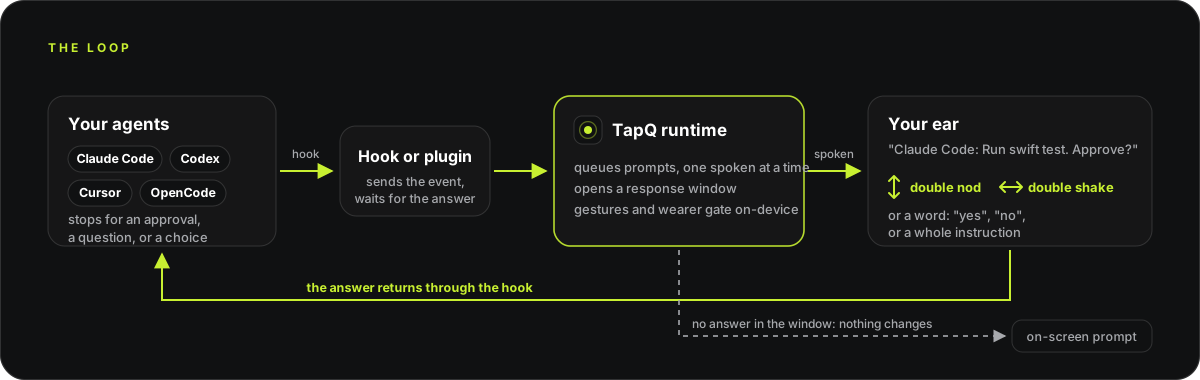
TapQ is a runtime on your Mac with an adapter for each agent and each device.
- Hooks in the agents.
tapq integration <agent> installadds a hook (Claude Code, Codex, Cursor) or a plugin (OpenCode) to the agent. When the agent stops for a permission, a question, or a choice, or finishes a turn, the hook sends that event to the runtime and waits for the answer. - Spoken in-ear, then a response window. The runtime speaks the prompt through the earbuds and listens for a set time. Prompts from several sessions queue and are spoken one at a time, each named with its agent.
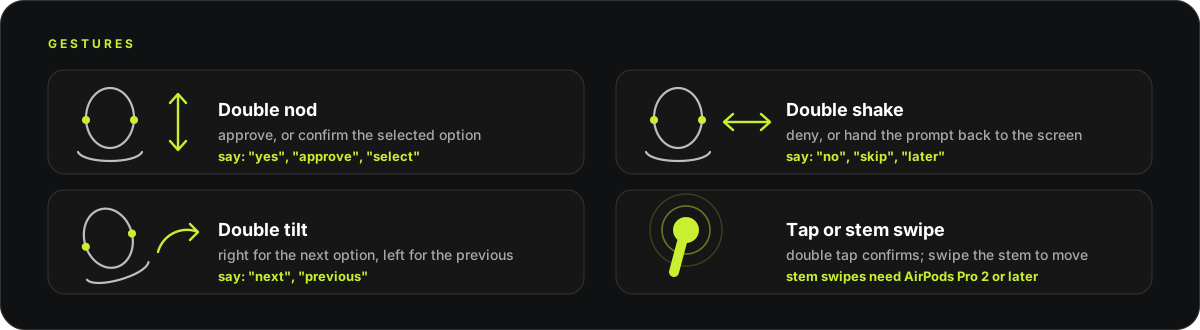
- Gestures from the motion stream. AirPods report head motion; TapQ recognizes a double nod, double shake, double tilt, and stem tap on-device and maps them to approve, deny, next or previous option, and confirm.
- Speech through a voice backend. With
--voice-backend openai-realtime, your speech is sent to OpenAI's realtime API only while a window is open, and the model turns what you said into one of a fixed set of actions: approve, deny, select an option, queue an instruction for an agent, answer a question about status or an agent's transcript, set a follow-up, or start a task. It can speak only what TapQ passes it; it cannot answer a prompt on its own. The default on-device backend matches a fixed vocabulary instead. - Wearer attribution. The same motion sensors register the vibration of your own
speech. With
--wearer-gate, speech that does not coincide with it is ignored, so a colleague or a video cannot answer for you. - Back through the hook, or back to the screen. The answer returns to the agent through its hook. If the window times out or nothing is recognized, the hook returns without an answer and the agent shows its normal on-screen prompt.
- Between prompts. With
--attention wake, an on-device recognizer listens for "hey tapq" whenever nothing else is listening and opens a window with the same rules; with no session running, a sentence starts one. What you and TapQ say to each other is appended to a local file, and a recent slice of it is given to the model each turn so it can resolve "the thing I asked about earlier".
Privacy and data
TapQ sits between you and tools that can run commands, so the boundaries are part of the design, not a settings page. What ships today:
- Head motion is read only inside a window. The motion stream opens when TapQ speaks a prompt or hears the wake word and stops when the window resolves. Between windows, a nod at a colleague does nothing in TapQ.
- Gesture recognition and wearer attribution run on-device. Nothing leaves the Mac to decide whether you nodded or whether the voice was yours.
- Speech leaves the Mac only if you opt in, and only inside a window. The default
backend matches a fixed vocabulary on-device with no API key. With
--voice-backend openai-realtime, audio goes to OpenAI's realtime API only while a response window is open; wake-word listening between windows stays on-device. - Conversation memory is local, bounded, and yours to clear. With the realtime
backend, what you and TapQ said to each other is appended to
wearer-conversation.jsonlin the runtime directory. It keeps 30 days or a couple of megabytes, whichever comes first, andtapq memory clearwipes it. Tool inputs, working directories, and permission modes are never spoken and never recorded. - Nothing TapQ does on its own can approve anything. Follow-ups, goals, and the deliberation loop can queue an instruction or say a sentence; every approval still comes from your gesture or your voice. The risk reasoner is escalation-only: it can raise the confirmation bar for a prompt and can do nothing else.
- Failure falls back to the screen. A timed-out window, a missed gesture, or a dead voice pipe returns the prompt to the agent's own on-screen flow.
The local broker boundary describes what the hooks and the runtime can and cannot do to each other. Privacy principles sets the rules for planned capture modes (explicit start, clear state, consent first) that shipped functionality will be held to.
Where TapQ fits
Nodding to answer an earbud is no longer exotic. Siri Interactions on AirPods let you nod yes or shake no to Siri, and every coding agent now offers some way to approve a prompt from a phone. TapQ is for the gap between them:
| Siri Interactions on AirPods | Approve from the agent's phone app | TapQ | |
|---|---|---|---|
| What a nod answers | Siri's own prompts | Nothing; you tap on a screen | Claude Code, Codex, Cursor, and OpenCode prompts |
| Where the prompt reaches you | Siri | A notification you read | Spoken in your ear, named with its agent |
| Beyond yes and no | Siri's features | The agent's own UI | Options, instructions, questions about the work, goals, follow-ups |
| Model | Apple's | The agent's | Your choice of realtime backend, or on-device with no key |
| Source | Closed | Closed | Apache 2.0, one Swift package, adapters you can add to |
TapQ is not an assistant and does not want to be one. It is the interaction layer between the assistants you already run and the earbuds you already wear.
Current support
| Supported today | |
|---|---|
| Version | 0.5.0-beta.2, pre-1.0, source-only (no Homebrew formula or signed download yet) |
| Mac | macOS 14 or newer, Swift 6, Xcode 16 or a compatible toolchain |
| Earbuds | Any AirPods that expose head motion: AirPods Pro (all generations), AirPods 3 and later, AirPods Max. Stem swipes need AirPods Pro 2 or later. Tested on AirPods Pro |
| Claude Code | Hook support: approvals, denials, option selection, notifications, and questions in final responses |
| Codex CLI | 0.142.5 or newer: structured single-choice questions, native permission approvals, completion, and final-response questions, with fail-through |
| Cursor | Agent hooks: shell and file-tool approvals and completion announcements; questions stay on screen until Cursor exposes them |
| OpenCode | 1.18.15 or newer, through a TapQ-managed plugin: permission prompts and completion, with fail-through |
| Linux | The portable core and management CLI build and test on Linux; no earbuds or agents |
| CI | Every pull request and push to main builds and tests the full graph on macOS 15 and the portable core on Linux |
Exactly which prompt types each agent exposes, and what is waiting on the agent vendors, is tracked line by line in the roadmap. Apple Watch is the next device.
Controls
| Intent | Motion or hardware | Voice examples |
|---|---|---|
| Approve / yes | Double nod or double tap | yes, approve, go ahead |
| Deny / no | Double shake | no, deny, cancel |
| Next option | Stem swipe down (volume down) or double tilt right | next, move on |
| Previous option | Stem swipe up (volume up) or double tilt left | previous, go back |
| Confirm option | Double nod or double tap | select, this one, one–four |
| Return to on-screen prompt | Double shake | skip, later, not sure |
A tilt is a lateral ear-toward-shoulder lean; two quick tilts to the same side
navigate, so a single lean never moves the selection. With the realtime voice backend,
anything beyond these words — an instruction, a question, a goal — is understood as a
sentence; the on-device backend matches the English (en-US) grammar above.
TapQ handles one single-select question at a time. Anything it can't answer — multi-select prompts, multiple questions, a missed gesture — stays in the agent's normal on-screen flow.
Quick start
TapQ is source-only for now — no Homebrew formula or signed download yet. You need
Swift 6, macOS 14 or newer with Xcode 16 (or a compatible toolchain), an AirPods
model with headphone motion (AirPods Pro, AirPods 3 or later, or AirPods Max —
tested on AirPods Pro), and Claude Code with hook support, a local Codex CLI
(0.142.5 or newer), Cursor, or OpenCode (1.18.15 or newer). Keep the AirPods
connected, in-ear, and selected as the audio output.
Without AirPods, tapq serve still runs. TapQ says so once and degrades to a plain
voice agent on whatever the system's default input and output are — prompts spoken on
the Mac's speaker, answered by voice — with gestures, taps, tilts, and volume swipes
inert. Connect AirPods mid-session and the next prompt has them back.
git clone https://github.com/spaceamoeba-t/tapq.git
cd tapq
swift build && swift test
1. Calibrate — builds and launches the locally signed headless app container so macOS can grant Motion, Speech, and Microphone permissions to a stable identity:
scripts/run-runtime-app.sh calibration run
2. Connect an agent:
# Claude Code (native policy recommended for interactive use):
build/TapQRuntime.app/Contents/MacOS/tapq integration claude install --permission-policy native

# Codex — then open Codex, run /hooks, and trust the TapQ hooks:
build/TapQRuntime.app/Contents/MacOS/tapq integration codex install

# Cursor — restart Cursor if an already-open session does not pick the hooks up:
build/TapQRuntime.app/Contents/MacOS/tapq integration cursor install

# OpenCode — then restart OpenCode so it loads the TapQ plugin:
build/TapQRuntime.app/Contents/MacOS/tapq integration opencode install
3. Start TapQ and keep it running while you use the agent. The conversational
features — instructions, questions about the work, goals, follow-ups — run on the
realtime voice backend and need OPENAI_API_KEY in the launcher's environment:
scripts/run-runtime-app.sh serve --voice-backend openai-realtime \
  --voice-instructions --voice-session --wearer-gate --attention wake
--wearer-gate is the attribution gate: an instruction is accepted only from a voice the
earbuds felt. --voice-trust environment replaces it when you trust the room, for
example on a Mac without AirPods. scripts/run-runtime-app.sh serve with no flags runs
the reactive loop alone — prompts spoken, answered by gesture or a fixed vocabulary —
with on-device speech and no API key.
That's the whole loop: the next time the agent stops to ask, you'll hear it.
For permission-policy details, the exact Codex hook and OpenCode plugin contracts, question classifiers, the risk reasoner, and packaging, see the integration guide; for every command and flag, see the CLI reference.
FAQ
Do I need AirPods? No. Without them TapQ runs as a plain voice agent on the Mac's default input and output. Gestures, taps, tilts, and stem swipes are inert until AirPods connect, and the next prompt after they do has them back.
Do I need an OpenAI API key? Only for the conversational features: instructions, questions about the work, goals, and follow-ups run on the realtime backend. The reactive loop (prompts spoken, answered by gesture or a fixed vocabulary) runs on-device with no key.
What happens if TapQ misses a gesture or I don't answer? The window times out, the hook returns without an answer, and the agent shows its normal on-screen prompt. TapQ never guesses.
Can TapQ approve something without me? No. Follow-ups, goals, and questions about the work can queue an instruction or speak a sentence, and every one of them is announced and attributed. Approval comes only from your gesture or your voice, and the risk reasoner can only raise the bar, never lower it.
Someone else in the room said "yes." Does that count?
Not with --wearer-gate. The earbuds register the vibration of your own speech, and
speech that does not coincide with it is ignored.
Does it record audio?
The default backend matches speech on-device. With the realtime backend, audio is sent
to OpenAI only while a response window is open, and what was said (the words, not the
audio) is kept in a local file for 30 days that tapq memory clear wipes.
Can I use the gesture engine without the agent machinery?
Yes. TapQDetectionBaseline has no agent dependency and can be depended on from your
own Swift project today; a standalone package is planned. tapq capture and tapq replay let you record a motion trace and score a detector against it offline.
Which agent gets the most complete support? Claude Code, because its hooks expose the most. Codex, Cursor, and OpenCode each have a supported slice bounded by what their hook or plugin surface carries; the roadmap lists what is waiting on each vendor.
Developer guide
The repository is one Swift package. Its main targets follow the data path above:
TapQContracts— the shared types and protocols: requests, answers, agent and device descriptions.TapQDetectionBaseline,TapQInteractionBaseline,TapQContextBaseline— the portable core: gesture recognition and calibration, the response-window state machine and voice intent tools, question classification and memory. No Apple dependency; this is what builds and tests on Linux.TapQBrokerRuntime,TapQWireProtocol— the local broker and the socket protocol the hooks speak.TapQClaudeAdapter,TapQCodexAdapter,TapQCursorAdapter,TapQOpenCodeAdapter— one target per agent, translating its hook or plugin events. A new agent is a new target of this shape; the integration guide documents the contracts.TapQAppleAdapters,TapQVoiceBackends— CoreMotion, Speech, and audio on macOS, and the realtime voice backend.TapQCLIandExecutables/— the command grammar, thentapqand the per-agent hook binaries that compose the above with concrete platform services.
Build and test with swift build && swift test, then scripts/check-public-boundary.sh
before opening a pull request. Gesture recognition can be developed without AirPods
in hand: tapq capture records a motion trace and tapq replay scores a detector
against it offline (see the CLI reference). The gesture engine has no
agent machinery attached, so it can be depended on from your own Swift project as
TapQDetectionBaseline today; a standalone package is planned. Conventions, target
ownership, and the contribution license are in CONTRIBUTING.md.
Documentation
Using and extending TapQ:
- CLI reference — every command and flag, including
tapq captureandtapq replayfor recording motion and scoring gesture accuracy offline - Integration guide — permission policies, the Codex hook and OpenCode plugin contracts, question classifiers, the risk reasoner, and packaging
- Roadmap — agent integrations, wearables, and interaction capabilities, with what is built and what is next
- Troubleshooting
- Changelog
Where it is going:
- Product vision — how the same interaction model extends from agent control to meetings, learning, and travel
- Use cases, Business Mode, Lecture Mode, Travel Mode
- Privacy principles — the rules planned capture modes are held to
- Experience roadmap
Project:
- Contributing — includes the build/test/boundary checks to run before submitting a change
- Release process — signed source tags, qualification gates, and source-only GitHub publication
- Security policy — how to report a vulnerability, supported versions, and the local broker boundary
- Code of conduct
- Trademarks
Community
- Found a bug or want an agent or device supported? Open an issue; the templates ask for the version, agent, and earbuds so a report can be reproduced.
- Found a vulnerability? Report it privately, as described in the security policy. Please do not open a public issue for it.
- Want to add an agent or a device? Each is one adapter target; start with the integration guide and CONTRIBUTING.md.
- Website: tapq.ai
License
TapQ source code and documentation are licensed under the
Apache License 2.0; see NOTICE for attribution. The license does
not grant rights to the TapQ name or marks, and the artwork in assets/brand/ is
separately reserved; see TRADEMARKS.md.
Terminal → Mouse → Touchscreen → TapQ. The screen was where computers made us come to them. Agents don't need that. TapQ is how they come to you.