

English | 简体中文
mailez — mail easy
Self-hosted email that scales with you: from a personal mailbox of one to ten-thousand-person organizations — teams, companies and public-sector agencies alike. Send and receive mail with your own domain, keep your data in your own hands, and enjoy a webmail that actually feels good to use. One command deploys the whole thing — mail delivery, spam filtering, authentication, admin console and webmail.
Who is it for?
- Individuals — a mailbox that is truly yours, not rented from a mail provider
- Businesses and organizations — domain mail for everyone, with data kept 100% in-house
- Public sector — strict data-sovereignty and privacy requirements, fully covered
The common ground: self-hosted and privacy-first, with no Linux mail expert required to run it.
What you get
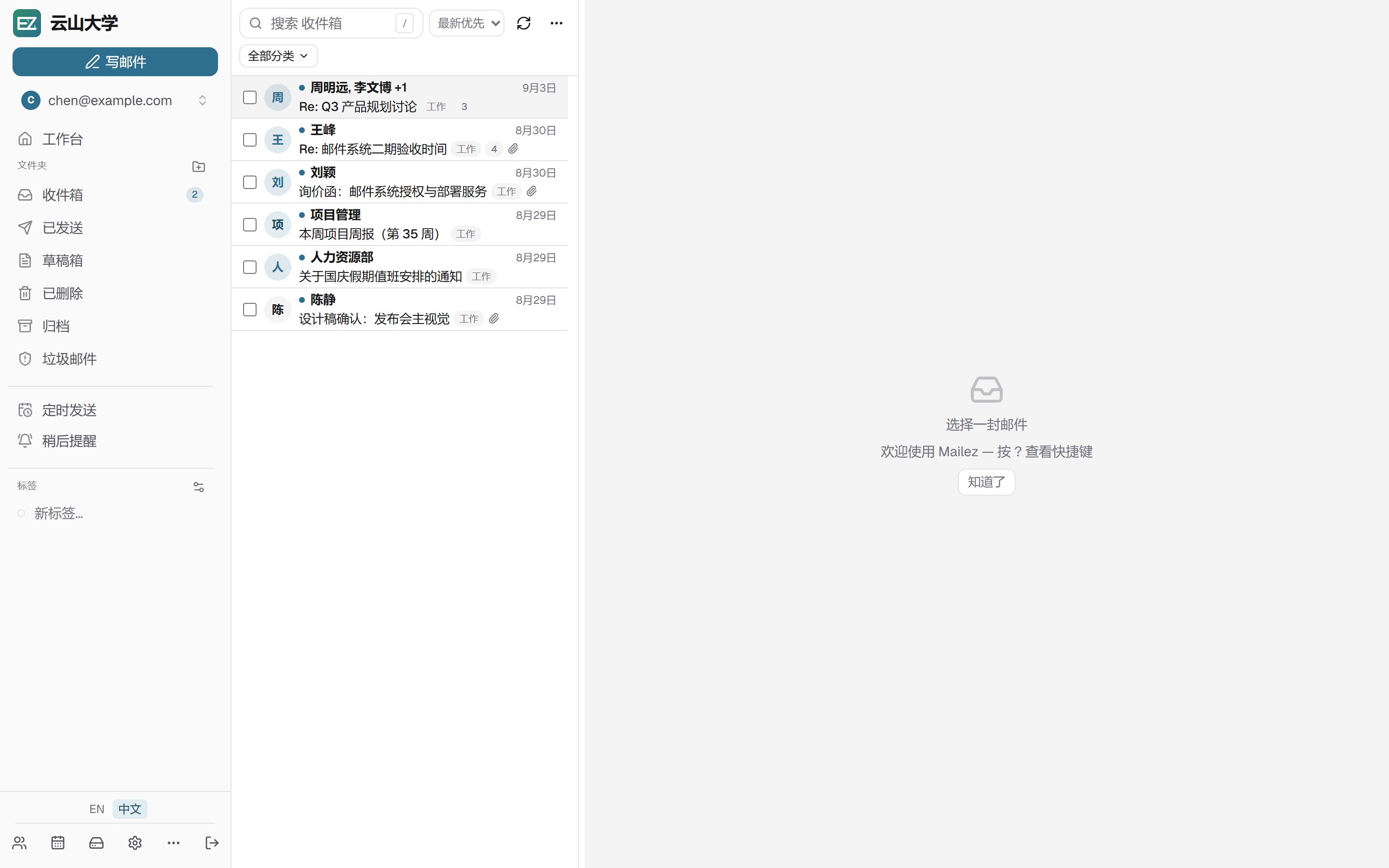
Webmail that feels like a native app
- Live, not refreshed — new mail arrives over a real-time push channel, so the inbox updates itself; reading, replying and organizing never reload the page, and long lists scroll smoothly through 10,000+ messages
- Conversation view keeps threads readable — replies under one subject merge into a single conversation with its full timeline, and quoted history in replies folds away until you expand it
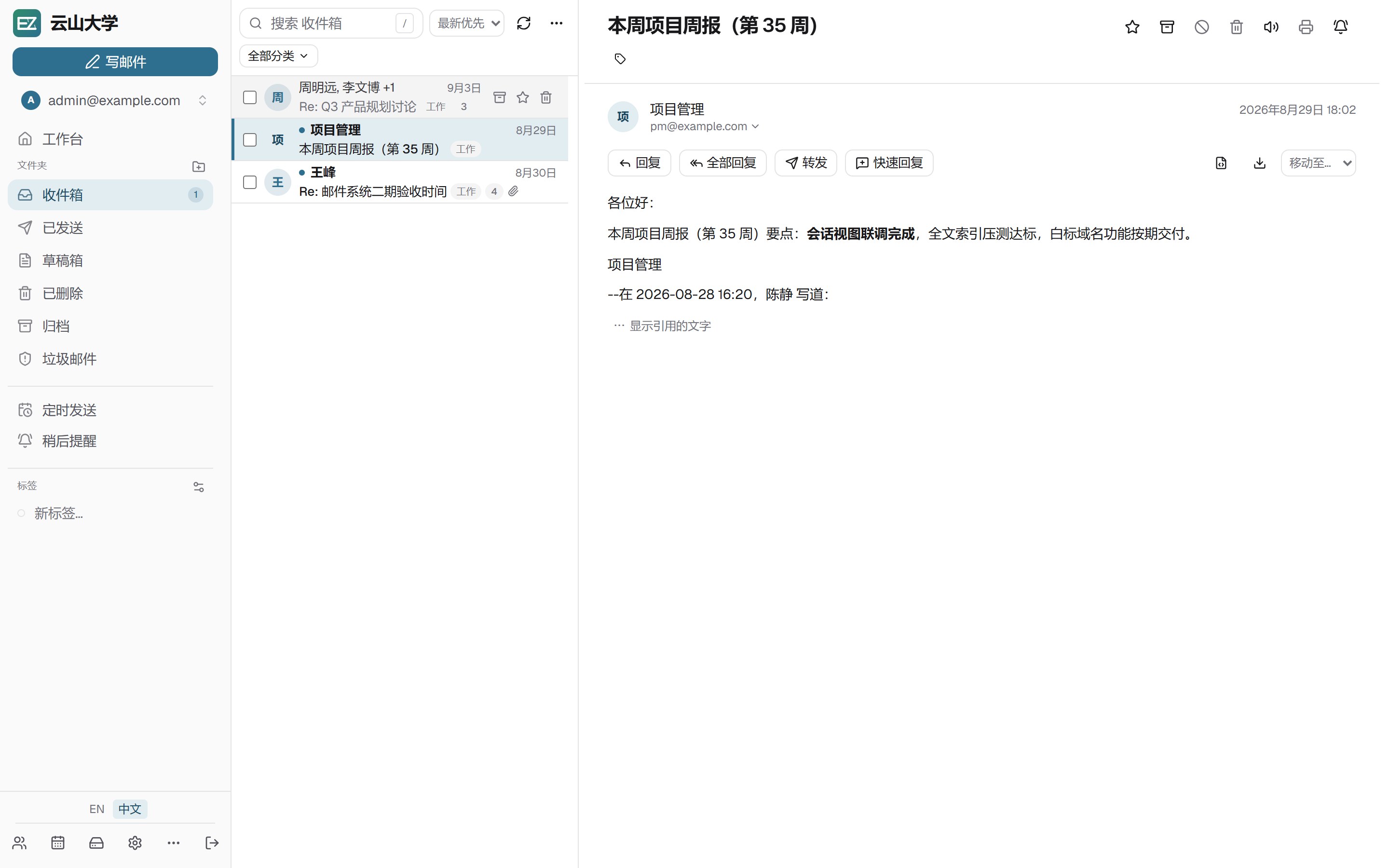
- Three-pane layout — folders, list and reading pane side by side; the list column is draggable to your preferred width
- Search that just works — type naturally (
from:,to:,has:attachment, dates…), save frequent searches, and filter with one click for unread, starred or messages with attachments - Keyboard-first — press
/to search,⌘Kfor the command palette,?for the full shortcut list - Day-to-day mail tasks made easy — conversation threads, quick reply right in the action bar, snooze, scheduled send, undo toast for bulk move / archive / delete, and drafts that keep every recipient including Bcc
- A workbench, not just an inbox — the home dashboard surfaces recent files and upcoming events, both clickable straight into context
- Privacy features built in — PGP sign and encrypt (distinct from your personal signature, with an optional auto-signature), two-factor authentication, remote-image blocking, a Sieve filter editor, and contacts grouped by sender
- Works offline — installs as a PWA; light/dark themes and three list densities for comfort
Mail is just the start
- Calendar — events with reminders, shared calendars, and subscriptions you can plug into Apple Calendar or Google Calendar via a private ICS link
- Contacts — vCard import/export, duplicate merging, and CardDAV sync for phones
- Drive — upload and organize files, share by link, restore from trash; recent files show up on the dashboard
Any device, any client
- Standard protocols — SMTP / IMAP / POP3 (implicit TLS available), plus CardDAV / CalDAV sync for phones and desktops; popular clients configure themselves via autoconfig/autodiscover
- Delta Chat — generate a login QR in settings and scan it with the Delta Chat app to turn the mailbox into an end-to-end-encrypted chat account, server setup included in the scan
- App tokens — per-client tokens you can issue and revoke from settings
An admin console that doesn't feel like admin work
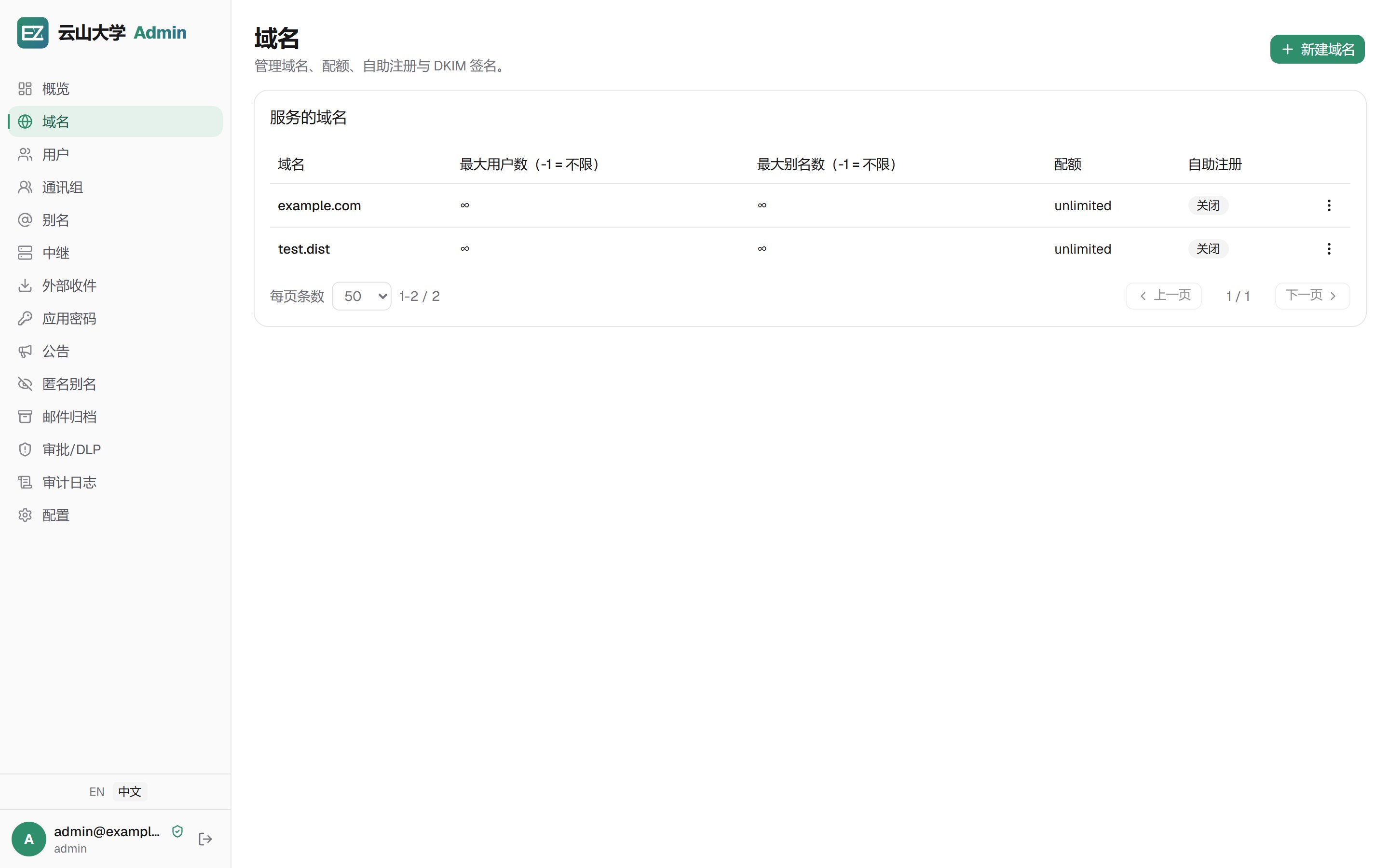
- Manage everything in one place — domains, mailboxes, aliases, relays, external mailbox fetching and app tokens; deleting a user cleans up their engine-side mailbox automatically
- One-click DKIM — generate signing keys with a status hint, so your mail stops landing in spam
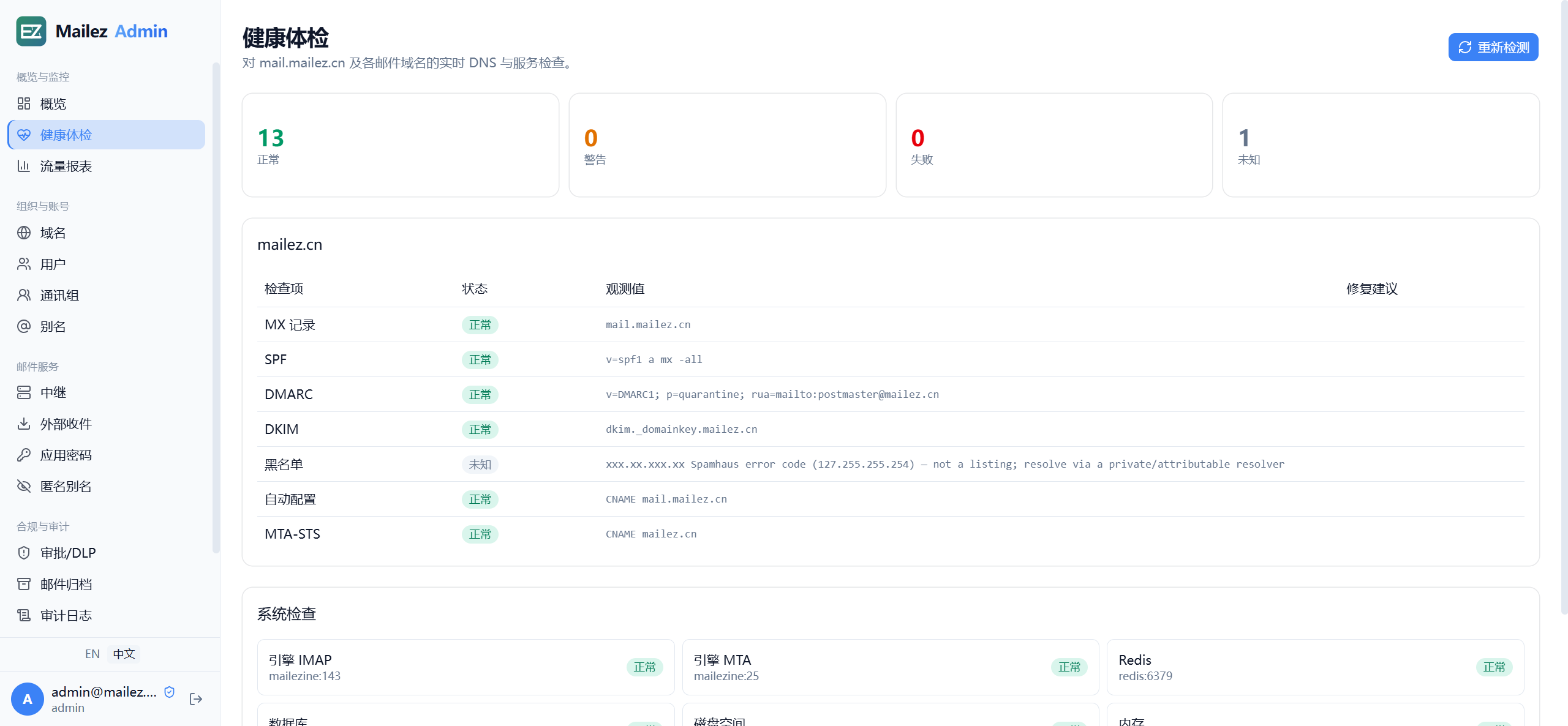
- Domain health checks — the Health page live-verifies MX / SPF / DMARC / DKIM key comparison / Spamhaus blocklists / autoconfig / MTA-STS for every domain, plus engine, database, disk and certificate-expiry probes — each item with a status and a fix hint; the DNS wizard lists every record you must publish and verifies each one live, so going live is copy-paste
- See who did what — audit log of admin actions and role-based access (admin / manager / user)
- Backup or migrate easily — export and import your whole configuration
Trust and security under the hood
- Spam filtering that works — Rspamd learns from your reporting; DKIM / DMARC signing and checking keep your mail deliverable
- Transport security — MTA-STS and DANE protect mail in transit; per-mailbox quotas and sending rate limits keep the system healthy
- Malware scanning & content controls — attachments are scanned for macros and known threats
Quick start
Two self-contained deployment tiers ship as compose files, managed by one entry point:
| Tier | Engine | Storage |
|---|---|---|
| dev (default) | mailezine | SQLite + Pebble + local FS |
| production | mailezine | SQLite + Pebble + local FS (MySQL/PostgreSQL optional) |
Both tiers run the same mailezine engine — same protocols, same
features at the mail layer, same upgrade path. They differ only in
orientation (dev builds from source on the host; production is a fully
containerized stack) and control-plane storage (SQLite by
default, with MySQL/PostgreSQL available behind compose profiles).
Existing deployments on the traditional multi-process mail architecture
migrate in place with mailezine migrate.
./deploy/mailezctl.sh up              # dev tier
./deploy/mailezctl.sh up ce    # production tier (pull prebuilt images)
The dev tier expects the backend on the host at :8080 (build the images
once with docker buildx bake from the repo root; details in
docs/dev-setup.md). The production tier is fully
containerized and publishes:
| Port | What's there |
|---|---|
| http://localhost:8082 | Admin console |
| http://localhost:8083 | Webmail |
| http://localhost:8081 | Backend API (for developers) |
| 25/465/587/143/993/4190 … | Mail protocols (SMTP / IMAP / ManageSieve) |
Two prerequisites before the first up:
- Sibling checkout. The mailezine engine image builds from the sibling
repository — clone both side by side:
git clone …/mailez && git clone …/mailezine(the compose build context points at../../mailezine). - Linux hosts: data-directory ownership. The backend runs as uid 1000
and the engine as uid 82; Docker creates
deploy/data/root-owned on first start, which crash-loops both. Pre-create it once:mkdir -p deploy/data && sudo chown -R 1000:82 deploy/data. (Docker Desktop mounts handle this automatically.)
Note that the mail ports above bind to loopback by default (safe for evaluations); a real deployment publishes them on the external interface via the compose port mappings.
mailezctl reads deploy/mailez.env (copy mailez.env.example, then set
MAILEZ_SECRET_KEY and MAILEZ_STACK_SECRET). Raw docker compose
invocations must pass --env-file mailez.env — the ${MAILEZ_STACK_SECRET:?}
interpolation reads shell env and --env-file only, never the services'
env_file. Host port mappings are overridable there too
(MAILEZ_HTTP_PORT, MAILEZ_ADMIN_PORT, …) for machines where
80/443/8082 are already taken.
TLS is off by default for local testing. For production, follow
deploy/certs/README.md to enable automatic
certificates.
After the stack is up, provision the admin account inside the container (the backend image ships a one-shot seeder; no local Go required):
docker compose --env-file deploy/mailez.env -f deploy/docker-compose.ce.yml exec backend mailez-seed
# default: admin@$MAILEZ_DOMAIN (admin@example.com on the shipped example
# domain) / MailezDemo2026! — override with
# MAILEZ_ADMIN_EMAIL / MAILEZ_ADMIN_PASSWORD before seeding
Then verify the whole mail path end to end (requires Go on the host):
cd backend
go run ./cmd/e2e    # sends a test mail, checks delivery, DKIM and spam filtering
Tech stack (for developers)
- Backend: Go + Fiber, GORM, Redis
- Frontend: Next.js (React) — separate admin and webmail apps
- Mail engine: mailezine (a single Go binary) speaks
SMTP/IMAP/POP3/ManageSieve behind an engine-agnostic directory contract
(
/stack/directory/*) with pluggable KV + blob storage — both the dev and production profiles run it; they differ only in storage (SQLite/pebble, with optional MySQL/PostgreSQL) - More details:
docs/dev-setup.md,docs/architecture.md; upgrading between versions (including the MySQL→SQLite control-plane switch):docs/upgrades.md
License
AGPL-3.0 — GNU Affero General Public License v3.0.
- Self-hosting is unencumbered — deploy, modify and run it for yourself or your organization with no obligations beyond keeping modifications open when you distribute them or offer them as a network service
- Copyleft by design — anyone distributing mailez or serving a modified version over a network must share their source under the same license, which keeps the project and its forks open
- Commercial licensing — closed-source use, SaaS/managed offerings and
OEM embedding are available under a commercial license; contact
contact@mailez.net