
English | 日本語

The next-generation office suite, built with Rust and the GPU, that opens your documents exactly as Microsoft Office shows them.
Word (.docx), Excel (.xlsx) and PowerPoint (.pptx) — fast, accurate, everywhere.

What is ibisOffice?
ibisOffice is an office suite for viewing, editing and saving Word, Excel and PowerPoint documents. It is written entirely in Rust and draws everything on the GPU. The same single codebase runs as a desktop app on macOS and Windows and in the web browser.
Our aim is simple: a document made in Microsoft Office should look the same when you open it in ibisOffice. Line breaks, page breaks, table borders, even chart tick marks — we build every part to produce the same result as Office.
Get started
-
Download the desktop app from Releases:
- macOS (11 or later): get
ibisOffice-<version>-macOS.zip, unzip it and moveibisOffice.appto your Applications folder. - Windows (64-bit): get
ibisOffice-<version>-Windows.zip, unzip it and runibisOffice.exein theibisOfficefolder.
- macOS (11 or later): get
-
Try the web version: open the playground in your browser — no installation (a browser with WebGPU). Open the sample Word, Excel and PowerPoint documents and try it right away.
-
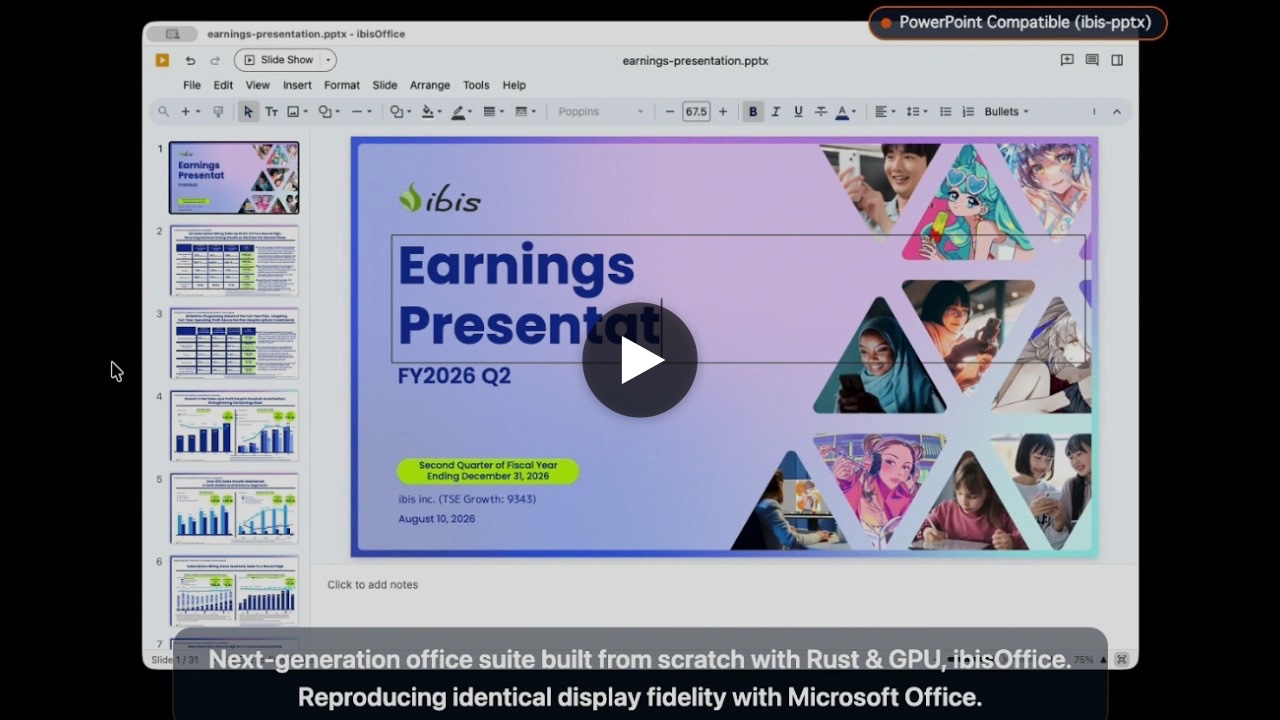
Watch the video: an introduction to ibisOffice (YouTube).
Goals
ibisOffice aims to be a world-class open-source office suite.
- Speed and robustness: memory-safe Rust code that opens large documents quickly and does not crash.
- Looks the same as Microsoft Office: text positions, line breaks, page breaks, tables, charts and shapes drawn just as Office draws them.
- Files that stay Microsoft Office files: open and save, then reopen in Office — nothing in the content or the layout is lost.
- Any OS: the desktop app works and looks the same on macOS, Windows and Linux.
- Native speed in the browser: with WebAssembly and WebGPU, no installation needed.
- Real-time collaboration: with the server edition, several people edit the same document at the same time.
Features
Three formats, one app
- Documents (.docx): paragraphs and styles, bullets and numbering, tables, columns, vertical text, ruby, footnotes, headers and footers, fields (page numbers, tables of contents), shapes, images and charts, page setup.
- Spreadsheets (.xlsx): formulas and functions, conditional formatting, AutoFilter, sorting, tables, PivotTables, charts, sparklines, data validation, sheet protection, rich text within a cell, Goal Seek.
- Presentations (.pptx): viewing and editing shapes, text, tables, charts and SmartArt; animations, transitions, slide shows and Presenter View (with dual-display support), video and audio, comments.
- Macro-enabled files (.docm, .xlsm, .pptm) open and save too. Macros are never run; they are kept as they are.
Compatibility, measured — not eyeballed
We verify visual compatibility by measurement. For each feature we build test documents and compare, pixel by pixel, the PDF that real Word, Excel and PowerPoint produce with what ibisOffice draws. Files saved by ibisOffice are checked to open in Office without repair.
A fast screen, drawn on the GPU
The screen is drawn on the GPU (Metal on macOS, DirectX on Windows, Vulkan on Linux, WebGPU in the browser), so scrolling, zooming and switching sheets are smooth. The UI is built with GPUI, the UI framework created for the high-performance Zed editor.
Desktop and browser
The same Rust code runs as a native app and, as WebAssembly, inside the browser.
Strengths
- A new implementation, written from scratch in Rust: no legacy code inherited from older office suites. Memory-safe, parallel and fast.
- Rendering compatibility, guaranteed by process: more than 70,000 tests continuously compare ibisOffice with Office's output, pixel by pixel.
- Every edit is a "command": every change goes through a command that carries only IDs and final values. It is the unit of undo and redo, and also the unit exchanged with the server in collaborative editing.
- Faithful to the standard: files are read and written following the international standard for Office Open XML (ECMA-376 / ISO/IEC 29500 / JIS X 4191). Built-in definitions such as shape outlines use the official ECMA-376 data distributed by Ecma, unmodified.
- Only components that are safe for commercial use: every library we depend on is under a license that allows commercial use, such as Apache-2.0, MIT or BSD. No copyleft libraries are used (checked on every change with
cargo deny).
Motivation
We provide ibisStorage, a file storage and sharing service like Google Drive. It needs to preview and edit Office files online — fast, accurately, and without putting load on the server. That is why we are building ibisOffice.
Speed
Smaller is faster. The figures in parentheses show how many times longer each product took than ibisOffice.
From opening a file to the first screen
With the app already running, the time from telling it to open the file until the first page (the first slide for pptx, the first screen of the first sheet for xlsx) is fully displayed.

| File | ibisOffice | Microsoft Office | LibreOffice | ONLYOFFICE |
|---|---|---|---|---|
| Presentation (.pptx) 31 slides, 35.9 MB |
0.59 s | 2.16 s (3.7×) | 4.40 s (7.5×) | 4.75 s (8.1×) |
| Document (.docx) 140–154 pages in English, 0.12 MB |
0.45 s | 1.11 s (2.5×) | 1.70 s (3.8×) | 3.15 s (7.0×) |
| Spreadsheet (.xlsx) 22 sheets, 29 charts, 589,000 formulas, 13.7 MB |
0.52 s | 14.07 s (27.0×) | 6.82 s (13.1×) | 9.36 s (17.9×) |
We recorded the app window (up to 60 frames per second) and measured, from the video, the time from the open request until the screen stopped changing. The final frame was checked by eye.
Converting to PDF
The time from starting a command-line conversion until the PDF is fully written.

| File | ibisOffice | Microsoft Office | LibreOffice | ONLYOFFICE |
|---|---|---|---|---|
| Presentation (.pptx) 31 slides, 35.9 MB |
1.42 s | 8.40 s (5.9×) | 32.26 s (22.8×) | 5.87 s (4.1×) |
| Document (.docx) 140–154 pages in English, 0.12 MB |
0.69 s | 12.49 s (18.1×) | 3.45 s (5.0×) | 4.19 s (6.1×) |
| Spreadsheet (.xlsx) 22 sheets, 29 charts, 589,000 formulas, 13.7 MB |
7.26 s | 42.94 s (5.9×) | 19.46 s (2.7×) | 24.89 s (3.4×) |
Conversion methods: ibisOffice ibisOffice --export pdf; Microsoft Office: opened and saved as PDF via AppleScript; LibreOffice soffice --headless --convert-to pdf; ONLYOFFICE: the x2t converter bundled with the app.
Test conditions
- Environment: Apple M2 Pro, 16 GB memory, macOS 26.5.1. Versions: ibisOffice 0.1.0 (development build), Microsoft Office 16.113.2, LibreOffice 26.8.0.3, ONLYOFFICE 9.4.0. Measured on September 29–30, 2026.
- Each figure is a single run. Every run started with all of the app's processes quit.
- The files are made from fictional data and from a public document with its metadata removed, and are published in
test/benchmark/.
Use cases
Desktop app (macOS, Windows, Linux)
- Your everyday office software: create and edit Word, Excel and PowerPoint documents and save them in the same formats as Office.
- Check documents you receive, instantly: open files from email or chat without waiting, and read them exactly as they were made in Office. Large workbooks and long presentations open fast too.
- Export to PDF and images: export to PDF or PNG from the command line without opening a window — ready for batch conversion and automated processing on servers.
Web edition (WebAssembly + WebGPU)
- Use it without installing anything: just open it in the browser to view and edit documents with the same screen and the same rendering as the desktop app. Works on PCs where you cannot install software and on shared machines.
- Build document viewing and editing into web systems: inside business systems, SaaS products and portals, view and edit attached Word, Excel and PowerPoint documents on the spot, looking just as they do in Office.
- Handle documents without sending them to a server: rendering and editing happen inside the browser, so when you open a local file its content is not sent to any external server.
Building
git clone --recurse-submodules https://github.com/ibisjp/ibis-office.git
cd ibis-office
cargo build --release- Requires the latest stable Rust.
- On macOS,
scripts/bundle-macos.shbuilds the app attarget/release/ibisOffice.app. - For the browser edition, build with
scripts/build-web.sh --releaseand servewww/(browsers with WebGPU: Chrome, Edge, Safari 26 or later).
Implemented Features
docx
| # | Feature | Status |
|---|---|---|
| 1 | docx: Text input and deletion | Completed |
| 2 | docx: IME conversion and confirmation | Completed |
| 3 | docx: Word, paragraph, and all selection | Completed |
| 4 | docx: Paragraph splitting and joining | Completed |
| 5 | docx: Manual line breaks and tab input | Completed |
| 6 | docx: Cut and copy | Completed |
| 7 | docx: Paste keeping source formatting | Completed |
| 8 | docx: Paste matching destination formatting | Completed |
| 9 | docx: Paste text only | Completed |
| 10 | docx: Paste special | Completed |
| 11 | docx: Format painter and repeated application | Completed |
| 12 | docx: Undo and redo | Completed |
| 13 | docx: Insert special characters and symbols | Completed |
| 14 | docx: Insert date and time with auto-update | Completed |
| 15 | docx: Fonts for Latin, East Asian, and Complex Scripts | Partial |
| 16 | docx: Font size and increment/decrement | Completed |
| 17 | docx: Bold and italic | Completed |
| 18 | docx: Underline styles and colors | Completed |
| 19 | docx: Strikethrough and double strikethrough | Completed |
| 20 | docx: Superscript and subscript | Completed |
| 21 | docx: Font color and theme colors | Completed |
| 22 | docx: Text highlight color | Completed |
| 23 | docx: Character shading and border | Completed |
| 24 | docx: All caps and small caps | Completed |
| 25 | docx: Hidden text | Completed |
| 26 | docx: Character scaling | Completed |
| 27 | docx: Expanded and condensed character spacing | Completed |
| 28 | docx: Raised and lowered character position (baseline offset) | Completed |
| 29 | docx: Font kerning | Completed |
| 30 | docx: Text outline, shadow, and glow | Partial |
| 31 | docx: Clear direct formatting | Completed |
| 32 | docx: Align left, center, right, and justify | Completed |
| 33 | docx: Distributed text alignment | Completed |
| 34 | docx: Left and right indents | Completed |
| 35 | docx: Character-unit indentation | Completed |
| 36 | docx: First line and hanging indent | Completed |
| 37 | docx: Paragraph space before and after | Completed |
| 38 | docx: Suppress spacing between paragraphs of same style | Completed |
| 39 | docx: Single and multiple line spacing | Completed |
| 40 | docx: Exactly and At least line spacing | Completed |
| 41 | docx: Tab stops, alignment, and leader lines | Completed |
| 42 | docx: Paragraph borders | Completed |
| 43 | docx: Paragraph shading | Completed |
| 44 | docx: Widow and orphan control | Completed |
| 45 | docx: Keep with next paragraph | Completed |
| 46 | docx: Keep lines together | Completed |
| 47 | docx: Page break before paragraph | Completed |
| 48 | docx: Suppress line numbers for paragraph | Completed |
| 49 | docx: Don't hyphenate paragraph | Completed |
| 50 | docx: Bullet lists | Completed |
| 51 | docx: Numbering formats | Completed |
| 52 | docx: Set start number | Completed |
| 53 | docx: Restart and continue numbering | Completed |
| 54 | docx: Multilevel lists | Completed |
| 55 | docx: Legal-style numbering across levels | Completed |
| 56 | docx: Link numbering to heading styles | Completed |
| 57 | docx: Number alignment and indent | Completed |
| 58 | docx: Follow number with tab, space, or none | Completed |
| 59 | docx: Change list level | Completed |
| 60 | docx: Apply paragraph styles | Completed |
| 61 | docx: Apply character styles | Completed |
| 62 | docx: Apply linked styles | Completed |
| 63 | docx: Apply table styles | Completed |
| 64 | docx: Create new style | Completed |
| 65 | docx: Modify existing style | Completed |
| 66 | docx: Style based on and inheritance | Completed |
| 67 | docx: Style for following paragraph | Completed |
| 68 | docx: Update style to match selection | Completed |
| 69 | docx: Document themes | Partial |
| 70 | docx: Insert table | Completed |
| 71 | docx: Insert and delete rows and columns | Completed |
| 72 | docx: Insert cells with shift | Completed |
| 73 | docx: Merge cells | Completed |
| 74 | docx: Split cells | Completed |
| 75 | docx: Split table | Completed |
| 76 | docx: Nested tables | Completed |
| 77 | docx: Convert text to table | Completed |
| 78 | docx: Convert table to text | Completed |
| 79 | docx: Sort data in table | Completed |
| 80 | docx: Formulas in table cells | Completed |
| 81 | docx: Paragraphs and lists inside cells | Completed |
| 82 | docx: Select table, row, column, or cell | Completed |
| 83 | docx: Table alignment and indentation | Completed |
| 84 | docx: Fixed width and percentage width tables | Completed |
| 85 | docx: Column width and row height | Completed |
| 86 | docx: Row height (exact / at least) | Completed |
| 87 | docx: AutoFit to contents | Completed |
| 88 | docx: AutoFit to window | Completed |
| 89 | docx: Distribute rows and columns evenly | Completed |
| 90 | docx: Cell margins | Completed |
| 91 | docx: Cell spacing | Completed |
| 92 | docx: Cell vertical alignment | Completed |
| 93 | docx: Cell text direction | Completed |
| 94 | docx: Table borders, line width, and colors | Completed |
| 95 | docx: Table shading and cell background | Completed |
| 96 | docx: Header row and total row table styles | Completed |
| 97 | docx: Banded rows and banded columns | Completed |
| 98 | docx: First column and last column formatting | Completed |
| 99 | docx: Repeat header rows across pages | Completed |
| 100 | docx: Allow row to split across pages | Completed |
| 101 | docx: Floating tables and distance from surrounding text | Completed |
| 102 | docx: Insert and replace images | Completed |
| 103 | docx: Image size and lock aspect ratio | Completed |
| 104 | docx: Rotate and flip images | Completed |
| 105 | docx: Crop images | Completed |
| 106 | docx: Image border and picture effects | Completed |
| 107 | docx: Insert SVG graphics | Completed |
| 108 | docx: Text box | Partial |
| 109 | docx: Charts and embedded workbook data | Partial |
| 110 | docx: In line with text wrapping | Completed |
| 111 | docx: Square text wrapping | Completed |
| 112 | docx: Tight and through text wrapping | Completed |
| 113 | docx: Top and bottom text wrapping | Completed |
| 114 | docx: Behind text and in front of text | Completed |
| 115 | docx: Distance from text | Completed |
| 116 | docx: Horizontal alignment and relative position | Completed |
| 117 | docx: Vertical alignment and relative position | Completed |
| 118 | docx: Move with text | Completed |
| 119 | docx: Fix position on page | Completed |
| 120 | docx: Lock anchor | Completed |
| 121 | docx: Allow object overlap | Completed |
| 122 | docx: Bring forward and send backward | Completed |
| 123 | docx: Align and distribute objects | Completed |
| 124 | docx: Object name and Selection Pane | Completed |
| 125 | docx: Positioning inside table cells | Completed |
| 126 | docx: Ruby (phonetic guide) input | Completed |
| 127 | docx: Ruby target range and alignment | Completed |
| 128 | docx: Separate formatting for ruby and base text | Completed |
| 129 | docx: Emphasis marks | Completed |
| 130 | docx: Enclosed characters | Completed |
| 131 | docx: Combined characters | Completed |
| 132 | docx: Horizontal text in vertical flow (Tate-chu-yoko) | Completed |
| 133 | docx: Vertical and horizontal text direction | Completed |
| 134 | docx: Line breaking rules (Kinsoku shori) | Completed |
| 135 | docx: Hanging punctuation | Completed |
| 136 | docx: Auto-spacing between Japanese and Latin/number text | Completed |
| 137 | docx: Spacing between Japanese and Western characters | Completed |
| 138 | docx: Spacing between Japanese text and numbers | Completed |
| 139 | docx: Grid document settings (characters and lines per page) | Completed |
| 140 | docx: Align to document grid | Completed |
| 141 | docx: Right-to-left paragraph direction | Completed |
| 142 | docx: Complex script font and size | Partial |
| 143 | docx: Full-width and half-width conversion | Completed |
| 144 | docx: Page size | Completed |
| 145 | docx: Page orientation (portrait / landscape) | Completed |
| 146 | docx: Top, bottom, left, and right margins | Completed |
| 147 | docx: Mirror margins | Completed |
| 148 | docx: Gutter margin and gutter position | Completed |
| 149 | docx: Vertical alignment of document text | Completed |
| 150 | docx: Page breaks | Completed |
| 151 | docx: Next page section break | Completed |
| 152 | docx: Continuous section break | Completed |
| 153 | docx: Odd page and even page section breaks | Completed |
| 154 | docx: Section-based page setup | Completed |
| 155 | docx: Number of columns | Completed |
| 156 | docx: Column width and spacing | Completed |
| 157 | docx: Line between columns | Completed |
| 158 | docx: Column break | Completed |
| 159 | docx: Line numbers start and restart | Completed |
| 160 | docx: Page borders | Completed |
| 161 | docx: Page background color | Completed |
| 162 | docx: Edit header and footer | Completed |
| 163 | docx: Different first page header/footer | Completed |
| 164 | docx: Different odd and even pages header/footer | Completed |
| 165 | docx: Link to previous section header/footer | Completed |
| 166 | docx: Header and footer distance from edges | Completed |
| 167 | docx: Images and tables in header | Partial |
| 168 | docx: Fields in footer | Completed |
| 169 | docx: Page number position | Completed |
| 170 | docx: Page number format | Completed |
| 171 | docx: Page number start at value | Completed |
| 172 | docx: Continue page numbering from previous section | Completed |
| 173 | docx: Total page count | Completed |
| 174 | docx: Style reference in header | Partial |
| 175 | docx: Insert field and edit field code | Completed |
| 176 | docx: Toggle field codes and results | Completed |
| 177 | docx: Update fields in selection or entire document | Completed |
| 178 | docx: Lock and unlock fields | Completed |
| 179 | docx: Unlink fields (convert to static text) | Completed |
| 180 | docx: Nested fields | Completed |
| 181 | docx: Formatting switches for numbers, text, and dates | Completed |
| 182 | docx: PAGE, NUMPAGES, and SECTIONPAGES fields | Completed |
| 183 | docx: DATE, TIME, CREATEDATE, and SAVEDATE fields | Completed |
| 184 | docx: AUTHOR, TITLE, and DOCPROPERTY fields | Completed |
| 185 | docx: REF, PAGEREF, and NOTEREF fields | Completed |
| 186 | docx: SEQ and LISTNUM numbering fields | Completed |
| 187 | docx: STYLEREF | Completed |
| 188 | docx: IF and COMPARE conditional fields | Completed |
| 189 | docx: ASK and FILLIN prompt fields | Completed |
| 190 | docx: Table Formula fields (=SUM, etc.) | Completed |
| 191 | docx: Document properties and custom attributes | Completed |
| 192 | docx: Insert and delete footnotes | Completed |
| 193 | docx: Insert and delete endnotes | Completed |
| 194 | docx: Convert footnotes to endnotes and vice versa | Completed |
| 195 | docx: Footnote numbering format and start value | Completed |
| 196 | docx: Restart footnote numbering | Completed |
| 197 | docx: Footnote and endnote placement | Completed |
| 198 | docx: Footnote separator and continuation separator lines | Partial |
| 199 | docx: Bookmarks | Completed |
| 200 | docx: Internal and external hyperlinks | Completed |
| 201 | docx: Cross-references | Completed |
| 202 | docx: Captions and caption labels | Completed |
| 203 | docx: Auto table of contents from headings | Completed |
| 204 | docx: TOC heading levels | Completed |
| 205 | docx: Map custom styles to TOC | Completed |
| 206 | docx: TOC tab leader and page numbers | Completed |
| 207 | docx: Update entire table or page numbers only | Completed |
| 208 | docx: Table of figures | Completed |
| 209 | docx: Navigation pane | Completed |
| 210 | docx: Rich text content control | Partial |
| 211 | docx: Plain text content control | Partial |
| 212 | docx: Check box content control | Partial |
| 213 | docx: Combo box content control | Partial |
| 214 | docx: Drop-down list content control | Partial |
| 215 | docx: Date picker content control | Partial |
| 216 | docx: Building block gallery content control | Partial |
| 217 | docx: Placeholder prompt text | Partial |
| 218 | docx: Track changes | Completed |
| 219 | docx: Track insertions and deletions | Completed |
| 220 | docx: Track formatting changes | Completed |
| 221 | docx: Track moved text and table modifications | Partial |
| 222 | docx: Show revisions by author | Completed |
| 223 | docx: Markup display (Simple, All, Original) | Completed |
| 224 | docx: Accept or reject tracked changes | Completed |
| 225 | docx: Process visible changes only | Completed |
| 226 | docx: Lock tracking with password | Completed |
| 227 | docx: Add and delete comments | Completed |
| 228 | docx: Reply to comments | Completed |
| 229 | docx: Resolve and reopen comments | Completed |
| 230 | docx: Accessibility Checker | Completed |
| 231 | docx: Picture alternative text | Completed |
| 232 | docx: Mark images as decorative | Completed |
| 233 | docx: Heading hierarchy and structure | Completed |
| 234 | docx: Specify header row for tables | Completed |
| 235 | docx: Meaningful hyperlink display text | Completed |
| 236 | docx: Keyboard accessibility and navigation | Partial |
| 237 | docx: Display zoom | Completed |
| 238 | docx: Dark mode support | Partial |
| 239 | docx: Read-only recommended | Completed |
| 240 | docx: Mark as Final | Completed |
| 241 | docx: Print Preview | Completed |
| 242 | docx: Export to tagged PDF | Completed |
| 243 | docx: Advance field | Completed |
| 244 | docx: Ask field | Completed |
| 245 | docx: Author field | Completed |
| 246 | docx: AutoNum field | Completed |
| 247 | docx: AutoNumLgl field | Completed |
| 248 | docx: AutoNumOut field | Completed |
| 249 | docx: Comments field | Completed |
| 250 | docx: Compare field | Completed |
| 251 | docx: CreateDate field | Completed |
| 252 | docx: Date field | Completed |
| 253 | docx: DocProperty field | Completed |
| 254 | docx: DocVariable field | Completed |
| 255 | docx: Eq field | Partial |
| 256 | docx: FileName field | Completed |
| 257 | docx: FileSize field | Completed |
| 258 | docx: Fill-In field | Completed |
| 259 | docx: = (Formula) field | Completed |
| 260 | docx: Hyperlink field | Completed |
| 261 | docx: If field | Completed |
| 262 | docx: IncludePicture field | Partial |
| 263 | docx: IncludeText field | Partial |
| 264 | docx: Index field | Partial |
| 265 | docx: Info field | Completed |
| 266 | docx: Keywords field | Completed |
| 267 | docx: LastSavedBy field | Completed |
| 268 | docx: ListNum field | Completed |
| 269 | docx: NoteRef field | Completed |
| 270 | docx: NumChars field | Completed |
| 271 | docx: NumPages field | Completed |
| 272 | docx: NumWords field | Completed |
| 273 | docx: Page field | Completed |
| 274 | docx: PageRef field | Completed |
| 275 | docx: PrintDate field | Completed |
| 276 | docx: Quote field | Completed |
| 277 | docx: Ref field | Completed |
| 278 | docx: RevNum field | Completed |
| 279 | docx: SaveDate field | Completed |
| 280 | docx: Section field | Completed |
| 281 | docx: SectionPages field | Completed |
| 282 | docx: Seq (Sequence) field | Completed |
| 283 | docx: Set field | Completed |
| 284 | docx: StyleRef field | Completed |
| 285 | docx: Subject field | Completed |
| 286 | docx: Symbol field | Completed |
| 287 | docx: TA (Table of Authorities Entry) field | Partial |
| 288 | docx: TC (Table of Contents Entry) field | Partial |
| 289 | docx: Template field | Completed |
| 290 | docx: Time field | Completed |
| 291 | docx: Title field | Completed |
| 292 | docx: TOA (Table of Authorities) field | Partial |
| 293 | docx: TOC (Table of Contents) field | Completed |
| 294 | docx: UserAddress field | Completed |
| 295 | docx: UserInitials field | Completed |
| 296 | docx: UserName field | Completed |
| 297 | docx: XE (Index Entry) field | Partial |
| 298 | docx: Support OOXML standard and Microsoft extension elements on save | Partial |
| 299 | docx: Evaluate unmodified round-trip preservation and fallback rendering | Partial |
| 300 | docx: Map existing features, scenarios, and coverage IDs | Partial |
| 301 | docx: Print Layout view | Completed |
| 302 | docx: Outline view | Partial |
| 303 | docx: Vertical page movement | Completed |
| 304 | docx: Side-to-side page movement | Partial |
| 305 | docx: One page, multiple pages, and page width views | Completed |
| 306 | docx: Zoom magnification percentage | Completed |
| 307 | docx: Horizontal ruler | Completed |
| 308 | docx: Vertical ruler | Completed |
| 309 | docx: Ruler unit settings | Completed |
| 310 | docx: Show gridlines | Completed |
| 311 | docx: Navigation pane for headings, pages, and search | Completed |
| 312 | docx: Show formatting marks | Completed |
| 313 | docx: Show/hide white space between pages | Completed |
| 314 | docx: Create new blank document | Completed |
| 315 | docx: Open existing document | Completed |
| 316 | docx: Recent documents and save locations | Completed |
| 317 | docx: Save and Save As | Completed |
| 318 | docx: Save as a copy | Completed |
| 319 | docx: Standard properties (title, subject, author, etc.) | Completed |
| 320 | docx: Custom properties | Completed |
| 321 | docx: Document statistics and last modified info | Completed |
| 322 | docx: Open and save macro-enabled documents (.docm) without executing macros | Completed |
| 323 | docx: User name and review author | Completed |
| 324 | docx: Overtype mode | Completed |
| 325 | docx: Default paste options | Completed |
| 326 | docx: Show formatting marks and hidden text | Completed |
| 327 | docx: Update fields and links before printing | Completed |
| 328 | docx: Print background colors, images, and hidden text | Completed |
| 329 | docx: Verify ribbon tabs (Home, Insert, Draw, Design, Layout, References, Mailings, Review, View, Developer) | Partial |
| 330 | docx: Verify context tabs and context menus for tables, images, shapes, formulas, and headers | Partial |
| 331 | docx: Find text and find next occurrence | Completed |
| 332 | docx: Replace and Replace All | Completed |
| 333 | docx: Match case | Completed |
| 334 | docx: Find whole words only | Completed |
| 335 | docx: Use wildcards in search | Completed |
| 336 | docx: Replace using wildcard capture groups | Completed |
| 337 | docx: Find and replace special characters and paragraph marks | Completed |
| 338 | docx: Search scope and direction | Completed |
| 339 | docx: Go To page, heading, footnote, etc. | Completed |
xlsx
| # | Feature | Status |
|---|---|---|
| 1 | xlsx: Number, text, and boolean input | Completed |
| 2 | xlsx: Date, time, currency, and percentage input | Completed |
| 3 | xlsx: Long numbers and 15-digit precision handling | Completed |
| 4 | xlsx: In-cell line break | Completed |
| 5 | xlsx: Rich text in cells | Partial |
| 6 | xlsx: Japanese input and phonetic guide | Partial |
| 7 | xlsx: Cell, range, and multi-range selection | Completed |
| 8 | xlsx: Cut and copy | Completed |
| 9 | xlsx: Paste special for values, formulas, and formats | Completed |
| 10 | xlsx: Transpose on paste | Completed |
| 11 | xlsx: Arithmetic operations on paste | Completed |
| 12 | xlsx: Skip blanks on paste | Completed |
| 13 | xlsx: Clear values, formats, and comments | Completed |
| 14 | xlsx: AutoFill | Completed |
| 15 | xlsx: Fill series | Completed |
| 16 | xlsx: Flash Fill | Partial |
| 17 | xlsx: Find and replace | Completed |
| 18 | xlsx: Go To Special | Completed |
| 19 | xlsx: Undo and redo | Completed |
| 20 | xlsx: Insert and delete sheets | Completed |
| 21 | xlsx: Rename sheet | Completed |
| 22 | xlsx: Move and copy sheets | Completed |
| 23 | xlsx: Sheet tab color | Completed |
| 24 | xlsx: Hide and unhide sheets | Completed |
| 25 | xlsx: Insert and delete rows and columns | Completed |
| 26 | xlsx: Row height and column width | Completed |
| 27 | xlsx: AutoFit row height and column width | Completed |
| 28 | xlsx: Hide and unhide rows and columns | Completed |
| 29 | xlsx: Group rows and columns (Outline) | Completed |
| 30 | xlsx: Subtotal and outline creation | Completed |
| 31 | xlsx: Freeze panes | Completed |
| 32 | xlsx: Zoom percentage | Completed |
| 33 | xlsx: Show sheet gridlines | Completed |
| 34 | xlsx: Show row and column headings | Completed |
| 35 | xlsx: Split window | Completed |
| 36 | xlsx: Arrange Windows (tile, horizontal, vertical, cascade) | Completed |
| 37 | xlsx: Show formula bar | Completed |
| 38 | xlsx: Normal, Page Layout, and Page Break Preview | Completed |
| 39 | xlsx: Font and font size | Completed |
| 40 | xlsx: Bold, italic, and underline | Completed |
| 41 | xlsx: Strikethrough, superscript, and subscript | Completed |
| 42 | xlsx: Font color and theme colors | Partial |
| 43 | xlsx: Horizontal and vertical cell alignment | Completed |
| 44 | xlsx: Wrap text in cell | Completed |
| 45 | xlsx: Shrink to fit cell | Completed |
| 46 | xlsx: Rotate cell text | Completed |
| 47 | xlsx: Vertical text in cell | Completed |
| 48 | xlsx: Indent cell content | Completed |
| 49 | xlsx: Merge and center cells | Completed |
| 50 | xlsx: Cell borders (style, width, color) | Completed |
| 51 | xlsx: Fill color and fill pattern | Completed |
| 52 | xlsx: Apply cell styles | Completed |
| 53 | xlsx: Create custom cell style | Completed |
| 54 | xlsx: Theme colors, fonts, and effects | Completed |
| 55 | xlsx: Clear cell formatting | Completed |
| 56 | xlsx: General and Number formatting | Completed |
| 57 | xlsx: Currency and Accounting formatting | Completed |
| 58 | xlsx: Percentage and Scientific formatting | Completed |
| 59 | xlsx: Fraction formatting | Completed |
| 60 | xlsx: Date and Time formatting | Completed |
| 61 | xlsx: Text formatting | Completed |
| 62 | xlsx: Four-section format string (positive;negative;zero;text) | Completed |
| 63 | xlsx: Conditional number formatting sections ([>100], etc.) | Completed |
| 64 | xlsx: Color specification in format string ([Red], [Blue], etc.) | Completed |
| 65 | xlsx: Digit placeholders (0, #, ?) | Completed |
| 66 | xlsx: Decimal point and thousands separator | Completed |
| 67 | xlsx: Thousands and millions scaling (commas) | Completed |
| 68 | xlsx: Quoted text and backslash escapes in format strings | Completed |
| 69 | xlsx: Space width (_) and character repetition (*) in formats | Completed |
| 70 | xlsx: Text placeholder (@) in formats | Completed |
| 71 | xlsx: Elapsed time format with brackets ([h], [m]) | Completed |
| 72 | xlsx: Contextual parsing of month vs. minute (m / mm) | Completed |
| 73 | xlsx: Locale and currency symbols in formats ([$-411], etc.) | Partial |
| 74 | xlsx: Japanese era date format (ggge, etc.) | Completed |
| 75 | xlsx: Separation of formatted display value and underlying number | Completed |
| 76 | xlsx: Highlight cells rules (greater than, less than, between, equal to) | Completed |
| 77 | xlsx: Highlight cells rule: text that contains | Completed |
| 78 | xlsx: Highlight cells rule: date occurring | Completed |
| 79 | xlsx: Highlight duplicate and unique values | Completed |
| 80 | xlsx: Top and bottom items and percent rules | Completed |
| 81 | xlsx: Above and below average rules | Completed |
| 82 | xlsx: Use a formula to determine which cells to format | Completed |
| 83 | xlsx: 2-color and 3-color scales | Completed |
| 84 | xlsx: Data bars | Completed |
| 85 | xlsx: Icon sets | Completed |
| 86 | xlsx: Threshold values, percentages, and formulas for rules | Completed |
| 87 | xlsx: Negative value data bars and axis settings | Completed |
| 88 | xlsx: Reverse icon order and custom icon selection | Completed |
| 89 | xlsx: Rule 'Applies to' range management | Completed |
| 90 | xlsx: Rule precedence and order | Completed |
| 91 | xlsx: Stop If True option | Completed |
| 92 | xlsx: Copy, edit, and delete conditional formatting rules | Completed |
| 93 | xlsx: Arithmetic, comparison, and concatenation operators | Completed |
| 94 | xlsx: Formula operator precedence | Completed |
| 95 | xlsx: Relative, absolute, and mixed cell references ($A$1, A$1, $A1) | Completed |
| 96 | xlsx: Cross-sheet cell references (Sheet1!A1) | Completed |
| 97 | xlsx: 3D references across multiple sheets (Sheet1:Sheet3!A1) | Completed |
| 98 | xlsx: External workbook references ([Book1.xlsx]Sheet1!A1) | Partial |
| 99 | xlsx: Defined names and name scope (Workbook vs. Sheet) | Completed |
| 100 | xlsx: Named formulas | Completed |
| 101 | xlsx: Structured references | Completed |
| 102 | xlsx: Array constants ({1,2;3,4}) | Completed |
| 103 | xlsx: Legacy CSE array formulas (Ctrl+Shift+Enter) | Completed |
| 104 | xlsx: Dynamic arrays and spill behavior | Completed |
| 105 | xlsx: Implicit intersection operator (@) | Completed |
| 106 | xlsx: Spill range operator | Completed |
| 107 | xlsx: Shared formulas optimization | Completed |
| 108 | xlsx: Calculation mode (Automatic, Manual, Data Table exception) | Completed |
| 109 | xlsx: Iterative calculation and circular reference resolution | Completed |
| 110 | xlsx: 1900 and 1904 date system support | Completed |
| 111 | xlsx: Precision as displayed option | Completed |
| 112 | xlsx: Calculated value cache handling | Completed |
| 113 | xlsx: Error values (#N/A, #VALUE!, #REF!, etc.) and propagation | Completed |
| 114 | xlsx: Trace precedents and dependents | Completed |
| 115 | xlsx: Formula evaluation and watch window | Completed |
| 116 | xlsx: Formula AutoComplete | Completed |
| 117 | xlsx: Math and trigonometry functions | Completed |
| 118 | xlsx: Statistical functions | Partial |
| 119 | xlsx: Financial functions | Partial |
| 120 | xlsx: Date and time functions | Completed |
| 121 | xlsx: Lookup and reference functions | Partial |
| 122 | xlsx: Text manipulation functions | Partial |
| 123 | xlsx: Logical functions | Completed |
| 124 | xlsx: Information functions | Completed |
| 125 | xlsx: Database functions | Completed |
| 126 | xlsx: Engineering functions | Completed |
| 127 | xlsx: Compatibility functions | Partial |
| 128 | xlsx: Create table and convert back to range | Completed |
| 129 | xlsx: Table name management | Completed |
| 130 | xlsx: Header row toggle and styling | Completed |
| 131 | xlsx: Total row | Completed |
| 132 | xlsx: Calculated column auto-expansion | Completed |
| 133 | xlsx: Auto-expand table on adjacent row/column entry | Completed |
| 134 | xlsx: Table styles and banded rows/columns | Completed |
| 135 | xlsx: Structured references in formulas ([@Column], etc.) | Completed |
| 136 | xlsx: Filter dropdown value list selection | Completed |
| 137 | xlsx: Number, date, and text filters | Completed |
| 138 | xlsx: Filter by cell color, font color, or icon | Completed |
| 139 | xlsx: Multi-level sorting | Completed |
| 140 | xlsx: Custom list sort order | Completed |
| 141 | xlsx: Case-sensitive sort | Completed |
| 142 | xlsx: Advanced Filter (complex criteria and unique records) | Completed |
| 143 | xlsx: Remove Duplicates | Completed |
| 144 | xlsx: Text to Columns wizard | Completed |
| 145 | xlsx: Consolidate data from multiple ranges | Completed |
| 146 | xlsx: Data validation: Whole number and Decimal | Completed |
| 147 | xlsx: Data validation: List from range or comma-separated | Completed |
| 148 | xlsx: Data validation: Date and Time | Completed |
| 149 | xlsx: Data validation: Text length | Completed |
| 150 | xlsx: Data validation: Custom formula | Completed |
| 151 | xlsx: Ignore blank option in data validation | Completed |
| 152 | xlsx: Input Message on cell selection | Completed |
| 153 | xlsx: Error Alert styles (Stop, Warning, Information) | Completed |
| 154 | xlsx: Circle Invalid Data | Completed |
| 155 | xlsx: Copy and paste data validation | Completed |
| 156 | xlsx: Edit and clear data validation | Completed |
| 157 | xlsx: Validation integrity evaluation on paste and calculation | Completed |
| 158 | xlsx: Clustered Column chart | Completed |
| 159 | xlsx: Stacked Column and 100% Stacked Column charts | Completed |
| 160 | xlsx: 3D Column chart and series depth | Partial |
| 161 | xlsx: Clustered Bar chart | Completed |
| 162 | xlsx: Stacked Bar and 100% Stacked Bar charts | Completed |
| 163 | xlsx: 3D Bar chart | Partial |
| 164 | xlsx: Line with Markers chart | Completed |
| 165 | xlsx: Stacked Line and 100% Stacked Line charts | Completed |
| 166 | xlsx: 3D Line chart | Partial |
| 167 | xlsx: Pie and 3D Pie charts | Partial |
| 168 | xlsx: Pie of Pie and Bar of Pie charts | Completed |
| 169 | xlsx: Doughnut chart | Completed |
| 170 | xlsx: Area chart | Completed |
| 171 | xlsx: Stacked Area and 100% Stacked Area charts | Completed |
| 172 | xlsx: 3D Area chart | Partial |
| 173 | xlsx: Scatter plot (markers, straight lines, smooth lines) | Completed |
| 174 | xlsx: Bubble chart and 3D bubble effects | Partial |
| 175 | xlsx: High-Low-Close Stock chart | Completed |
| 176 | xlsx: Open-High-Low-Close Stock chart | Completed |
| 177 | xlsx: Volume-High-Low-Close Stock chart | Completed |
| 178 | xlsx: Radar, Radar with Markers, and Filled Radar charts | Completed |
| 179 | xlsx: Combo chart and secondary axis | Completed |
| 180 | xlsx: Change chart data range and series | Completed |
| 181 | xlsx: Switch row and column data | Completed |
| 182 | xlsx: Chart title and axis titles | Completed |
| 183 | xlsx: Legend position (top, bottom, left, right) | Completed |
| 184 | xlsx: Data labels and value from cells | Completed |
| 185 | xlsx: Data table display | Completed |
| 186 | xlsx: Axis minimum, maximum, and major/minor units | Completed |
| 187 | xlsx: Logarithmic scale on axis | Completed |
| 188 | xlsx: Date axis and text axis | Completed |
| 189 | xlsx: Axis cross point and values in reverse order | Completed |
| 190 | xlsx: Secondary axis and series axis | Completed |
| 191 | xlsx: Major and minor gridlines | Completed |
| 192 | xlsx: Series overlap and gap width | Completed |
| 193 | xlsx: Data marker options and line styles | Completed |
| 194 | xlsx: Chart element fill, outline, and effects | Completed |
| 195 | xlsx: Error bars | Completed |
| 196 | xlsx: Trendline, equation, and R-squared value | Completed |
| 197 | xlsx: Show empty and hidden cells in chart | Completed |
| 198 | xlsx: Chart styles and color palettes | Completed |
| 199 | xlsx: Move chart to chart sheet | Completed |
| 200 | xlsx: Sparklines and sparkline axis | Completed |
| 201 | xlsx: Shapes, pictures, SVG, and SmartArt | Partial |
| 202 | xlsx: Create PivotTable and specify source range | Completed |
| 203 | xlsx: Arrange fields in Rows, Columns, Values, and Filters | Completed |
| 204 | xlsx: Summarize values by Sum, Count, Average, etc. | Completed |
| 205 | xlsx: Show values as percentage of total, running total, etc. | Completed |
| 206 | xlsx: Subtotals and grand totals display | Completed |
| 207 | xlsx: PivotTable report layouts (Compact, Outline, Tabular) | Completed |
| 208 | xlsx: Repeat item labels in tabular layout | Completed |
| 209 | xlsx: Display options for empty cells and error values | Completed |
| 210 | xlsx: Group dates by month/year and numbers by interval | Completed |
| 211 | xlsx: Manual item grouping | Completed |
| 212 | xlsx: Calculated Field creation | Completed |
| 213 | xlsx: Calculated Item creation | Completed |
| 214 | xlsx: Sort and filter PivotTable items | Completed |
| 215 | xlsx: Top 10 and Value filters in PivotTable | Completed |
| 216 | xlsx: Refresh PivotTable and data cache | Completed |
| 217 | xlsx: Drill down / show details on double click | Completed |
| 218 | xlsx: Preserve cell formatting on PivotTable update | Completed |
| 219 | xlsx: Import CSV and text files | Partial |
| 220 | xlsx: Workbook model saving and fallback display | Partial |
| 221 | xlsx: Goal Seek target value and changing cell | Completed |
| 222 | xlsx: One-variable Data Table | Completed |
| 223 | xlsx: Two-variable Data Table | Completed |
| 224 | xlsx: Create Scenarios | Completed |
| 225 | xlsx: Switch and edit Scenarios | Completed |
| 226 | xlsx: Merge Scenarios | Completed |
| 227 | xlsx: Scenario Summary report | Completed |
| 228 | xlsx: Trend fill (linear and exponential) | Completed |
| 229 | xlsx: Correlation analysis | Partial |
| 230 | xlsx: Covariance analysis | Partial |
| 231 | xlsx: Descriptive statistics | Partial |
| 232 | xlsx: F-Test two-sample for variances | Partial |
| 233 | xlsx: Histogram | Partial |
| 234 | xlsx: Random number generation | Partial |
| 235 | xlsx: Rank and percentile | Partial |
| 236 | xlsx: Regression analysis | Partial |
| 237 | xlsx: t-Test: Paired two sample for means | Partial |
| 238 | xlsx: t-Test: Two-sample assuming equal / unequal variances | Partial |
| 239 | xlsx: z-Test: Two-sample for means | Partial |
| 240 | xlsx: Forecast Sheet | Partial |
| 241 | xlsx: Locked cell and hidden formula properties | Completed |
| 242 | xlsx: Protect sheet with password | Completed |
| 243 | xlsx: User permissions on protected sheet | Completed |
| 244 | xlsx: Allow Users to Edit Ranges | Completed |
| 245 | xlsx: Protect workbook structure | Completed |
| 246 | xlsx: Threaded comments | Completed |
| 247 | xlsx: Legacy notes / cell comments | Completed |
| 248 | xlsx: Print area | Completed |
| 249 | xlsx: Page breaks | Completed |
| 250 | xlsx: Paper size, orientation, and margins | Completed |
| 251 | xlsx: Fit to pages wide and tall | Completed |
| 252 | xlsx: Print titles (rows to repeat at top, columns at left) | Completed |
| 253 | xlsx: Header and footer codes (&[Page], &[Date], etc.) | Completed |
| 254 | xlsx: Print gridlines and row/column headings | Completed |
| 255 | xlsx: Page order and center on page | Completed |
| 256 | xlsx: Print selection, active sheet, or entire workbook | Completed |
| 257 | xlsx: Export to PDF, CSV, and legacy XLS | Completed |
| 258 | xlsx: Accessibility Checker | Completed |
| 259 | xlsx: Alternative text for images and objects | Completed |
| 260 | xlsx: Audit differences between official alphabetical list and function IDs | Partial |
| 261 | xlsx: Audit function tracking by name to prevent omissions from categories | Partial |
| 262 | xlsx: Cross-check 526 tested functions against 521 officially listed functions | Partial |
| 263 | xlsx: Expand function specifications (arguments, optional params, arrays, errors, precision, version differences) | Partial |
| 264 | xlsx: Cross-reference all enum values for number formats, conditional formatting, and chart sub-types | Partial |
| 265 | xlsx: Record platform differences across Windows, Mac, and Web (rendering, editing, save, calc, refresh) | Partial |
| 266 | xlsx: Map OOXML standard and extensions to existing coverage tests | Partial |
| 267 | xlsx: ABS | Completed |
| 268 | xlsx: ACCRINT | Partial |
| 269 | xlsx: ACCRINTM | Completed |
| 270 | xlsx: ACOS | Completed |
| 271 | xlsx: ACOSH | Completed |
| 272 | xlsx: ACOT | Completed |
| 273 | xlsx: ACOTH | Completed |
| 274 | xlsx: ADDRESS | Completed |
| 275 | xlsx: AGGREGATE | Completed |
| 276 | xlsx: AMORDEGRC | Partial |
| 277 | xlsx: AMORLINC | Completed |
| 278 | xlsx: AND | Completed |
| 279 | xlsx: ARABIC | Completed |
| 280 | xlsx: AREAS | Completed |
| 281 | xlsx: ARRAYTOTEXT | Completed |
| 282 | xlsx: ASC | Completed |
| 283 | xlsx: ASIN | Completed |
| 284 | xlsx: ASINH | Completed |
| 285 | xlsx: ATAN | Completed |
| 286 | xlsx: ATAN2 | Completed |
| 287 | xlsx: ATANH | Completed |
| 288 | xlsx: AVEDEV | Completed |
| 289 | xlsx: AVERAGE | Completed |
| 290 | xlsx: AVERAGEA | Completed |
| 291 | xlsx: AVERAGEIF | Completed |
| 292 | xlsx: AVERAGEIFS | Completed |
| 293 | xlsx: BASE | Completed |
| 294 | xlsx: BESSELI | Partial |
| 295 | xlsx: BESSELJ | Partial |
| 296 | xlsx: BESSELK | Partial |
| 297 | xlsx: BESSELY | Partial |
| 298 | xlsx: BETA.DIST | Partial |
| 299 | xlsx: BETA.INV | Partial |
| 300 | xlsx: BETADIST | Partial |
| 301 | xlsx: BETAINV | Partial |
| 302 | xlsx: BIN2DEC | Completed |
| 303 | xlsx: BIN2HEX | Completed |
| 304 | xlsx: BIN2OCT | Completed |
| 305 | xlsx: BINOM.DIST | Completed |
| 306 | xlsx: BINOM.DIST.RANGE | Completed |
| 307 | xlsx: BINOM.INV | Partial |
| 308 | xlsx: BINOMDIST | Completed |
| 309 | xlsx: BITAND | Completed |
| 310 | xlsx: BITLSHIFT | Completed |
| 311 | xlsx: BITOR | Completed |
| 312 | xlsx: BITRSHIFT | Completed |
| 313 | xlsx: BITXOR | Completed |
| 314 | xlsx: BYCOL | Completed |
| 315 | xlsx: BYROW | Completed |
| 316 | xlsx: CEILING | Completed |
| 317 | xlsx: CEILING.MATH | Completed |
| 318 | xlsx: CEILING.PRECISE | Completed |
| 319 | xlsx: CELL | Partial |
| 320 | xlsx: CHAR | Completed |
| 321 | xlsx: CHIDIST | Completed |
| 322 | xlsx: CHIINV | Partial |
| 323 | xlsx: CHISQ.DIST | Partial |
| 324 | xlsx: CHISQ.DIST.RT | Completed |
| 325 | xlsx: CHISQ.INV | Completed |
| 326 | xlsx: CHISQ.INV.RT | Completed |
| 327 | xlsx: CHISQ.TEST | Partial |
| 328 | xlsx: CHITEST | Partial |
| 329 | xlsx: CHOOSE | Completed |
| 330 | xlsx: CHOOSECOLS | Completed |
| 331 | xlsx: CHOOSEROWS | Completed |
| 332 | xlsx: CLEAN | Completed |
| 333 | xlsx: CODE | Completed |
| 334 | xlsx: COLUMN | Completed |
| 335 | xlsx: COLUMNS | Completed |
| 336 | xlsx: COMBIN | Completed |
| 337 | xlsx: COMBINA | Completed |
| 338 | xlsx: COMPLEX | Completed |
| 339 | xlsx: CONCAT | Completed |
| 340 | xlsx: CONCATENATE | Completed |
| 341 | xlsx: CONFIDENCE | Completed |
| 342 | xlsx: CONFIDENCE.NORM | Partial |
| 343 | xlsx: CONFIDENCE.T | Partial |
| 344 | xlsx: CONVERT | Completed |
| 345 | xlsx: CORREL | Completed |
| 346 | xlsx: COS | Completed |
| 347 | xlsx: COSH | Completed |
| 348 | xlsx: COT | Completed |
| 349 | xlsx: COTH | Completed |
| 350 | xlsx: COUNT | Completed |
| 351 | xlsx: COUNTA | Completed |
| 352 | xlsx: COUNTBLANK | Completed |
| 353 | xlsx: COUNTIF | Completed |
| 354 | xlsx: COUNTIFS | Completed |
| 355 | xlsx: COUPDAYBS | Completed |
| 356 | xlsx: COUPDAYS | Completed |
| 357 | xlsx: COUPDAYSNC | Completed |
| 358 | xlsx: COUPNCD | Completed |
| 359 | xlsx: COUPNUM | Completed |
| 360 | xlsx: COUPPCD | Completed |
| 361 | xlsx: COVAR | Completed |
| 362 | xlsx: COVARIANCE.P | Completed |
| 363 | xlsx: COVARIANCE.S | Completed |
| 364 | xlsx: CRITBINOM | Partial |
| 365 | xlsx: CSC | Completed |
| 366 | xlsx: CSCH | Completed |
| 367 | xlsx: CUMIPMT | Partial |
| 368 | xlsx: CUMPRINC | Partial |
| 369 | xlsx: DATE | Completed |
| 370 | xlsx: DATEDIF | Completed |
| 371 | xlsx: DATEVALUE | Partial |
| 372 | xlsx: DAVERAGE | Completed |
| 373 | xlsx: DAY | Completed |
| 374 | xlsx: DAYS | Completed |
| 375 | xlsx: DAYS360 | Completed |
| 376 | xlsx: DB | Completed |
| 377 | xlsx: DBCS | Completed |
| 378 | xlsx: DCOUNT | Completed |
| 379 | xlsx: DCOUNTA | Completed |
| 380 | xlsx: DDB | Completed |
| 381 | xlsx: DEC2BIN | Completed |
| 382 | xlsx: DEC2HEX | Completed |
| 383 | xlsx: DEC2OCT | Completed |
| 384 | xlsx: DECIMAL | Completed |
| 385 | xlsx: DEGREES | Completed |
| 386 | xlsx: DELTA | Completed |
| 387 | xlsx: DEVSQ | Completed |
| 388 | xlsx: DGET | Completed |
| 389 | xlsx: DISC | Completed |
| 390 | xlsx: DMAX | Completed |
| 391 | xlsx: DMIN | Completed |
| 392 | xlsx: DOLLAR | Completed |
| 393 | xlsx: DOLLARDE | Completed |
| 394 | xlsx: DOLLARFR | Completed |
| 395 | xlsx: DPRODUCT | Completed |
| 396 | xlsx: DROP | Completed |
| 397 | xlsx: DSTDEV | Completed |
| 398 | xlsx: DSTDEVP | Completed |
| 399 | xlsx: DSUM | Completed |
| 400 | xlsx: DURATION | Completed |
| 401 | xlsx: DVAR | Completed |
| 402 | xlsx: DVARP | Completed |
| 403 | xlsx: EDATE | Completed |
| 404 | xlsx: EFFECT | Completed |
| 405 | xlsx: ENCODEURL | Completed |
| 406 | xlsx: EOMONTH | Completed |
| 407 | xlsx: ERF | Completed |
| 408 | xlsx: ERF.PRECISE | Completed |
| 409 | xlsx: ERFC | Completed |
| 410 | xlsx: ERFC.PRECISE | Completed |
| 411 | xlsx: ERROR.TYPE | Completed |
| 412 | xlsx: EVEN | Completed |
| 413 | xlsx: EXACT | Completed |
| 414 | xlsx: EXP | Completed |
| 415 | xlsx: EXPAND | Completed |
| 416 | xlsx: EXPON.DIST | Completed |
| 417 | xlsx: EXPONDIST | Completed |
| 418 | xlsx: F.DIST | Partial |
| 419 | xlsx: F.DIST.RT | Partial |
| 420 | xlsx: F.INV | Partial |
| 421 | xlsx: F.INV.RT | Partial |
| 422 | xlsx: F.TEST | Partial |
| 423 | xlsx: FACT | Completed |
| 424 | xlsx: FACTDOUBLE | Completed |
| 425 | xlsx: FALSE | Completed |
| 426 | xlsx: FDIST | Partial |
| 427 | xlsx: FILTER | Completed |
| 428 | xlsx: FILTERXML | Completed |
| 429 | xlsx: FIND | Completed |
| 430 | xlsx: FINDB | Completed |
| 431 | xlsx: FINV | Partial |
| 432 | xlsx: FISHER | Completed |
| 433 | xlsx: FISHERINV | Completed |
| 434 | xlsx: FIXED | Completed |
| 435 | xlsx: FLOOR | Completed |
| 436 | xlsx: FLOOR.MATH | Completed |
| 437 | xlsx: FLOOR.PRECISE | Completed |
| 438 | xlsx: FORECAST | Completed |
| 439 | xlsx: FORECAST.LINEAR | Completed |
| 440 | xlsx: FORMULATEXT | Completed |
| 441 | xlsx: FREQUENCY | Partial |
| 442 | xlsx: FTEST | Partial |
| 443 | xlsx: FV | Completed |
| 444 | xlsx: FVSCHEDULE | Completed |
| 445 | xlsx: GAMMA | Partial |
| 446 | xlsx: GAMMA.DIST | Partial |
| 447 | xlsx: GAMMA.INV | Partial |
| 448 | xlsx: GAMMADIST | Completed |
| 449 | xlsx: GAMMAINV | Completed |
| 450 | xlsx: GAMMALN | Completed |
| 451 | xlsx: GAMMALN.PRECISE | Completed |
| 452 | xlsx: GAUSS | Completed |
| 453 | xlsx: GCD | Completed |
| 454 | xlsx: GEOMEAN | Completed |
| 455 | xlsx: GESTEP | Completed |
| 456 | xlsx: GROWTH | Partial |
| 457 | xlsx: HARMEAN | Completed |
| 458 | xlsx: HEX2BIN | Completed |
| 459 | xlsx: HEX2DEC | Completed |
| 460 | xlsx: HEX2OCT | Completed |
| 461 | xlsx: HLOOKUP | Completed |
| 462 | xlsx: HOUR | Completed |
| 463 | xlsx: HSTACK | Completed |
| 464 | xlsx: HYPERLINK | Completed |
| 465 | xlsx: HYPGEOM.DIST | Partial |
| 466 | xlsx: HYPGEOMDIST | Partial |
| 467 | xlsx: IF | Completed |
| 468 | xlsx: IFERROR | Completed |
| 469 | xlsx: IFNA | Completed |
| 470 | xlsx: IFS | Completed |
| 471 | xlsx: IMABS | Completed |
| 472 | xlsx: IMAGE | Completed |
| 473 | xlsx: IMAGINARY | Completed |
| 474 | xlsx: IMARGUMENT | Completed |
| 475 | xlsx: IMCONJUGATE | Completed |
| 476 | xlsx: IMCOS | Completed |
| 477 | xlsx: IMCOSH | Completed |
| 478 | xlsx: IMCOT | Completed |
| 479 | xlsx: IMCSC | Completed |
| 480 | xlsx: IMCSCH | Completed |
| 481 | xlsx: IMDIV | Completed |
| 482 | xlsx: IMEXP | Completed |
| 483 | xlsx: IMLN | Completed |
| 484 | xlsx: IMLOG10 | Completed |
| 485 | xlsx: IMLOG2 | Completed |
| 486 | xlsx: IMPOWER | Partial |
| 487 | xlsx: IMPRODUCT | Completed |
| 488 | xlsx: IMREAL | Completed |
| 489 | xlsx: IMSEC | Completed |
| 490 | xlsx: IMSECH | Completed |
| 491 | xlsx: IMSIN | Completed |
| 492 | xlsx: IMSINH | Completed |
| 493 | xlsx: IMSQRT | Completed |
| 494 | xlsx: IMSUB | Completed |
| 495 | xlsx: IMSUM | Completed |
| 496 | xlsx: IMTAN | Completed |
| 497 | xlsx: INDEX | Completed |
| 498 | xlsx: INDIRECT | Completed |
| 499 | xlsx: INFO | Partial |
| 500 | xlsx: INT | Completed |
| 501 | xlsx: INTERCEPT | Completed |
| 502 | xlsx: INTRATE | Completed |
| 503 | xlsx: IPMT | Completed |
| 504 | xlsx: IRR | Partial |
| 505 | xlsx: ISBLANK | Completed |
| 506 | xlsx: ISERR | Completed |
| 507 | xlsx: ISERROR | Completed |
| 508 | xlsx: ISEVEN | Completed |
| 509 | xlsx: ISFORMULA | Completed |
| 510 | xlsx: ISLOGICAL | Completed |
| 511 | xlsx: ISNA | Completed |
| 512 | xlsx: ISNONTEXT | Completed |
| 513 | xlsx: ISNUMBER | Completed |
| 514 | xlsx: ISO.CEILING | Completed |
| 515 | xlsx: ISODD | Completed |
| 516 | xlsx: ISOMITTED | Completed |
| 517 | xlsx: ISOWEEKNUM | Completed |
| 518 | xlsx: ISPMT | Completed |
| 519 | xlsx: ISREF | Completed |
| 520 | xlsx: ISTEXT | Completed |
| 521 | xlsx: JIS | Partial |
| 522 | xlsx: KURT | Completed |
| 523 | xlsx: LAMBDA | Completed |
| 524 | xlsx: LARGE | Completed |
| 525 | xlsx: LCM | Completed |
| 526 | xlsx: LEFT | Completed |
| 527 | xlsx: LEFTB | Completed |
| 528 | xlsx: LEN | Completed |
| 529 | xlsx: LENB | Completed |
| 530 | xlsx: LET | Completed |
| 531 | xlsx: LINEST | Partial |
| 532 | xlsx: LN | Completed |
| 533 | xlsx: LOG | Completed |
| 534 | xlsx: LOG10 | Completed |
| 535 | xlsx: LOGEST | Partial |
| 536 | xlsx: LOGINV | Completed |
| 537 | xlsx: LOGNORM.DIST | Partial |
| 538 | xlsx: LOGNORM.INV | Completed |
| 539 | xlsx: LOGNORMDIST | Completed |
| 540 | xlsx: LOOKUP | Completed |
| 541 | xlsx: LOWER | Completed |
| 542 | xlsx: MAKEARRAY | Partial |
| 543 | xlsx: MAP | Completed |
| 544 | xlsx: MATCH | Completed |
| 545 | xlsx: MAX | Completed |
| 546 | xlsx: MAXA | Completed |
| 547 | xlsx: MAXIFS | Completed |
| 548 | xlsx: MDETERM | Completed |
| 549 | xlsx: MDURATION | Completed |
| 550 | xlsx: MEDIAN | Completed |
| 551 | xlsx: MID | Completed |
| 552 | xlsx: MIDB | Completed |
| 553 | xlsx: MIN | Completed |
| 554 | xlsx: MINA | Completed |
| 555 | xlsx: MINIFS | Completed |
| 556 | xlsx: MINUTE | Completed |
| 557 | xlsx: MINVERSE | Partial |
| 558 | xlsx: MIRR | Completed |
| 559 | xlsx: MMULT | Completed |
| 560 | xlsx: MOD | Completed |
| 561 | xlsx: MODE | Completed |
| 562 | xlsx: MODE.MULT | Completed |
| 563 | xlsx: MODE.SNGL | Completed |
| 564 | xlsx: MONTH | Completed |
| 565 | xlsx: MROUND | Completed |
| 566 | xlsx: MULTINOMIAL | Partial |
| 567 | xlsx: MUNIT | Completed |
| 568 | xlsx: N | Completed |
| 569 | xlsx: NA | Completed |
| 570 | xlsx: NEGBINOM.DIST | Partial |
| 571 | xlsx: NEGBINOMDIST | Partial |
| 572 | xlsx: NETWORKDAYS | Completed |
| 573 | xlsx: NETWORKDAYS.INTL | Completed |
| 574 | xlsx: NOMINAL | Completed |
| 575 | xlsx: NORM.DIST | Completed |
| 576 | xlsx: NORM.INV | Completed |
| 577 | xlsx: NORM.S.DIST | Completed |
| 578 | xlsx: NORM.S.INV | Completed |
| 579 | xlsx: NORMDIST | Completed |
| 580 | xlsx: NORMINV | Completed |
| 581 | xlsx: NORMSDIST | Completed |
| 582 | xlsx: NORMSINV | Completed |
| 583 | xlsx: NOT | Completed |
| 584 | xlsx: NOW | Completed |
| 585 | xlsx: NPER | Completed |
| 586 | xlsx: NPV | Completed |
| 587 | xlsx: NUMBERVALUE | Partial |
| 588 | xlsx: OCT2BIN | Completed |
| 589 | xlsx: OCT2DEC | Completed |
| 590 | xlsx: OCT2HEX | Completed |
| 591 | xlsx: ODD | Completed |
| 592 | xlsx: ODDFPRICE | Partial |
| 593 | xlsx: ODDFYIELD | Partial |
| 594 | xlsx: ODDLPRICE | Completed |
| 595 | xlsx: ODDLYIELD | Partial |
| 596 | xlsx: OFFSET | Completed |
| 597 | xlsx: OR | Completed |
| 598 | xlsx: PDURATION | Completed |
| 599 | xlsx: PEARSON | Completed |
| 600 | xlsx: PERCENTILE | Completed |
| 601 | xlsx: PERCENTILE.EXC | Completed |
| 602 | xlsx: PERCENTILE.INC | Completed |
| 603 | xlsx: PERCENTOF | Completed |
| 604 | xlsx: PERCENTRANK | Completed |
| 605 | xlsx: PERCENTRANK.EXC | Completed |
| 606 | xlsx: PERCENTRANK.INC | Completed |
| 607 | xlsx: PERMUT | Completed |
| 608 | xlsx: PERMUTATIONA | Completed |
| 609 | xlsx: PHI | Completed |
| 610 | xlsx: PHONETIC | Completed |
| 611 | xlsx: PI | Completed |
| 612 | xlsx: PMT | Completed |
| 613 | xlsx: POISSON | Partial |
| 614 | xlsx: POISSON.DIST | Partial |
| 615 | xlsx: POWER | Partial |
| 616 | xlsx: PPMT | Partial |
| 617 | xlsx: PRICE | Partial |
| 618 | xlsx: PRICEDISC | Completed |
| 619 | xlsx: PRICEMAT | Partial |
| 620 | xlsx: PROB | Completed |
| 621 | xlsx: PRODUCT | Completed |
| 622 | xlsx: PROPER | Completed |
| 623 | xlsx: PV | Completed |
| 624 | xlsx: QUARTILE | Completed |
| 625 | xlsx: QUARTILE.EXC | Completed |
| 626 | xlsx: QUARTILE.INC | Completed |
| 627 | xlsx: QUOTIENT | Completed |
| 628 | xlsx: RADIANS | Completed |
| 629 | xlsx: RAND | Partial |
| 630 | xlsx: RANDARRAY | Partial |
| 631 | xlsx: RANDBETWEEN | Partial |
| 632 | xlsx: RANK | Completed |
| 633 | xlsx: RANK.AVG | Completed |
| 634 | xlsx: RANK.EQ | Completed |
| 635 | xlsx: RATE | Partial |
| 636 | xlsx: RECEIVED | Completed |
| 637 | xlsx: REDUCE | Completed |
| 638 | xlsx: REPLACE | Completed |
| 639 | xlsx: REPLACEB | Completed |
| 640 | xlsx: REPT | Completed |
| 641 | xlsx: RIGHT | Completed |
| 642 | xlsx: RIGHTB | Completed |
| 643 | xlsx: ROMAN | Completed |
| 644 | xlsx: ROUND | Completed |
| 645 | xlsx: ROUNDDOWN | Completed |
| 646 | xlsx: ROUNDUP | Completed |
| 647 | xlsx: ROW | Completed |
| 648 | xlsx: ROWS | Completed |
| 649 | xlsx: RRI | Completed |
| 650 | xlsx: RSQ | Completed |
| 651 | xlsx: SCAN | Completed |
| 652 | xlsx: SEARCH | Completed |
| 653 | xlsx: SEARCHB | Completed |
| 654 | xlsx: SEC | Completed |
| 655 | xlsx: SECH | Completed |
| 656 | xlsx: SECOND | Completed |
| 657 | xlsx: SEQUENCE | Completed |
| 658 | xlsx: SERIESSUM | Partial |
| 659 | xlsx: SHEET | Completed |
| 660 | xlsx: SHEETS | Completed |
| 661 | xlsx: SIGN | Completed |
| 662 | xlsx: SIN | Completed |
| 663 | xlsx: SINH | Completed |
| 664 | xlsx: SKEW | Completed |
| 665 | xlsx: SKEW.P | Completed |
| 666 | xlsx: SLN | Completed |
| 667 | xlsx: SLOPE | Completed |
| 668 | xlsx: SMALL | Completed |
| 669 | xlsx: SORT | Completed |
| 670 | xlsx: SORTBY | Completed |
| 671 | xlsx: SQRT | Completed |
| 672 | xlsx: SQRTPI | Completed |
| 673 | xlsx: STANDARDIZE | Completed |
| 674 | xlsx: STDEV | Completed |
| 675 | xlsx: STDEV.P | Completed |
| 676 | xlsx: STDEV.S | Completed |
| 677 | xlsx: STDEVA | Completed |
| 678 | xlsx: STDEVP | Completed |
| 679 | xlsx: STDEVPA | Completed |
| 680 | xlsx: STEYX | Completed |
| 681 | xlsx: SUBSTITUTE | Completed |
| 682 | xlsx: SUBTOTAL | Completed |
| 683 | xlsx: SUM | Completed |
| 684 | xlsx: SUMIF | Completed |
| 685 | xlsx: SUMIFS | Completed |
| 686 | xlsx: SUMPRODUCT | Completed |
| 687 | xlsx: SUMSQ | Completed |
| 688 | xlsx: SUMX2MY2 | Completed |
| 689 | xlsx: SUMX2PY2 | Completed |
| 690 | xlsx: SUMXMY2 | Completed |
| 691 | xlsx: SWITCH | Completed |
| 692 | xlsx: SYD | Completed |
| 693 | xlsx: T | Completed |
| 694 | xlsx: T.DIST | Partial |
| 695 | xlsx: T.DIST.2T | Partial |
| 696 | xlsx: T.DIST.RT | Partial |
| 697 | xlsx: T.INV | Partial |
| 698 | xlsx: T.INV.2T | Partial |
| 699 | xlsx: T.TEST | Partial |
| 700 | xlsx: TAKE | Completed |
| 701 | xlsx: TAN | Completed |
| 702 | xlsx: TANH | Completed |
| 703 | xlsx: TBILLEQ | Completed |
| 704 | xlsx: TBILLPRICE | Completed |
| 705 | xlsx: TBILLYIELD | Completed |
| 706 | xlsx: TDIST | Partial |
| 707 | xlsx: TEXTAFTER | Completed |
| 708 | xlsx: TEXTBEFORE | Completed |
| 709 | xlsx: TEXTJOIN | Completed |
| 710 | xlsx: TEXTSPLIT | Completed |
| 711 | xlsx: TIME | Completed |
| 712 | xlsx: TIMEVALUE | Completed |
| 713 | xlsx: TINV | Partial |
| 714 | xlsx: TOCOL | Partial |
| 715 | xlsx: TODAY | Completed |
| 716 | xlsx: TOROW | Partial |
| 717 | xlsx: TRANSPOSE | Partial |
| 718 | xlsx: TREND | Partial |
| 719 | xlsx: TRIM | Completed |
| 720 | xlsx: TRIMMEAN | Completed |
| 721 | xlsx: TRIMRANGE | Completed |
| 722 | xlsx: TRUE | Completed |
| 723 | xlsx: TRUNC | Completed |
| 724 | xlsx: TTEST | Partial |
| 725 | xlsx: TYPE | Completed |
| 726 | xlsx: UNICHAR | Completed |
| 727 | xlsx: UNICODE | Completed |
| 728 | xlsx: UNIQUE | Completed |
| 729 | xlsx: UPPER | Completed |
| 730 | xlsx: VALUE | Completed |
| 731 | xlsx: VALUETOTEXT | Completed |
| 732 | xlsx: VAR | Completed |
| 733 | xlsx: VAR.P | Completed |
| 734 | xlsx: VAR.S | Completed |
| 735 | xlsx: VARA | Completed |
| 736 | xlsx: VARP | Completed |
| 737 | xlsx: VARPA | Completed |
| 738 | xlsx: VDB | Partial |
| 739 | xlsx: VLOOKUP | Completed |
| 740 | xlsx: VSTACK | Completed |
| 741 | xlsx: WEBSERVICE | Completed |
| 742 | xlsx: WEEKDAY | Completed |
| 743 | xlsx: WEEKNUM | Completed |
| 744 | xlsx: WEIBULL | Partial |
| 745 | xlsx: WEIBULL.DIST | Partial |
| 746 | xlsx: WORKDAY | Completed |
| 747 | xlsx: WORKDAY.INTL | Completed |
| 748 | xlsx: WRAPCOLS | Completed |
| 749 | xlsx: WRAPROWS | Completed |
| 750 | xlsx: XIRR | Partial |
| 751 | xlsx: XLOOKUP | Completed |
| 752 | xlsx: XMATCH | Completed |
| 753 | xlsx: XNPV | Completed |
| 754 | xlsx: XOR | Completed |
| 755 | xlsx: YEAR | Completed |
| 756 | xlsx: YEARFRAC | Completed |
| 757 | xlsx: YIELD | Partial |
| 758 | xlsx: YIELDDISC | Completed |
| 759 | xlsx: YIELDMAT | Partial |
| 760 | xlsx: Z.TEST | Partial |
| 761 | xlsx: ZTEST | Partial |
| 762 | xlsx: Insert basic shapes, lines, and connectors | Completed |
| 763 | xlsx: Change shape and edit shape points | Completed |
| 764 | xlsx: Shape fill, outline, shadow, and 3D effects | Completed |
| 765 | xlsx: Shape position, size, and rotation | Completed |
| 766 | xlsx: Bring to front / send to back z-order | Completed |
| 767 | xlsx: Align and distribute objects | Completed |
| 768 | xlsx: Group and ungroup | Completed |
| 769 | xlsx: Move and size with cells positioning | Completed |
| 770 | xlsx: Print object property | Completed |
| 771 | xlsx: Text box | Completed |
| 772 | xlsx: Character and paragraph formatting in text box | Completed |
| 773 | xlsx: Text direction, vertical alignment, and margins | Completed |
| 774 | xlsx: Link text box to cell contents | Completed |
| 775 | xlsx: Insert floating images over cells | Completed |
| 776 | xlsx: Image size, aspect ratio, and rotation | Completed |
| 777 | xlsx: Crop picture | Completed |
| 778 | xlsx: Picture corrections, color, and transparency | Completed |
| 779 | xlsx: Picture effects and picture border | Completed |
| 780 | xlsx: Insert SVG and recolor graphic | Completed |
| 781 | xlsx: Picture alternative text | Completed |
| 782 | xlsx: Copy cell range, chart, or object as picture | Completed |
| 783 | xlsx: Normal view | Completed |
| 784 | xlsx: Page Break Preview | Completed |
| 785 | xlsx: Zoom percentage | Completed |
| 786 | xlsx: Zoom to selection | Completed |
| 787 | xlsx: Formula bar and status bar | Completed |
| 788 | xlsx: Gridlines and headings | Completed |
| 789 | xlsx: Freeze panes (top row, first column, or custom) | Completed |
| 790 | xlsx: Split window | Completed |
| 791 | xlsx: Hide and unhide window | Completed |
| 792 | xlsx: Create Custom View | Completed |
| 793 | xlsx: Show and delete Custom Views | Completed |
| 794 | xlsx: Custom Views exclusivity with Excel tables | Completed |
| 795 | xlsx: Create new blank workbook | Completed |
| 796 | xlsx: Open existing workbook | Completed |
| 797 | xlsx: Recent workbooks | Completed |
| 798 | xlsx: Create new presentation from template | Completed |
| 799 | xlsx: Save and Save As | Completed |
| 800 | xlsx: Save a copy | Completed |
| 801 | xlsx: Save as Excel template (.xltx) | Completed |
| 802 | xlsx: CSV character encoding and delimiter options | Completed |
| 803 | xlsx: Properties (title, author, etc.) | Completed |
| 804 | xlsx: Custom properties | Completed |
| 805 | xlsx: Line sparkline | Completed |
| 806 | xlsx: Column sparkline | Completed |
| 807 | xlsx: Win/Loss sparkline | Completed |
| 808 | xlsx: Data range and location cell for sparklines | Completed |
| 809 | xlsx: Edit source data range for single sparkline | Completed |
| 810 | xlsx: Group and ungroup sparklines | Completed |
| 811 | xlsx: Group formatting for sparklines | Completed |
| 812 | xlsx: Sparkline styles and line color | Completed |
| 813 | xlsx: Sparkline line weight | Completed |
| 814 | xlsx: Sparkline markers | Completed |
| 815 | xlsx: High point and low point markers | Completed |
| 816 | xlsx: First point and last point markers | Completed |
| 817 | xlsx: Negative points highlight color | Completed |
| 818 | xlsx: Sparkline marker color customization | Completed |
| 819 | xlsx: General and Date axis types for sparklines | Completed |
| 820 | xlsx: Show horizontal axis on sparklines | Completed |
| 821 | xlsx: Plot data right-to-left in sparklines | Completed |
| 822 | xlsx: Automatic minimum and maximum for each sparkline | Completed |
| 823 | xlsx: Same for all sparklines in group vertical axis | Completed |
| 824 | xlsx: Custom vertical axis minimum and maximum values | Completed |
| 825 | xlsx: Hidden and empty cells handling (gaps, zero, connect) | Completed |
| 826 | xlsx: Show data in hidden rows and columns | Completed |
| 827 | xlsx: Clear selected sparklines | Completed |
| 828 | xlsx: Verify ribbon tabs (Home, Insert, Draw, Page Layout, Formulas, Data, Review, View, Developer) | Partial |
| 829 | xlsx: Verify context menus for cells, rows/columns, sheets, and objects | Partial |
| 830 | xlsx: Verify calculation options and formula error checking settings | Partial |
pptx
| # | Feature | Status |
|---|---|---|
| 1 | pptx: New slide and layout selection | Completed |
| 2 | pptx: Duplicate slide | Completed |
| 3 | pptx: Delete slide | Completed |
| 4 | pptx: Reorder slides | Completed |
| 5 | pptx: Copy and paste slide | Completed |
| 6 | pptx: Reuse slides with source formatting | Completed |
| 7 | pptx: Reuse slides matching destination theme | Completed |
| 8 | pptx: Hide slide | Completed |
| 9 | pptx: Slide size and orientation | Completed |
| 10 | pptx: Maximize or ensure fit on slide size change | Completed |
| 11 | pptx: Create and rename sections | Completed |
| 12 | pptx: Move and remove sections | Completed |
| 13 | pptx: Fold sections | Completed |
| 14 | pptx: Slide number start value | Completed |
| 15 | pptx: Multiple slide masters | Partial |
| 16 | pptx: Apply and reset slide layout | Partial |
| 17 | pptx: Reset slide layout to default | Completed |
| 18 | pptx: Title placeholder | Partial |
| 19 | pptx: Body and content placeholders | Completed |
| 20 | pptx: Picture placeholder | Completed |
| 21 | pptx: Table, chart, and SmartArt placeholders | Completed |
| 22 | pptx: Media placeholder for video | Completed |
| 23 | pptx: Placeholder position and size | Partial |
| 24 | pptx: Placeholder prompt text | Completed |
| 25 | pptx: Body text styles by hierarchy level | Partial |
| 26 | pptx: Formatting inheritance from slide master | Partial |
| 27 | pptx: Hide background graphics | Completed |
| 28 | pptx: Show date, footer, and slide number | Partial |
| 29 | pptx: Don't show footer on title slide | Completed |
| 30 | pptx: Apply theme | Completed |
| 31 | pptx: Theme variants | Completed |
| 32 | pptx: Customize theme colors | Completed |
| 33 | pptx: Customize theme fonts | Completed |
| 34 | pptx: Solid fill background | Completed |
| 35 | pptx: Gradient fill background | Completed |
| 36 | pptx: Picture or texture fill background | Completed |
| 37 | pptx: Pattern fill background | Completed |
| 38 | pptx: Apply background to all slides | Completed |
| 39 | pptx: Save and apply templates | Completed |
| 40 | pptx: Insert basic shapes | Completed |
| 41 | pptx: Lines and connectors | Completed |
| 42 | pptx: Change shape type | Completed |
| 43 | pptx: Curve and freeform shapes | Partial |
| 44 | pptx: Shape fill | Completed |
| 45 | pptx: Line color, width, and dash style | Completed |
| 46 | pptx: Shadow, reflection, and glow effects | Completed |
| 47 | pptx: Soft edges and 3D bevel | Completed |
| 48 | pptx: 3D rotation and depth | Partial |
| 49 | pptx: Numeric position and size settings | Completed |
| 50 | pptx: Lock aspect ratio | Completed |
| 51 | pptx: Rotate and flip | Completed |
| 52 | pptx: Bring forward and send backward ordering | Completed |
| 53 | pptx: Align and distribute evenly | Completed |
| 54 | pptx: Group and ungroup | Completed |
| 55 | pptx: Object name | Completed |
| 56 | pptx: Selection Pane and visibility toggles | Completed |
| 57 | pptx: Set as default shape formatting | Completed |
| 58 | pptx: Hyperlinks | Completed |
| 59 | pptx: Action buttons and mouse click actions | Completed |
| 60 | pptx: Text box | Completed |
| 61 | pptx: WordArt | Partial |
| 62 | pptx: Font and font size | Completed |
| 63 | pptx: Bold, italic, and underline | Completed |
| 64 | pptx: Font color and text highlight color | Completed |
| 65 | pptx: Text outline and effects | Completed |
| 66 | pptx: Strikethrough | Completed |
| 67 | pptx: Superscript and subscript | Completed |
| 68 | pptx: Change case | Completed |
| 69 | pptx: Paragraph align left, center, right, and justify | Completed |
| 70 | pptx: Distributed text alignment | Completed |
| 71 | pptx: Bullet symbols and picture bullets | Completed |
| 72 | pptx: Numbered lists | Completed |
| 73 | pptx: List levels and hierarchy | Completed |
| 74 | pptx: Paragraph indent and tab stops | Completed |
| 75 | pptx: Line spacing and paragraph spacing | Completed |
| 76 | pptx: Columns in text frame | Completed |
| 77 | pptx: Vertical text and 90/270 degree rotation | Completed |
| 78 | pptx: Vertical text alignment (top, middle, bottom) | Completed |
| 79 | pptx: Internal margins of text box | Completed |
| 80 | pptx: Auto-fit text and resize shape to fit text | Completed |
| 81 | pptx: Wrap text in shape | Completed |
| 82 | pptx: Insert symbols | Completed |
| 83 | pptx: Format painter and clear formatting | Completed |
| 84 | pptx: Find, replace, and replace fonts | Completed |
| 85 | pptx: Insert table with row and column count | Completed |
| 86 | pptx: Insert and delete rows and columns | Completed |
| 87 | pptx: Merge and split cells | Completed |
| 88 | pptx: Move and resize table | Completed |
| 89 | pptx: Row height and column width | Completed |
| 90 | pptx: Distribute rows and columns evenly | Completed |
| 91 | pptx: Vertical cell alignment | Completed |
| 92 | pptx: Cell margins | Completed |
| 93 | pptx: Cell text direction | Completed |
| 94 | pptx: Border style, color, and width | Completed |
| 95 | pptx: Cell fill and effects | Completed |
| 96 | pptx: Table styles | Completed |
| 97 | pptx: Header row, total row, and banded rows | Completed |
| 98 | pptx: Formatting text inside table cells | Completed |
| 99 | pptx: Column and Bar charts | Completed |
| 100 | pptx: Line and Area charts | Completed |
| 101 | pptx: Pie and Doughnut charts | Completed |
| 102 | pptx: Scatter (X Y) and Bubble charts | Completed |
| 103 | pptx: Stock, Radar, and Surface charts | Partial |
| 104 | pptx: Combo chart and secondary axis | Partial |
| 105 | pptx: Edit embedded worksheet data | Partial |
| 106 | pptx: Data series and chart range | Partial |
| 107 | pptx: Chart title and legend | Completed |
| 108 | pptx: Axis bounds and tick marks | Completed |
| 109 | pptx: Data labels | Completed |
| 110 | pptx: Format data series and plot area | Completed |
| 111 | pptx: Error bars and trendlines | Completed |
| 112 | pptx: Chart styles and color palettes | Completed |
| 113 | pptx: List style | Partial |
| 114 | pptx: Insert picture from device | Completed |
| 115 | pptx: Change picture | Completed |
| 116 | pptx: Size and lock aspect ratio | Completed |
| 117 | pptx: Rotate and flip | Completed |
| 118 | pptx: Crop and aspect ratio | Completed |
| 119 | pptx: Crop to shape | Completed |
| 120 | pptx: Picture brightness and contrast corrections | Completed |
| 121 | pptx: Color saturation, tone, and transparency | Completed |
| 122 | pptx: Picture border and effects | Completed |
| 123 | pptx: Reset picture and size | Completed |
| 124 | pptx: Insert SVG graphic and change graphic fill | Completed |
| 125 | pptx: Display and play animated GIFs | Partial |
| 126 | pptx: Embed video from device | Completed |
| 127 | pptx: Video start options (In Click Sequence, Automatically) | Completed |
| 128 | pptx: Trim video start and end times | Completed |
| 129 | pptx: Audio fade-in and fade-out | Completed |
| 130 | pptx: Video volume | Completed |
| 131 | pptx: Play full screen | Completed |
| 132 | pptx: Rewind video after playing | Completed |
| 133 | pptx: Loop video continuously | Completed |
| 134 | pptx: Hide video when not playing | Completed |
| 135 | pptx: Set poster frame for video | Completed |
| 136 | pptx: Media playback bookmarks | Completed |
| 137 | pptx: Insert audio from device | Completed |
| 138 | pptx: Play automatically or when clicked | Completed |
| 139 | pptx: Play in background (audio) | Completed |
| 140 | pptx: Play across slides | Completed |
| 141 | pptx: Loop until stopped | Completed |
| 142 | pptx: Trim audio start and end times | Completed |
| 143 | pptx: Audio fade-in and fade-out | Completed |
| 144 | pptx: Volume and mute | Completed |
| 145 | pptx: Hide audio icon during slide show | Completed |
| 146 | pptx: Audio bookmarks | Completed |
| 147 | pptx: Rewind after playing | Completed |
| 148 | pptx: Entrance animation effects | Partial |
| 149 | pptx: Emphasis animation effects | Partial |
| 150 | pptx: Exit animation effects | Partial |
| 151 | pptx: Motion path animation effects | Completed |
| 152 | pptx: Effect options and direction | Completed |
| 153 | pptx: Add multiple animations to shape | Completed |
| 154 | pptx: Start on click | Completed |
| 155 | pptx: Start with previous | Completed |
| 156 | pptx: Start after previous | Completed |
| 157 | pptx: Animation start delay | Completed |
| 158 | pptx: Smooth start and smooth end | Completed |
| 159 | pptx: Reorder animations | Completed |
| 160 | pptx: Animation pane | Completed |
| 161 | pptx: Advanced timeline | Completed |
| 162 | pptx: After animation dim color or hide | Completed |
| 163 | pptx: Animation painter | Completed |
| 164 | pptx: Preview and remove animation effects | Completed |
| 165 | pptx: Slide transition settings | Completed |
| 166 | pptx: Transition effect options | Completed |
| 167 | pptx: Transition duration | Completed |
| 168 | pptx: Transition sound | Completed |
| 169 | pptx: Advance slide on mouse click | Completed |
| 170 | pptx: Advance slide automatically after delay | Completed |
| 171 | pptx: Apply transition to all slides | Completed |
| 172 | pptx: Start slide show from beginning | Completed |
| 173 | pptx: Start slide show from current slide | Completed |
| 174 | pptx: Custom slide show | Completed |
| 175 | pptx: Show type (presented by speaker, browsed by individual, kiosk) | Completed |
| 176 | pptx: Loop continuously until 'Esc' | Completed |
| 177 | pptx: Slide show range (all or custom slides) | Completed |
| 178 | pptx: Show without narration and animations | Completed |
| 179 | pptx: Use timings if present | Completed |
| 180 | pptx: Presenter view | Completed |
| 181 | pptx: Display current and next slide in Presenter View | Completed |
| 182 | pptx: Presenter notes | Completed |
| 183 | pptx: Timer and pause in Presenter View | Completed |
| 184 | pptx: See all slides overview | Completed |
| 185 | pptx: Zoom into slide during presentation | Completed |
| 186 | pptx: Laser pointer | Completed |
| 187 | pptx: Pen and highlighter annotations | Completed |
| 188 | pptx: Black or white screen toggle | Completed |
| 189 | pptx: Select monitor and swap presenter view | Completed |
| 190 | pptx: Rehearse timings | Completed |
| 191 | pptx: Input speaker notes | Completed |
| 192 | pptx: Notes Master | Partial |
| 193 | pptx: Normal view | Completed |
| 194 | pptx: Outline view | Completed |
| 195 | pptx: Slide Sorter view | Completed |
| 196 | pptx: Notes Page view | Completed |
| 197 | pptx: Reading view | Completed |
| 198 | pptx: Zoom and window arrangement | Completed |
| 199 | pptx: Gridlines, guides, and snap to grid | Completed |
| 200 | pptx: Teleprompter and notes display | Partial |
| 201 | pptx: Export tagged PDF | Completed |
| 202 | pptx: Export slides as images (PNG/JPEG) | Completed |
| 203 | pptx: Save as PowerPoint Show (.ppsx) | Completed |
| 204 | pptx: Proofing language settings | Completed |
| 205 | pptx: Add and delete comments | Completed |
| 206 | pptx: Reply to comments | Completed |
| 207 | pptx: Resolve and reopen comments | Completed |
| 208 | pptx: Read-only and Mark as Final display | Completed |
| 209 | pptx: Inspect Document and remove personal info | Completed |
| 210 | pptx: Accessibility Checker | Completed |
| 211 | pptx: Unique slide titles | Completed |
| 212 | pptx: Hidden slide titles for screen readers | Completed |
| 213 | pptx: Reading order | Completed |
| 214 | pptx: Alt text for images, shapes, and charts | Completed |
| 215 | pptx: Mark objects as decorative | Completed |
| 216 | pptx: Table headers and reading order | Completed |
| 217 | pptx: Meaningful link text | Completed |
| 218 | pptx: ScreenTip for links | Completed |
| 219 | pptx: Color contrast check | Completed |
| 220 | pptx: Keyboard accessibility and navigation | Partial |
| 221 | pptx: Magnification and high contrast | Partial |
| 222 | pptx: New, Open, and Recent files | Completed |
| 223 | pptx: Save, Save As, and Save a Copy | Completed |
| 224 | pptx: Create new presentation from template | Completed |
| 225 | pptx: Save as PowerPoint template (.potx) | Completed |
| 226 | pptx: Properties (title, author, etc.) | Completed |
| 227 | pptx: Custom properties | Completed |
| 228 | pptx: Font embedding and font substitution | Partial |
| 229 | pptx: Map existing features, scenarios, and coverage IDs | Partial |
| 230 | pptx: Evaluate unmodified round-trip preservation and fallback rendering | Partial |
License
ibisOffice is dual-licensed under AGPL-3.0-only and a commercial license.
- AGPL-3.0: free to use, modify and distribute as open source. If you offer a modified version as a service over a network, you must also publish its source under AGPL-3.0. See LICENSE.
- Commercial license: if you build ibisOffice into a product or service that cannot meet the AGPL-3.0 terms (publishing the source), please use the commercial license. See COMMERCIAL-LICENSE.md.
All copyrights in ibisOffice are held by ibis inc., which is what allows it to be offered under both licenses.
The components we use and the notices their licenses require are listed in www/license.md. Our modified forks of GPUI (Apache-2.0) are published as gpui-pre, gpui-pre-macos and gpui-pre-web.
Contributing
Until our Contributor License Agreement (CLA) is ready, we do not accept external contributions (pull requests). Bug reports are welcome in Issues. Please report security issues through the channels in SECURITY.md, not in Issues.
Trademarks
Microsoft, Microsoft Office, Microsoft 365, Word, Excel and PowerPoint are registered trademarks or trademarks of Microsoft Corporation in the United States and other countries. LibreOffice is a registered trademark or trademark of The Document Foundation, and ONLYOFFICE of Ascensio System SIA. All other company and product names are registered trademarks or trademarks of their respective owners. ibisOffice is not affiliated with, endorsed by or sponsored by any of these companies.
The ibisOffice name and logo are trademarks of ibis inc. See TRADEMARK.md for how to use them. Anything based on ibisOffice must display "Powered by ibisOffice".
© ibis inc.