
OmacVM
Omarchy in a VM on your Mac, feeling native
One command builds the VM, in its own app OmacVM.app, UTM, VMware Fusion or Parallels Desktop. Then your Mac's Wi-Fi, Bluetooth, sound, keys, trackpad, displays, Night Shift and wallpaper all work in Omarchy.
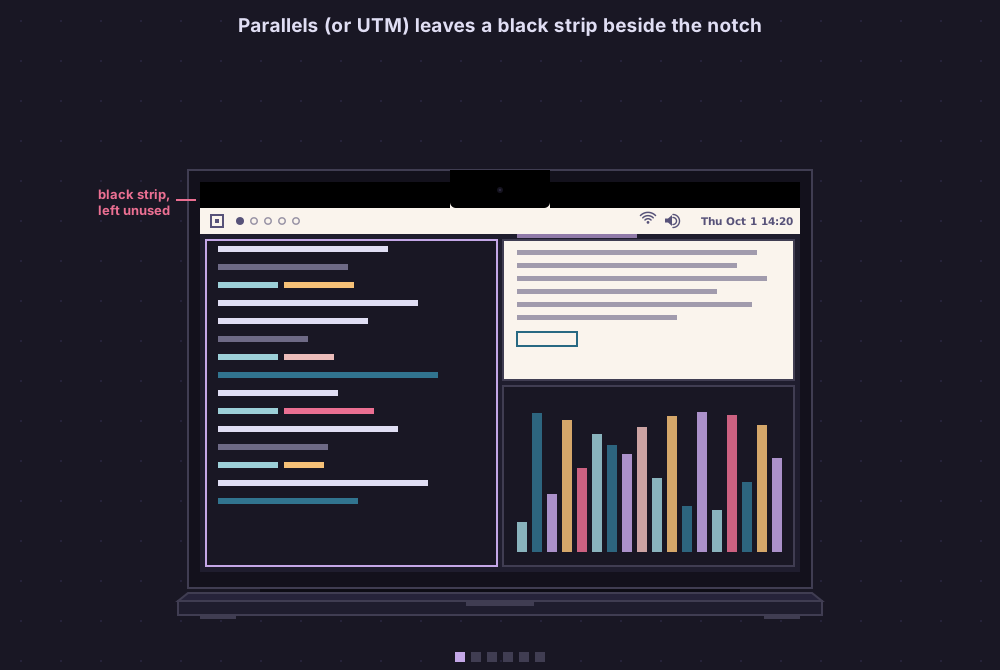

With Omanotch: Omarchy's real bar beside the MacBook's notch, where the VM leaves a black strip.
curl -fsSL https://raw.githubusercontent.com/gillesgoetsch/omacvm/main/install.sh | bashUsing a coding agent? Copy the prompt for it.
| What you get in Omarchy | How you run it |
|---|---|
| 🔳 Omanotch Omarchy's real bar beside the MacBook's notch, where the VM leaves a black strip. On by default on a Mac with a notch. |
🍎 Standalone app, UTM, VMware Fusion or Parallels Pick one, OmacVM sets it up the same way. OmacVM.app is one icon in the Dock and adds omacvm to Terminal. |
| 🖥️ Every display, full screen Your macOS arrangement, external monitors included, each in a Space of its own. ⌃⌥ Esc goes one Space over to macOS; twice opens Mission Control. |
💻 Runs on M1, M2, M3, M4, M5, M6 Adapts to notch, ProMotion, HDR and missing hardware on its own. |
| 🎬 Hardware video decoding OmacVM.app: YouTube 4K on the Mac's media engine, not the CPU, Omarchy's Chromium too. The sound stays in step with the picture. |
🛠️ A setup script that fits your needs Pick the app, CPUs, memory, disk, keyboard, user and every feature; change them later anytime. OmacVM.app's window also sets CPUs and memory one by one and grows or compacts the disk. |
| 🎮 Real GPU performance Keeps up with your display's refresh, up to 120 Hz. Graphics in OmacVM.app: OpenGL, Vulkan (KosmicKrisp on macOS 26+) or Automatic: Vulkan on macOS 26 and newer, OpenGL before. Vulkan adds WebGPU in Chromium. Graphics memory grows with what the Mac can spare. |
⏱️ Ready in 5 minutes Download a prebuilt VM, or build it fully yourself. |
| 👆 Mac trackpad and Magic Mouse gestures 2, 3 and 4 finger swipes and pinch zoom, optional macOS-like momentum scrolling. Magic Mouse swipes count as 3 or 4 fingers, your pick. |
💾 Your VMs where you want them OmacVM.app's Storage moves them to another folder or drive and shows their sizes. |
| ⌨️ Mac keys, fully Omarchy Cmd works as Super, ⌘ F10–F12 take Omarchy's screenshots, macOS shortcuts stay out of the way. In OmacVM.app the globe (fn) key opens Omarchy's emoji picker. |
🎨 Theme, wallpaper and boot splash Your Omarchy theme and wallpaper carry over to macOS; OmacVM.app shows Omarchy's logo from the first frame. |
| 🔑 Touch ID for sudo and 1Password Off until you turn it on: sudo, polkit and 1Password (with its own switch on) in Omarchy ask the Mac's Touch ID, in an Omarchy-styled panel in OmacVM.app, in macOS's own dialog on the other apps. Your password keeps working; only for the VM in front. |
🧪 Experiments, off until you turn them on x86 Linux apps through box64 on every route. In OmacVM.app: USB devices, a fast network (VPN included), GPU compute (OpenCL, WebGPU in Firefox) and the Mac's input methods for Chinese, Japanese and Korean. |
| 📶 Wi-Fi, audio and battery from the Mac The bar shows your real networks, sound devices and battery. Sound holds on a busy Mac. |
🔋 Optimized for battery Measured power draw on every route; an idle OmacVM.app VM wakes the Mac half as often. |
| 🔊 Native volume and brightness The Mac's keys with Omarchy's own popups, in finer steps (32, Option: 64), for external displays too. |
🎛️ Control centre in Omarchyomacvm in the VM opens a floating window: features on or off, updates, report a problem. From the Mac too: Features… in OmacVM.app. |
| 💡 Keyboard backlight Shift+F1/F2 dims and brightens the Mac's keyboard, like Omarchy on a laptop. |
🩺 One check for everythingomacvm check tells you what works and what to fix. |
| 📷 Camera and microphone Video calls in the VM. |
🔄 Updates in one stepu in the control centre updates the Mac and the VM, OmacVM.app included. Checked once a week, signed with OmacVM's release key, with a way back. |
| 📋 Copy and paste, both ways Plus a Mac folder at ~/Mac (OmacVM.app, off by default), Night Shift, True Tone and the Mac's clock format. |
🔐 Token-secured bridge to the Mac Only your own VM can talk to the Mac side, proven with a secret token. |
See the full compatibility list per app below, or every feature in detail.
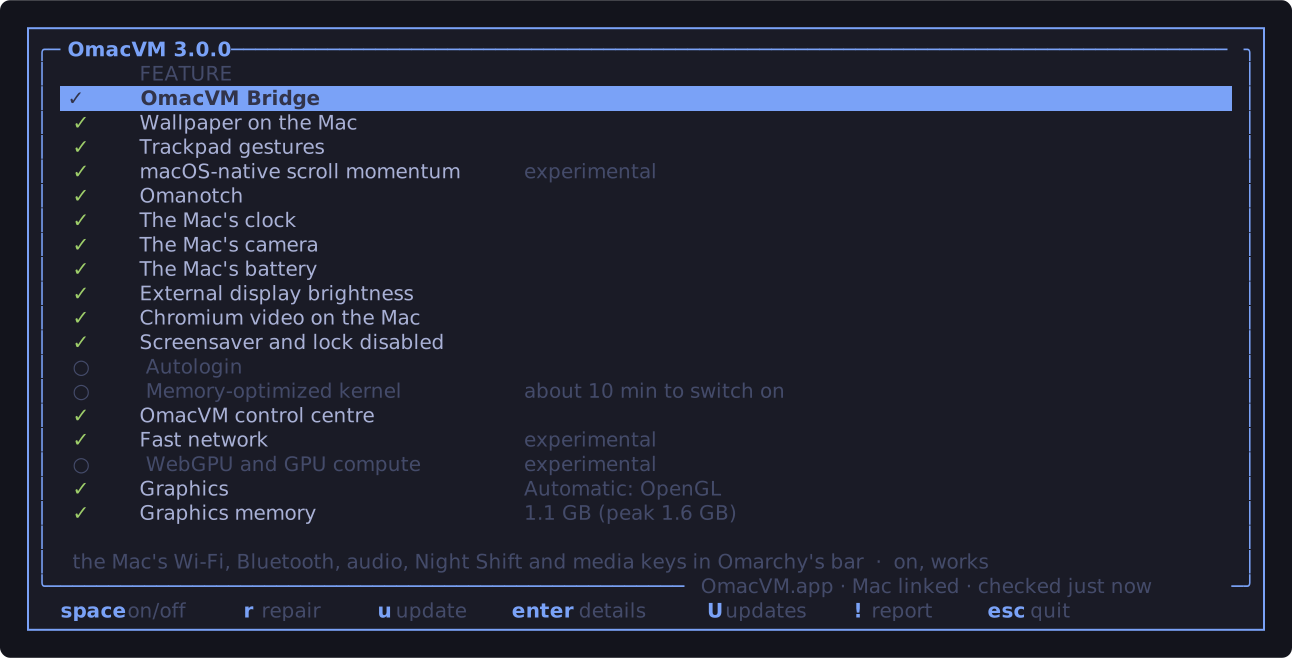
The control centre
Type omacvm in Omarchy (or pick it in the Omarchy menu): every feature with its live status, on or off with space, plus updates and "report a problem".
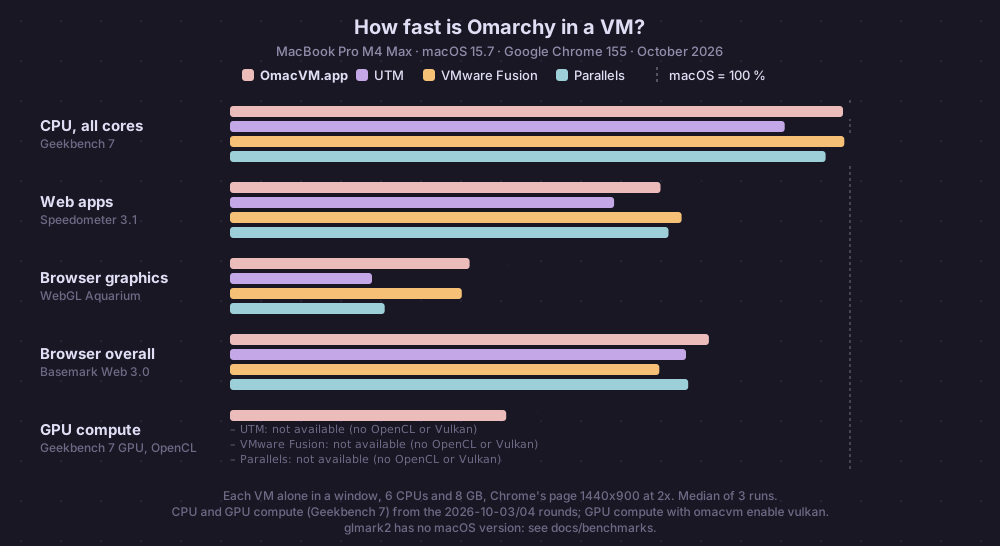
Which app?
OmacVM.app is the recommended way: free, open source, and the only one with hardware video and the full GPU. UTM is the free classic. VMware Fusion is free. Parallels is the most polished, but paid.
| OmacVM.app | UTM | VMware Fusion | Parallels | |
|---|---|---|---|---|
| Price | free | free | free | paid |
| Open source | ✅ | ✅ | ❌ | ❌ |
| Omanotch | ✅ | ✅ | ✅ | ✅ |
| Hardware video decoding | ✅ | ❌ | ❌ | ❌ |
| GPU in desktop and browsers | ✅ | ✅ | ✅ | ✅ |
| Vulkan, WebGPU, OpenCL | ✅ ³ | ❌ | ❌ | ❌ |
| External monitors | ✅ | ❌ | ✅ | ✅ |
| 120 Hz ProMotion | ✅ | ✅ | ✅ | ✅ |
| Trackpad and Magic Mouse gestures | ✅ | ✅ | ✅ | ✅ |
| Momentum scrolling (optional) | ✅ | ✅ | ✅ | ✅ |
| Cmd as Super | ✅ | ✅ | ✅ | ✅ ¹ |
| Wi-Fi, Bluetooth, audio from the Mac | ✅ | ✅ | ✅ | ✅ |
| Battery in the bar | ✅ | ✅ | ✅ | ✅ |
| Volume and brightness | ✅ | ✅ | ✅ | ✅ |
| Keyboard backlight (Shift+F1/F2) | ✅ | ✅ | ✅ | ✅ |
| External display brightness | ✅ | ✅ ⁴ | ✅ ⁴ | ✅ ⁴ |
| Camera and microphone | ✅ | ✅ | ✅ | ✅ |
| Copy and paste | ✅ | ✅ | ✅ ² | ✅ |
| Theme and wallpaper sync | ✅ | ✅ | ✅ | ✅ |
| Touch ID for sudo, polkit and 1Password | ✅ | ✅ | ✅ | ✅ |
| Control centre in Omarchy | ✅ | ✅ | ✅ | ✅ |
| Prebuilt VM (5 min) | ✅ | ✅ | ✅ | ✅ |
| x86 Linux apps (experimental, slower) | ✅ | ✅ | ✅ | ✅ |
| Mac input methods (Chinese, Japanese, Korean…) (experimental) | ✅ | ❌ | ❌ | ❌ |
| CPU and memory limit | none | none | none | 4 CPUs, 8 GB on Standard |
¹ after one setting in Parallels · ² when the pointer crosses the VM's edge · ³ a Graphics setting per VM (OpenGL, Vulkan, Automatic = Vulkan on macOS 26+, OpenGL before); Vulkan adds Vulkan apps next to OpenGL: on KosmicKrisp on macOS 26 or newer, on MoltenVK before; Vulkan windows reach the screen by a copy on the Mac, faster than the VM's software copy; OpenGL and browser speed are the same either way, and Vulkan gives Chromium WebGPU; OpenCL and WebGPU in Firefox opt-in (numbers) · ⁴ with the VM in full screen on that display
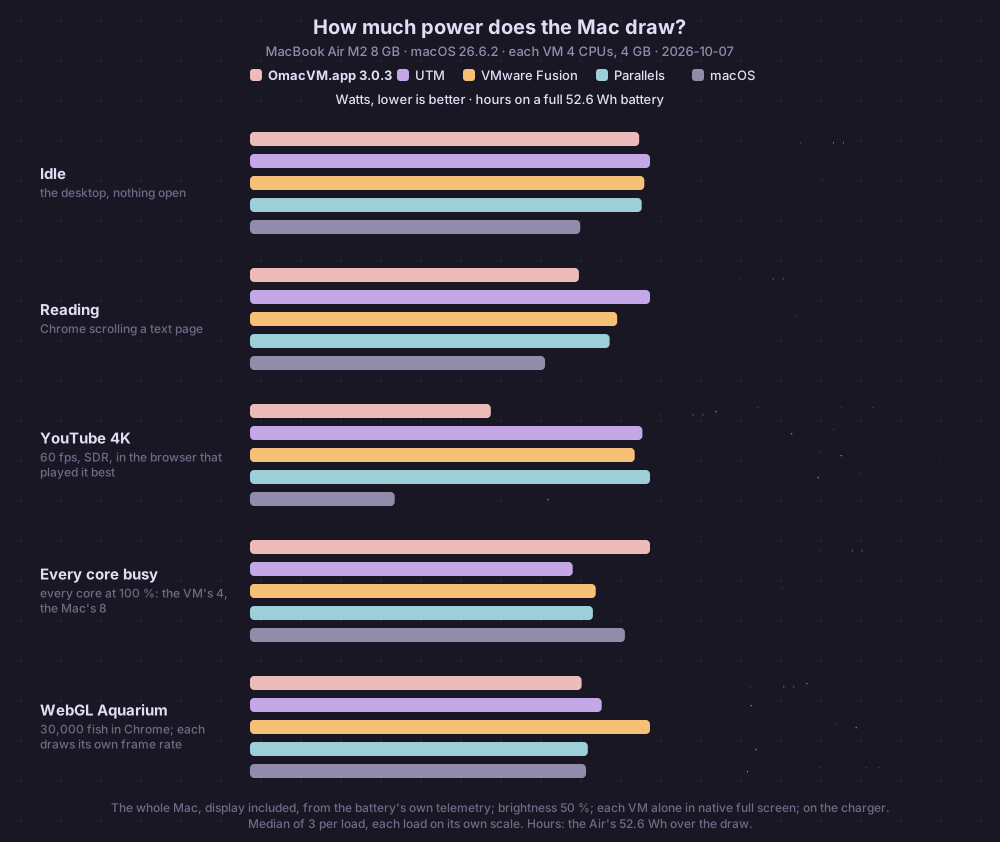
Power: the whole Mac from its battery's telemetry on a MacBook Air M2 8 GB, each VM 4 CPUs and 4 GB alone in native full screen, brightness 50 %; OmacVM.app played the video on the Mac's media engine. How it was measured.
Full comparison with benchmarks: docs/compare.md.
Get started
The command at the top puts OmacVM in ~/.omacvm (it follows the releases:
omacvm update takes it to the newest), adds the omacvm command and starts it. Run omacvm any time after that: with no VM yet it builds one;
otherwise it asks what you want to do (build another VM, switch features,
update, check). Prefer git? git clone https://github.com/gillesgoetsch/omacvm
and run ./install.sh in it. Using a coding agent? Copy the prompt.
Only OmacVM.app? Its window's "omacvm in Terminal" Install adds the command.
Requirements
- An Apple Silicon Mac, M1 or newer, with macOS 15 for OmacVM.app or macOS 14 for the others. (On an M1 or M2, Asahi Linux can also run Omarchy natively.)
- About 30 GB of free disk space on the drive the VM goes to, and a decent connection.
- One of the apps: OmacVM.app (
omacvmdownloads it), UTM 5 (beta), VMware Fusion 13 or Parallels Desktop 19, or newer. How to get each: docs/routes/. - For UTM, Fusion and Parallels: Xcode Command Line Tools and
Homebrew with
zstdande2fsprogs. OmacVM.app needs neither: it brings what it runs on the Mac. (install.shasks for the Command Line Tools once, for git.)
omacvm checks all of this first, and installs what is missing or waits for you.
Build a VM
omacvm # or: omacvm buildIt asks a few questions (the app, build or download, CPUs and memory, features, your user and password), shows a summary and builds. A build takes 30 to 70 minutes: OmacVM.app 10 to 30, VMware Fusion about 15 more. A prebuilt VM is ready a few minutes after a 3.5 to 6 GB download. A VM window opens on the way: that is the temporary installer, leave it alone.
For scripts: --vm-type app|utm|fusion|parallels, --prebuilt, --vm-dir PATH
(Parallels and Fusion), --FEATURE or --no-FEATURE, --yes. omacvm build --help lists
them all; every step in detail: docs/guide.md.
When it is done, allow the macOS prompts for OmacVM Bridge and OmacVM Gestures (which ones). On Parallels, change one setting so Cmd reaches Omarchy.
Everyday use
omacvm features                 # switch features on or off
omacvm update                   # the newest OmacVM, on the Mac and in every running VM
omacvm check                    # what works and what to fix; it changes nothing
omacvm vms                      # your VMs and their OmacVM version
omacvm report                   # report a problem: shows what goes into the GitHub issue first
omacvm resources --vm NAME      # change its CPUs and memory
omacvm graphics --vm NAME       # OmacVM.app: OpenGL, Vulkan or Automatic
In Omarchy, omacvm (also in the Omarchy menu and the bar; from the Mac,
OmacVM.app's Features… or omacvm features --in-vm) opens the control
centre: every feature with its status, on or off with space, repair, updates,
and "report a problem" without personal data.
OmacVM.app looks for a new version once a week (Check Now in its window asks
at once; Go Back in its menu; off in its settings or the control centre). u
in the control centre updates everything: OmacVM.app on the Mac first (the VM
restarts once, after one confirm), then the VM. It shows each step while it
runs; R restarts the VM at the end for kernel, memory and keyboard changes.
Add --vm NAME for a VM other than the default. Have an Omarchy VM from
omarchy-mac already? omacvm apply --vm NAME adds OmacVM to it.
Put the VM in full screen for the gestures. ⌃⌥ Esc moves the monitor under the pointer one Space over to macOS, with macOS's own animation; the VM stays full screen in its Space. Press it there again to go back into the VM; twice quickly opens Mission Control (more). Everything else: docs/guide.md.
How it works
OmacVM installs omarchy-mac, the Arch
Linux ARM port of Omarchy, onto the VM's own disk: a full Omarchy with
omarchy update, not a demo. Small helpers on the Mac pass its hardware to the
VM over the VM's private network, with a secret token: OmacVM Bridge,
OmacVM Gestures and Omanotch.
More: docs/how-it-works.md, the whole build in AGENTS.md, everything else in docs/.
Troubleshooting
Start with omacvm check: it names what is wrong and what to do. Still stuck?
omacvm report (or ! in the control centre) collects the checks, versions and
logs without your names, addresses, Wi-Fi names or tokens, shows you the text,
then opens a pre-filled GitHub issue.
- The Mac's menu bar stays over the full-screen VM: System Settings › Menu Bar › Automatically hide and show the menu bar: In Full Screen Only.
- Gestures do nothing: the VM must be full screen and in front; if ⌃⌥ Esc
left you in the VM without the trackpad, press it again.
omacvm checksays when the helpers miss a permission. - "answers with another SSH host key" after a rebuild:
omacvm apply --vm NAME --reset-host-key.
More: docs/troubleshooting.md.
Uninstall
omacvm uninstall # --purge also removes the bridge token and settingsThen delete the VM in its app, and remove the OmacVM apps from System Settings
› Privacy & Security › Location Services if still listed. The omacvm command
itself stays: rm -rf ~/.omacvm "$(command -v omacvm)" removes it. OmacVM.app
stays too: drag it to the Bin (its VMs stay in ~/OmacVM, older ones in
~/Library/Application Support/OmacVM/VMs, until you delete them).
OmacVM 2.7.0 and older: don't use --purge if you have OmacVM.app VMs. It
deletes them with the settings. Fixed in 2.7.1: run omacvm update first.
Credits
Omarchy (MIT) and DHH for making this!
omarchy-mac and
try-omarchy by the Omarchy team.
try-omarchy (MIT) gives the camera bridge, the Mac's battery in the VM and
OmacVM.app's pieces. Also Arch Linux ARM;
omarchy-parallels by
Vincenzo Palazzo (MIT), whose image builder is the temporary installer; and
omarchy-arm-utm, whose UTM
findings shaped the UTM route and whose Wayland SPICE agent (MIT) is the base
of omacvm-vdagent. The bar widgets are clones of Omarchy's own.
OmacVM is a community project, not affiliated with the Omarchy team, Parallels, UTM, VMware (Broadcom) or Apple.
Want to help? Start with CONTRIBUTING.md.
License
MIT, see LICENSE. Code reused from others: THIRD_PARTY_NOTICES.md.