
echo-dot-assist
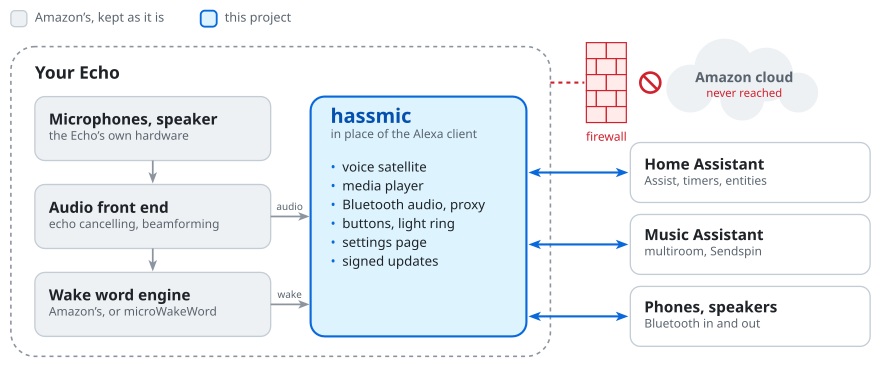
Turn an old Amazon Echo into a Home Assistant voice satellite that never talks to Amazon.
The Echo keeps what it is good at: Amazon's microphone processing and wake word engine, so it still hears you across
the room and over its own music. Only Alexa goes. In its place runs hassmic, a small daemon that Home Assistant finds
as an ESPHome device, with no YAML and no add-on.
Caution
Vibecoded, unaudited, your risk. Code, notes and docs were written by an AI (Claude) in conversation with the author, and tried on one Echo of each model. The install unlocks the bootloader and writes the system partition: it can brick the Echo. A mistake in the firewall or the updates could leave it online or open on your network. Read what you run. No warranty, no support.
Supported Echos
| Echo | Model | Codename | Way in | |
|---|---|---|---|---|
| ✅ | Echo Dot 3rd gen (2018) | D9N29T | donut |
open the case, wires on test pads |
| ✅ | Echo Dot 2nd gen (2016) | RS03QR | biscuit |
micro-USB, no soldering |
| ✅ | Echo 2nd gen (2017) | XC56PY | radar |
open the case, solder USB to the amplifier board |
| ❌ | Echo Dot 3rd gen (2019–2020) | C78MP8 | crumpet |
the Dot 3 unlock does not work on it |
| ❌ | Echo Dot 3rd gen with clock | 36EBT3 | doebrite |
thought to be crumpet hardware |
Each model needs exactly the firmware its page names (donut: Fire OS 6574.1 only). Another model? What is known and
how to add one: devices/.
What you get
| Stock Alexa | With hassmic | |
|---|---|---|
| Voice assistant | Alexa, in Amazon's cloud | Home Assistant Assist |
| Hears you across the room, over music | ✅ | ✅ the same front end |
| Wake words | Alexa, Echo, Computer, … | the same, or any microWakeWord or openWakeWord model |
| Only the nearest Echo answers | ✅ decided in the cloud | ✅ decided on your network |
| Timers, announcements, follow-ups | ✅ | ✅ |
| Drop In between Echos | ✅ through Amazon | ✅ on your network |
| Multiroom music | Amazon speaker groups | Music Assistant (Sendspin) |
| Bluetooth speaker for your phone | SBC | SBC, AAC, aptX, aptX HD |
| Plays on a Bluetooth speaker | ✅ | ✅ |
| Bluetooth proxy for Home Assistant | – | ✅ |
| Do not disturb, equalizer, ring brightness | Alexa app | entities in Home Assistant |
| Buttons and light ring in automations | – | an event and a light in Home Assistant |
| Louder speaker (Echo Dot 2, Echo 2, Echo Dot 3) | – | up to +12 dB on the settings page (Echo Dot 3: +2 dB) |
| Sound detection (smoke alarm, glass, …) | Alexa Guard, checked in the cloud | on the Echo, less reliable |
| Whisper detection | answers in a whisper | a sensor for your conversation agent |
| Motion sensor | – | from the Wi-Fi signal, experimental |
| Wi-Fi setup from a phone | Alexa app | Home Assistant app |
| Talks to Amazon | always | never (firewalled) |
| Updates | from Amazon, automatic | signed: from your PC, or from Home Assistant |
The table is for the ESPHome mode (the default). The Echo can be a Wyoming satellite instead: voice, wake word, buttons and Music Assistant work, most of the rest does not (details).
On the Echo
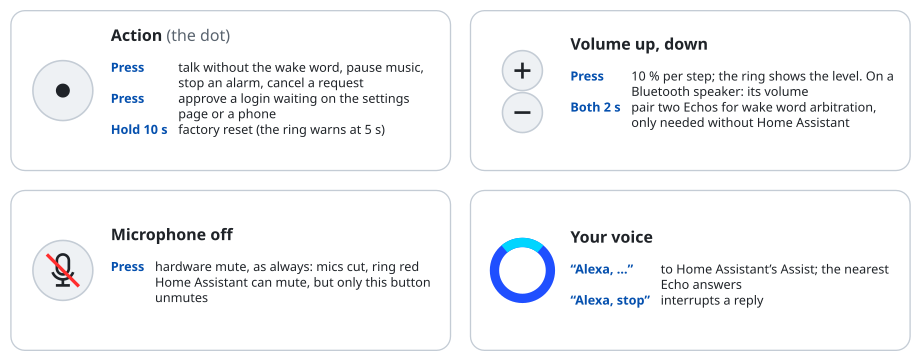
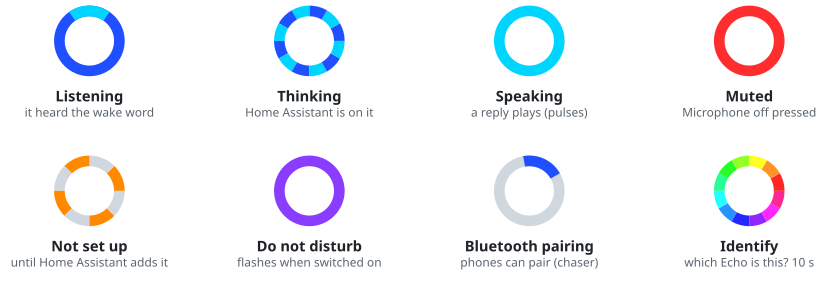
The light ring speaks stock Alexa's language:
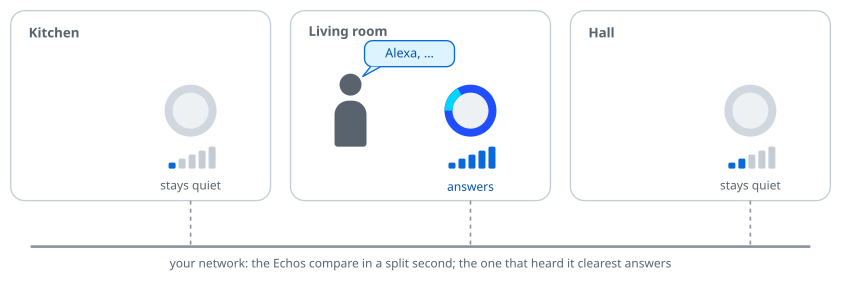
With several Echos, all of them hear you, but only one answers. They settle it among themselves, without Home Assistant and without a cloud; nothing to set up (how).
Everything else is set on the Echo's own settings page, http://<echo-ip>:28931/ ("Visit" on its device page in
Home Assistant): every setting with what it does, the features to switch on and the entities each adds, other Echos to
copy settings and wake words to, the log. A press of the action button lets your browser in. More.
Requirements
- A supported Echo, and a USB way into it (its page says what: a cable, or wires).
- A Linux PC with
adb,fastboot,python3,make,unzip,debugfs(e2fsprogs),sqlite3, ~5 GB free disk. The setup offers to install what is missing. - Home Assistant with a working Assist pipeline (speech to text, conversation agent, text to speech). Try it in the app first. Optional: Music Assistant (tested with 2.10.4).
- Wi-Fi with a WPA2 password or none (no captive portal, no enterprise login) that reaches Home Assistant.
Install
scripts/setup.sh

One guided run for every supported model. It does everything itself and stops only when you have to act: download a
file (it picks it up from ~/Downloads), plug a cable or solder, hold a button, type the Wi-Fi password. It wipes the
Echo, so it asks for a typed yes first.
- Stopped? Ctrl-C any time; the next run continues where it left off. When a step fails it shows why and offers to
try again (full output in
build/<codename>/setup.log). - Nothing to compile on a commit GitHub has built (every push to
mainandrelease): the setup takes that build, checked against the project's key, and skips the 1 GB Android NDK. - Already rooted on the right firmware? It offers a shortcut: no unlock, no wipe.
- More Echos:
--restartstarts over for the next one,--preset hassmic-settings.confgives it the settings exported from another. --dry-runshows every command without running one;--from <step>skips ahead.- Back up
secrets/update.key, made by the setup: it signs your updates and opens adb over Wi-Fi without Home Assistant.
The steps by hand, and what to solder: each model's page in Supported Echos.
Once the Echo is on your network, Home Assistant discovers it: add it, pick an Assist pipeline, say "Alexa". The Echo names itself after its model and MAC address ("Echo Dot 3 5695c4"); give it your name in Home Assistant.
Updating

- From Home Assistant: pick a channel under "Online updates" on the settings page.
releasegets releases (thereleasebranch),betaalso every build ofmainthat changes the Echo's software,off(the default) nothing. The Echo's firmware entity then shows new versions and installs them. ESPHome mode only. The Echo downloads them itself, so it needs internet access to GitHub; the page checks that before it takes a channel. - From your PC:
git pull, thenscripts/ota-push.sh <echo-ip>(it remembers the address). It builds, or takes that commit's build from GitHub as the setup does, signs with yoursecrets/update.keyand pushes over Wi-Fi (TCP 28929).
Either way a broken update cannot strand the Echo: until a new version has passed its self test, the Echo falls back to the last one that worked. What changed: CHANGELOG.md. What online updates trust: security.
When something is wrong
The settings page's Log (System section) shows what the Echo did; over adb it is
adb shell tail -30 /data/local/hassmic/boot.log. Lines start with UTC once the Echo has the time from Home Assistant
(the page shows your time zone), boot+<seconds> before that: behind the firewall only Home Assistant sets the clock,
on connecting and every 6 hours.
The wake word and the button do nothing
Most likely no connection to Home Assistant; the Echo does not show that yet. In the log, wake: ALEXA type=2 means it
heard you, client connected / voice assistant: subscribed means Home Assistant is there. Nothing after the last
client disconnected: check the Echo's address (adb shell ifconfig wlan0), that Home Assistant reaches it (TCP
26053) and the Echo reaches Home Assistant (8123). Keep exactly one Wi-Fi profile on the Echo.
No sound from replies or music
The Echo fetches every reply, announcement and play_media from the URL Home Assistant or Music Assistant gives it.
Home Assistant builds it from its internal URL (Settings › System › Network), or its LAN IP. The Echo must resolve
that name (DNS from DHCP; .local works) and reach the address: on a network without internet, a URL inside it. The log says what
failed (net: cannot ...). No button sounds either? Check the volume.
"Invalid encryption key" in Home Assistant
After a reset of the Echo, or when something else set a key first:
scripts/adb-wifi.sh <echo-ip>, then adb shell rm /data/local/hassmic/state/api_key, reboot the Echo, delete the
device in Home Assistant and add it again.
Open issues and measurements: PLAN.md.
Undo it
- For now:
adb shell rm /data/local/hassmic/hassmic.conf, reboot. A stock, unregistered Echo, which updates itself if it gets internet. - For good:
scripts/install-system.sh --uninstall. - All of it: reflash the stock firmware from TWRP, step 1 of the model's page.
- Start over but keep the install: factory reset (hold the action button 10 s).
Security
No cloud: the firewall lets Amazon's programs reach only your local network, and firmware updates never get out. The link to Home Assistant is encrypted with a key Home Assistant sets; until you add the Echo, anyone on the network can connect. The settings page lets in only browsers you approved with the action button. adb is closed over Wi-Fi. Updates install only with a valid signature. The whole model, including what it does not protect against: docs/SECURITY.md.
More
- User guide: every feature and setting in detail.
- DEVELOPMENT.md: how it works, building, tests, contributing.
- docs/: what was found taking the Echo apart.
Licence
MIT, for everything written here. src/third_party/ keeps its own licences, stated in each file: monocypher
(BSD-2-Clause OR CC0-1.0), dr_flac.h (public domain or MIT-0), minimp3.h (CC0-1.0), rnnoise/ (BSD-3-Clause,
COPYING beside it), freeaptx.c/.h (LGPL-2.1-or-later; linked statically, and everything needed to rebuild and
relink it is in this repository).
Nothing of Amazon's is in this repository or covered by this licence: firmware, libraries and wake word models come from your own device and stay Amazon's. Not affiliated with or endorsed by Amazon, Home Assistant or Music Assistant; "Alexa" and "Echo" are Amazon's trademarks.