
fsr4-shader-performance-overrides
Makes AMD FSR 4.1.1 upscaling faster on Radeon graphics cards, on Windows and Linux, by replacing FSR 4's slowest shaders with faster ones. One file to swap, nothing else in the game changes.
Quick start
Warning
Never use this in online games or in any game with anti-cheat. These are modified game files. Anti-cheat software can treat a changed DLL or changed shaders as tampering, and that can get an account banned. Use it in single-player games only.
1. Download the archive for your graphics card.
| Your graphics card | Download |
|---|---|
| A Radeon RX 7000 or RX 6000 graphics card: the name has "RX" and a four-digit number, such as RX 7800 XT or RX 6700 XT. This includes gaming laptops with their own RX chip (RX 7700S, RX 6700M and the like) | fsr4.1.1-cyboman-2026-10-19.7z (5.6 MB) or .zip (82 MB) |
| Graphics built into the processor: most laptops, mini PCs and handhelds. The name is "Radeon Graphics" or "Radeon" with a three-digit number, such as Radeon 780M or 890M; also the Steam Deck | fsr4.1.1-igpu-cyboman-2026-10-19.7z (5.6 MB) or .zip (82 MB) |
| Radeon RX 9000 | not for these cards: they run a different FSR 4. Do not install it there. |
The .7z and the .zip hold the same files. Windows 11 (version 23H2 or later) opens a .7z itself; on Windows 10 use
7-Zip or take the .zip.
Not sure which you have? In Windows, open Task Manager, go to Performance and look at the GPU's name; on a laptop with two, the RX one is the one games use.
2. Choose a version. Each archive holds three folders with one file each:
| Folder | Speed | Picture |
|---|---|---|
exact |
faster than AMD's | the same as AMD's, byte for byte |
lossy |
faster again | very close to AMD's, but not the same. Read WARNING.txt in that folder first |
lossy2 (new; to replace lossy later) |
as lossy |
lossy with trained weights: closer to AMD's on swaying foliage and fireflies, slower to follow brightening. Not for Ultra Performance yet (there it is the same as lossy). Read WARNING.txt in that folder first |
If you are not sure, take exact.
3. Put the file in the game's folder. The game must already run FSR 4.1.1, for example through OptiScaler.
- Find
amd_fidelityfx_upscaler_dx12.dllin the game's folder (often next to OptiScaler) and rename it toamd_fidelityfx_upscaler_dx12.dll.orig. It must be version 4.1.1.2740. - Copy the
amd_fidelityfx_upscaler_dx12.dllfrom the folder you chose into its place.
This works on Windows and, under Proton, on Linux. Linux users can instead use one launch option and leave the DLL alone.
4. Check that it worked. Open OptiScaler's overlay in the game. The FSR version reads
4.1.1-cyboman (or 4.1.1-lossy-cyboman, 4.1.1-lossy2-cyboman; with the other archive 4.1.1-igpu-cyboman,
4.1.1-igpu-lossy-cyboman or 4.1.1-igpu-lossy2-cyboman), and the upscaler time is lower than before.
To undo it, delete the file and rename the .orig file back.
What to expect
-
The gain depends on the output resolution. It is largest at 4K. At 1440p and 1080p the exact DLL's gain depends on the card: some keep most of it (an RX 7900 XT 30% at 1440p, an RX 6600 XT 24% at 1080p), others show little or nothing (the RX 7800 XT and an RX 7900 XTX at 1080p). The lossy DLL helps at every size, because it skips work instead of only doing the same work faster.
-
It depends on your graphics chip, and on Windows or Linux. FSR 4 time saved at 4K, from testers' timing-kit runs up to October 17, 2026 (Windows: about 130 reports; Linux: 13 runs on 8 cards, plus our own RX 7800 XT). The same DLL saves much more under Linux on most Radeon cards, most likely because Linux's driver runs two of AMD's shaders (the last pass and network pass 11) in a slower mode than Windows does, which leaves more to save.
Graphics chip Exact DLL, Windows Exact DLL, Linux Lossy DLL, Windows Lossy DLL, Linux Radeon RX 7600, RX 7900 GRE, XT, XTX 17 to 29% 12 to 48% (7900 XTX, 7900 GRE) 33 to 49% about 42 to 63% Radeon RX 7800 XT 2 to 4% (one report 14%) 28 to 35% 29 to 41% about 50% Radeon RX 6600 XT, RX 6650 XT, RX 6900 XT 10 to 20% 29 to 31% (6600 XT, 6900 XT) 30 to 41% about 47 to 48% Radeon RX 6600, RX 6700, RX 6700 XT, RX 6750 XT, RX 6800 (XT) 0 to 6% 29 to 30% (6750 XT, 6800 XT) 15 to 45% about 50 to 51% Integrated graphics and handhelds (Steam Deck, Radeon 890M) from 8% faster to 4% slower 5% (Steam Deck) 23 to 32% about 29 to 36% Intel Arc (B580; integrated Arc in one report) 6 to 10% not measured 30 to 33% not measured GeForce (GTX 1650, RTX 3060 Ti, 3090, 5070) none not measured 24 to 37% not measured Radeon RX 5700 XT, RX Vega, Radeon Pro VII none (Windows) 6% (Pro VII) 42% about 35% Most Linux cells rest on one or two runs per card. The Linux lossy figures are derived: the Linux kit times a frame that runs the network and a frame that skips it, and the lossy DLL alternates them, so the table gives their average. On RX 6000 cards under Windows the exact DLL is compared with AMD's shaders with the ghosting fix (the same picture), so the table shows only the speed difference. One Windows RX 6700 report with impossible readings is left out. We do not yet know what decides where a card falls in its range. Results by graphics chip, timing kit results.
-
It only shows when the graphics card is the limit. If the processor limits your frame rate, the frame rate does not change.
-
The exact DLL cannot change the picture. Its output was compared with AMD's byte for byte at 720p, 1080p, 1440p, 4K and 5K, in still and moving scenes. One intended exception: on RX 6000 cards under Windows, AMD's own file shows ghosting, and the exact DLL carries the fix, so its picture differs from AMD's there.
-
The lossy DLL trades a little accuracy for speed. It runs FSR 4's neural network on every other frame and carries its result along with the picture's motion in between. Measured differences and comparison crops: exact and lossy compared. What the alternating cost means for frame caps and V-Sync: frame pacing.
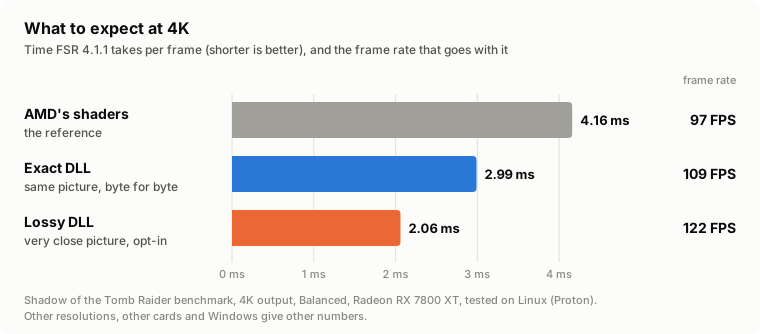
One card, one game, as an example of the best case: a Radeon RX 7800 XT, Shadow of the Tomb Raider's benchmark, 4K output, FSR 4.1.1 Balanced. Your card and your game will give other numbers:
| FSR 4 time per frame | Frame rate | Picture | |
|---|---|---|---|
| AMD's shaders | 4.16 ms | 97 FPS | the reference |
| Exact | 2.99 ms (−28%) | 109 FPS (+12%) | identical |
| Lossy | 2.06 ms (−50%) | 122 FPS (+26%) | still picture within 0.2 dB of AMD's |
| Lossy2 | 2.09 ms (−50%) | 121 FPS (+25%) | still picture within 0.5 dB of AMD's (one run, dll-2026-10-19) |
More games and resolutions: all results.
Note
Two settings where you will see little or no gain:
- FSR's debug view (the debug panels FSR can draw over the picture). The faster shaders do not cover the
debug versions of FSR's last pass, so AMD's own slow one runs and most of the gain is gone. Switch the debug view off
to measure or to play. FSR's version watermark (the white text in the top left corner, switched on with the
MLSR-WATERMARKenvironment variable) is not the debug view: with it on, every DLL keeps its full gain and frame skip works as usual (measured under Proton on an RX 7800 XT). It shows the DLL's version name, such as4.1.1-CYBOMAN, so it also tells you which build is running. - Ultra Performance mode (since
dll-2026-10-15). The lossy DLL skips frames there too, and runs the network all the same on one in three of the frames it would skip (lossy2 too: it does not support Ultra Performance yet and runs lossy's network there). Ultra Performance only, not representative of other modes: at 4K about 3.2 to 2.5 ms per frame on an RX 7800 XT, and its picture costs there are larger than in other modes (details).
New in this release
See what this release changes against the previous one, in pictures and figures →
Tip
New: lossy2, a third DLL in each archive, next to exact and lossy. It is the lossy DLL with new weights in six of the network's twelve layers, trained to match AMD's picture through lossy's whole frame loop. It is meant to replace lossy once it has been trained further; until then both are included. It was made with the tools of Durandal, the project's unreleased work on a smaller network that runs on every frame, and is one step on that longer path.
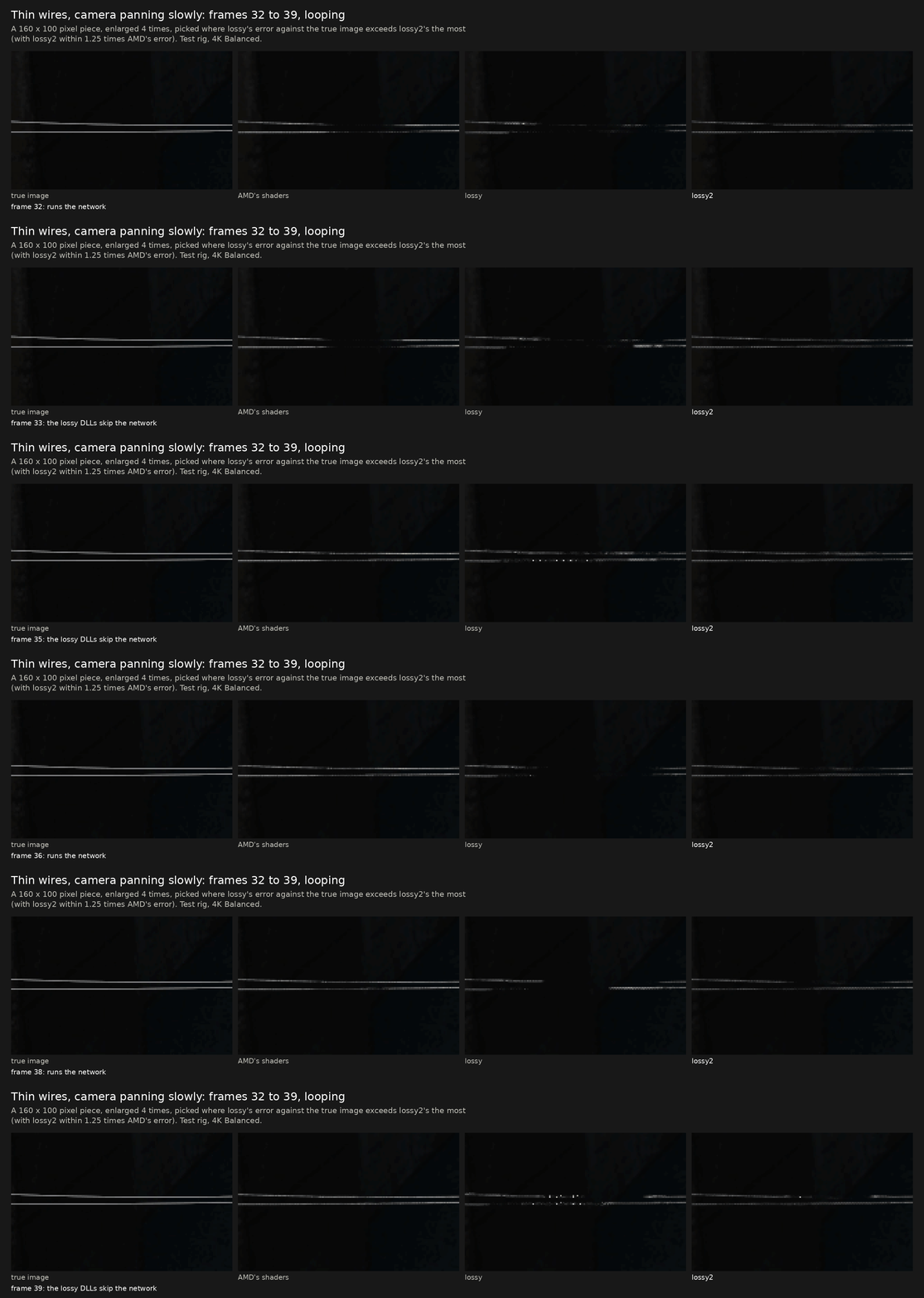
- Better than lossy: swaying foliage much closer to AMD's picture (error 12.2 against 17.9; AMD's own file 12.1), areas a moving object has just uncovered about 1 dB better, 16 to 30% fewer fireflies, steadier thin wires in a pan (test rig, 4K Balanced).
- Worse than lossy: it follows brightening 2 to 2.5 times as slowly (1.5 frames behind against 0.6 on a bright area), a still picture is 0.3 to 0.4 dB less accurate, and heavy film grain is less steady when the game uses FSR's auto exposure. It was trained on 4K Balanced and checked at 1080p, 1440p and 5K; Quality and Performance are not checked.
- Not for Ultra Performance yet: lossy2 has no trained weights for that mode; there it runs lossy's network unchanged and looks and performs exactly like lossy.
- Speed: as lossy. Shadow of the Tomb Raider's benchmark at 4K Balanced on an RX 7800 XT under Linux: 18,784 frames, 121 FPS (one run).
- Lossy DLL: the register cut of
dll-2026-10-15is removed. The Windows timing kit has shown that this should lower the lossy DLL's upscaler time againstdll-2026-10-15by about 1.3 to 1.8% on RX 6000 cards, about 3% on the RX 7600 and 0.5 to 1% on the other cards measured (4K). Exact DLL: unchanged. - Downloads: each archive also comes as a
.7z, 5.6 MB instead of 82 MB.
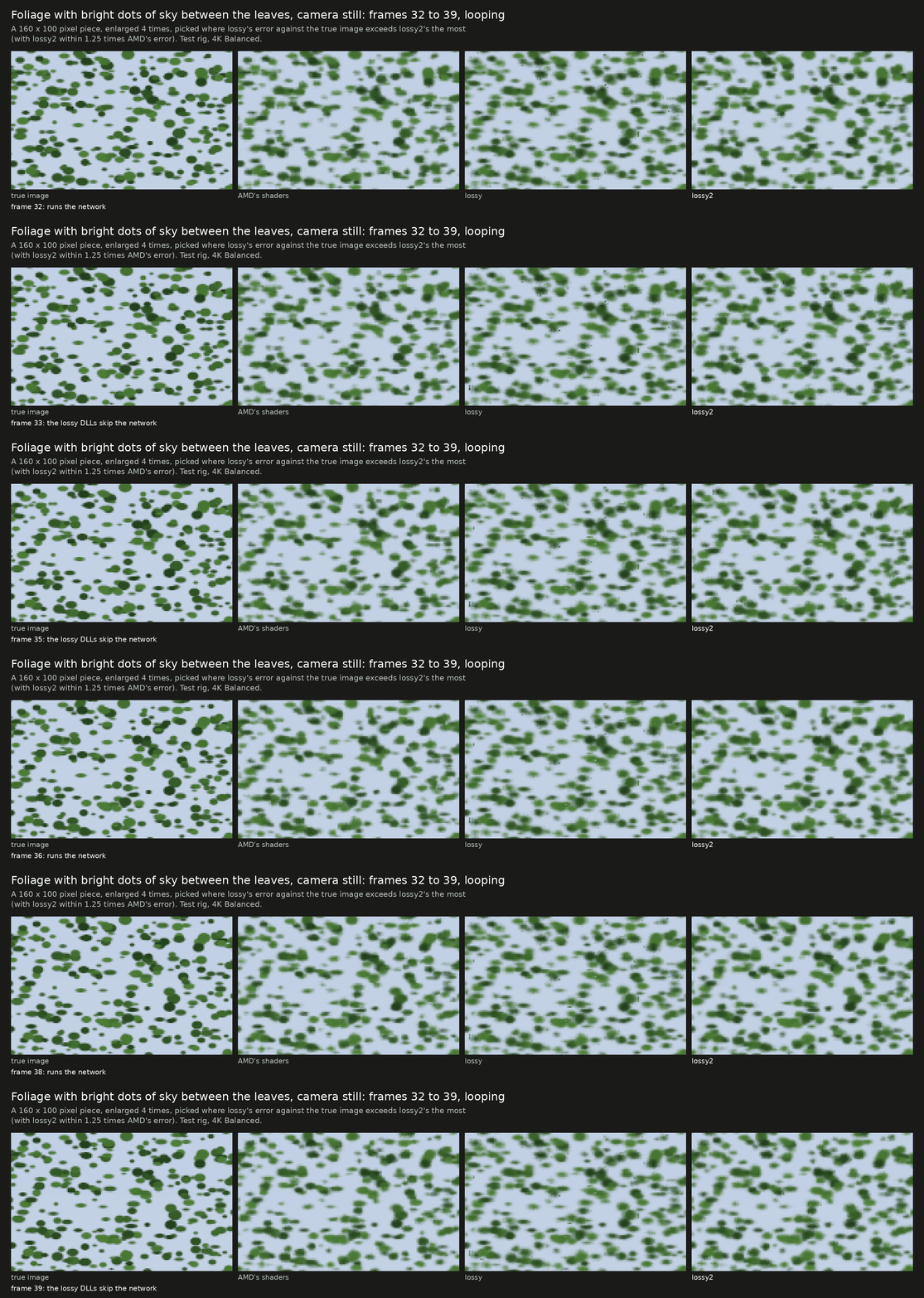
The largest visible changes against dll-2026-10-15, eight frames looping each (test rig, 4K Balanced; the lossy DLLs skip the network
on every other frame). Above: swaying foliage with bright dots of sky, where lossy's leaves are softer and shimmer. Below: thin wires in a
slow pan, which lossy breaks into fragments and lossy2 keeps whole.
The release page has every measure, including the ones where lossy2 is worse.
Help test it: the timing kit
Download the Windows timing kit (experimental, about 20 MB, version 2026-10-19): unpack, double-click
fsr4time.exe, wait about 15 minutes (up to about 20 on a slow chip). It times FSR 4 with AMD's shaders and with these DLLs on your graphics card, checks that each DLL gives the same picture, and offers to send the result. Reports are in from more than twenty graphics chips so far; every further card helps, including GeForce and Intel Arc. On Linux and the Steam Deck: the Linux kit.
- New in the Windows kit (2026-10-19): a study run for RDNA2 and RDNA3 graphics in the same download (
run-study.cmd, about 30 minutes: each change of the exact DLL timed on its own); Windows 10 PCs can fetch Microsoft's newer DirectX 12 runtime, which FSR 4 needs (not yet tried on Windows 10 itself). Details- Earlier (2026-10-18.3): it starts on Windows 11 23H2 again (2026-10-18.2 did not). (2026-10-18.2):
--all-presetsalso times the Quality and Performance sizes; the RDNA2 graphics built into processors are compared like RX 6000 cards. Details- Earlier (2026-10-18): seven DLLs instead of fourteen, so each gets more rounds in the same 15 minutes; on RX 6000 cards the percentages are against AMD's shaders with the dot products split; a DLL that hangs or crashes no longer stops the run; leftover time re-times unsteady readings; one message per report, with the summary and the per-run figures attached. Details
- Optional: the kit asks for a name or nickname for the thank-you page.
Will it work for me?
| Graphics card | Which archive | Status |
|---|---|---|
| RX 7900, 7800, 7700, 7600 (desktop RDNA3) | fsr4.1.1-cyboman-<version> |
measured here on an RX 7800 XT; testers report large gains on Windows |
| RX 6000 (RDNA2) | fsr4.1.1-cyboman-<version> |
runs, and includes the fix for the shimmering these cards show with AMD's file; at 4K, reports with the exact DLL range from a few percent to about 30%, and we do not yet know what decides it; a few percent at 1440p and below (tester reports) |
| Radeon 780M, 890M and other integrated graphics, Steam Deck | fsr4.1.1-igpu-cyboman-<version> |
experimental: few reports, small gains |
| RX 9000 (RDNA4) | none | no: a different FSR 4 runs there (open for someone to pick up) |
| Any other graphics chip: Nvidia GeForce, Intel Arc and Intel integrated graphics, older Radeon | fsr4.1.1-cyboman-<version>; for a chip built into the processor try fsr4.1.1-igpu-cyboman-<version> first |
should run, untested. FSR 4.1.1's shaders are ordinary DirectX 12 compute shaders: they need Shader Model 6.6 with 8-bit integer dot products, 16-bit types and wave operations, which current drivers from all three makers provide. Users report the DLLs running on a GeForce laptop and on an Arc A770. Nothing has been measured there: the rewrites were made for Radeon chips, so they may or may not be faster than AMD's shaders, and "same picture" has only been verified on Radeon. A timing-kit result tells both |
You also need a DirectX 12 game in which FSR 4.1.1 already runs, with
amd_fidelityfx_upscaler_dx12.dll version 4.1.1.2740.
Both DLLs have AMD's graphics-card check lifted (AMD's own file offers this FSR 4 only on desktop RX 7000 cards), so they start on any card whose driver can run the shaders: DirectX 12 with Shader Model 6.6. That is also why they must not go on an RX 9000 card, where a different FSR 4 would then start as well.
If the first zip is slower than AMD's file on a small RX 6000 card, try the second one: it differs only in one shader that is built smaller. Details: GPU support.
Linux: a launch option instead of the DLL
On Linux you can leave AMD's DLL in place and give the game the replacement shaders directly.
-
Download or clone this repository.
-
In Steam, add this to the game's launch options (keep anything already there in front of
%command%):VKD3D_SHADER_OVERRIDE='Z:/path/to/fsr4-shader-performance-overrides/prebuilt' %command%Z:is how Proton sees your Linux root, soZ:/home/you/...is/home/you/.... For the lossy version use the folderprebuilt-lossy(orprebuilt-lossy2) instead, after reading theWARNING.txtin it.
- The game must be using AMD's original DLL. The launch option does nothing while a DLL from this project is installed, because the files are matched to AMD's shaders.
- The version name does not change with the launch option; OptiScaler shows plain
4.1.1. The upscaler time is how you tell it applied. - The prebuilt files do not fit every setup. They were made on an RX 7000 desktop card. On
one tester's RX 6900 XT, Proton laid the same shaders out differently and the picture came out
darker. If the picture looks wrong, build your own files:
Linux guide.
./tools/check_prebuilt.sh <dump folder>tells you whether the prebuilt files fit.
If it does not get faster: Linux guide.
More about the files
Each DLL is AMD's own file with the rewritten shaders swapped in and the version name changed.
How that is done, and how to build it yourself: dll/; lossy2's trained weights and the tools that rebuild it
from them: research/lossy2. There is also a ReShade add-on
that does the same without touching the DLL: windows/.
The scripts that rewrite the Linux shaders and build the files in prebuilt/ are in tools/
(they were in the top folder until release dll-2026-10-11.3; commands in older posts need tools/ in front).
In some games OptiScaler's upscaler time is only reliable with the frame rate uncapped. If nothing changes at all, check that the game really runs FSR 4.1.1 with AMD's DLL version 4.1.1.2740; other versions have different shaders. See shader variants.
Good to know
- Nothing else changes. No game files are edited, and the output was compared byte for byte with AMD's at 4K, 1440p and 1080p.
- If a game crashes with the
exactDLL from the RX 7000 / RX 6000 archive, try theexactDLL from thefsr4.1.1-igpu-cybomanarchive instead: the same picture, byte for byte, with one shader built differently. In timing-kit reports on Windows it is about 1 to 1.5% slower on RX 6000 cards and no slower on RX 7000 cards (medians). - Game and OptiScaler updates can put the original DLL back; the launch option keeps working.
- Never in online games or games with anti-cheat. This changes the shaders the game renders with, and anti-cheat software can treat that as tampering. Single-player games only.
- Linux: do not set
RADV_PERFTEST=cswave32for a game that runs FSR 4; it adds about 1.1 ms.
More
| Page | What is in it |
|---|---|
| All results | every game measured, benchmark pages with screenshots |
| Linux guide | requirements, building your own files, troubleshooting |
| Making a shader dump | step by step, for reporting a wrong image or a missing speedup on Linux |
| Timing kit | a download for Linux and the Steam Deck that times every FSR 4 pass on your GPU, no game needed (new; five GPUs so far) |
| GPU support | which download fits which GPU, integrated GPUs, RX 6000 cards and their shimmering fix |
| Shader variants | which versions of FSR 4's shaders are covered, and what to do if your game's is not |
| How it works | what the rewrites do, where the time goes, what else was tried |
| Exact and lossy compared | what the lossy DLL changes in the picture, with measurements and crops |
| Lossy2 beside FSR 4.1.2 Lite, FSR 3.1, HelixSR and XeSS | six upscalers on the same test scenes and timing, for comparison |
| Frame pacing with the lossy builds | what the alternating upscaler time means for frame caps, V-Sync, latency and overlay readings |
| RDNA4 | what is known about the FP8 model on RX 9000 cards; open for anyone who can test on one |
| Release pages | each release against the one before it, in pictures and figures |
| The lossy DLL's rules | what the last shader does on a skipped frame, and which fault each rule answers |
| Earlier releases | what each release changed, newest first |
| Research | the probes, data and scripts behind all of it |
Star History
Credits and license
The postpass rewrite is adapted from tools/fsr4cap/postpass_lds.py in
bbport, a native Linux port of Bloodborne whose
author found the slow store pattern and wrote the original rewrite for that project's own FSR 4.1.1
runtime. This repository ports it to the shaders vkd3d-proton generates, so it works in ordinary
games.
The scripts are licensed under the GNU GPL v2 or later, like the project they derive from. See
LICENSE. The prebuilt shaders are modified versions of AMD's, distributed under the same
license together with AMD's notice; see prebuilt/NOTICE.md. Not affiliated
with or endorsed by AMD.
Testers who have asked to be named are listed on the thank-you page.
This repository is maintained independently. If this project has provided value to you, and you want to help support the author, consider formalizing your support with a voluntary micro-donation: