


BeadRelief
Image in. Editable beads out.
Turn any image into an editable bead pattern or a multicolor 3MF relief — entirely in your browser.
Try the live demo → · Download the sample 3MF · 简体中文

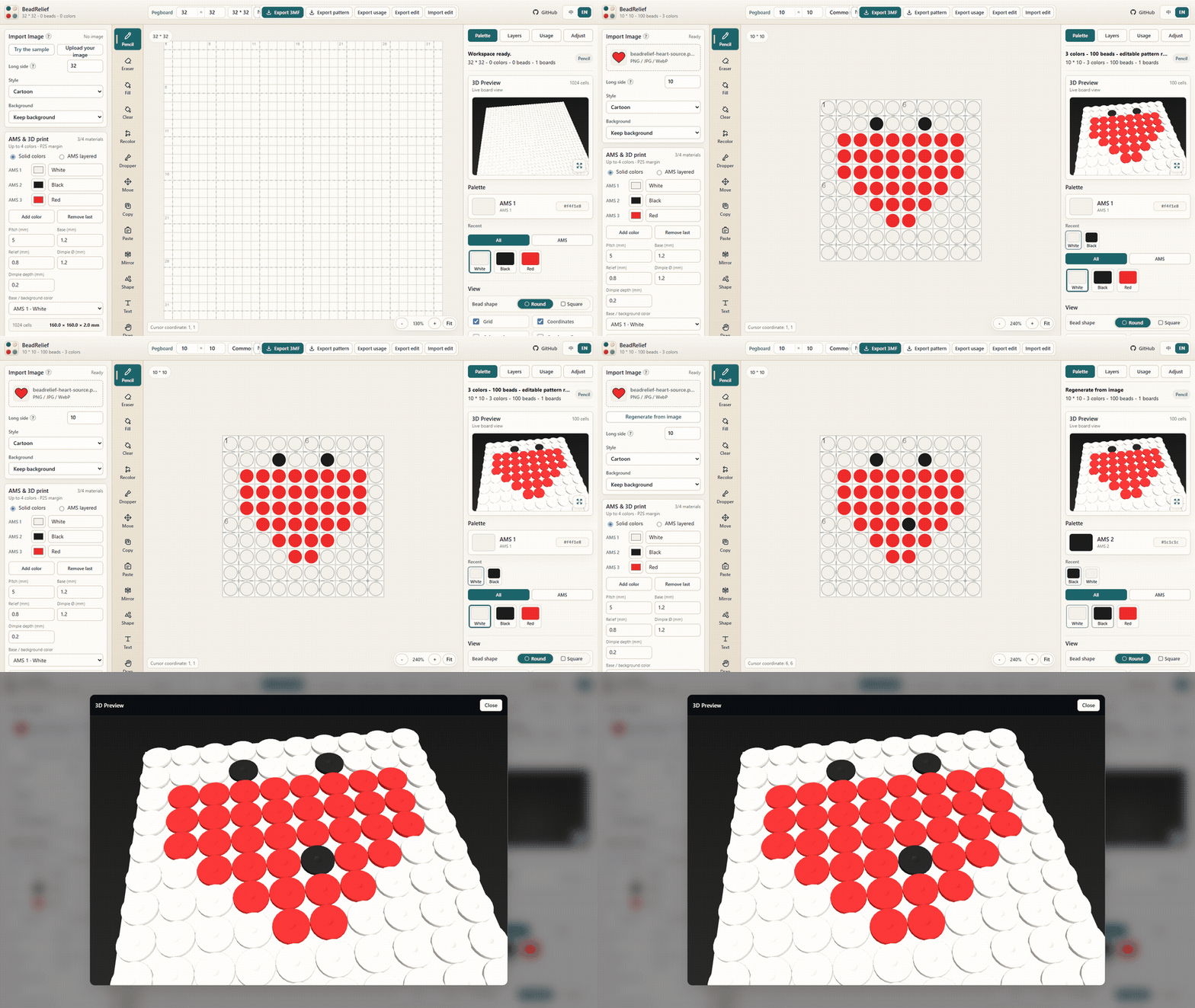
Desktop-first · Use a viewport at least 980 px wide for the complete workspace.
Why BeadRelief?
| 🔒 Local by design | 🧩 Printable bead charts | 🖨️ Bambu-ready 3MF |
|---|---|---|
| Images and generated files stay in your browser. | Use the full MARD palette and export PNG/PDF patterns. | Project-filament colors and part assignments are included. |
Three-minute quick start
- Open the live demo and choose Bead pattern or 3D print.
- Select Try the sample or upload a JPG, PNG, or WebP image.
- Adjust the size, color limit, crop, and background; then edit cells with the palette and drawing tools.
- Export a PNG/PDF pattern, usage workbook, edit-record JSON, or a 3MF in 3D print mode.
The Help button in the app keeps this workflow, keyboard controls, FAQ, and browser support in one place.
Choose an output
The live demo has two explicit workflows that share the same editable canvas:
- Bead pattern: use the complete upstream workbench with Basic/Complete MARD palettes, all drawing tools, layers, reference tracing, adjustments, usage counting, 3D bead preview, and PNG/PDF/XLSX/JSON exports. Pattern canvases and image conversion support up to 180 × 180 cells, with the full 291-color palette available.
- 3D print: convert with up to four AMS colors, inspect the relief, and export a grouped
.3mf.
Open the live demo, choose Bead pattern or 3D print, then upload a JPG, PNG, or WebP image.
From image to print, without guesswork
| 1 · Frame | 2 · Build | 3 · Inspect | 4 · Calibrate |
|---|---|---|---|
| Crop, zoom, reposition, and clean the background. | Choose solid or layered color and add a border, detachable backplate, hanging loop, or recessed back text. | Scrub through print layers, isolate a layer, or explode the stack; the same mesh is used for preview and export. | Print the generated swatch, enter measured colors, then save the printer/nozzle/material profile for reuse. |
Every project JSON, layered workbook, and 3MF carries the bottom-to-top print recipe. The 3MF also embeds the selected nozzle and material assignments.
The usage panel can safely merge isolated color speckles in one undoable pass. Layered calibration is tied to the physical filament order, TD, printer, nozzle, and layer height; changing those inputs automatically retires stale measurements.
Open it in Bambu Studio
- Import the exported
.3mf. - Select the Bambu Lab P2S and
0.4 mmnozzle. - Review the included project-filament colors and part assignments, map them to the physical AMS slots, then slice and inspect the color preview.
For layered work, open Material profile → Layered color calibration, download the calibration 3MF, print it with the same printer/nozzle/filaments, and enter the measured swatch colors before marking the profile as physically verified.
Important
The checked-in heart file has not yet been physically printed. Always confirm the AMS mapping and slice preview before printing.
Try the heart sample
Follow the full editable-project path with the same tiny heart:
| Source | Edit | |
|---|---|---|
| PNG | Project JSON | Grouped 3MF |
Canvas shortcuts
| Input | Action |
|---|---|
| Arrow keys | Move the keyboard cursor |
| Space or Enter | Draw at the cursor |
| Delete or Backspace | Clear the cursor cell |
| Hold Space and drag | Temporarily pan the canvas |
| Mouse wheel | Zoom the canvas |
| Right-click drag | Pan or erase, based on the right-click setting |
Browser support
Releases are verified in current Chromium. The supported setup is the latest Chrome or Edge with a desktop viewport at least 980 px wide; WebGL is required for the 3D preview. Firefox and Safari are not yet part of the supported release contract.
FAQ
Are my images uploaded?
No. Image conversion and exports run locally in your browser.
How should I back up a project?
The current draft is saved to this browser's IndexedDB after a 400 ms idle delay and a completed database transaction. The right-hand status area shows “Saving…” or “Saved”; a failure stays visible until a later save succeeds. Wait for “Saved” before closing the tab. Export the edit-record JSON for any project you need to keep or move to another device.
Why is 3MF export unavailable?
Switch to 3D print, keep the canvas at 32 × 32 cells or smaller, and resolve any print-setting validation message before exporting.
Run locally
Requires Node.js 22.9 or newer.
npm ci
npm run check
npm run dev
Open http://127.0.0.1:5174/.
Verification status
CI regenerates the checked-in samples, tests every 3MF archive, and verifies the embedded project-filament colors and part assignments. Exact hashes and the compatibility record are in Bambu Studio verification.
Known limits
- Solid mode exports one grouped relief. Layered mode is experimental, uses one global bottom-to-top filament order, and is not Bambu Studio Mixed Filament metadata.
- 3D print mode uses up to four materials; those AMS and 3MF limits do not apply to bead-pattern mode.
- 3MF export is limited to 32 × 32 cells.
- Confirm the physical AMS slot mapping in Bambu Studio before printing.
Privacy
Image processing and generated files stay in the browser; the app does not upload them to a server. The current editable draft may remain in browser local storage until it is replaced or cleared.
Upstream and license
BeadRelief is based on the MIT-licensed Jett-Wu/Perler_Beads_Generator. See UPSTREAM.md for the imported commit and project-specific changes. This repository is released under the MIT License.
If BeadRelief helped you make something, a GitHub star helps other makers find it. Contributions are welcome — see CONTRIBUTING.md.