

omacosy
omakase + macOS + cosy. An omarchy-style setup for macOS: tiling window management with a real Super key and Hyprland's dwindle layout, a status bar built for it (bar, popups, sliders and screen dimming in one process), focus follows mouse, trackpad workspace swipes, a Mission-Control-style workspace overview with live previews, focused-window border rings, and one theme switch that covers everything down to the wallpaper. All of it installs from this one repo.
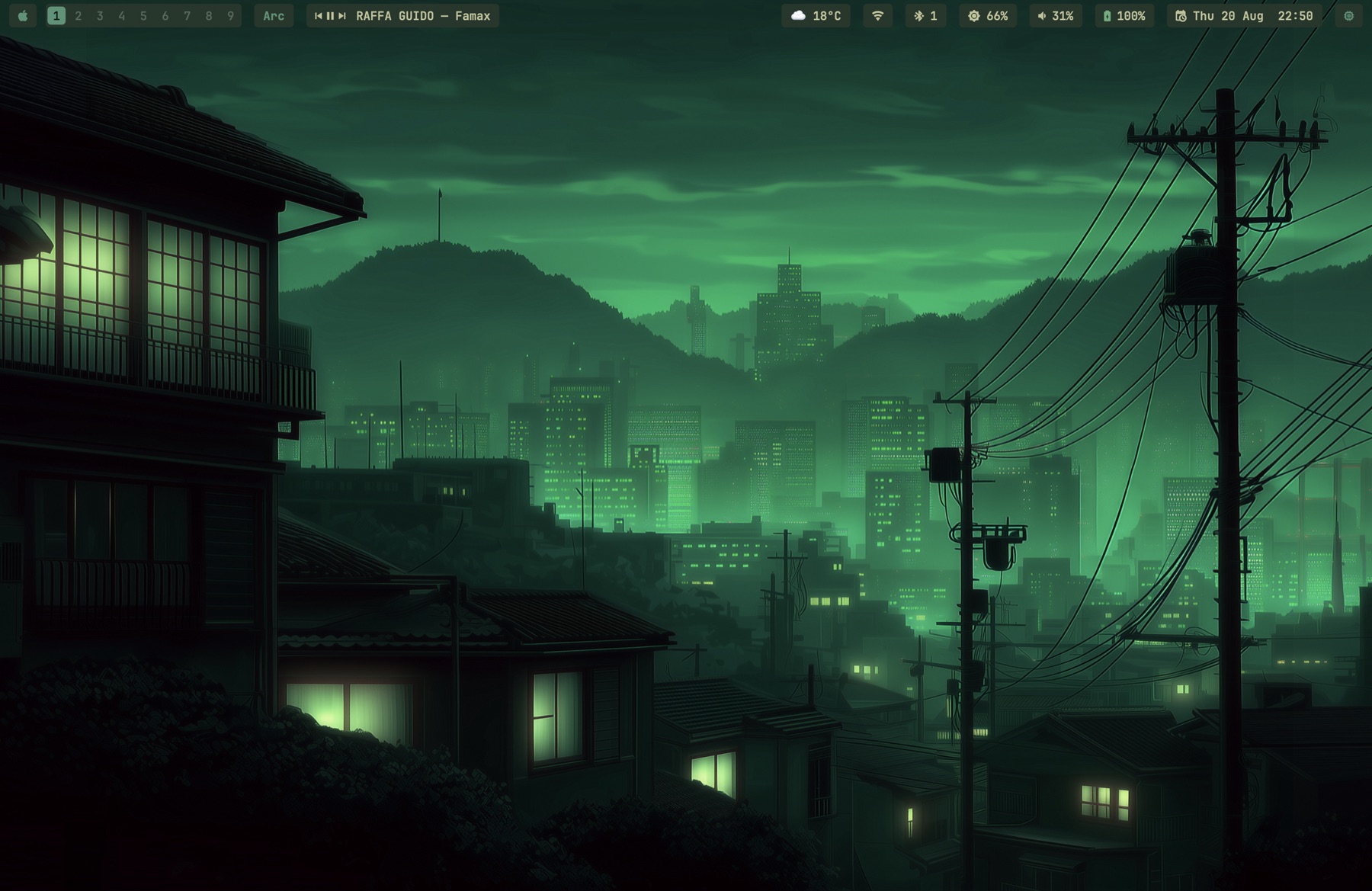
The whole environment idles at about 157MB of memory. Numbers per process in Memory use.
Most of it is seven small signed binaries (Swift and C) built by the installer, because several of the existing tools are broken on macOS 26. The details are under What's inside.
Built for macOS 26 (Tahoe) on one desk: a MacBook Pro plus one external display. It tries to generalize (display roles instead of hardware names, per-display notch detection), but so far it has only run on this machine. The permission setup is real work. Issues and PRs welcome; support promises are not made.
Fresh Mac
The same command installs and reinstalls. It clones the repo, or updates the clone that is already there, then runs the installer:
d=~/.local/share/omacosy
if [ -d "$d/.git" ]; then git -C "$d" pull --ff-only; else git clone https://github.com/paulsp94/omacosy.git "$d"; fi &&
cd "$d" && ./install.sh
This installs AeroSpace. For OmniWM
instead, run ./install.sh --omniwm: AeroSpace is then not installed.
A later install.sh or omacosy-update keeps the window manager you
chose.
./install.sh --yazi also installs yazi, an optional file manager on
Super+Shift+Y; --yazi-full adds its video and raw-photo previews. Both
are off by default; see the tool table.
The clone location matters. Configs are symlinked into the repo, and
macOS privacy (TCC) blocks launchd services from reading ~/Documents,
~/Desktop and ~/Downloads. If you clone there anyway, the installer
falls back to copying configs; that still works, but edits then need an
install.sh re-run to apply.
The installer is idempotent. It installs Homebrew if missing, runs
brew bundle, compiles the helper binaries, generates the AeroSpace
config from your app choices, symlinks configs (backing up anything it
would replace), hides the native menu bar, applies the default theme,
and starts the services.
See Permissions for the grants it asks of you, what each one is used for, and what breaks without it. Karabiner-Elements also asks you to approve its driver extension.
Updating
omacosy-update          # pull, then re-run the installer
omacosy-update --check  # just say whether there is anything new
install.sh rebuilds only the binaries whose sources changed and
restarts their agents, so an update is a pull plus a re-run, and this
command wraps both. It refuses a clone with local edits, and refuses
one whose branch has diverged, rather than deciding either for you.
There is no background update check. The bar makes exactly one network call (the weather), and a daemon polling GitHub on a timer would quietly make that two. Nothing here contacts the network unless you run it.
Permissions
A window manager needs broad permissions, so here is the whole list: every grant, which binary asks, what it is used for, and what you lose by refusing it. Everything is refusable; the parts that depend on a grant hide themselves rather than half-work.
| Grant | Who asks | What it does | Without it |
|---|---|---|---|
| Accessibility | AeroSpace or OmniWM, omacosy-gesture, omacosy-bar (reads the focused app's menus for the app-pill popup), omacosy-ffm (AeroSpace mode only), omacosy-borders (optional; hears the ringed window close) |
Move, resize and focus other apps' windows. This is the tiling itself, and it is the broadest permission here. The focus ring uses it only to hear an app report that the ringed window is closing. | Nothing tiles. Not optional in practice. Without it for omacosy-borders alone, the ring leaves a window closed with Cmd-W about 0.25 s later. |
| Input Monitoring | Karabiner-Elements, omacosy-gesture (and OmniWM, under that option) |
Karabiner reads keys to remap Caps Lock; omacosy-gesture reads raw trackpad contacts, because macOS 26 stopped carrying touch data in normal events. |
No Super key, no swipe gestures. |
| Screen Recording | the program that first starts omacosy-overview (see below) |
Captures a thumbnail per window for the overview cards, including windows the window manager has stashed offscreen. A screenshot of the visible screen could not see those. | Cards fall back to app icons and titles. |
| Bluetooth | omacosy-bar |
Reads adapter power and the paired-device list for the bluetooth pill and its menu. | The pill hides itself. |
| Location | omacosy-bar |
Reads only the wi-fi network's name, which macOS classes as location data. No coordinate is ever requested; the authorisation itself is what unlocks CWInterface.ssid(). |
The wi-fi popup's title row reads "wi-fi" instead of your network's name. Everything else is unaffected. |
| Automation | omacosy-bar, theme-set, omacosy-finder-window |
Apple Events to Spotify (what is playing; play/pause/next from the media pill), to System Events (sleep, lock and restart from the Apple menu; setting the wallpaper) and to Finder (a new window for Super+Shift+F). |
The media pill hides; those menu rows do nothing; Super+Shift+F opens no window. |
| Files and Folders | omacosy-bar |
Only if your clone lives in ~/Documents, ~/Desktop or ~/Downloads. The bar reads its palette from the theme directory inside the repo, and macOS walls launchd agents off from those folders. |
The bar hangs at startup waiting on the prompt. Clone to ~/.local/share/omacosy and this never comes up. |
More on Location, because it sounds worse than it is: it buys
exactly one string. The bar requests authorisation and then reads
ssid(). It never asks for a position, holds no coordinate and starts
no location updates. Two things are required and neither alone is
enough: measured on macOS 26.3, an unbundled binary reads nil however
it is authorised, which is why the bar ships inside a minimal .app.
Refuse the grant and you lose the name, nothing else.
More on Screen Recording, because the entry that counts is not the
one you would expect. omacosy-overview takes the thumbnails, but it keeps
running in the background after it first opens, and macOS holds the program
that started it that first time responsible for every later opening too.
Observed in macOS's permission log on macOS 27.2, with the overview started
fresh each time: omacosy-gesture when a four-finger swipe up started it,
Karabiner-Elements (Karabiner-Console-User-Server) when Super+O started it
under OmniWM, and the overview's own entry not consulted. Those are the
entries to switch on. An overview first started from a terminal answers to
that terminal's entry until it stops. Under AeroSpace, Super+O does
something else, and the swipe is the only way in.
What it does not do
- No telemetry, no analytics, no crash reporting. Nothing is sent anywhere about you or this machine.
- One network call, ever:
https://wttr.in/?format=j1on a long timer, for the weather pill. wttr.in infers your city from the IP the request arrives on; no coordinates are gathered or sent, and the bar holds no location API. Delete the weather pill and nothing leaves the machine. - The focus ring only listens.
omacosy-bordersasks for Accessibility to hear an app report that the ringed window is closing. It reads the app's window list and registers for that one report on that one window. It never clicks, types, moves a window or reads what a window shows. Refuse the grant and the ring still works; a window closed with Cmd-W keeps its ring about 0.25 s longer. - omacosy's own binaries never run as root.
install.shuses no sudo, installs no LaunchDaemon, and every helper it builds runs as you, in your login session. - Karabiner-Elements does run as root, and you should know that
before installing. It is a Homebrew dependency here, purely to turn
Caps Lock into Super. It ships a DriverKit system extension plus
daemons that run as root (
Karabiner-VirtualHIDDevice-Daemon,Karabiner-Core-Service); that is what the driver-extension approval during install is. It is the most privileged thing this repo puts on your Mac, and it is third-party. Skip it if that trade is wrong for you; you lose the Super key and keep everything else. - Nothing here reads your keystrokes. No omacosy binary opens a
keyboard event tap. Only Karabiner sees keys, which is inherent to
remapping one.
omacosy-gesture's event tap is gesture-only and listen-only (1 << NSEventTypeGesture,kCGEventTapOptionListenOnly), so it cannot see or alter a keystroke. Debug logs (/tmp/omacosy-*.log) carry window titles, app names and workspace numbers, never input.
Keep your permissions across updates
macOS keeps each permission with the program's code signature. With an
Apple Development certificate on this Mac, install.sh signs every
helper with it, and an update keeps all your permissions. Without one,
macOS treats each rebuilt helper as a new app, and you grant its
permissions again after an update. omacosy works either way, and
install.sh ends with a warning while no certificate signs.
To add a certificate (free, needs an Apple ID):
- Install Xcode from the App Store and open it once.
- Xcode → Settings → Accounts: add your Apple ID.
- Select it, then Manage Certificates → + → Apple Development.
- Run
./install.shagain, oromacosy-update.
You can do this before or after installing omacosy. The next install signs with the certificate. macOS then asks once more for each permission, because the signature changed; after that, no update asks again.
If install.sh says the certificate cannot sign because Apple's G3
certificate is missing, answer y when it offers to add it, or add it
yourself:
cd /tmp && curl -fsSLO https://www.apple.com/certificateauthority/AppleWWDRCAG3.cer
security add-certificates -k ~/Library/Keychains/login.keychain-db AppleWWDRCAG3.cer
App choices
Keybindings launch apps defined in config/apps.conf. Defaults are
Ghostty, Spotify, Slack (terminal, music, messenger). The browser and
mail chords have no app of their own: they open the macOS default web
browser and mail app, asked at each press, so changing the default in
System Settings takes effect with no reinstall. Override any app in
config/apps.local.conf (gitignored), then re-run install.sh:
# config/apps.local.conf — your picks win over apps.conf
TERMINAL=Korren
BROWSER=Arc          # pins the browser chord; EMAIL pins the mail chord
Your personal shell config belongs in ~/.zshrc.local; the repo's
zshrc wires the CLI stack and sources it.
What's inside
| Piece | Tool | Config |
|---|---|---|
| Tiling WM | AeroSpace or OmniWM via omacosy-wm-switch |
config/aerospace/aerospace.template.toml, config/omniwm/settings.toml |
| Super key | Karabiner (Caps Lock → cmd+ctrl+alt) | config/karabiner/ (copied, not symlinked — TCC) |
| Status bar, popups, shade | omacosy-bar (self-compiled launchd agent, one process draws all of it) |
helper/bar.swift |
| Window borders + fullscreen shroud | omacosy-borders (self-compiled launchd agent) |
helper/borders.swift, config/borders.conf |
| Focus follows mouse | omacosy-ffm (self-compiled launchd agent; parked under OmniWM, whose native ffm takes over) |
helper/ffm.swift, config/ffm-ignore |
| Trackpad gestures | omacosy-gesture (self-compiled launchd agent; engine absorbed from aerospace-swipe, MIT) |
helper/gesture/, config/gesture/ (live copy: ~/.config/omacosy/gesture.json) |
| Workspace overview | omacosy-overview (self-compiled resident daemon) |
helper/overview.swift |
| Dwindle split direction | AeroSpace: on-focus-changed hook running omacosy-helper split-hint; OmniWM: native dwindle + a preselect in omacosy-spawn (omarchy's right/below insertion) |
config/aerospace/aerospace.template.toml, helper/main.swift |
| Workspace / window navigation | omacosy-ws, omacosy-cycle, omacosy-float, omacosy-wm-switch; under OmniWM all of it rides omacosy-omni, a held-socket IPC client |
bin/, helper/gesture/omniwm.c |
| Terminal look & spawn size | Ghostty (hidden titlebar; new windows spawn small so tiling never flashes full-screen) | config/ghostty/config |
| Park/restore the stack | omacosy-toggle |
bin/omacosy-toggle |
| System glue | omacosy-helper (self-compiled) |
helper/main.swift |
| Prompt | starship | config/starship.toml |
| Shell | zsh | zsh/zshrc + your ~/.zshrc.local |
| CLI stack | fzf, eza, zoxide, ripgrep, bat, lazygit, btop | wired in zsh/zshrc |
| Files, opt-in | yazi on Super+shift+y, in a Ghostty window. ./install.sh --yazi installs it with fd, poppler, resvg and sevenzip for search and previews; --yazi-full adds ffmpeg-full and imagemagick-full for video thumbnails and raw photos (large). Without either flag nothing is installed and the key stays unbound |
bin/omacosy-files |
Why so much of it is self-built:
- AutoRaise broke on macOS 26 (cooperative activation), so
omacosy-ffmfocuses windows through the same SkyLight calls AeroSpace uses. - aerospace-swipe broke because CGEvent taps stopped carrying
multi-touch data on macOS 26.3. We fixed it (raw MultitouchSupport
frames) and offered the fixes upstream as
#29 and
#30; once
the daemon had to serve both window managers and carried more of
our patches than upstream commits, the engine moved in-tree as
omacosy-gesture(MIT notice kept). - JankyBorders keeps a bitmap per window and costs hundreds of MB.
omacosy-bordersstrokes one CAShapeLayer that the WindowServer rasterizes, driven by SkyLight notifications for focus, move and resize, so the ring glides with drags without polling. With Accessibility it also hears an app report that the ringed window is closing, so the ring is gone before the window starts to fade. - Mission Control cannot see AeroSpace's virtual workspaces, so a
workspace overview cannot be had any other way than
omacosy-overviewcapturing them itself. omacosy-helpercovers wallpaper setting (System Events scripting half-broke in macOS 14+), CoreAudio output switching, IOBluetooth control, cursor position, per-display notch detection, and the dwindle split hint.omacosy-barholds the window model in memory and subscribes to the system's own publishers: SkyLight for window churn, IOBluetooth for connects, SCDynamicStore for the network, IOPS for battery, CoreAudio for volume, DisplayServices for brightness, Spotify's own broadcast for the track. It polls for nothing macOS announces; its only timers are the weather fetch and the clock. A workspace switch repaints in 2.5 ms because it asks no one anything; the shell bar it replaced took 164 ms to answer the same event.
The bar
One process draws all of it: bar, popups and sliders are surfaces of
helper/bar.swift. Transparent bar, everything a flat radius-4 pill.
A popup stays open while the pointer is anywhere in the bar or the
popup, and closes when it is in neither. The bar hides itself when a
window takes the whole display, and comes back if you put the pointer
on the very top edge, so brightness and volume stay reachable mid-film
without leaving fullscreen. The climb happens only when a fullscreen
window actually covers the bar — otherwise the top edge belongs to the
auto-hidden native menu bar, which reveals ABOVE the bar and stays
clickable (app menus were unreachable before that fix). It drops back
behind everything when the pointer leaves. Under OmniWM the bar simply
stays visible in its reserved strip and never plays this game.
If the native menu bar ever gets stuck revealed over the bar (a
Tahoe bug, most often poked by a Focus mode's menu-bar icon),
killall SystemUIServer resets it.
Workspace icons
You can set workspace icons in the optional
~/.config/omacosy/workspace-icons.conf file. Each non-comment line has one
workspace name, an equals sign, and either one Unicode scalar or a reverse-DNS
application bundle identifier.
1 = ★
14 = ◆

4 = com.apple.Safari
The bar first uses a configured icon. It then uses the icon of the sole app on
that workspace, and finally shows the workspace's last digit. Exact workspace
names win. In this example, workspace 14 uses ◆, not the 4 shorthand.
The shorthand applies only to multi-digit, all-numeric workspace names ending
in 1 through 9 when they have no valid exact declaration.
The bar reads the file once at startup. To apply an edit, restart it with:
launchctl kickstart -k "gui/$(id -u)/com.omacosy.bar"Malformed lines are logged and ignored. A well-formed bundle identifier that does not resolve to an installed app is unavailable. It blocks shorthand for that exact workspace, then the bar falls back to the sole app or the digit. Image paths are unsupported because the bar resolves configured app icons at startup and does no config-file or image-file I/O while it draws.
- Apple menu: the REAL one, read over Accessibility — About This Mac, System Settings, Recent Items (drills in, with app and file-type icons resolved locally since AX exposes none), Force Quit, the power verbs — plus omacosy's Next Theme at the bottom. Hidden hold-Option duplicates are collapsed; falls back to a hand-rolled list without the Accessibility grant.
- App menus: clicking the front-app pill drops that app's actual menu bar into a popup — File/Edit/… drill into their real items, nested submenus included, and clicking a leaf performs it directly via AXPress with no native menu ever appearing. Shortcuts sit right-aligned; enabled-state is not rendered because apps validate menu items only when a menu opens, so closed-menu reads lie. Menus taller than the screen scroll. The one thing the auto-hidden native bar still owned, gone.
- Workspaces: one segmented capsule per monitor showing only that monitor's workspaces; accent pill on the focused one; click to jump.
- Media: prev / play-pause / next + track title (Spotify). Centered
on flat displays, left cluster on notched ones (per-display notch
detection via
NSScreen.safeAreaInsets), hidden when Spotify isn't running. - Bluetooth: device menu (click to connect/disconnect), power toggle.
- WiFi: the pill is the icon alone; the popup names the network and adds ip and router, signal with a verdict, link rate and security generation, channel with its band and width. The name is in the popup because an SSID can be arbitrarily wide, and on a notched display a long one pushed the right cluster under the notch. The name needs the Location grant (see Permissions).
- Weather: wttr.in, cached details popup.
- Volume: scroll adjusts, click opens slider + output-device menu, right-click mutes.
- Brightness: scroll adjusts, click opens a slider (DisplayServices, no deps). Scrolling past 0 keeps going: a shade dims the display below its hardware minimum by scaling gamma, so there is no overlay window in the z-order and screenshots come out normal. It survives sleep/wake and it reaches external displays, which have no backlight API. Gamma is reset when the setting process exits, so a crash or an uninstall restores the screen by itself.
- Battery / Clock (calendar popup) / Activity (floating btop).
- Floats: appears only while the workspace holds floating windows; click surfaces the next one.
Weather defaults to Celsius and uses the public IP address for location, so it follows a VPN exit node. Override either preference without editing the repo:
omacosy-weather unit fahrenheit
omacosy-weather location 10001
omacosy-weather location "Chicago"
omacosy-weather location auto       # follow the VPN/public IP again
omacosy-weather status
The command restarts only the bar so the next weather fetch uses the new
preference immediately. Settings live in ~/.config/omacosy/weather.json.
Keybindings — Super = hold Caps Lock
Karabiner remaps Caps Lock to cmd+ctrl+alt (a combo macOS never
uses), so omarchy's scheme works letter-for-letter without breaking
typing or app shortcuts. Caps Lock tapped alone is Escape.
| Chord | Action |
|---|---|
| Navigation | |
Super+1..9 |
switch to this display's workspace N |
Super+tab / Super+shift+tab |
next / previous workspace, within this display's set |
Super+b |
back and forth between the last two workspaces |
Alt+tab / Alt+shift+tab |
cycle windows on this workspace, floats included |
Ctrl+Alt+tab |
cycle focus between displays |
Super+arrows |
focus the window in that direction |
Super+s |
surface the next floating window (and bring the cursor) |
| Moving windows | |
Super+shift+arrows |
AeroSpace: move the window in that direction. OmniWM: swap tiles (ctrl+opt+shift+arrows stacks into the neighbor as a group instead) |
Super+shift+1..9 |
move the window to workspace N and follow it |
Super+shift+o |
throw the window to the same slot on the other display |
Super+shift+space |
throw the WHOLE workspace to the other display |
| Layout | |
Super+w |
close window |
Super+t |
toggle floating |
Super+j |
toggle split direction |
Super+- / Super+= |
resize |
Super+f |
zoom the focused window inside its workspace — the outer gaps and the bar strip stay, so it reads as one enlarged tile rather than true fullscreen (it stays in its workspace; swipes still reach it) |
Super+n |
native macOS fullscreen (a separate Space — outside the workspace model, avoid unless an app needs it) |
Super+r |
resize mode (h/j/k/l, -/=, esc) — AeroSpace only; OmniWM has no binding modes |
Super+shift+; |
service mode (esc reload, r flatten, ⌫ close others) |
| Apps and system | |
Super+enter / Super+shift+enter |
terminal / browser (the default browser) |
Super+space |
launcher (Raycast; the OmniWM option opens OmniWM's command palette instead) |
Super+shift+f / +m / +g / +e |
files / music / messenger / mail (set in apps.conf; mail is the default mail app); files opens a NEW Finder window on every press |
Super+shift+t |
next theme |
Super+shift+y |
yazi, a file manager, in a new Ghostty window (only when yazi is installed) |
Super+shift+b |
next wallpaper of the current theme |
Super+shift+l |
lock the screen |
Super+k |
keybinding cheatsheet (this table, rendered from the config) |
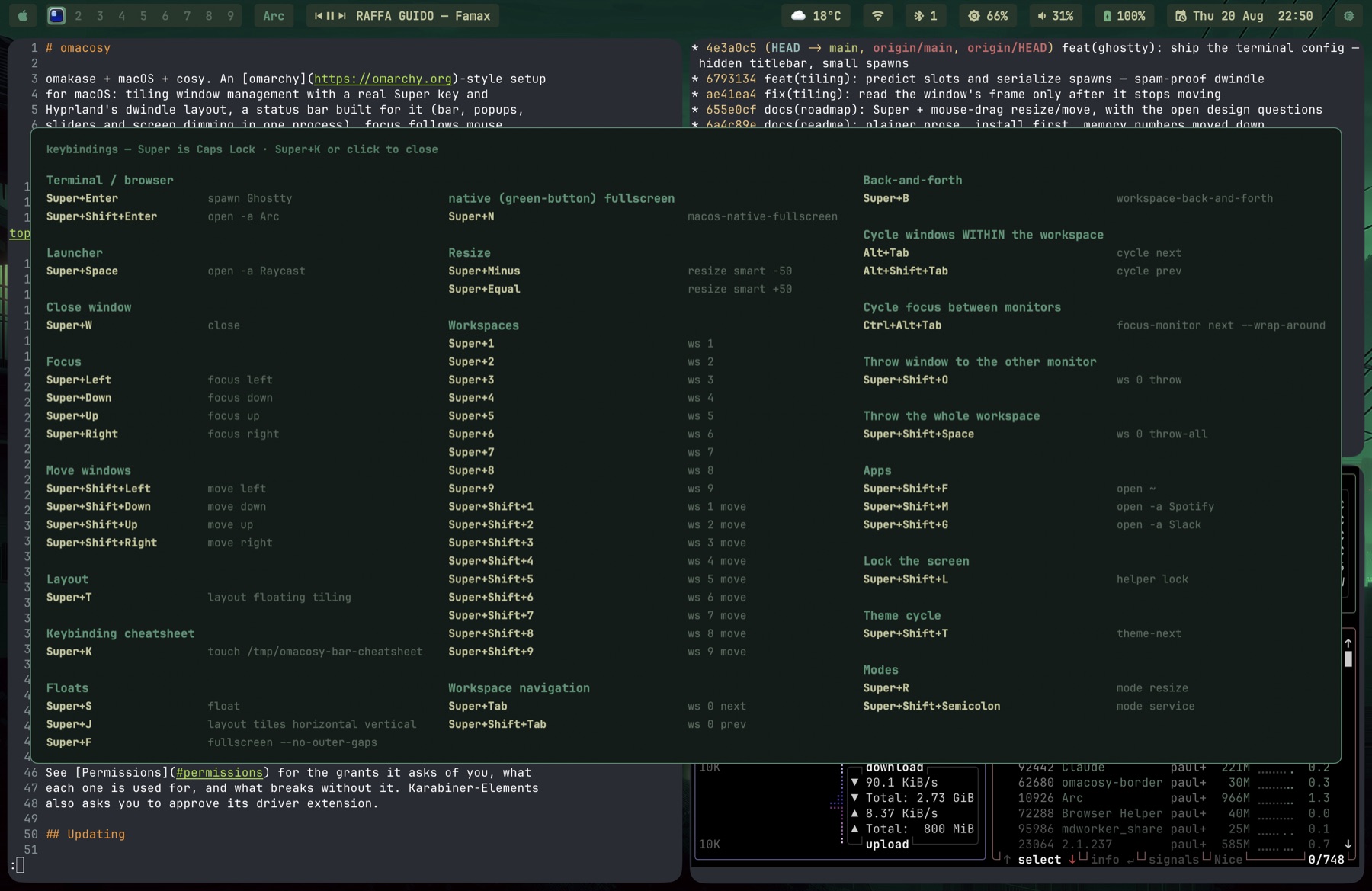
Screenshots, clipboard and app switching stay macOS's own
(Cmd+Shift+3/4/5, Cmd+C/V, Cmd+Tab). Alt+Tab above is the
window-scoped switcher macOS lacks.
The files key gives a new window every time. open ~ makes a window
only when no Finder window shows your home folder. After that it raises
the one you have, so the key stops making new ones.
omacosy-finder-window asks Finder for a window instead, which costs the Automation permission for Finder on first use. It
spawns through omacosy-spawn --cmd <command...>, the same lock
Super+Enter takes, so a burst of presses still splits one slot at a time
instead of landing in one flat row. Finder will not draw a window below 474
points wide, which is Finder's own floor and not a tiling fault.
On the modifier space. omarchy layers Super+Ctrl and Super+Alt
on top of Super. This setup cannot: Super IS cmd+ctrl+alt, so those
modifiers are already spent and Shift is the only layer left, two
against omarchy's four. Bindings that would collide are re-homed by
mnemonic (lock is Super+Shift+L, not Super+Ctrl+L), and the
overflow lives in binding modes instead.
Each display owns an independent set of nine workspaces, omarchy style:
main holds 1–9, secondary holds 11–19. Same last digit means the same
slot, and the bar and overview render only the slot digit. Super+N
switches the focused monitor's slot N (via omacosy-ws);
Super+Shift+N moves the window to that slot; Super+Shift+O throws
the window to the same slot on the other monitor. Windows open on the
workspace you're on; nothing is auto-assigned by app.
Unplugging folds the second display's workspaces into the first.
AeroSpace parks 11–19 on the remaining display, but Super+N and
Super+Tab only match single-digit slots, so without help every window
on a secondary workspace would be stranded where no keybinding reaches
it. On a monitor-count change the bar runs omacosy-ws-collapse: each
occupied guest workspace empties into the lowest free 1–9 slot,
occupied slots are never touched, and every moved window is recorded
with its origin. Plug the display back in and they go home
individually, so anything you opened while undocked stays put.
Themes
theme-set <name> switches everything at once: bar, borders, wallpaper
on every display, and any terminal that follows omarchy's
~/.config/omarchy/current/theme convention (the author's does).
Super+Shift+T cycles.
Each theme ships omarchy's full wallpaper set. Super+Shift+B (or
theme-bg-next) cycles through them; theme-bg-next <path> sets any
image you like. Switching themes restarts at the theme's first
wallpaper.
Themes: tokyo-night, catppuccin, gruvbox, osaka-jade. Each
themes/<name>/ holds colors.toml (omarchy's 22-color palette),
sketchybar.sh / borders.sh (bar and ring colors; the file keeps its
omarchy name and format, and the ring uses the theme accent, omarchy's
own convention), and backgrounds/ (wallpapers from omarchy's
MIT-licensed theme packs). Copy a directory to add one.
Tiling: dwindle
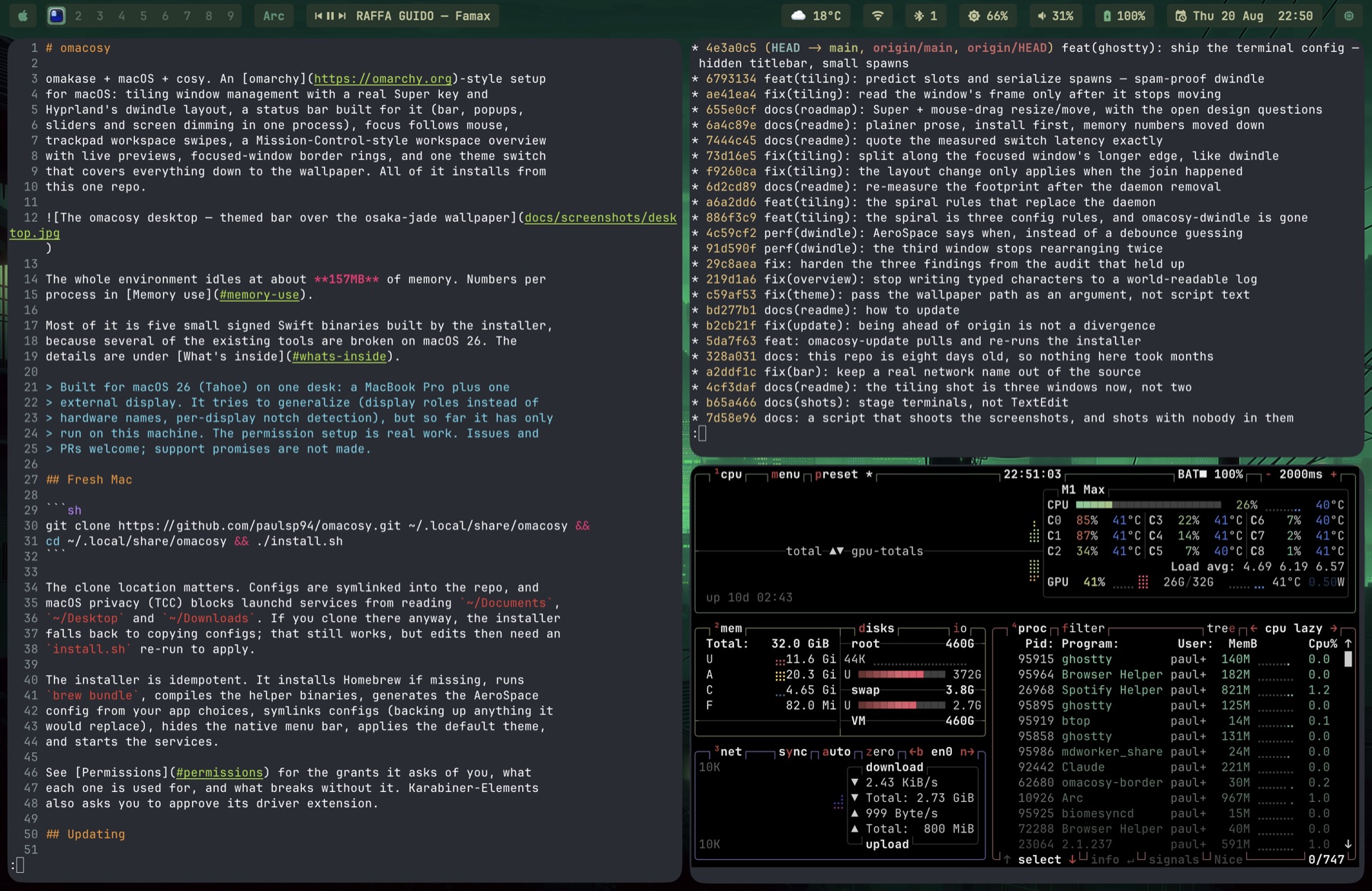
AeroSpace natively inserts new windows as equal siblings, so three windows become three columns. Hyprland's dwindle splits the focused window along its own longer edge instead: a new window lands beside a wide window and below a tall one. That is the omarchy feel, and on a 3440-wide display it is also the difference between a usable third window and three narrow strips.
AeroSpace cannot express that rule. Its config language has no window
geometry; the format variables are ids, titles and container layouts,
with no width or height anywhere. So the direction is decided in code:
the on-focus-changed hook runs omacosy-helper split-hint, which
reads the newly focused window's frame and issues
aerospace split horizontal or vertical on it.
The timing is what matters. The hint lands before the next window exists, so AeroSpace places that window correctly in its first pass. An earlier version was a daemon that re-nested windows after AeroSpace had already placed them, and you could see it: the screen laid out twice, about 250ms apart. What remains now is the new window's own first frame, which appears about 150ms before AeroSpace tiles it. No window manager can place a window that does not exist yet.
Two implementation notes. enable-normalization-flatten-containers is
off, because it dissolves the very container split creates (AeroSpace
prints a warning saying so if you try). And the hint waits for the
window's frame to hold still before reading it, then names its window
with --window-id instead of trusting "the focused window". Both guard
against the same thing: a new window fires the hook too (it takes focus
on open), at a moment when its frame is still the app's default shape
and another window may grab focus before the hint lands. One hook
covers both hover and keyboard focus: AeroSpace notices the focus
omacosy-ffm moves, even though ffm moves it through SkyLight.
A refocus is the one case that does not wait: an existing window
usually sits in its slot already, so its frame is read at once. It is
then watched for a moment anyway, because a refocus can also follow a
window leaving. Close the second of two windows and the survivor takes
focus before AeroSpace has re-expanded it, so the read catches its old
half slot. If the frame changes, the settled frame decides and the hint
is issued again, which nobody sees: the window is its container's only
child at that point, and split on an only child just turns the
container.
Manual control (Super+J flips, resize, float) works unchanged.
Floats get a rescue path, because macOS will not keep them on top: z-order is per app, not per window, so a float sinks behind whichever app you focus next, and pinning it would need a private call with SIP off. Instead the bar grows a pill whenever the focused workspace holds floats, and Super+S or a click on that pill surfaces the next one and brings the cursor with it.
Two window managers (OmniWM option, beta)
AeroSpace is the default. OmniWM is a newer, signed-and-notarized tiling WM with a native dwindle layout — omacosy can run on either, and switching is one command:
omacosy-wm-switch omniwm      # installs OmniWM on first use, then
                              # switches with a guarded handover
omacosy-wm-switch aerospace   # the way back, and installs AeroSpace
                              # on first use after ./install.sh --omniwm
The switch checks itself: it snapshots your windows, stops AeroSpace, starts OmniWM and waits until OmniWM manages them. On a first switch, grant OmniWM's permissions when macOS asks. If OmniWM does not take over within 2 minutes, or you press Ctrl-C, the switch reverts to AeroSpace and puts your windows back.
Under OmniWM everything keeps working — bar, overview (with type-to-search), gestures, keybindings, themes — and the dwindle layout is native, so the split-hint machinery below simply isn't needed there. What changes: OmniWM draws the focus border (themed by theme-set), app-launching chords run through Karabiner rules that the switch installs and removes, and Super+Space opens OmniWM's command palette instead of Raycast.
Under OmniWM the plumbing changes shape: Super+N/Hyper+N route
through Karabiner into omacosy-omni (a held-socket IPC client) so
slots resolve on the display under your cursor — OmniWM's native
hotkeys are name-global and would always hit the main set — at the
cost of ~40 ms per chord. Hyper+arrows swap tiles; OmniWM's own
directional move stacks windows into a group, which stays available
on ctrl+opt+shift+arrows.
Honesty section: this option is daily-driven on the author's desk (0.6.4, docked multi-monitor, each display running its own nine workspaces), and docs/omniwm-port.md carries a ledger of upstream quirks found while porting — read it before assuming a weird layout is omacosy's fault. AeroSpace remains the longer-tested default.
Focus follows mouse & swipes
Under the OmniWM option this daemon is parked: OmniWM's native
focus-follows-mouse (with warp-to-focus and hover-raise) replaces it.
Under AeroSpace, omacosy-ffm: hover focuses, with no raise over floating windows, so
floats stay in front. It is event-driven off mouse movement, so a
parked cursor never steals focus from a launching window. It never
changes focus during drags, and never through an always-on-top panel:
hovering a Touch ID prompt leaves focus exactly where it is instead of
falling through to the window beneath. Per-app opt-out lives in
config/ffm-ignore (omarchy's JetBrains-style exception).
4-finger swipes left/right switch workspaces on the display under the
cursor (native-Spaces semantics), with wrap-around, on any trackpad.
The system's own 4-finger gestures are disabled by macos-defaults.sh
so Mission Control never fights the daemon; uninstall.sh restores
them.
Workspace overview
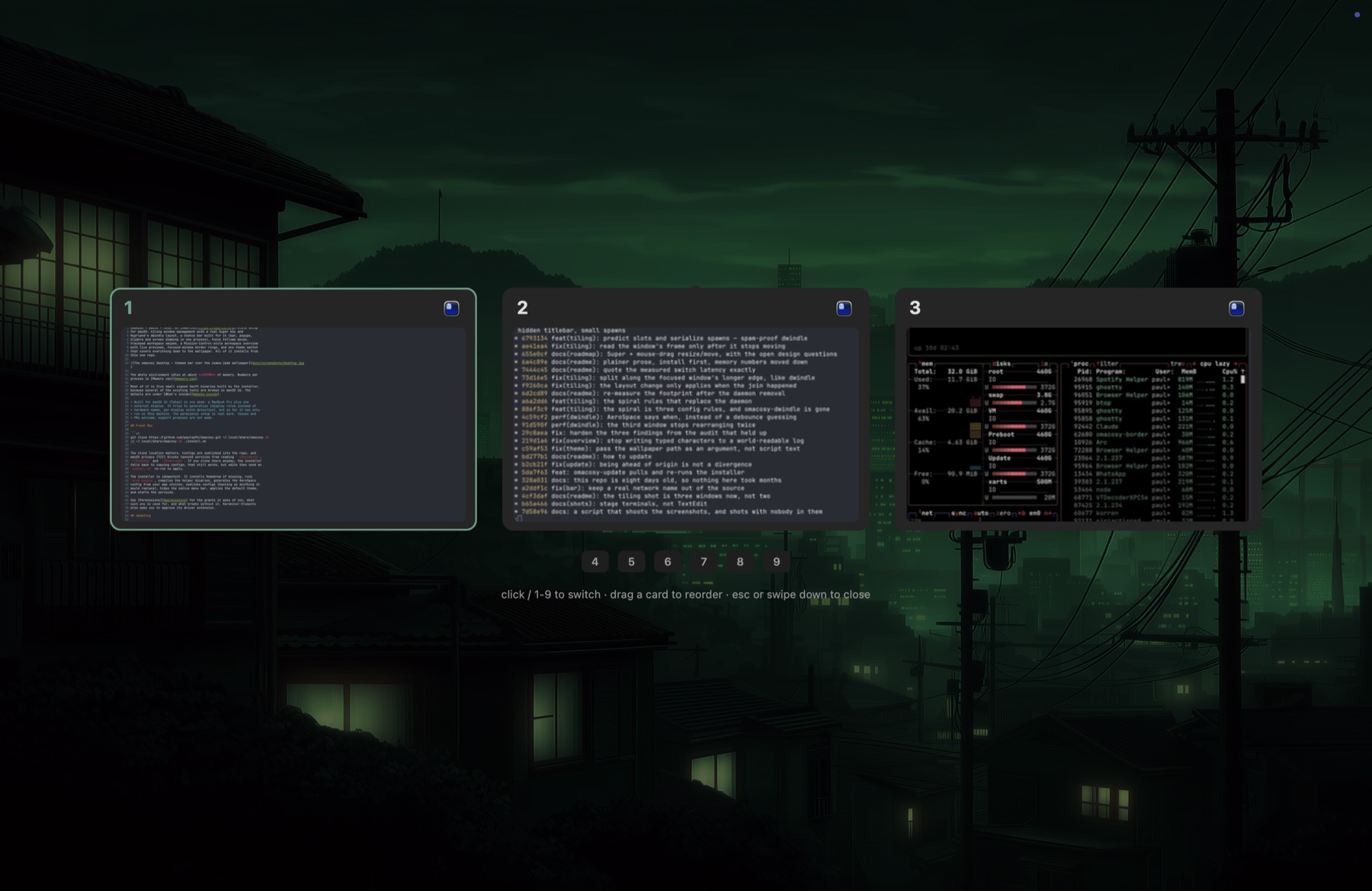
4-finger swipe up: the wallpaper breathes in behind a dim wash and every non-empty workspace of the cursor's monitor gets a card (per-display Mission Control semantics), with live window previews (ScreenCaptureKit, composed into the tile layout), app icons, and an accent ring on the focused workspace. Click a card or press its digit to jump; empty workspaces show as small chips, and digits work for them too. Swipe down, Esc, or a backdrop click dismisses. It is a resident daemon, so it opens instantly.
Type to search while it is open: a search pill filters cards to
matching window titles and apps as you type, Enter jumps to the
first hit, Esc clears the filter before it closes the overview.
Digits type into an active filter instead of switching, so numeric
titles stay reachable.
Drag a card to reorganize: the row makes room as you move, and the drop slides everything between the old and new position over by one. Workspaces cannot be renamed or resequenced in either WM (the name is the position), so what actually moves is their windows, which means a split layout inside a moved workspace comes back as a flat row. Dropping a card on an empty chip moves that workspace there instead.
Parking the setup
omacosy-toggle off returns to a vanilla Mac in one command (AeroSpace
stops managing, all daemons and the bar stop) without uninstalling;
omacosy-toggle on brings everything back. No argument flips.
Memory use
About 157MB of physical footprint (what Activity Monitor calls
Memory) across WM, bar, three background daemons, the gesture daemon and
Karabiner, measured docked to a second display. Resident set size reads
~322MB, but RSS counts each process's share of the same shared system
frameworks more than once, so footprint is the number to compare.
(Measured in AeroSpace mode; OmniWM mode is a wash — its ~44MB WM
replaces AeroSpace plus the parked omacosy-ffm.)
Largest first:
| footprint | RSS | |
|---|---|---|
omacosy-overview |
36MB | 46MB |
omacosy-bar |
32MB | 55MB |
| AeroSpace | 24MB | 85MB |
| Karabiner (4 processes) | 24MB | 61MB |
omacosy-borders |
19MB | 29MB |
omacosy-gesture |
13MB | 22MB |
omacosy-ffm |
10MB | 24MB |
On one display the same set measured ~155MB; the bar and the border
overlay each draw per-screen, and AeroSpace carries a second workspace
set. The figures move with uptime. omacosy-overview caches a
half-resolution capture per window shown, so it starts near 9MB and
settles around 37MB; it plateaus there rather than climbing, because
the cache is refiltered to the visible set on each open. AeroSpace
drifts the other way, reading higher the longer it runs. Packaging the
bar as an .app (which is what unlocks the wi-fi network name) cost
about 1MB; the bundle is a directory and an Info.plist, not a second
copy of anything.
Back to a normal Mac
~/.local/share/omacosy/uninstall.shIf you cloned omacosy somewhere else, run <your clone>/uninstall.sh.
The script finds the clone from its own path.
Manifest-driven: install.sh records what this machine actually gained
(Homebrew packages that weren't already present, cloned repos, every
defaults key's prior value), and uninstall.sh removes and restores
exactly that. Tools and settings you had before omacosy are never
touched. Pre-manifest installs fall back to a conservative teardown
that leaves all Homebrew packages in place.
Before it removes anything, the script saves your omacosy settings, the
record of this install and your karabiner.json in
~/omacosy-backup-<date>-<time>/. It prints that folder's path at the end.
After the script, do these steps in this order:
- Close the terminal window and open a new one. The old window still uses omacosy's shell setup, and some of the programs it calls are gone.
- Optional: delete the clone. The script keeps it, and nothing breaks
if it stays. With the clone kept, a reinstall is one command. To
delete it, run
rm -rf <your clone>. The default clone is~/.local/share/omacosy. - If omacosy installed Homebrew, the script says so. To remove Homebrew too, use Homebrew's own uninstall script. Homebrew packages you had before omacosy stay installed.
- In System Settings → General → Login Items, remove AeroSpace if it is still in the list.
- If you used the Caps Lock dictation shortcut in the Claude desktop app, turn it on again in Claude's settings. The install removed it.
- Optional: in System Settings → Privacy & Security, delete the entries omacosy added. The permissions table lists each one and the program it names. No script can remove them, and they do nothing once the programs are gone.
- Log out and log in again. The native menu bar comes back fully only then.
To stop omacosy for a while without removing it, see Parking the setup.
License & credits
MIT (see LICENSE). Standing on: omarchy
(the whole idea, plus MIT-licensed theme palettes and wallpapers),
AeroSpace,
Karabiner-Elements,
aerospace-swipe (MIT;
its gesture engine lives on here as omacosy-gesture, notice kept in
helper/gesture/).