


Sphinx
You can outsource your thinking, but not your understanding.
Works with Claude Code · Codex · Cursor · OpenCode · Pi · or a plain git push
Reviews run on your Claude Code or Codex plan · OpenRouter · any OpenAI-compatible endpoint
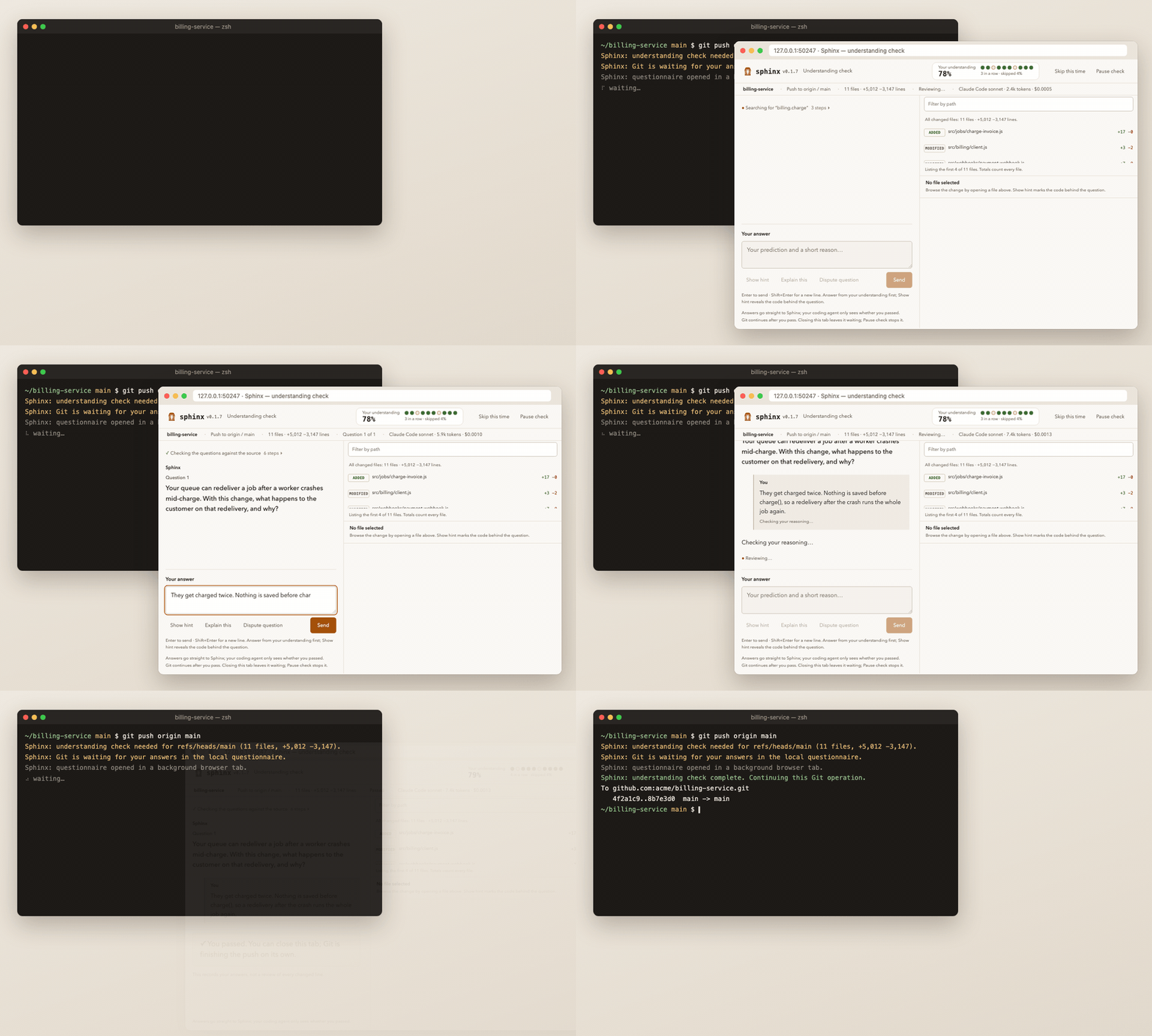
Sphinx adds an understanding check to agent-assisted development. When you push to a protected branch, Git waits while Sphinx asks you to predict what your change will do. If you miss something, it explains and gives you a new scenario to try. Once you pass, the same push continues. This works whether you or a coding agent ran git push.
The questions come from a separate reviewer model. It reads the committed change through read-only Git tools and does not see the conversation that produced the code.
What a check looks like
This is an illustrative exchange for a change that adds a background job queue:
Question. The worker commits the operation but crashes before acknowledging the job. After redelivery, can the operation happen twice? Give a short reason.
Your answer. No, the job is marked done when the operation commits.
Sphinx. Not quite. The job is only marked done by the acknowledgement, which happens after the commit. A crash between the two leaves it unacknowledged, so the queue delivers it again and the operation runs a second time.
New scenario. A worker stalls past the visibility timeout, so a second worker receives the same job. Both commit before either acknowledges. What stops a duplicate, if anything?
Questions cover behavior, failure modes, and invariants rather than file names or function names. The check is open-book: you can read the code, or ask your agent to show it to you, while you answer.
Before you install
- Requirements. Node.js 22.19 or newer, Git, and macOS, Linux, or WSL. Native Windows is not supported yet.
- It applies to every repository on this machine.
sphinx installsets your global Gitcore.hooksPath. Your existing hooks still run first. Right after install, pushes tomainormasterin any repository are checked.sphinx initlets you adjust that for each repository. - It blocks Git. A matching push waits until you pass, pause, or skip, for up to 25 minutes. Your coding agent's shell may time out sooner.
- You need a reviewer model account. This can be a signed-in Codex or Claude Code CLI, which uses that plan's allowance. It can also be an OpenRouter API key, which bills separately and is required even for free models, or any OpenAI-compatible endpoint. Sphinx has no account or hosted service of its own.
- Code leaves your machine. The reviewer provider receives the changed code and related files from the commit, your answers, and
.sphinxcontext.md. Ignored files are never read, and.envfiles, private keys, and common credential files are excluded by default. Add your own sensitive paths to.sphinxignorebefore your first check. Ignore rules match file paths, so they will not catch a secret pasted into ordinary source. - There is no default cap on model calls. A typical check makes about 5 to 8 requests, plus about one per answer. You can set a cap, and you should set spending limits with paid providers.
- This is practice, not a security gate. Anyone with local access, including a coding agent, can bypass hooks or get outside help. Passing does not prove who wrote the code or that you understood it unaided. The examiner is an LLM and can be wrong.
Quick start
1. Install (required)
npm install -g sphinx-understand
sphinx install
Guided setup asks which coding agents you use and which reviewer to use. It suggests Haiku through Claude Code or GPT-6 Luna through Codex. If you choose OpenRouter, it asks for an API key. It then offers the recommended checkpoints (pushes to main or master at standard depth) or Customize to pick events, branches, remotes, and depth. To install without prompts:
sphinx install --yes --preset claude-economy --agents claude
You should see:
✓ Git hooks installed for this user. Existing hooks are chained.
✓ Claude Code native questionnaire hooks and Sphinx MCP server installed.
Use --preset codex-economy for Codex, or --agents none if you don't use a coding agent. Other presets, OpenRouter, OpenAI-compatible endpoints, and custom routes are covered in configuration.
Settings files symlinked into a dotfiles repository (Stow, Dotbot, chezmoi, home-manager) are supported: Sphinx edits the link's target in place and keeps the link. Hooks call the sphinx command your package manager installed (npm, pnpm, yarn, or Bun), so upgrading the package keeps them working.
2. Load Sphinx in your coding agent (required if you use one)
Guided setup opens your selected agents in fresh sessions. Then:
- Codex: open
/hooksand trust the Sphinx hooks. Sphinx cannot do or verify this for you. - Claude Code: start a new session.
/mcpshould showsphinxconnected. - Pi, Cursor, OpenCode: see per-client notes.
If you skip this step, the Git checkpoint still works. However, your agent won't know it should wait for a blocked push, and the fallback forms used when the browser can't open won't be available.
3. Set up a repository (required)
cd your-repo
sphinx init
This asks which branches and events to check and how deep the questions should go. Then it creates three files without overwriting existing ones:
.sphinxconfig: the repository's policy..sphinxignore: paths that are never read. Edit this now if the repository has private or generated files..sphinxcontext.md: a short description of what the project does, which every reviewer request receives. Leave out secrets.
To set it up without prompts:
sphinx init --yes --branches main
Commit the three files to share the policy with collaborators.
4. Check the setup (recommended)
sphinx doctor
It should end with ✓ Configured integrations are in place. and exit with status 0. If not, it says what needs attention, such as a repository with its own hooks directory. Fix that with sphinx install --repo.
5. Push and pass your first check
git push origin main
Git prints the questionnaire address and waits:
Sphinx: understanding check needed for refs/heads/main (medium change).
Sphinx: Git is waiting for your answers in the local Sphinx questionnaire. It will continue automatically after you pass. Do not start another copy of this Git operation.
Sphinx questionnaire: http://127.0.0.1:56114/fSdZM7yg…
Sphinx: questionnaire opened in a background browser tab. Your coding window stays in place.
On macOS, the page opens in a background browser tab. On Linux, WSL, and over SSH, Git prints open the local URL above to answer instead, so open the printed address yourself. From a remote session, forward the same port and open the URL unchanged, or run sphinx check; see remote machines. Questions can take a moment while the reviewer reads the change, and the page shows its progress as it works. Beside each question, the page shows the checkpoint's changed files, lines added and removed, a browsable diff, and the code locations the reviewer read for that question. Answer each question with a prediction and a short reason. When you pass:
Sphinx: understanding check complete. Continuing this Git operation.
To github.com:you/your-repo.git
 * [new branch]      main -> main
Pushing the same change again does not ask again. A pass lasts 24 hours, unless the code, destination, or policy changes.
During and after a check
- Wrong answer. You get an explanation and a new scenario about the same concept. Disputes and errors never count as passing.
- Explain this. Shows the concept and asks you a new question.
- Dispute question. Use this if a question's premise is wrong or ambiguous. A bad question must be corrected before that concept can pass.
- Pause check. Saves your progress and stops the push. Run the same
git pushlater to pick up where you left off. - Closing the tab doesn't stop anything. Git keeps waiting, and the same address works until the 25-minute deadline.
- Skip this time. Lets the push through immediately, even while the review is still running. Skips never count as passing.
sphinx yoloturns checks off for the current repository, or globally when run outside one. Run it again to turn checks back on. A repository's own setting wins over the global one, so turning yolo off inside a repository keeps checks on there even while global yolo is on.--reason "prod hotfix"is optional.sphinx checkruns the same check in your terminal instead of the browser.- Headless or terminal-first. Over SSH, or anywhere Sphinx can't open the browser in the background, the questions appear right in the terminal where you ran
git push. Type/hint,/learn,/dispute <reason>,/skip, or/quitthere. To always use the terminal, runsphinx config --interface terminal; to always use the browser, use--interface browser. - On GitHub. If the GitHub CLI (
gh) is signed in, a pass marks the pushed commit with asphinx/understandingstatus. You can also opt in to a summary comment on the pull request. This never blocks a push. See GitHub commit status and pull requests.
Every skip and yolo toggle is logged with its reason, and sphinx status lists recent ones. If Git exited before you finished, for example because your agent's shell timed out, run the push once more. Never start a second copy while one is still waiting. For more cases, see troubleshooting.
Your answers go straight from the page to Sphinx. Your coding agent sees only the check's status, progress, and usage, never your answers.
Limits and cost
Question count depends on the size of the change and the depth you choose: small changes get up to one question (none for documentation or trivial edits), and large ones up to three at the default depth. Understanding distance sets how close to the code questions get: high (default) asks what your change does and affects, low asks about its specific logic and edge cases. Set it in setup, with sphinx config --distance low, or per repository in .sphinxconfig. After commits, Sphinx prepares questions in the background, so they are often ready by the time you push. Calls, tokens, and (when reported) cost appear in the questionnaire.
sphinx config --max-model-calls 30        # optional cap per check (1–100)
sphinx config --preset openrouter-value --allow-paid
Context size, output tokens, and review time are always capped. Provider failures never retry automatically. For routing thresholds, model tables, pricing, and every limit, see configuration and cost.
Version 0.1 checks local commits and pushes only. It does not cover web merges, CI-required checks, or deployments. It cannot read binary file contents, and it tests understanding rather than auditing the code. The evaluation results record question quality, grading errors, and costs on synthetic changes. They do not certify arbitrary repositories.
Commands
| Command | Use it to |
|---|---|
install |
Set up machine-wide Git hooks and agent integrations |
init |
Create this repository's policy, ignore, and context files |
doctor |
Check hook and integration coverage |
status |
Show this repository's policy, pending checks, and recent skips |
check |
Start or resume a check in the terminal (--staged for commits) |
pending |
List unfinished checks |
yolo |
Toggle skipping checks |
config |
Change reviewer models and limits |
auth |
Save your OpenRouter key or an OpenAI-compatible endpoint |
prepare |
Schedule background preparation (--retry after a failure) |
activate |
Open configured coding agents without reinstalling |
uninstall |
Remove Sphinx integrations, keeping unrelated settings |
Each command explains itself with sphinx <command> --help. --json gives machine-readable output, and NO_COLOR=1 turns off color.
Reference
- Configuration and cost: reviewer models, OpenRouter, pricing, routing, limits,
.sphinxconfig,.sphinxignore, project context, and background preparation. - Integrations and troubleshooting: Codex, Claude Code, Pi, Cursor, OpenCode, fallback forms, SSH, existing hooks, the JSON protocol, and uninstalling.
- Architecture: the checkpoint sequence, the reviewer and its evidence, compaction, and state.
- Evaluation and results.
Configuring Sphinx
Sphinx has two kinds of settings:
- Your own machine-wide settings in
~/.config/sphinx/config.json. Change them withsphinx config. - Per-repository files that you commit so collaborators share them:
.sphinxconfig,.sphinxignore, and.sphinxcontext.md.sphinx initcreates them.
sphinx config with no flags shows the settings in effect for the current repository.
Switch the reviewer model
Each change gets a small, medium, or large route depending on its size. A preset fills all three:
sphinx config --preset claude-economy                 # your Claude Code plan
sphinx config --preset codex-economy                  # your Codex plan
sphinx config --preset openrouter-value --allow-paid  # paid OpenRouter credits
sphinx config --preset openrouter-free                # free, slower, rate limited
Or set each size yourself as provider:model:
sphinx config --small claude:haiku --medium claude:haiku --large claude:sonnet
To use any OpenAI-compatible endpoint (OpenAI, Groq, Together, Ollama, LM Studio, vLLM, and others):
sphinx auth --provider openai --base-url https://api.openai.com/v1   # asks for the key
sphinx config --provider openai --model gpt-5-mini
sphinx auth saves or replaces your OpenRouter key. Claude Code and Codex routes bill your signed-in plan, and Sphinx strips API keys from their environment. --cli-billing api lets them use API keys instead. A new route applies to new checks.
If a review is rate limited or a CLI fails mid-check, the questionnaire offers to switch to one of your installed coding plans.
.sphinxconfig: when checks run
{
  "version": 1,
  "events": ["pre-push"],
  "branches": ["main", "release/*"],
  "remotes": ["*"],
  "level": "standard",
  "distance": "high",
  "exclude": ["vendor/**"]
}| Setting | What it means |
|---|---|
enabled |
false turns Sphinx off for this repository |
events |
pre-push (default), pre-commit, or both |
branches |
Branches that trigger a check. Pushes match the destination, commits match the current branch. ["*"] checks every branch, which is useful for pull requests |
remotes |
Remote names that trigger push checks; * (default) means any |
level |
How many questions: relaxed, standard (default), or thorough |
distance |
high (default): what the change does and affects. low: its specific logic, conditions, and edge cases |
exclude |
Extra paths to keep from the reviewer, on top of .sphinxignore |
backgroundPreparation |
false stops preparing questions in the background after commits |
github |
GitHub commit status and pull request comment; see below |
.sphinxignore: files the reviewer never sees
It uses gitignore-style patterns:
internal/customer-exports/
/config/production.json
*.generated.ts
dist/
.env files, private keys, and common credential files are always excluded, and a repository can't undo that. A change that only touches ignored files needs no check. The rules match paths, so they won't catch a secret pasted into ordinary source.
.sphinxcontext.md: what the project is
A short description of what the project does, who uses it, and what must never break, for example "Reservations must never overlap." The reviewer reads it with every request, so questions focus on what matters. Keep it under 16 KB and free of secrets.
Your own settings
These live in config.json, and most can be set with sphinx config:
| Setting | Flag | What it means |
|---|---|---|
models |
--preset, --small, --medium, --large |
The reviewer for each change size |
interface |
--interface |
Where questions appear. auto (default): the browser on a local Mac, otherwise the terminal you pushed from. Or browser / terminal |
maxModelCalls |
--max-model-calls |
Optional cap on model requests per check (1–100, or unlimited, the default) |
maxOutputTokens |
--max-output-tokens |
Output allowance per request, including reasoning (default 4096) |
allowPaid |
--allow-paid |
Lets OpenRouter use paid models |
cliBilling |
--cli-billing |
plan (default) bills your Claude or Codex plan; api lets those CLIs use API keys |
github |
edit the file | status (default on): mark pushed commits on GitHub. comment: keep a summary comment on the pull request. answers: include your answers in it. Needs a signed-in gh CLI and never blocks a push |
receiptHours |
edit the file | How long a pass stays valid for the same change (default 24) |
sphinx yolo turns checks off and on again for the current repository, or globally when run outside one. The full reference, including routing thresholds and pricing, is in configuration and cost.
Development
npm ci
npm test
npm run eval -- --out /tmp/sphinx-eval.json
node bin/sphinx.js --help
npm install -g .   # use this checkout as the installed sphinx
Tests use Node's test runner, real temporary Git repositories, isolated homes, and fixture model backends. The suite makes no live model requests. Never run installer tests against a real home directory or Git configuration. See CONTRIBUTING.md. MIT licensed.