

nixarchy
Omarchy vendored for NixOS — the whole desktop, with its menus rewired to Nix instead of pacman.

Install · Try it in a VM · Getting started · Roadmap · Discussions
Omarchy 4.x is not a dotfiles repo, it's an application: 445 shell commands, a QuickShell desktop shell, 22 themes, and Hyprland configured through the Lua API introduced in 0.55. Nixarchy packages that tree as a derivation and replaces the parts that assume Arch, rather than reimplementing it in Nix.
Tracking an upstream release is a source bump, not a re-port.
What that buys you: the Install menu writes to a Nix config instead of running
pacman, 68 applications are selectable that way, every other package and
NixOS option is one Install ▸ Search away, plugins and themes still install
from a git URL at runtime the way upstream intends, and every command that
assumed /usr either points at what NixOS uses or says why it cannot.
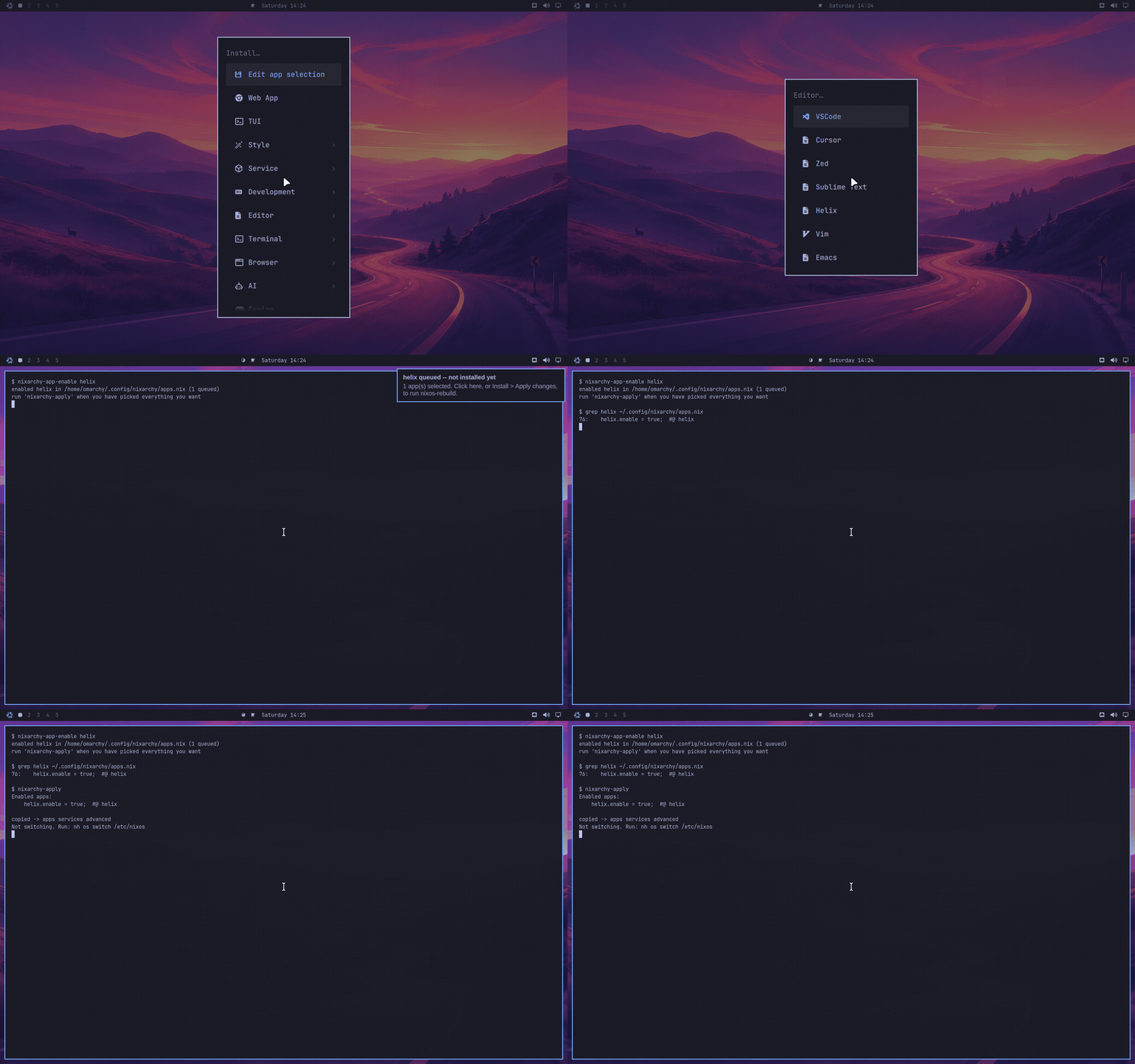
The whole model in one clip: a pick becomes a declaration in
~/.config/nixarchy/apps.nix, nixarchy-apply copies it into your flake, and
only then does anything build.
What you can do with it
Every row ships today. The left column links to the feature's page in the manual; what each one is made of, and which are on by default, is in What works below.
| Install apps from a menu | a pick writes a declaration — Install ▸ Search covers all of nixpkgs |
| Try an app before installing it | nixarchy try <name> |
| Look before you switch | nixarchy preview boots the pending configuration in a VM window |
| Disposable VMs | nixarchy vm run |
| Arch or Debian, when NixOS will not do | the Distrobox panel — Super+Alt+D |
| Run the binary you just downloaded | nix-ld, envfs and AppImages, on by default — nixarchy-doctor <binary> names what is still missing |
| Get this machine back | nixarchy reinstall iso — an install image built from your own configuration |
| One flake, many machines | roll a change out to a fleet from one repository |
| Stable or unstable | Update ▸ Channel, per machine or per package |
| A toolchain per project | nixarchy dev init react, or the panel on Super+Alt+E |
| Your phone on the desktop | nixarchy android, mirrored or emulated |
| The desktop from anywhere | gliff between two Hyprland machines over SSH, installed by default with a bar widget that checks each machine; hypr-rdp, the running session over RDP |
| Ask the machine | agent skills written for NixOS, even against a local model |
| the menu (Super+Space) | Install |
|---|---|
 |
 |
| Remove | Update |
 |
 |
 |
 |
More in docs/screenshots/ — and more recordings, of boxes,
sandboxes, themes and plugins, throughout
the manual.
How it works — read this first
- Pick. An Install row uncomments one line in a file you own. Nothing is built.
- Apply.
Install ▸ Apply changescopies that file into your flake. - Rebuild.
nh os switchbuilds the machine — the only step that installs anything, and one rebuild for one app or twenty. - Roll back if you dislike it: every rebuild is a NixOS generation, in
the boot menu and one
nixos-rebuild --rollbackaway.
Themes and plugins are the deliberate exception: omarchy theme install <url>
and omarchy plugin add <url> still clone at runtime the way upstream intends,
because trying one should be a command, not a rebuild. Where the line falls,
and why, is the NixOS philosophy.
Runtime themes
Nixarchy includes omatheme as its default runtime theme plugin. The NixOS module owns the theme daemon and application bridges; Nixarchy owns the plugin manifest, so one declaration installs it once. It works with or without Stylix: Stylix can remain the declarative template source, while omatheme switches the generated runtime files immediately.
The default is enabled for a configured programs.nixarchy.user. Disable it
with programs.nixarchyThemeEngine.enable = false;, or opt out of only the
plugin with programs.nixarchy.defaultPlugins.omatheme = false;.
Hyprland settings, previewed live
Nixarchy ships Hyprforge
by Aziz as a default plugin: gaps, borders, blur, animations with a curve
editor, per-app rules, profiles and every Hyprland option, previewed on your
real windows before anything is saved. It is Super+Space ▸ Hyprforge, and
what it saves is loaded by nixarchy's session. Opt out with
programs.nixarchy.defaultPlugins.hyprforge = false;.
Omarchy's Install menu runs pacman -S. Here it edits a file you own.
Every app Omarchy offers is written to ~/.config/nixarchy/apps.nix at first
login, fully populated and entirely commented out:
{
  programs.nixarchy.apps = {
    # ── Browser ───────────────────────────
    # brave.enable      = true;  #@ brave
    # firefox.enable    = true;  #@ firefox    # a NixOS module, so policies are declarative too
    # ── Service ───────────────────────────
    # tailscale.enable  = true;  #@ tailscale  # a daemon
    # _1password.enable = true;  #@ _1password # unfree — needs the module for its setuid helper
  };
}
Picking an app from the menu uncomments one line and tells you so. Pick as many as you like — nothing is built until you apply, which is the point of a declarative system:
Install ▸ Brave          →  "brave queued — not installed yet"
Install ▸ VSCode         →  "2 app(s) selected"
Install ▸ Apply changes  →  nh os switch <flake>
The notification is clickable and runs the rebuild.
Anything the menu does not offer
The 68 apps in the selection are the ones Omarchy's own menu lists, and a few
it does not. Everything else in nixpkgs —
and every NixOS option — is behind Install ▸ Search, or nixarchy-search
from a terminal:
  nixarchy > tailscale
  ┌──────────────────────────────────────────┬──────────────────────────────────┐
  │ app  tailscale    Tailscale (Service)    │ NIXOS OPTION                     │
  │ pkg  tailscale    Node agent for Tails…  │ services.tailscale.enable        │
  │ opt  services.tailscale.enable           │                                  │
  │ opt  services.tailscale.useRoutingFea…   │ type:     boolean                │
  │ opt  services.tailscale.authKeyFile      │ default:  false                  │
  │ …                                        │ example:  true                   │
  │                                          │                                  │
  │                                          │ Whether to enable Tailscale      │
  │                                          │ client daemon.                   │
  │                                          │                                  │
  │                                          │ declared in:                     │
  │                                          │   nixos/modules/services/…       │
  └──────────────────────────────────────────┴──────────────────────────────────┘
  enter to select · tab for several · esc to cancel
About 137,000 rows on a default install: some 25,000 NixOS options, 112,000
packages, and 65 of the 68 apps (the three with no nixpkgs equivalent cannot be
indexed). The exact count is each machine's own, because the index is built from
that system's options and package set. Three kinds,
one picker, because you should not have to know which kind you want before you
can look. They are not interchangeable and the rows say so — picking Tailscale
from the app rows gets you services.tailscale with its daemon; picking
tailscale from the package rows gets you the CLI and nothing running.
Selecting routes to whichever writer is right:
| row | what it writes |
|---|---|
app |
<name>.enable = true; in the app selection — the module, if the app needs one |
pkg |
an entry in environment.systemPackages, validated against nixpkgs first |
opt |
the option itself, as a line of its own |
Or by hand, if you already know the name:
nixarchy-pkg-add ripgrep fd     # refuses anything nixpkgs does not have
nixarchy-apply                  # one rebuild for these and your menu picks
Options are only written where they can be written honestly. An option's value is arbitrary Nix — a submodule, a function, a package, a list of them — so booleans and enums get a value picker and land uncommented, and anything more complicated is written commented out, with its type, default, example, description and declaring file as comments beside it:
  services.tailscale.enable = true;  #@opt services.tailscale.enable

  # NIXOS OPTION  services.nginx.virtualHosts
  #
  # type:     attribute set of (submodule)
  # default:  { localhost = { }; }
  #
  # Declarative vhost config
  #
  # declared in:
  #   nixos/modules/services/web-servers/nginx/default.nix
  # services.nginx.virtualHosts = ;  #@opt services.nginx.virtualHosts
The tool does the discovery and the placement; the expression stays yours.
Neither form can break a build — the scaffold is inert, and every edit is
reverted as a unit if nix-instantiate cannot parse the result.
The index is built from this machine, not from search.nixos.org. Its own
nixpkgs and its own options — about a minute, once each time nixpkgs changes, and
it buys the one property that matters: the picker cannot offer you a package
that this machine then refuses to build. The options half substitutes from
cache.nixos.org, so only the nixpkgs half is real work.
Install
Warning
This is in active development. Expect to hit problems.
The ISO installer is the least settled part of it. It writes partition tables and bootloaders on real disks, it is the hardest thing here to test, and it is where the bugs have been. Treat it as something to try on a spare machine or a VM — not on a laptop you need working on Monday, and not on a disk holding anything you have not backed up.
The flake route is the mature one. Adding
nixarchy.nixosModules.nixarchy to a machine that already runs NixOS is the
path that has had the most use and the most testing, it changes nothing about
your disk or your bootloader, and a bad result is one nixos-rebuild --rollback away. If you already run NixOS, start there — see
Adding it to a machine you already run.
Everything is being worked on and tested continuously; the four VM install
checks in CI exist precisely because this is the part that needs proving.
Please file what you hit —
omarchy debug --no-sudo --print collects the useful details for you.
On NixOS you already run
Start here:
nix run github:olafkfreund/nixarchy#doctor
It reads the running system and prints the configuration that machine needs -- before nixarchy is an input anywhere. It changes nothing.
Then, in order:
-
Add the input, and import the NixOS module. Pin a release unless you want
mainmoving under you -- see Releases for what the version means.inputs.nixarchy.url = "github:olafkfreund/nixarchy/v4.0.3-2"; # in your host's modules: imports = [ inputs.nixarchy.nixosModules.nixarchy ]; programs.nixarchy.enable = true;
gliff, Gliff-Manager and
programs.nixarchy.defaultPluginsarrive in a release after v4.0.4-3; until one is marked Latest, usegithub:olafkfreund/nixarchy(main) to get them. -
Paste what the doctor printed. On a machine that already runs Hyprland behind greetd, that is:
programs.nixarchy.displayManager = false;                        # keep your greeter
programs.hyprland.package = lib.mkForce pkgs.hyprland;           # keep your Hyprland
programs.hyprland.portalPackage = lib.mkForce pkgs.xdg-desktop-portal-hyprland;
-
Import the Home Manager module for the user who will run the desktop. Without it there is no app selection, no theme state and no seeded config.
home-manager.users.you = {
  imports = [ inputs.nixarchy.homeManagerModules.nixarchy ];
  programs.nixarchy.enable = true;
};
-
Rebuild.
nixos-rebuild switchwill tell you about anything the doctor missed: every remaining conflict is an evaluation failure, not a broken machine. -
Log out and pick "Omarchy" at your greeter. If you already have a Hyprland config, this is the step that matters -- see what defers to you.
What the doctor's three silent findings mean, what the module defers to your
existing configuration, and keeping a hyprland.lua you already have:
Configuring nixarchy.
Then, from inside the session, nix run github:olafkfreund/nixarchy#verify
asks the questions no VM check can — hardware rendering, Bluetooth, the
RetroArch cores — and prints what it found rather than a verdict.
On a blank machine
There is an ISO now. Download it, write it to a stick, boot it, and answer seven questions.
Caution
This is the least mature part of nixarchy, and it partitions disks.
The installer is under active development and is where most of the recent bugs have been. It is covered by four VM install checks in CI — blank disk, free space beside an existing OS, encrypted, and a boot of the real ISO — and those checks are the reason problems get found, not a promise there are none left.
Use a spare machine or a VM first. Back up anything on the target disk. If the machine already runs NixOS, you do not need this at all — use the flake route, which touches neither your partitions nor your bootloader and rolls back in one command.
Releases carry prebuilt
images from v4.0.1-3 onward, built and install-tested by CI on the machine
that runs the nightly checks. The large one is split, because GitHub will not
take a single file that size:
cat nixarchy-v*.iso.part-* > nixarchy.iso     # the ~7 GB image only
sha256sum -c --ignore-missing SHA256SUMS
sudo dd if=nixarchy.iso of=/dev/sdX bs=4M status=progress oflag=sync
--ignore-missing because one SHA256SUMS covers both images and nobody
downloads both.
There are two images, and the difference is what they carry:
| Size | Needs a network | ||
|---|---|---|---|
#iso |
about 7 GB | no | carries the desktop; installs by copying |
#iso-net |
about 2 GB | yes | downloads the desktop as it installs |
Take #iso unless the download is the thing you mind. It is the one the tests
boot every night, it works on a machine that has never had a network, and it is
faster once you have it. #iso-net is a quarter of the download and asks you
to get online first — its first screen offers Wi-Fi if there is no cable.
Boot it: no boot menu, no login prompt, the installer is what comes up. The
questions, one by one, are in
Getting started.
Writing the stick from Windows or macOS (and why Rufus' recommended answer is
the wrong one), Secure Boot, Ventoy, answering the questions from a file, and
what the installer leaves in /etc/nixos:
The ISO in depth.
Keeping Windows on the same disk:
dual boot.
Try it in a VM
The front door needs no repository knowledge at all -- it boots the same installer ISO a release ships, in a local UEFI VM, and you answer the wizard yourself:
nix run github:olafkfreund/nixarchy#try            # offline image, ~7 GB download
nix run github:olafkfreund/nixarchy#try -- --net   # network image, ~2 GB download
The offline image installs with no network at all; the network image fetches
the rest from binary caches during the install. Both write to a
nixarchy-try.qcow2 in the current directory (up to 32 GB), and when the
install finishes, -- --boot starts the installed system from that disk;
-- --fresh wipes it and installs again. -- --help lists the rest.
Before anything heavy starts it says what is about to happen and refuses what
cannot work: whether the image is a download or would be a source build --
and when the commit you are on has no cached image, it falls back to the
latest release's prebuilt, install-tested one (verified against the
release's checksums) instead of quietly compiling for hours. It checks there
is enough RAM (8 GB by default, --memory to shrink it) and disk first,
and whether /dev/kvm is usable -- without it the VM still runs, with a
loud warning, several times slower. On a machine with no display it serves
the screen over VNC on 127.0.0.1:5900 instead of dying.
No Nix yet? Try it from any Linux
#try above is a nix run app, so it needs Nix installed. If you are on
Ubuntu, Fedora, Arch or anything else and would rather look first, there is a
script that needs only qemu and curl from your own package manager:
curl -fLO https://raw.githubusercontent.com/olafkfreund/nixarchy/main/installer/try-nixarchy.sh
less try-nixarchy.sh          # it is going to download an image and start a VM
bash try-nixarchy.sh
It fetches the latest release's installer image, checks it against the
release's own SHA256SUMS, and boots it in a UEFI VM. --boot starts the
machine you installed, --fresh wipes it and starts again, --help lists the
rest.
It takes the latest release and cannot resolve a particular commit — if you
have Nix, #try is the better door and knows it.
Vendored, not reimplemented
Omarchy is vendored, not reimplemented — the desktop is the real thing, tracked by a source bump rather than a re-port. Its Install menu writes a declaration and rebuilds, so you get a menu and a reproducible machine. A runtime install menu is not against NixOS; a menu that installs at click time is, and this one does not.
Everything upstream resolves through a single environment variable:
-- default/hypr/bootstrap.lua
package.path = home.."/.local/state/?.lua;"..home.."/.config/?.lua;"
  ..(os.getenv("OMARCHY_PATH") or "/usr/share/omarchy").."/?.lua;"
Point OMARCHY_PATH at a store path and the bins, the QML shell, the themes and
the Lua defaults all follow. Only 36 of 444 scripts actually run
pacman/yay — that's the entire distro-coupling surface.
Nine of those are replaced outright, in pkgs/omarchy/nix-bin/: package
management, the update check, migrations and the default agent. The rest manage Arch release channels, keyrings and orphan
pruning, none of which have a Nix meaning worth reimplementing — your flake
input is the release channel, and the store has no orphans. Those fail either
way, so a pacman shim only changes how: instead of command not found, you
get told what replaced the command. It keeps pacman's contract (stderr,
non-zero), so omarchy version and omarchy debug, which already wrap it in
2>/dev/null || fallback, are unaffected.
Two names, on purpose
The desktop is Omarchy's. The port is nixarchy's. The commands say which is
which, and nixarchy is the way in:
nixarchy                     # what this port adds, and what it defers to
nixarchy search tailscale    # nixarchy-search
nixarchy pkg add ripgrep     # nixarchy-pkg-add
nixarchy apply               # nixarchy-apply
nixarchy dev init react      # nixarchy-devenv — a devenv project, here
nixarchy theme set catppuccin   # → omarchy theme set catppuccin, unchanged
Anything nixarchy does not own it execs through to omarchy, so both names
work and the exit status, terminal and signals stay the command's own.
Upstream's 445 commands keep upstream's name, deliberately. omarchy theme set is the same script here as on Arch — a bug in it is a bug to report there,
and renaming it would say otherwise. It would also cost the property this repo
is built on: tracking a release is a source bump because nixarchy replaces 19
scripts and patches ~100 strings, and renaming would make all 5,365 occurrences
of omarchy a patch to re-apply on every bump. omarchy.* is also a reserved
plugin namespace that omarchy plugin validate enforces and third-party
plugins target.
The branding you do see is nixarchy's: the session is Nixarchy, the menu
button wears the snowflake, and the screensaver and About window carry the
NIXARCHY banner. The session's id stays omarchy so a greeter that already
remembers it keeps remembering it — Name= is what a greeter prints, the
basename is what it stores.
What works
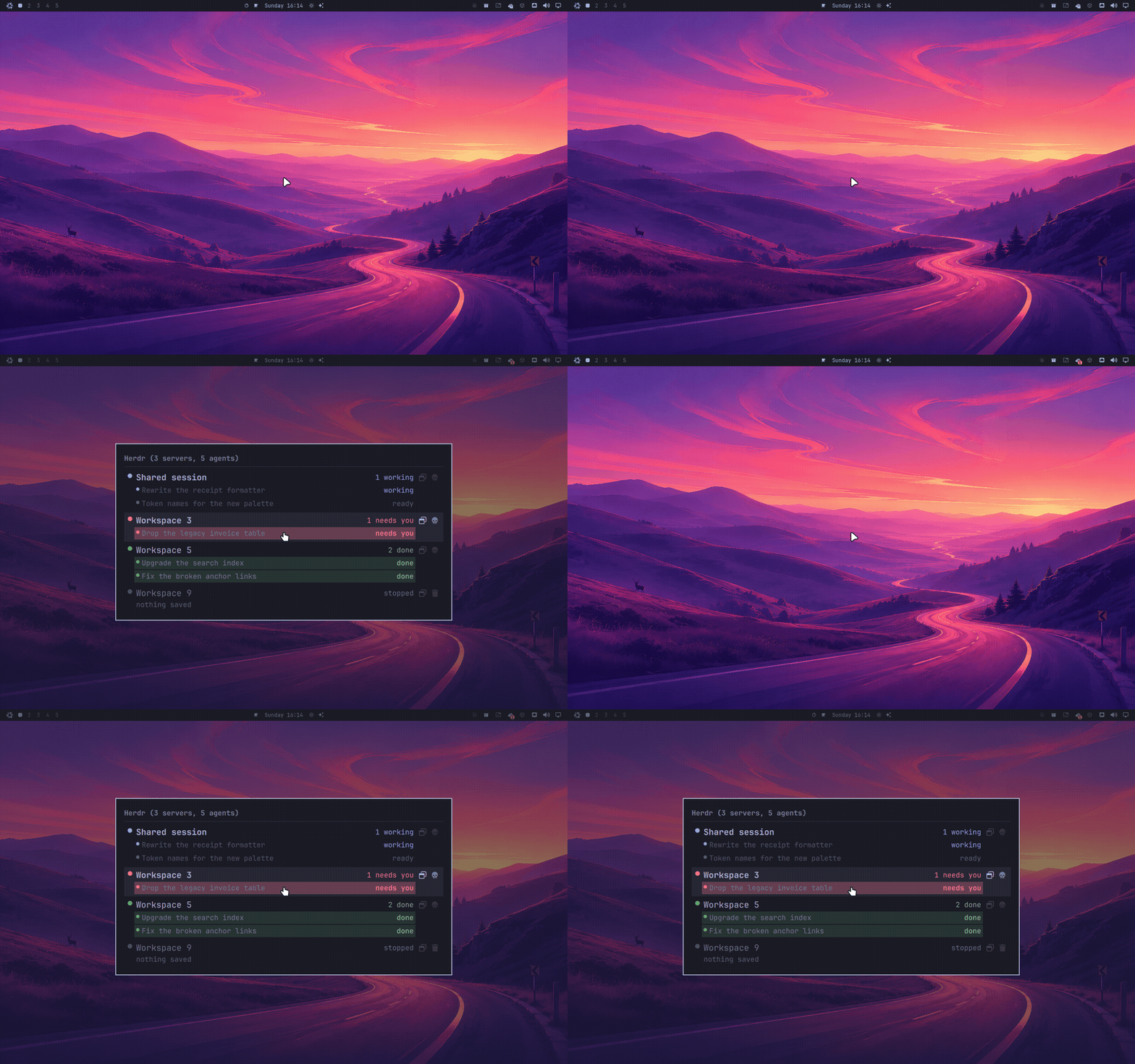
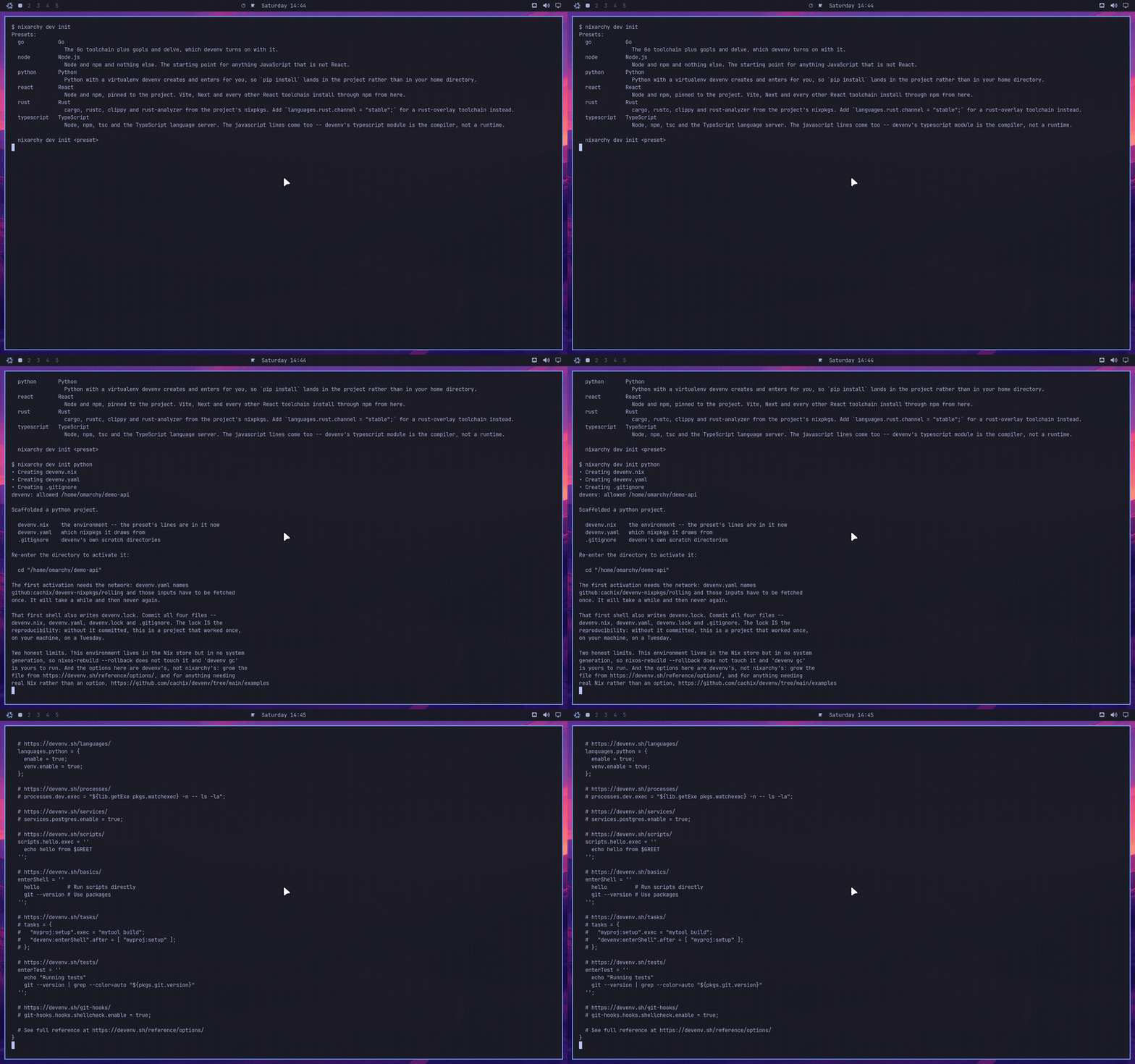
The panels below are described in prose further down and are easier to believe
in motion. Each is a real session, recorded in a VM (Flatpak & Snap: on a test
laptop, since it needs Flathub and the Snap Store) and gated on what the frames
actually show (tests/demo/).
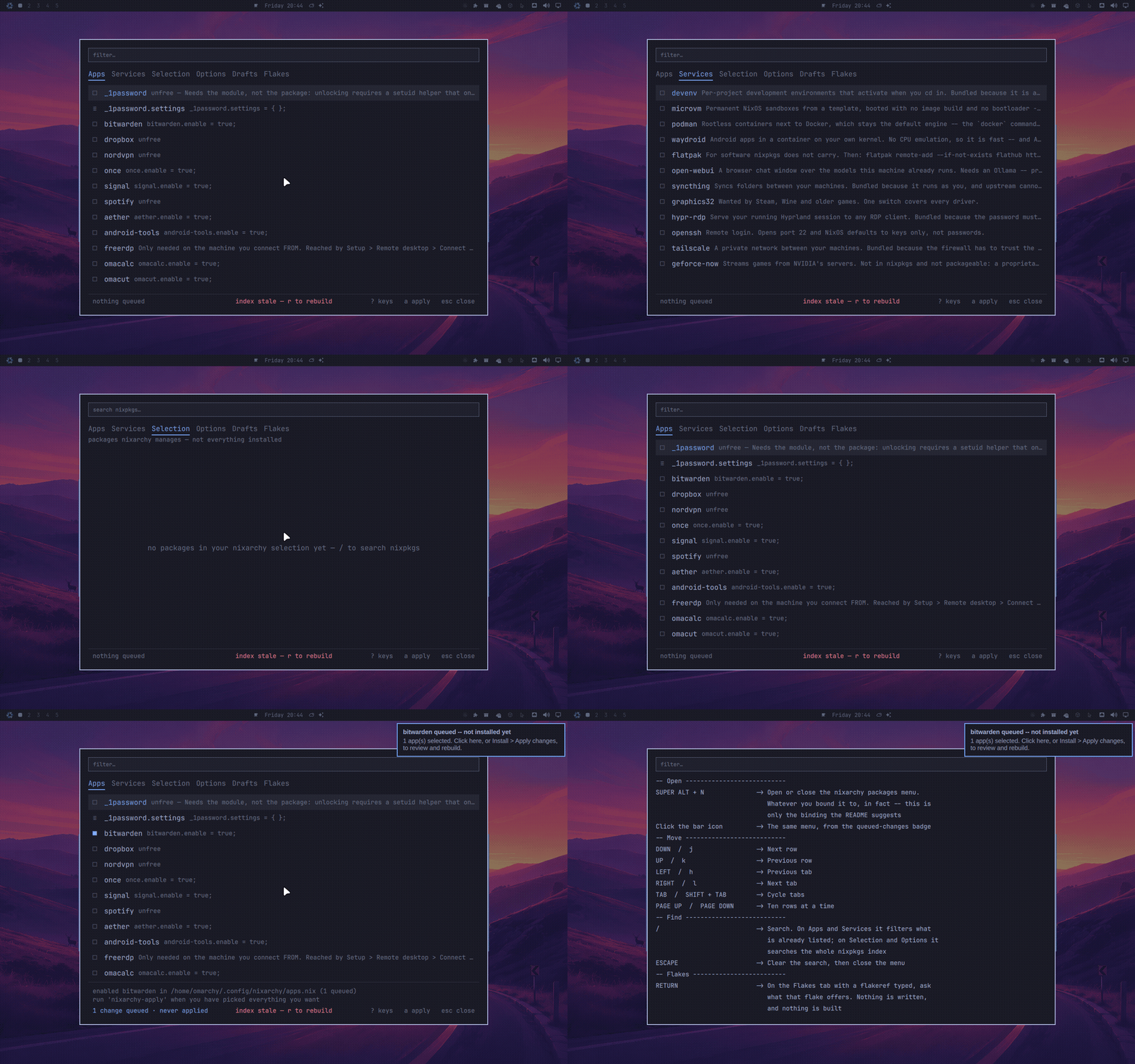 |
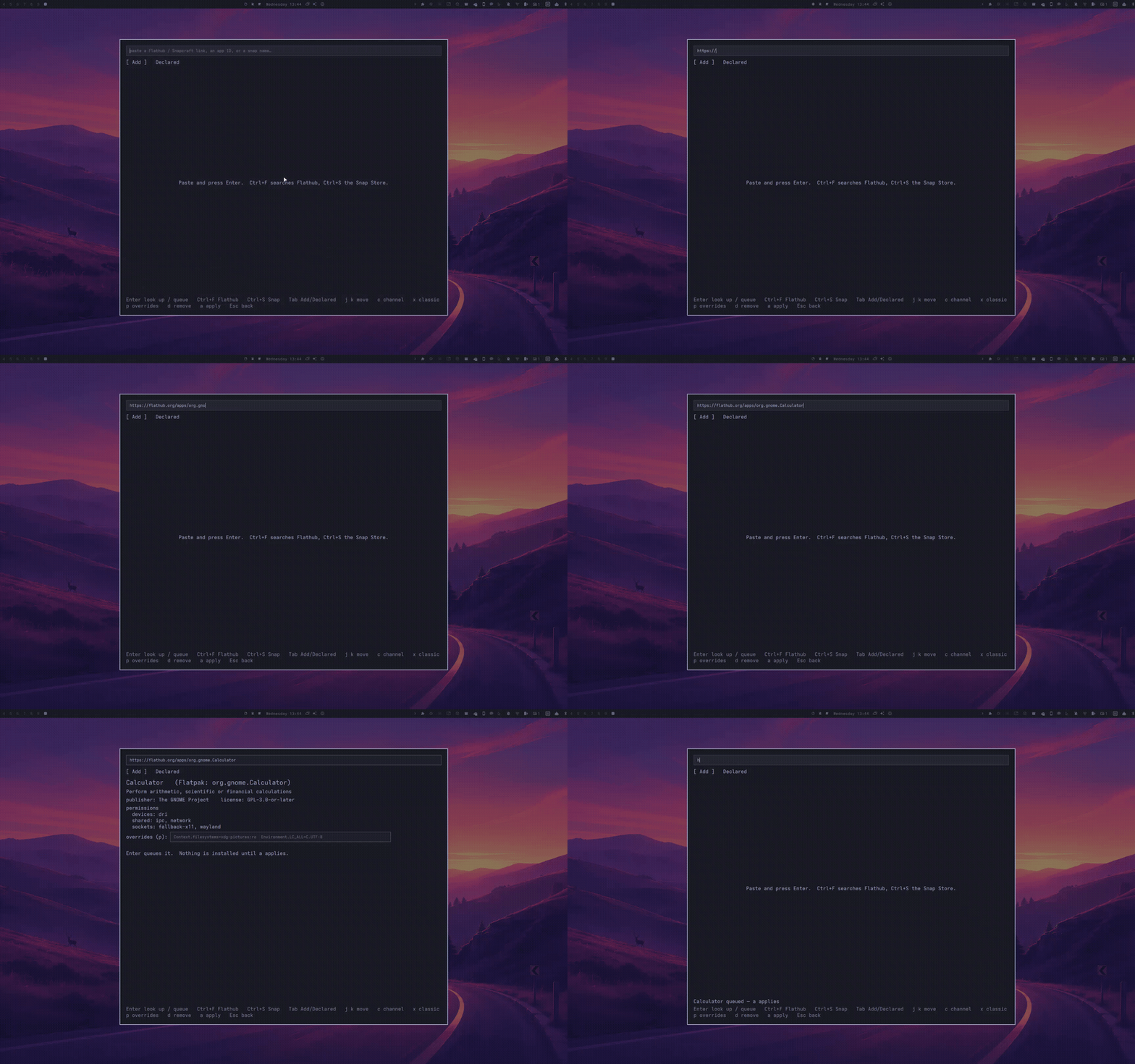 |
Install ▸ Packages — Super+Alt+N |
Install ▸ Flatpak & Snap |
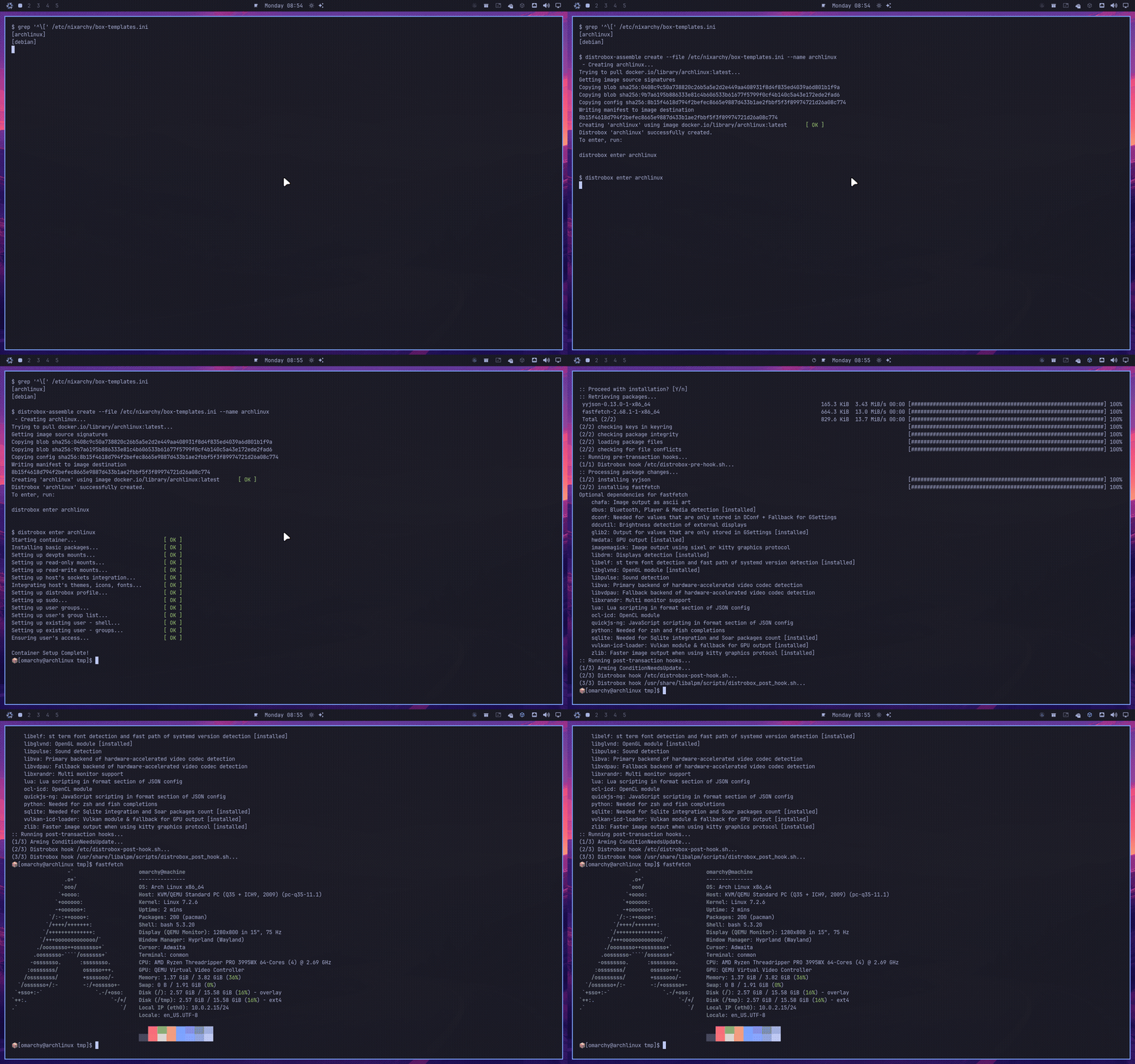 |
 |
Trigger ▸ Boxes — Super+Alt+D |
Apps ▸ Herdr — Super+Alt+H |
 |
|
Apps ▸ Dev environments — Super+Alt+E |
More under docs/img/features/, and the rest of the tour
is on the site.
| Hyprland session, QuickShell bar, 22 themes | as upstream ships them |
omarchy CLI |
all 445 subcommands, omarchy commands --check green |
| Install menu | picks write to a Nix config, not pacman |
| Install ▸ Search | one picker over 137k rows — every nixpkgs package, every NixOS option, and the app selection |
| Install ▸ Packages | the same catalogue in a panel (nixarchy-pkg): search, add, draft and apply without a terminal. On by default, Super+Alt+N on a new install; programs.nixarchy.defaultPlugins.pkg = false removes it |
| Apps ▸ GitLab Pipelines | project pipelines, stages and jobs in a panel (nixarchy-gltui), with glab. On by default, Super+Alt+P on a new install; programs.nixarchy.defaultPlugins.gitlab = false removes it |
| Apps ▸ GitHub Actions | repository workflow runs, jobs and steps in a panel (nixarchy-ghtui), with gh. On by default, Super+Alt+A on a new install; programs.nixarchy.defaultPlugins.github = false removes it |
| Apps ▸ Herdr | your herdr sessions and their agents in the bar (nixarchy-herdr), with herdr. On by default, Super+Alt+H on a new install; programs.nixarchy.defaultPlugins.herdr = false removes it |
| Install ▸ Apply changes | the rebuild itself in a panel (pkgs/rebuild-panel/, shipped with nixarchy): it asks before it starts, then shows the elapsed time and the log tail while nixarchy-rebuild runs, and keeps the exit code and the log if it fails. Closing it does not stop the rebuild. On by default; its bar icon shows only while one is running — programs.nixarchy.defaultPlugins.rebuild = false removes it |
| Super+Space | a palette over the whole menu (nixarchy-menu): apps, Omarchy's rows, sums, conversions, files, hotkeys, a hand-off to your agent. Installed, off by default: Omarchy's own menu is the default, and Setup ▸ Defaults ▸ Menu switches to the palette with no rebuild |
| Hyprforge | every Hyprland setting, previewed live on your real windows (Hyprforge, by Aziz). On by default, and what it saves is what the session loads |
| Gliff-Manager | your gliff machines in the bar: ready or not, headless or mirror, connect (Gliff-Manager, by Gavin Nugent, through a NixOS-ready fork). On wherever nixarchy installs gliff |
| Setup ▸ Plugins ▸ Add Plugin | the plugin marketplace, audited in a sandbox before anything installs (nixarchy-plugin-browser). On by default, Super+Alt+U |
| Runtime themes | the active palette across supported apps without a rebuild (omatheme). On by default |
| ai-mirror | let an agent use your real desktop, and stop it (ai-mirror) — it works through the desktop a person sees, so the thing it drives is the dialog or the unlabelled button, not an API. On by default, and it asks a human before it takes control — the page |
| Voice | operate the desktop by talking to it (nixarchy-voice). Opt-in — the page |
nixarchy command |
this port's own commands, and a way through to Omarchy's 445 |
| Remove menu | deselects apps, never touches your own config |
| Update menu | nh os switch --update <flake> |
| 68 apps in the selection | 50 from nixpkgs, 7 as NixOS modules, 8 built here, 3 with no equivalent |
| Learn menu | NixOS wiki, search.nixos.org packages and options |
| Shell functions | bash and zsh source the chain; fish derives it from the same files |
| RetroArch | 13 libretro cores, resolved from the store rather than /usr/lib |
| Plugins | omarchy plugin add <url> works as upstream ships it, and programs.nixarchy.plugins pins one in your flake |
| Themes | omarchy theme install <url> clones and applies a published theme at runtime |
| 13 language toolchains | Go, Rust, Node, Bun, Deno, Java, Elixir, Zig, Clojure, Scala, .NET, OCaml, Python — from nixpkgs, not from mise |
| Per-project environments | nixarchy dev init react scaffolds a devenv project that activates on cd in bash, zsh and fish, and the Dev environments panel (Super+Alt+E) lists, creates, enters and removes them — the page. Off by default |
| Boxes | the Distrobox panel (Super+Alt+D) creates, enters and promotes an Arch or Debian userland via rootless podman and distrobox, for software NixOS will not run — the page. Off by default |
| Trigger ▸ Boxes | your distrobox boxes in a panel (nixarchy-distrobox), created from nixarchy's own templates. On wherever Boxes are, Super+Alt+D on a new install; programs.nixarchy.defaultPlugins.distrobox = false removes it |
| Trigger ▸ Sandbox | disposable and permanent MicroVMs in one panel (nixarchy-microvm). On by default, Super+Alt+V on a new install; programs.nixarchy.defaultPlugins.microvm = false removes it |
| Apps ▸ Podman | containers, images, volumes and networks in a panel (nixarchy-podman). On wherever podman is — the Podman services row or Boxes — Super+Alt+O on a new install; docker stays Docker |
| Remote desktop | gliff user@host shows another Hyprland machine's session over SSH, installed by default, with a Gliff-Manager bar widget (Setup ▸ Remote desktop ▸ Manage gliff machines); programs.nixarchy.services.hypr-rdp serves the running Hyprland session to any RDP client, from an encrypted password, with the firewall closed — the page. RDP is off by default |
| Sandboxes | nixarchy vm run boots a disposable NixOS MicroVM sharing the host's /nix/store, no root and no rebuild — the page. Off by default |
| Prebuilt binaries | nix-ld with a curated library set — a downloaded binary finds libGL, the X/Wayland stack, NSS and friends; envfs resolves /bin and /usr/bin shebangs; binfmt makes AppImages double-clickable — the page. On by default |
| Branded boot splash | the wordmark animates in with ttfx, over a progress bar that is on for every boot |
| The guide | nixi — a card over the desktop with a hands-on tour and a tutor grounded in your machine (Claude Code by default), from the snowflake in the bar or nixi — the page. On by default; services.nixi.enable = false removes it entirely |
| Agent skills | from nixarchy and nixos to nixos-gpu and nixos-android — rewritten for NixOS, not Omarchy's Arch originals |
| LocalSend | the firewall opens 53317 as upstream's firewall.sh does — Share ▸ Receive is reachable, not merely listening |
| Disk Usage, screensaver | dua and ttfx are runtime dependencies, so the launcher row and SUPER + Esc do something |
| Fresh-machine install | a bootable ISO, seven questions, and the machine is a flake you own — with no network |
| Android | scrcpy mirrors the phone you own, nixarchy android gets it paired over Wi-Fi, and Waydroid runs Android without one — the page. Off by default |
| Lock screen on sleep/wake | quickshell pinned to 0.3.1; 0.3.0 aborts on DPMS and leaves the compositor locked with no way in |
AI agent skills
Omarchy ships skills for coding agents, and omarchy-provision-user symlinks every
one of them into ~/.claude/skills, ~/.agents/skills, ~/.codex/skills and
~/.pi/agent/skills. Whatever is in that directory is what an agent on this machine
is told to do.
Upstream's are written for Arch. They point at /usr/share/omarchy, and their
decision framework answers "install a package" with omarchy pkg add — a script
this repo replaced with one that deliberately refuses. Shipping them unchanged means
an agent confidently doing imperative things the next rebuild wipes, which is the
one failure mode that looks like success.
So sixteen skills ship here instead, with eight Nix skills beside them:
| skill | owns |
|---|---|
nixarchy |
The desktop: Hyprland, the bar, themes, capture. Upstream's omarchy skill, renamed and corrected |
nixos |
Packages and system changes: apps.nix, the Install menu, nixos-rebuild, generations, rollback, option search |
nixos-gpu |
NVIDIA/CUDA, AMD/ROCm, Intel — as three layers, because almost every "the GPU does not work" report is one specific layer and skipping to the last one is why they stay unsolved |
nixos-ai |
Ollama, Open WebUI, llama.cpp, model sizing, pointing an agent at a local endpoint |
nixos-services |
systemd units, the firewall, containers, why a service will not start, why a rebuild will not evaluate |
nixos-secrets |
agenix, sops-nix, *File options, LoadCredential, and why a leaked secret is rotated rather than deleted |
nixos-performance |
Kernel choice, zram and swappiness, governors, storage, Nix build speed, boot time |
nixos-security |
Firewall and nftables, SSH, sudo and the groups that are root in a costume, systemd sandboxing, kernel hardening |
nixos-doctor |
The sweep to run before you have a theory: failed units, -p err, disk, memory, and what changed between generations |
nixos-config-repo |
Getting the configuration into git and keeping it there, and the two things that bite: untracked files are invisible to the build, and git refuses a repository owned by somebody else |
nixos-android |
scrcpy over USB and over Wi-Fi, Waydroid and what it will not run, and the two traps: programs.adb.enable is inert on current nixpkgs, and adb mdns services cannot work because android-tools is built without an mDNS backend |
nixos-binaries |
Why a downloaded binary, an AppImage or a pip wheel will not run, and the ladder out: nix-ld's curated library set, envfs, an FHS environment, a box, packaging it — including the correction that nix-ld cannot help an interpreter nixpkgs built |
nixos-gaming |
Steam as a module rather than a package, Proton per title, the 32-bit graphics stack that is the usual cause, controllers, gamescope, and thirteen libretro cores that live in the package rather than /usr/lib |
nixos-fleet |
One flake, several machines: the hosts/<name>/ layout, what is shared and what is per-machine, nixarchy-apply's hostname match, pulling on a timer, and where --target-host stops |
devenv |
Per-project environments: devenv.nix, the lockfile, and the judgement call of whether a requested tool belongs to the project or to the machine |
diagnose-crash |
Upstream's, patched. Keeps its name because omarchy-agent-crash reads that path literally |
What each skill corrects, how Menu ▸ Trigger ▸ Ask routes to them, and running them against a local model with no account and no network: the AI page. The reasoning behind the split, and the measurements behind refusing a CPU-only model, are in docs/internals/design.md.
Staying current with Omarchy
Almost nothing here waits on a maintainer.
57 of the 68 apps never touch this repo. Brave, VSCode, Signal and the rest
are installed as pkgs.<name> from your nixpkgs, and the five
module-backed ones (Steam, 1Password, Tailscale, Firefox, Xbox controllers)
come from there too — the module is NixOS', not this repo's. Your own
nix flake update moves all of them. Nixarchy is not in that path, so there
is nobody to wait for.
Omarchy itself is checked daily. omarchy.yml asks GitHub for the newest
release, and if it differs from the pin it bumps the input and re-runs every
assertion against the new tree:
v4.0.0 -> v4.0.1
  ✓ the vendored tree builds
  ✓ every bin this port replaces is still there
  ✓ every substituteInPlace anchor still matches   (--replace-fail)
  ✓ every menu row it overrides still exists
  ✓ all 37 Install rows are still mapped in data/apps.nix
  ✓ a booted session renders its wallpaper   (delta 10, threshold 120)
Each line is a different way upstream can break this port, and each has caught
a real one. The last is the reason the others are not enough on their own: the
desktop once rendered pure black while every other check passed — a wallpaper
wider than GL_MAX_TEXTURE_SIZE draws nothing at all while Qt still reports
the image Ready. So the session test boots a machine, screenshots it through
qemu, and compares the screen's average colour to the wallpaper's own.
If they all pass, the bump merges itself. When one fails, the run summary names which of them broke and which file to edit.
And something watches the watchers. review.yml runs at 06:00, after the
others have finished, and asks two questions in one place: is anything this
repo pins behind what upstream ships, and did the jobs that are supposed to
answer that actually run and pass? Findings go into a single issue, edited in
place each night and closed automatically when everything is green.
It exists because the daily check above once failed for three nights running
and nobody heard: twice it was killed by its own timeout -- which GitHub
records as cancelled, and if: failure() does not catch -- and once it
failed on a false positive in a copy of a check that had drifted from the
original. A security release sat unadopted the whole time. The same script
runs at a prompt:
nix run .#review
A new app in Omarchy's Install menu is usually one line in
data/apps.nix — attr for a plain nixpkgs package, option for something
that needs a NixOS module. The menu rewiring and its Remove row are generated
from that entry.
Keeping applications updated
Most of it is not our job, and should not be:
| where the app comes from | who updates it |
|---|---|
| nixpkgs (57 of 68 apps) | nobody — your own nix flake update |
| pinned in this repo (2) | a nightly bot, opening a PR |
zen |
upstream's own flake |
retroarch |
nixpkgs, via this flake's own pin — it is a rebuild with cores |
For the handful pinned here by version and hash, .github/workflows/update.yml
runs nix run .#update nightly — every package with an updateScript, listed
by nix eval .#update.pinned — builds each of them, and opens a
PR. Those PRs are not auto-merged: a build proves a package assembles, not
that it still launches, and two of them are proprietary Electron bundles that
can do the first without the second.
Every app also exposes a package option, so a newer version is yours to take
without a fork or a PR:
programs.nixarchy.apps.once.package =
  nixarchy.packages.${system}.once.overrideAttrs (old: rec {
    version = "0.4.0";
    src = pkgs.fetchurl {
      url = "…";
      sha256 = "…";
    };
  });
Releases
inputs.nixarchy = {
  url = "github:olafkfreund/nixarchy/v4.0.3-2";
  inputs.nixpkgs.follows = "nixpkgs";
};
gliff, Gliff-Manager and programs.nixarchy.defaultPlugins arrive in a release
after v4.0.4-3; until one is marked Latest, use github:olafkfreund/nixarchy
(main) to get them.
From v4.0.1-3 on, a tag also publishes the two ISOs and a SHA256SUMS to
the Releases page, so a tag
is both something to pin and something to install from.
The version names the Omarchy it vendors, because that is the first thing
anyone needs to know about a packaging repo: v4.0.1-1 is Omarchy 4.0.1. The
suffix counts packaging releases against that upstream — a fix here that does
not move Omarchy becomes v4.0.1-2, and Omarchy 4.0.2 becomes v4.0.2-1. A
plain semantic version would leave you reading the changelog to answer the
question the tag should answer on sight.
inputs.nixpkgs.follows is worth setting. The module takes its package from
pkgs.extend, so following your nixpkgs keeps Omarchy's ~80 runtime
dependencies as the store paths your system already has, rather than a second
copy built from nixarchy's own.
Tracking main instead is reasonable while you are trying things — it is what
the machines this is developed on do — but it moves, and the option surface has
been moving with it.
The nix run commands in this README are deliberately left unpinned.
doctor, verify and vm are one-shot and change nothing, so the newest is
the one you want; it is flake inputs, which decide what your system is built
from, that are worth holding still.
There is no 1.0 yet, deliberately. plugins, preinstallsExclude and
bootSplash were all added within a day of each other. 1.0 is a promise that
the options have stopped changing, and they have not; that number is worth
keeping until it means something. Until then, expect options to be added and
occasionally reshaped between releases, and read the release notes before
bumping.
Two kinds of "stable". nixarchy channel stable picks your nixpkgs
(26.05 instead of unstable; see
Stable or unstable).
The release branch picks your nixarchy. Every installed machine follows
release, so nix flake update nixarchy moves it to the latest release and
never to main. The two choices are independent.
Releasing
main takes every merge; release is what users get. It moves only when a
v* tag is pushed, and release.yml fast-forwards it to the tag. It never
moves backwards.
Every Monday a workflow (weekly.yml) updates one issue labelled
release-candidate. The issue names the newest commit that nightly built,
installed and booted, the tag it would be, and what would ship. Cutting the
release is the two commands in that issue. Nothing tags automatically.
A release is either the tip of main or that newest green nightly. The
release job refuses any other commit behind main: that is how v4.0.2-7
shipped without a fix that was already merged.
A hotfix, when one fix cannot wait for everything else on main:
- Merge the fix to
mainas usual. git switch -c hotfix/<issue> origin/release, thengit cherry-pickit.- Tag the branch head with the next packaging number (
v4.0.4-1becomesv4.0.4-2) and push the tag.release.ymlpublishes it and movesrelease, because the commit is not onmainand descends fromrelease. - Merge the tag back into
mainwith a merge commit, keepingmain's tree:git merge -s ours <tag>on a branch, opened as a pull request and merged with Create a merge commit. Without this,releaseis no longer an ancestor ofmain, and the next normal release cannot move it. The weekly issue warns when this step was missed.
Roadmap
What is being worked on, and what is planned. The issues are the detail; this is the shape. The project board is the same work with its state attached -- what is in flight, what is waiting, and what each feature has left. It is public, and the Shipped view is the honest answer to "is this thing alive".
When something lands, it is announced in Discussions with a changelog: what was added, what changed, and what is coming. This section says what is PLANNED; a merged pull request announces nothing to somebody who only uses nixarchy, and that is the gap those posts fill.
| epic | what it is for |
|---|
Nothing in flight. The last epic landed; what is next is picked in Discussions.
What is deliberately not planned
Snap. nix-snapd exposes three options and none of them is a package
list, so a snap cannot be declared at all — it would be an imperative
side-channel in a project whose whole claim is that nothing imperative
survives a rebuild. It also ships a patch its own authors named
bubblewrap-insecure.patch, and
fails on Hyprland,
which is the desktop this is. Nothing worth having is snap-only. See
#105 for the reasoning
in full.
Anything that edits a configuration nixarchy did not write. Adding the module to a machine you already run means nixarchy is one import among yours, and the backup and reset work in #112 refuses to run there rather than warning about it.
Every open issue is the authoritative list; this table is the summary and CI keeps it honest — an epic opened or closed without touching this section fails the build, so the table above is the open set rather than a description of it.
Under the hood
What used to be the rest of this file, moved where it can be read without scrolling past it:
| Configuring nixarchy | every option worth a decision: shell functions, plugins, RetroArch cores, the binary cache, Neovim, the boot splash, and what defers to a configuration you already have |
| The ISO in depth | writing the stick, the two images, the answers file, and the caveats |
| Design notes, status, and what running it found | each bug that shipped and is now guarded by CI; what proves every claim in What works; the AI measurements; the screencast and the development checks |
| How this is tested | what CI runs, when, and what each check does not prove |
The manual
Every page the site publishes. CI keeps this list honest against
docs/manual/ — a page added there and not named here fails a pull request,
by name (build.yml, "Every manual page is in the sidebar").
Start here — what nixarchy is, how to install it, and what a declarative machine changes about your habits
Getting Started · Try it in a VM · The NixOS philosophy, and what it changes · The ISO in depth · Updating NixOS
Installing software — from the menu, from all of nixpkgs, without installing at all, and when the thing is not packaged
Other packages · Flatpak and Snap · Try It First · Preview changes · Prebuilt Binaries · Python
Development — toolchains per project, an Arch or Debian userland, a disposable VM, a phone
Development tools · Per-project environments · Boxes · Sandboxes · Android
The desktop — options, panels, your own files, your own theme, agents, and games
Configuring nixarchy · nixarchy's Plugins · Dotfiles · Making your own theme · AI · Gaming
Keeping it running — updating, stable or unstable, going back, and what to do when something breaks
Updates · Stable or unstable · System snapshots · Troubleshooting · How this is tested
Security and access — the firewall and disk encryption, credentials that are not world-readable, and the session from elsewhere
Security · Secrets · Remote desktop
More than one machine — one flake for several hosts, an image of this machine, sharing a disk, and installing hands-free
Many machines, one repo · A reinstall image of this machine · Dual boot install · Unattended installs
Contributing
Contributions are welcome, and the process is written down rather than
assumed. CONTRIBUTING.md is the way in for people;
AGENTS.md is the way in for the AI agent most people bring
with them — a priority-ordered list of the mistakes that have actually
happened here, with the reasons attached. Bug reports are routed before they
are filed, because two projects share this desktop:
the routing rules are the
same ones the agents on an installed machine follow.
The short version of the whole process: a fix that would also fix Arch belongs upstream, and a check that has never been seen failing has never been seen working.