

KiviDB

KiviDB is a fast, Redis-compatible in-memory store written in Rust. It speaks the Redis RESP protocol, uses a sharded in-memory key-value design, and supports persistence via snapshots and an optional append-only file, aimed at workloads where throughput and predictable latency matter.
- Protocol: Redis-compatible command surface (see COMMANDS.md for the supported commands)
- Search and vectors: Redis Stack–style
FT.*commands for full-text, tag, numeric and vector (FLAT / HNSW) search - Lua scripting: optional Cargo feature.
EVAL,SCRIPT,FUNCTION,FCALLand related commands are available in builds with--features lua(see Scripting commands (Lua)) - TLS: optional Cargo feature (
--features tls) - Default listen address:
0.0.0.0:6380, with protected mode on - License: GNU Affero General Public License v3 (AGPL-3.0-only), open source; using KiviDB does not put your application under the AGPL; see License
Repository: github.com/kividbio/kividb · Website: kividb.io
Performance

Throughput, latency, vector search and vector ingest. Click for the full-resolution video.
All figures below are from one session in October 2026 on AWS Graviton3 bare metal: the
server on a c7gn.metal (64 vCPU), confined to 32 cores, and the load generator on a
second c7gn.metal in the same placement group. Each engine ran alone on the server,
one after another.
Key-value
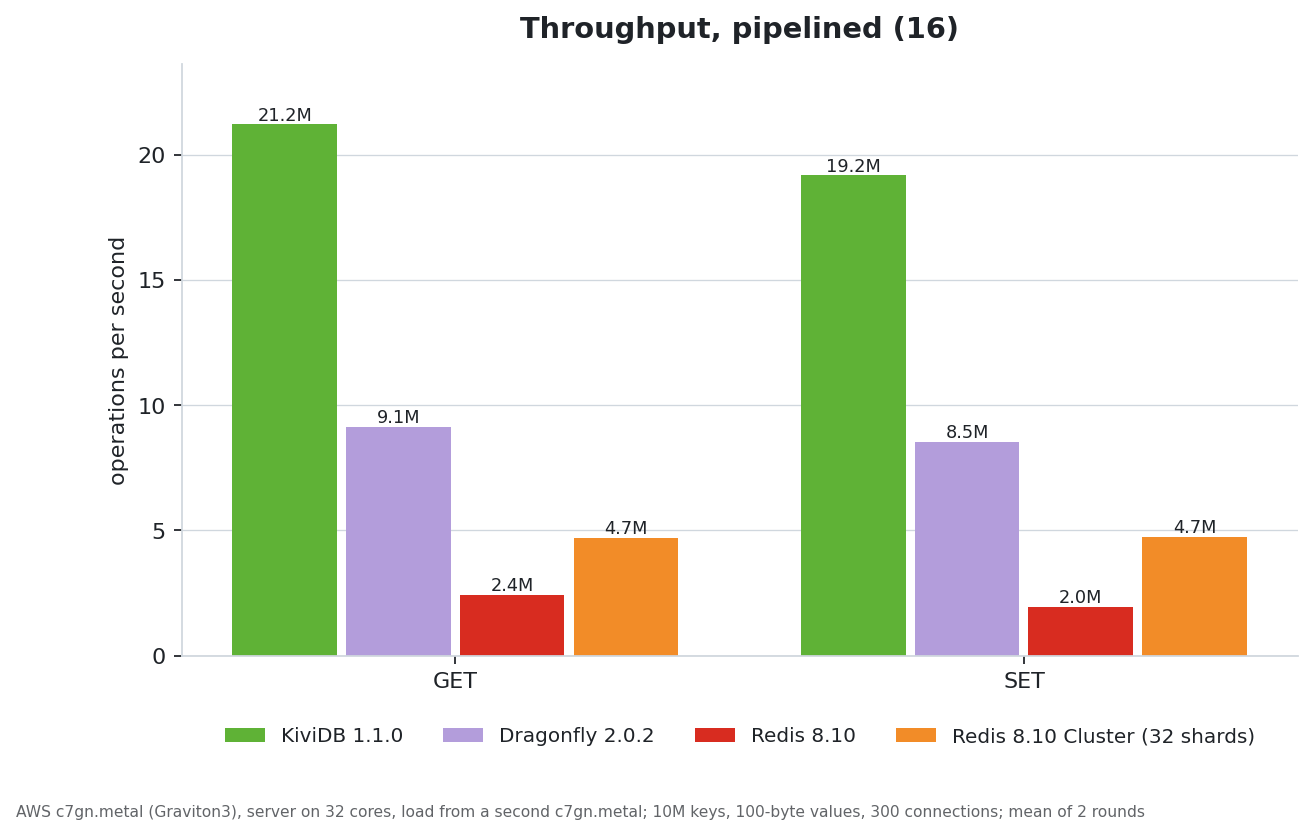
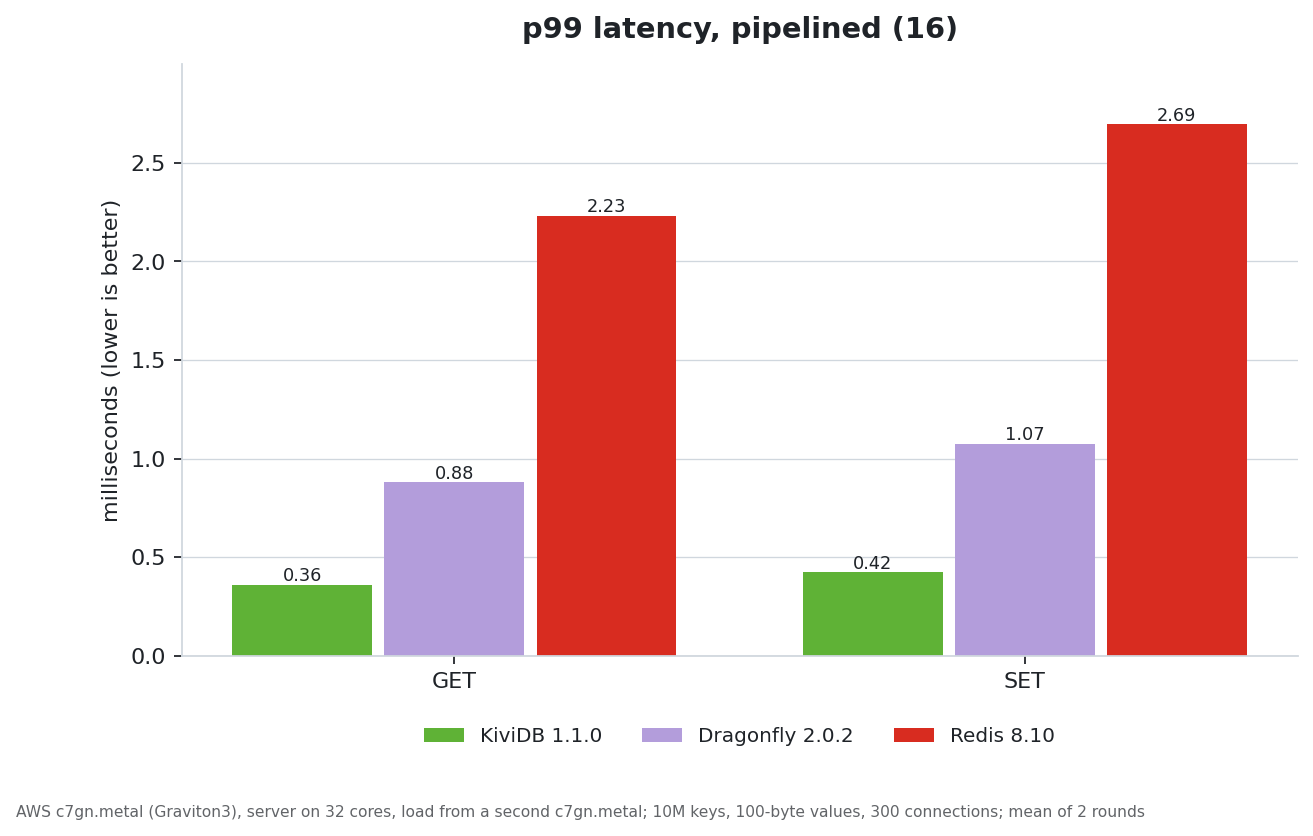
memtier_benchmark through kivi-benchmark's run-matrix.sh: 10 million keys, 100-byte
values, 30 s a scenario, mean of two rounds; 300 connections pipelined, 1,200 without
pipelining.
| ops/s | KiviDB 1.1.0 | Dragonfly 2.0.2 | Redis 8.10 | Redis Cluster (32 shards) |
|---|---|---|---|---|
| GET, pipeline 16 | 21.2M | 9.1M | 2.4M | 4.7M |
| SET, pipeline 16 | 19.2M | 8.5M | 2.0M | 4.7M |
| GET, no pipelining | 3.07M | 3.35M | 1.32M | 1.46M |
| SET, no pipelining | 3.12M | 3.38M | 1.54M | 1.46M |
| p99 latency, GET / SET, pipeline 16 | 0.36 / 0.42 ms | 0.88 / 1.07 ms | 2.2 / 2.7 ms | |
| Memory per key | 177 B | 134 B | 178 B | 183 B |
Vector search
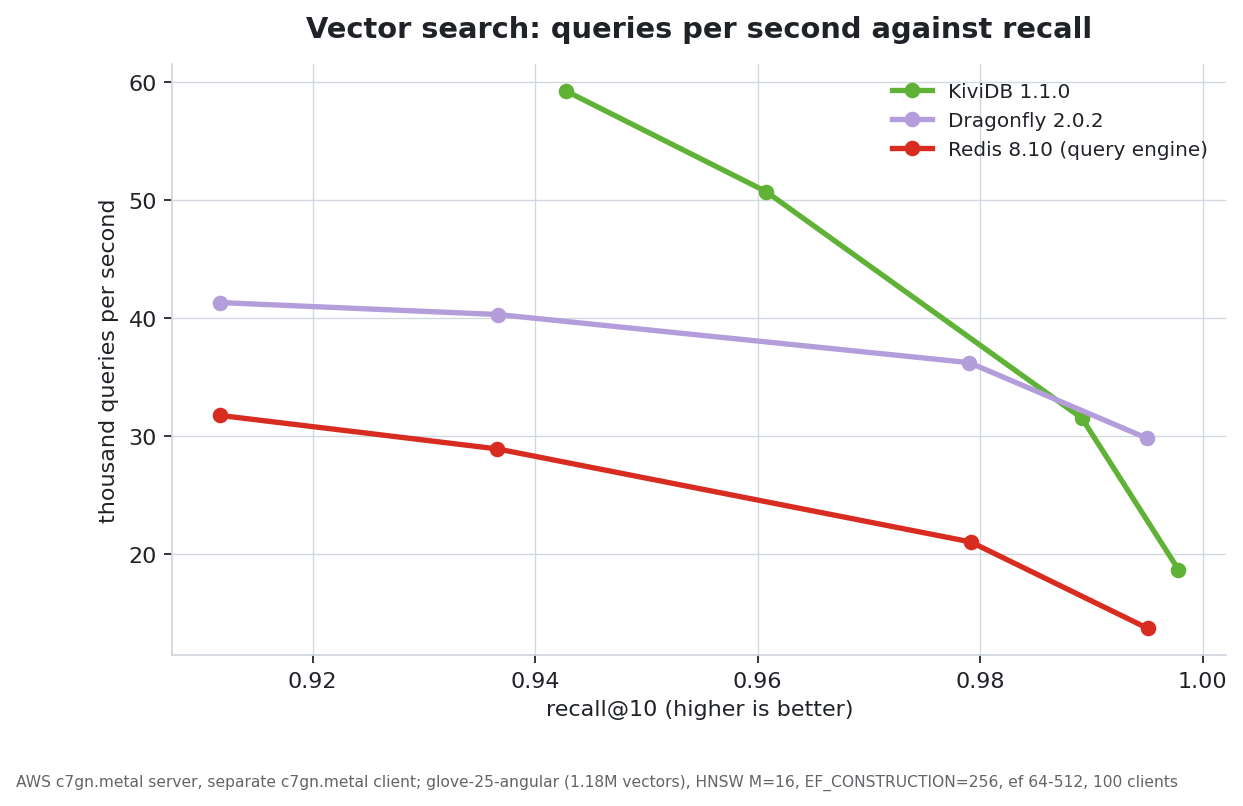
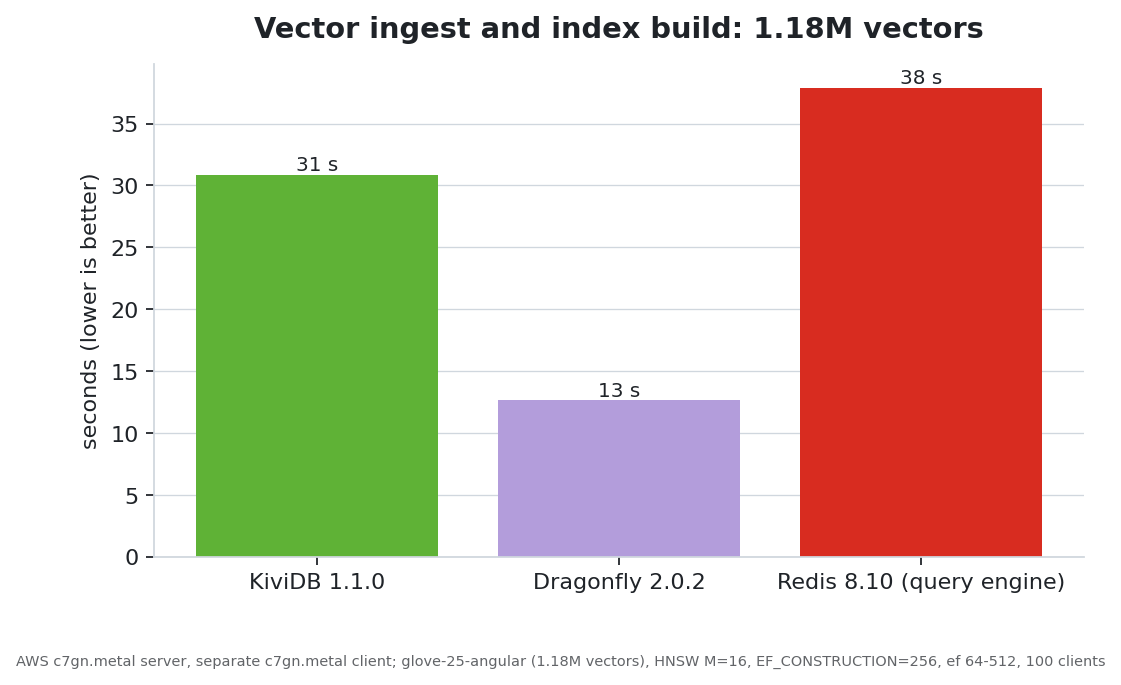
redis/vector-db-benchmark on glove-25-angular (1.18M vectors, 25 dimensions): HNSW with M=16 and EF_CONSTRUCTION=256, 100 clients uploading in batches of 64, then queries at ef 64, 128, 256 and 512.
| KiviDB 1.1.0 | Dragonfly 2.0.2 | Redis 8.10 (query engine) | |
|---|---|---|---|
| Queries/s at ef 64 (recall@10) | 59.3k (0.943) | 41.3k (0.912) | 31.8k (0.912) |
| Queries/s at ef 128 | 50.7k (0.961) | 40.3k (0.937) | 28.9k (0.937) |
| Queries/s at ef 256 | 31.5k (0.989) | 36.2k (0.979) | 21.1k (0.979) |
| Queries/s at ef 512 | 18.7k (0.998) | 29.8k (0.995) | 13.7k (0.995) |
| Ingest and index build | 31 s | 13 s | 38 s |
| Memory after ingest | 1.66 GB | 1.13 GB | 1.07 GB |
- Methodology and scripts: kivi-benchmark
- The most recent automated run: benchmarks/LATEST.md
Results depend on the environment. Treat published figures as one controlled capture, not a guarantee, and measure on your own hardware and workload.
Vector search (Redis Stack–style FT.*)
KiviDB implements Redis Stack–compatible search and vector commands, so existing clients and tutorials largely work unchanged. Use them for full-text (BM25), tags / numerics, and vector ANN (FLAT or HNSW) on hash fields.
Quick start
- Create an index on keys with a prefix, declaring at least one
VECTORfield (HNSW or FLAT) and optionalTEXT/TAG/NUMERICfields:
redis-cli -p 6380 FT.CREATE idx ON HASH PREFIX 1 doc: SCHEMA \
  vec VECTOR HNSW 10 TYPE FLOAT32 DIM 128 DISTANCE_METRIC COSINE M 16 EF_CONSTRUCTION 128
-
Store vectors as raw FLOAT32 little-endian bytes in a hash field (
DIM × 4bytes), the same convention as Redis Stack andredis-py/numpyblobs. Use your client's binary-safeHSET(the integration tests undertests/e2e/have examples). -
Query with KNN (Dialect 2), passing the query vector as a named binary parameter:
redis-cli -p 6380 FT.SEARCH idx '*=>[KNN 10 @vec $q]' PARAMS 2 q <blob> DIALECT 2
The full command surface, filters, hybrid search and edge cases are in COMMANDS.md (search for FT.CREATE, FT.SEARCH, FT.HYBRID, and so on).
Persistence and restarts
- Native snapshots (
dump.kdb) store the keys, the index schemas, and, when youSAVE/BGSAVEwith indexes populated, the HNSW graph of each vector field, so search quality after a restart matches the graph you had before shutdown. - While search indexes are being rebuilt at startup, most commands return
LOADINGuntil the rebuild finishes;PING,INFOand a few other commands still work. - After a large ingest, run
SAVE(or scheduleBGSAVE) so the next start reloads the graph from disk instead of rebuilding it from the hashes.
Builds
KiviDB comes in four variants, chosen by Cargo features at build time:
| Variant | Cargo features | Adds |
|---|---|---|
default |
none | the core server, without Lua or TLS |
lua |
lua |
Lua scripting (EVAL, EVALSHA, SCRIPT, FUNCTION, FCALL, …) |
tls |
tls |
TLS listener, and TLS between cluster nodes and replicas |
full |
lua,tls |
both |
In a build without Lua, the scripting commands return an error. A build without TLS refuses
to start if --tls-port is given, rather than serving plaintext.
Building from source
Requires a stable Rust toolchain (rust-toolchain.toml selects
stable with rustfmt and clippy). The crate uses the 2024 edition; the oldest
toolchain it is checked against is Rust 1.89, the version the Dockerfile
builds with.
git clone https://github.com/kividbio/kividb.git
cd kividb

cargo build --release                      # default variant
cargo build --release --features lua       # with Lua scripting
cargo build --release --features tls       # with TLS
cargo build --release --features lua,tls   # full

./target/release/kividb
On Linux the server uses io_uring when the kernel allows it and falls back to Tokio
otherwise (--io-model auto, the default).
To build the Docker image yourself, docker build -t kividb . builds the default variant;
docker build --build-arg KIVIDB_FEATURES=lua,tls -t kividb:full . builds another one.
Running KiviDB
./target/release/kividb                    # listens on 0.0.0.0:6380
redis-cli -p 6380 PING
Any Redis client works; point it at port 6380.
Protected mode
Protected mode is on by default, as in Redis. While it is on, no bind address has been
set (--bind or bind in the config file) and the default user has no password, only
clients on the same machine (loopback) may connect. Any other client
receives a -DENIED error that explains the options, and is disconnected.
To accept clients from other machines, do one of these:
- set a password:
--requirepass <password>, orACL SETUSER default ><password>; - set a bind address:
--bind <address>; - turn protected mode off:
--protected-mode no,protected-mode noin the config file, orCONFIG SET protected-mode nofrom a local client.
If you turn it off or bind to a public address, make sure the server cannot be reached from the internet without a password.
Docker
Images are published to Docker Hub and the GitHub Container Registry, with the same tags in both:
docker pull kividb/kividb:latest
# or
docker pull ghcr.io/kividbio/kividb:latest
latest and version tags such as v1.1.0 are the default variant; v1.1.0-lua,
v1.1.0-tls and v1.1.0-full are the others. Images are built for amd64 and arm64.
docker run -p 6380:6380 kividb/kividb
A container is reached through its network, never from loopback, so the image's default
command is --protected-mode no. Arguments you pass replace that default, which turns
protected mode back on. When you pass your own flags, set a password (recommended) or add
--protected-mode no yourself:
docker run -p 6380:6380 ghcr.io/kividbio/kividb \
  --requirepass "change-me" \
  --databases 8 \
  --loglevel debug
With AOF persistence (mount a volume so data survives restarts; the server runs as user
kividb in /home/kividb):
docker run -p 6380:6380 \
  -v $(pwd)/data:/home/kividb \
  ghcr.io/kividbio/kividb --aof --requirepass "change-me"
With --aof, every write is appended to appendonly.aof and the file is replayed on
startup, so a crash loses at most about the last second of writes (the fsync interval)
rather than everything since the last snapshot. When an AOF is present it is the source of
truth and the snapshot is not loaded; see docs/PERSISTENCE.md for why.
io_uring in containers: Docker's default seccomp profile blocks io_uring on recent
versions, and KiviDB then falls back to Tokio. To allow it on a Linux host, run with
--security-opt seccomp=unconfined (understand what that permits before using it in
production).
Release binaries
Release binaries for Linux (x86_64, aarch64) and macOS (Apple silicon, Intel) are published
on GitHub Releases. The latest/download
links below always resolve to the newest release; replace latest/download with
download/v1.1.0 to pin a version.
# Linux x86_64
curl -LO https://github.com/kividbio/kividb/releases/latest/download/kividb-linux-x86_64.tar.gz
tar xzf kividb-linux-x86_64.tar.gz
./kividb

# Linux aarch64 (an ARMv8.1 CPU or newer: Graviton2 and later, Ampere; not a Raspberry Pi 4)
curl -LO https://github.com/kividbio/kividb/releases/latest/download/kividb-linux-aarch64.tar.gz

# macOS, Apple silicon / Intel
curl -LO https://github.com/kividbio/kividb/releases/latest/download/kividb-darwin-aarch64.tar.gz
curl -LO https://github.com/kividbio/kividb/releases/latest/download/kividb-darwin-x86_64.tar.gz
Each variant other than the default has its name in the file: kividb-lua-linux-x86_64.tar.gz,
kividb-tls-…, kividb-full-…. The default variant is also packaged for Linux as
kividb_amd64.deb / kividb_arm64.deb and kividb.x86_64.rpm / kividb.aarch64.rpm,
built with nfpm from
packaging/nfpm.yaml. A SHA256SUMS.txt file lists the checksum
of every file in a release.
curl -LO https://github.com/kividbio/kividb/releases/latest/download/kividb_amd64.deb && sudo dpkg -i kividb_amd64.deb
curl -LO https://github.com/kividbio/kividb/releases/latest/download/kividb.x86_64.rpm && sudo rpm -i kividb.x86_64.rpm
Configuration
KiviDB is configured with command-line flags, or with a Redis-style configuration file
(one directive per line, such as port 6380 or appendonly yes). The file is read from
/etc/kividb/kividb.conf if it exists; --configfile <path> names another one. A flag given
on the command line wins over the same setting in the file. Run kividb --help for the full
list.
| Flag | Default | Description |
|---|---|---|
--port |
6380 |
Port to listen on |
--bind |
0.0.0.0 |
Address to listen on. Setting it explicitly turns off protected mode |
--protected-mode <yes|no> |
yes |
See Protected mode |
--threads |
0 (auto) |
Worker threads; auto is the number of cores minus 2 (all cores below 4) |
--databases |
16 |
Number of databases |
--dir <path> |
start directory | Where dump.kdb, appendonly.aof and nodes.conf live |
--aof |
off | Append-only file persistence |
--maxmemory <bytes> |
0 (unlimited) |
Memory limit |
--maxmemory-policy |
noeviction |
What happens at the limit: noeviction, or the allkeys-* / volatile-* eviction policies (kividb --help lists them) |
--loglevel |
info |
debug, verbose, notice (or info), warning, nothing |
--logfile <path> |
standard error | Write the log to a file |
--log-format <text|json> |
text |
Log line format |
--io-model |
auto |
auto, uring or tokio (io_uring is Linux only) |
--requirepass <password> |
none | Password for the default user |
--aclfile <path> |
none | ACL file to load users from |
--replicaof <HOST> <PORT> |
none | Replicate from a primary |
--replica-announced-port <port> |
server port | Port announced to the primary via REPLCONF listening-port |
--slowlog-log-slower-than <us> |
off | Slowlog threshold in microseconds (0 logs every command) |
--slowlog-max-len <n> |
128 |
Slowlog entries kept |
--cluster-enabled <yes|no> |
no |
Cluster mode: a cluster bus on <port> + 10000, topology in nodes.conf, gossip, failure detection and failover |
--cluster-node-timeout <ms> |
15000 |
Time without a reply before a peer is suspected to have failed |
--tls-port <port> |
0 (off) |
TLS listener (TLS builds only) |
--tls-cert-file, --tls-key-file |
none | Server certificate and key (PEM) |
--tls-ca-cert-file |
none | CA that client certificates are checked against |
--tls-auth-clients <yes|optional|no> |
yes |
Whether clients must present a certificate (only with --tls-ca-cert-file) |
--update-check <yes|no> |
yes |
The startup update check |
TLS
TLS clients connect on a separate port, --tls-port; plain traffic stays on --port.
cargo build --release --features tls
./target/release/kividb --port 6380 --tls-port 6381 --tls-cert-file cert.pem --tls-key-file key.pem
redis-cli --tls -p 6381 --cacert ca.pem   # ca.pem: the CA that signed cert.pem
Client certificates (mutual TLS). With --tls-ca-cert-file ca.pem, clients must present a
certificate signed by that CA; others are refused during the handshake.
--tls-auth-clients optional accepts clients without a certificate but still refuses an
invalid one, and --tls-auth-clients no does not ask for one. With redis-cli:
redis-cli --tls -p 6381 --cacert ca.pem --cert client.pem --key client.key.
Clients must use TLS on the TLS port. A plain connection to it (for example redis-cli -p 6381
without --tls) fails the handshake, and the server logs [TLS] handshake failed. For
memtier_benchmark, add --tls (and --tls-skip-verify for a self-signed certificate).
Logs and errors
The log goes to standard error, or to --logfile. docs/LOGGING.md
describes the log; docs/ERRORS.md explains the warnings, errors and error
replies, and what to do about each.
Startup update check
When it starts, a release build of KiviDB makes one HTTPS request to
https://github.com/kividbio/kividb/releases/latest, the same page you would open to find
the newest release. GitHub answers with a redirect to that release's tag; if it is newer
than the running build, KiviDB prints a short notice with the link before the startup
banner. Nothing is sent but the request itself, with a User-Agent of kividb/<version>:
no host name, configuration, keys, data or identifier. GitHub sees the request's source IP
address, as any web server would.
Startup waits at most 1.5 seconds for the reply; a failure is logged at debug level only and never affects clients. Only a version-shaped tag is accepted from the reply, and nothing else from it is printed.
Any one of these turns it off:
--update-check noon the command line;update-check noin the configuration file;KIVIDB_NO_UPDATE_CHECK=1in the environment.
It is also never made by a debug build or when the CI environment variable is set.
--update-check-url points it at another https:// address, such as a mirror inside a
closed network. docs/UPDATE_CHECK.md has the details.
Contributing
Contributions are welcome. See CONTRIBUTING.md for how to build, test and submit changes. Contributions are accepted under the Contributor License Agreement, which you sign on your first pull request.
Please follow the Code of Conduct. The Changelog lists what changed in each release.
Security
Please do not report security vulnerabilities in public issues. See SECURITY.md for how to report one privately.
License
Copyright (c) 2026 KIVIDB PRIVATE LIMITED.
KiviDB is open source software, licensed under the GNU Affero General Public License, version 3 (AGPL-3.0-only), an OSI-approved license. You may use, modify and redistribute it under its terms. See NOTICE.
Using KiviDB does not put your application under the AGPL. An application that talks to KiviDB over the network, through any Redis client, is a separate program: you can run an unmodified KiviDB as your database, in any product, open or closed, commercial or not, with no obligation on your application's code. The AGPL asks for one thing beyond the GPL: if you modify KiviDB itself and let others use your modified version over a network (for example, as a hosted service), you must offer them the source code of your modified KiviDB.
Commercial license. KIVIDB PRIVATE LIMITED owns the copyright in KiviDB and also offers it under a commercial license, for organizations that cannot use AGPL software or that want to modify or embed KiviDB without publishing their changes. Write to support@kividb.io.
Our commitment. Every version of KiviDB we release under the AGPLv3 stays available under the AGPLv3. The Contributor License Agreement lets us offer the commercial license alongside it; it is not a way to take the open source version away.
FAQ
- Can I use KiviDB as the database of my closed-source or commercial application? Yes. Your application connects to KiviDB over the network; it is not a derivative of KiviDB, and the AGPL places no obligation on it.
- Can I run KiviDB as a service for my own users or customers? Yes. If you run it unmodified, you have nothing to publish. If you modify KiviDB and offer that modified version over a network, you must offer its source to the users of that service.
- Do client libraries or my configuration count as modifications? No. Redis clients, configuration files, and scripts and functions you send to KiviDB are not part of KiviDB.
- My organization does not allow AGPL software. The commercial license is for that case: support@kividb.io.
Trademarks
Redis® is a registered trademark of Redis Ltd. Any rights therein are reserved to Redis Ltd. Any use by KiviDB is for referential purposes only and does not indicate any sponsorship, endorsement or affiliation between Redis and KiviDB. KiviDB is not affiliated with Redis Ltd. Other names mentioned are trademarks of their respective owners.