

open-whispersync

A self hosted version of "Whispersync" which is position syncing between a Kobo ereader (served by Calibre-Web) and your audiobooks in Audiobookshelf
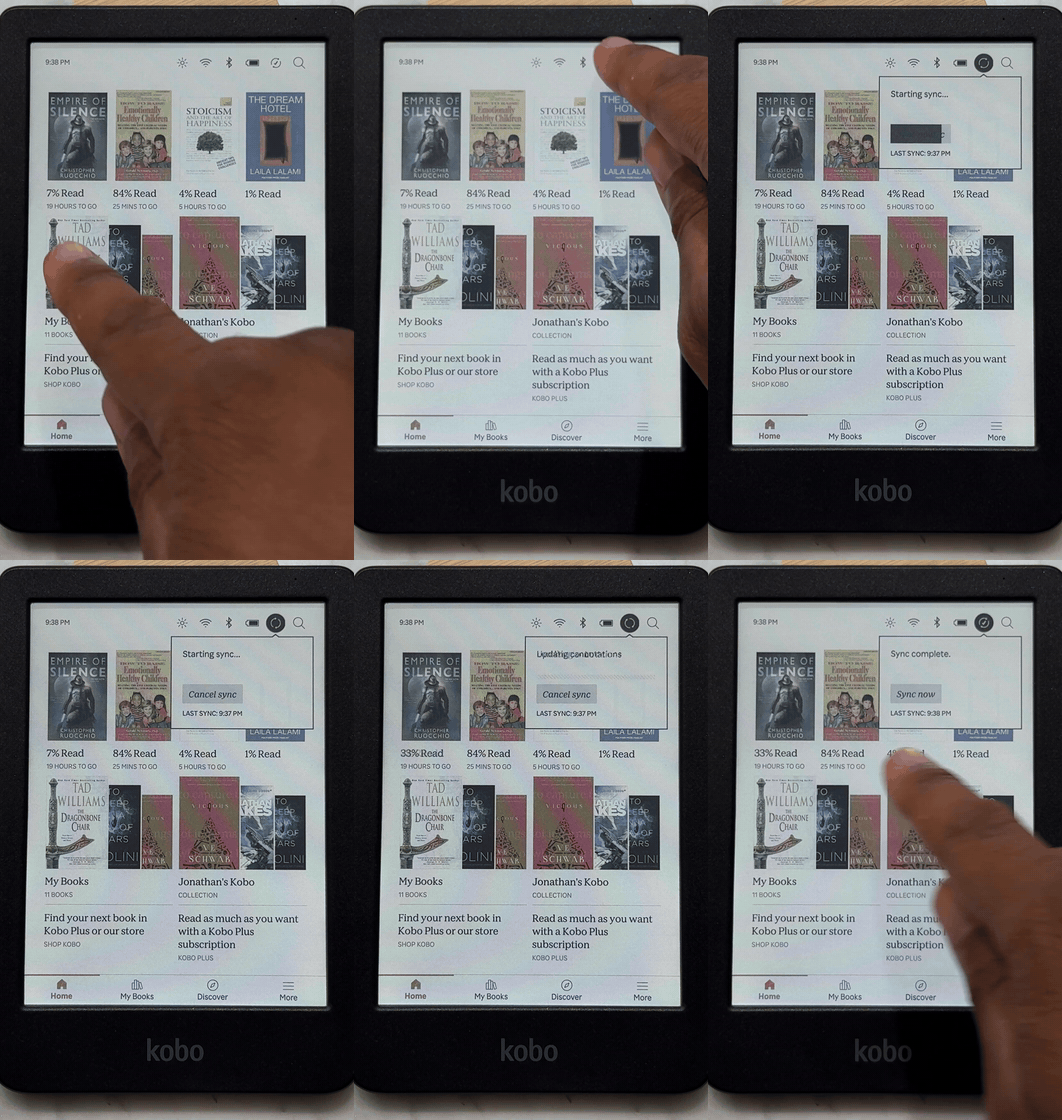
Listen to a chapter on your commute, then press the Kobo's native Sync button: the ebook jumps to the exact paragraph the narrator just finished. No new buttons, no separate app.
How it works
The hard part is knowing that audio second 14,203 equals page position X in the ebook. This project solves it with forced alignment: it runs aeneas against your audiobook narration and the ebook's kepub text spans, producing a per-book alignment map (tens of thousands of text fragments, each with a start time). After that, translating a position between the two formats is a table lookup.
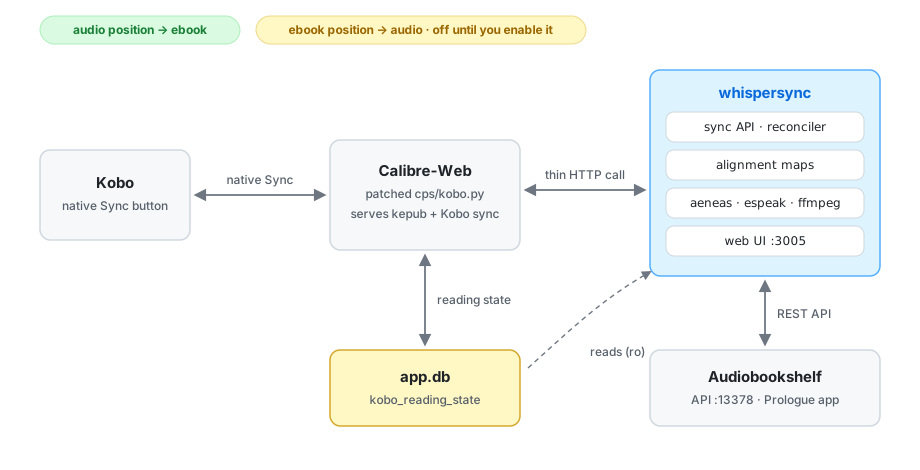
- All alignment tooling (aeneas, espeak-ng, ffmpeg) is baked into the container; nothing is installed on the host.
- A small web UI on port 3005 lets you add a book and build its alignment map from the browser.
- The Calibre-Web side is one thin hook in
cps/kobo.py(seepatches/) that calls the container during a normal Kobo sync. Errors are swallowed, so if the container is down your native sync works exactly as before.
Safety model
- Forward-only. Your position never moves backward. On any ambiguity or missing map, the sync is a no-op.
- Write-gated. Position write-back to Audiobookshelf is disabled until you
set
WHISPERSYNC_ALLOW_ABS_WRITE=1. - The hook never breaks the native sync: every whispersync error is caught.
Status
- Audio → Kobo direction is live and verified end to end, and lands in a single Sync press (the hook asserts fresh audio positions before Calibre-Web builds its sync response).
- Kobo → Audiobookshelf write-back is included but off by default; enable it
with
WHISPERSYNC_ALLOW_ABS_WRITE=1once you trust the mapping.
Requirements
- Calibre-Web with the Kobo sync endpoint enabled, and the ability to mount a
patched
cps/kobo.pyinto its container - Audiobookshelf with an API token
- Your ebook in kepub format (the alignment maps use koboSpan anchors)
- The matching audiobook files on disk
- Docker
Quick start
-
cp .env.example .envand fill it in. -
docker compose up -d --buildOr skip the build and use the prebuilt image (published automatically from this repo by GitHub Actions, x86-64): in
docker-compose.yml, delete thebuild: .line and change theimage:line toimage: ghcr.io/jstriblet/open-whispersync:latest
then run
docker compose up -d. -
Open
http://YOUR-SERVER-IP:3005and add your book. What the fields mean:Field Needed? What it is Calibre book id required The number in the Calibre-Web book page URL ( .../book/129→129)kepub path (container) required to build The .kepubfile as seen inside the container — yourMEDIA_ROOTmount appears at/media, so e.g./media/books/Author/Title.kepubaudio mp3 path (container) required to build The audiobook file, same rule: /media/audiobooks/.../Title.mp3ABS library item id required to sync From the Audiobookshelf web app: open the audiobook and copy the id from the URL ( .../item/<id>)Title optional Display name in the book list and logs ABS media id optional Stored for reference; sync does not use it Then press Build. Alignment is CPU-heavy: expect roughly an hour for a long novel. The build log streams on the same page, and the book syncs only after the map build finishes.
-
Install the Calibre-Web hook (makes a timestamped backup, checks anchors, refuses anything it does not recognize, and syntax-checks the result):
python3 patches/install_hook.py /path/to/calibre-web/cps/kobo.py
Then restart Calibre-Web.
--uninstallreverses it cleanly, and re-running after a Calibre-Web upgrade re-applies it. Manual instructions live at the top ofpatches/whispersync_kobo_hook.pyif the installer refuses your version. -
Press Sync on the Kobo.
Configuration
| Variable | Meaning |
|---|---|
MEDIA_ROOT |
Audiobook library root (read-only mount) |
CALIBRE_DB |
Path to Calibre-Web's app.db inside the container |
ABS_URL / ABS_TOKEN |
Audiobookshelf server and API token |
KOBO_USER_ID |
Calibre-Web user whose reading state is synced |
WHISPERSYNC_ALLOW_ABS_WRITE |
0 = never write to Audiobookshelf (default) |
Support
If this project saved your reading spot or saved you from buying into a locked ecosystem, you can fuel the next alignment map:
License
MIT for everything in this repository except patches/, which modifies
Calibre-Web (GPL-3.0) and is therefore licensed GPL-3.0.