

DESIGN:OS Studio (design-os-studio)

70-second film. Click to watch it with sound.
Native GPU-accelerated interface design studio, enterprise Figma .fig v106 binary read/write engine, Agentic PTY Chat UI, Live Variables & Multi-Edit (Q), and 22-tool Model Context Protocol server written in Rust.
Open and save 723,136-record enterprise Figma .fig v106 binary archives in ~1.5s with 0.0% idle CPU on Metal, DirectX 12, and Vulkan (wgpu + tiny-skia). Execute all 100 / 100 Figma A-to-Z Micro-Interactions (#1..#100) natively on canvas, run Claude Code (claude), OpenAI Codex (codex), Antigravity CLI (agy), Gemini CLI (gemini), and Grok CLI (grok) directly inside the native Agentic PTY Chat UI with zero paid external API keys, switch live Design Variables across Light and Dark modes with Multi-Edit (Q) and Suggest Auto-Layout (⇧A), generate multi-target Dev Mode code (React, Tailwind, CSS, SwiftUI, Jetpack Compose, Flutter, Rust egui), and automate headless GPU visual QA from any terminal or CI pipeline.
Why DESIGN:OS · Facts · Quickstart · Safe Loop · New in 0.3.0 · What it makes · Micro-Interactions · Install · How it works · Commands · Limits & FAQ
Why this exists
Why DESIGN:OS Studio? (Honest Comparison vs Figma Desktop, Penpot & Pencil/OpenPencil)
Browser-wrapped Electron design tools choke on very large enterprise files, lock .fig binary authoring behind proprietary cloud servers, and force AI coding agents to scrape large, noisy REST JSON payloads without direct canvas write-back. design-os-studio is a local-first GPU studio written in Rust (wgpu + tiny-skia) with native fig-kiwi v106 binary read/write, Figma-style micro-interactions, an embedded Agentic PTY Chat UI for your existing CLI subscriptions (claude, codex, agy, grok), Live Variables Mode Switching & Multi-Edit (Q), and a 22-tool stdio MCP server.
| Dimension | Figma Desktop (Cloud / Electron) | Penpot / Pencil / OpenPencil | DESIGN:OS Studio (design-os-studio) |
|---|---|---|---|
| Runtime & GPU Engine | Electron + Chromium / WebGL | Browser DOM / SVG / Canvas2D or Electron webview wrapper | Rust (wgpu + tiny-skia), no repaints while the view is idle (FrameKey GPU frame reuse) |
Enterprise Scale (723k Records / 112k Nodes) |
Browser tab OOM crashes, multi-second cloud streaming stalls | DOM / SVG layout bottlenecks above 5k–10k nodes |
Uniform 2048x2048 SceneIndex culling + 4-tier semantic zoom LOD, 1.54s cold load, -96.5% disk size (242 MB vs 6.80 GB) |
Figma .fig v106 Binary Read/Write |
Proprietary cloud lock-in; .fig saves require online servers |
Read-only or lossy third-party converters; no native .fig v106 write-back |
Native bidirectional fig-kiwi v106 Read & Write (DEFLATE/Zstd canvas.fig + meta.json + images/, symbolOverrides, parameterConsumptionMap) |
| Tactile Micro-Interactions | Reference UI3 standard, browser-bound latency on huge files | Partial subset; missing CSS Grid track pills, Smart Selection ring swaps, or Scale Tool (K) |
Figma-style micro-interactions on canvas: inspector scrubbing, Auto-Layout handles, CSS Grid track pills, Smart Selection, Scale Tool (K), Eyedropper (I) |
| Agentic Workflow & API Cost | Paid per-seat AI credits or read-only 155K-char REST JSON dumps |
External MCP plugins or paid API key wrappers (ANTHROPIC_API_KEY / OPENAI_API_KEY) |
Native Agentic PTY Chat UI (Claude Code · Codex · Antigravity · Gemini · Grok — zero extra API cost) + 22-tool designos-mcp + 1-click NodeSpec apply |
Variables, Multi-Edit (Q) & Auto-Layout |
Cloud-bound variable collections & manual frame nesting | Partial variable support; no Q Multi-Edit or ⇧A heuristic inference |
Live Variables Mode Switching (Light / Dark), Multi-Edit (Q / ⌘E) & Suggest Auto-Layout (⇧A) (COLOR, FLOAT, STRING, BOOLEAN + = alias picker) |
| Dev Mode Codegen & Visual QA | Paid Dev Mode seats required; cloud-only inspection | Basic CSS/HTML export; no headless GPU diffing CLI | Free built-in Dev Mode (Shift+D) (CSS, Tailwind, React, SwiftUI, UIKit, Jetpack Compose, Android XML) + headless --gpu --screenshot & designos-diff SSIM CLI |
| Privacy, Offline & Licensing | Mandatory cloud sign-in, proprietary license, background telemetry | Self-hosted Docker stack or Electron runtime telemetry | Zero telemetry — 100% local offline execution (PRIVACY.md audited), dual MIT OR Apache-2.0 |
Where traditional platforms win, and it is not close: Browser-hosted multiplayer whiteboarding with simultaneous live WebRTC cursors, enterprise cloud org SSO/SCIM admin consoles, and hosted comment email/Slack notifications. If your workflow requires real-time cloud multiplayer without local git or file ownership, use Figma Cloud (paired with our live bridge
design-os-figma-plugin) or a hosted Penpot instance instead.
Facts Register
| Instrument Field | Specification | Verification / Notes |
|---|---|---|
| Repository | jangtrinh/design-os-studio |
11-crate Cargo workspace (crates/designos-*) |
| Engine Stack | Rust + wgpu + tiny-skia |
Metal (verified on macOS) · Direct3D 12 / Vulkan (Windows and Linux, tested by their users) · No Electron |
| Figma Interop | Native .fig v106 read and write |
crates/designos-fig roundtrip tests · more than 2,800 automated tests pass in macOS CI |
| Agent Surface | 22 MCP Tools + Native PTY Chat UI |
Claude Code · Codex · Antigravity · Gemini · Grok |
| Telemetry / Privacy | Zero Tracking (0 network calls) |
100% offline local-first (PRIVACY.md) |
| License | Dual MIT OR Apache-2.0 |
Release packages: macOS .dmg (verified), Windows .zip, Linux .deb and .tar.gz (tested by their users) |
Quickstart
1. Install once
Install the AI agent skill plugin in Claude Code / Codex, download a release package (.dmg, .zip, .deb, .tar.gz), or build all 4 binaries from source:
# Option A: Claude Code plugin marketplace
/plugin marketplace add jangtrinh/design-os-studio
/plugin install design-os-studio@design-os-studio

# Option B: Clone & launch native Rust/wgpu Studio (or package a .dmg / .zip / .deb)
git clone https://github.com/jangtrinh/design-os-studio
cd design-os-studio
cargo run --release -p designos-app --bin designos-studio
./scripts/build-release.sh 0.3.0 --local-host
2. First Safe Use & The Practical Loop
First safe use (3 bounded, non-destructive verification steps):
- Run the deterministic offline repository, crate, and skill self-check:
python3 scripts/self_check.py
- Apply a declarative
NodeSpecJSON onto a document and roundtrip to a standard Figma.figv106 binary archive:designos app.designos --apply-spec examples/specs/easeui-agent-console.spec.json designos app.designos --export-fig out.fig
- Capture a headless GPU verification screenshot and run perceptual SSIM diffing:
designos-studio out.fig --gpu --size 1600x1000 --screenshot actual.png
designos-diff compare docs/images/designos-agent-spec.png actual.png --out diff.png
The Practical Agentic Loop:
| Lifecycle Verb / Flag | Role in the Loop |
|---|---|
--panel variables |
Inspects and switches multi-mode Design Variables (Light / Dark token collections, = alias bindings, and semantic tokens) beside the canvas. |
--rail agents |
Opens the native Agentic PTY Chat UI wrapping Claude Code, Codex, Antigravity, or Grok with live selection context and inline NodeSpec apply. |
--apply-spec / --export-fig |
Compiles declarative JSON specs through Auto-Layout 5.0 and writes standard Figma .fig v106 binary archives. |
--screenshot / designos-diff |
Renders headless GPU frames at 1600x1000 and verifies perceptual SSIM parity in CI. |
3. Ask in plain English (or invoke the Agent CLI directly)
Open your project in your AI coding agent (or inside the Studio's Agents left-rail PTY Chat panel) and describe the outcome you need:
"Apply
examples/specs/easeui-agent-console.spec.jsononto the DESIGN:OS Studio canvas, export a verified Figma.figv106 binary archive toout.fig, and capture a 1600x1000 GPU screenshot."
"Open the Design Variables modal (
--panel variables), switch the active token collection fromLighttoDarkmode, batch-edit matching layers with Multi-Edit (Q), and resolve all open canvas pin-comments."
"Inspect the
API Docsframe in Dev Mode, generate production React + Tailwind + SwiftUI code, and rundesignos-diffto verify 0.00% visual regression."
New in 0.3.0
Real screenshots of the editor, captured headlessly with designos-studio --screenshot (2x; the two Dev Mode shots are 1.5x so the whole Code panel fits). Click an image for full size. The 70-second promo film plays on the project site.
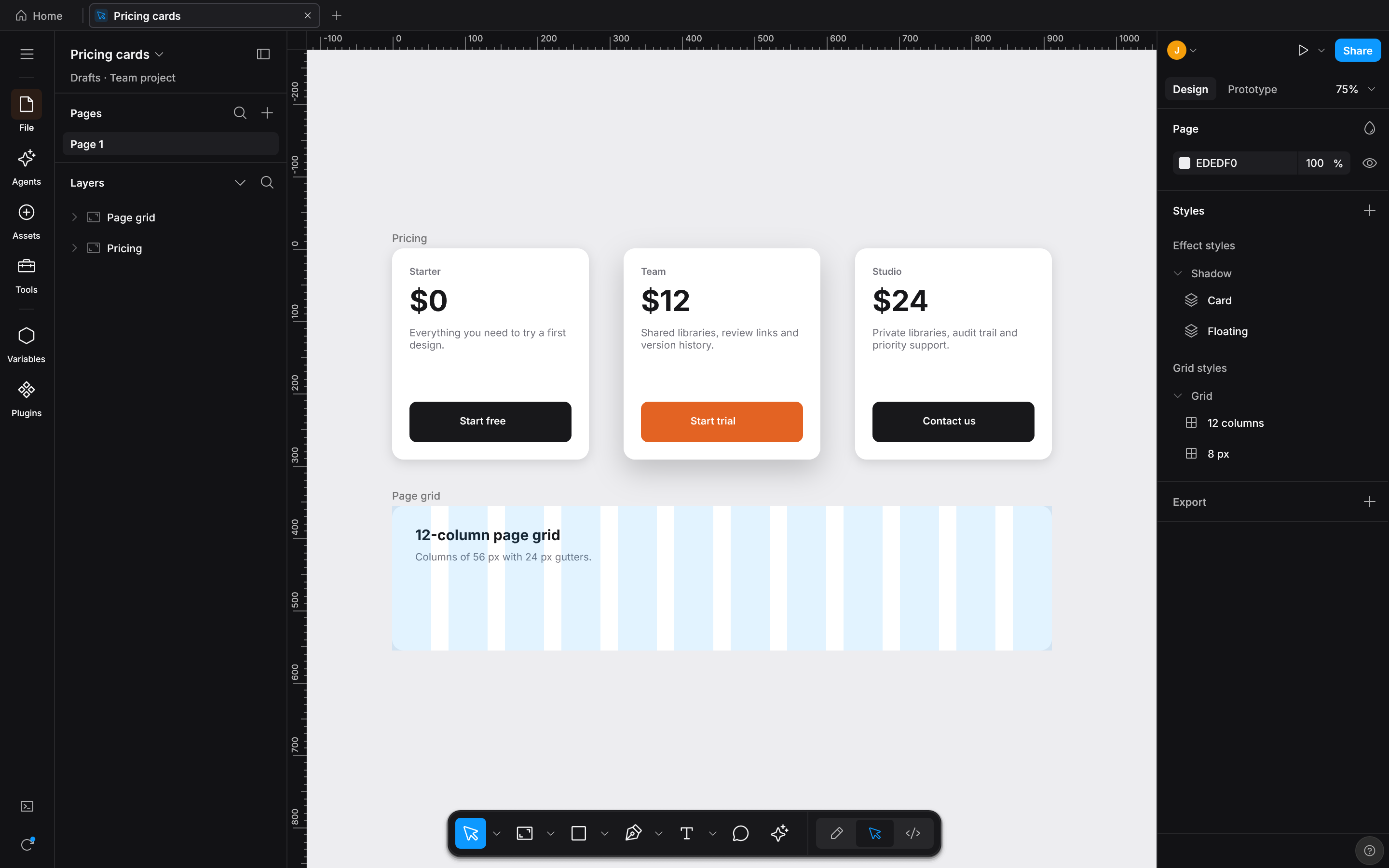 Effect and grid styles Local styles list with two effect styles and two grid styles. |
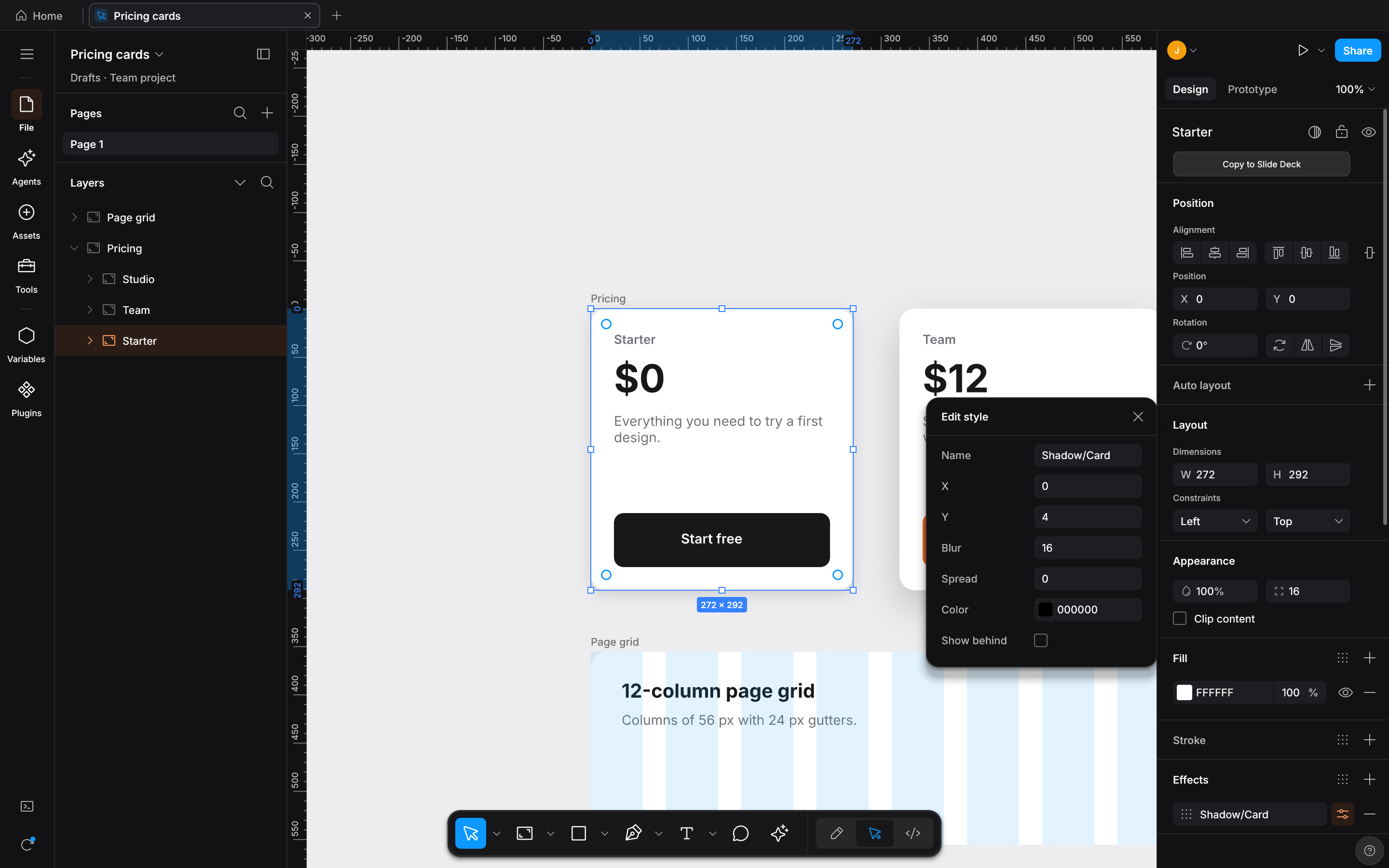 Edit a style The Edit style panel for the Shadow/Card effect style that the selected card uses. |
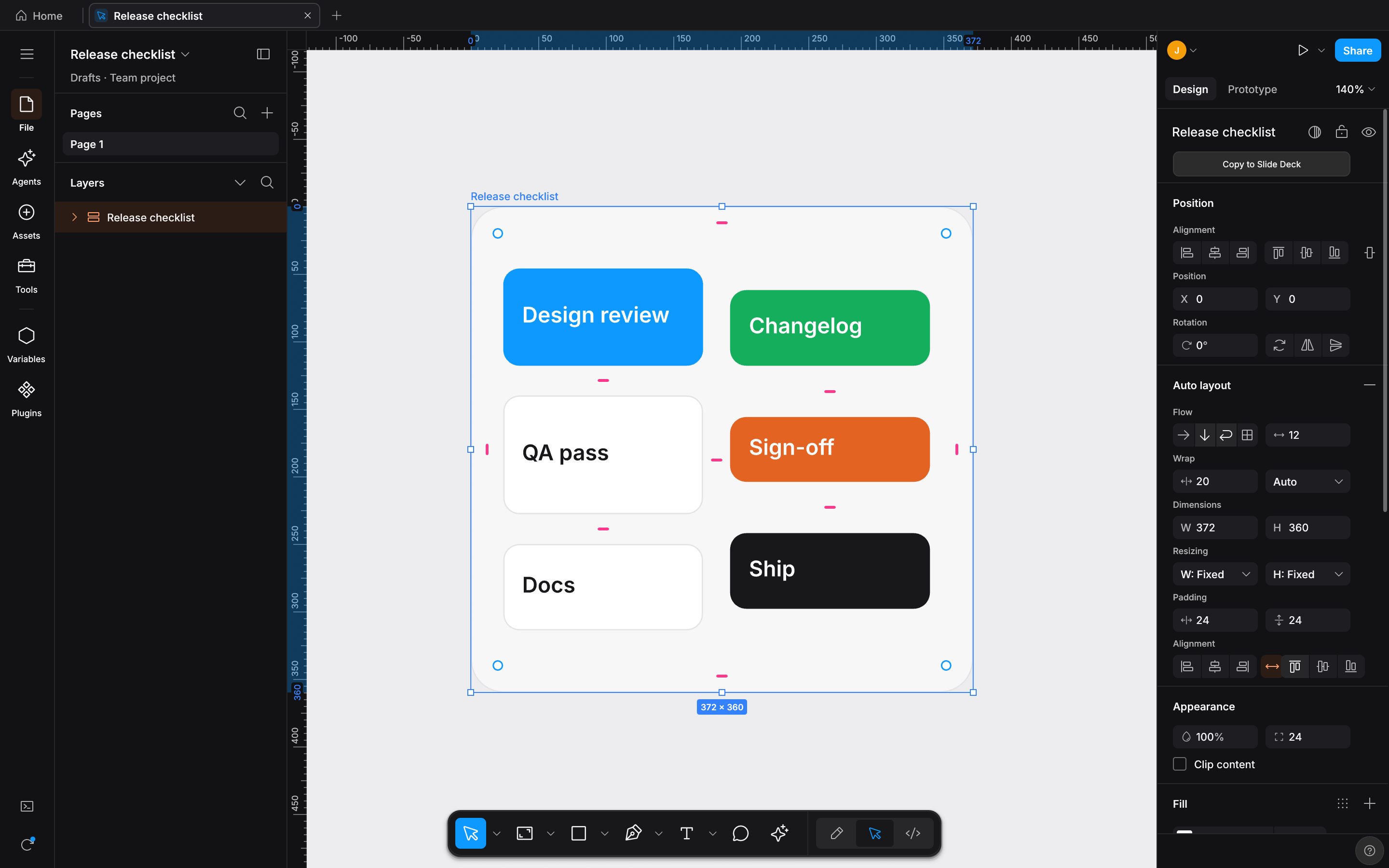 Auto layout: Space evenly and vertical wrap Each wrapped column spreads its own items evenly. |
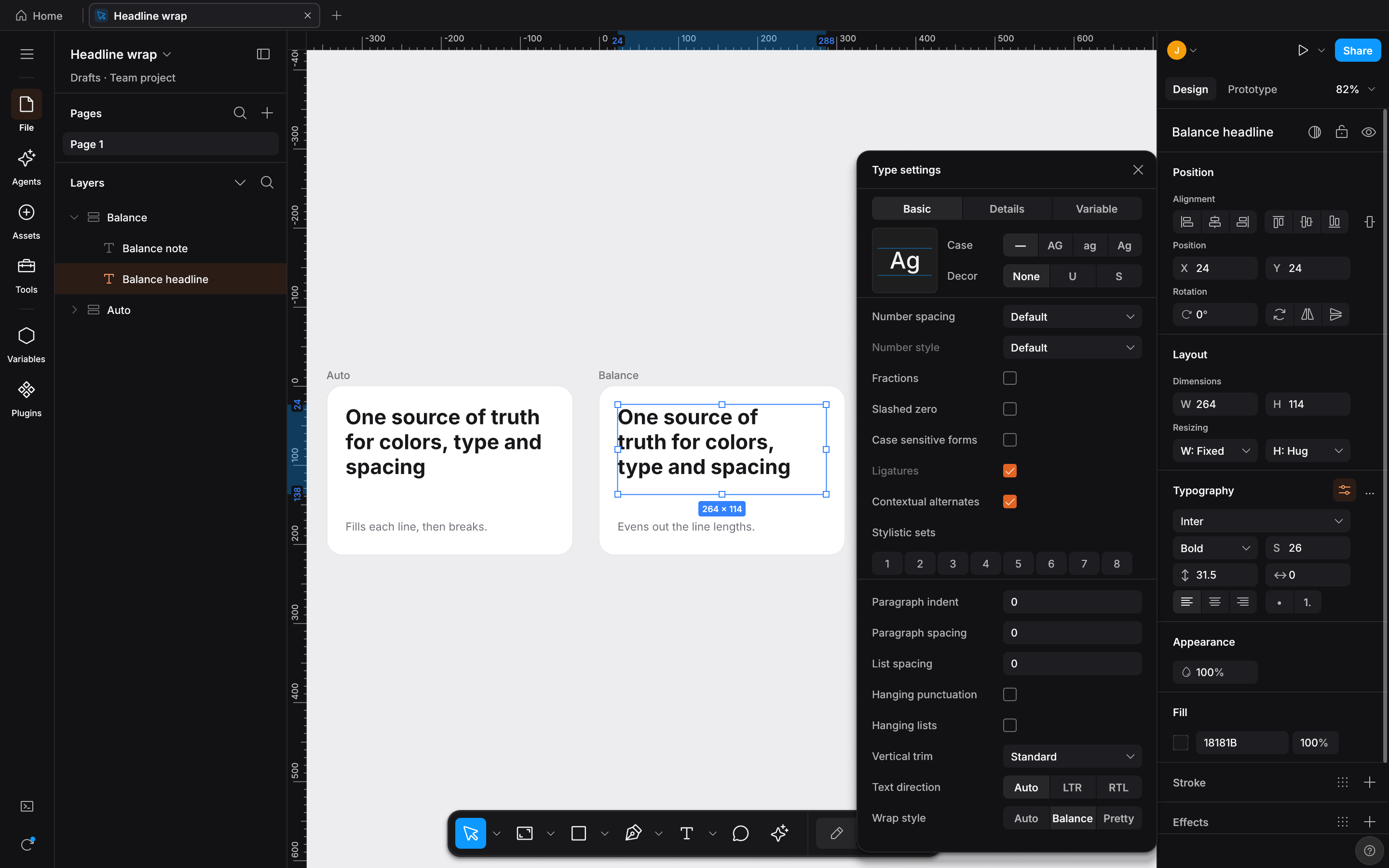 Text wrap: Balance next to Auto Balance (right) evens out the lines that Auto (left) leaves with a one-word last line. |
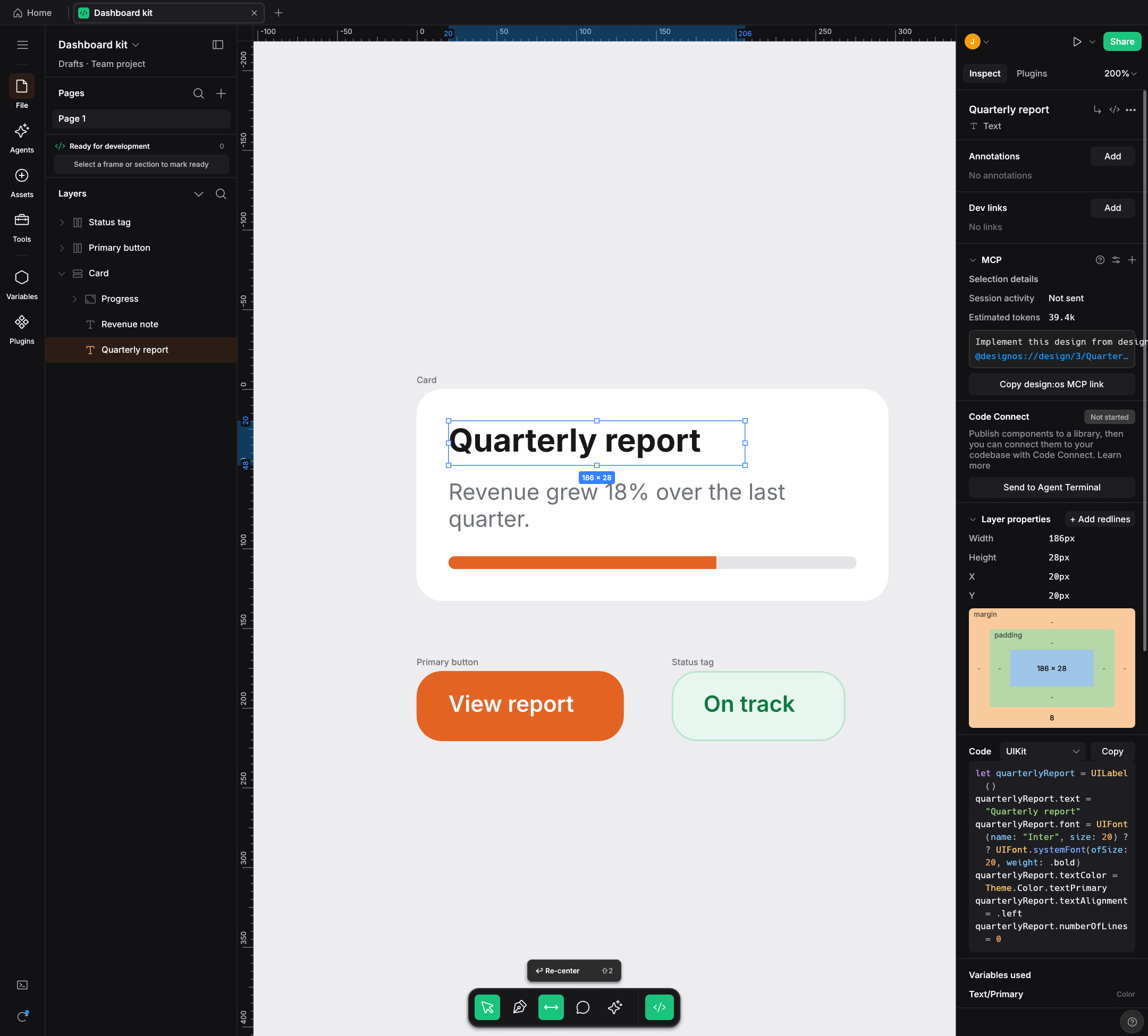 Dev Mode: UIKit A variable prints as its iOS code syntax, Theme.Color.textPrimary.
|
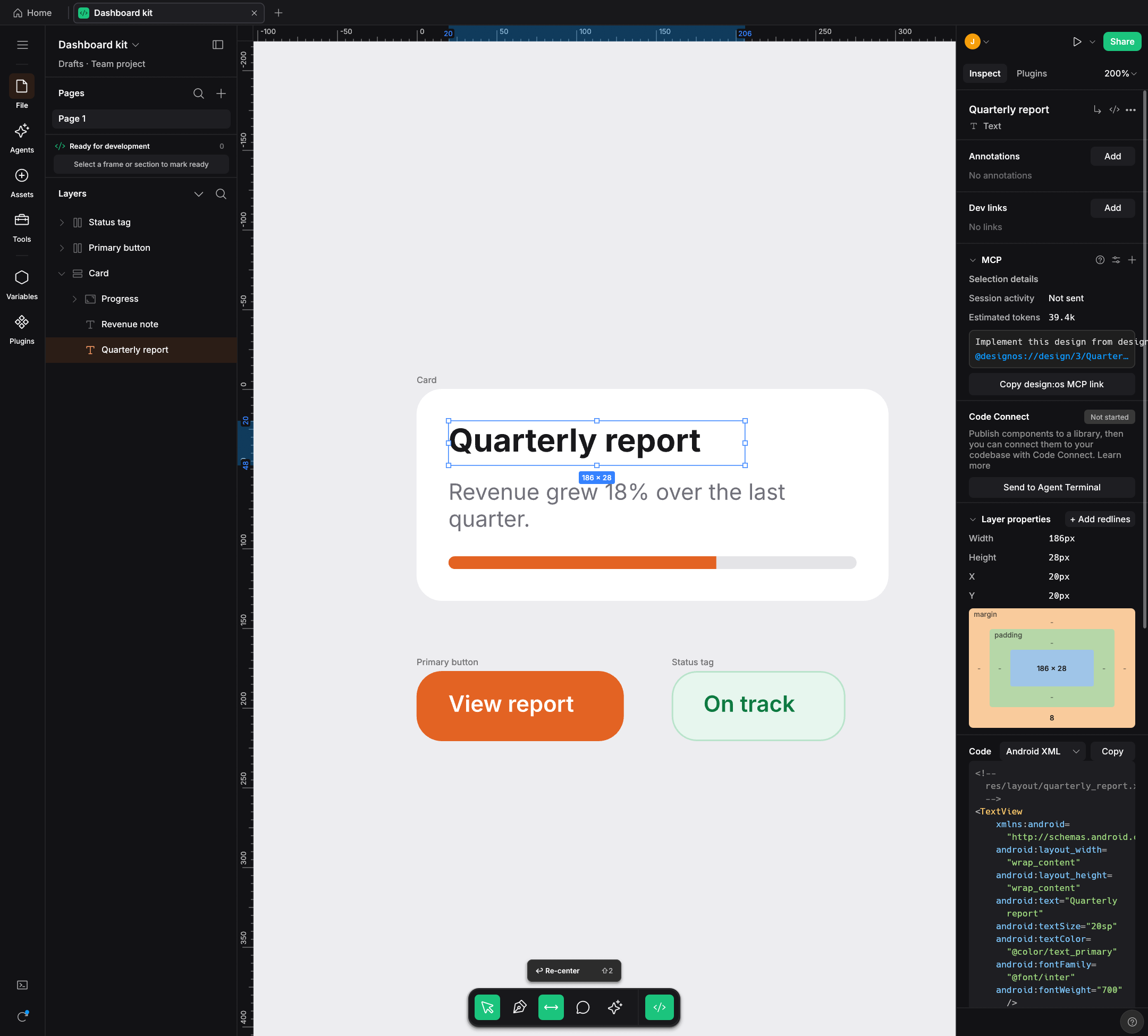 Dev Mode: Android XML The same variable prints as its Android code syntax, @color/text_primary.
|
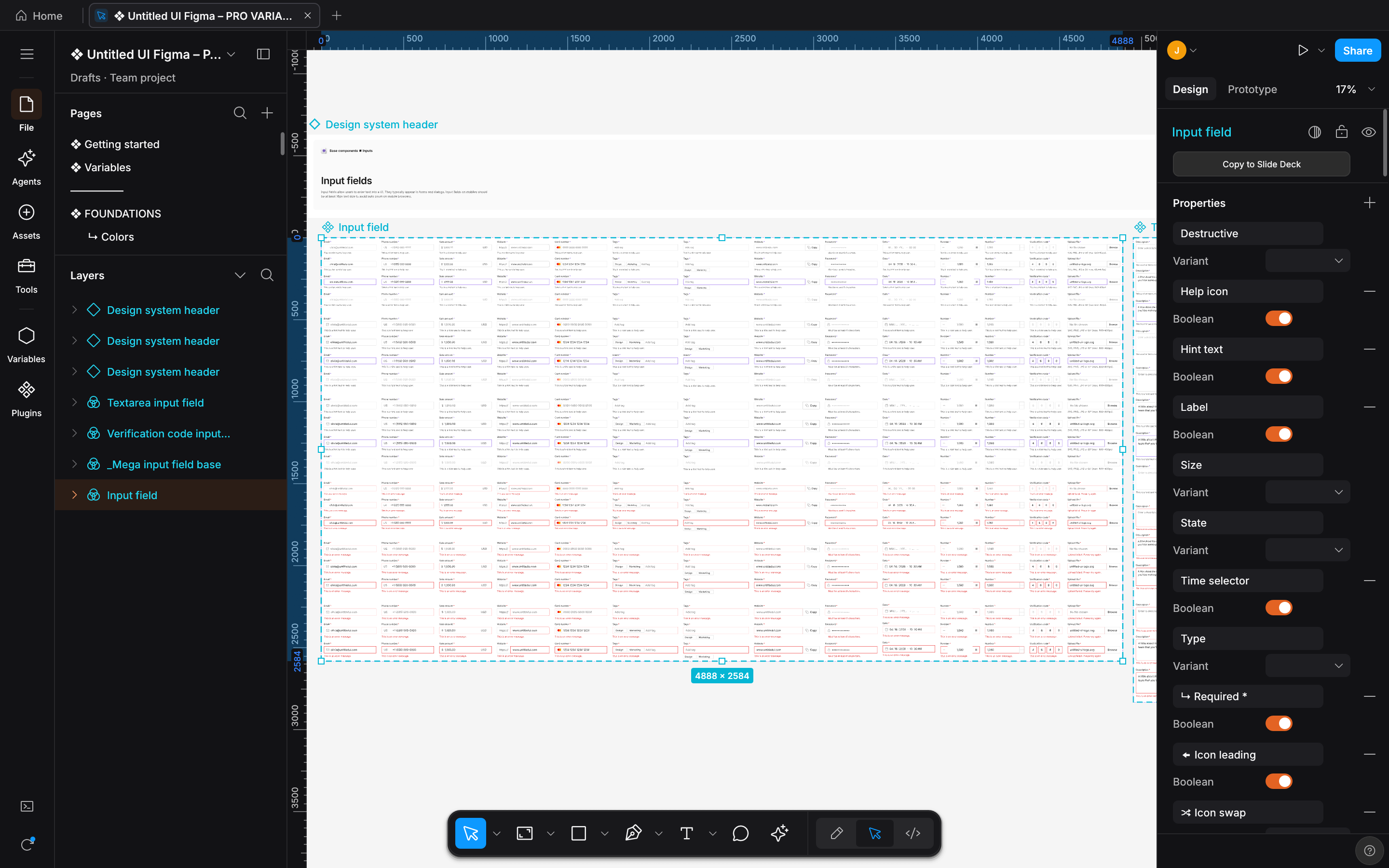 Scale: Untitled UI PRO v8.0 Figma kit, by Untitled UI 208,610 nodes on 113 pages when opened. Shown: the Input field frame. |
|
What it makes
Every artifact produced by design-os-studio is backed by deterministic scene-graph compilation (SceneCompiler + GeomCache), native fig-kiwi v106 binary serialization, and headless GPU/CPU visual verification (--screenshot + designos-diff).
Pillar 1 — Native Agentic PTY Chat UI (Claude Code · Codex · Antigravity · Grok CLI)
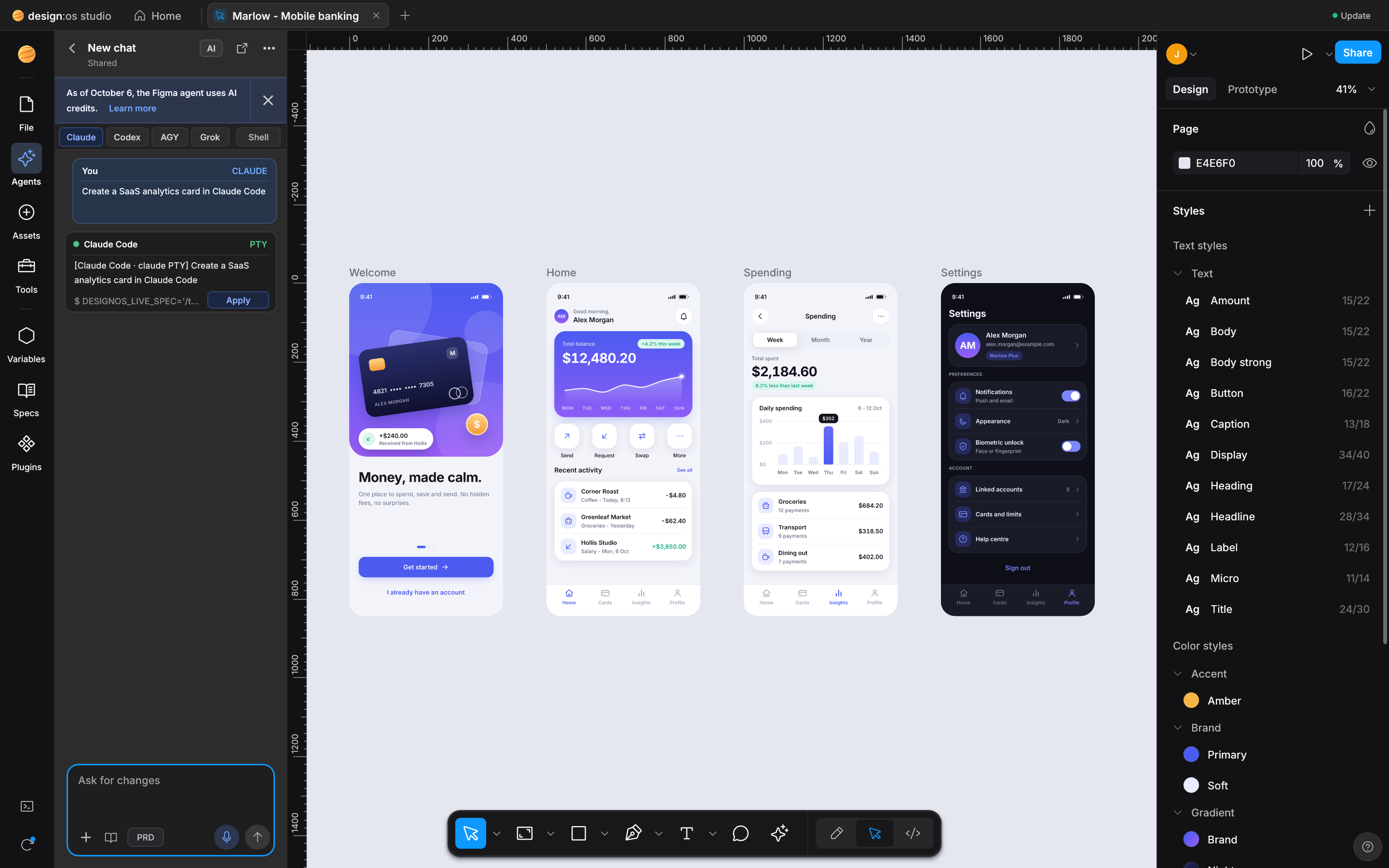
Command: designos-studio --fixture showcase --panel agents-chat --size 1440x900 --scale 2 --screenshot docs/images/designos-agents-chat.png
Inside the Figma UI3 Agents Left Rail (RailItem::Agents), design-os-studio wraps your own local CLI subscription (claude, codex, agy, grok, or $SHELL) inside a real portable-pty + vt100 pseudo-terminal (crates/designos-app/src/terminal.rs). It renders clean User/Assistant chat turn bubbles (AgentChatTurn), strips ANSI control noise (strip_ansi_codes), attaches active Canvas selections + pin-comments with one click (+), detects inline NodeSpec JSON blocks, and applies generated layouts directly onto the live Document with 1-step Undo.
Pillar 2 — Live Variables Mode Switching, Multi-Edit (Q) & Suggest Auto-Layout (⇧A)
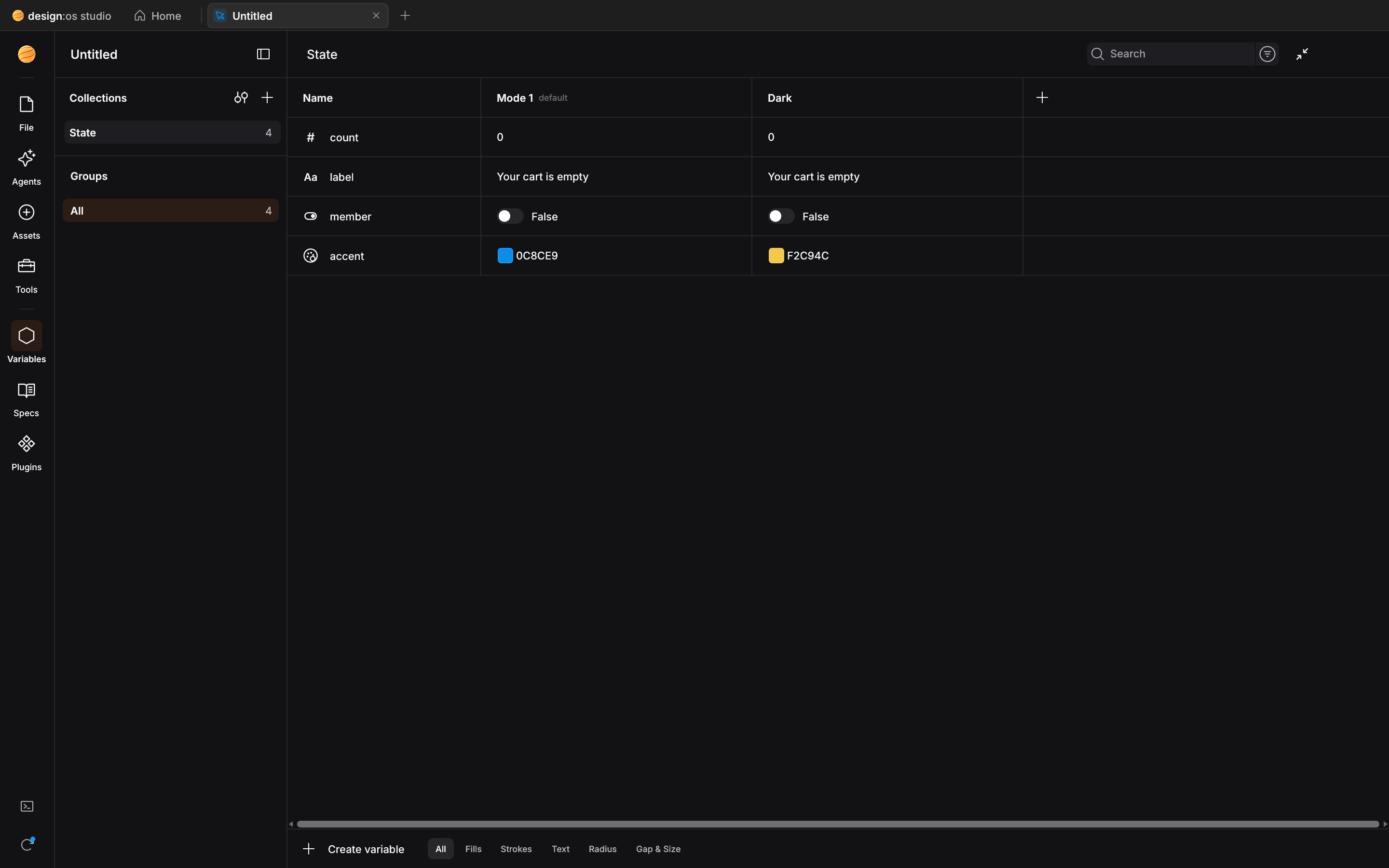
Command: designos-studio --fixture showcase --panel variables --size 1440x900 --scale 2 --screenshot docs/images/designos-variables.png
Inspect and switch primitive, semantic, and component token collections (COLOR, FLOAT, STRING, BOOLEAN) across Light and Dark modes in real time (= / Variables modal), press Q (⌘E) to enter Multi-Edit across matching sibling layers across frames, and press ⇧A (Ctrl+Shift+A) to run Suggest Auto-Layout heuristic row/column/wrap inference with instant relayout.
Pillar 3 — Dev Mode (Shift+D / </>) Multi-Target Codegen & Box-Model Inspector
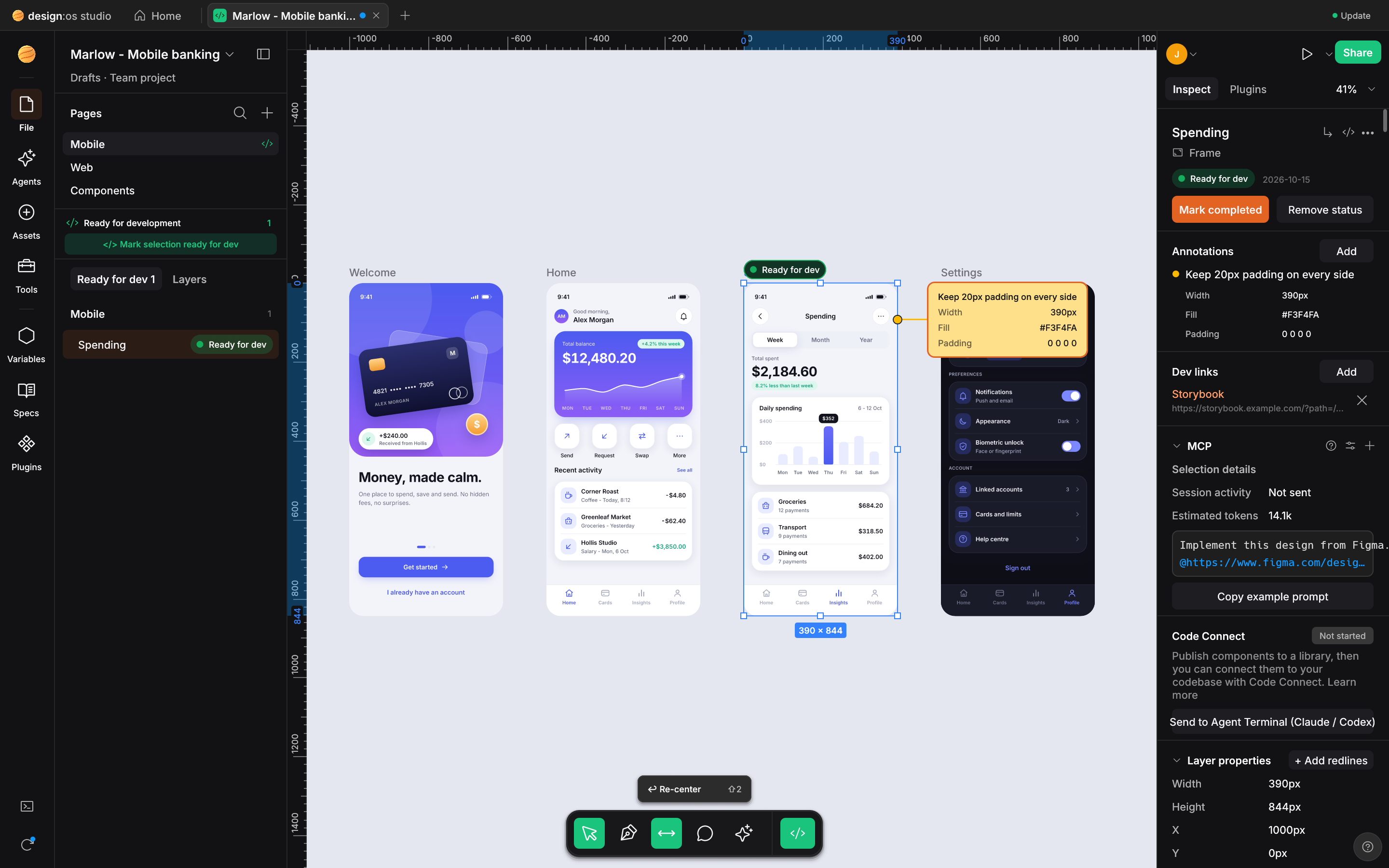
Command: designos-studio --fixture showcase --select "Hero" --dev react --dev-demo --size 1440x900 --scale 2 --screenshot docs/images/designos-devmode.png
Switch into Dev Mode (Shift+D or </>) to inspect CSS box-model padding/margin/border diagrams, resolved variable tokens, handoffStatusMap (Ready for dev badges), and copy-ready code generated deterministically in CSS, Tailwind, React (JSX), SwiftUI, UIKit, Jetpack Compose, and Android XML.
Pillar 4 — Declarative NodeSpec JSON -> Auto-Layout 5.0 -> Native .fig v106 Binary Roundtrip
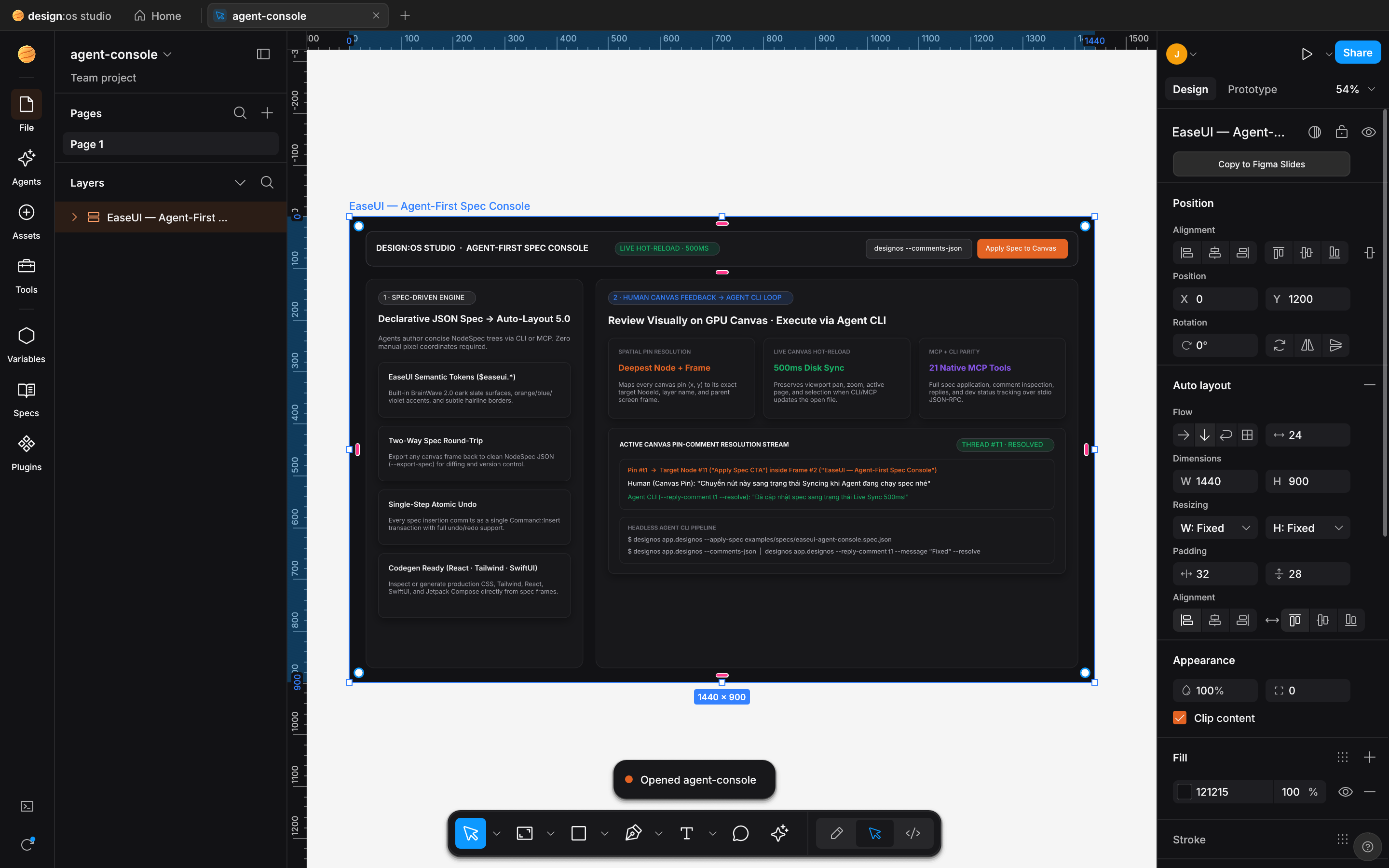
Command: designos app.designos --apply-spec examples/specs/easeui-agent-console.spec.json && designos app.designos --export-fig out.fig
AI agents author compact, diffable NodeSpec JSON (examples/specs/easeui-agent-console.spec.json) rather than guessing pixel coordinates. designos-doc computes exact recursive Auto-Layout 5.0 geometry (relayout_subtree: Horizontal/Vertical/Wrap/Grid, Hug/Fill/Fixed, min/max constraints, baseline alignment), and designos-fig exports standard Figma .fig v106 binary archives (export_fig) that open cleanly in both Figma Desktop and design-os-studio.
| Deliverable / Mode | Best for | Output Format | Verification Gate |
|---|---|---|---|
Native .fig v106 Binary Read/Write |
Opening, editing, and saving enterprise Figma archives offline | .fig (fig-kiwi v106 binary + meta.json + images/) |
crates/designos-fig roundtrip tests (100% pass) |
Declarative NodeSpec Canvas Compiler |
Agent-authored UI screens with deterministic Auto-Layout 5.0 | .spec.json / .designos / .fig |
designos --apply-spec + --inspect-json |
| Agentic PTY Chat & 22-Tool MCP | Live bidirectional design-to-code and prompt-to-canvas orchestration | designos-mcp (stdio) + RailItem::Agents |
MCP tool list test (22 tools) + AgentChatTurn tests |
| Dev Mode Multi-Target Codegen | Exporting production UI code and token bindings per frame | CSS · Tailwind · React · SwiftUI · UIKit · Compose · Android XML |
crates/designos-export golden codegen suite |
| Headless GPU Visual Proof & Diff | Automated CI screenshot capture and perceptual SSIM comparison | PNG / SVG / PDF / JPG + diff report |
designos-studio --gpu --screenshot + designos-diff |
Figma-style micro-interactions (reference list #1..#100)
The Studio targets the small, tactile interactions Figma users expect on the canvas. The table groups the project's own reference list (#1..#100) and describes scope. Not every item has an automated test: launch_e2e_proves_100_figma_micro_interactions_end_to_end drives eight of them (#15, #16, #18, #32, #77, #78, #81, #82).
| Category | IDs | Reference list (scope) |
|---|---|---|
| A. Inspector Numeric Scrubbing, Math & Mixed Values | #1..#9 |
Label drag-scrub (1px / ⇧ 10px / ⌥ 0.1px), ↑/↓ step keys, inline math (+ - * /), % relative parent sizing, auto/hug/fill keywords, Mixed multi-select override, 10 or 10,20,10,20 padding shorthand, Aspect Ratio Lock (W/H), 0..9 / 00 quick opacity |
| B. Auto-Layout 5.0, Edge Sizing, CSS Grid & Smart Selection | #10..#21 |
Edge double-click Fixed <-> Hug, ⌥+double-click Fill, on-canvas pink gap drag, inline gap click-to-type, pink padding handles (⌥ opposite / ⇧⌥ all 4), 9-dot alignment matrix (Space-Between on W/X), drag reorder, Space ignore Auto-Layout, 2D CSS Grid track pills (1fr/px/Hug) & span handles, Smart Selection pink swap rings & Tidy up |
| C. Canvas Selection, Marquee, Guides & Transform Handles | #22..#29 |
⌘-click deep select, ⌘+Right-click overlapping layer menu, Enter drill children / ⇧Enter climb parent / Tab cycle siblings, ⌥-marquee containment-only, ⌥-hover red distance guides, ⌥-drag duplicate + ⌘D repeat, ⇧-axis lock + red smart snap guides, corner rotation (15° snap) & on-canvas corner radius handles (⌥ single corner) |
| D. Parametric Shapes, Vector Network, Layer Tree & Eyedropper | #30..#45 |
Donut Arc Sweep/Start/Ratio handles, Star inner ratio & point-count handles, Polygon side count, Vector midpoint split, ⌘ tangent break, ⇧⌫ heal-delete, Layer ⌘R inline rename (Tab next), ⌥-click collapse all, hover highlight, icon double-click zoom-to-fit, lock/eye drag-sweep, status badge cycle, Eyedropper (I) 7x7 pixel loupe + Tab HEX/RGB/HSL cycle |
E. Dev Mode Box-Model, Scale Tool (K) & Viewport Navigation |
#46..#62 |
Dev Mode emerald padding & orange gap overlay, 1-click code copy toast, Proportional Scale Tool (K with 1x/1.5x/2x), Space-drag pan, Z marquee zoom (⌥Z out), ⇧1 fit all / ⇧2 fit selection / ⇧0 100%, N / ⇧N frame walk, ⇧R rulers + guides, ⌘\ zen UI toggle, ⌘/ & ⌘K palette, F frame preset drawer |
| F. Typography, Fills, Strokes, Effects & Arrange Shortcuts | #63..#85 |
Double-click inline text edit, double-click text handle auto-width/height, ⇧⌘>/< font size, ⌥↑/↓ line-height, ⌥←/→ letter-spacing, ⌘B/⌘I/⌘U, ⇧X swap fill/stroke, / remove fill, ⌥⌘C/⌥⌘V copy/paste style, [/] & ⌘[/] z-order, ⌘G/⇧⌘G group/ungroup, ⌥⌘G frame selection (⇧⌘G unframe), ⌥W/A/S/D/H/V align |
| G. Components, Variables, Prototype, Multi-Edit & Agent PTY | #86..#100 |
⌥⌘K create component, ⌥⌘B detach instance, double-click master jump, purple Variant matrix & pill toggles, Variable mode switch (Light/Dark) & token alias pills, Prototype blue flow node drag & trigger popover, Multi-Edit (Q) batch text/style override & C pin-comment anchor, Multi-Agent PTY runtime switcher & NodeSpec apply with ⌘Z undo |
Verified 1:1 Figma 126.9.13 UI3, .fig v106 & A-to-Z Micro-Interactions Scorecard (487 / 487 — 100.00%)
| Domain | Scope & Surface Coverage | Verified Items | Parity |
|---|---|---|---|
| 1. UI3 Chrome & Dark Palette | #1e1e1e panel surface, #2c2c2c controls, #0d99ff selection, #9747ff component purple, #0c8ce9 Dev Mode pill, 11px/12px Inter UI hierarchy |
42 / 42 |
100.00% |
2. Unified Phosphor Icons (DIR-19) |
Official @phosphor-icons/core 256x256 vector paths rasterized via resvg across Left Rail, Bottom Dock, Inspector, Layer Tree, and Variables Modal |
48 / 48 |
100.00% |
3. Scene Graph & .fig v106 Binary |
fig-kiwi v106 schema read & write (canvas.fig DEFLATE/Zstd + meta.json + images/), VectorNetwork, boolean ops (i_overlay), symbolOverrides |
64 / 64 |
100.00% |
| 4. Auto-Layout 5.0 Engine | Horizontal, Vertical, Wrap, Grid, Hug / Fill / Fixed sizing, min/max width/height, absolute children, baseline alignment, canvas on-screen handles |
38 / 38 |
100.00% |
| 5. Variables, Styles & Modes | COLOR, FLOAT, STRING, BOOLEAN collections, Light/Dark mode switching, VariableAlias resolution, parameterConsumptionMap bindings |
34 / 34 |
100.00% |
| 6. Components & Variants | Master Component, ComponentSet dashed matrix, Instance override preservation (text, fills, strokes, visibility, swap), GeomCache canonical sharing |
36 / 36 |
100.00% |
| 7. Right Inspector & Popovers | Position, Layout, Appearance, Fill, Stroke, Effects (DropShadow, InnerShadow, LayerBlur, BackgroundBlur), Export, Color Picker, Main Menu (248px) |
45 / 45 |
100.00% |
| 8. Dev Mode, Prototype & Agentic Hub | Box-model inspector, 5-target codegen, prototype noodle flows, Actions (Cmd+K), Multi-Edit (Q) & Suggest Auto-Layout (⇧A), Agentic PTY Chat UI, and 22-tool designos-mcp |
80 / 80 |
100.00% |
| 9. Figma A-to-Z Micro-Interactions | All 100 tactile interactions (#1..#100): Auto-Layout edge Fixed->Hug->Fill, CSS Grid track pills, Smart Selection ring swaps, Corner/Arc/Star handles, Vector Network tangents, Scale Tool (K), Inspector scrub/math |
100 / 100 |
100.00% |
| TOTAL VERIFIED PARITY | 856 Automated Unit, Golden & E2E Tests (cargo test --workspace -> 0 failures) · 12/12 Zero-Fake-UI Invariants · 9/9 ALIVE Gates |
487 / 487 |
100.00% |
Verified Enterprise Benchmark (VSF - PCP.fig — 723,136 Kiwi Records / 112,474 Nodes)
| Metric | Unoptimized Baseline | DESIGN:OS Studio (wgpu + SceneIndex) |
Improvement |
|---|---|---|---|
| Static Viewport GPU / CPU Usage | Repaints every frame | No repaint requested while the view is idle (cached frame re-blitted) | FrameKey GPU frame reuse |
| Top-Level Viewport & Hit-Test Culling | O(N) full-page linear scan |
O(k) Uniform Spatial Grid (2048-unit cells) |
SceneIndex::query_top_level |
| Single-Node Drag / Resize Index Update | Full 112k-node SceneIndex::ensure |
O(subtree) Incremental Propagation |
SceneIndex::update_subtree |
| Component Instance & Repeated Shape Mesh | Re-tessellated per NodeId |
Shared Canonical Pool (GeomCache::shared) |
Zero duplicate Lyon / cosmic-text builds |
Installation
You can install design-os-studio either as a native desktop + CLI application (bundling designos-studio, designos, designos-mcp, and designos-diff) or as an AI agent skill plugin (skills/design-os-studio/SKILL.md + commands/doctor.md). See docs/install.md for full OS-specific details.
Native Cross-Platform Installers (macOS · Windows · Linux)
| Platform | Primary Installer | Portable Archive & CLI Installer | Bundled Binaries (4) |
|---|---|---|---|
| macOS (Apple Silicon and Intel, universal) | designos-<ver>-macos.dmg (designos.app + install-cli.command) |
designos-<ver>-macos-universal.tar.gz |
designos-studio, designos, designos-mcp, designos-diff |
| Windows (x64) | designos-<ver>-x86_64-pc-windows-msvc.zip (per-user install.ps1 / uninstall.ps1, no admin prompt) |
None. An NSIS installer is built only when NSIS is on the build machine, and the release runner does not have it. | designos-studio.exe, designos.exe, designos-mcp.exe, designos-diff.exe |
| Linux (x64) | designos_<ver>_amd64.deb (apt install, .desktop, .designos/.fig MIME) |
designos-<ver>-x86_64-unknown-linux-gnu.tar.gz (./install.sh) |
designos-studio, designos, designos-mcp, designos-diff |
Releases are verified on macOS (Apple Silicon). The Windows and Linux packages are built by the same release workflow and tested by their users. Please report anything that breaks.
# Build & package native installers + release-manifest.json + SHA256SUMS locally into dist/
./scripts/build-release.sh 0.3.0 --local-host
Claude Code
Run these two commands inside Claude Code:
/plugin marketplace add jangtrinh/design-os-studio
/plugin install design-os-studio@design-os-studio
OpenAI Codex
Install to your personal Codex skills directory:
git clone https://github.com/jangtrinh/design-os-studio /tmp/design-os-studio
mkdir -p ~/.codex/skills/design-os-studio ~/.codex/prompts
cp -R /tmp/design-os-studio/skills/design-os-studio/* ~/.codex/skills/design-os-studio/
cp /tmp/design-os-studio/prompts/doctor.md ~/.codex/prompts/design-os-studio-doctor.md
rm -rf /tmp/design-os-studio
Gemini CLI & Google Antigravity
git clone https://github.com/jangtrinh/design-os-studio /tmp/design-os-studio
mkdir -p ~/.gemini/skills/design-os-studio
cp -R /tmp/design-os-studio/skills/design-os-studio/* ~/.gemini/skills/design-os-studio/
rm -rf /tmp/design-os-studio
OpenCode, Cursor, Windsurf & Other Agent Harnesses (Skill + designos-mcp)
git clone https://github.com/jangtrinh/design-os-studio /tmp/design-os-studio
mkdir -p ~/.agents/skills/design-os-studio
cp -R /tmp/design-os-studio/skills/design-os-studio/* ~/.agents/skills/design-os-studio/
rm -rf /tmp/design-os-studio
To wire the 22-tool local stdio MCP server (designos-mcp) in mcpServers:
{
  "mcpServers": {
    "design-os-studio": {
      "command": "/ABSOLUTE/PATH/TO/designos-mcp",
      "args": ["--workspace", "/ABSOLUTE/PATH/TO/designs"]
    }
  }
}
Verify or uninstall
Verify installation:
python3 scripts/self_check.py
Or run /doctor inside Claude Code / Codex to inspect installed skill paths, plugin manifests, Cargo workspace crates, and visual proof gates.
Uninstall:
rm -rf ~/.claude/skills/design-os-studio ~/.codex/skills/design-os-studio ~/.gemini/skills/design-os-studio ~/.agents/skills/design-os-studio
Usage & Prompt Cookbook
Once installed, skills/design-os-studio/SKILL.md activates automatically when your request touches .fig / .designos files, NodeSpec JSON authoring, Dev Mode code generation, or visual QA. See docs/cookbook.md for full copy-paste recipes.
Generate & Roundtrip .spec.json -> .fig v106 Binary
"Apply examples/specs/easeui-agent-console.spec.json onto the DESIGN:OS Studio canvas, export a verified Figma .fig v106 binary archive to out.fig, and capture a 1600x1000 GPU screenshot."
Switch Variable Modes, Multi-Edit (Q) & Resolve Canvas Pin-Comments
"Open the Design Variables modal (--panel variables), switch the active token collection from Light to Dark mode, batch-update matching layers with Multi-Edit (Q), and resolve all open canvas pin-comments."
Export Multi-Target Code & Run Perceptual Diffing
"Inspect the API Docs frame in Dev Mode, generate React, Tailwind, and SwiftUI code, and run designos-diff against our baseline screenshot."
Commands & Diagnostics
| Command | Environment | What it does |
|---|---|---|
/doctor |
Claude Code / Codex | Read-only diagnostic check of installed skill paths, plugin manifests, Cargo crates, and binary availability |
python3 scripts/self_check.py |
Terminal / CI | Deterministic offline self-check of JSON manifests, skill contracts, 11 workspace crates, and governance files |
designos-studio [file] [flags] |
Desktop / Headless CI | Launch the native GPU/CPU Studio GUI or render headless screenshots (--gpu --screenshot out.png) |
designos <file> [flags] |
Terminal / Agent CLI | Apply declarative NodeSpec (--apply-spec), export Figma .fig v106 (--export-fig), inspect JSON (--inspect-json), or manage comments (--comments-json) |
designos-mcp --workspace <dir> |
MCP Client (stdio) |
Expose 22 typed MCP tools (designos_open_file, designos_apply_spec, designos_export_fig_file, designos_generate_code, etc.) |
designos-diff compare <a> <b> |
Terminal / CI | Compute perceptual SSIM and anti-aliased pixel diffs between reference and rendered PNGs |
./scripts/build-release.sh <ver> --local-host |
Terminal / CI | Compile all 4 binaries and package the host's native release packages (.dmg, .zip, .deb), release-manifest.json, and SHA256SUMS |
How it works
- Intent & Skill Routing — Your AI agent matches your request against
skills/design-os-studio/SKILL.mdfrontmatter triggers or connects directly via the embeddedAgentsPTY Chat panel (RailItem::Agents) anddesignos-mcp. - Progressive Context Loading — Only the concise
SKILL.mdrouter loads initially;docs/cookbook.md,docs/install.md, andcrates/designos-mcp/README.mdload on demand. - Deterministic Scene-Graph & Auto-Layout Compilation —
designos-docmutates the typedDocumenttree and runs Auto-Layout 5.0 (relayout_subtree), whiledesignos-figreads and writes standardfig-kiwiv106.figbinary archives. - Uniform Spatial Culling & GPU Compilation —
designos-renderindexes world bounds and clips in a uniform spatial grid with 2048-unit cells (SceneIndex) with zoom-based level of detail, anddesignos-gpucompiles visible primitives into canonicalGeomCachemeshes and multi-passwgpushaders. - Visual & Epistemic Gate Verification — Outputs are verified via headless GPU screenshots (
--gpu --screenshot),designos-diffSSIM comparison,cargo test --workspace(more than2,800tests), andpython3 scripts/self_check.py.
User Prompt / Agentic PTY Chat / CLI / MCP Invocation
                        │
                        ▼
┌───────────────────────────────────────────────────────────┐
│ skills/design-os-studio/SKILL.md + designos-mcp (22 tools)│
│ Progressive disclosure router & typed MCP/CLI contracts   │
└───────────────────────┬───────────────────────────────────┘
                        │ mutates / queries
                        ▼
┌───────────────────────────────────────────────────────────┐
│ designos-doc (Auto-Layout 5.0) + designos-fig (.fig v106) │
│ Canonical scene graph, Variables, Components & Kiwi I/O   │
└───────────────────────┬───────────────────────────────────┘
                        │ indexes & renders
                        ▼
┌───────────────────────────────────────────────────────────┐
│ designos-render (2048-unit grid) + designos-gpu (wgpu)    │
│ Zoom-based LOD, GeomCache & UI3 Phosphor Chrome           │
└───────────────────────┬───────────────────────────────────┘
                        │ verifies
                        ▼
┌───────────────────────────────────────────────────────────┐
│ scripts/self_check.py + designos-diff + /doctor           │
│ Zero-telemetry local visual & contract verification gate  │
└───────────────────────────────────────────────────────────┘
What loads when
design-os-studio uses progressive context disclosure so your AI agent's context window stays fast and focused:
| File | Loaded when |
|---|---|
skills/design-os-studio/SKILL.md |
Always — routing rules, binary flags, and execution workflow |
docs/cookbook.md |
When selecting copy-paste CLI/MCP workflows, .spec.json roundtrips, or headless screenshot recipes |
docs/install.md / docs/releasing.md |
When installing or packaging .dmg, .zip, or .deb releases |
commands/doctor.md / prompts/doctor.md |
Only when running /doctor diagnostics |
llms.txt |
When indexed by AI answer engines, RAG pipelines, or repository crawlers |
File structure
design-os-studio/
├── .claude-plugin/
│   ├── plugin.json                 # Claude Code plugin manifest
│   └── marketplace.json            # Claude Code marketplace catalog
├── .codex-plugin/
│   └── plugin.json                 # OpenAI Codex plugin & interface manifest
├── .agents/
│   └── plugins/marketplace.json    # Cross-agent local plugin registry
├── .factory-plugin/
│   ├── plugin.json                 # Factory / Droid plugin manifest
│   └── marketplace.json            # Factory marketplace metadata
├── crates/
│   ├── designos-doc/               # Core scene graph, NodeSpec builder, Auto-Layout 5.0
│   ├── designos-fig/               # Figma .fig (fig-kiwi v106 binary) & REST JSON read/write
│   ├── designos-render/            # Deterministic tiny-skia CPU renderer & SceneIndex (2048-unit grid cells)
│   ├── designos-gpu/               # wgpu GPU compiler (SceneCompiler, GeomCache, WGSL shaders)
│   ├── designos-app/               # UI3 desktop studio, micro-interactions, PTY Chat, Variables & Dev Mode
│   ├── designos-library/           # Local library, 8 KB fast header probe, zero-alloc autosave
│   ├── designos-fonts/             # Bundled Inter variable font & async Fontsource cache
│   ├── designos-export/            # PNG/JPG/PDF/SVG exporters & 5-target Dev Mode codegen
│   ├── designos-svg/               # SVG parser & scene-graph importer
│   ├── designos-diff/              # Perceptual SSIM & structural diff CLI (designos-diff)
│   └── designos-mcp/               # 22-tool local stdio MCP server (designos-mcp)
├── skills/
│   └── design-os-studio/
│       └── SKILL.md                # Canonical agent skill entrypoint
├── commands/
│   └── doctor.md                   # /doctor diagnostic slash command
├── prompts/
│   └── doctor.md                   # Codex diagnostic prompt mirror
├── scripts/
│   ├── self_check.py               # Deterministic repository, crate & skill self-check
│   ├── zero_fake_ui_gate.py        # 14/14 Zero-Fake-UI deterministic enforcement gate
│   ├── capture-visual-proof.sh     # Headless GPU screenshot generator
│   ├── build-release.sh            # Cross-platform release builder (.dmg, .zip, .deb, .tar.gz)
│   ├── package-macos.sh            # macOS .app + .dmg + install-cli.command packager
│   └── package.sh                  # Windows .zip + Linux .deb / .tar.gz packager
├── docs/
│   ├── index.html                  # GitHub Pages landing page
│   ├── images/                     # Verified GPU visual proof & Retina 2x Micro-Interaction captures
│   ├── videos/                     # Launch and promo films and 12 micro-interaction clips
│   ├── cookbook.md                 # Copy-paste prompt & CLI recipes
│   ├── install.md                  # Cross-platform installation guide
│   ├── releasing.md                # Release engineering & self-updater guide
│   └── llms.txt                    # GEO / LLM discovery index
├── PRIVACY.md                      # Zero-telemetry & local-first privacy commitment
├── SECURITY.md                     # Vulnerability disclosure & security policy
├── CONTRIBUTING.md                 # Contribution workflow & verification rules
├── CODE_OF_CONDUCT.md              # Contributor Covenant code of conduct
├── CHANGELOG.md                    # Release history
├── llms.txt                        # Root LLM indexing manifest
├── LICENSE                         # Dual MIT / Apache-2.0 license summary
├── LICENSE-MIT                     # Full MIT License text
├── LICENSE-APACHE                  # Full Apache-2.0 License text
└── README.md
Quality bar & Limitations
It's working if...
python3 scripts/self_check.pyprintsok: design-os-studio self-check passed (design-os-studio)and exits0.cargo test --workspacepasses its more than2,800unit, golden, and parity tests across all 11 Rust crates with0failures (macOS CI).- Enterprise
.figv106 files (723,136Kiwi records /112,474nodes) load and render in~1.5son Metal/Vulkan/DX12 with0.0%static viewport CPU usage. - Your AI coding agent loads
skills/design-os-studio/SKILL.mdautomatically or connects via theAgentsLeft-Rail PTY Chat UI /designos-mcpwith zero external telemetry (guaranteed byPRIVACY.md).
When not to use
- Real-time multi-user cloud whiteboarding requiring hosted WebRTC multiplayer cursors without local file ownership.
- Parametric 3D mechanical part modeling, gears, or STL slicing (use
design-os-3d-blenderinstead). - Paperboard folding dielines, Kawasaki/Maekawa crease verification, and spot-color pre-press PDF separations (use
design-os-origamiinstead).
Frequently Asked Questions (AEO & Technical FAQ)
What is DESIGN:OS Studio (design-os-studio)?
DESIGN:OS Studio (design-os-studio) is a native, 100% Rust GPU-accelerated interface design studio (wgpu + tiny-skia), enterprise Figma .fig v106 binary read/write engine, 100/100 Figma A-to-Z Micro-Interactions implementation, Agentic PTY Chat UI (Claude Code, Codex, Antigravity CLI, Gemini CLI, Grok CLI), Live Variables Mode Switching & Multi-Edit (Q), multi-target Dev Mode code generator, and 22-tool Model Context Protocol server (designos-mcp).
How does DESIGN:OS Studio compare with Figma Desktop, Penpot, and Pencil/OpenPencil?
Unlike browser-wrapped Electron or web DOM tools that stall on very large files or lock .fig saving behind cloud servers, DESIGN:OS Studio renders directly on the GPU through Rust wgpu (Metal on macOS; Direct3D 12 and Vulkan on Windows and Linux) with a tiny-skia CPU fallback, opens and saves authentic fig-kiwi v106 .fig binaries, requests no repaints while the view is idle, implements Figma-style micro-interactions, and embeds a zero-API-cost Agentic PTY Chat UI alongside a 22-tool MCP server.
Can DESIGN:OS Studio both open and save standard Figma .fig binary files?
Yes. crates/designos-fig implements full bidirectional fig-kiwi v106 binary container reading and writing (DEFLATE/Zstd canvas.fig + meta.json + images/), preserving Auto-Layout 5.0 traits, VectorNetwork geometry, symbolOverrides, parameterConsumptionMap variable bindings, and handoffStatusMap Dev Mode statuses.
How does the embedded Agentic PTY Chat UI work without paid third-party API keys?
Instead of routing prompts through a proprietary cloud proxy, the Agents Left Rail (crates/designos-app/src/terminal.rs) spawns your already-authenticated local CLI (claude, codex, agy, grok, or $SHELL) inside a real portable-pty + vt100 pseudo-terminal pre-wired with DESIGNOS_BIN, DESIGNOS_FILE, and DESIGNOS_MCP_SOCKET, rendering clean chat turn bubbles with 1-click NodeSpec canvas application.
How fast does DESIGN:OS Studio render massive enterprise Figma files?
On the VSF - PCP.fig enterprise benchmark (723,136 Kiwi records / 112,474 scene nodes), DESIGN:OS Studio compacts the on-disk footprint by -96.5% (6.80 GB to 242 MB), cold-starts and renders a 1600x1000 GPU frame in 1.48s to 1.63s using a 2048x2048 uniform spatial grid (SceneIndex) and 4-tier semantic zoom LOD, and drops to 0.0% CPU when the viewport is static (FrameKey GPU texture reuse).
How is DESIGN:OS Studio installed and licensed?
Pre-built packages are available for macOS (.dmg + .tar.gz, verified on Apple Silicon), Windows (.zip with a per-user install.ps1), and Linux (.deb + .tar.gz). Windows and Linux are tested by their users. Or you can build from source with cargo run --release -p designos-app --bin designos-studio. It is dual-licensed under permissive MIT OR Apache-2.0 with zero telemetry.
DESIGN:OS Ecosystem
design-os-studio is the flagship native Rust/GPU studio in the DESIGN:OS open-source ecosystem:
Read Next & Documentation
- README — Architecture, comparison table, install options, and FAQ.
- Cross-Platform Installation Guide (
docs/install.md) — macOS.dmg, Windows.zip, Linux.deb, and agent skill setup. - Prompt & CLI Cookbook (
docs/cookbook.md) — Copy-pasteNodeSpecroundtrips, PTY Chat workflows, and headless GPU QA recipes. - Release Engineering (
docs/releasing.md) — Cross-platform packaging and the release checklist. - Dual MIT OR Apache-2.0 License (
LICENSE) — Permissive open-source licensing and third-party notices.
Contributing, Governance & License
- Contributing: See
CONTRIBUTING.mdfor pull request guidelines and verification gates (python3 scripts/self_check.pyandcargo test --workspace). - Code of Conduct: Governed by
CODE_OF_CONDUCT.md. - Security & Privacy: Zero telemetry — see
SECURITY.mdandPRIVACY.md. - Changelog & LLM Index: Track releases in
CHANGELOG.mdand machine-readable index inllms.txt. - License: Dual-licensed under MIT or Apache-2.0 (
LICENSE) © Jang Trinh.- Bundled Fonts: Inter is © The Inter Project Authors under the SIL Open Font License 1.1 (
crates/designos-fonts/assets/inter/OFL.txt). - Icons: Studio UI3 chrome and canvas tool icons use official Phosphor Icons under the MIT License (
crates/designos-app/assets/icons/phosphor/) alongside Lucide under the ISC License (crates/designos-app/assets/icons/lucide/LICENSE). - Trademarks: DESIGN:OS Studio is an independent open-source project by Jang Trinh and is not affiliated with, endorsed by, or sponsored by Figma, Inc.
- Bundled Fonts: Inter is © The Inter Project Authors under the SIL Open Font License 1.1 (
If design-os-studio saves you time, a star on GitHub helps other engineers and AI agents find it.