

gits — Ghost in the Shell for Hyprland
A whole Ghost in the Shell desktop for Hyprland: deep navy and cyan phosphor, square corners, thin frames, kanji tags — and a little Lain dancing where you least expect her. One installer gives your session a new look and feel, one uninstaller takes it away again, and nothing of yours is overwritten without a backup.

What you get
A desktop that feels alive. Clock, calendar, weather, network, battery, load and a to-do list glow on your wallpaper, next to an audio
spectrum that moves with whatever is playing. The bar at the top shows what you need and nothing more. Windows snap in crisply, and you can
change the motion (or turn it off) any time with Super+Shift+Y.
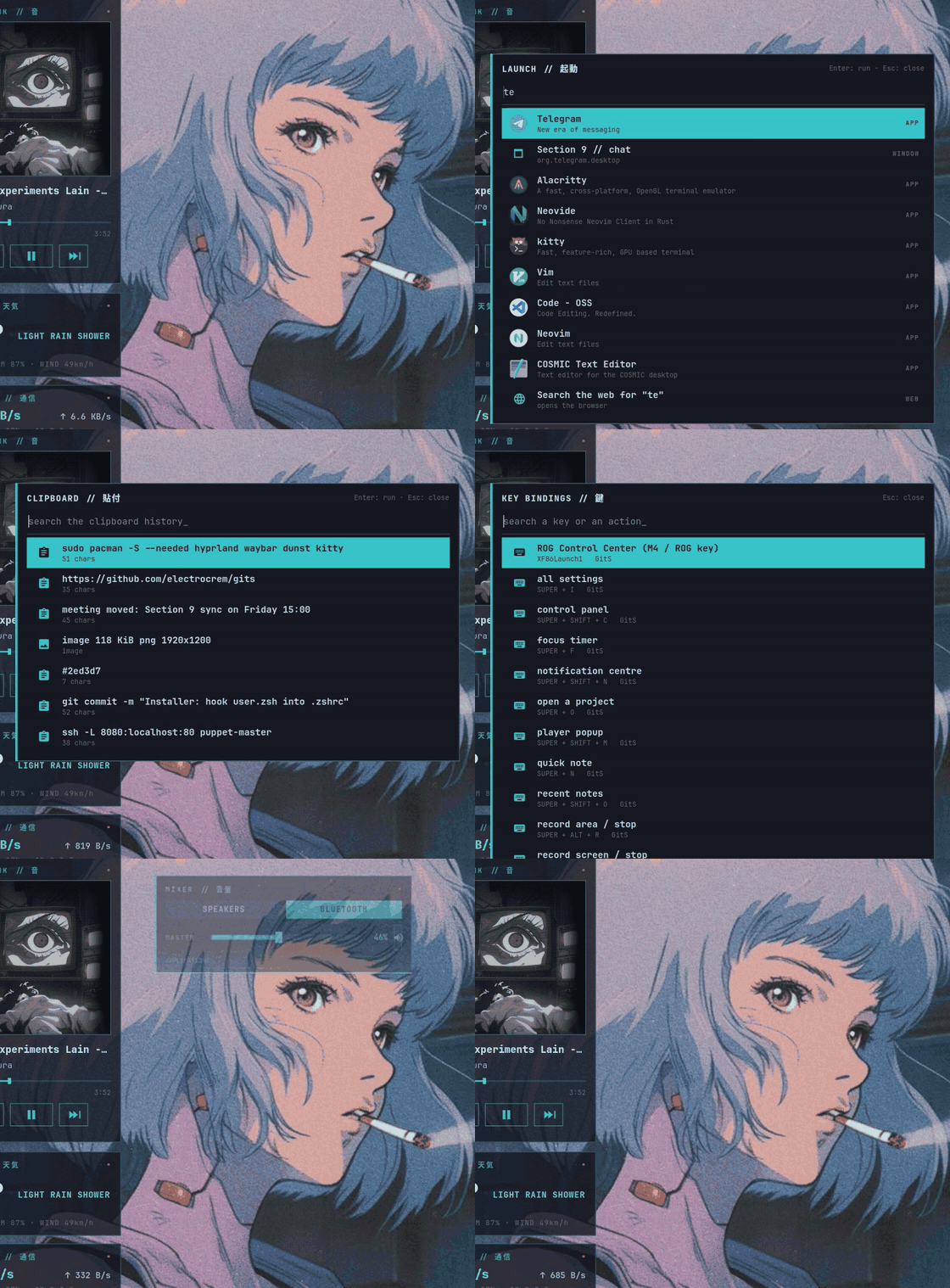
Everything is one keystroke away. Super+A opens a launcher that finds apps, settings, projects, open windows and notes, and does maths.
Super+V is your clipboard history, Super+Tab jumps between windows, Super+, picks an emoji, and Super+/ lists every shortcut there is.
Music, and a radio with a dancer. Super+Shift+M pages through everything that is playing — Spotify, a browser tab, a video — and the last
page is a web radio (DATAMOSH; any AzuraCast station works). It shows what is on air, the cover, how many are listening, and a hologram Lain
who dances on the live spectrum, faster with the music, jumping when the beat hits. Super+R opens it straight away.
A lock screen with a pulse. The clock glitches now and then, the cursor blinks, a scanner runs along the line, and Lain dances at the edge of the picture.
Comfortable basics. A control panel (Super+Shift+C) with the usual toggles and sliders, a sound mixer with one slider per app, a
notification centre, Wi-Fi and Bluetooth menus, on-screen display for volume and brightness, a power menu, quick notes, a focus timer,
screenshots with OCR, screen recording, a night-light schedule, and separate sleep timers for the wall socket and the battery.
A terminal and apps that match. A banner in kitty, a themed prompt, tmux, btop, lazygit, yazi, Neovim, VS Code, Dolphin, and styles for Zen, Logseq, Telegram, Spotify (Spicetify) and Discord (Vesktop). Plus matching icons (Flatpak apps too) and cursors, and login, boot and lock screens in the same style.
It looks after itself. gits-doctor checks that everything is in order and can repair what an update breaks. gits-update takes a
snapshot, updates the system, and then runs the repair.
The keys you will use most
| Keys | What happens |
|---|---|
Super+A |
launcher and command palette |
Super+V · Super+Tab · Super+, |
clipboard history · window switcher · emoji picker |
Super+/ |
every shortcut, searchable |
Super+Shift+M · Super+R |
media popup with all players · the radio |
Super+Shift+C · Super+Alt+V · Super+Shift+N |
control panel · sound mixer · notification centre |
Super+I |
all settings in one menu |
Super+N · Super+F · Super+O |
quick note · focus timer · open a project |
Super+P · Super+Ctrl+S · Super+Alt+R |
screenshot a region · read text from the screen · record an area |
Super+L |
lock the screen |
Super+Shift+Y · Super+Shift+L · Super+Shift+X |
window animations · tiling layout · workflow (default, editing, gaming, battery saver) |
Super+Alt+W · Super+Alt+B · Super+Shift+W |
Wi-Fi · Bluetooth · wallpaper |
Super+Alt+N · Super+Ctrl+N · Super+Alt+I |
night light schedule · night light now · sleep timers |
Super+Shift+R · Super+Shift+U · Super+F7 / F8 / F9 |
radio on / off · UI sounds on / off · previous / play-pause / next |
Super+Shift+T · Super+Alt+U · Super+Alt+D · Super+Shift+B |
tmux sessions · update the system · health report · restart the bar and services |
Gallery
 Tiling with gaps and neon borders: the terminal banner, yazi and Neovim side by side.
 The bar: workspaces, clock, player, load and temperature, Wi-Fi, Bluetooth, volume, layout, mode, notifications, battery, tray, power.
Launcher and quick tools
 Launcher ( Launcher (Super+A): apps, settings, projects, windows, notes and web search in one field |
 Calculator in the same field: Calculator in the same field: sqrt(1764) * 2, 2^10; Enter copies the result |
 Clipboard history ( Clipboard history (Super+V): text and images |
 Window switcher ( Window switcher (Super+Tab) |
 Emoji and symbols ( Emoji and symbols (Super+,): search by name |
 Every shortcut ( Every shortcut (Super+/), searchable |
 Quick note ( Quick note (Super+N) into ~/notes/inbox.md |
 Focus timer ( Focus timer (Super+F): a pomodoro with a counter on the bar |
Panels and menus
 Control panel ( Control panel (Super+Shift+C): toggles, sliders, power profile, tools, session |
 Media popup ( Media popup (Super+Shift+M): one page per sound source; switch with the arrows, the dots, ← → or a two-finger swipe |
 Radio ( Radio (Super+R): Lain dances on the live spectrum, flashing on the beat |
 Sound mixer ( Sound mixer (Super+Alt+V): master, outputs and one slider per app |
 Notification centre ( Notification centre (Super+Shift+N) |
 Wi-Fi (click the bar icon) Wi-Fi (click the bar icon) |
 Bluetooth (click the bar icon) Bluetooth (click the bar icon) |
 All settings ( All settings (Super+I) |
 On-screen display for volume, brightness, keyboard backlight On-screen display for volume, brightness, keyboard backlight |
 Notification popups: normal, critical, from your phone Notification popups: normal, critical, from your phone |
 Power menu Power menu |
Terminal and tools
 Terminal: the banner and the prompt Terminal: the banner and the prompt |
 gits-doctor: the health report |
 Neovim start screen Neovim start screen |
 Neovim with the GitS colours Neovim with the GitS colours |
 tmux tmux |
 lazygit lazygit |
 yazi yazi |
 btop btop |
Apps, login and lock
 Dolphin with cyan folders Dolphin with cyan folders |
 VS Code / Code-OSS VS Code / Code-OSS |
 Login screen (SDDM) Login screen (SDDM) |
 Lock screen: a dancing Lain, a glitching clock, a blinking cursor Lock screen: a dancing Lain, a glitching clock, a blinking cursor |
Install
You need an Arch-based system with Hyprland 0.55 or newer (developed on CachyOS with Hyprland 0.56). The list of packages is in
packages.txt, and ./install.sh --deps installs them for you.
git clone https://github.com/electrocrem/gits.git
cd gits
./install.sh --dry-run          # look at what would happen first
./install.sh                    # install for your user, no sudo
./install.sh --system           # plus the login, boot and GRUB screens (asks for sudo)
Then log out and back in and pick the Hyprland session. Afterwards run gits-doctor: it looks over the session, the services, the theme and
the boot screens and tells you if something is off.
Your files are safe. Anything the installer would replace is first moved to ~/.local/share/gits-install/backup/<time>/. It adds a few
clearly marked lines to your zsh and Neovim config and changes nothing else in them. Running the installer twice is harmless.
Want a peek without logging out? GITS_NESTED=1 Hyprland -c ~/.config/hypr/hyprland.lua opens the desktop in a window.
Other options: --telegram builds a Telegram theme into ~/Downloads, --login-guards helps laptops with hybrid AMD/NVIDIA graphics that sometimes
log in to a black screen, and --dry-run only shows what would be done.
Uninstall
./uninstall.sh
It restores your backups, removes what it created and takes its lines out of your zsh and Neovim config. The login, boot and GRUB screens need sudo, so the commands to undo them are printed at the end.
Make it yours
- Look:
Super+I→ Appearance: the colour theme, your own accent colour on top of it, the lock-screen mascot, the radio's dancer and each theme's wallpaper in one window. Orgits-theme set NAME/gits-theme option NAME accent '#FF2E97'. A theme is a small file in~/.config/gits/themes/that gives the roles ofgits.theme(background, accent, red...) other colours; the whole desktop is recoloured from it andgits-theme set gitsbrings the originals back exactly. - Window motion:
Super+Shift+Y—cyber(simple and sharp, the default),gits(hard snap),lively(springs and bounces), oroff. - Wallpaper:
gits-wall --pick, or drop pictures into~/Pictures/wallpapers— GIFs work too. - Another radio station: set
GITS_RADIO_STREAMandGITS_RADIO_API(any AzuraCast station). Prefer a calmer Lain?GITS_RADIO_LAIN_SPEED=0.5; no flash on the beat:GITS_RADIO_FLASH=0; her own colours:GITS_RADIO_LAIN=color. - A plainer lock screen: copy
~/.config/hypr/hyprlock/static.confover~/.config/hypr/hyprlock.conf. On battery the animations already run slower (gits-lock, about a third of the CPU);GITS_LOCK_LITE=alwaysorneveroverrides that. - Weather card:
GITS_WEATHER_LOCATION="Berlin"(it guesses by IP otherwise). - Home server card:
hl.env("GITS_SERVER", "pi")inlocal.lua(a Host from~/.ssh/config, oruser@host) shows a Raspberry Pi or any Linux box on the desktop: CPU, RAM, temperature, disks, Docker containers and undervoltage. It needs key login andpython3on the server, nothing is installed there.GITS_SERVER_NAMEchanges the name on the card. - Add your own rows to the settings menu in
~/.config/gits/settings.tsv. - Monitors and other per-machine settings: put them in
~/.config/hypr/gits/local.lua(for examplehl.monitor({ output = "DP-3", mode = "2560x1440@180", position = "0x0", scale = 1 })). It loads last and the installer never touches it.
If something looks wrong
Run gits-doctor first; gits-doctor --fix repairs what an update usually breaks. If GRUB shows
error: ... sparse file not allowed. Press any key on every boot, run ./install.sh --fix-grub. More in docs/PITFALLS.md.
For tinkerers
How the repo is laid out, what exactly the installer touches, and how the pictures are made: docs/MAINTAINING.md. The colours are in docs/PALETTE.md.
License
Code and configs: MIT, see LICENSE. The pictures in assets/ and third-party files are not covered by it, see NOTICE.md.