


st8ks
A fast Kubernetes desktop client that finds what is broken and helps you fix it.
Linux · macOS · Windows
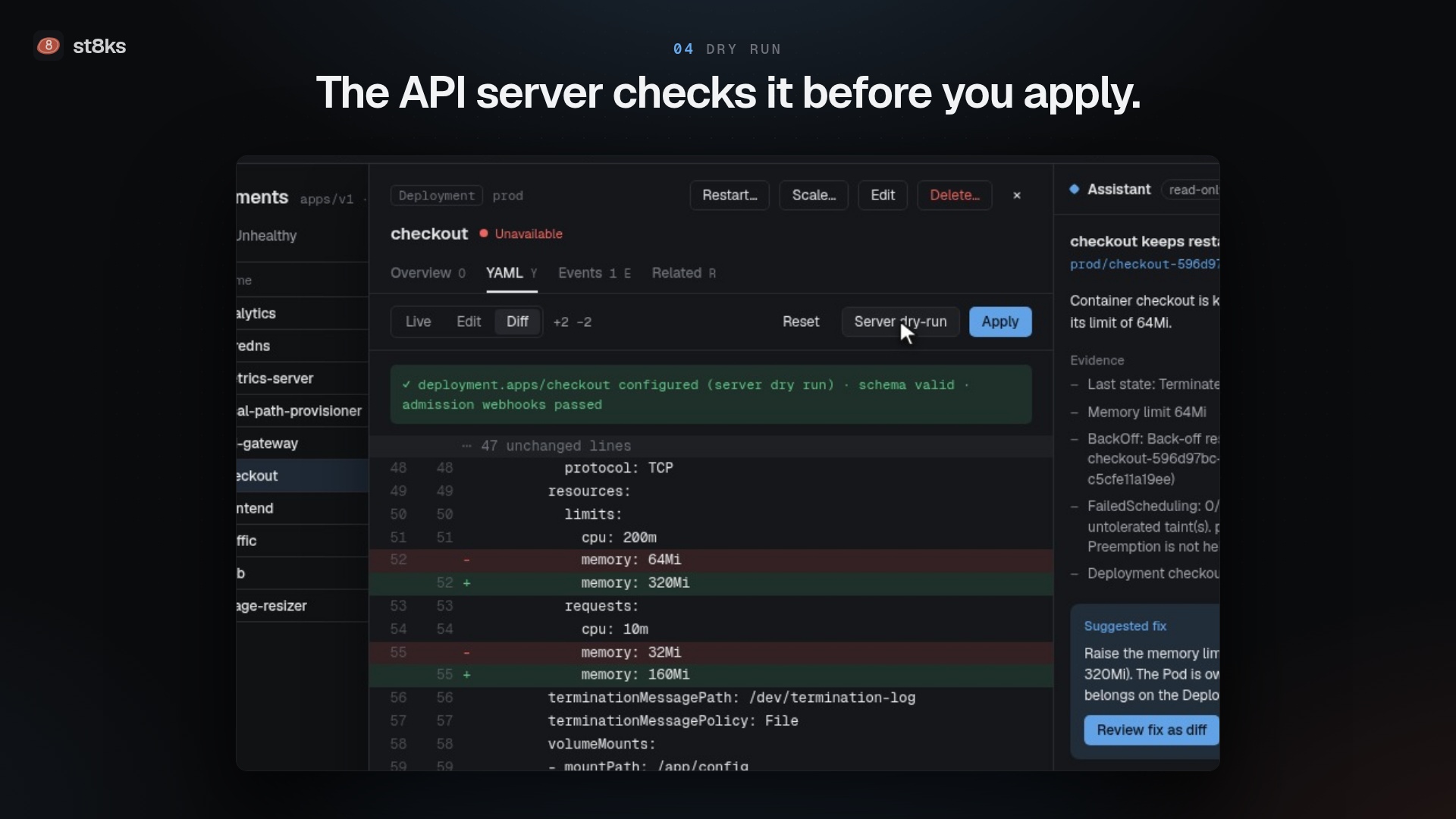
st8ks watches your clusters live. It shows every resource, finds workloads that fail, collects the evidence, and proposes a fix that you review as a diff. Every change goes through a confirmation with an optional server dry run.

What you can do
| See every resource live | Lists for all built-in kinds and every CRD. Filter with ns:prod status:crash app=web, sort, save views, and act on many objects at once. More |
| Find what is broken | st8ks detects crash loops, OOM kills, missing images, pods that cannot be scheduled, stuck rollouts and failed jobs. More |
| Fix it safely | Review a proposed fix as a YAML diff, run a server dry run, then apply. Protected namespaces need the name typed first. More |
| Edit manifests in Git | The IDE checks your manifests against the schema and the live pods of the cluster, shows the diff to the cluster, applies with server-side apply, and commits and pushes. More |
| Debug a container | Stream logs, open a shell, attach a debug container to a pod that crashes, and forward ports. More |
| Understand access | The RBAC explorer names the binding and the rule behind each permission. The API server confirms each answer. More |
| Operate Helm releases | Revision history, rollback, uninstall, and upgrade with edited values. More |
| Trace traffic | A topology graph from ingress to service, pod, ReplicaSet and Deployment. More |
| Ask why | The read-only assistant explains an issue from the YAML, events and logs with the Claude API. More |

Install
Download the file for your platform from the latest release:
| Platform | File |
|---|---|
| macOS, Apple silicon and Intel | st8ks-darwin-universal.dmg |
| Windows x64 or Arm | st8ks-windows-amd64-setup.exe or st8ks-windows-arm64-setup.exe |
| Linux x86-64 or Arm64 | st8ks-linux-amd64.tar.gz or st8ks-linux-arm64.tar.gz |
On Linux, extract the archive and run ./install.sh. st8ks needs WebKitGTK 4.1 and GTK 3. The installation guide covers each platform, Gatekeeper and SmartScreen prompts, and checksums.
Quick start
st8ks reads the same kubeconfig files as kubectl. Start it, and it opens your current context.
st8ks                                   # KUBECONFIG, ~/.kube/config and other files in ~/.kube
st8ks --kubeconfig ~/clusters/lab.yaml  # only this file
st8ks --context prod-eu                 # open this context first
Press Ctrl K, or ⌘K on macOS, to search resources and run commands. The getting started guide takes five minutes.
Try it on a local cluster
You need Docker. The script downloads kind and helm when they are missing:
make cluster-up      # a 3-node kind cluster with workloads that fail on purpose
make dev             # st8ks finds ~/.kube/st8ks-dev.yaml by itself
make cluster-reset   # delete the cluster and create it again
make cluster-down    # delete the cluster
See Development for what the cluster contains.
Documentation
- Installation
- Getting started
- Clusters and kubeconfig files
- Resources, filters and bulk actions
- Details, YAML editing and safe changes
- IDE for manifests in Git
- Logs, shells and port-forwards
- Issues and the assistant
- RBAC explorer
- Helm releases
- Topology
- Keyboard shortcuts
- Settings, flags and environment variables
- Troubleshooting
- Architecture and performance
- Development
- Release process
Build from source
go install github.com/wailsapp/wails/v2/cmd/wails@v2.16.0
make build    # the binary goes to build/bin
On Linux, install libgtk-3-dev and libwebkit2gtk-4.1-dev first. Development lists the requirements for each platform.