

Run GitHub Docker Compose apps in disposable sandboxes. Verify workflows, test hardening, and get evidence-backed reports.
Quick start · Usage guide · Setup
中文 README · English
How it works
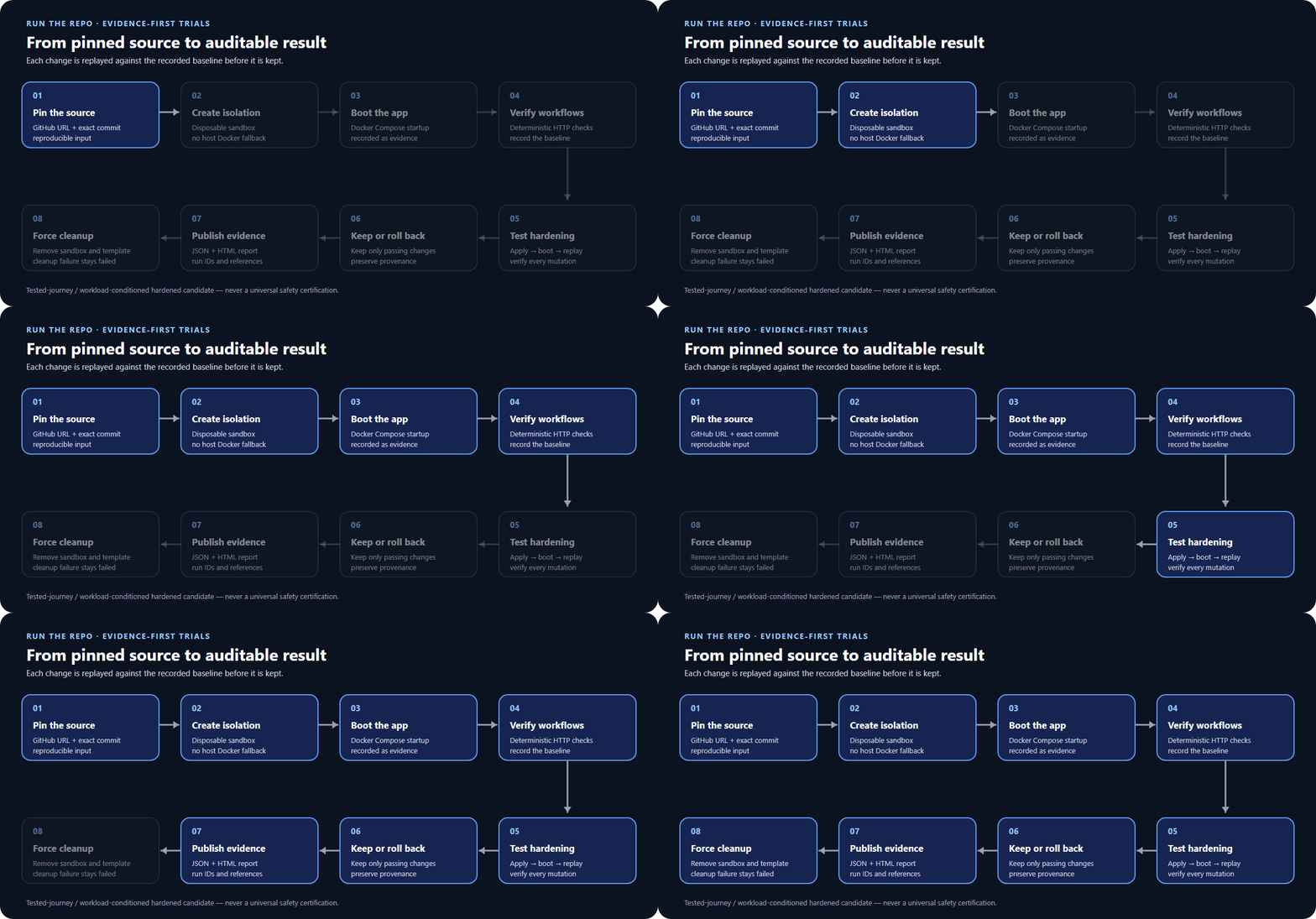
Feature Demo
1. Automatic Project Detection and Environment Check
new-check.en.mp4
2. Trial Run and Results
trial-run-results.en.mp4
What you get
| Capability | Result |
|---|---|
| Commit-pinned trials | Know exactly which source version was tested |
| Deterministic HTTP checks | Check response status and content, including declared authenticated workflows |
| Tested hardening | Keep or roll back each change based on replayed checks |
| Usable outputs | JSON/HTML reports, evidence references and a cumulative hardened overlay when provenance is valid |
| Local console | Submit one trial, follow its status and open its report |
Quick start
Before you begin: use the distro's ext4 filesystem with Ubuntu 24.04 on WSL2, systemd, accessible nested KVM and authenticated Docker Sandboxes v0.42.0 with the reviewed default-deny policy. Native Windows and host Docker execution are not supported. Follow the one-time setup guide if these prerequisites are not ready.
From your checked-out project directory, with uv installed:
uv sync --locked --all-groups
uv run playwright install chromium
uv run repotrial doctor
Continue only when doctor reports READY. The setup guide covers browser OS
dependencies and proxy configuration.
Local Web console
For model-assisted runs, open Advanced options in the Web console. Enter an
OpenAI-compatible Base URL and API key, click Get models, then choose a
returned model or enter one manually and save. The key is persisted only in an
owner-only settings file within the XDG configuration directory. By default,
this file is ~/.config/repotrial/model-settings.json; set XDG_CONFIG_HOME to
use another XDG configuration directory. The settings API does not echo the key,
it is excluded from public job payloads, and a run passes it only to the
trusted CLI subprocess. Clear model settings to remove it.
Start the console in the same WSL Bash session:
uv run repotrial serve --port 8765
Open http://127.0.0.1:8765/, enter a public repository URL, its full commit SHA and internal web port. Set your model endpoint/name when using a model. The console is loopback-only and runs one trial at a time.
CLI
Example target: Umami. Replace the model endpoint and name with your provider's
values; this command does not supply the authenticated workflow shown above.
Authentication provider keys are supplied through REPOTRIAL_MODEL_API_KEY;
see the usage guide for the
complete CLI-only instructions.
uv run repotrial inspect https://github.com/umami-software/umami \
  --provider docker-sbx \
  --commit-sha ca661c7057984aa98ed4f7083d84dae2f65bfcb0 \
  --container-port 3000 \
  --compose-path docker-compose.yml \
  --model-endpoint https://MODEL-ENDPOINT/v1 \
  --model-name MODEL_NAME
Reports are written to artifacts/<run_id>/report/.
For your own HTTP checks, use --journeys-file.
Preview boundaries
- Isolation: no host Docker fallback. Cleanup is fail-closed; CPU, memory, disk and host-side sandbox-duration bounds remain enforced.
- PID limits: the supported SBX runtime has no verified PID hard bound; fork-bomb protection is not claimed.
- Coverage: real-target browser workflows are unsupported. Accepted LLM contribution has not been demonstrated; operator-authored checks are not LLM evidence.
- Installation: tested on the supported existing WSL/SBX host, not a fresh OS.
- Product scope: no public resume or durable Web history; the default API container is not a ready-to-run sandbox service.
- Credentials: use disposable target test accounts only. Web model keys are persisted in the owner-only settings file within the XDG configuration directory described above; CLI model runs use the process environment. Neither path puts keys in a Journey file.
Documentation
| Need | Guide |
|---|---|
| Install WSL/SBX or fix connectivity | Environment setup |
| Write HTTP checks, configure a model or troubleshoot | Usage guide |