


Game Boy Advance, Game Boy and Game Boy Color on your PSP,
and two PSPs that play together like two consoles and a link cable.
Version 4.1.0 · PSP-1000, 2000/3000 and Go · no BIOS needed · GPL-2.0
⬇ Download the latest release · ▶ Watch the trailer · What's new · Install · Playing together · Full feature list
Hold a button. Take it back. Rewind arrived in 4.0.0: the game runs backwards for as long as you hold, and you carry on from wherever you let go. The gameplay is real; the anime retelling is from the 4.0.0 trailer.
Race a friend in Mario Kart, fight them in Advance Wars, trade Pokémon across Game Boy generations: GBAdhoc links two PSPs the way a cable links two Game Boys, for Game Boy Advance games as well as Game Boy and Game Boy Color. This release improves save protection, Game Boy timer accuracy, rewind clock restoration and wireless session validation. It also adds a bounded GBA GameShark/Action Replay cheat subset.
It still runs the hard ROM hacks at full speed on a PSP-1000, because the renderer lives on the console's second processor, and you can still put the PSP to sleep and pick the game up tomorrow exactly where it was.
 Rewind
Hold △ and the game runs backwards, sound and all. Let go and play on from there. Your in-game saves are never undone. |
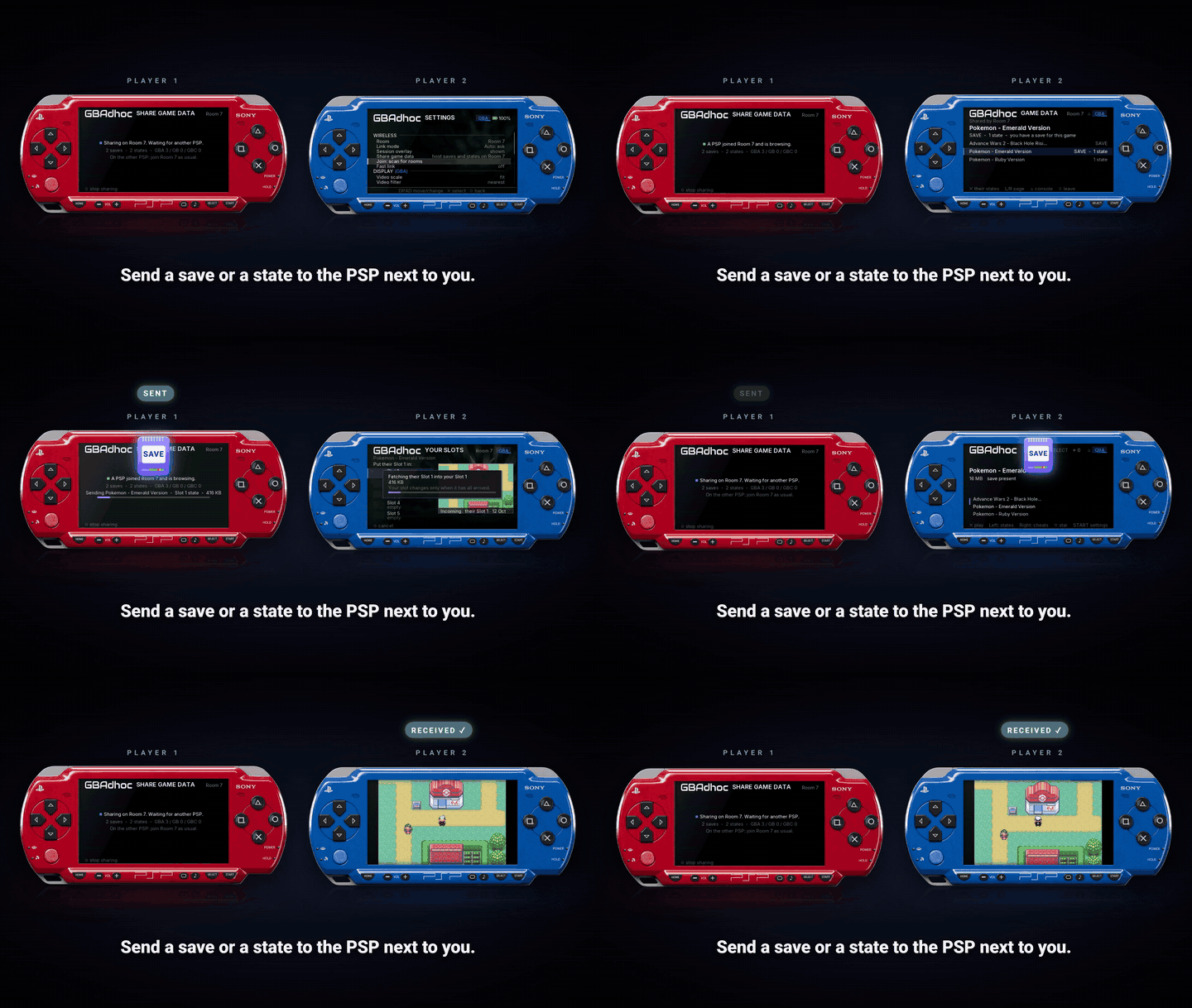 Share saves and states
Send a save file or a save state to the PSP next to you, over the PSP's own WiFi. ROMs are never sent. |
 Faster link play
Link-cable games between two PSPs cost much less than before. Street Fighter Alpha 3 and Sonic Battle run at full speed. |
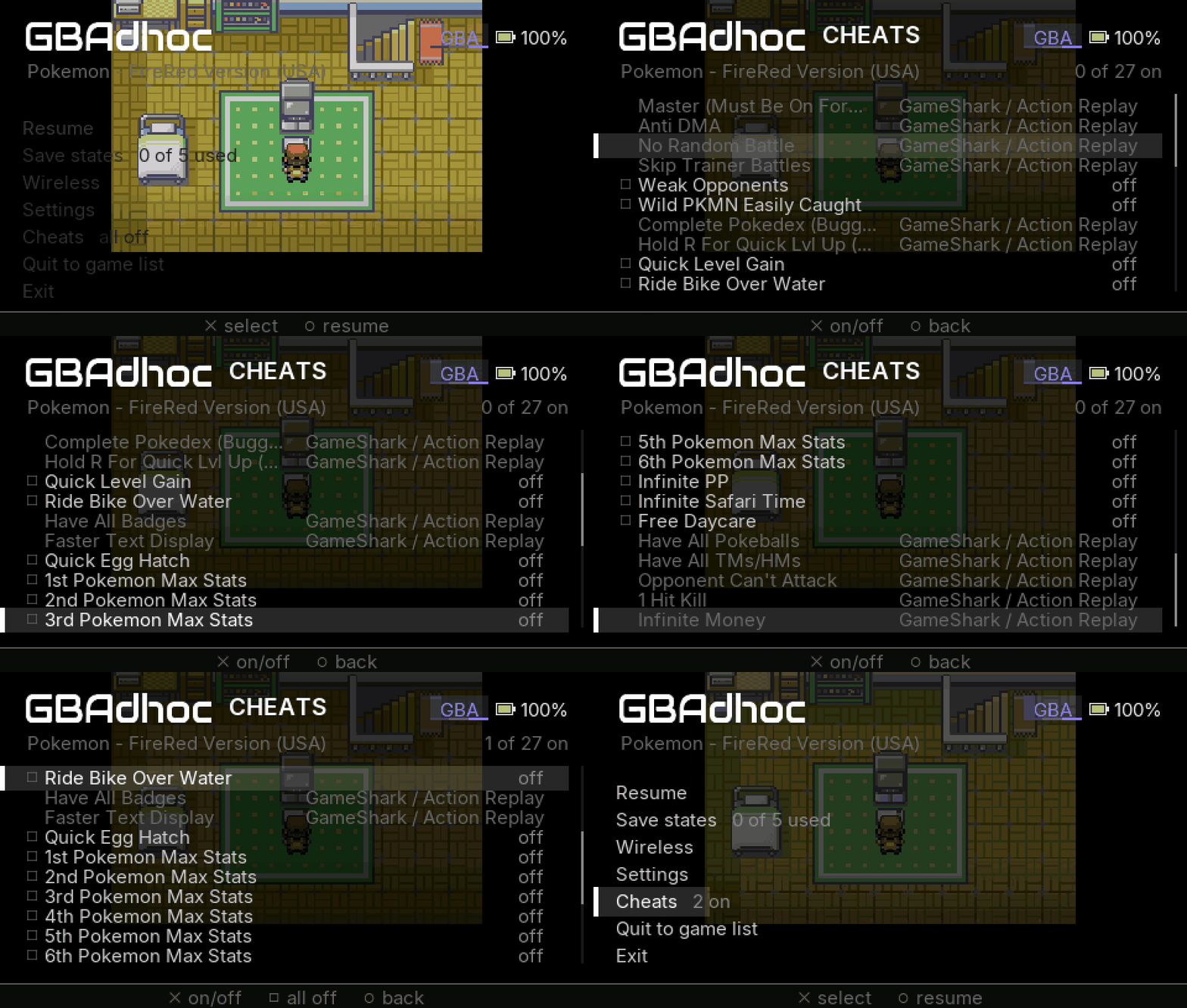 Cheats
Named cheats switched on and off from the menu. Ready-made packs, CodeBreaker and supported GameShark/Action Replay codes. |
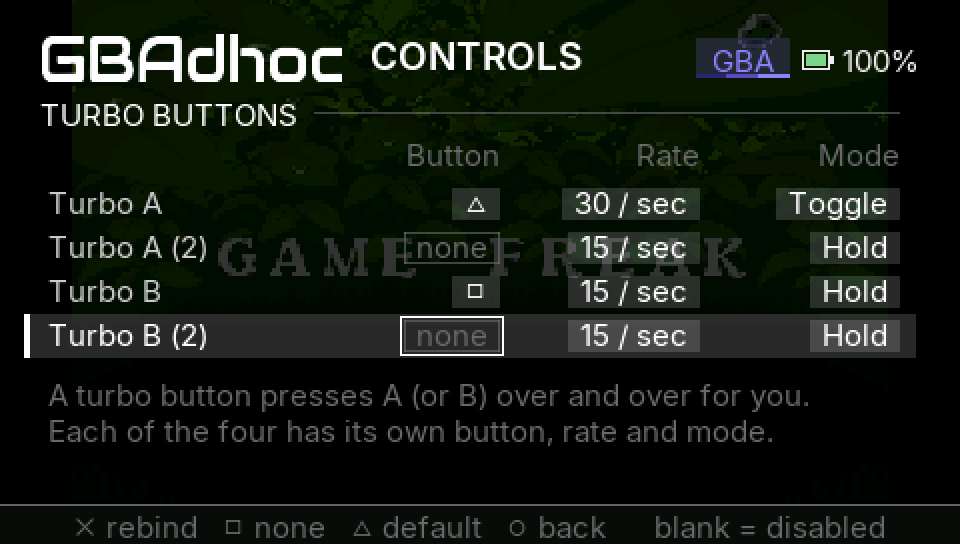 Turbo buttons
Four of them, each with its own button, speed and hold-or-toggle mode. |
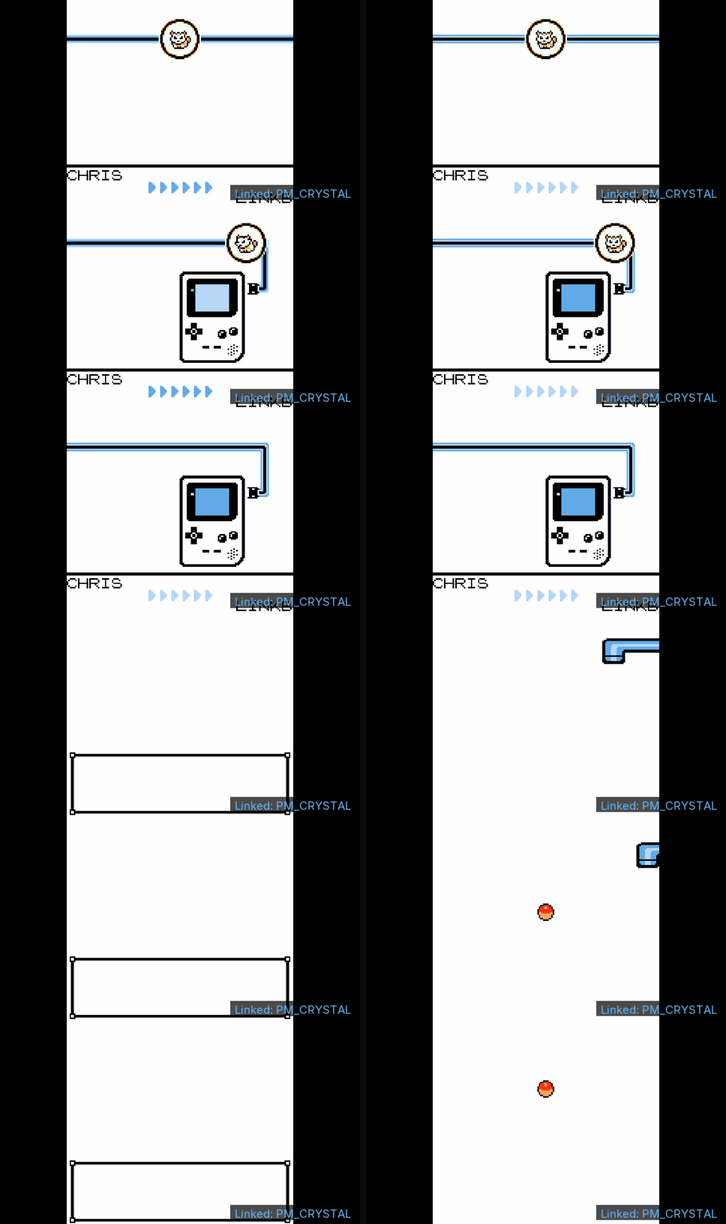 Game Boy trades
Red, Blue, Yellow, Gold, Silver, Crystal: trade and battle like two Game Boys. Only one of you needs the cartridge. |
What's new in this release
4.1.0 focuses on reliability:
- Whole-image battery writes preserve the previous usable save when replacement fails; failed battery reads refuse boot instead of later writing blank or partial RAM.
- GBA cable startup completes pending battery writes before changing session RAM.
- GB/GBC DIV and TIMA timing, delayed reloads, HALT wakeup, audio and display fixes.
- Rewind restores cartridge clock context and handles failed restores safely.
- Malformed save states are rejected before they can corrupt core state.
- Media Engine, standby and USB fixes enforce buffer and file ownership.
- Wireless admission and save sharing reject stale sessions. Update both PSPs to 4.1.0: these transports now use protocol version 2.
- GBA GS1/AR3 cheats support a bounded RAM-only subset; new entries start disabled. See supported cheat commands.
See the 4.1.0 release notes and validation scope.
Download the ready-made cheat pack: 48 game lists / 1,618 entries. Extract into PSP/GAME/GBAdhoc410/cheats, match filenames to your ROMs, then open Cheats and press X to toggle an entry.
Features introduced in 4.0.0
The features below were introduced after 3.5.0.
NEW Rewind
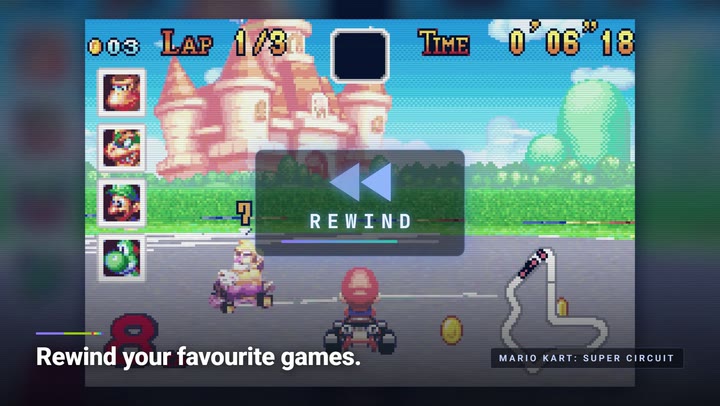
Real gameplay from the 4.0.0 trailer. On the PSP, a ring and a timer take the place of the trailer's REWIND badge.
Hold a button and the game runs backwards, sound and all. Let go and you carry on from that moment.
- Hold △ to rewind, let go to play. A ring on screen turns as you go back: the dot
leaves the bottom and travels counter-clockwise, and when it is back where it started
you have reached the oldest moment you can return to. Beside it, how far back you are
and how much is left (
-0:06 0:04 left). - Your saves are permanent. Rewinding past an in-game save never undoes it. The save on your Memory Stick is the one the game last wrote, whatever you rewind over, and the rewind will not set you down in the middle of a save.
- It survives the POWER switch. Sleep in the middle of a rewind and the PSP wakes to the picture you were looking at.
- It works with fast-forward, so you can skim forward and step back.
- Turn it on in Settings → Rewind. It is off by default and takes effect from the next game you start. Rewind length chooses how much history is kept: Short (1 MB), Medium (2 MB, the default) or Long (4 MB). How many seconds that is depends on the game: about 40 seconds of Pokémon Emerald at Medium, a few seconds of a busy 3D racer. Long is meant for the PSP-2000, 3000 and Go, which have the memory to spare.
- GBA games only for now. Rewind is off during link play. △ no longer cycles the video preset by default; bind that wherever you like in Controls.
NEW Cheats
Per-game cheat lists you switch on and off from the menu.
- One text file per game in
GBAdhoc/cheats/, named like the ROM with.cht: a name on one line, its codes underneath. RetroArch.chtfiles are read as they are.cheats/README.txtin the download is a worked example. - Switch codes on and off from Cheats in the in-game menu, or with RIGHT on a game in the list. Every cheat starts off, and your choices are remembered per game.
- Game Boy Advance: CodeBreaker codes and plain
ADDRESS:VALUEwrites. Game Boy / Game Boy Color: GameShark codes. - Kept small on purpose. A cheat can only write to the game's working memory, so a bad code cannot damage a ROM or a save file. That is also why GameShark and Action Replay codes for GBA, which are encrypted and often patch the cartridge, are listed but cannot be switched on yet. A larger cheat engine is planned for a following update.
- Cheats are paused during link play and come back afterwards.
NEW Share game data between two PSPs
Send a save file or a save state to a friend's PSP, or pull theirs onto yours.
- Settings → Share game data on one PSP opens a room; the other joins it from the room list. You see the games you both have, and for each one the other PSP's save states, with their pictures and times, and its save file.
- Careful with your saves. Every transfer is checked end to end. Replacing a save
file asks first and keeps your old one beside it as
.sav.bak. A file that is not what it claims to be is refused before anything is written. - Save states need the same GBAdhoc version on both PSPs; save files do not.
- Saves and states only. ROMs are never sent.
NEW Turbo buttons
Settings → Controls → Turbo buttons. Four turbo actions, two for A and two for B. Each has its own button, its own speed (10, 15 or 30 presses a second) and its own mode: Hold fires while you hold it, Toggle starts on one press and stops on the next. Nothing is bound until you bind it, and your normal A and B are untouched. Turbo is off during link play.
NEW Faster link play
- NEW GBA Link Cable sessions are faster. Each PSP runs two Game Boy Advances during a link, and the second one now costs much less. On a PSP-3000 + PSP-1000 pair: Advance Wars 2 at 58.6–59.0 fps, a Mario Kart: Super Circuit race at 58.4, and Super Street Fighter II Turbo Revival, the heaviest game we test, up from about 39 fps to 47.
- NEW Wireless → Fast link. Off by default, and the host decides for both PSPs. It halves the number of radio packets, which helps games that still run below full speed (Street Fighter II Turbo Revival reaches about 50). If a link feels worse with it on, turn it off.
- NEW More games played between two real consoles: Street Fighter Alpha 3 and Sonic Battle at full speed, and Kirby multiplayer a little under it.
- NEW A finished trade is written to the Memory Stick straight away, instead of at the next periodic save.
- Update both PSPs to 4.1.0 before linking or sharing saves. Protocol version 2 refuses older transports safely. The new speed and Fast link need both sides.
NEW Fixes
- NEW Music is right again in games that play samples faster than the PSP's output rate: Golden Sun: The Lost Age, Castlevania: Harmony of Dissonance and Iridion II had been wrong since 3.0.0.
- NEW A save always reaches the Memory Stick while you play. When a game ran below full speed, its save could sit in memory until you quit. It is now written within a few seconds.
- NEW Saving after a sleep cannot leave an empty file. The first save after waking rewrote the whole file and emptied it first; it now overwrites in place.
- NEW A save is no longer dropped on exit after a failed write.
- NEW Driver 2 Advance runs at full speed instead of stuttering, with no extra memory.
- NEW Need for Speed Underground 2 no longer flickers.
- NEW PSP-1000: the second-processor renderer needs about 280 KB less system memory, so it loads in more situations.
- NEW Sleeping again on the wake screen no longer drops you to the XMB on the next wake.
- NEW Game clocks (Pokémon's time of day, Game Boy cartridge clocks) keep better time across sleeps and time-zone changes.
NEW Smaller things
- NEW The thumbstick can act as a second d-pad, or each direction can be bound like a button. Settings → Thumbstick; off by default.
- NEW The battery level is in the menu header.
- The Shelf's placeholder card for a game with no box art is shorter.
Release history: 3.5.0 and earlier
3.5.0
GBA link cable between two PSPs (each PSP runs both games; only the buttons cross the air), the Game Boy and Game Boy Color link cable with cartridge sharing for the session, the in-game menu over the paused game, save states with pictures and times, Quit to game list in about a second, every button and shortcut remappable with HOME as an optional menu button, per-console picture settings with integer 2x, sharp bilinear and Ambient bars, reworked fast-forward presets, dynarec optimisations with a pinned instruction-cache layout, and the fix for rare crashes on the PSP-2000, 3000 and Go.
3.0.0
Game Boy and Game Boy Color on the TGB Dual core, at full speed with sound on every model, with the same browser, save states and shoulder chords as GBA. The console switch (△ cycles GBA → GB → GBC), per-console skins, favourites, five save-state slots with the state shelf, dynarec and Media Engine fixes, PSP-1000 ROM loading, link shedding and link hold for the Wireless Adapter, startup-sized JIT caches and full ROM residency on the 64 MB consoles.
2.1.0
The Pokémon sound mixer stopped costing a third of the frame (Heart & Soul's heaviest battle went from 57 to 59.8 fps), and a hard freeze in compiled code was closed, backed by 36 unattended hardware runs and 1440 save-state reloads without a lockup.
2.0.x
Mystery Gift from an Android phone, the three fast-forward presets, the Marquee and Shelf browsers with box art and hero art, wake from sleep with the Media Engine live, the translation gates that took Pokémon Unbound from 29 to 59.9 fps, and the wall clock for the GBA RTC.
The full notes for each are on the releases page.
Playing together
Two PSPs, two ways to link them, both over the PSP's own ad-hoc WiFi: no router, no Internet, no cable.
| Mode | For | What crosses the air |
|---|---|---|
| Link Cable | GBA link-cable games, and every GB/GBC link game | only the buttons each player presses |
| Wireless Adapter | Pokémon Emerald, FireRed and LeafGreen through the AGB-015 adapter | the adapter's radio traffic |
The game picks the mode. Settings → Link mode shows what the game will use:
Auto: Link Cable, Auto: Wireless Adapter, or Auto: ask for the games that do both
(Pokémon Emerald, FireRed and LeafGreen, Mega Man Battle Network 5 and 6, Mario Tennis:
Power Tour), which ask How will the other PSP connect? when you host. You can override
it per game; the choice is kept in roms/linkmode.txt. Games that only link through the
adapter (Mario Golf: Advance Tour among them) stay on the adapter.
Link Cable: how it works
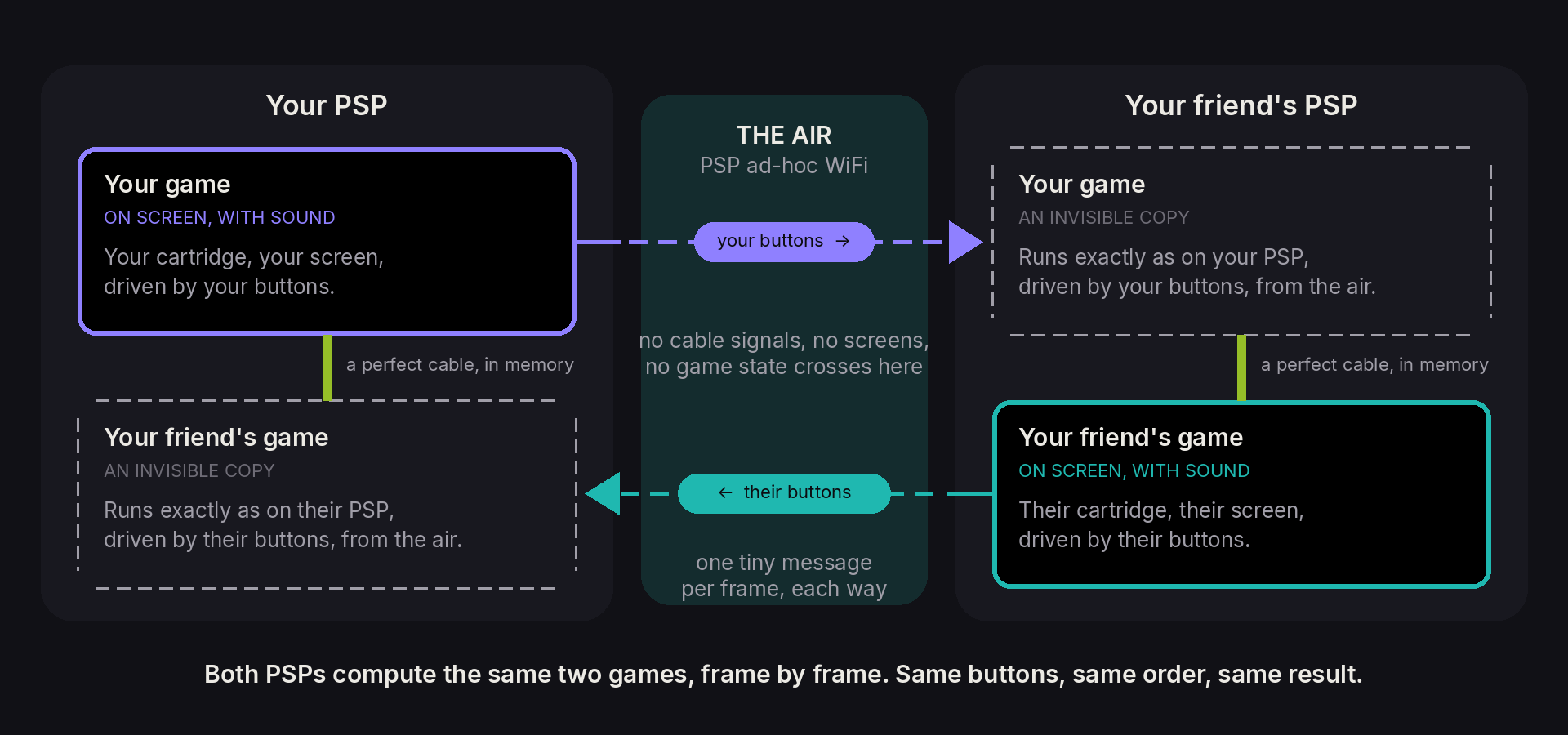
A real link cable answers in microseconds; PSP WiFi answers in milliseconds. Sending the cable over the air can't work, so GBAdhoc doesn't. Each PSP runs both games: yours, the one you see and hear, plus an invisible copy of your friend's, and the two are joined by a perfect cable in memory. The only thing that crosses the air is which buttons each player pressed, one tiny message per frame (about 2.4 KB a second). Both PSPs get the same buttons in the same order, so they compute exactly the same race, battle or trade. No game needs special code for it: if it links by cable, it can link this way.
Game Boy links work the same way, with one difference: only one PSP needs the cartridge. If your friend doesn't have it, it is sent over for the session (Receiving … MB), kept in memory, checked, and never written to their Memory Stick.
Starting a link
- Open the game on both PSPs (for Game Boy, only the host needs it).
- Host: in-game menu → Wireless → Host. A toast says Hosting Room 7 by Link Cable. Waiting for the other PSP.; keep playing.
- Join: in-game menu → Wireless → Join: scan for rooms, and pick the room. Or Join room to go straight to a room number.
- The LINKING screen runs once on both PSPs, then you're in. The chip in the corner reads Link Cable · Room 7 · P1 on the host and P2 on the joiner.
Rooms are numbered 0 to 99; yours is under Settings → Room (Room 7 unless you change it). In the scan list, a room you can't enter is dimmed, and ✕ on it says why (Room 3 is playing Mario Kart Super Circuit. Open it to join.).
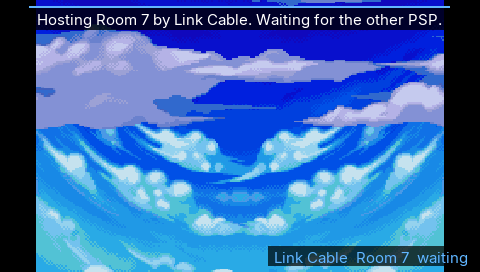 | 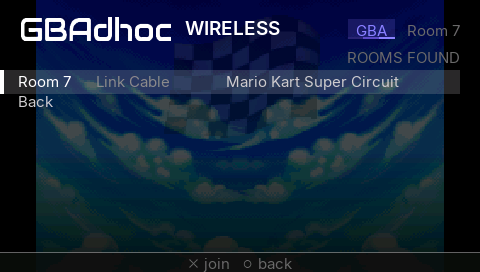 | 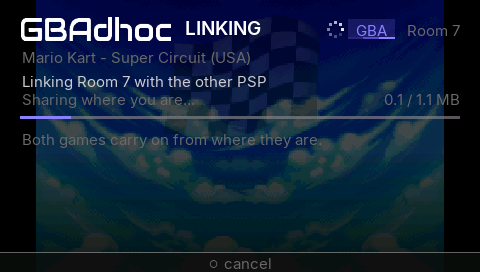 |
| Host, and keep playing. | Join: the rooms in range. | LINKING, once, then play. |
If a link won't start
| The PSP says | What to do |
|---|---|
| The games do not match: a different version or hack. | Both PSPs need the same ROM. |
| The other PSP runs a different GBAdhoc version. | Update both PSPs to the same release. |
| Room 7 is full: 2 players. | Wait for a seat, or host your own room. |
| Room 7 not found - is the host still there? | Have them host again, then rescan. |
| Nobody joined Room 7. (Game Boy) | Host again when the other PSP is ready. |
| The link could not start: not enough memory. | Quit to the game list, open the game, try again. |
| Room 7 is a Wireless Adapter room. This game links by cable. | The host picked the adapter; host or join by cable instead. |
Wireless Adapter
The AGB-015 Wireless Adapter is emulated in full (that work is davidgfnet's); GBAdhoc carries its radio traffic over the PSP's ad-hoc WiFi with a reliable transport of its own. Union Room trades, link battles (singles and doubles), the Trade Center and Mystery Gift, between any of Emerald, FireRed and LeafGreen. Link sessions are paced to 59.73 fps on both consoles, because Gen-3 games count link timeouts in frames. At each battle menu the games themselves pause for about a second while both consoles sync, exactly as they do through the real adapter.
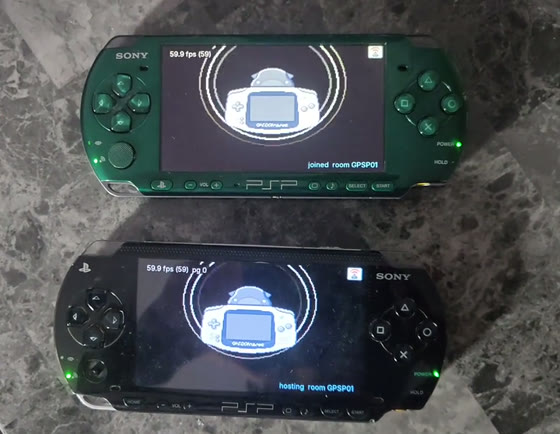
Real hardware, no cables: a PSP-1000 and a PSP-3000 trade over the emulated Wireless Adapter, then fight a link double battle. MP4
⚠ Read this before you link two PSPs
1. The physical WLAN switch must be ON. It is in a different place on every model, and the PSP Go has no switch at all, it is a setting. If it is off you get a message that says so.
2. Both consoles must be on the SAME FIXED ad-hoc channel, not "Automatic".
GBAdhoc uses the channel the XMB sets under Settings → Network Settings → Ad Hoc Mode.
Pick 1, 6 or 11 and set the same one on both consoles, and pick one that is
away from your router. "Automatic" lets the two consoles choose different channels,
and two radios on different channels cannot hear each other no matter how correct
everything else is.
3. Start the session from the in-game menu, Wireless, on both PSPs. Save states are locked while a session is live, because a mid-session load would desync both games.
Mystery Gift
Gen-3 Mystery Gift works, from an Android phone. The phone stands in for Nintendo's distribution station, and the game receives a real Wonder Card through its own Mystery Gift menu; nothing is written into your save by the emulator.
Get the app: Mystery Gift Station
- Open Mystery Gift Station on the phone and pick a gift. The app starts its own
Wi-Fi Direct access point named
Mystery Gift. - On the PSP, in-game, press SELECT + DOWN. GBAdhoc joins that access point and starts listening; it creates the connection profile itself, so there is nothing to set up in the PSP's network settings.
- In the game, go to Mystery Gift on the title screen and receive the card as you normally would.
SELECT + DOWN again stops it (remappable under Controls). Mystery Gift and a link session cannot run at the same time; the emulator will tell you to stop one before starting the other. Full protocol notes, the gift list and troubleshooting live in the app's repository.
Screenshots
New in this release, in the dark theme. The 3.0.0 screens (both browsers, every console skin, favourites, the state shelf) are unchanged and still apply.
 The in-game menu, over the paused game. |
 Save States. Five slots, a picture and a time each. |
 Controls. Game buttons, shortcuts, and HOME as the menu. |
 Settings, over the selected game's art. Room, Link mode, and a display section per console. |
 Loading, over the game's own art. |
 Quit to game list. The game fades into the library, no relaunch. |
 Linked. The chip says which room and which player. |
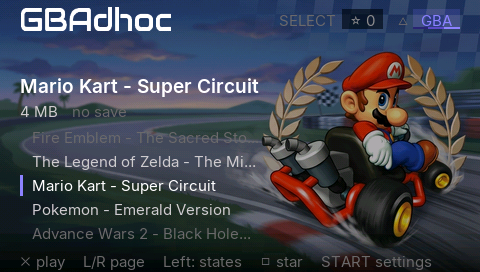 Marquee, with the game's hero art. |
Everything it does
The full feature list
Consoles
- Game Boy Advance on the gpSP core with its MIPS dynarec and the translation gates that make CFRU hacks (Pokémon Unbound, Heart & Soul) run at full speed.
- Game Boy and Game Boy Color on TGB Dual, full speed with sound, with Super Game Boy palettes, a GB palette setting and a cartridge real-time clock. GBC colour correction modelled on the real screen.
- No BIOS needed: an open-source replacement is bundled. Drop a real
gba_bios.binin the app folder if you prefer.
Playing together
- GBA link cable between two PSPs (Link Cable mode).
- GB/GBC link cable between two PSPs; only one needs the cartridge.
- AGB-015 Wireless Adapter emulation over PSP ad-hoc: Union Room, Trade Center, link battles, Mystery Gift.
- Mystery Gift from an Android phone (Mystery Gift Station).
- NEW Fast link, an option for games that run below full speed when linked.
- NEW Share game data: send save files and save states between two PSPs.
- Save auto-backup before every session; save states locked while linked.
Performance
- The renderer runs on the PSP's Media Engine, so both processors work on every frame.
- Three fast-forward presets: 3x, Unlimited (flat out, at most 30 frames drawn a second) and Unlimited Smooth (flat out, up to 60 drawn). Hold or toggle.
- Dynarec optimisations and a pinned instruction-cache layout.
The browser
- Two shells, Marquee and Shelf, each in dark or light.
- One list per console, △ to switch with the flare, per-console skins.
- Favourites with □ and SELECT, stored in
roms/favourites.txt. - Box art and hero art matched by filename.
- Settings over the selected game's art; a loading screen with the art.
Playing
- NEW Rewind for GBA games: hold a button to run the game backwards.
- NEW Per-game cheats: CodeBreaker and raw codes for GBA, GameShark for GB/GBC.
- NEW Turbo buttons: four, each with its own button, speed and hold/toggle mode.
- NEW The thumbstick as a second d-pad, or bound per direction.
- The in-game menu over the paused game.
- Remap every button and shortcut; HOME as the menu button if you want it.
- Per-console picture: scale (1x, fit, stretch, integer 2x), filter (nearest, bilinear, sharp bilinear), Ambient bars, GB palette.
Saving
- Five save-state slots per game with pictures and times, the state shelf in the browser (LEFT), delete (△ in game, □ on the shelf).
- Select + L / Select + R for a quick save and load of slot 1.
- Battery saves flushed on exit, on HOME, on Quit to game list, and
periodically as you play, with a
.sav.bakkept. Sleeping never touches the save.
The console
- Wake from sleep: slide it shut, flick the switch, come back whenever.
- All three PSP models, tested on hardware. 333 MHz.
- Screenshots to
log/.
In-game controls (all remappable under Settings → Button mapping)
| PSP (default) | Does |
|---|---|
| D-pad | D-pad |
| ○ | A |
| × | B |
| L / R | GBA L / R |
| Start / Select | Start / Select |
| □ | Fast-forward (hold by default; preset and hold/toggle in Settings) |
| △ | NEW Rewind, while held (when Rewind is on; GBA) |
| (unbound) | Cycle video preset |
| Select + L | Quick save, slot 1 |
| Select + R | Quick load, slot 1 |
| Select + △ | Pause screen |
| Select + Down | Mystery Gift listener on/off |
| L + R + Select | Screenshot |
| Start + Select, held ~¼ s | In-game menu (or HOME, if you choose it) |
| Start + Select, held 1.5 s | Quit |
In Button mapping, ✕ rebinds a row (press the new button or chord), □ sets it to none, △ restores its default. A shortcut can be a chord of up to four buttons, but never START and SELECT together. Taking a button that another row uses moves it, and the other row goes blank, which the page tells you. The menus themselves always use ✕ to confirm and ○ to go back.
Settings
| Section | Setting | |
|---|---|---|
| Wireless | Room | Room 0–99 (Room 7 by default) |
| Link mode | Auto, Link Cable or Wireless Adapter, per game | |
| Session overlay | show or hide the session chip during play | |
| NEW Fast link | on or off; the host decides for both PSPs | |
| NEW Share game data | from the game list: share, or scan for a room | |
| Display per console | Video scale | 1x, fit, stretch, 2x (integer) |
| Video filter | nearest, bilinear, sharp bilinear | |
| Ambient bars | off, art, art else game | |
| GB palette | Auto, Grey, DMG green, Pocket | |
| Interface | Theme | dark or light |
| Menu style | Marquee or Shelf | |
| Gameplay | Fast-forward | 3x, Unlimited, Unlimited Smooth |
| FF button (Square) | hold or toggle | |
| FPS counter | on or off | |
| NEW Rewind | on or off, from the next game | |
| NEW Rewind length | Short, Medium or Long | |
| Controls | NEW Thumbstick | off, moves (a second d-pad) or custom |
| Button mapping | every button and shortcut; the menu button | |
| NEW Turbo buttons | four turbo actions: button, rate, hold or toggle |
The Display section is labelled with the console it applies to (DISPLAY (GBA), (GB)
or (GBC)): from the browser it edits the highlighted game's console, in game the
running one. A few more keys live only in config.ini: quick_return = 0 brings back
the old relaunching Quit to game list, gbc_color_correction = 0 the old GBC colours,
loading_art = 0 a plain loading screen, and gblink_delay (1–30 frames, default 4)
the Game Boy link's input delay.
Where things are saved
- Battery saves:
roms/<game>.savfor GBA,roms/<game>.gb.savandroms/<game>.gbc.savfor Game Boy. A.sav.bakis kept. - Save states:
roms/<game>.st0….st4, and.gb.st0/.gbc.st0… likewise, each with a.thumbbeside it and, a.shot(the full-size picture on the Save States page). - Favourites:
roms/favourites.txt. Link mode overrides:roms/linkmode.txt. - NEW Cheats:
cheats/<game>.cht, which you write, andcheats/<game>.on, where the menu remembers what is switched on. - Screenshots:
log/. - Settings:
config.iniin the app folder.
Install
- Download the latest release
and unzip it to the root of your Memory Stick. It lands in
PSP/GAME/GBAdhoc. - Put your
.gba,.gband.gbcfiles inGBAdhoc/roms/, loose or in subfolders (two levels). - Optional: box art in
GBAdhoc/boxart/, hero art inGBAdhoc/hero/(see Artwork), cheat files inGBAdhoc/cheats/. - Launch it from the XMB. No BIOS needed.
Requirements: a PSP running custom firmware (developed and tested on ARK-4); PSP-1000, 2000/3000 and Go are all tested. To play together: two PSPs, both with the WLAN switch on, both on the same fixed ad-hoc channel.
Upgrading: copy EBOOT.PBP, gbadhoc_me.prx and gbadhoc_home.prx over your
install, always all three together. Your config.ini carries over, and your settings are
moved into the per-console profiles automatically. Your roms/, battery saves and save
states are untouched.
Artwork
Two optional kinds of picture: box art, the small cover in the Shelf layout, and hero art, the full-screen 480x272 backdrop behind Marquee, Settings and the loading screen. The browser works fine without either. A picture is matched to a game by filename and nothing else:
roms/Pokemon - LeafGreen Version (USA).gba
hero/Pokemon - LeafGreen Version (USA).png     <- found
hero/Pokemon LeafGreen.png                     <- silently ignored
No database, no fuzzy matching, and a mismatch prints no warning; the game just shows
no art. If a card is not showing up, the name is wrong. Same rule for boxart/, and
the same for .gb and .gbc games.
Ready-made packs, a tool that renames a pack to match the ROMs you actually have, and a script that derives a backdrop from box art are in the art repository: GBAdhoc-heroart. The packs are generated images, not scans and not official artwork, and they are kept out of this repository because hero art derives from copyrighted box art.
What to expect from which games
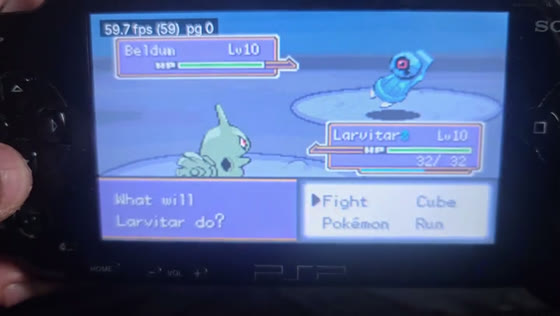
The slowest PSP, the heaviest game: Pokémon Unbound's rival battle on a PSP-1000, FPS counter on. The middle of the fight is sped up 3× for the clip (labelled); the counter shows the real rate throughout. MP4
| Pokémon Emerald / FireRed / LeafGreen | Full speed. Wireless Adapter trades and battles on real consoles; Emerald's Cable Club by Link Cable in emulated pairs. |
| Pokémon Unbound and other CFRU hacks | Full speed (59.9). Run it on the game's medium music preset for the best results. |
| Pokémon Heart & Soul | Full speed (59.8) including its heaviest battles. Set its sound to mono for the best performance. |
| Advance Wars 2 | Linked battles between two PSPs, 58.6–59.0 fps on a PSP-3000 + PSP-1000 pair. |
| Mario Kart: Super Circuit | Linked two-player races, 58.4 fps on the same pair. |
| NEW Street Fighter Alpha 3, Sonic Battle | Linked play at full speed between two real consoles. |
| NEW Super Street Fighter II Turbo Revival | Links and stays in sync at about 47 fps; about 50 with Fast link. |
| NEW Driver 2 Advance | Full speed (it stuttered before this release). |
| Sonic Advance, Mario Tennis: Power Tour | Linked play passes in emulated pairs; not yet on two real consoles. |
| Pokémon Red, Blue, Yellow, Gold, Silver, Crystal | Trades and battles between two PSPs. |
| Mario Golf: Advance Tour | Its cable link doesn't form, so GBAdhoc offers it the Wireless Adapter instead (not yet tested with it). |
| Most commercial GBA titles | Full speed. |
| Heavy 3D / Mode 7 GBA titles | Varies; fast-forward and frameskip are there if you need them. |
| Game Boy / Game Boy Color | Full speed with sound on every model. Shantae is playable but shows glitches on this core. |
Status and known limitations
Works, tested on hardware, on all three PSP models: Wireless Adapter link battles and trades, sleep/wake with the Media Engine live, GB/GBC at full speed, and Quit to game list (520 returns on a PSP-1000 and a PSP-3000, about a second each, against three for a fresh boot). On a PSP-3000 + PSP-1000 pair: GBA Link Cable (Advance Wars 2, Mario Kart: Super Circuit) and the Game Boy link (24 of 24 trade, battle and cartridge-transfer runs).
Rough edges, honestly:
- Link Cable is two players, and both need the same cartridge: two-cartridge pairs such as Ruby with Sapphire can't link by cable (FireRed and LeafGreen still trade through the Wireless Adapter).
- Not yet run between two real consoles: the GBA Link Cable's menus as a player uses them (the hardware runs drove the link directly), the version check, and a third PSP finding a room full. They are covered on emulated pairs.
- NEW Rewind is GBA only, and it is off during link play. With Rewind on, a GBA game gives up a little memory to the history: on a PSP-1000 that comes out of the part of a large cartridge kept in memory, about 0.7 MB at Medium and 2.7 MB at Long, and it stays reserved during a link session. Use Short or Medium on a PSP-1000.
- NEW Cheats: GameShark and Action Replay codes for GBA, and any code that patches the cartridge, cannot be switched on yet.
- On a PSP-1000, link support keeps about 2 MB less of the cartridge in memory in single player (the second GBA's code stays loaded; its working memory is lent back to your game until a session starts). A very large cartridge may page from the Memory Stick a little more.
- Sleep waits for a reload to finish. While a game boots, a link session starts or ends, or Quit to game list unloads, the POWER switch is held for that second or two, then the PSP sleeps. While joining a room that has just disappeared it can wait up to about 15 seconds.
- The wake prompt appears a beat after the screen lights: the LCD shows video memory the instant it powers on, and we blank it at suspend, so you get black then the prompt.
- Wireless Adapter sessions are paced to 59.73 fps on both consoles.
- HOME as the menu button needs
gbadhoc_home.prxbeside the EBOOT; without it you get a message and START+SELECT keeps the job. - Hero art is not included in this repository; see GBAdhoc-heroart.
- Single-core rendering is deprecated but kept for diagnostics (
me_mode = 0). - If a game ever faults, it is reset with a short message (Emulation fault, game was reset) and your battery save stays in memory. If the PSP itself ever faults, the screen shows a diagnostic page; a photo of it is the most useful thing a bug report can carry.
The second processor
The PSP has two CPUs. The second one, Sony's Media Engine, sits idle in almost every homebrew emulator; GBAdhoc gives it the entire GBA renderer.
A GBA screen is 160 lines drawn top to bottom, and the instant line 160 is done the picture is final; nothing the game does for the rest of the frame can change it. But the console still has the whole vblank period before it has to show anything. So the drawing is handed over at line 160 and both processors work at once for the remainder. The Media Engine's first act is to take a private copy of what it needs, which releases the main CPU to start the next frame instead of waiting, and it copies only the video memory the game actually wrote, typically 8 KB of 96 KB, tracked by a per-page map. The emulator gets roughly 750 microseconds of every frame back.
Building from source
Docker supplies the toolchain, so the build is reproducible on any machine.
# one profile name, one artifact, one manifest
gpsp/tools/build.sh release      # what a player installs
gpsp/tools/build.sh harness      # the hardware test rig
gpsp/tools/build.sh diagnostic   # release plus instruments
# -> gpsp/psp/EBOOT.PBP
The three profiles share the same dynarec configuration deliberately: a diagnostic build
must be the same emulator as the release, or it answers a different question. What
differs is the frontend: release has telemetry compiled out entirely; harness
adds telemetry and the autopilot so a job file can drive a console unattended (titled
GBAdhoc HARNESS on the XMB so it is never mistaken for a playable build);
diagnostic is release plus instruments that write to the Memory Stick. The GBA Link
Cable is built in with GBA_LINK=1. The reproducible release procedure and current flag
set are in gpsp/docs/RELEASE.md.
Documentation
docs/ARCHITECTURE.md, how the pieces fit togetherdocs/GBA-LINK-MIRROR.md, the GBA Link Cable: both games on each PSP, lockstep, and the hardware resultsdocs/GBA-LINK-UI.md, the link menus, rooms and messagesdocs/GB-LINK.md, the Game Boy link and its hardware runsdocs/UI-OVERLAY.md, the in-game menu and the Save States pagedocs/CONTROL-REMAP.md, button mapping and HOME as the menudocs/DISPLAY-FEATURES.mdanddocs/SHARP-BILINEAR.md, the picture settingsdocs/INPROC-RETURN.md, Quit to game list without a relaunchdocs/ADHOC-NOTES.md, the RFU protocol as we found itdocs/DECISIONS.md, every design decision and why, including the ones that were wrongdocs/TESTING.md, the harnessdocs/RELEASE.md, how a release is built and verifiedgbcore/tgbdual/LOCAL-PATCHES.md, every change to the Game Boy core
Credits, this project stands on other people's work
Everything that makes wireless multiplayer possible was built by other people. We wrote a PSP shell and a radio transport around it.
-
David Guillen Fandos (davidgfnet), maintainer and principal author of the modern gpSP core. He reverse-engineered the GBA Wireless Adapter and implemented its emulation (
rfu.c,serial_proto.c), which is the single hardest and most valuable piece of this entire stack. His write-up: https://www.davidgf.net/2024/01/13/gba-wireless-adapter/. Repo: https://github.com/davidgfnet/gpsp. -
Hii, author of TGB Dual, the Game Boy / Game Boy Color emulator that runs the
.gband.gbcgames; it was built to run two Game Boys joined by a cable, which is exactly what each PSP does in a Game Boy link. And Brunni, whose MasterBoy ported it to the PSP (with earlier PSP work by LCK, ruka and RIN) and made it fast enough for full speed. GBAdhoc vendors MasterBoy's core only, with its changes listed ingbcore/tgbdual/LOCAL-PATCHES.md. Its Super Game Boy support descends from GEST (TM) and VisualBoyAdvance (Forgotten). All GPL v2 or later. -
mcidclan (m-c/d), the reason sleep/wake works at all. The PSP cannot resume with custom code on the Media Engine, because the kernel's own ME driver owns a system event handler that runs during suspend and finds hardware it no longer understands. His libraries identified and solved this, and GBAdhoc uses his mechanism (MIT): psp-media-engine-custom-core and psp-media-engine-safe-task.
-
ShoshinFauteux, project lead. Set the direction, ran every hardware test on three consoles, pushed for sleep/wake after being told it probably was not worth the risk, designed the wake prompt, and reported what actually happened, including the times it contradicted what a build was meant to prove.
-
Rodrigo Alfonso (afska) and Corwin (kuiper.dev), the community protocol work on the Wireless Adapter that the emulation is built on and cross-checked against: gba-link-connection's
wireless_adapter.mdand blog.kuiper.dev/gba-wireless-adapter. -
libretro/gpsp, the upstream repository this is forked from (https://github.com/libretro/gpsp), including its MIPS32 dynarec (which is why a PSP can run this at all), the rewritten video renderer, and the bundled open-source BIOS replacement. gpSP itself descends from Exophase's original gpSP and notaz's fork.
-
The libretro project, the
retro_netpacket_callbackinterface (env call 78) that lets a frontend carry a core's link traffic over any transport it likes. -
pret (
pokeemerald/pokefirereddecompilations), used to understand game-side RFU behaviour while debugging the input-eating gates. -
PSPSDK / pspdev, the toolchain and the
sceNetAdhocdocumentation-by-source. -
Inter by Rasmus Andersson (SIL Open Font License), the UI typeface.
-
The PSP in the renders on this page is Sony PSP by Ilya Ostrovsky, licensed CC BY 4.0; modified: re-lit, screen replaced with GBAdhoc footage. The renders, the trailer included, are ours; the game content on the screens is the games'.
-
Voxel Revolution by Kevin MacLeod (incompetech.com), licensed CC BY 4.0; excerpted and crossfaded for the trailer.
Licensed GPL-2.0, same as gpSP (see COPYING). Upstream copyright headers are intact.
Changes to the core itself are kept minimal and are intended to be offered upstream.
License
GPL-2.0. See COPYING.