


Live site · API reference · Changelog · Issues
Liquid Glass for Flutter: refraction, blur, tint and a rim over the live
backdrop, in the shape the engine already draws (RSuperellipse). Built for
cost first. Features come second.
The name is glass, spelled in digits.
Note
Status: 0.x. The API will still change between minor versions; every change is in the changelog.











Every loop is rendered by the package itself, headless, from
example/showcase/. The tiles are cut
from one backdrop, two to a row, and meet without a seam. Tap a tile for its page
on the site.
Contents
- How it works
- Install
- Quick start
- AI agents
- What is in the box
- Finishes
- Common patterns
- What is not here, and why
- Things the application has to declare
- Misuse and common errors
- Platforms
- Diagnostics
- Development
- Re-shooting the animations
- License
How it works
Most glass packages put a BackdropFilter on every surface, which means the
engine reads the backdrop once per surface on every frame. This package takes a
different route:
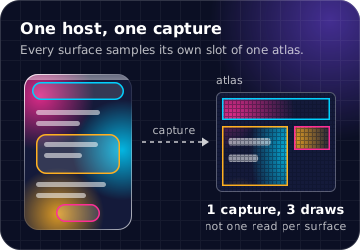
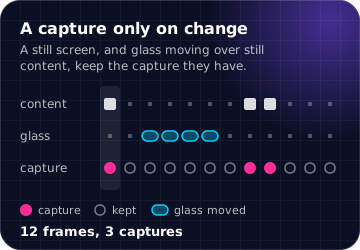
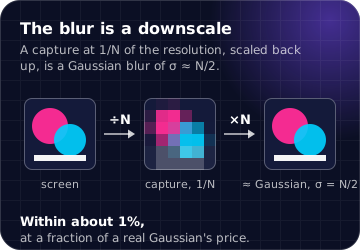
| One host, one capture | A GlassHost records what is painted under all of its glass into one atlas, at a resolution picked against a measured quality budget. Every surface then samples its own slot of that atlas. |
| A capture only when something changed | The host walks the composited layer tree. When nothing under the glass changed, it keeps the proxy it already has. That covers a still screen, and a moving glass over content that stays put. Keeping the proxy is the default, and it is the biggest saving in the package: 79.4% and 66.3% of the route's added cost on Adreno, 97.8% on Metal. |
| The blur is a downscale | A 1/N proxy is a Gaussian of σ ≈ N/2 to within about 1%, at a fraction of the price of a real Gaussian. |
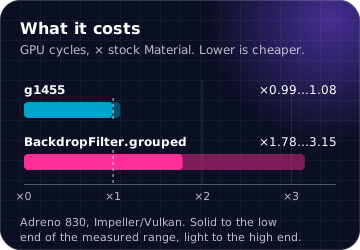
Measured costs, each on its own platform, because the platforms are not comparable:
| platform | glass vs stock Material | engine BackdropFilter.grouped |
|---|---|---|
| Android, Impeller/Vulkan, Adreno 830 (GPU cycles) | ×0.99…1.08 | ×1.78…3.15 |
| iPad, Impeller/Metal (GPU ms, scrolling screen) | ×1.93…2.02, or ×1.46…1.54 with thermal throttling | — |
Where the numbers come from
Every number in this README and on the site was measured in a profile build,
on the device named, before the package's first release: the code that became
0.1.0 on 2026-10-03, on Flutter 3.47.1 stable (framework 6655482ec0,
engine 5d53178869, Dart 3.13.1). The raw digests are in
provenance/.
| device | GPU | system | renderer | metric | dates |
|---|---|---|---|---|---|
| Samsung Galaxy S25 Ultra (SM-S938B) | Snapdragon 8 Elite, Adreno 830 | Android 16 (BP4A.251205.006) |
Impeller, Vulkan · 1080×2340 @3×, 120 Hz | GPU cycles a frame (kgsl busy × freq), windows of 30 s × 3 |
2026-08-24 … 2026-09-23 |
| iPad Pro 11″, 4th gen. (iPad14,3) | Apple M2 | iPadOS 26.6.1 (23G83) |
Impeller, Metal · 1668×2388 @2×, 120 Hz | GPU ms a frame (engine GPUTracer), after a reboot, windows of 4 s × 3 |
2026-09-08 … 2026-09-26 |
| Samsung Galaxy S22 Ultra (SM-S908B) | Exynos 2200, Xclipse 920 | Android 16 (BP2A.250605.031) |
Impeller, Vulkan · 720×1544 | GPU busy × freq; blind to the capture, so used only to cross-check |
2026-09-08 … 2026-09-26 |
| MacBook Pro (M3 Max) | Apple M3 Max | macOS 26.4.1 (25E253) |
Impeller, Metal · 1600×1200 @2× | raster ms a frame | 2026-09-15 |
The ratios above compare scenes on the same device, run in one binary in a shuffled order. They do not carry from one device to another, and they are not a frame time.
Install
flutter pub add g1455
Requires Flutter 3.47 or later.
Quick start
A whole app: a list of coloured tiles to refract, a bar over it and a tab bar
under it. Paste it over lib/main.dart.
import 'package:flutter/material.dart';
import 'package:g1455/g1455.dart';

void main() => runApp(const App());

class App extends StatelessWidget {
  const App({super.key});

  @override
  Widget build(BuildContext context) => MaterialApp(
    // The host goes above the navigator, so dialogs, sheets and menus are
    // under it as well as the screens.
    builder: (BuildContext context, Widget? navigator) => GlassHost(
      // The backdrop is a feed of colours rather than one flat colour: pick
      // the labels against any backdrop, and dim the glass if they need it.
      richBackdrop: true,
      minLabelContrast: kTextContrastAA,
      child: navigator!,
    ),
    home: const Home(),
  );
}

class Home extends StatefulWidget {
  const Home({super.key});

  @override
  State<Home> createState() => _HomeState();
}

class _HomeState extends State<Home> {
  int _tab = 0;

  @override
  Widget build(BuildContext context) => Scaffold(
    body: Stack(
      children: <Widget>[
        // What the glass refracts: coloured tiles, scrolling under both bars.
        ListView.builder(
          padding: const EdgeInsets.fromLTRB(16, 120, 16, 120),
          itemCount: 40,
          itemBuilder: (BuildContext context, int i) => Container(
            height: 96,
            margin: const EdgeInsets.only(bottom: 12),
            decoration: BoxDecoration(
              color: HSLColor.fromAHSL(1, i * 27.0 % 360, 0.7, 0.55).toColor(),
              borderRadius: BorderRadius.circular(20),
            ),
          ),
        ),
        const Positioned(
          top: 0,
          left: 16,
          right: 16,
          child: SafeArea(
            child: GlassBar(child: Text('Library')),
          ),
        ),
        Positioned(
          left: 16,
          right: 16,
          bottom: 0,
          child: SafeArea(
            child: GlassTabBar(
              items: const <GlassTabItem>[
                GlassTabItem(icon: Icons.photo_library_outlined, label: 'Library'),
                GlassTabItem(icon: Icons.favorite_border, label: 'For You'),
                GlassTabItem(icon: Icons.search, label: 'Search'),
              ],
              selectedIndex: _tab,
              onSelected: (int i) => setState(() => _tab = i),
            ),
          ),
        ),
      ],
    ),
  );
}
The host goes in MaterialApp.builder, above the navigator, rather than around
one screen: dialogs, sheets and menus are built in the navigator's overlay, and
a host below the navigator does not see them.
Every component is live at g1455.plugfox.dev,
with its guide, its code and its API. The site is the example/
app built for the web: one host, every component on its own page, the original
full-screen demos, and a settings menu that switches the finish, the tint, the
rung and the ripple.
AI agents
The package ships an agent skill for Claude Code, Codex, Cursor, Antigravity, Gemini CLI, GitHub Copilot and the rest: the rules an agent needs to write glass that works (one host above the navigator, what the app declares, what costs a capture), with every page of the site as a reference it reads before it writes a component.
npx skills add PlugFox/g1455
In Claude Code, the repository is a plugin marketplace:
/plugin marketplace add PlugFox/g1455
/plugin install g1455@g1455
Without Node, unpack it where the agent looks for skills
(.claude/skills/ for Claude Code, .agents/skills/ for the others):
mkdir -p .agents/skills/g1455
curl -fsSL https://g1455.plugfox.dev/.well-known/agent-skills/g1455.tar.gz | tar -xz -C .agents/skills/g1455
Or point any agent at https://g1455.plugfox.dev/SKILL.md. The site also
serves llms.txt, and every page as
markdown at its address plus .md. The skill is in
skills/g1455/; more on
the site.
What is in the box
Every name links to its page in the API reference.
Foundations
| API | What it is |
|---|---|
GlassHost |
The one capture every glass below it samples. Takes what the application declares: backdrop, hardware, thermal, highContrast, ripple. GlassHost.precache() in main() compiles the shaders before the first frame. |
GlassSurface |
The primitive: a region of the screen that is glass, with a corner radius, an optional finish, and presence / materialize for appearing. |
GlassFinish |
The optics: .regularDark, .regularLight, .clear and .frosted, calibrated against Apple's own materials on iOS 26. Apple's .regular is two materials, dark over dark content and light over light, and GlassHost picks the branch the same way unless you name one: from backdrop and the platform's appearance. |
GlassTheme · GlassThemeData |
The tokens a screen's glass reads: the finish every surface wears unless it names its own, the rung, the label floor. |
GlassRipple |
Optional, and not Apple's. A viscous wave from the touch: a dimple under the finger, a front that travels out, a spring-back on release. viscosity goes from water (0) to honey (1). Declare it on GlassHost.ripple for every surface, or on GlassSurface.ripple for one. A wave takes no capture and repaints nothing; off under reduced motion. |
GlassAdaptive |
Optional: glass that reads its own backdrop. Each bar, card and button picks the branch of .regular and its label from the mean level of the capture under it, instead of from backdrop. Off by default and free when off; on, a small read-back per capture, at most once per interval (250 ms, a second on the web), behind a band and a hold. |
GlassDropMotion |
How the held drop of the switch, slider, segmented control and tab bar stretches as it sets off and squashes as it stops. On and subtle by default, because it costs no capture; GlassDropMotion.none turns it off, and so does reduced motion. Declare it on GlassHost, the theme or one control. |
GlassPress |
How a pressed GlassButton swells (12 px on its longest side) and leans toward a dragging finger, then springs back. A feel, not a measurement: Apple's press was not measured. Two captures a press and none at rest; GlassPress.none turns it off, and so does reduced motion. Declare it on GlassHost, the theme or one button. |
GlassConcentric |
Apple's concentric corners as arithmetic: a shape inset inside glass takes the glass's radius less the inset, never below a floor. For anything you nest in a surface. |
Panels and controls
| API | What it is |
|---|---|
GlassBar · GlassButton · GlassCard |
Panels with a label colour chosen for legibility. |
GlassSwitch · GlassSlider |
Controls whose knob turns into a clear drop while held. A slider with divisions lands on stops. |
GlassTabBar · GlassSegmentedControl |
The selection lifts into a drop that can be dragged between items. A tab's icon and label can be any widget, through iconBuilder and labelBuilder. The tab bar collapses to its selected tab on a scroll down (minimizeBehavior, under a GlassTabBarMinimizer) and carries a bottomAccessory. |
GlassStepper |
A minus and a plus in one glass capsule; a held half repeats, and the end at a limit is disabled. One surface; a press is no capture. |
GlassPageControl |
Page dots on a glass capsule; follows and turns a PageController, a tap steps toward its side, a drag scrubs. One surface. |
GlassButtonGroup |
A toolbar capsule of icon buttons (GlassToolbarItem). |
GlassTextField |
A single line of text in a glass capsule. |
GlassSearchBar |
The search field with a clear button and a Cancel that slides in on focus. One surface; the slide costs a capture a frame for 250 ms (16 captures; 1 with reduced motion). |
GlassBadge |
A count or a dot on an icon's corner, as an opaque red capsule. Not glass, as Apple's is not; costs no surface. |
GlassScrollEdge |
The scroll edge effect under a bar, and the bar. |
GlassScaffold |
A screen wired as this README recommends: a host when none is above, a top bar in a soft scroll edge, an optional bottom bar and floating action, and a body that scrolls under the bars. |
The button, switch, slider, segmented control, stepper, page control and a
toolbar's cells take the keyboard's focus: Space and Enter press, the arrows
step a slider, a segmented control, a stepper and a page control, and the ring
is drawn without a capture on glass. The switch, slider, segmented control,
stepper, page control and toolbar mirror under a right-to-left
Directionality. Inside a horizontal PageView or list, a horizontal drag
that starts on the switch, slider or segmented control moves the control and
not the page, and a vertical swipe that starts on them still scrolls the
vertical list around them.
Modals
| API | What it is |
|---|---|
showGlassDialog · GlassAlert |
An alert that materializes over the screen, blur first and tint last. |
showGlassSheet |
A glass sheet from the bottom edge that follows the finger. With GlassSheetDetent.large it pulls up to the whole height, where it turns opaque and stops reading its backdrop. |
GlassMenuAnchor · GlassPopoverAnchor |
A menu, or a panel of any content, that grows out of its anchor. |
Glass appears and leaves through GlassSurface.materialize: the bend, the blur
and the tint arrive over the whole shape. presence erodes the shape and is for
budding inside a GlassGroup; on a lone panel it narrows to a line.
Composition
| API | What it is |
|---|---|
GlassGroup · GlassUnion |
Several surfaces drawn as one silhouette, fusing where they meet. |
GlassTravel |
Declares the region a moving glass travels in, so the motion does not trigger a capture. |
GlassMorph |
Swap the child and the glass flows to its size, the way a button becomes its menu. A neck forms while it grows; at rest it is one plain surface. |
GlassAbove |
Raises the glass below it a level above the glass beside it: a bar over glass cards sees the cards. |
GlassBackdrop |
Declares what is behind the glass in a subtree — a colour, an image, a texture the app holds, a gradient — so that glass samples it instead of a capture. A screen whose glass is all declared takes no snapshot. |
GlassProxy |
Tells the capture what a subtree is: a stand-in for a video or a platform view (GlassProxyPainter, SolidProxyPainter, GradientProxyPainter), a subtree to leave out, an opaque cover, or a blur to keep. The frame the user sees does not change. |
Policy and accounting
| API | What it is |
|---|---|
GlassTier · GlassTierPolicy |
Pick the rung: full glass, a flat translucent fill, or opaque. Use it for reduce transparency, low-end devices and thermal pressure. |
GlassLedger |
Reports how much glass is on the screen and what it costs. |
GlassHardware · GlassThermalState |
What the application declares about the device. |
The whole library is at pub.dev/documentation/g1455.
Finishes
A finish is what the glass does to the light it lets through. The four presets,
every number as GlassFinish holds it:
| Finish | Blur σ, px | Tint, RGB | Tint alpha | Rim adds, of 255 | Bend at the rim, px | Falloff with depth u, px | Magnification |
|---|---|---|---|---|---|---|---|
.regularDark |
2.6 | 29, 29, 32 | 0.693 | 50.2 | -58.2 | (1 - (u/21)^0.6)^1.9 | 1 |
.regularLight |
2.6 | 252, 252, 252 | 0.718 | 50.2 | -58.2 | (1 - (u/21)^0.6)^1.9 | 1 |
.clear |
0 | 249, 249, 249 | 0.22 | 50.2 | -58.2 | (1 - (u/21)^0.6)^1.9 | 1 |
.frosted |
8 | 249, 249, 249 | 0.22 | 50.2 | -58.2 | (1 - (u/21)^0.6)^1.9 | 1 |
- Blur is the sigma applied to the capture before it is sampled, in logical pixels.
- Tint is laid over the refracted sample as
mix(sample, tint, alpha), so1 - alphaof the backdrop comes through: 0.307 of it under.regularDark, 0.282 under.regularLight..regularis dark because it barely transmits the backdrop, not because it lays something dark over it. - Rim is a white outline 0.79 px wide that adds to what is under it rather than mixing over it, and has no light direction.
- Bend is how far a sample is pulled at the rim; negative is inward. It falls to nothing 21 px in from the edge along the falloff curve.
- Magnification is 1 for every finish. What magnifies is the tab bar's
held drop, by
kGlassTabDropZoom(1.17), as iOS's does.
.regularDark and .regularLight are the two branches of Apple's .regular,
which is dark over a dark backdrop and light over a light one.
GlassFinish.regular(appearance:, backdrop:) picks the branch, and GlassHost
calls it unless a finish is named. .clear and .frosted differ only in blur.
.frosted is a heavy blur kept under its old name: scored against Apple's
material, it is a UIVisualEffectView blur rather than Liquid Glass.
A finish of your own is a GlassFinish(...) or a copyWith of a preset. The
package's damage tables are keyed by the four names above, so a finish under
another name gets no measured price.
Common patterns
Each snippet assumes a GlassHost above it, as in the quick start.
Glass over a scrolling list
The commonest screen there is, and the case the capture is built for: a frame
the list moves is one capture for all the glass on the screen, and a frame it
rests is none. For iOS's soft edge under the bar, put the bar in a
GlassScrollEdge.
class Feed extends StatelessWidget {
  const Feed({super.key});

  @override
  Widget build(BuildContext context) => Stack(
    children: <Widget>[
      // A frame the list moves is one capture for every glass on the screen;
      // a frame it rests is none.
      ListView.builder(
        padding: const EdgeInsets.only(top: 96),
        itemCount: 100,
        itemBuilder: (BuildContext context, int i) => ListTile(title: Text('Message $i')),
      ),
      const Positioned(
        top: 0,
        left: 16,
        right: 16,
        child: SafeArea(
          child: GlassBar(child: Text('Inbox')),
        ),
      ),
    ],
  );
}
Moving glass inside a GlassTravel
Glass that moves over still content would otherwise be captured on every frame
it moves, because its slot in the capture is its own box. GlassTravel makes
the slot the whole region, so the drag costs no capture. The content under it
goes behind its own RepaintBoundary, and so does the moving glass: a repaint
under the glass counts as changed content. The switch, slider, segmented
control and tab bar already do this for their drops.
class Lens extends StatefulWidget {
  const Lens({super.key});

  @override
  State<Lens> createState() => _LensState();
}

class _LensState extends State<Lens> {
  Offset _at = const Offset(100, 100);

  @override
  Widget build(BuildContext context) => Stack(
    children: <Widget>[
      // What the lens moves over, behind its own boundary: the drag repaints
      // none of it.
      const Positioned.fill(
        child: RepaintBoundary(child: FlutterLogo(style: FlutterLogoStyle.stacked)),
      ),
      // The lens may go anywhere in here, and the host captures all of it
      // once: dragging the lens over still content takes no capture.
      Positioned.fill(
        child: GlassTravel(
          child: RepaintBoundary(
            child: Stack(
              children: <Widget>[
                Positioned(
                  left: _at.dx - 48,
                  top: _at.dy - 48,
                  width: 96,
                  height: 96,
                  child: GestureDetector(
                    onPanUpdate: (DragUpdateDetails d) => setState(() => _at += d.delta),
                    child: const GlassSurface(
                      borderRadius: kGlassCapsule,
                      finish: GlassFinish.clear,
                      labelled: false,
                      child: SizedBox.expand(),
                    ),
                  ),
                ),
              ],
            ),
          ),
        ),
      ),
    ],
  );
}
Glass on glass
A bar over a list of glass cards is the cards' sibling, and by default it sees
the page with the cards cut out. GlassAbove raises it a level, so it refracts
the cards. A level costs one more snapshot on a frame that captures, and nothing
when there is no glass under the lifted one.
class Cards extends StatelessWidget {
  const Cards({super.key});

  @override
  Widget build(BuildContext context) => Stack(
    children: <Widget>[
      ListView(
        padding: const EdgeInsets.fromLTRB(16, 96, 16, 16),
        children: <Widget>[
          for (int i = 0; i < 20; i++)
            Padding(
              padding: const EdgeInsets.only(bottom: 12),
              child: GlassCard(child: Text('Card $i')),
            ),
        ],
      ),
      // The bar is the cards' sibling, not their parent. Without GlassAbove
      // it would show the page with the cards cut out of it; with it, the bar
      // is a level above them and refracts them.
      const Positioned(
        top: 0,
        left: 16,
        right: 16,
        child: SafeArea(
          child: GlassAbove(child: GlassBar(child: Text('Cards'))),
        ),
      ),
    ],
  );
}
A menu or a dialog over a bar
Both are built in the navigator's overlay, so the host has to be above the
navigator: MaterialApp(builder: (context, navigator) => GlassHost(child: navigator!)).
The package's own modals are already lifted above the bars.
class NotesBar extends StatelessWidget {
  const NotesBar({super.key});

  @override
  Widget build(BuildContext context) => GlassBar(
    child: Row(
      children: <Widget>[
        const Expanded(child: Text('Notes')),
        GlassMenuAnchor(
          items: <GlassMenuItem>[
            GlassMenuItem(label: 'Delete all', isDestructive: true, onPressed: () => _confirm(context)),
          ],
          builder: (BuildContext context, GlassMenuController menu) => GlassButton(
            onPressed: menu.open,
            semanticLabel: 'More',
            padding: EdgeInsets.zero,
            child: const Icon(Icons.more_horiz),
          ),
        ),
      ],
    ),
  );

  Future<void> _confirm(BuildContext context) => showGlassDialog<void>(
    context: context,
    builder: (BuildContext context) => GlassAlert(
      title: const Text('Delete all notes?'),
      actions: <GlassAlertAction>[
        GlassAlertAction(label: 'Cancel', isDefault: true, onPressed: () => Navigator.pop(context)),
        GlassAlertAction(label: 'Delete', isDestructive: true, onPressed: () => Navigator.pop(context)),
      ],
    ),
  );
}
A tab bar that collapses on scroll
iOS 26's tab bar shrinks to its selected tab while the content scrolls down,
and comes back on a scroll up. A scroll only reports upward, and the bar is
not inside the scroll view, so both go under one
GlassTabBarMinimizer, which GlassScaffold
already is. The collapse moves inside a declared travel region and takes no
capture; the scroll that set it off captures as any scroll does.
class Library extends StatefulWidget {
  const Library({super.key});

  @override
  State<Library> createState() => _LibraryState();
}

class _LibraryState extends State<Library> {
  int _tab = 0;

  @override
  Widget build(BuildContext context) => GlassTabBarMinimizer(
    // Above the list and the bar both: the list's scrolls bubble up to it,
    // and the bar, which is not inside the list, reads it.
    child: Stack(
      children: <Widget>[
        ListView.builder(
          padding: const EdgeInsets.only(bottom: 160),
          itemCount: 60,
          itemBuilder: (BuildContext context, int i) => ListTile(title: Text('Song $i')),
        ),
        Positioned(
          left: 16,
          right: 16,
          bottom: 0,
          child: SafeArea(
            child: GlassTabBar(
              items: const <GlassTabItem>[
                GlassTabItem(icon: Icons.library_music, label: 'Library'),
                GlassTabItem(icon: Icons.search, label: 'Search'),
              ],
              selectedIndex: _tab,
              onSelected: (int i) => setState(() => _tab = i),
              minimizeBehavior: GlassTabBarMinimizeBehavior.onScrollDown,
              // Above the bar, and beside its circle once it collapses.
              bottomAccessory: const Text('Now playing'),
            ),
          ),
        ),
      ],
    ),
  );
}
A video, a map or a platform view under glass
The host captures what is under its glass by painting that part of the tree a
second time. A platform view, a Texture, a video or a camera preview paints
outside Flutter's pictures and records nothing, so the glass over it shows a
hole. GlassProxy.replace paints a stand-in in its place, for
the capture only:
class Player extends StatelessWidget {
  const Player({super.key, required this.video});

  /// A platform view, a `Texture`, anything that paints outside Flutter's own
  /// pictures.
  final Widget video;

  @override
  Widget build(BuildContext context) => Stack(
    fit: StackFit.expand,
    children: <Widget>[
      GlassProxy.replace(
        // A gradient of the poster's colours. Write a GlassProxyPainter of your
        // own for anything else: the last frame as an image, the map's tiles.
        painter: const GradientProxyPainter(
          LinearGradient(colors: <Color>[Color(0xFF1B1F2A), Color(0xFFFF9F0A)]),
        ),
        child: video,
      ),
      const Positioned(left: 16, right: 16, bottom: 16, child: GlassBar(child: Text('Live'))),
    ],
  );
}
Three more declarations do the rest of what the capture cannot know:
| The capture… | For | |
|---|---|---|
GlassProxy.hidden |
leaves the subtree out and does not run its paint |
a subtree the glass should not show, or one whose paint counts something |
GlassProxy.opaque |
takes the subtree as covering its box, and looks no further under it | a full-bleed image or panel |
GlassProxy.verbatim |
exempts the subtree from the shadow filter | a highlight blurred through a MaskFilter on purpose |
A stand-in changes what the glass sees, not when the host captures: a video that composites a new frame is still a change. Live, with each declaration: Capture control.
A backdrop that does not change
When the application already knows what is behind the glass — a page of one
colour, a wallpaper, a gradient — capturing it is a snapshot of something in
hand. GlassBackdrop declares it for a subtree: the glass
below samples a texture made once from the declaration, through the same
shader, and the host leaves it out of the capture. The cards here capture
nothing; the bar over the list still refracts the list:
class Lockscreen extends StatelessWidget {
  const Lockscreen({super.key, required this.wallpaper, required this.feed});

  /// The wallpaper, which does not change while the screen is up.
  final ImageProvider wallpaper;

  /// A list that scrolls under the bar.
  final Widget feed;

  @override
  Widget build(BuildContext context) => GlassBackdrop.image(
    wallpaper,
    // Painted under the child, then sampled by every glass below: the cards
    // capture nothing at all.
    child: Column(
      children: <Widget>[
        const GlassCard(child: Text('12:45')),
        const GlassCard(child: Text('2 notifications')),
        Expanded(
          // The bar over the list has to refract the list, so it captures.
          child: GlassBackdrop.live(
            child: Stack(
              children: <Widget>[
                feed,
                const Positioned(left: 16, right: 16, top: 8, child: GlassBar(child: Text('Feed'))),
              ],
            ),
          ),
        ),
      ],
    ),
  );
}
| Declares | Made | |
|---|---|---|
GlassBackdrop.color |
one colour | once: a single texel, at every blur and size |
GlassBackdrop.image |
an ImageProvider, placed by fit and alignment |
once per finish blur and size, after the image loads |
GlassBackdrop.texture |
a ui.Image the application holds |
the same; a new ui.Image re-renders |
GlassBackdrop.gradient |
a Gradient across the box |
once per finish blur and size |
GlassBackdrop.painter |
a GlassProxyPainter: anything drawn |
the same; shouldRepaint re-renders |
GlassBackdrop.live |
nothing: the subtree captures again | — |
The declaration is what the glass shows, so it has to be true. The widget
paints it under its child unless paintBackdrop: false; content between the
backdrop and the glass is not refracted, and a backdrop that changes without
the declaration changing is shown as it was. Until an image loads, the glass
captures as if nothing were declared.
The cheap rung
GlassTier.cheap draws the tint over the backdrop and captures nothing. The
package sets no ceiling itself, because whether a screen can afford full glass
is a fact about the application's frame. The application decides, and declares
it. Reduce transparency gives GlassTier.opaque, a solid fill matched to the
glass over the declared backdrop.
MaterialApp(
  builder: (BuildContext context, Widget? navigator) => GlassHost(
    backdrop: Colors.white, // what the opaque rung fills to match
    tier: GlassTierPolicy(
      reduceTransparency: reduceTransparency, // read natively by the app
      ceiling: lowEndDevice ? GlassTier.cheap : null, // the app's own benchmark or device table
    ).choose(),
    child: navigator!,
  ),
  home: const Scaffold(body: Feed()),
)
To put one part of a screen on another rung, wrap it in a GlassTheme with a
tier of its own.
What is not here, and why
- Dispersion, or chromatic aberration. Apple's material sends the red, green and blue channels to the same place, to within 0.155 logical px against a measurement floor of 0.457. One sample per pixel is what the reference does, not a shortcut, and a dispersion effect would be a departure from it.
- Shapes other than
RSuperellipse. Every surface is aBorderRadiusdrawn as the engine's round superellipse, the shape aRoundedRectangleBorderalready lowers to and the continuous corner Apple's material has. A plain rounded rectangle is not a substitute: the curvature jumps where its straight side meets the arc, and the rim's shading would show the jump. The refraction is an analytic distance to that one shape, with one corner radius per surface, so four different corners, a star or an arbitrary path are not drawn. A capsule is a radius larger than the box,kGlassCapsule.
Things the application has to declare
The package cannot work some things out from the render tree, so the application declares them:
- What is behind the glass, for label legibility:
GlassHost.backdropfor a flat colour, orrichBackdrop: truewithminLabelContrastfor an image or a scrolling feed. Without either, labels are picked against the worst case, and in debug the package warns when a finish cannot be read over it. Or let bars, cards and buttons read it:GlassHost(adaptive: GlassAdaptive())measures the capture under each of them, for a small read-back per capture. - Reduce transparency, increase contrast on macOS, and thermal state.
Flutter does not pass these on, and this package ships no platform code to
read them. Read them natively and pass them in: reduce transparency to
GlassTierPolicy, contrast toGlassHost.highContrast, thermal state toGlassHost.thermalas aGlassThermalState. On iOS and Android 34+ the host already reads contrast fromMediaQuery. On macOS the engine does not pass it on. - The hardware family, if it is not an Apple device:
GlassHost.hardware. Undeclared hardware gets the same behaviour with no price attached. - What the capture cannot read: a platform view, a
Textureor a video records nothing, and the glass over it shows a hole. Wrap it inGlassProxy.replacewith a stand-in; see the pattern above.
Misuse and common errors
Most mistakes with glass fail quietly: no exception, only glass that is
missing, grey, or captured on every frame. Each entry is the symptom, then the
cause and the fix; a message a debug build prints is quoted as it starts. To see
where the glass is, set debugPaintGlassSurfaces = true: every surface gets a
cyan outline. The same list, at more length:
Misuse & common errors.
Setup
- Only the children are drawn, with no glass. No
GlassHostabove the surface: it paints its child over nothing, and says nothing. Put one host inMaterialApp.builder, as in the quick start. GlassAlert was built with no GlassHost above it.Or "A glass sheet", or a menu's or popover's panel. Modals are built in the navigator's overlay, and a host inside a route does not reach them, nor does the oneGlassScaffoldmounts when none is above. Debug only; in release the modal shows without glass. Move the host above the navigator.- A
GlassThemeabove the host changes nothing. The host installs its own theme from its parameters. Declare onGlassHost, and put aGlassThemebelow it for a subtree. - The first frames show no glass, then a blur without tint or rim. The
first frame of a screen has no glass by design: the capture reads the frame
just painted. The blur without optics is the shaders still compiling;
await GlassHost.precache()inmain()compiles them first.
What the glass shows
- A hole over a video, a map or a platform view. They paint outside
Flutter's pictures and record nothing into the capture. Wrap them in
GlassProxy.replacewith a stand-in, as in the pattern above. - Glass inside an
Opacityor a fade disappears. AnOpacitybelow 1, aFadeTransition, aColorFilteror anImageFilteredopens a layer, and glass inside it does not survive it. On the cheap rung the rim and the press highlight add to the layer instead: oneOpacity(0.99)above a button takes its press from +50 code values to +4. Fade glass withGlassSurface.materialize, hide it withVisibility. Content fading under glass is fine. - A bar over glass cards shows the page with the cards cut out. Sibling
glass does not see sibling glass: wrap the bar in
GlassAbove, as in Glass on glass. - An unlifted bar shows up blurred inside a scroll edge. Levels are a
declaration, not paint order. Lift the bar with the edge, which
GlassScrollEdge.childdoes. - A surface that replaces another at the same place draws nothing. A known issue: a host replacing one surface with another at exactly the same rect keeps the old capture until something else under the glass changes.
- The glass does not refract what scrolls under it. A
GlassBackdropabove it declares the backdrop, and the glass shows the declaration only. Wrap the part with live content inGlassBackdrop.live. - A tab bar with
minimizeBehavior: onScrollDownnever collapses. A scroll reports only upward, and the bar is the scroll view's sibling. Put aGlassTabBarMinimizerabove both, as in the pattern above;GlassScaffoldis one. Only the nearest vertical scroll view counts, not one nested in it.
Look and legibility
A glass component has no GlassThemeData.backdrop, and its finish is not legible over every backdrop. Declarebackdropfor a flat screen, orrichBackdrop: truewithminLabelContrastover an image or a feed; see what the application declares.GlassTier.opaque with no GlassThemeData.backdrop declared.The opaque rung fills with the level the glass shows overbackdrop; without one it fills with the tint, 29 of 255 for.regularDarkwhere the glass shows 69 over mid-grey. Declarebackdropwhenever reduce transparency can be on.- Glass over a flat colour is a grey box. There is nothing to refract. Put
glass over content, or use a plain
Container. - A lens or a held drop looks grey. The label floor dims glass for a label
it does not have: pass
labelled: falseto glass with no text. - Labels in a bar have the wrong colour. Bars, cards, buttons and modals set
DefaultTextStyleandIconThemeto a legible colour; a colour hard-coded inside them overrides it. - Adaptive glass does not adapt.
GlassAdaptivere-picks bars, cards and buttons. A rawGlassSurface,GlassScrollEdge, the tab bar and the segmented control do not adapt, and a finish named anywhere is held. N of M surfaces in a GlassGroup name their own finish.A fused group is one draw with one finish: the group's. Its members draw nofadeand no ripple either.A GlassGroup holds N surfaces; the fused draw carries 12.PastkMaxFusedShapesthe group is refused, not truncated: the members draw themselves without the bridges. Fuse fewer.- A ripple does not show. It is off by default, under reduced motion,
below
GlassTier.fulland on a fused group member. - A panel appearing through
presencenarrows to a line.presenceis for budding inside a group; animatematerializeinstead. - A shape inside glass sits badly in its corners. A highlight, a thumb or a
ring inset in glass has the glass's radius less the inset:
GlassConcentric.radius(outer, inset)or.borderRadius(...), not a number that agrees by accident until one of the two moves. - A badge drawn as glass is a different red over every backdrop. Apple's
badge is opaque, on the glass and not of it: use
GlassBadge, which is a plain capsule and costs no surface.
Cost
- Moving glass captures on every frame. Its slot is its own box. Wrap the
region it moves in in a
GlassTravel, as in the pattern above. - Glass in a
GlassTravelstill captures as it moves. Moving it must repaint nothing else: put the still content and the moving glass behind aRepaintBoundaryeach. - A custom finish costs more than its preset. A
nameoutside the measured tables gets no lower capture resolution. Derive it withcopyWith, which keeps the name. - Too much glass. Each surface is a draw, and the cost grows faster than
the count: glass is for bars and controls, not every card of a feed. A row of
icon actions is one
GlassButtonGroup, and a minus and a plus are oneGlassStepper, not two buttons; a group is a look, not a saving (twelve clustered surfaces cost 1.60 to 1.65 times ungrouped). - The search bar captures when it takes or loses the focus. Cancel's slide
narrows the field's glass, and glass whose box changes is retaken: 16
captures over the 250 ms at 60 Hz, each way, and none after it (headless,
in the package's tests).
showsCancelButton: falsekeeps the box still; under reduced motion it is one frame. - A change inside a large sheet captures. An opaque large sheet is drawn
on
GlassTier.cheapand reads no backdrop, but a cheap surface is content to the capture of the glass around it, so a change in the sheet is a retake. Headless, a 400 × 800 window with a glass bar under the sheet: one surface of two captured instead of two, 20,608 px² of capture against 337,408, and one retake for a label changed in the sheet against none. A translucentlargeFinishkeeps it glass, and its capture with it. - Every press of a button captures twice. The swell grows inside a travel
region declared from touch-down until the spring settles: one capture as it
appears, one as it goes, nothing at rest.
GlassPress.noneon the host, a theme or one button keeps the box still and builds no region. - A tab bar rebuilt by a bare
setStatecaptures once. A known cost, not yet traced. Rebuild the bar when its selection changes, not with every change of the screen around it. - A page control captures while the pages turn. The control does not: the
PageViewmoving under the glass does: 43 captures a swipe headless, with the dots following it and with dots that stay put. Content that moves under glass is a capture a frame. - Glass is coarser on a large window. The capture must fit the GPU's
texture limit, and the host assumes the specification's floor (4096 on
Vulkan, 8192 on Metal). Every GPU measured allocates 16384:
GlassHost(maxTextureSide: 16384)on a device you know. - A slider rounded in
onChangedis told every frame. Passdivisions: every input lands on a stop, andonChangedis called only when the stop changes. - Every frame captures, still or not.
content: GlassContentDeclaration.undeclaredis for ruling the change detection out, not for shipping; nor aremaxCaptures,resolutionandblurPass.
Platform settings and tests
- Reduce transparency, contrast on macOS or thermal state change nothing.
Flutter does not pass them on: read them natively and
declare them. A
GlassTierPolicy(pinned: ...)overrides the user's setting; never ship one. - A widget test finds no glass. The test needs a
GlassHostabove the glass (above theNavigatorfor modals), and the first frame has none: pump one more. await GlassHost.precache()hangs in a widget test. The fake clock never completes the shader load. Alternatetester.runAsyncwithtester.pumpuntil it completes, or leave the precache out.
Platforms
| Renderer | Where | Status |
|---|---|---|
| Impeller — Metal | iOS, macOS | ✅ |
| Impeller — Vulkan | Android | ✅ |
| Impeller — GLES | Android | ✅ |
| Skia — GLES | Android below API 29, Vivante GPUs | ✅ |
| Skwasm | Web | ✅ |
| CanvasKit | Web | ✅, slow; see below |
The route renders byte-identically on all of them. Every bundled shader is
compiled for all five shader targets in test/shader_targets_test.dart, so a
shader that SkSL would reject fails the tests rather than a user's app.
Warning
On the web, outside Chromium, the glass is slow. Every capture of the
backdrop goes through Picture.toImageSync. On CanvasKit that call reads
the pixels back from the GPU and waits for them. On the same machine, a
MacBook Pro with an M3 Max (macOS 26.4.1), a frame of full glass took 15 to
30 ms on CanvasKit and 4 to 10 ms on Skwasm, in WebKit and in Chromium alike
(the example site, g1455 0.1.1 on Flutter 3.47.1, 2026-10-04). On a phone
CanvasKit is well past a 60 Hz frame.
Flutter's loader picks Skwasm only in Chromium browsers (Chrome, Edge, Opera, Brave and others) unless the app allows more. Safari, Firefox and every browser on iOS, Chrome for iOS included (they all run WebKit) get dart2js and CanvasKit. Two things help:
- Build with
flutter build web --wasmand allow Skwasm on WebKit as well:_flutter.loader.load({config: {wasmAllowList: {webkit: true}}}). Test it on the devices you ship to. Flutter leaves WebKit off by default, and Skwasm on WebKit still costs about twice what it costs in Chromium. - Where the app still runs on CanvasKit (
kIsWeb && !kIsWasm), declare a cheaper rung:GlassTierPolicy(ceiling: GlassTier.cheap)draws the tint over the backdrop and captures nothing, and the two renderers are level there. The example site opens that way on CanvasKit and says so.
Diagnostics
package:g1455/glass_diagnostics.dart
exposes the switches a benchmark flips, such as the tile split of a group's draw
and the anti-alias flag. It also exposes the host's proxy handle, whose counters
show whether a frame captured. An application has no reason to import it.
Development
flutter pub get
dart format .
flutter analyze --fatal-infos
flutter test --coverage
(cd example && flutter test test/ showcase/)
dart format takes its width (120) and its trailing-comma rule from
analysis_options.yaml, and CI fails on a file it would change.
The skill's SKILL.md is written by hand; its references/ are the site's
pages, generated from the catalog in example/lib/src/catalog/ by
(cd example && dart run tool/skill.dart). The example's tests fail when they
are stale.
Some tests check a constant baked into lib/ against the measurement it came
from. Those measurements are copied into provenance/, unchanged and under
their original file names. They live in the repository only; the published
package does not carry them.
A pull request runs the same checks in CI, plus flutter pub publish --dry-run
and pana. A release is a tag: bump version in pubspec.yaml, add its
## <version> section to CHANGELOG.md, and push v<version>. The tag
publishes to pub.dev and opens a GitHub release with that section as notes.
Re-shooting the animations
tool/showcase.sh                  # every tile
tool/showcase.sh switch,tab_bar   # just these
tool/showcase.sh screen           # the whole screen at the top
The script plays each scene of example/showcase/scenes.dart under
flutter test, with a fake clock and scripted touches, so every run produces
the same frames and needs no device. It plays one loop to let springs and waves
settle and records the next, and it fails if the last frame does not lead back
into the first. It then packs the frames into looping webp files in
doc/showcase/ with cwebp and webpmux (from libwebp: brew install webp),
each frame encoding only the rect that changed.
The whole screen at the top is example/showcase/screen.dart. It has its own
size and no shared backdrop, and it is not one of pub.dev's screenshots, so the
script shoots it only when it is named.
The screenshots pub.dev shows are the same loops at half the size, because pub ships them with the package:
SHOWCASE_DPR=1 SHOWCASE_DIR=doc/screenshots tool/showcase.sh
A new scene is a ShowcaseScene in that list: a builder given the loop's phase
from 0 to 1, and Strokes for the fingers. Scenes are cut from one backdrop in
list order, two to a row, so a scene's position in the list is its place in the
grid; keep the count even, and at most ten — as many screenshots as pub.dev
shows.
The banner at the top is doc/readme/banner.svg,
drawn by hand over the same backdrop, and so are the four cards under
How it works, doc/readme/how-*.svg. Their numbers are copied
from the tables beside them; change both together.