


Usernames. Emails. Phone Numbers. 19 Projects. One Tool.
By the OSINT Experts Society
A unified lookup tool combining 9,700+ modules and site rules from 19 open-source projects, maintained by our experts, with a weekly review target.
Install · See it in action · Features · Compare · Updates









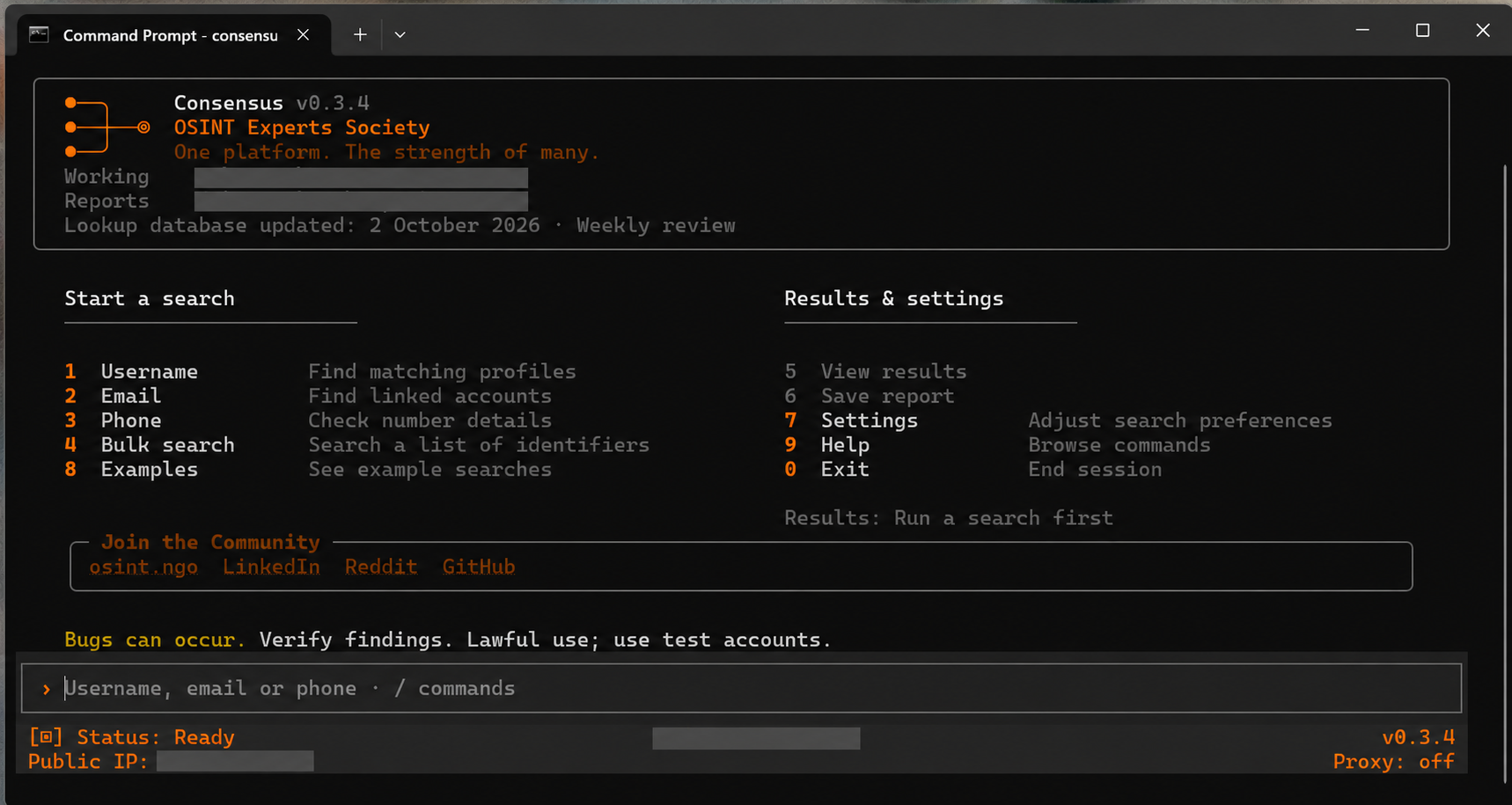
Why Consensus
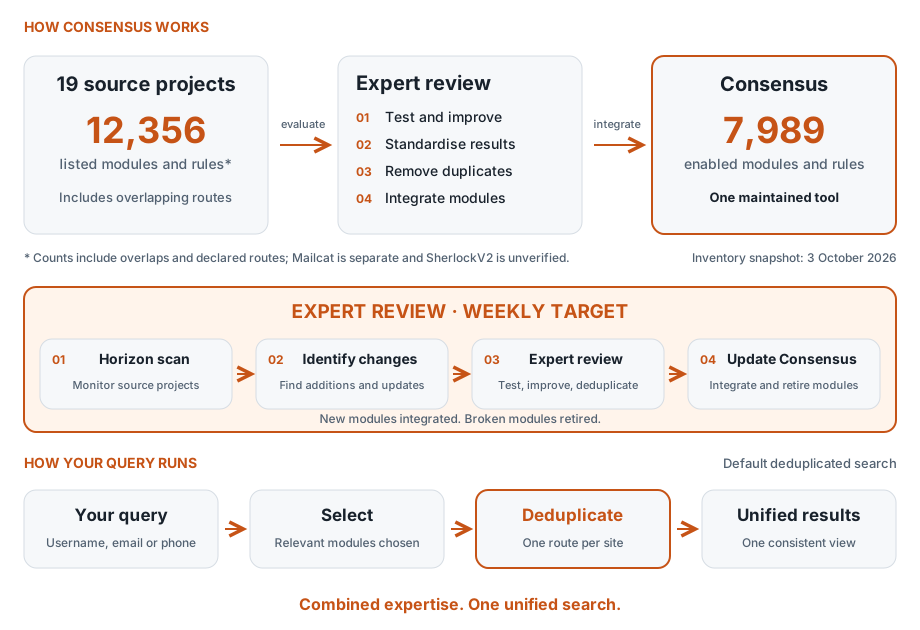
Last expert review: 16 October 2026 · Latest accepted intake: 13 modules + 1,782 site rules added · 11 module and 161 site candidates remain disabled with specific acceptance holds
Compare
Combined coverage. Maintained modules. Consistent results. One installation and update process replaces managing separate tools and reconciling their results.
Full comparison: Consensus and its 19 source projects
Counts are a documented snapshot from 3 October 2026. Scroll the table horizontally on smaller screens.
Lookup activity for User Scanner, Maigret and WhatsMyName was rechecked for 17 September–16 October 2026 (30 complete UTC days). Their entries count distinct days with non-merge changes to lookup files, not releases or a promised update schedule. Other frequency figures retain the six-month snapshot ending 3 October; they are historical median gaps, not commitments.
| Tool | Username | Phone | Duplicate ratio | Observed lookup update activity | Last module update | |
|---|---|---|---|---|---|---|
Combined solution | 7,782 | 205 | 2 | Deduplicated default searches | Weekly review target | 16 Oct 2026 |
| Maigret | 5,483 | — | — | 40.8% 5,482/5,483 mapped | 8 update days in the 30-day window | 10 Oct 2026 |
| User Scanner | 2,511 | 211 | — | 68.9% 2,575/2,722 mapped | 13 update days in the 30-day window | 15 Oct 2026 |
| Aliens Eye | 840 | — | — | 65.4% 837/840 mapped | Too few updates | 10 Jun 2026 |
| WhatsMyName | 716 | — | — | 60.8% 716/716 mapped | 3 update days in the 30-day window | 15 Oct 2026 |
| Sherlock | 481 | — | — | 98.5% 479/481 mapped | Too few updates | 28 Apr 2026 |
| FindMe | 412 | — | — | 99.8% 410/412 mapped | No updates in 6 months | 14 Jan 2025 |
| DetectDee | 375 | 3 | 4 | 82.5% 380/382 mapped | No updates in 6 months | 19 Jul 2023 |
| Nexfil | 328 | — | — | 89.3% 327/328 mapped | No updates in 6 months | 14 Aug 2023 |
| GoSearch | 306 | — | — | 92.6% 306/306 mapped | Every 47 days | 30 Sep 2026 |
| Vesper | 299 | — | — | 96.6% 298/299 mapped | No updates in 6 months | 20 Jun 2021 |
| Sreg | 51 | 50 | 50 | Not comparable | No updates in 6 months | 23 Mar 2015 |
| Holehe | — | 123 | — | 28.5% 123/123 mapped | No updates in 6 months | 24 Jul 2024 |
| Linkook | 64 | — | — | 96.9% 64/64 mapped | Too few updates | 30 Sep 2026 |
| UserJoo | 29 | — | — | 6.9% 29/29 mapped | Every 4 days | 03 Sep 2026 |
| Socialscan | 6 | 6 | — | 91.7% 12/12 mapped | No updates in 6 months | 21 Jan 2024 |
| Numint | — | — | 5 | 60.0% 5/5 mapped | Too few updates | 12 Jul 2026 |
| Ignorant | — | — | 3 | 100.0% 3/3 mapped | No updates in 6 months | 24 Mar 2021 |
| SherlockV2 | Unverified (repository unavailable) | Unverified | Unverified | Unverified | ||
| Mailcat | 26 mailbox-provider checks | Not comparable | Too few updates | 05 Sep 2026 | ||
Key features
Coverage and maintenance
- 🛠️ Expert-maintained coverage. Our team aims to review all 19 source projects weekly and evaluates new OSINT projects as they emerge. The latest completed review is dated above. Suitable modules are tested, improved and integrated; broken modules are retired.
- 🔄 Keep investigations current. Search newly added lookup sources, or recheck saved identifiers with the original limit and filters. Compare newly discovered matches, changed details and inconclusive results.
- 🎛️ Choose your search size. Guided username and email searches offer Quick (up to 300 checks), Custom (enter a number) and Full (all eligible checks). Use settings once, or choose Settings → Save these preferences as my defaults for future sessions. Eligible enrichment stays enabled, and email domain analysis is separate.
- ⚖️ Balanced limited searches.
--top 500and Quick aim for 50/50 site checks and modules, filling unused slots from the other group. Limits apply per username/email after exclusions; email's module-only plan uses the available modules. Stored ranks order each group, not verified current popularity. Modules do not guarantee returned enrichment. Continue the full search to add remaining coverage, or use--full. - 🔔 Automatic update checks. See new-release notices inside Consensus and update with your existing installation. See Updates.
Investigation workflow
- 🔀 Follow new leads automatically. Enable recursive search to investigate usernames, email addresses and linked accounts discovered in your results, expanding your search without entering each new lead yourself.
- 👤 Enriched results. Go beyond found/not found with available profile details, including names, biographies and linked accounts. Inspect the returned information, see source coverage and compare details across results.
- 📋 Bulk search and advanced controls. Process lists, generate username variations, filter sites and categories, and use proxies.
- 🔁 Retry unsuccessful checks. Retry errors, blocks and inconclusive responses without repeating completed checks. Rate-limited checks cool down first. A proxy may help some access blocks, but is not a guaranteed fix or a reason to bypass rate limits.
- 💾 Save your investigation. Keep named investigations, notes and review decisions. Saved/unsaved status and exit prompts help protect results. Storage is local and explicit; recent-search history is optional.
- 🩺 Check your setup. Settings → Setup / health shows local installation details, optional dependencies, missing keys and report locations without contacting providers.
Reports and integrations
- 📂 Reports and evidence graphs. Choose a format when saving: HTML, PDF, CSV, JSON and more. Explore connections visually, with XMind and Neo4j exports also available.
- 🤖 AI integration. Optional MCP support connects compatible assistants to Consensus lookups and results.
See Consensus in action
Follow a search from query to evidence. Click any image to enlarge. Console screenshots have personal details redacted; report and graph examples use fictional data.
Try the output before installing: Download the example report and interactive graph (.zip)
Extract the ZIP and open either HTML file in your browser. Both use fictional profiles and work offline.
|
1. Start a search Username, email, phone and bulk searches from one menu.
|
2. Follow your search See progress, matches and enrichment; preview, pause or stop at any time. 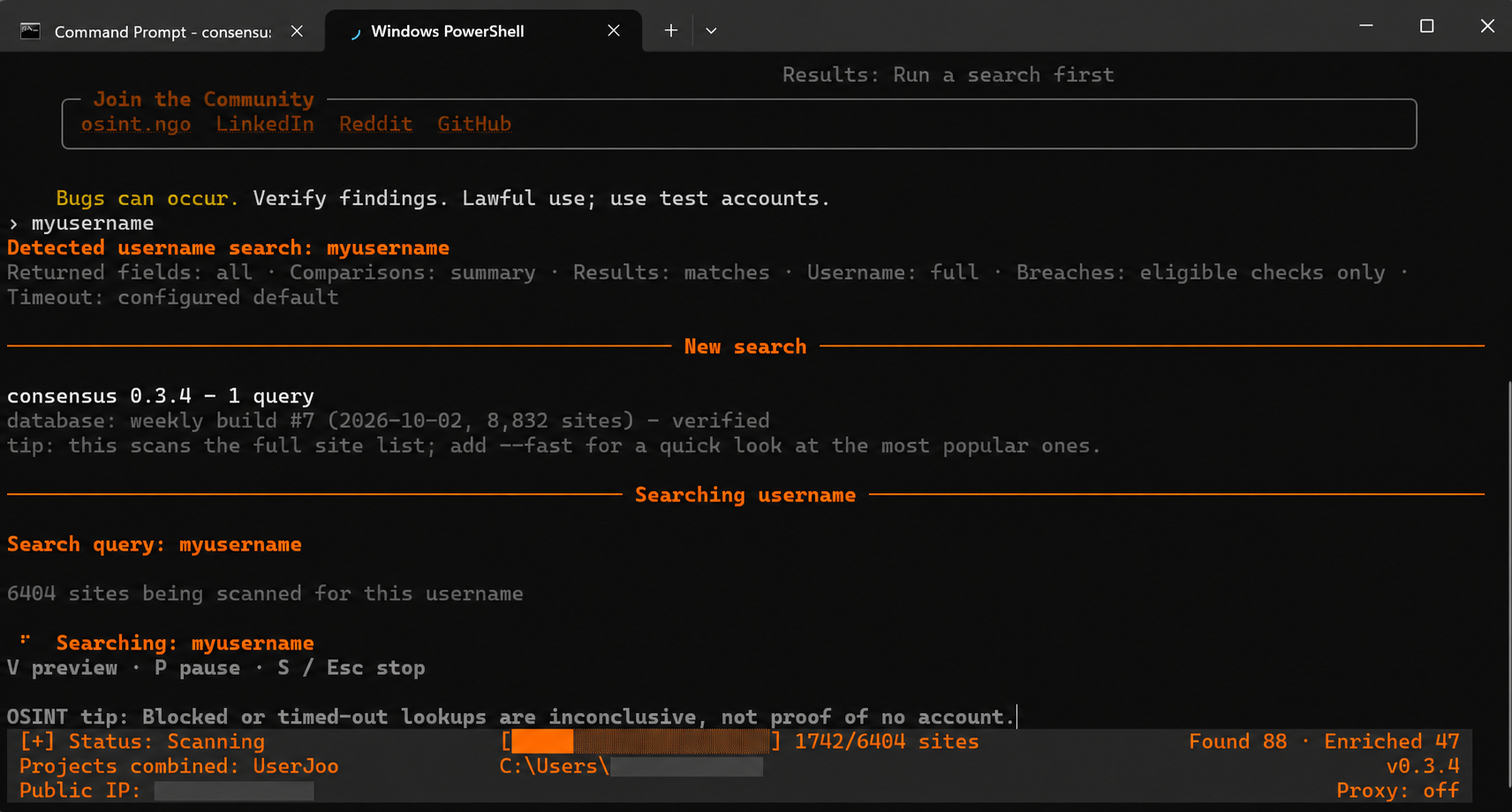
|
|
3. Review the report Search findings, profile details and source coverage. 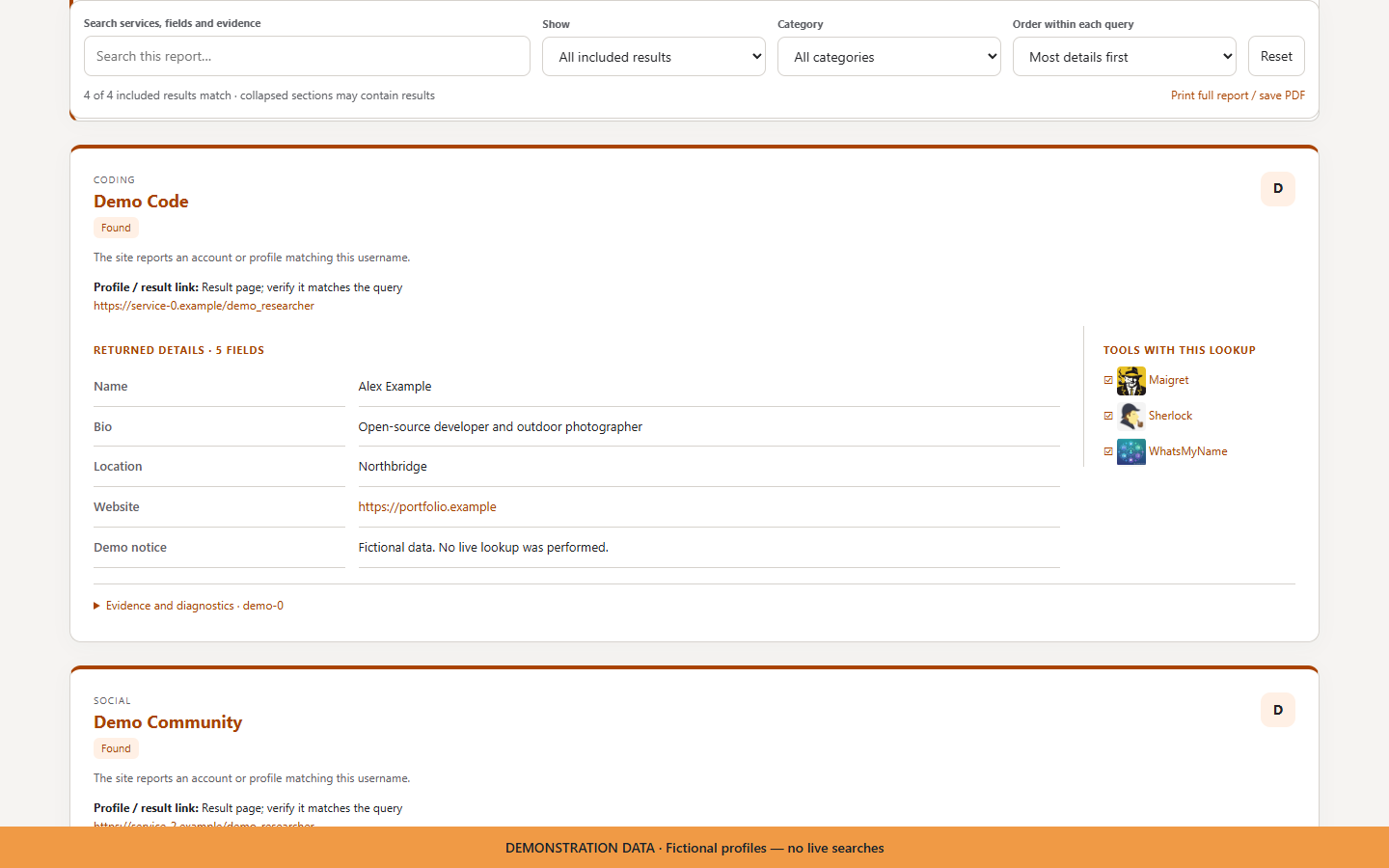
|
4. Explore the evidence graph Follow connections and inspect the supporting evidence. 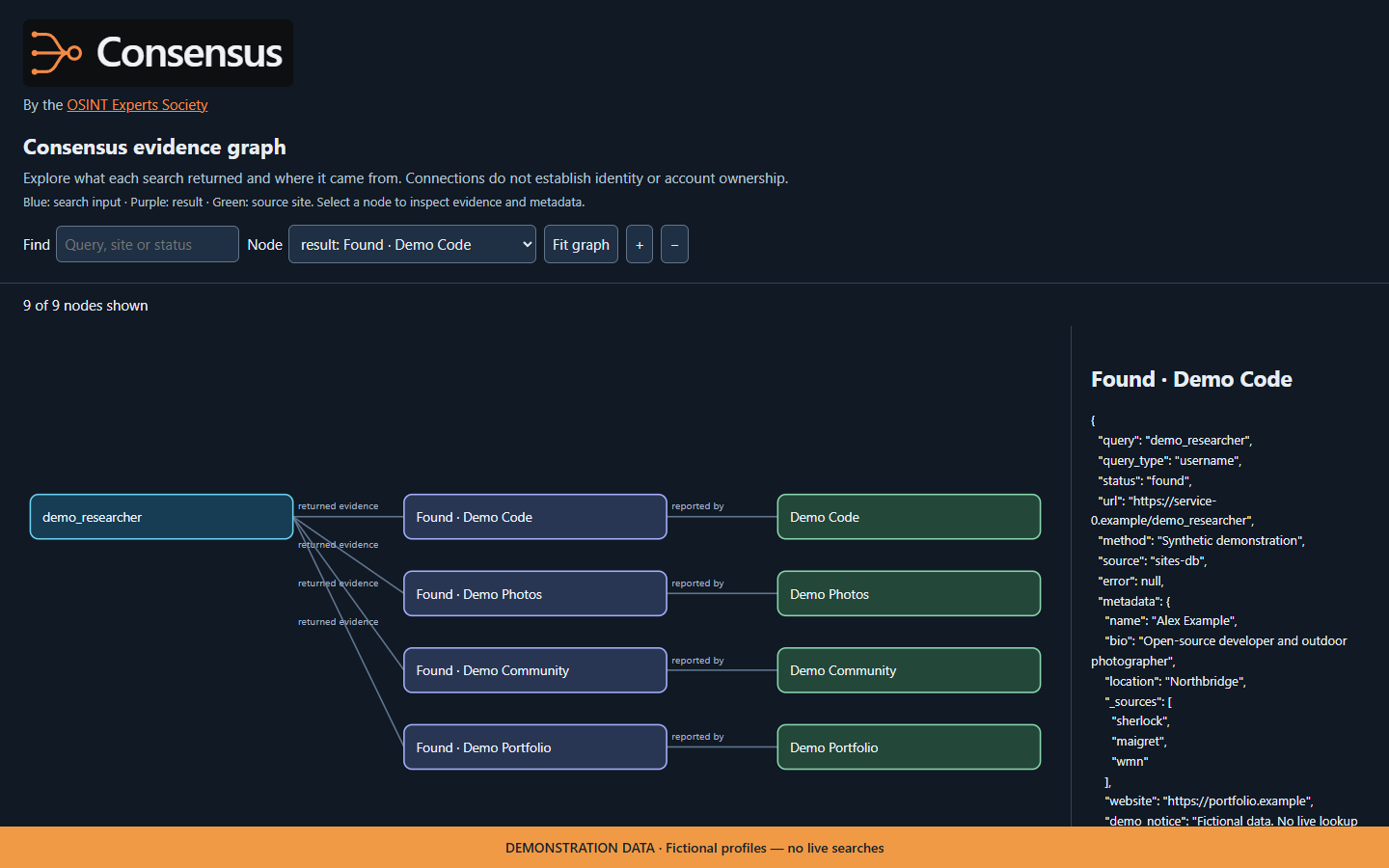
|
After a search, choose Save report, select a format, then confirm the location. The default HTML report + graph saves two files, with a separate link to open each in your browser. All outcomes are saved, including those hidden by display filters.
Install
The Windows install bundle is recommended for most users. It sets up Python and the required dependencies automatically.
Windows quick install — no coding needed
- 📥 Download: open Releases, find Assets, and save the
Consensus-<version>.zipinstaller to your Downloads folder. - 📦 Extract it: right-click the ZIP, select Extract All, then Extract.
- ⚙️ Install: open the extracted folder, double-click Install.cmd, and wait for installation to finish. Keep your internet connection on.
- 🚀 Open Consensus: choose Launch Consensus when prompted, or press the Windows key, type Consensus, and open the Start menu shortcut.
- 🔎 Start searching: choose Username, Email or Phone, then enter what you want to look up.
Tested platforms
The published 0.4.10 release was tested on Windows and Linux, including installation/update checks. Native macOS testing was not completed for that release; macOS installation instructions are available, but it is not labelled as tested. Platform tests do not guarantee that every external provider is available.
Other installation options
For macOS, Linux, PyPI or a terminal-based installation, use the options below.
| Platform | Double-click installer | Bundle from terminal | Install from PyPI | Install from source |
|---|---|---|---|---|
| Windows | Install.cmd | Run .\Install.cmd in CMD or PowerShell. |
Python + PyPI instructions | Git + Python instructions |
| macOS / Linux | Use the terminal option. | Run sh install.sh. |
Python + PyPI instructions | Git + Python instructions |
Both bundle options set up Python and dependencies for you. Run terminal commands from the extracted folder. Internet access is required.
After a bundle install, open a new terminal:
consensusInstall from PyPI
Already have Python 3.10 or newer? Install Consensus with its lookup modules and PDF reporting:
python -m pip install "consensus-osint[modules,pdf]"
consensus
Use py instead of python on Windows, or python3 on macOS/Linux, if required.
Start searching
- Choose Username, Email, Phone or Bulk search.
- Enter your query. Include the country code for phone numbers.
- Review matches, open enriched details, then Save report, Filter results or Search again.
Choose I Follow up in results to continue a full search, search new sources, recheck, retry unsuccessful checks or view changes. Choose 8 Investigations to save searches and notes together. Newly discovered profiles are not necessarily newly created accounts; an unavailable result does not prove deletion. Follow-ups retain starting identifiers and filters, but do not repeat recursive expansion or optional web-search/mailbox discovery.
Press Esc or S to stop an interactive scan; type exit to quit. Enable Recent searches in Settings to keep up to 10 searches locally. History is off by default.
Command-line examples
consensus user "YOUR_USERNAME"
consensus email "YOUR_EMAIL"
consensus phone "+COUNTRY_CODE_AND_NUMBER"
consensus user "YOUR_USERNAME" -o reports/username.html
Explore more with consensus --help or consensus examples.
Updates
🔔 Check inside Consensus. On launch, Consensus checks for a new version in the background and shows an update notice when one is available. (latest) beside the version means a recent successful check confirmed it. You can also open Settings → Installation & updates → Check now; offline or proxy-restricted checks may leave the latest version unknown.
⬆️ Get the latest version from your command line. Close Consensus, then run this in Command Prompt or PowerShell on Windows, or Terminal on macOS/Linux—not at the consensus> prompt:
consensus updateAlternatively, choose Settings → Installation & updates → Install update. Updates use your existing installer, pip, pipx, uv tool, or clean Git checkout—no migration required. Installed optional capabilities are retained. The interface asks before closing so you can save results first.
Restart Consensus after updating. Source updates fast-forward the checkout's configured branch; installed source copies are reinstalled in the same environment. Local edits, pins, locked projects and OS-managed Python are protected: if an automatic update is unsafe, the command explains what needs attention rather than forcing it.
If a Consensus scan proxy or Tor default is configured, update checks and downloads will not silently connect directly. Manual updates explain this limitation; use your existing installation tool with its own proxy configuration. Installer-managed rollback remains available locally.
Interactive launches show public-release notices and one-time new-version summaries. Installer-based copies retain automatic updates by default; other installations update only when requested. Checks run in the background, use a one-hour cache and stay off for redirected output, proxy/Tor sessions or --no-update-check.
Repair, rollback and update controls
Open Settings → Installation & updates to check versions and install updates. Restart, repair, rollback and bundle selection require an installer-managed copy with saved environments.
To update from an installer ZIP, extract it, then select Choose bundle in Settings and choose the extracted folder, or run its installer. Restart to apply changes.
| Command | Action |
|---|---|
consensus update --repair |
Repair the installed version. |
consensus update --rollback |
Restore the previous version and pause automatic upgrades. |
A manual update resumes upgrades after rollback. Set CONSENSUS_AUTO_UPDATE=0 for notifications only, or CONSENSUS_NO_UPDATE_CHECK=1 to disable startup checks.
Moving from a source install? Choose Switch to managed installation in the Updates screen and select the extracted bundle. Your configuration and report locations are preserved.
Advanced installation
Install from source
Requires Python 3.10+ and Git.
git clone https://github.com/OSINT-Experts-Society/Consensus-OSINT.git
cd Consensus-OSINT
python -m venv .venv
Windows
.\.venv\Scripts\python.exe -m pip install ".[modules,pdf]"
.\.venv\Scripts\consensus.exe
macOS / Linux
Use python3 above if required, then:
.venv/bin/python -m pip install ".[modules,pdf]"
.venv/bin/consensus
Add mcp to the extras for AI integration, for example ".[modules,pdf,mcp]". PDF support is included in managed installs.
Use Consensus with AI assistants
Connect an assistant using Model Context Protocol (MCP)
Install the MCP extra in your Python environment:
python -m pip install --upgrade "consensus-osint[modules,pdf,mcp]"For clients using an mcpServers configuration, add:
{
  "mcpServers": {
    "consensus": {
      "command": "consensus",
      "args": ["mcp", "--transport", "stdio"]
    }
  }
}
Use the full path to the installed consensus executable if your assistant cannot find it. Client configuration screens vary; select a local stdio server and use the same command and arguments.
The server provides username, email and phone lookups, paginated results and detailed evidence. Example request: “Use Consensus to search my username YOUR_USERNAME across up to 20 sources, then summarise the matches and inconclusive results.” Lookups contact external services; review your assistant's tool permissions before running them. Returned profile text is evidence, not instructions.
Common questions
What does Consensus search? Usernames, email addresses and phone numbers using the installed lookup catalogue. Coverage varies by identifier type, enabled modules and available provider access.
How are the 19 projects combined? Their lookup modules and rules are standardised into one catalogue. Default searches reconcile overlapping lookup routes before presenting unified results; Consensus does not simply run 19 complete searches.
Are results just found or not found? Available evidence can include profile names, biographies and linked accounts, alongside each result's status. A match is a lead, not proof of a person's identity; errors and inconclusive responses do not establish absence.
How do I install and update it? Choose the installer or PyPI, then follow the update instructions for your installation.
Join the community
Want your OSINT project evaluated for inclusion?
Contact the OSINT Experts Society


Important
Use responsibly. Shared details are leads, not proof of identity; verify important matches at their source.