

Centauri Carbon 2 Community Firmware
Community firmware, local printer control and reproducible build tools for the ELEGOO Centauri Carbon 2, maintained by Neme77.
Independent community project. Not affiliated with, endorsed by or supported by ELEGOO.
Local control · Canvas · OrcaSlicer sync · Eight app languages · Six themes
First installation · OrcaSlicer & Canvas · Screenshots · Community credits
Start here / Guide rapide
| Guide | English | Italiano |
|---|---|---|
| First installation, printer IP and LAN access code | First setup | Prima installazione |
| OrcaSlicer connection, upload and Canvas filament sync | OrcaSlicer guide | Guida OrcaSlicer |
| Latest complete firmware and retained features | Changelog | Novità della release |
V4.4.1 — complete firmware with CC2 Control 1.2.10
Download the complete V4.4.1 firmware — released 14 October 2026, on the qualified ELEGOO CC2 02.01.01.07 base.
For new users: one firmware installation includes CC2 Control 1.2.10, its qualified fixes and the complete signed updater in Settings. No second application package from the computer is needed. The native callback and firmware patches remain included; Canvas stays on MQTT. PR103/114 and full experimental Canvas UDS remain excluded.
| Download | Purpose |
|---|---|
| Complete signed V4.4.1 firmware | Printer USB/offline installation; includes compatible base, CC2 Control 1.2.10 and updater helpers. Keep the .zip.sig intact. |
| Public source builder | Source-only computer build kit; official vendor inputs, qualified tools and private signing/AES keys remain external. This ZIP is not printer firmware. |
| SHA256SUMS.txt | Checksums for these exact release assets. |
First installation in English · Prima installazione in italiano. Existing V4.4 users may instead install the application-only update below; a factory reset is not required. Keep the existing V4.4-compatible application channel: 4.4.1 is the complete firmware release, while 4.4 is its compatibility family. The printer display retains base 02.01.01.07.
Application update authorization: Check for updates needs no LAN code. Download/upload and Install require confirmation with the printer's configured LAN code, read on the display under Settings → LAN only, even when CC2 Control is already connected. This is different from the SSH password. English explanation · Spiegazione italiana. Updates are never installed unattended; the panel updates CC2 Control, while complete firmware uses the USB procedure.
The exact R3 image passed its signed build and maintainer installation/connection/Canvas/profile-retention/restart trial. All seven CI jobs passed. Earlier prolonged-print beta reports remain described below; they are not a new 40-hour test of this exact image. Integration: PR126; application PRs and contributors are credited below.
Italiano: la V4.4.1 offre ai nuovi utenti un unico firmware con CC2 Control 1.2.10, fix e updater già integrati. Per gli update successivi basta il pannello e la conferma con il codice LAN. Chi usa già la V4.4 può scegliere l'aggiornamento della sola applicazione. Non serve ripristinare la stampante.
CC2 Control 1.2.11 — stable update from the panel
Download CC2 Control 1.2.11 · English instructions · Istruzioni in italiano.
Community Firmware V4.4/V4.4.1 only; V4.3 and original firmware are unsupported. All features and fixes from 1.2.10 are retained. This corrects Settings → Updates: descriptions of installed/older versions disappear, new signed release notes follow the selected app language, and unavailable translations are explicitly labelled as English.
| Your installation | Update to 1.2.11 |
|---|---|
| V4.4.1, or an app with Settings → Updates | Select Stable → Check for updates. Enter the configured LAN code, Download and verify, then separately confirm Install. |
| Original V4.4 app without the updater panel | Download and extract CC2-Control-1.2.11-Multiplatform-Update.zip on the computer; run the installer described in the English/Italian guide. |
| Prefer local upload | Upload the release's .cc2update file in Settings → Updates. The installer ZIP is not accepted by the panel. |
Use an idle, connected, cold printer with heater targets zero and live view paused. Checking availability needs no LAN code; download/upload and installation require it. Read the code from the display under Settings → LAN only: it is different from the SSH password. No factory reset or firmware reflash is needed. Updates are never installed unattended.
Validated: all seven CI jobs passed; the maintainer accepted the signed candidate and authorized distribution. Exact source/payload checksums and signature were verified. PR127 adds this UI correction; the included 1.2.10 PRs and original contributors remain credited below. Firmware, callback and MQTT Canvas are retained. This does not claim a new long-print test of 1.2.11.
Italiano: con il pannello già installato vai in Impostazioni → Aggiornamenti → Stabile → Controlla aggiornamenti, inserisci il codice LAN e scegli Scarica e verifica, poi conferma Installa. La 1.2.11 conserva tutte le novità della 1.2.10 e corregge le note degli aggiornamenti. Solo V4.4/V4.4.1; non serve reinstallare il firmware.
Previous application update — CC2 Control 1.2.10
Download CC2 Control 1.2.10 · English installation guide · Guida italiana.
Community Firmware V4.4 only. V4.3 and original ELEGOO firmware are unsupported. This updates CC2 Control, preserving the installed firmware and callback runtime. Canvas remains on MQTT; continuous Canvas UDS and PR103/114 remain excluded.
| New in the application update | What you get |
|---|---|
| Eight languages | Hungarian (Magyar) joins English, Italian, French, Chinese, Russian, Polish and Czech. |
| Advanced bed mesh | Measurements by bed temperature and nozzle, nozzle Z corrections, configurable soak and guarded calibration. |
| Files and History | Available space for internal/mounted USB storage; 15 items per page with filtering and sorting. |
| Persistent live camera | Enable in Settings → Appearance: after Start, the same stream continues through navigation and hidden/minimized pages. Pause, disabling, closing the page and viewer handover still stop it. Reload does not start video automatically. |
| Canvas and file metadata fixes | External-feed starts clear old mappings; calibrated multicolour starts send the whole map. Orca estimates read real bed temperatures and total filament across tools. |
| Updates in Settings | Check the signed GitHub index, download and verify compatible updates, then confirm installation separately. Signed local upload is also available. |
| Print setup | Clearing the file-analysis notification removes its close icon, so no empty box overlaps the Canvas dialog. |
First update from the CC2 Control included in V4.4: extract CC2-Control-1.2.10-Multiplatform-Update.zip on the computer and run Install-Windows.cmd, or the Linux/macOS installer. This enables Settings → Updates. Already have the updater panel? Check the Stable channel there, or upload the release's .cc2update file. Use an idle, connected and cold printer, with heater targets zero. No factory reset is needed; LAN settings, materials, preferences, plates/nozzles and spool inventory are retained.
Confirmed on the maintainer's V4.4 printer: computer-assisted installation, signed local upgrade, certificate-verified GitHub download, complete online panel update, restart, Canvas/settings retention and the print-dialog fix. Automatic host/ARM, sanitizer, browser and builder checks passed. The wider beta campaign's long-print reports are described below; they do not represent a new long-duration test of this exact update. Forced-failure rollback has host coverage, but has not been deliberately exercised on the printer.
Included PRs and thanks
| Merged PR | Included improvement | Original contribution / integration |
|---|---|---|
| #104 | Temperature/nozzle mesh measurements and soaked calibration | beanbo |
| #115, #116 | Hungarian translation and packaging/browser integration | pezso92; Neme77 integration |
| #117 | V4.4-only application installer, compatibility checks, backup and restore | Neme77 |
| #118 | Available storage space and 15-item File Manager/History pages | Neme77 |
| #119 | External-feed Canvas table clear and complete calibrated multicolour mapping | beanbo |
| #120 | Correct Orca G-code bed temperatures and multi-tool filament estimates | Neme77, with beta-tester reports |
| #121 | Optional persistent camera across navigation and hidden/minimized pages | Neme77, retaining beanbo's viewer coordination |
| #124 | Signed GitHub updates in Settings and cleared Canvas-analysis notification | Neme77 |
Special thanks to pezso92 for Hungarian and beanbo for the advanced mesh and Canvas fixes. We also thank Surfoo for the UI/localization/test foundations, efiten for Orca Canvas sync and Skcycos for Chinese. Original authorship is retained through integration PRs. Thank you to DamiBFryta, our first beta tester, and Barry Green, Michael Husbyn, Jiří Heider, James Morriss Hill, Brian Mcmillion and everyone offering time, printers and detailed feedback. Full community credits.
Previous complete firmware — V4.4
Community Firmware V4.4 is officially available, with CC2 Control 1.2.3 and official CC2 base 02.01.01.07. Released on 13 October 2026 with the tested complete firmware, public source builder and checksums.
| V4.4 highlight | What changes for the user |
|---|---|
| New official base and connection fixes | Ported firmware patches, LAN/WAN reconnection and native light commands with display-state acknowledgement. |
| Control panel | Aligned cards, fan percentage fields applied with Enter, guarded PID/Input Shaper tools and calibration Quick Actions. |
| Material profiles | Names such as PLA MATTE are accepted; a themed dropdown shows preheat presets without squeezing names into a row of buttons. Selecting a preset loads the fields; Apply temperatures starts heating. |
| Canvas | Confirmed reset of the four filament records; empty slots are dimmed without a colour. MQTT Canvas telemetry and Orca filament sync remain supported. |
| Camera | Live viewing continues while scrolling; hidden-tab, navigation and viewer-ownership controls remain active. |
| Languages | English, Italian, French, Simplified Chinese, Russian, Polish and Czech. |
The O0 callback runtime, protected live Z offset, spool inventory, build-plate library, mesh tools, history/timelapse, file uploads/downloads and Panda Breath compatibility are retained. PR103/104 and the experimental full Canvas UDS variant are not included in the published V4.4 firmware.
Long-print results and callback patch
The community beta campaign delivered encouraging results: 40-hour printing sessions without reported freezes and more than 20 confirmed long tests. Tester feedback also helped resolve smaller issues in the interface and printer integration.
| Evidence | Result |
|---|---|
| Long printer sessions | 40-hour prints and more than 20 long tests reported by the maintainer and beta testers, with no freezes reported in those sessions. |
| Automatic validation | Host tests, ARM build/smoke checks, address/undefined and thread sanitizers, web UI checks, builder tests and reactor fixtures passed on the release-preparation PR. |
| Callback runtime | Qualified O0 cleanup of completed callback references, timers and completion waiters, ported to the fingerprinted new printer executable. |
The callback patch is a central part of this work: it addresses retained references in the reactor so completed requests do not keep the corresponding objects alive through those structures. Its cleanup and exception paths were qualified, and the 4.4 port preserves the same principle with the new executable addresses. During the beta cycle, the printer recovered available memory after activity and completed prolonged printing without the reported freezes we were investigating.
These are positive integration results, rather than a controlled measurement attributing every memory change to the callback patch. The runtime targets reactor retention; camera buffers, caches and other vendor allocations have separate lifecycles. Read the callback mechanism and validation evidence.
Release packaging: the V4.4 release supplies complete firmware and its builder. The new CC2 Control application is included in that compatible firmware; installing it separately on V4.3 is not supported. The separately released V4.4-only application updater above is now available. Future application updates are planned in two clearly identified variants: the current MQTT Canvas path and an experimental UDS Canvas path, each with explicit firmware compatibility and separate validation results.
Previous downloads — V4.4
| Download | Purpose |
|---|---|
| Complete signed V4.4 firmware | Install or update the complete Community Firmware, including its compatible base and CC2 Control 1.2.3. |
| Public V4.4 source builder | Build locally; qualified official firmware, vendor library, local tools and private signing/AES material remain external. Read PUBLIC-BUILDER.txt and Build guide. |
| SHA256SUMS.txt | Verify both release downloads. |
| Release notes and all assets | Features, callback evidence, validation, installation and acknowledgements. |
The complete firmware assets above retain CC2 Control 1.2.3 and their original checksums. After installing/configuring V4.4, use the separate 1.2.11 application update above for the newest app features. V4.3 is unsupported. A factory reset is not required.
Original ELEGOO firmware
Download original CC2 02.01.01.07 · Return-to-stock notes · Istruzioni in italiano.
The externally hosted package matches the exact official V4.4 base: SHA-256 278a0606a072ae432e9bf2d4f0157acba4570d1c85dbc768c359fef53ac5f406. ELEGOO blocks downgrades to older firmware. This is the original package for the same 02.01.01.07 version, not a downgrade tool. The maintainer confirmed a successful return from V4.4 to this same-version original firmware on the printer. A factory reset does not replace the firmware.
Previous releases and historical downloads
- V4.3 experimental pre-release, with CC2 Control 1.2.0 and the first callback integration.
- Community Firmware V4.2-R5.
- CC2 Control 1.1.31fix, a historical standalone updater for its documented firmware compatibility.
These releases keep their original assets, checksums and validation records. They are not the current V4.4 downloads.
SSH access
SSH username: root. Use your SSH password; the default access reference is documented in the installation guides linked below. This is separate from the LAN access code. English SSH reference · Riferimento SSH in italiano.
Changed the printer LAN access code?
Why updates ask for the LAN code: reading the update list does not require it. Downloading/uploading a package and installing it require a separate confirmation with the code configured for this printer, even when CC2 Control is already connected. Read it on the display under Settings → LAN only; it is different from the SSH password. English explanation · Spiegazione italiana.
Open http://PRINTER-IP:8081, go to Settings → Connection, enter the replacement code and choose Change / Revalidate, then confirm. This saves the code and restarts the CC2 Control service; a separate “Save changes” step is not required for the LAN code.
Read first setup and LAN-code recovery or prima configurazione e codice LAN. Advanced SSH recovery remains in Installation.
Features
| Area | What you can do |
|---|---|
| Dashboard and print tuning | Monitor temperatures, fans, print progress and live movement; adjust print speed (25–200%) and extrusion flow (50–150%) during an active or paused print with fresh telemetry. |
| File manager | Browse internal and USB storage, search and sort files, inspect model thumbnails and print metadata, upload G-code, download G-code to your computer, delete files and start a protected print. |
| Canvas and print continuity | View four material slots, colours and presets; select, load or unload a spool; enable Auto refill so the printer can continue from another slot holding the same filament when one spool runs out. |
| Spools | Keep a filament inventory that knows which spool is in which Canvas slot or on the external holder, charged with what the printer really extrudes. New filament in a slot asks which spool it is, a spool that runs out is set to zero, weigh-ins correct the count, and the print popup warns when a spool holds less than the file needs. Off until switched on. |
| Print popup and timelapse | Choose filament-slot mapping and bed side before printing, use a saved mesh or a calibrated start, and enable timelapse recording for that print. |
| History | Review jobs recorded by the printer, including start time, duration and result; download ready timelapse videos and render recorded frames into a video while Idle. Delete individual records or clear loaded completed records with confirmation; G-code files are preserved. |
| Camera | Start live viewing on request, take snapshots and open the viewer in a separate window. CC2 coordinates camera ownership between its pages and windows and releases the viewer when it closes; the vendor camera service remains active. In V4.4, scrolling away from the camera card does not stop the stream. |
| Printer control | Home and move axes, set nozzle and bed targets, use material temperature presets, control fans and lights, extrude filament and adjust the live session Z offset. V4.4 adds numeric fan inputs and the themed preheat selector. |
| Bed levelling | View the mesh in 2D or interactive 3D, inspect values and saved profiles, choose Side A / Side B, use adaptive probing and measure four-screw adjustment with the nozzle load cell. |
| Quick Actions and safety | Configure dashboard shortcuts with real light-state feedback; use object exclusion, a protected console and global emergency stop. Heater-off actions require fresh Idle telemetry. |
| Printer status and connection | See native machine sub-states and refusal messages; obtain telemetry through persistent UDS sessions, discover the printer serial automatically using saved LAN credentials, and revalidate a changed LAN code. |
| Slicer and integrations | OrcaSlicer upload, Device UI and Moonraker-agent Canvas filament sync use port 8081. The separate read-only Panda Breath compatibility bridge uses port 7125. |
| Interface | Use English, Italian, French, Simplified Chinese, Russian, Polish or Czech; choose Light, Dark, Dracula, Nord, Monokai or Solarized Light themes; save appearance preferences and collapse the navigation menu. |
Community contributions
Our sincere thanks to the contributors whose code, ideas, translations and validation helped build CC2 Control. V4.4 retains their work from throughout the project's history; credit follows original authorship, including work integrated through a later maintainer PR.
| Contributor | Contributions included in the project |
|---|---|
| @Surfoo | The complete interface redesign, Control-page and mobile/tablet improvements; French translation and JSON localization; CI, sanitizers and ARM smoke tests; upload-slot fixes, byte-exact inputs, LAN-code visibility and release/version tooling. Selected PRs: #24, #15, #19, #50. |
| @beanbo | Spool inventory, the original build-plate library, persistent UDS subscriptions, printer states/refusals, Canvas auto-refill, camera handover, history, upload improvements, idle motor release and Russian translation. Selected PRs: #97, #83 → #89, #88, #67. |
| @efiten | Original OrcaSlicer/Canvas filament-sync implementation proposal, analysis and printer-side validation: #8, integrated through #12. |
| @Skcycos | Simplified Chinese interface translation: #26. |
Hungarian translation: thanks to @pezso92 for the complete Hungarian interface (Magyar), all 879 source entries and preserved placeholders in #115. Maintainer integration retains his original commits and adds builder packaging and language tests. Hungarian is included in CC2 Control 1.2.10; the original complete V4.4 firmware still ships seven languages.
Special recognition to Surfoo for reshaping the interface and its development foundations, and to beanbo for the extensive additions to everyday printing and printer integration. Thank you to every contributor for the care, time and follow-through behind these improvements.
We also thank @sauadhi for the full Canvas filament-ejection work in #103, which remains excluded together with PR114. beanbo's advanced mesh/calibration work in #104 is merged and included in CC2 Control 1.2.10. The original complete V4.4 firmware artifacts remain unchanged and do not contain that extension.
@Neme77 maintains the project, develops and integrates the firmware/control fixes, coordinates hardware validation and prepares release artifacts. The recent integration includes the Control/Canvas changes, Polish/Czech translations and new firmware-base port (#107, #108, #109, #110).
See the detailed contributor credits and original PRs.
Beta testers
Special thanks to DamiBFryta, our very first beta tester, for being reliable, impartial and always available throughout development.
Our sincere thanks also go to Barry Green, Michael Husbyn, Jiří Heider, James Morriss Hill and Brian Mcmillion, and to all the other beta testers not named here. By offering their time and their printers, running long printing sessions and providing patient, precise feedback, they helped identify issues and improve the stability of this release.
Source layout
| Path | Contents |
|---|---|
cc2-control/ |
C backend, web UI, scripts, tests and protocol notes |
builder/current/ |
Current firmware build logic and host-side tests |
docs/ |
Installation, architecture, build and testing documentation |
CHANGELOG.md |
User-visible project history |
AGENTS.md |
Repository working rules for contributors and coding agents |
Historical versions are preserved through Git tags, GitHub Releases and Git history instead of parallel version-specific documents on main.
Documentation
- First installation and LAN access code / Italiano
- OrcaSlicer and Canvas sync / Italiano
- Installation and advanced recovery
- Build and reproduction
- Architecture
- CC2 Control
- Source and third-party inputs
- Testing
- Contributor credits
- Contributing
Interface preview
Real-printer screenshots of CC2 Control 1.2.3, supplied on 13 October 2026 for the V4.4 release candidate. Open the complete screenshot gallery to see all eleven views at full size.
Dashboard
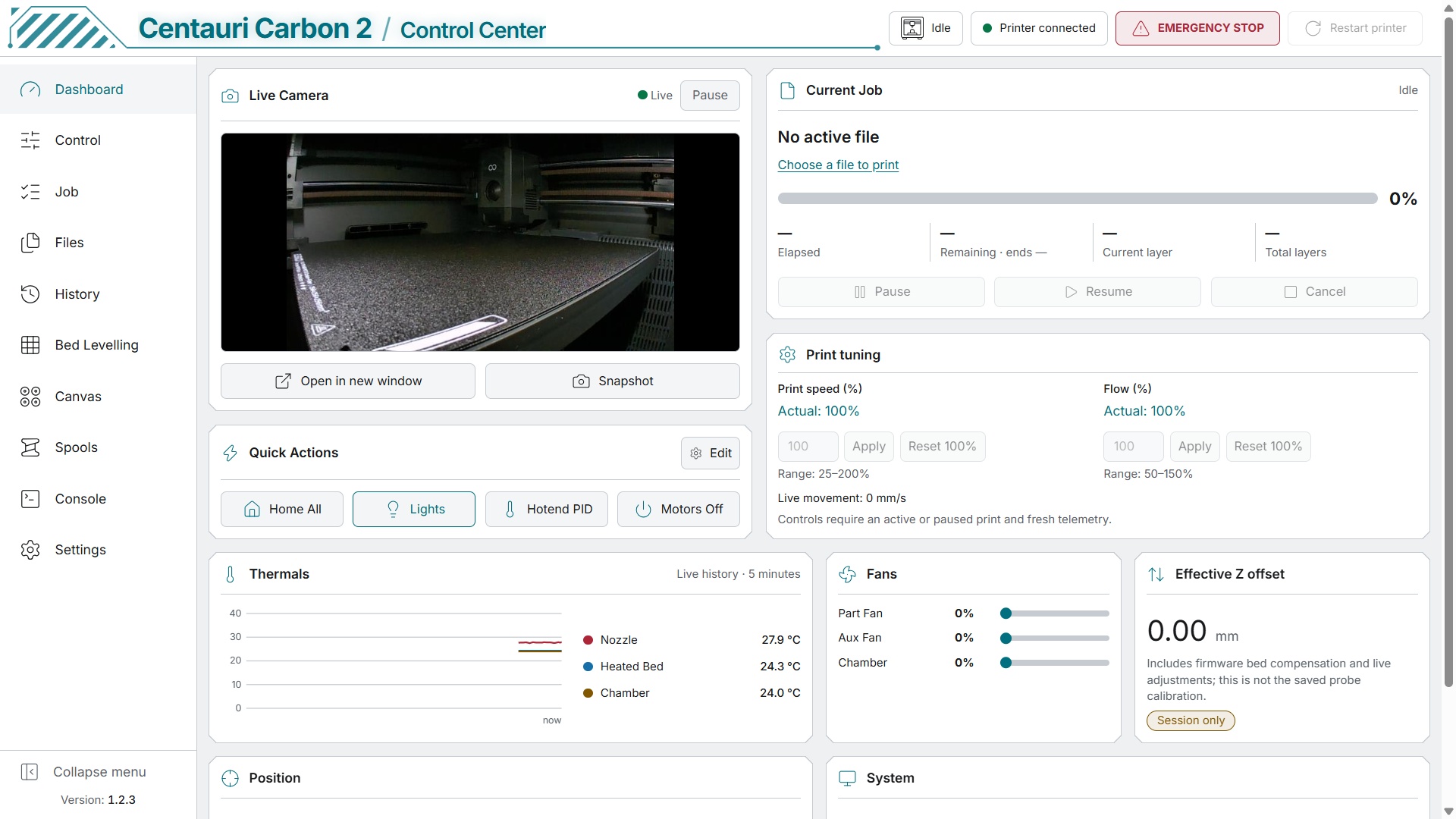
The opening image shows the Light-theme dashboard with live camera, Quick Actions, print status and temperature history. View it at full size.
Control panel and Canvas
The Control panel includes numeric fan fields applied with Enter and a preheat dropdown supporting names such as PLA MATTE. Canvas displays empty slots without a filament colour and provides Reset all filaments.
| Control and preheat presets | Canvas and filament reset |
 |  |
Bed mesh and spool inventory
Interactive mesh inspection and optional tracking of the filament inventory.
| 3D bed mesh | Spool inventory |
 |  |
The complete gallery also shows PID/Input Shaper and material profiles, the Job page, G-code files and model previews, the protected console, integration checks and the six themes.
AI-assisted development
This project uses AI-assisted development tools as part of the workflow, including support for code review, refactoring, debugging, documentation and selected code generation tasks.
A substantial part of the codebase is written and maintained directly by the project maintainer. Architecture decisions, reverse engineering, hardware testing, printer-side validation and release approval are performed by the maintainer and community testers.
AI-assisted changes are reviewed and validated before being included in a release.
License and notices
Project code is provided under GPL-3.0-only where the contributors have the right to license it. Vendor firmware and third-party components keep their own terms. See LICENSE and NOTICE.md.