


KJDraw
The open-source CAD engine for the AI era
The model describes engineering intent. KJDraw compiles it into real CAD drawings
that stay editable, verifiable, undoable, and reopenable.
Quick start · Try with AI · Live editor · Docs · Contribute Skills · 简体中文
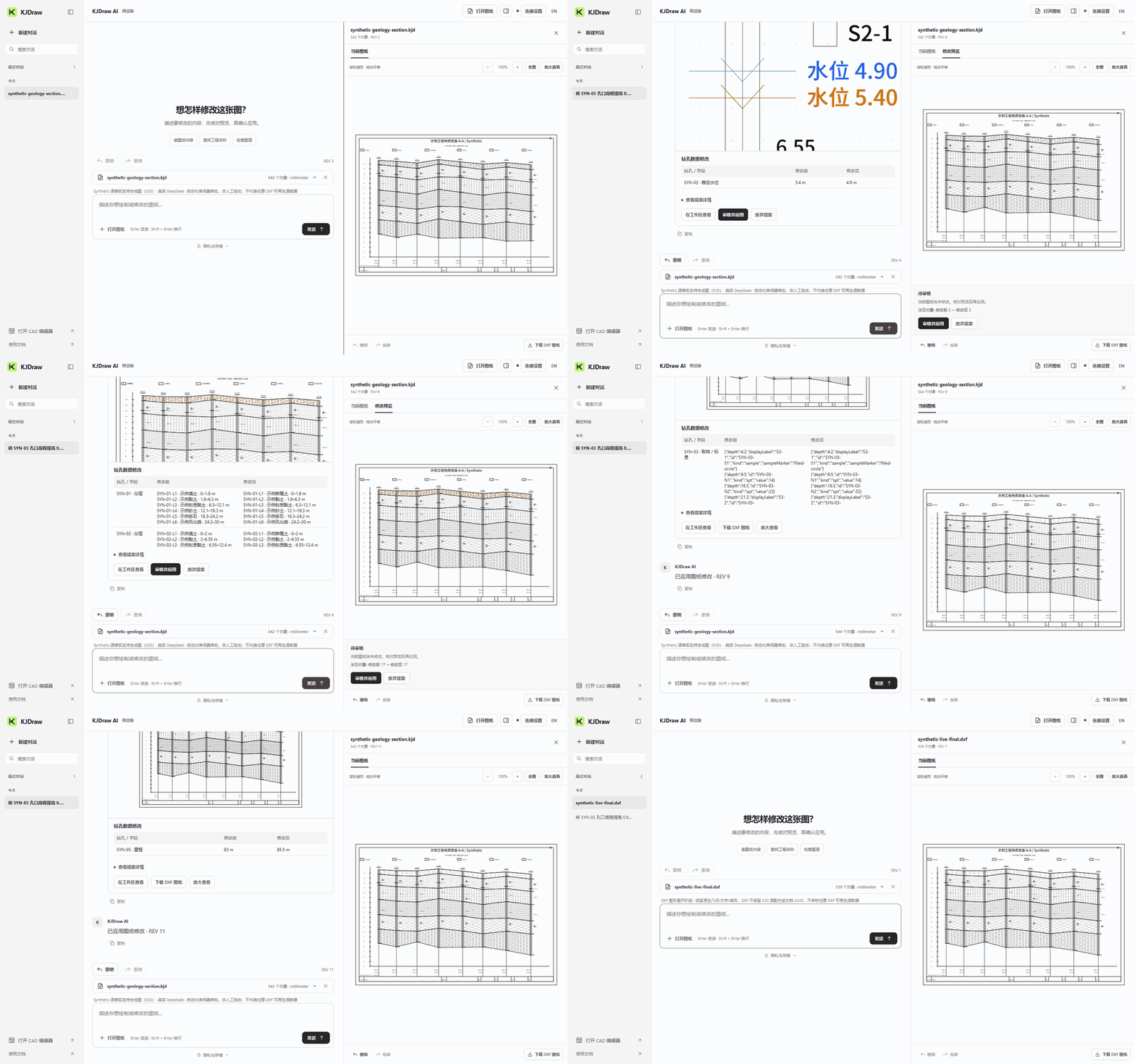
Real DeepSeek · ten edits on one synthetic section · condensed recording. Full recording and checks ↗
Draw it. Then keep editing it.
KJDraw creates editable CAD objects, not a one-off picture. Ask your agent to draw a part, then change a hole diameter, move an object or revise a layer without starting over. Review each proposed change before applying it; undo, save and reopen the drawing when you need to.
The model decides what to draw. KJDraw handles the CAD operations.
🚀 Quick start
For Codex, Claude Code, Cursor and other terminal-enabled agents (Node.js 22+), run these once:
npm install -g @kanjieteam/kjdraw
npx skills add KanJieTeam/kjdraw -g
The first command installs the CAD engine. In the second, select kjdraw-cad and your agent. Restart your agent, then ask:
Use KJDraw to draw a circle with a radius of 5 mm.
Review the proposed change, approve it, then export the drawing as DXF. The Skill calls the local CAD engine through kjdraw agent; MCP registration is optional. Approval and export guide.
Prefer not to install? Try with AI in your browser and connect your model. Your requests and drawing context go to that provider; conversations, drawings and the key stay saved in this browser. Clear site data on shared devices. Connection requirements and other agents.
What you can build
| Workflow | Current scope |
|---|---|
| Understand existing drawings | Available: paged reads, spatial and property queries, stable IDs within a live/KJD document, layers, block references, topology and change-impact inspection for supported objects. DXF reimport may assign new internal IDs |
| Generate engineering drawings | Sample workflows: manufacturing parts, floor plans, site and utility plans, road alignments, borehole logs, geological sections and charts. Complete production workflows are still being validated |
| Keep editing through conversation | Available command subset: select, move, copy, rotate, scale, offset, stretch, lengthen, edit text, change layers and delete for supported objects and combinations; model-guided multi-turn tasks still need real-world validation |
| Review and revise safely | Available: revision-bound proposals, human approval, one-transaction changes, undo and save/reopen checks for the supported workflow |
| Embed CAD in your product | Available: TypeScript/JavaScript SDK, React and Vue components, packaged editor, CLI, MCP and local file workflows on the same engine |
Is KJDraw right for you?
| ✅ Good fit | ⏳ Not a fit yet |
|---|---|
| You want an AI agent to generate and repeatedly revise engineering drawings | You need to open and save DWG directly |
| You're building an AI product that changes drawings, with a human in the loop | You need full desktop-CAD parity or 3D solid modeling |
| You need a CAD editor inside a web product (review, inspection, configurators, internal tools) | You need certified plotting or print output |
| You process DXF/KJD in scripts or CI, headless, with no upload |
KJDraw is a CAD engine and execution layer. It is not trying to replace desktop CAD.
📦 Embed CAD in your app
Building a JavaScript or TypeScript app? Use the separate SDK quickstart for project installation. You do not need the agent setup above. The embed API looks like this:
<div id="cad" style="height: 720px"></div>
import { createKJDrawEditor } from '@kanjieteam/kjdraw/editor'

const editor = createKJDrawEditor('#cad', {
  document: 'sample',
  locale: 'en',
  theme: 'dark',
  layout: 'classic', // 'classic' | 'compact' | 'focus'
})

await editor.ready
// await editor.open(file)                              // a File from your file picker
// await editor.save({ format: 'DXF', download: true })
React
import { KJDraw } from '@kanjieteam/kjdraw/react'

export default function DrawingPage() {
  return <KJDraw document="sample" locale="en" style={{ height: 720 }} />
}
Vue 3
<script setup lang="ts">
import { KJDraw } from '@kanjieteam/kjdraw/vue'
</script>

<template>
  <KJDraw document="sample" locale="en" style="height: 720px" />
</template>
Quickstart · React guide · Vue guide · Runnable examples · API reference
🤖 Build a CAD agent into your own product
Your app brings the model. KJDraw brings the CAD tools, the review step and the undo history.
sequenceDiagram
    participant U as User
    participant M as Your model
    participant K as KJDraw
    U->>M: "Move the pump 500 mm east"
    M->>K: Query drawing (layers, entities, geometry)
    K-->>M: Read-only, revision-bound results
    M->>K: Propose move
    K-->>U: Preview the exact change
    U->>K: Approve
    K->>K: Commit as one transaction (undoable)
Each proposal is bound to the revision it was made against, can be used only once, and commits as a single transaction that undoes like a manual edit.
- Agent workflow guide: call drawing tools, review a change and apply it
- Connecting a model: the host owns transport, budgets and approval
- Instructions for coding agents
- Command example: propose, approve and undo without a model or API key
Formats and scope
Use DXF to exchange drawings with other CAD tools. KJD and KJP are optional native formats for KJDraw document and project state.
| Area | Status |
|---|---|
| DXF (ASCII) | ✅ Documented subset, R14–2024 version labels — compatibility details |
| Binary DXF | ❌ Not supported |
| DWG | ❌ Not in 1.0 — convert to DXF first (for example with ODA File Converter) |
| KJD native drawings | ✅ Read/write, validation, transactions, revisions, undo/redo |
| KJP projects | ✅ Multiple drawings in one package with snapshots, hashes and command journals |
| 3D | 🧪 Experimental meshes, primitives and box booleans |
| CLI | ✅ Inspect, validate and convert KJD, KJP and DXF headless — file guide |
Unsupported content is rejected rather than silently dropped. Full boundaries: release status · 1.0 scope.
Contributing
Contribute a Skill for your industry. Start with the Skill catalog and developer guide. An industry pack is one skills/kjdraw-<industry-task>/ directory containing a workflow and any useful templates, rules or helpers.
Fork → add skills/kjdraw-<topic>/ → test your workflow → open a PR.
Skill developer guide · Skill catalog and samples · All contribution types · 中文技能包指南.
Define the inputs, outputs and acceptance checks. Reusing existing operations normally does not require a kernel change; propose missing planner, plugin or engine capabilities separately.
For a new Skill, include SKILL.md and a human README in English or Chinese; maintainers can help with the translation. Add a focused tests/community-<topic>.spec.mjs, then run one command from the repository root:
npm run check:skill
This checks package structure and runs workflow tests with public synthetic inputs; it does not certify model behavior. To check only your pack, append -- skills/kjdraw-your-topic. List the Skill in the catalog.
The most useful contributions right now:
- An installable domain Skill. Start from read-only text audit, mechanical hole patterns or drawing templates and layer rules; keep its own short
SKILL.mdand useful resources, and add tests for your actual workflow. - A reproducible drawing problem. Share a small synthetic DXF or a reduced example you are authorized to publish, with the request and expected result. Do not upload private customer drawings.
- A reusable engineering workflow. Explicit inputs, editable CAD output, and tests for changes, undo and DXF reopening. Start from the domain planner example.
- Try it in your AI client and report back, especially failed generations or multi-turn edits that go wrong.
- Editing tools, drawing types, performance, accessibility and docs.
git clone https://github.com/KanJieTeam/kjdraw.git
cd kjdraw
npm ci --ignore-scripts
npm run dev          # http://localhost:4173
Open the editor at http://localhost:4173. For a Skill-only PR, use npm run check:skill; SDK or UI changes also need the checks in Contributing. Choose a task from the industry-pack claim list and claim it here, or propose your own. See Governance · Roadmap · Support.
Star History
If KJDraw is useful to you, a ⭐ helps other engineers find it.
Built by KanJieTeam, open to contributors everywhere · kanjieteam@163.com · Apache-2.0