

 Dishylink
An open-source Starlink desktop app for macOS, Windows and browsers to monitor the performance and health of your Starlink.
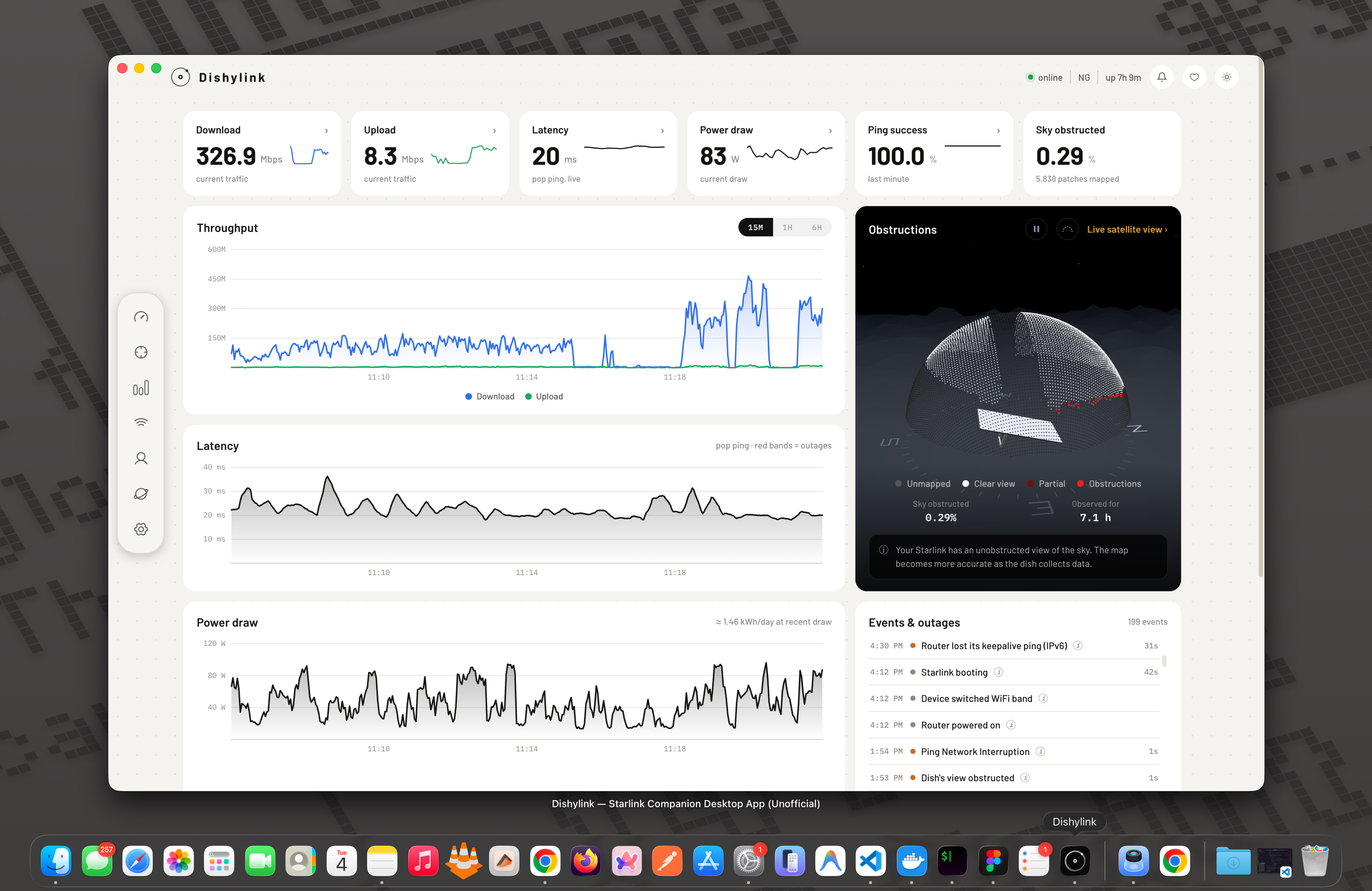
It reads your dish and router directly over your local network, so it keeps working during an outage — which is exactly when you want to see what happened. No account, no cloud, no telemetry: everything it records is written to your own machine and stays there. Connecting a Starlink account is optional. It adds your plan and billing figures and enables supported router controls such as pausing connected devices. Your session remains stored locally and is sent only to Starlink.
 Download
| Platform | Format | Architecture | |
|---|---|---|---|
 macOS 12+ macOS 12+ |
DMG |
arm64: Apple silicon |
|
| macOS 12+ |
DMG |
x64: Intel |
|
 Windows 10+ Windows 10+ |
EXE |
Universal | |
| Windows 10+ |
EXE |
x64 |
|
| Windows 10+ |
EXE |
arm64 |
|
 Chrome 144+ Chrome 144+ |
Extension | Any | |
 Edge Edge |
Extension | Any | |
 Firefox Firefox |
Extension | Any | |
Not sure which to pick? On Windows, take Universal. On macOS, take arm64 for
Apple silicon (M1 and later) or x64 for Intel.
Features
What it shows
- Stat tiles: live downlink and uplink, pop-ping latency, power draw in watts, 60-second ping-success rate and sky-obstruction fraction. Each carries a sparkline and opens into a detail panel.
- Throughput chart: download and upload across 15m, 1h and 6h windows on the dashboard, or by day, week and month from recorded history rather than only what the current tab has seen.
- Latency chart: bucketed by max, so spikes survive downsampling instead of averaging away. Outages are drawn as red bands.
- Energy and power chart: what the dish actually draws over time, with kWh totals by day, week and month, and honest gaps wherever recording stopped.
- Sky obstruction map: the dish's 123×123 SNR grid drawn as a polar sky dome, with obstructed cells escalating through a status palette.
- Obstruction time-lapse: scrub back through hourly snapshots of the sky survey, with LIVE as the last stop.
- Sky view: a full-viewport scene of the dome, your dish, and the satellite constellation passing overhead. Click any satellite for its pass details.
- Alignment dials: rotation and tilt against the desired azimuth and elevation band, ported from the dish's own web app.
- Data usage: self-measured download and upload volume by day, week and month, plus per-device usage for the billing month taken from the router's own per-client counters. Name your devices and see vendor, device type and last-seen times.
- Network: router radio temperatures, the client list, per-client throughput and the router's own event log.
- Event logs: outages, thermal events, and a terminal panel covering firmware, GPS, alignment, mesh routers and alerts.
- Speed test and alerts: on-demand speed tests, alerts graded by severity with an in-app bell, and light, dark or system instrument themes.
- Cloud account tab (optional, opt-in): your Starlink plan, billing cycles and authoritative monthly data usage, plus the authenticated controls your router supports.
What it controls
Monitoring is only half of it. Most settings write to the dish or router over the same LAN API; controls that current firmware rejects locally are identified below as requiring an optional Starlink account connection:
- Snow melt: automatic, always on, or off.
- Sleep schedule: power the dish down for a set number of hours each day.
- Software updates: pick the reboot window, or defer updates for 3 days.
- Maintenance: reboot the dish, reset the learned obstruction map, and stow/unstow motorized kits.
- Router: SSIDs and their bands, mesh node trust, firmware and country, and a router reboot.
- Router address and subnet: point Dishylink at a router that isn't on the default address, and change the address range the router hands out. Changing the subnet needs a connected account.
- Custom DNS: point the router at your own resolvers.
- Bypass mode: put the router into bridge mode for your own networking gear.
- Connected devices: pause or unpause another device while it is connected. Available in the desktop app and web development harness, this control requires an optional Starlink account sign-in: Dishylink reads the router configuration locally, prepares the smallest accepted client update on the trusted host, and sends it only to Starlink's authenticated device endpoint. The device running Dishylink cannot pause itself, which is what Your device on this network in app settings pins down. The browser extension does not expose this control because ordinary desktop extensions cannot reliably read the host computer's LAN IP or MAC address. Although the extension can send the update, it cannot prove which router client is itself and therefore cannot safely prevent self-pausing.
- Copy debug data: diagnostics + status + config as JSON, for bug reports.
Content filtering is deliberately not exposed: a bad write there can take the WiFi down until a physical reset.
Network rules
Meter any device on your network and pause it automatically when it goes over.
- Three kinds of limit: a data allowance, a schedule that pauses by the clock, or a countdown that runs for a set stretch of time.
- One device or a group: meter a device on its own, or group several together. A group can either pool its allowance, so members spend from one shared budget and run out together, or give each member the full allowance to spend independently.
- One list for everything: every rule on the network appears in one place, whether you wrote it there or from a device's own card, each showing how much of its limit is left.
- Rules use the same account-connected pausing described above, including the protection that stops Dishylink pausing the device it is running on.
Three ways to run it in dev
Dishylink ships as three independent products from one codebase. To run any of them from source:
npm install

npm run dev              # web harness on localhost:5173
npm run dev:electron     # desktop app on Mac and Linux
npm run dev:electron:win # desktop app on Windows
npm run dev:extension    # browser extension, loaded unpacked from .output/ (WXT)
Windows needs dev:electron:win rather than dev:electron: it sets the
environment variable through cross-env and skips the icon generation step,
neither of which works from a Windows shell.
All three read the real hardware, so you have to be on the Starlink LAN for anything to appear. Tests and typechecks run anywhere.
They don't talk to each other or share a runtime: each independently polls the dish/router and records its own history. Packaging:
npm run pack:mac        # signed Mac build
npm run pack:win        # Windows build
npm run build:extension # Chromium extension bundle
npm run build:extension:firefox
npm run build:extension:edge
docker compose up --build   # browser dashboard + recorder, this machine only
Docker (browser)
Packages the web dashboard and the history recorder in one container. The
image is built only for the CPU of the machine you clone and build on —
amd64 on an x86 box, arm64 on Apple Silicon or a 64-bit Raspberry Pi. Compose
does not cross-build. Open http://localhost:8080. The host running Docker
must be on the Starlink LAN — the dish (192.168.100.1) and router
(192.168.1.1) are reached through the host, not from inside Compose. Docker
Desktop has no real --network host; do not set it.
docker compose up --build
A Raspberry Pi 4/5 needs the 64-bit OS and enough RAM for the Vite build (4 GB is comfortable; 2 GB often OOMs).
Recordings, and a pasted starlink.com session, persist in the historian-data
volume — a session survives a restart with no extra mount needed. If
com.dishylink.historian is already running under launchd, stop it first —
two recorders double the router's 200 ms client poll.
Optional, in compose.yaml:
HOST_LAN_IP/HOST_MAC— the host's LAN address, so "This device" and pause-self-protect still work through Docker Desktop's port publish.
Cloud session writes stay localhost-only. Opening the dashboard via the host's LAN IP from a phone still shows live data and history.
Useful while working on it:
npm run historian       # standalone energy collector, serving /api/energy
npm run test:watch      # vitest in watch mode
npm run lint:fix        # eslint with --fix
A fresh desktop build opens with no history by design: it fills up as it runs.
Desktop app (Mac, Windows)
- Lives in the tray / menu bar and keeps recording after its window is closed; it quits only from the tray's Quit.
- Live throughput readout — ↓/↑ rates in the macOS menu bar, or a draggable always-on-top pill on Windows. Whichever surface, the open window feeds it when there is one and the recorder takes over when there isn't, so the dish is never polled twice.
- Start at Login, launching hidden, so collection covers the outages that happen while nobody is looking.
- Native OS notifications for alerts when the window isn't in front, throttled so a flapping link can't spam.
- Auto-updates, and remembers its window position across runs and displays.
Browser extension (Chrome, Edge, Firefox)
Install it from the Chrome Web Store, Edge Add-ons or Firefox Add-ons.
- The toolbar icon opens the dashboard as a chromeless window (default) or an ordinary tab — never a cramped toolbar popup.
- Toolbar badge — the number of alerts firing right now, tinted by the worst one's severity, so it reads the same outside the app as the bell does inside.
- Recording — its own history store in IndexedDB, filled by a 30s
chrome.alarmstick that survives service-worker teardown, with honest coverage gaps for stretches when the browser was closed. - Chrome 144+ — below that a Local Network Access bug makes the worker silently collect nothing.
Dev workflow:
npm test                # vitest
npm run typecheck       # tsc -b
npm run lint            # eslint
Diagnostics:
node scripts/debug-decode.mjs <captured-body.bin>   # decode a captured response
node scripts/debug-browser.mjs                      # probe fetch path in headless Chrome
How it talks to the dish and router
The dish serves its API at 192.168.100.1 on two ports; the router answers
a matching API on its own LAN address:
| Port | Protocol | Notes |
|---|---|---|
| 9200 | native gRPC (HTTP/2) | used by grpcurl, has reflection |
| 9201 | grpc-web (HTTP/1.1) | what this app uses from the browser |
Two quirks discovered while building (both handled by the Vite proxy in dev, and by the host's own transport in Electron/the extension):
- CORS allowlist — port 9201 only answers CORS preflights for the dish's own origin, so a third-party web page cannot call it cross-origin.
- Referer guard — requests carrying an unrecognized
Refererheader get an empty 200 back; the transport stripsReferer/Originbefore forwarding.
Protobuf schema is not guessed: schema/dish.protoset was dumped from the
dish's own gRPC reflection service and is decoded at runtime with
@bufbuild/protobuf (core/dishClient.ts). To refresh the schema after a
firmware update:
grpcurl -plaintext -protoset-out schema/dish.protoset \
  192.168.100.1:9200 describe SpaceX.API.Device.Device
cp schema/dish.protoset public/dish.protoset
The dish's history ring buffer (900 samples @ 1 Hz) is unrolled via its
absolute sample counter (core/telemetry.ts); note it reports outages[]
timestamps in the GPS epoch while eventLog uses Unix — the converter
accounts for the 18 leap seconds. See LOCAL-API.md for the full set of
measured behaviours, quirks, and dead-end fields on this firmware.
Recorded history
The dish and router only hold a few minutes to a few hours locally. An
always-on history recorder (collector/, the "historian") polls
continuously and writes append-only local records so day/week/month views
have real data behind them — never anything invented across a gap; every
range reports what fraction of it was actually sampled. See
collector/README.md for how it runs and its on-disk format.
Everything above is local-only by design: your telemetry, your history, your storage, never transmitted.
License
MIT. See LICENSE.
Dishylink is an unofficial, independent project with no affiliation to SpaceX or Starlink. Starlink is a trademark of Space Exploration Technologies Corp.